sensor Hyundai Kona EV 2019 Owner's Guide
[x] Cancel search | Manufacturer: HYUNDAI, Model Year: 2019, Model line: Kona EV, Model: Hyundai Kona EV 2019Pages: 540, PDF Size: 21.84 MB
Page 199 of 540
3-115
Convenient features of your vehicle
3
Conditions Where the ParkingDistance Warning (Reverse)system May Not Operate
The Parking Distance Warning
(Reverse) system may not operate
normally when any of the following
occur:
The sensor is covered with dirt or
debris such as snow or ice, or the
sensor cover is blocked.
The Rear Parking Distance
Warning (Reverse) system may
experience a malfunction when the
following occurs:
Driving on uneven road surfacessuch as unpaved roads, gravel,
bumps, or gradient.
Objects generating excessive noise such as vehicle horns, loud motor-
cycle engines, or truck air brakes
can interfere with the sensor.
Heavy rain or water spray is present.
Wireless transmitters or mobile phones are present near the sensor.
The sensor is covered with snow.
Any non-factory equipment or acces- sories have been installed, or if the
vehicle bumper height or sensor
installation has been modified.
Detecting range may decrease when:
Outside air temperature is extreme-ly hot or cold.
Undetectable objects smaller than 40 inches (1 m) and narrower than
6 inches (14 cm) in diameter.
The following objects may not be
recognized by the sensor:
Sharp or slim objects such asropes, chains or small poles.
Objects, which tend to absorb sen- sor frequency such as clothes,
spongy material or snow.
Page 200 of 540
3-116
Convenient features of your vehicle
Parking Distance Warning(Reverse) system Precautions
The Parking Distance Warning
(Reverse) system may not operate
consistently in some circum-
stances depending on the speed of
the vehicle and the shapes of the
objects detected.
The Parking Distance Warning (Reverse) system may malfunction
if the vehicle bumper height or sen-
sor installation has been modified
or damaged. Any non-factory
installed equipment or accessories
may also interfere with the sensor
performance.
The sensor may not recognize objects less than 12 in. (30 cm)
from the sensor, or it may sense an
incorrect distance. Use caution.
When the sensor is blocked with snow, dirt, debris, or ice, the rear
parking assist system may be inop-
erative until the snow or ice melts,
or the debris is removed. Use a
soft cloth to wipe debris away from
the sensor. Do not push, scratch or strike the
sensor with any hard objects that
could damage the surface of the
sensor. Sensor damage could occur.
Do not spray the sensors or its sur- rounding area directly with a high
pressure washer. Doing so may
cause the sensors to fail to operate
normally.
Extreme caution should always
be taken to avoid accidents or
vehicle injuries. Do not solely
rely on the Parking Distance
Warning (Reverse) system.
Always drive safely and cau-
tiously, especially when back-
ing up in reverse.
WARNING
Page 203 of 540
3-119
Convenient features of your vehicle
3
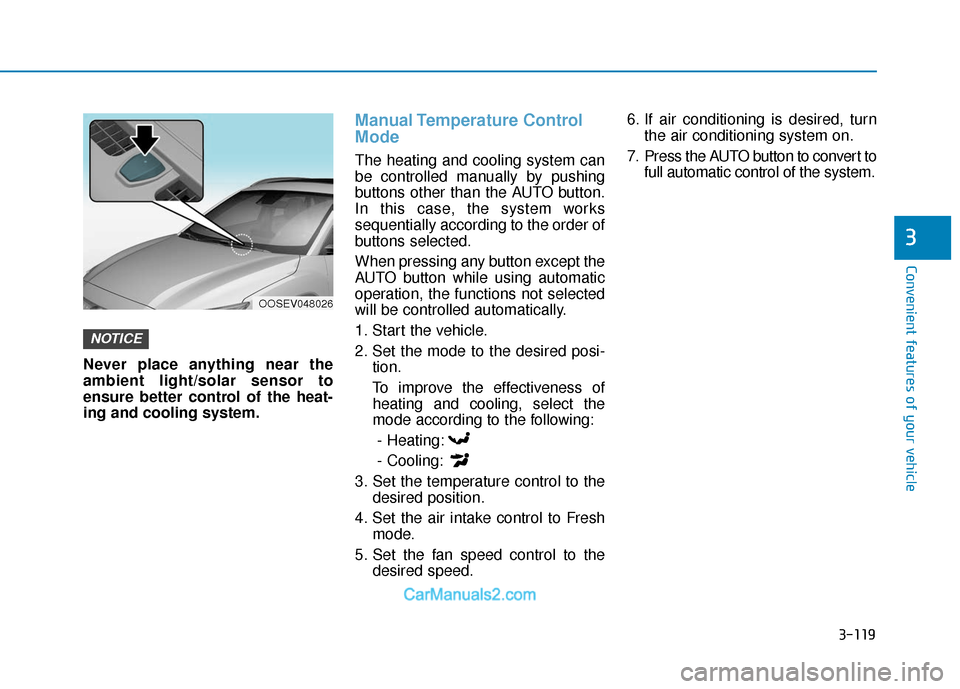
Never place anything near the
ambient light/solar sensor to
ensure better control of the heat-
ing and cooling system.
Manual Temperature Control
Mode
The heating and cooling system can
be controlled manually by pushing
buttons other than the AUTO button.
In this case, the system works
sequentially according to the order of
buttons selected.
When pressing any button except the
AUTO button while using automatic
operation, the functions not selected
will be controlled automatically.
1. Start the vehicle.
2. Set the mode to the desired posi-tion.
To improve the effectiveness of heating and cooling, select the
mode according to the following:
- Heating:
- Cooling:
3. Set the temperature control to the desired position.
4. Set the air intake control to Fresh mode.
5. Set the fan speed control to the desired speed. 6. If air conditioning is desired, turn
the air conditioning system on.
7. Press the AUTO button to convert to full automatic control of the system.
NOTICE
OOSEV048026
Page 216 of 540
3-132
Convenient features of your vehicleWhen the Auto Defogging
System operates, the indi-
cator will illuminate.
If a high amount of humidity is
detected in the vehicle, the Auto
Defogging System will be enabled.
The following steps will be performed
automatically:
Step 1) The A/C button will turn ON.
Step 2) The air intake control will change to Fresh mode.
Step 3) The mode will be changed to defrost to direct airflow to the
windshield.
Step 4) The fan speed will be set to MAX.
If the air conditioning is off or recircu-
lated air position is manually select-
ed while Auto Defogging System is
ON, the Auto Defogging System
Indicator will blink 3 times to signal
that the manual operation has been
canceled.
To cancel the auto defogging system
1. Press the POWER button to the ON position.
2. Press the front defroster button over 3 seconds.
3. The front defroster button indicator will blink 3 times and then ADS
OFF will illuminate on the climate
control information screen when
the auto defogging system is can-
celed.
To reactivate the auto defogging sys-
tem
1. Press the POWER button to theON position.
2. Press the front defroster button over 3 seconds.
3. The front defroster button indicator will blink 6 times and then ADS OFF
will go out on the climate control
information screen when the auto
defogging system is reactivated.
Information
• When the air conditioning is turned on by Auto defogging system, if you
try to turn off the air conditioning,
the indicator will blink 3 times and
the air conditioning will not be
turned off.
• To maintain the effectiveness and efficiency of the Auto Defogging
System, do not select Recirculation
mode while the system is operating.
• When the Auto Defogging System is operating, the fan speed adjust-
ment button, the temperature
adjustment knob, and the air
intake control button are all dis-
abled.
Do not remove the sensor cover
located on the upper end of the
windshield glass.
Damage to system parts could
occur and may not be covered by
your vehicle warranty.
NOTICE
i
Page 234 of 540
Driving your vehicle
Before Driving ........................................................5-4
Before Entering the Vehicle ...........................................5-4
Before Starting ..................................................................5-4
Power Button..........................................................5-6
Power Button Positions ...................................................5-7
Starting the Vehicle ..........................................................5-9
Turning Off the Vehicle .................................................5-10
Push Button Gear Shift Selector .......................5-11
Vehicle Operation ............................................................5-11
Parking ........................................................................\
.......5-13
LCD Display Messages ...................................................5-14
Good Driving Practices ..................................................5-17
Regenerative Braking System ............................5-19
Paddle Shifter Operation...............................................5-19
One Pedal Driving ...........................................................5-20
Smart Regeneration System .............................5-21
System Setting .................................................................5-21
Activating the Smart Regeneration System .............5-21
Cancelling the Smart Regeneration System .............5-23
Resuming the Smart Regeneration System ..............5-23Disabling the Smart Regeneration System ...............5-23
Vehicle-to-Vehicle Front Recognition
- Front Radar Sensor ....................................................5-23
Warning Message............................................................5-24
Limitations of the System .............................................5-24
Braking System ....................................................5-29
Power Brakes ...................................................................5-29
Disc Brake Wear Indicator ............................................5-30
Electronic Parking Brake (EPB)...................................5-30
Auto Hold ........................................................................\
..5-36
Anti-lock Brake System (ABS) ....................................5-40
Electronic Stability Control (ESC)................................5-42
Vehicle Stability Management (VSM).........................5-45
Hill-Start Assist Control (HAC) ....................................5-47
Good Braking Practices .................................................5-47
Initial Setting for Each Drive Mode ............................5-48
Drive Mode System .............................................5-48
Drive Mode .......................................................................5\
-48
5
Page 235 of 540
5
Forward Collision-Avoidance Assist (FCA)
System ...................................................................5-49
System Setting and Activation.....................................5-49
FCA Warning Message and System Control ............5-52
FCA Sensor .......................................................................5\
-54
System Not Operating....................................................5-56
Limitations of the System .............................................5-57
Blind-Spot Collision Warning (BCW) /
Rear Cross-Traffic Collision Warning (RCCW) ..5-62
System Description .........................................................5-62
Blind-Spot Collision Warning (BCW) ..........................5-63
Rear Cross-Traffic Collision Warning (RCCW) .........5-66
Detecting Sensor .............................................................5-68
Limitations of the System .............................................5-69
Lane Keeping Assist (LKA) System ...................5-75
LKA Operation..................................................................5-76
Warning Light and Message.........................................5-78
Limitations of the System .............................................5-81
LKA Function Change.....................................................5-82
Driver Attention Warning (DAW) System .........5-83
System Setting and Activation.....................................5-83
Resetting the System .....................................................5-85
System Standby ...............................................................5-85
System Not Operating....................................................5-85
Cruise Control .......................................................5-88
Cruise Control Operation...............................................5-88
Smart Cruise Control with Stop & Go System .5-93
Smart Cruise Control Switch ........................................5-93
Smart Cruise Control Speed .........................................5-94
Smart Cruise Control Vehicle-to-Vehicle Distance...5-98
Sensor to Detect Distance to the Vehicle Ahead ..5-102
SCC Reaction Setting ...................................................5-104
Conventional Cruise Control Mode ...........................5-104
Limitations of the System...........................................5-105
Special Driving Conditions ................................5-111
Hazardous Driving Conditions....................................5-111
Rocking the Vehicle ......................................................5-111
Smooth Cornering .........................................................5-112
Driving at Night .............................................................5-112
Driving in the Rain ........................................................5-112
Driving in Flooded Areas.............................................5-113
Highway Driving ............................................................5-113
Reducing the Risk of a Rollover ...............................5-114
Page 256 of 540
5-23
Driving your vehicle
5
Cancelling the Smart
Regeneration System:
Cancelled manuallyPulling and holding the right side
paddle shifter for more than 1 sec-
ond.
The Smart Regeneration System
turns off temporarily. Note that the
"AUTO" indicator in the LCD dis-
play turns off.
Cancelled automatically - The vehicle is shifted to N(Neutral), R (Reverse) or P
(Park).
- The Cruise Control System (including the Smart Cruise
Control system) is enabled.
- The ESC (Electronic Stability Control) or ABS is activated.
Resuming the Smart
Regeneration System
To re-activate the Smart
Regeneration System while driving,
pull and hold the right side paddle
shifter for more than 1 second again.
Note that the "AUTO" indicator in the
LCD display turns back on, signaling
that the Smart Regeneration System
is enabled again.
Disabling the Smart
Regeneration System
To turn off the system, shift to P (Park)
and deselect 'User Settings →
Convenience →Smart Regeneration'
on the User Settings mode.
Vehicle-to-Vehicle Front
Recognition - Front Radar
Sensor
In order for the Smart Regeneration
System to operate properly, always
make sure the radar sensor cover is
clean and free of dirt, snow, and
debris. Dirt, snow, or foreign sub-
stances on the lens may adversely
affect the sensing performance of
the sensor. In this case, the system
operation may stop temporarily and
not operate normally.
Do not apply license plate
frame or foreign objects such
as a bumper sticker or a
bumper guard near the radar
sensor. Doing so may adverse-
ly affect the sensing perform-
ance of the radar.
Always keep the radar sensor
and lens cover clean and free
of dirt and debris.
CAUTION
When the Smart Regeneration
System is cancelled automati-
cally, adjust the vehicle speed
directly by depressing the
accelerator or brake pedal
according to the road condition
ahead and driving condition.
WARNING
Page 257 of 540
5-24
Driving your vehicle
Warning Message
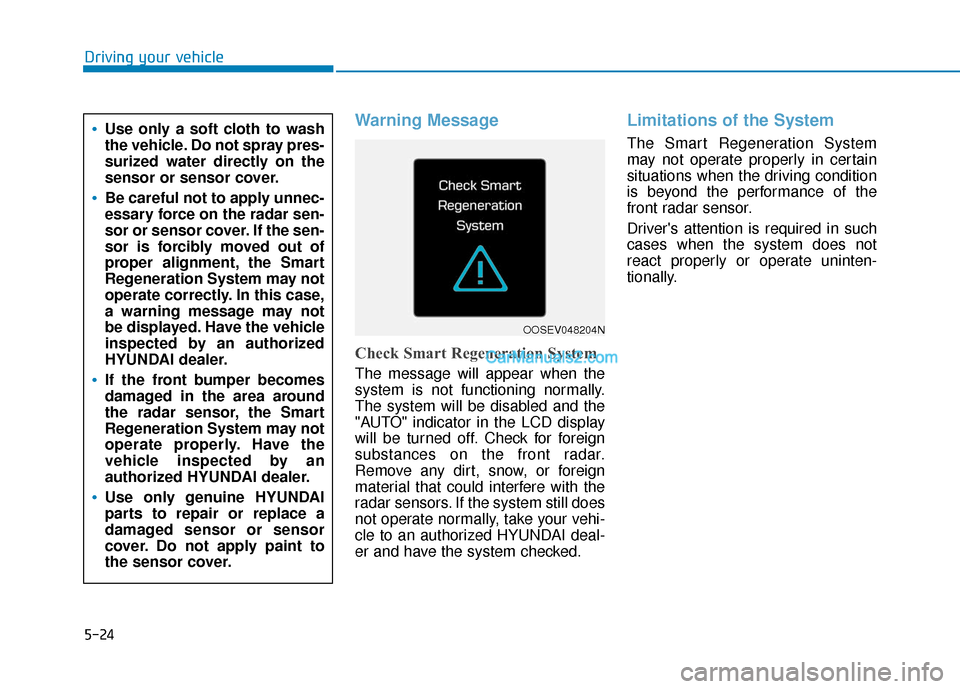
Check Smart Regeneration System
The message will appear when the
system is not functioning normally.
The system will be disabled and the
"AUTO" indicator in the LCD display
will be turned off. Check for foreign
substances on the front radar.
Remove any dirt, snow, or foreign
material that could interfere with the
radar sensors. If the system still does
not operate normally, take your vehi-
cle to an authorized HYUNDAI deal-
er and have the system checked.
Limitations of the System
The Smart Regeneration System
may not operate properly in certain
situations when the driving condition
is beyond the performance of the
front radar sensor.
Driver's attention is required in such
cases when the system does not
react properly or operate uninten-
tionally.Use only a soft cloth to wash
the vehicle. Do not spray pres-
surized water directly on the
sensor or sensor cover.
Be careful not to apply unnec-
essary force on the radar sen-
sor or sensor cover. If the sen-
sor is forcibly moved out of
proper alignment, the Smart
Regeneration System may not
operate correctly. In this case,
a warning message may not
be displayed. Have the vehicle
inspected by an authorized
HYUNDAI dealer.
If the front bumper becomes
damaged in the area around
the radar sensor, the Smart
Regeneration System may not
operate properly. Have the
vehicle inspected by an
authorized HYUNDAI dealer.
Use only genuine HYUNDAI
parts to repair or replace a
damaged sensor or sensor
cover. Do not apply paint to
the sensor cover.
OOSEV048204N
Page 259 of 540
5-26
Driving your vehicle
Lane changing
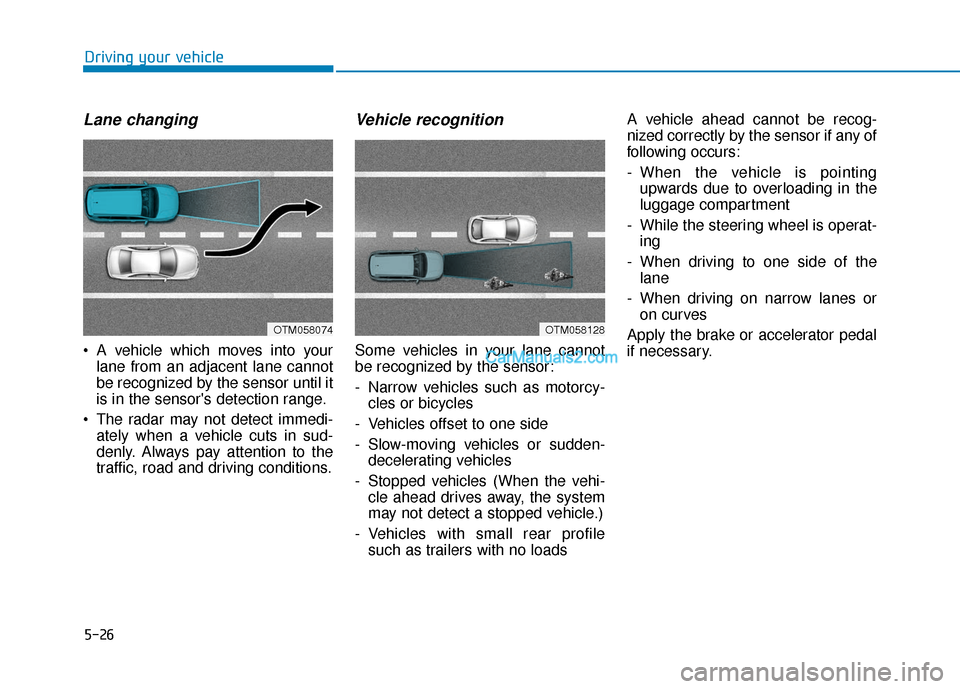
A vehicle which moves into yourlane from an adjacent lane cannot
be recognized by the sensor until it
is in the sensor's detection range.
The radar may not detect immedi- ately when a vehicle cuts in sud-
denly. Always pay attention to the
traffic, road and driving conditions.
Vehicle recognition
Some vehicles in your lane cannot
be recognized by the sensor:
- Narrow vehicles such as motorcy-cles or bicycles
- Vehicles offset to one side
- Slow-moving vehicles or sudden- decelerating vehicles
- Stopped vehicles (When the vehi- cle ahead drives away, the system
may not detect a stopped vehicle.)
- Vehicles with small rear profile such as trailers with no loads A vehicle ahead cannot be recog-
nized correctly by the sensor if any of
following occurs:
- When the vehicle is pointing
upwards due to overloading in the
luggage compartment
- While the steering wheel is operat- ing
- When driving to one side of the lane
- When driving on narrow lanes or on curves
Apply the brake or accelerator pedal
if necessary.
OTM058128OTM058074
Page 287 of 540
5-54
Driving your vehicle
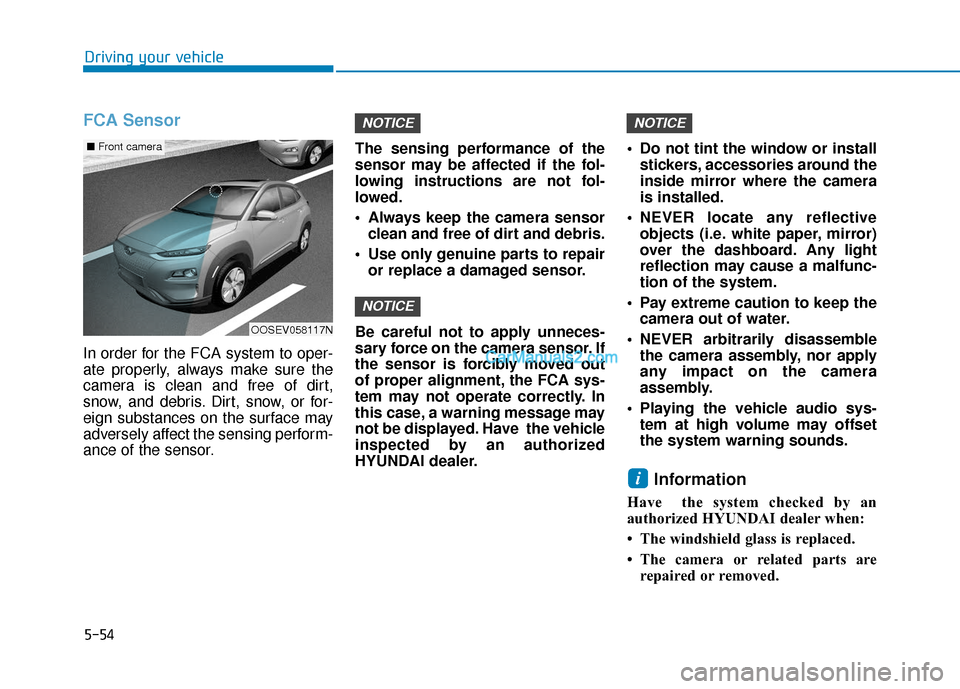
FCA Sensor
In order for the FCA system to oper-
ate properly, always make sure the
camera is clean and free of dirt,
snow, and debris. Dirt, snow, or for-
eign substances on the surface may
adversely affect the sensing perform-
ance of the sensor.The sensing performance of the
sensor may be affected if the fol-
lowing instructions are not fol-
lowed.
Always keep the camera sensor
clean and free of dirt and debris.
Use only genuine parts to repair or replace a damaged sensor.
Be careful not to apply unneces-
sary force on the camera sensor. If
the sensor is forcibly moved out
of proper alignment, the FCA sys-
tem may not operate correctly. In
this case, a warning message may
not be displayed. Have the vehicle
inspected by an authorized
HYUNDAI dealer. Do not tint the window or install
stickers, accessories around the
inside mirror where the camera
is installed.
NEVER locate any reflective objects (i.e. white paper, mirror)
over the dashboard. Any light
reflection may cause a malfunc-
tion of the system.
Pay extreme caution to keep the camera out of water.
NEVER arbitrarily disassemble the camera assembly, nor apply
any impact on the camera
assembly.
Playing the vehicle audio sys- tem at high volume may offset
the system warning sounds.
Information
Have the system checked by an
authorized HYUNDAI dealer when:
• The windshield glass is replaced.
• The camera or related parts arerepaired or removed.
i
NOTICE
NOTICE
NOTICE
OOSEV058117N
■ Front camera