brakes Hyundai Kona EV 2019 Owner's Guide
[x] Cancel search | Manufacturer: HYUNDAI, Model Year: 2019, Model line: Kona EV, Model: Hyundai Kona EV 2019Pages: 540, PDF Size: 21.84 MB
Page 446 of 540
7-66
Maintenance
After washing, rinse the vehicle thor-
oughly with lukewarm or cold water.
Do not allow soap to dry on the fin-
ish. Do not use strong soap, chemi-
cal detergents or hot water, and
do not wash the vehicle in direct
sunlight or when the body of the
vehicle is warm.
Be careful when washing the side windows of your vehicle.
Especially, with high-pressure
water, water may leak through
the windows and wet the interi-
or.
To prevent damage to the plastic parts, do not clean with chemi-
cal solvents or strong deter-
gents.
To prevent damage to the charg- ing door, make sure to close and
lock the vehicle doors when
washing (high-pressure wash-
ing, automatic car washing, etc.)
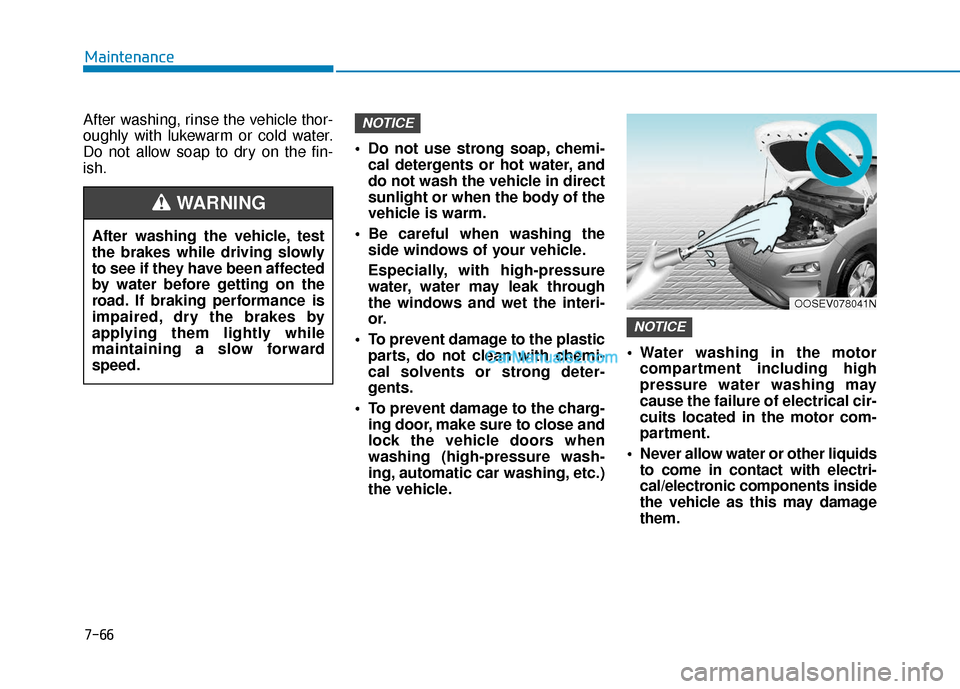
the vehicle. Water washing in the motor
compartment including high
pressure water washing may
cause the failure of electrical cir-
cuits located in the motor com-
partment.
Never allow water or other liquids to come in contact with electri-
cal/electronic components inside
the vehicle as this may damage
them.
NOTICE
NOTICE
OOSEV078041N
After washing the vehicle, test
the brakes while driving slowly
to see if they have been affected
by water before getting on the
road. If braking performance is
impaired, dry the brakes by
applying them lightly while
maintaining a slow forward
speed.
WARNING
Page 448 of 540
7-68
Maintenance
Bright-metal maintenance
To remove road tar and insects,use a tar remover, not a scraper or
other sharp object.
To protect the surfaces of bright- metal parts from corrosion, apply a
coating of wax or chrome preser-
vative and rub to a high luster.
During winter weather or in coastal areas, cover the bright metal parts
with a heavier coating of wax or
preservative. If necessary, coat the
parts with non-corrosive petroleum
jelly or other protective compound.
Underbody maintenance
Corrosive materials used for ice and
snow removal and dust control may
collect on the underbody. If these
materials are not removed, acceler-
ated rusting can occur on underbody
parts such as the fuel lines, frame,
floor pan and exhaust system, even
though they have been treated with
rust protection. Thoroughly flush the vehicle under-
body and wheel openings with luke-
warm or cold water once a month,
after off-road driving and at the end
of each winter. Pay special attention
to these areas because it is difficult
to see all the mud and dirt. It will do
more harm than good to wet down
the road grime without removing it.
The lower edges of doors, rocker
panels, and frame members have
drain holes that should not be
allowed to clog with dirt; trapped
water in these areas can cause rust-
ing.
Aluminum wheel maintenance
The aluminum wheels are coated
with a clear protective finish.
Do not use abrasive cleaner, pol-
ishing compound, solvent, or
wire brushes on aluminum
wheels.
Clean the wheel when it has cooled.
Use only a mild soap or neutral detergent, and rinse thoroughly
with water. Also, clean the
wheels after driving on salted
roads.
Do not wash the wheels with high-speed car wash brushes.
Do not use any cleaners con- taining acid or alkaline deter-
gents.
NOTICE
After washing the vehicle, test
the brakes while driving slowly
to see if they have been affected
by water. If braking performance
is impaired, dry the brakes by
applying them lightly while
maintaining a slow forward
speed.
WARNING
Page 465 of 540
How to Disconnect Portable Charger .........................H41
Charging Connector Manual Release ..........................H42
Precautions When Using the Portable Charger ........H42
EV Charging Troubleshooting
- Steps to Consider ...............................................H43
How to Start the Vehicle ......................................H44
How to Stop the Vehicle.......................................H44
Virtual Engine Sound System ..............................H45
Distance to Empty .................................................H45
When destination is not set ...........................................H46
Navigation - When a Destination is Set .....................H46
Tips for Improving Range When Using the
Climate Control System ........................................H46
Tips for Improving Range While Driving ............H47
Power/Charge Gauge............................................H47
State of Charge (SOC) Gauge for
High Voltage Battery ...........................................H47
Warning and Indicator Lights .............................H48
Ready Indicator ................................................................H48
Service Warning Light .....................................................H48
Power Down Warning Light ...........................................H49
Charging Indicator Light..................................................H49
High Voltage Battery Level Warning Light .................H49
Regenerative Brake Warning Light ..............................H49
LCD Display Messages ..........................................H50
Shift to P to charge .........................................................H50
Remaining Time .................................................................H50
Unplug vehicle to start ....................................................H50
Charging Door Open ........................................................H51Charging Stopped. Check the AC/DC charger ...........H51
Charging Stopped. Check the cable connection .......H52
Check regenerative brakes/
Stop vehicle and check regenerative brakes ............H52 Low Battery........................................................................\
H52
Charge immediately. Power limited ..............................H53
Low outside temperature may limit power output.
Charge EV battery/Low EV battery temperature.
Power limited .....................................................................H53\
EV Battery Overheated! Stop vehicle..........................H54
Power limited .....................................................................H54\
Stop vehicle and check power supply .........................H55
Check Virtual Engine Sound System............................H55
Check electric vehicle system .......................................H55
Energy Flow ..........................................................H56
Vehicle Stop........................................................................\
H56
EV Propulsion ....................................................................H56
Regeneration ......................................................................H5\
6
Aux. Battery Saver+ .............................................H57
Mode ........................................................................\
............H57
System Setting...................................................................H58
LCD Message .....................................................................H58\
Utility Mode ............................................................H59
System Setting and Activation ......................................H59
System Deactivation .........................................................H59
If an Accident Occurs ...........................................H60
Additional Precautions..........................................H62
Service Interlock Connector ................................H62
Service Plug ...........................................................H62
Page 510 of 540
H47
Tips for Improving Range
While Driving
Depress and hold the acceleratorpedal to maintain speed and drive
economically.
Gradually depress and release the accelerator pedal when accelerat-
ing or decelerating.
Always maintain specified tire pressures.
Do not use unnecessary electrical components while driving.
Do not load unnecessary items in the vehicle.
Do not mount parts that may increase air resistance.
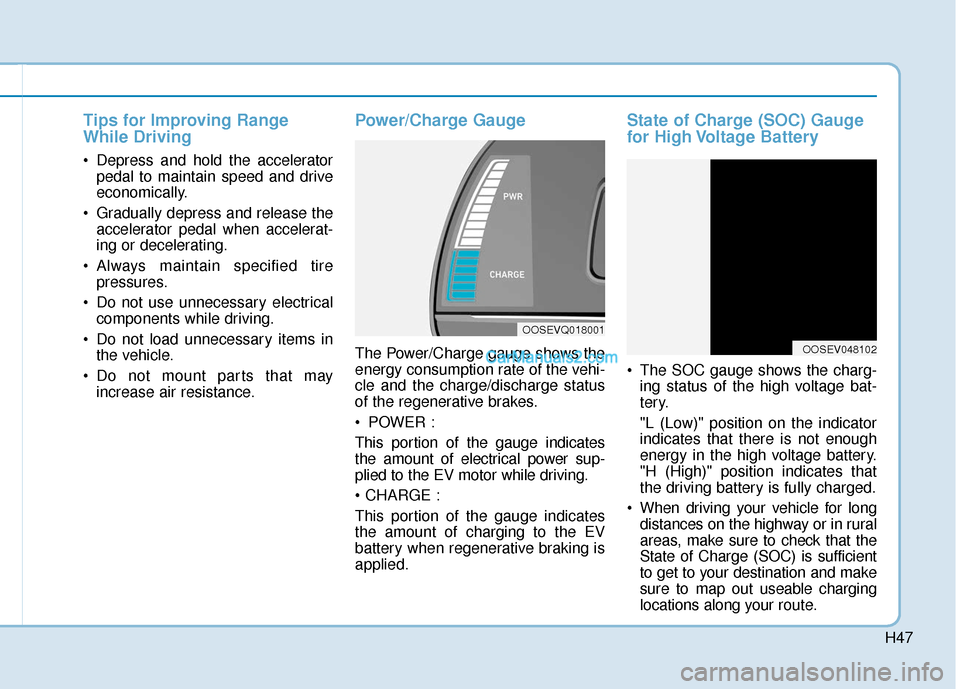
Power/Charge Gauge
The Power/Charge gauge shows the
energy consumption rate of the vehi-
cle and the charge/discharge status
of the regenerative brakes.
POWER :
This portion of the gauge indicates
the amount of electrical power sup-
plied to the EV motor while driving.
This portion of the gauge indicates
the amount of charging to the EV
battery when regenerative braking is
applied.
State of Charge (SOC) Gauge
for High Voltage Battery
The SOC gauge shows the charg-ing status of the high voltage bat-
tery.
"L (Low)" position on the indicator
indicates that there is not enough
energy in the high voltage battery.
"H (High)" position indicates that
the driving battery is fully charged.
When driving your vehicle for long distances on the highway or in rural
areas, make sure to check that the
State of Charge (SOC) is sufficient
to get to your destination and make
sure to map out useable charging
locations along your route.
OOSEVQ018001
OOSEV048102
Page 515 of 540
H52
D
DR
RI
IV
V I
IN
N G
G
A
A N
N D
D
O
O P
PE
ER
R A
A T
TI
IN
N G
G
I
IN
N F
FO
O R
RM
M A
AT
TI
IO
O N
N
(
( C
C O
O N
NT
T.
.)
)
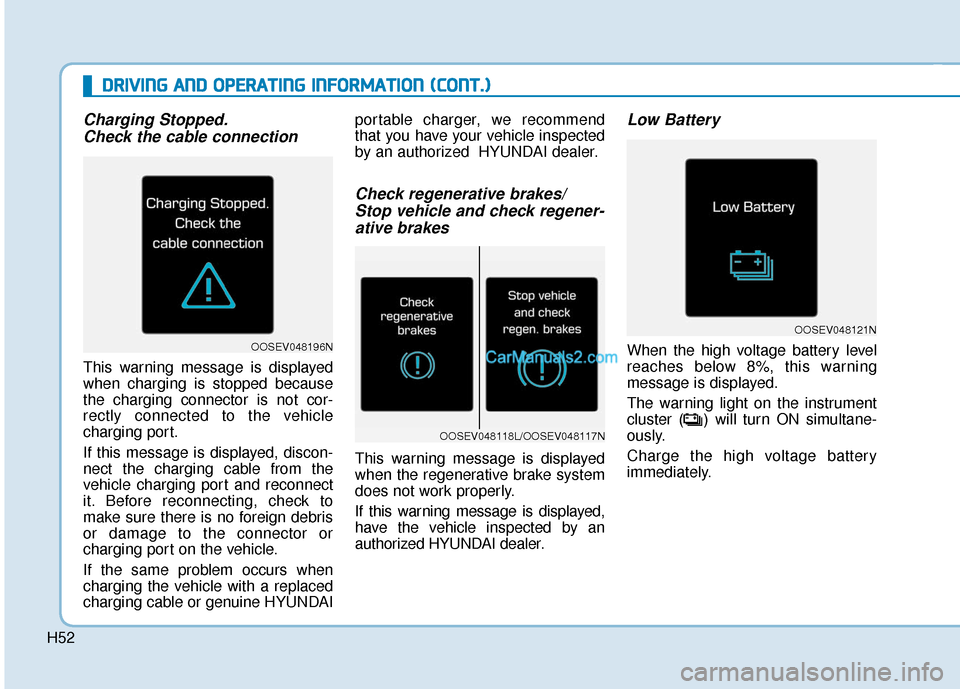
Charging Stopped.
Check the cable connection
This warning message is displayed
when charging is stopped because
the charging connector is not cor-
rectly connected to the vehicle
charging port.
If this message is displayed, discon-
nect the charging cable from the
vehicle charging port and reconnect
it. Before reconnecting, check to
make sure there is no foreign debris
or damage to the connector or
charging port on the vehicle.
If the same problem occurs when
charging the vehicle with a replaced
charging cable or genuine HYUNDAI portable charger, we recommend
that you have your vehicle inspected
by an authorized HYUNDAI dealer.
Check regenerative brakes/
Stop vehicle and check regener-ative brakes
This warning message is displayed
when the regenerative brake system
does not work properly.
If this warning message is displayed,
have the vehicle inspected by an
authorized HYUNDAI dealer.
Low Battery
When the high voltage battery level
reaches below 8%, this warning
message is displayed.
The warning light on the instrument
cluster ( ) will turn ON simultane-
ously.
Charge the high voltage battery
immediately.OOSEV048196N
OOSEV048121N
OOSEV048118L/OOSEV048117N
Page 529 of 540
I-3
Battery (12 volt)..............................................................7-23
Battery saver function ...................................................3-103
Before driving ...................................................................5-4
Blind-Spot Collision Warning (BCW) system ...............5-62
Blue Link
®center ...........................................................3-19
Bluetooth®Wireless Technology .....................................4-4
Bottle holder .................................................................3-137
Brake fluid ......................................................................7-\
15
Brake system ...................................................................5-29 Anti-lock Brake System (ABS)..................................5-40
Auto hold ....................................................................5-36\
Disc brakes wear indicator .........................................5-30
Electronic Parking Brake (EPB) ................................5-30
Electronic Stability Control (ESC).............................5-42
Good braking practices ..............................................5-47
Hill-start Assist Control (HAC) .................................5-47
Power brakes ..............................................................5-29
Vehicle Stability Management (VSM) .......................5-45
Bulb replacement ............................................................7-55 Daytime running lamp................................................7-56
Front position lamp ....................................................7-56
Front turn signal lamp ................................................7-56
Headlamp....................................................................7-56\
High mounted stop lamp ............................................7-62
Interior light bulb .......................................................7-63
License plate light bulb ..............................................7-62 Rear combination light bulb .......................................7-61
Side repeater lamp .....................................................7-61
Bulb wattage .....................................................................8-3\
Capacities (Lubricants) .....................................................3-6
Care Exterior care ...............................................................7-65
Interior care ................................................................7-70
Tire care ......................................................................7-\
26
Cargo area cover ...........................................................3-145
Center console storage ..................................................3-135
Central door lock switch .................................................3-12
Certification label .............................................................8-7
Chains Tire chains ................................................................5-116
Charging door .................................................................3-43
Checking tire inflation pressure ......................................7-28
Child restraint system (CRS) ..........................................2-36 Booster seats...............................................................2-39
Forward-facing child restraint system........................2-39
Installing a child restraint system (CRS) ...................2-39
Rearward-facing child restraint system......................2-38
Selecting a child restraint system (CRS) ...................2-37
Child-protector rear door lock ........................................3-14
Climate control air filter replacement.............................7-17
Clock ........................................................................\
.....3-142
I
Index
B
C
Page 533 of 540

I-7
Jump starting .....................................................................6-4\
LabelRefrigerant label ...........................................................8-8
Tire sidewall labeling .................................................7-31
Tire specification and pressure label ............................8-8
Vehicle certification label .............................................8-7
Lane change signals ......................................................3-102
Lane Keeping Assist (LKA) system ..............................5-75
Lap/shoulder belt ............................................................2-26
LCD display Assist mode ................................................................3-78
Assist mode ................................................................3-78
LCD display modes ....................................................3-77
Master warning mode .................................................3-79
Quick guide help ........................................................3-80
Trip computer mode ...................................................3-78
Turn By Turn (TBT) mode.........................................3-78
User settings mode .....................................................3-80
LCD display control Assist mode ................................................................3-78
LCD display modes ....................................................3-77
User settings mode .....................................................3-80 LCD display messages
Driving info display ...................................................3-63
Aux. Battery Saver+ used while parked ....................3-71
Battery discharging due to external electrical devices .3-64
Charge immediately. Power limited ...........................3-72
Charging door open ....................................................3-70
Charging stopped. Check the AC/DC charger ...........3-70
Charging stopped. Check the cable connection .........3-71
Check Blind-Spot Collision Warning (BCW) system.3-67
Check brake light ......................................................3-67
Check BRAKE SWITCH fuse ...................................3-64
Check cornering lamp ................................................3-67
Check Driver Attention Warning (DAW) system ......3-68
Check electric vehicle system ....................................3-75
Check Forward Collision Avoidance Assist system...3-67
Check headlight ..........................................................3-66
Check headlight LED .................................................3-67
Check High Beam Assist (HBA) system ...................3-67
Check Lane Keep Assist (LKA) system ....................3-68
Check regenerative brakes / Stop vehicle and check regenerative brakes ............3-72
Check Smart Cruise Control System ........................3-68
Check turn signal........................................................3-67
Check virtual engine sound ........................................3-75
Door, Hood, Liftgate open indicator .........................3-65
EV battery Overheated! Stop vehicle.........................3-73
Heated steering wheel turned off ...............................3-66
Key not detected .........................................................3-64
I
Index
J
L
Page 535 of 540

I-9
Maintenance services ........................................................7-4
Mirrors ........................................................................\
....3-19Adjusting the side view mirror...................................3-29
Blue Link
®center .......................................................3-19
Electrochromic mirror (ECM) with HomeLink®system,
compass and Blue Link®............................................3-20
Folding the side view mirrors ....................................3-29
Inside rearview mirror ................................................3-19
Side view mirrors .......................................................3-28
Moonroof, see sunroof ....................................................3-34
Motor compartment panel fuse replacement ..................7-43
Motor number ...................................................................8-8
Multi fuse ........................................................................\
7-44
Multimedia system............................................................4-2 Antenna ........................................................................\
4-3
Audio / Video / Navigation system ..............................4-4
Aux, USB and iPod ......................................................4-2
Bluetooth
®Wireless Technology ................................4-4
Steering wheel audio controls ......................................4-3
Occupant Classification System (OCS)..........................2-57
Odometer........................................................................\
.3-49
Outside temperature indicator.........................................3-48
Owner maintenance ..........................................................7-5 Paddle shifter ..................................................................5-19
Parking Distance Warning (Reverse) system................3-113
Parking lamp position .....................................................3-98
Passenger's front air bag .................................................2-49
Power brakes ...................................................................5-29
Power button .....................................................................5-6\
Starting the vehicle .......................................................5-9
Turing off the vehicle .................................................5-10
Power outlet ..................................................................3-139
Power steering.................................................................3-16
Power window lock switch .............................................3-33
Power/Charge gauge .......................................................3-47
Pre-tensioner seat belt .....................................................2-29
Push button gear shift selector ........................................5-11 Gear position ..............................................................5-11
Good driving practices ...............................................5-17
LCD display messages ...............................................5-14
Shift-lock system ........................................................5-13
When the battery (12 V) is discharged ......................5-13
I
Index
O
P