belt Hyundai Kona EV 2019 Repair Manual
[x] Cancel search | Manufacturer: HYUNDAI, Model Year: 2019, Model line: Kona EV, Model: Hyundai Kona EV 2019Pages: 540, PDF Size: 21.84 MB
Page 413 of 540
7-33
7
Maintenance
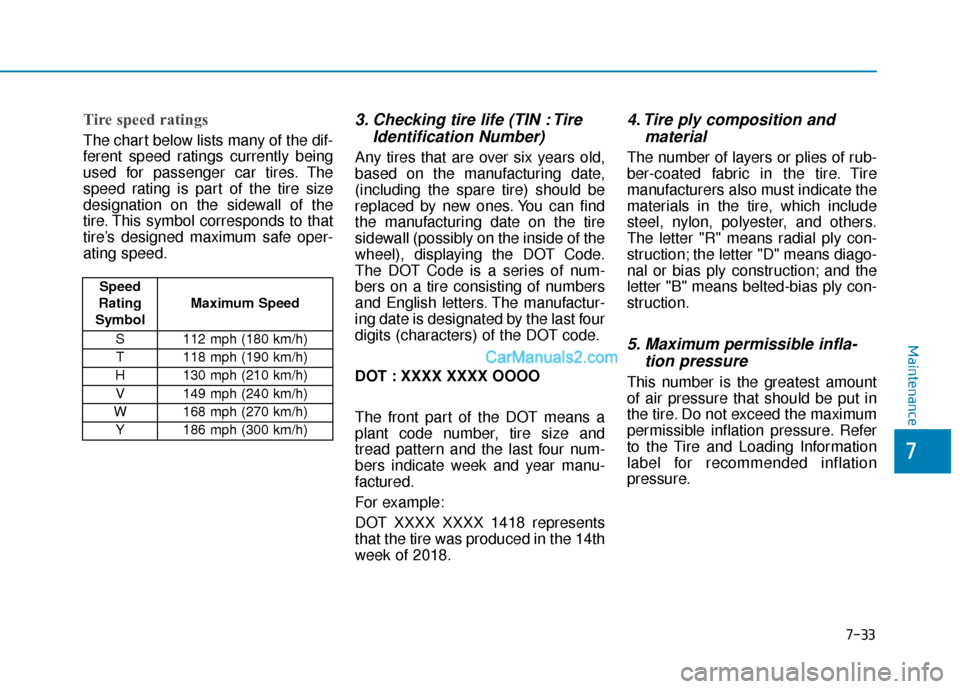
Tire speed ratings
The chart below lists many of the dif-
ferent speed ratings currently being
used for passenger car tires. The
speed rating is part of the tire size
designation on the sidewall of the
tire. This symbol corresponds to that
tire’s designed maximum safe oper-
ating speed.
3. Checking tire life (TIN : TireIdentification Number)
Any tires that are over six years old,
based on the manufacturing date,
(including the spare tire) should be
replaced by new ones. You can find
the manufacturing date on the tire
sidewall (possibly on the inside of the
wheel), displaying the DOT Code.
The DOT Code is a series of num-
bers on a tire consisting of numbers
and English letters. The manufactur-
ing date is designated by the last four
digits (characters) of the DOT code.
DOT : XXXX XXXX OOOO
The front part of the DOT means a
plant code number, tire size and
tread pattern and the last four num-
bers indicate week and year manu-
factured.
For example:
DOT XXXX XXXX 1418 represents
that the tire was produced in the 14th
week of 2018.
4. Tire ply composition andmaterial
The number of layers or plies of rub-
ber-coated fabric in the tire. Tire
manufacturers also must indicate the
materials in the tire, which include
steel, nylon, polyester, and others.
The letter "R" means radial ply con-
struction; the letter "D" means diago-
nal or bias ply construction; and the
letter "B" means belted-bias ply con-
struction.
5. Maximum permissible infla-tion pressure
This number is the greatest amount
of air pressure that should be put in
the tire. Do not exceed the maximum
permissible inflation pressure. Refer
to the Tire and Loading Information
label for recommended inflation
pressure.
Speed
Rating
Symbol Maximum Speed
S 112 mph (180 km/h) T 118 mph (190 km/h)
H 130 mph (210 km/h) V 149 mph (240 km/h)
W 168 mph (270 km/h)
Y186 mph (300 km/h)
Page 415 of 540
7-35
7
Maintenance
Temperature - A, B & C
The temperature grades are A (the
highest), B and C representing the
tire’s resistance to the generation of
heat and its ability to dissipate heat
when tested under controlled condi-
tions on a specified indoor laboratory
test wheel.
Sustained high temperature can
cause the material of the tire to
degenerate and reduce tire life, and
excessive temperature can lead to
sudden tire failure. Grade C
responds to a level of performance
which all passenger car tires must
meet under the Federal Motor
Vehicle Safety Standard No. 109.
Grades B and A represent higher
levels of performance on the labora-
tory test wheel than the minimum
required by law.
Tire Terminology and
Definitions
Air Pressure
The amount of air inside the tire
pressing outward on the tire. Air
pressure is expressed in pounds per
square inch (psi) or kilopascal (kPa).
Accessory Weight
This means the combined weight of
optional accessories. Some exam-
ples of optional accessories are
automatic transmission, power
seats, and air conditioning.
Aspect Ratio
The relationship of a tire's height to
its width.
Belt
A rubber coated layer of cords that is
located between the plies and the
tread. Cords may be made from steel
or other reinforcing materials.
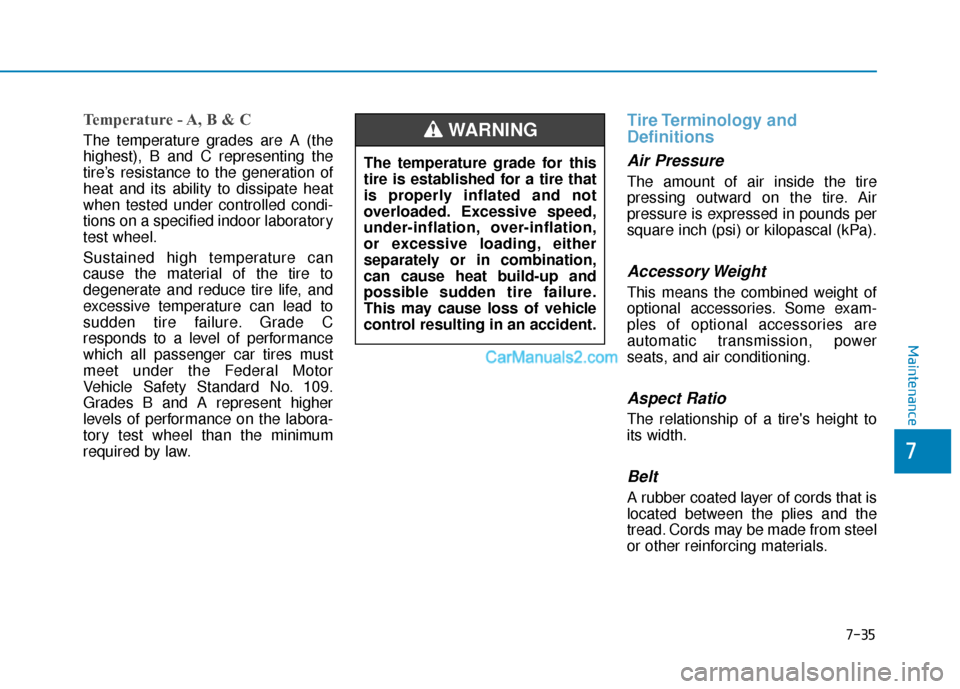
The temperature grade for this
tire is established for a tire that
is properly inflated and not
overloaded. Excessive speed,
under-inflation, over-inflation,
or excessive loading, either
separately or in combination,
can cause heat build-up and
possible sudden tire failure.
This may cause loss of vehicle
control resulting in an accident.
WARNING
Page 419 of 540
7-39
7
Maintenance
All Season Tires
HYUNDAI specifies all season tires
on some models to provide good
performance for use all year round,
including snowy and icy road condi-
tions. All season tires are identified
by ALL SEASON and/or M+S (Mud
and Snow) on the tire sidewall. Snow
tires have better snow traction than
all season tires and may be more
appropriate in some areas.
Summer Tires
HYUNDAI specifies summer tires on
some models to provide superior
performance on dry roads. Summer
tire performance is substantially
reduced in snow and ice. Summer
tires do not have the tire traction rat-
ing M+S (Mud and Snow) on the tire
side wall. If you plan to operate your
vehicle in snowy or icy conditions,
HYUNDAI recommends the use of
snow tires or all season tires on all
four wheels.
Snow Tires
If you equip your car with snow tires,
they should be the same size and
have the same load capacity as the
original tires. Snow tires should be
installed on all four wheels; other-
wise, poor handling may result. Snow
tires should carry 4 psi (28 kPa)
more air pressure than the pressure
recommended for the standard tires
on the tire label on the driver’s side of
the center pillar, or up to the maxi-
mum pressure shown on the tire
sidewall, whichever is less. Do not
drive faster than 75 mph (120 km/h)
when your vehicle is equipped with
snow tires.
Radial-Ply Tires
Radial-ply tires provide improved
tread life, road hazard resistance and
smoother high speed ride. The radi-
al-ply tires used on this vehicle are of
belted construction, and are selected
to complement the ride and handling
characteristics of your vehicle.
Radial-ply tires have the same load
carrying capacity, as bias-ply or bias
belted tires of the same size, and use
the same recommended inflation
pressure. Mixing of radial-ply tires
with bias-ply or bias belted tires is
not recommended. Any combina-
tions of radial-ply and bias-ply or bias
belted tires when used on the same
vehicle will seriously deteriorate
vehicle handling. The best rule to fol-
low is: Identical pairs of radial-ply
tires should always be used as a set
for the front tires and a set for the
rear tires.
Page 451 of 540
7-71
7
Maintenance
Cleaning the upholstery andinterior trim
Vinyl (if equipped)
Remove dust and loose dirt from
vinyl with a whisk broom or vacuum
cleaner. Clean vinyl surfaces with a
vinyl cleaner.
Fabric (if equipped)
Remove dust and loose dirt from fab-
ric with a whisk broom or vacuum
cleaner. Clean with a mild soap solu-
tion recommended for upholstery or
carpets. Remove fresh spots immedi-
ately with a fabric spot cleaner. If
fresh spots do not receive immediate
attention, the fabric can be stained
and its color can be affected. Also, its
fire-resistant properties can be
reduced if the material is not properly
maintained.
Using anything but recommended
cleaners and procedures may
affect the fabric's appearance and
fire-resistant properties.
Leather (if equipped)
Feature of Seat Leather
- Natural leather is used in the fab-rication of leather seats which
may be included in your vehicle
depending on trim level. Note that
for leather material, each part
may differ in thickness or density.
Wrinkles may appear as a natural result of stretching and shrinking
depending on the temperature
and humidity.
- The seat is made of stretchable fabric to improve comfort.
- The parts contacting the body are curved and the side supporting
area is high which provides driv-
ing comfort and stability.
- Wrinkles may appear naturally from usage.
NOTICE
Wrinkles or abrasions which
appear naturally from usage
are not covered by warranty.
Belts with metallic acces-
sories, zippers or keys inside
the back pocket may damage
the seat fabric.
Make sure not to wet the seat.
It may change the nature of
natural leather.
Jeans or clothes which could
bleach may contaminate the
surface of the seat covering
fabric.
CAUTION
Page 452 of 540
7-72
Maintenance
Caring for the leather seats - Vacuum the seat periodically toremove dust and sand on the
seat. It will prevent abrasion or
damage of the leather and main-
tain its quality.
- Wipe the natural leather seat cover often with dry or soft cloth.
- Use of proper leather protective may prevent abrasion of the
cover and helps maintain the
color. Be sure to read the instruc-
tions and consult a specialist
when using leather coating or
protective agent.
- Light colored (beige, cream beige) leather is easily contami-
nated and the stain is noticeable.
Clean the seats frequently.
- Avoid wiping with wet cloth. It may cause the surface to crack. Cleaning the leather seats
- Remove all contaminationsinstantly. Refer to instructions
below for removal of each con-
taminant.
- Cosmetic products (sunscreen, foundation, etc.)
Apply cleansing cream on a cloth
and wipe the contaminate spot.
Wipe off the cream with a wet
cloth and remove water with a dry
cloth.
- Beverages (coffee, soft drink, etc.)
Apply a small amount of neutral
detergent and wipe until contami-
nations do not smear.
- Oil Remove oil instantly with
absorbable cloth and wipe with
stain remover used only for natu-
ral leather.
- Chewing gum Harden the gum with ice and
remove gradually.
Cleaning the seat belt webbing
Clean the belt webbing with any mild
soap solution recommended for
cleaning upholstery or carpet. Follow
the instructions provided with the
soap. Do not bleach or re-dye the
webbing because this may weaken
the seat belt.
Cleaning the interior windowglass
If the interior glass surfaces of the
vehicle become fogged (that is, cov-
ered with an oily, greasy or waxy
film), they should be cleaned with
glass cleaner. Follow the directions
on the glass cleaner container.
Do not scrape or scratch the
inside of the rear window. This
may result in damage to the rear
window defroster grid.
NOTICE
Page 453 of 540
7-73
7
Maintenance
C
CA
A L
LI
IF
F O
O R
RN
N I
IA
A
P
P E
ER
R C
CH
H L
LO
O R
RA
A T
TE
E
N
N O
O T
TI
IC
C E
E
Perchlorate Material-special handling may apply, See: www.dtsc.ca.gov/hazardouswaste/perchlorate.
Notice to California Vehicle Dismantlers:
Perchlorate containing materials, such as air bag inflators, seatbelt pretensioners and keyless remote entry batteries,
must be disposed of according to Title 22 California Code of Regulations Section 67384.10 (a).
Page 462 of 540
8-9
88
Specifications, Consumer information and Reporting safety defects
Eastern Region:
Connecticut, Delaware,
Maine, Massachusetts, New
Hampshire, New Jersey, New York,
Pennsylvania, Rhode Island,
Vermont.
Eastern Region
1122 Cranbury South River Road
Jamesburg, NJ 08831
(800) 633-5151
Southern Region:
Florida, Georgia, Maryland, North
Carolina, South Carolina, Virginia,
West Virginia.
Southern Region
3025 Chastain Meadows Parkway
Suite 100 Marietta, GA 30066
(800) 633-5151South Central Region:
Alabama, Arkansas, Louisiana,
Mississippi, New Mexico, Oklahoma,
Tennessee, Texas.
South Central Region
1421 South Beltline Road, Suite 400
Coppell, TX 75019
(800) 633-5151
Central Region:
Illinois, Indiana, lowa, Kentucky,
Michigan, Minnesota, Nebraska,
North Dakota, South Dakota, Ohio,
Wisconsin, Kansas, Missouri.
Central Region
2 Trans Am Plaza Dr #500 Oakbrook
Terrace, IL 60181
(800) 633-5151Western Region:
Alaska, Hawaii, Arizona, California,
Colorado, Idaho, Montana, Nevada,
Oregon, Utah, Washington,
Wyoming.
Western Region
10550 Talbert Avenue P.O.Box
20850 Fountain Valley, California
92728-0850
(800) 633-5151
C C
O
O N
NS
SU
U M
M E
ER
R
I
IN
N F
FO
O R
RM
M A
AT
TI
IO
O N
N
This consumer information has been prepared in accordance with regulations issued by the National Highway Traffic
Safety Administration of the U.S. Department of Transportation. Your HYUNDAI dealer will help answer any questions you
may have as you read this information.
HYUNDAI motor vehicles are designed and manufactured to meet or exceed all applicable safety standards.
For your safety, however, we strongly urge you to read and follow all directions in this Owner’s Manual, particularly the
information under the headings "NOTICE", "CAUTION" and "WARNING".
If, after reading this manual, you have any questions regarding the operation of your vehicle, please contact your nearest
HYUNDAI Motor America Regional Office as listed in the following:
Page 507 of 540
H44
How to Start the Vehicle
1. Holding the smart key, sit in thedriver's seat.
2. Fasten the seat belt before start- ing the vehicle.
3. Make sure to engage the parking brake.
4. Turn OFF all electrical devices.
5. Make sure to depress and hold the brake pedal.
6. While depressing the brake pedal, shift to P (Park).
7. Depress and hold the brake pedal while pressing the POWER but-
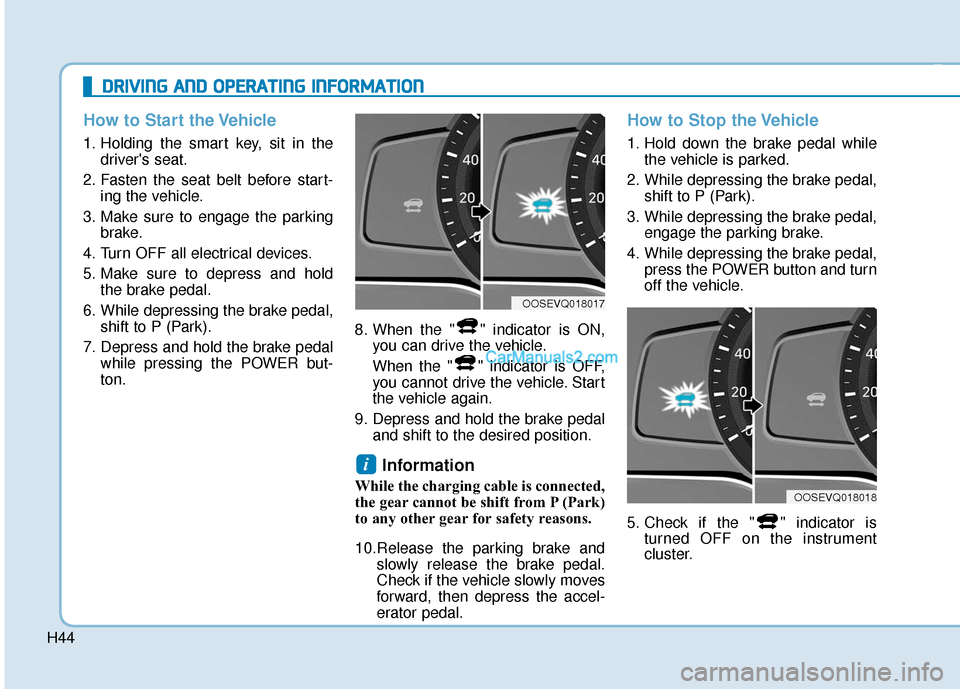
ton. 8. When the " " indicator is ON,
you can drive the vehicle.
When the " " indicator is OFF,
you cannot drive the vehicle. Start
the vehicle again.
9. Depress and hold the brake pedal and shift to the desired position.
Information
While the charging cable is connected,
the gear cannot be shift from P (Park)
to any other gear for safety reasons.
10.Release the parking brake and slowly release the brake pedal.
Check if the vehicle slowly moves
forward, then depress the accel-
erator pedal.
How to Stop the Vehicle
1. Hold down the brake pedal whilethe vehicle is parked.
2. While depressing the brake pedal, shift to P (Park).
3. While depressing the brake pedal, engage the parking brake.
4. While depressing the brake pedal, press the POWER button and turn
off the vehicle.
5. Check if the " " indicator is turned OFF on the instrument
cluster.
i
D
DR
RI
IV
V I
IN
N G
G
A
A N
N D
D
O
O P
PE
ER
R A
A T
TI
IN
N G
G
I
IN
N F
FO
O R
RM
M A
AT
TI
IO
O N
N
OOSEVQ018018
OOSEVQ018017
Page 532 of 540
I-6
If the vehicle overheats .....................................................6-6
If the vehicle stalls at a crossroad or crossing ..................6-2
If the vehicle stalls while driving .....................................6-2
If the vehicle will not start ................................................6-3
If you have a flat tire ......................................................6-14
If you have a flat tire while driving ..................................6-3
Immobilizer system...........................................................3-8
Important safety precautions.............................................2-2Air bag hazards ............................................................2-2
Always wear your seat belt ..........................................2-2
Control your speed .......................................................2-3
Driver distraction..........................................................2-2
Keep your vehicle in safe condition.............................2-3
Restrain all children .....................................................2-2
In case of emergency while driving..................................6-2
Indicator light..................................................................3-51
Inside rearview mirror ....................................................3-19
Instrument cluster ...........................................................3-44 Assist mode ................................................................3-78
Gauges and meters .....................................................3-46
Instrument panel illumination ....................................3-45
LCD display control ...................................................3-76
LCD display messages ...............................................3-63
LCD display modes ....................................................3-77
Master warning mode .................................................3-79
Regenerative braking level indicator .........................3-50 Shift indicator .............................................................3-50
Shift indicator pop-up ................................................3-50
Smart ECO pedal guide..............................................3-51
Trip computer mode ...................................................3-78
User settings mode .....................................................3-80
Warning and indicator lights ......................................3-51
Instrument panel fuse replacement .................................7-42
Instrument panel overview ...............................................1-5
Interior care .....................................................................7-7\
0
Interior features Bottle holder .............................................................3-137
Cargo area cover.......................................................3-145
Clock ........................................................................\
3-142
Coat hook .................................................................3-143
Cup holder ................................................................3-137
Floor mat anchor(s) ..................................................3-143
Luggage net (holder) ................................................3-144
Power outlet..............................................................3-139
Sunvisor ....................................................................3-13\
8
USB charger .............................................................3-140
Wireless cellular phone charging system .................3-140
Interior lamp AUTO cut................................................3-105
Interior lights.................................................................3-105 Front lamps...............................................................3-105
Interior lamp AUTO cut ...........................................3-105
Luggage compartment lamp .....................................3-106
Rear lamp .................................................................3-106
Vanity mirror lamp ...................................................3-107
Interior overview...............................................................1-4
Index
I
Page 533 of 540

I-7
Jump starting .....................................................................6-4\
LabelRefrigerant label ...........................................................8-8
Tire sidewall labeling .................................................7-31
Tire specification and pressure label ............................8-8
Vehicle certification label .............................................8-7
Lane change signals ......................................................3-102
Lane Keeping Assist (LKA) system ..............................5-75
Lap/shoulder belt ............................................................2-26
LCD display Assist mode ................................................................3-78
Assist mode ................................................................3-78
LCD display modes ....................................................3-77
Master warning mode .................................................3-79
Quick guide help ........................................................3-80
Trip computer mode ...................................................3-78
Turn By Turn (TBT) mode.........................................3-78
User settings mode .....................................................3-80
LCD display control Assist mode ................................................................3-78
LCD display modes ....................................................3-77
User settings mode .....................................................3-80 LCD display messages
Driving info display ...................................................3-63
Aux. Battery Saver+ used while parked ....................3-71
Battery discharging due to external electrical devices .3-64
Charge immediately. Power limited ...........................3-72
Charging door open ....................................................3-70
Charging stopped. Check the AC/DC charger ...........3-70
Charging stopped. Check the cable connection .........3-71
Check Blind-Spot Collision Warning (BCW) system.3-67
Check brake light ......................................................3-67
Check BRAKE SWITCH fuse ...................................3-64
Check cornering lamp ................................................3-67
Check Driver Attention Warning (DAW) system ......3-68
Check electric vehicle system ....................................3-75
Check Forward Collision Avoidance Assist system...3-67
Check headlight ..........................................................3-66
Check headlight LED .................................................3-67
Check High Beam Assist (HBA) system ...................3-67
Check Lane Keep Assist (LKA) system ....................3-68
Check regenerative brakes / Stop vehicle and check regenerative brakes ............3-72
Check Smart Cruise Control System ........................3-68
Check turn signal........................................................3-67
Check virtual engine sound ........................................3-75
Door, Hood, Liftgate open indicator .........................3-65
EV battery Overheated! Stop vehicle.........................3-73
Heated steering wheel turned off ...............................3-66
Key not detected .........................................................3-64
I
Index
J
L