gear HYUNDAI KONA EV 2022 User Guide
[x] Cancel search | Manufacturer: HYUNDAI, Model Year: 2022, Model line: KONA EV, Model: HYUNDAI KONA EV 2022Pages: 548, PDF Size: 49.14 MB
Page 70 of 548
2-5
02
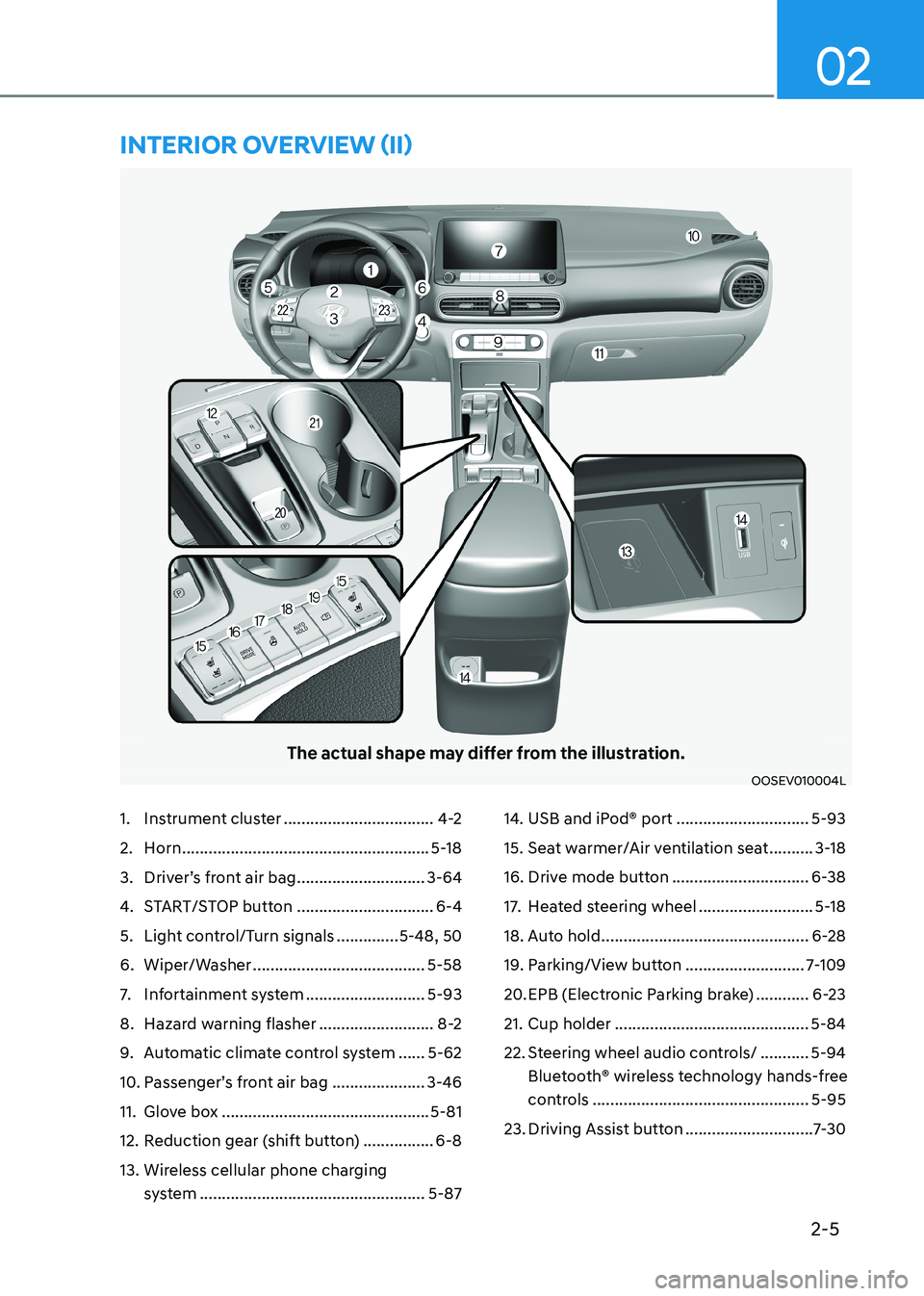
The actual shape may differ from the illustration.
OOSEV010004L
1. Instrument cluster ..................................4-2
2. Horn ........................................................ 5-18
3. Driver’s front air bag .............................3-64
4. START/STOP button ...............................6-4
5. Light control/Turn signals ..............5-48, 50
6. Wiper/Washer ....................................... 5-58
7. Infortainment system ...........................5-93
8. Hazard warning flasher ..........................8-2
9. Automatic climate control system ......5-62
10. Passenger’s front air bag ..................... 3-46
11. Glove box ............................................... 5-81
12. Reduction gear (shift button) ................6-8
13. Wireless cellular phone charging system ................................................... 5-8714. USB and iPod® port
..............................5-93
15. Seat warmer/Air ventilation seat ..........3-18
16. Drive mode button ...............................6-38
17. Heated steering wheel ..........................5-18
18. Auto hold ............................................... 6-28
19. Parking/View button ...........................7-109
20. EPB (Electronic Parking brake) ............6-23
21. Cup holder ............................................ 5-84
22. Steering wheel audio controls/ ...........5-94
Bluetooth® wireless technology hands-free
controls ................................................. 5-95
23. Driving Assist button .............................7-30
intErior ovErviEw (ii)
Page 76 of 548

02
2-11
To help achieve proper vehicle performance and durability, use only lubricants of the
proper quality.
These lubricants and fluids are recommended for use in your vehicle.
Lubricant Volume Classification
Reduction gear fluid
1.0 ~ 1.1 ℓ
(1.0 ~ 1.1 US qt.) 70W, API GL-4,
TCGO-9(MS517-14)
Coolant without heat
pump 12.5 ~13 ℓ
(13.2 ~ 13.7 US qt.) Designated coolant water
for electric vehicles
with heat
pump 13 ~13.4 ℓ
(13.7 ~ 14.2 US qt.)
Brake fluid 0.7 ~ 0.8 ℓ
(0.74 ~ 0.85 US qt.) SAE J1704 DOT-4 LV,
FMVSS 116 DOT-4,
ISO 4925 CLASS-6
recoMMenDeD LuBricants anD capacities
Page 144 of 548
4
Instrument cluster ............................................................................................ 4-2
Instrument cluster control ........................................................................................... 4-3
Instrument panel illumination ................................................................................... 4-3
Gauges and meters ...................................................................................................... 4-3
Speedometer ............................................................................................................. 4-3
Power/Charge gauge................................................................................................. 4-3
State of Charge (SOC) gauge for high voltage battery ..........................................4-4
Outside Temperature Gauge .................................................................................... 4-4
Odometer ................................................................................................................... 4-5
Distance to empty ..................................................................................................... 4-5
Reduction gear shift indicator ................................................................................. 4-6
Regenerative braking level indicator ....................................................................... 4-6
Warning and indicator lights ....................................................................................... 4 -7
LCD display messages ..................................................................................... 4-17
LCD display ....................................................................................................... 4-27
LCD display control .................................................................................................... 4-27
View modes ................................................................................................................ 4-28
Trip computer mode ................................................................................................ 4-29
Turn By Turn (TBT) mode ......................................................................................... 4-29
Driving assist mode ................................................................................................. 4-29
Master warning group ............................................................................................ 4-30
User settings mode .................................................................................................... 4-31
Trip computer .................................................................................................. 4-39
Trip modes ................................................................................................................ 4-39
Drive Info ................................................................................................................. 4-40
After Recharging ..................................................................................................... 4-40
Accumulated info ..................................................................................................... 4-41
Energy flow .............................................................................................................. 4-41
Digital speedometer ................................................................................................ 4-41
4. Instrument cluster
Page 149 of 548
Instrument cluster
4-6
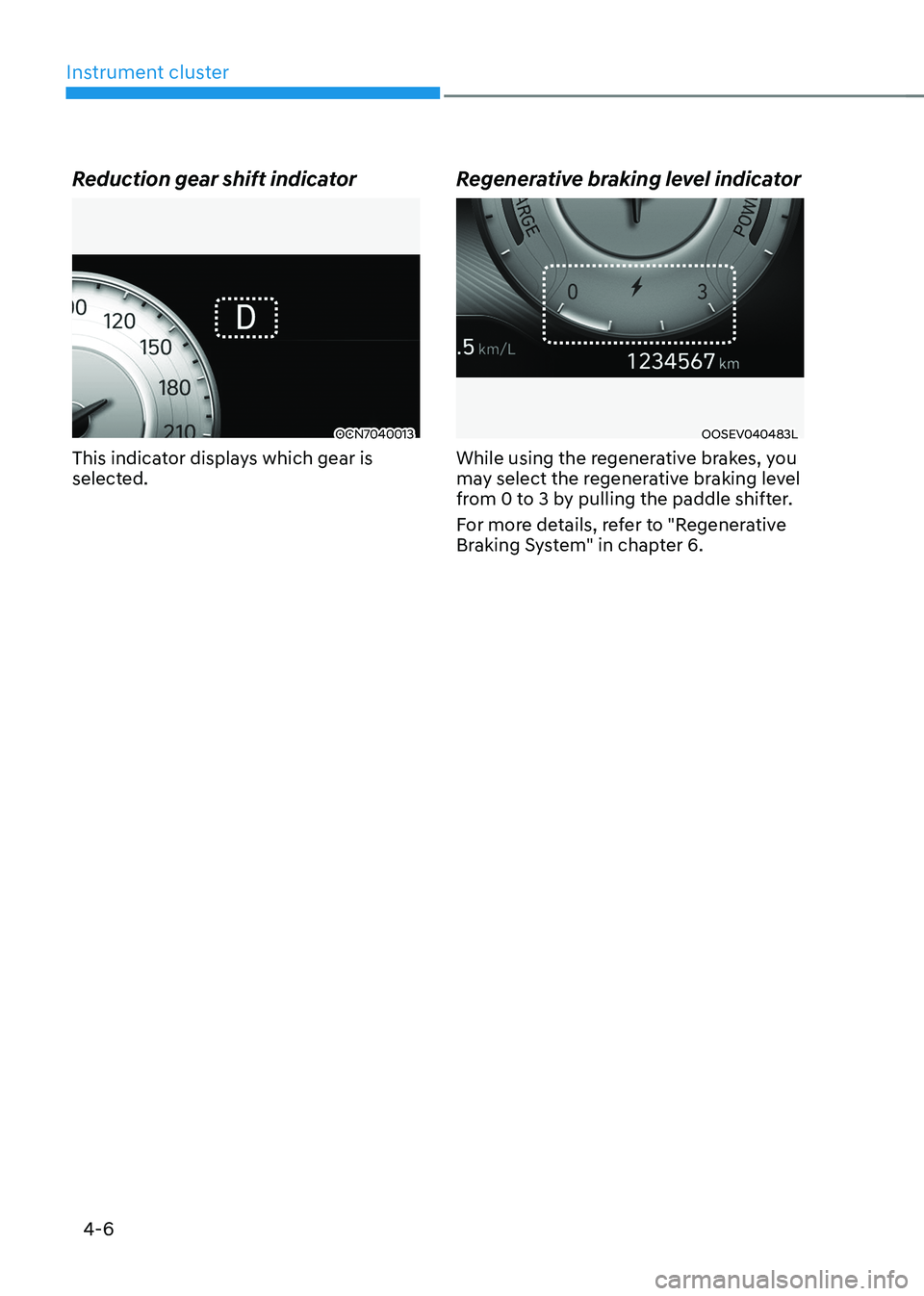
Reduction gear shift indicator
OCN7040013
This indicator displays which gear is
selected. Regenerative braking level indicatorOOSEV040483L
While using the regenerative brakes, you
may select the regenerative braking level
from 0 to 3 by pulling the paddle shifter.
For more details, refer to "Regenerative
Braking System" in chapter 6.
Page 160 of 548
04
4-17
lcD DIsplay messages
Shift to P
This warning message is displayed if you
try to turn off the vehicle when the gear
is not in the P (Park) position.
At this time, the START/STOP button
changes to the ACC position (If you press
the START/STOP button once more, it will
turn to the ON position).
Low key battery
This warning message is displayed if the
battery of the smart key is discharged
while changing the START/STOP button
to the OFF position.
Press START/STOP button while turning wheel
This warning message is displayed if the
steering wheel does not unlock normally
when the START/STOP button is pressed.
You should press the START/STOP button
while turning the steering wheel right
and left.
Check steering wheel lock system
This warning message is displayed if the
steering wheel does not lock normally
while the START/STOP button changes to the OFF position.
Press brake pedal to start vehicle
This warning message is displayed if the
START/STOP button changes to the ACC
position twice by pressing the button
repeatedly without depressing the brake pedal.
You can start the vehicle by depressing
the brake pedal.Key not in vehicle
This warning message is displayed if the
smart key is not in the vehicle when you
press the START/STOP button.
When attempting to start the vehicle,
always have the smart key with you.
Key not detected
This warning message is displayed if the
smart key is not detected when you press
the START/STOP button.
Press START/STOP button again
This message is displayed if you were
unable to start the vehicle when the
START/STOP button was pressed.
If this occurs, attempt to start the vehicle
by pressing the START/STOP button again.
If the warning message appears each
time you press the START/STOP button,
we recommend you to have your vehicle
inspected by an authorized Hyundai
dealer.
Press START/STOP button with key
This warning message is displayed if you
press the START/STOP button while the
warning message "Key not detected" is
displayed.
At this time, the immobilizer indicator
light blinks.
Page 164 of 548
04
4-21
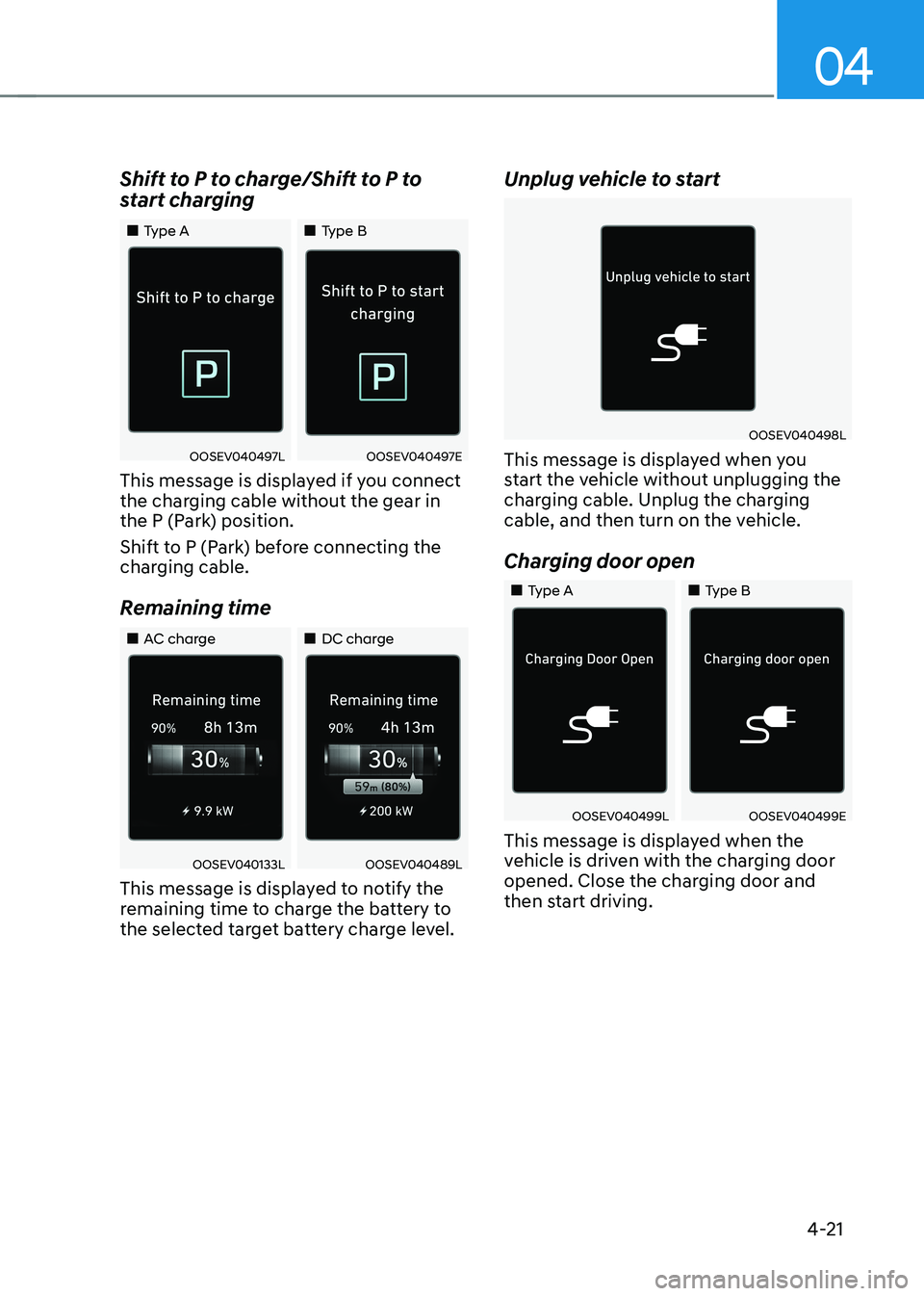
Shift to P to charge/Shift to P to
start charging
„„Type A
„„Type B
OOSEV040497LOOSEV040497E
This message is displayed if you connect
the charging cable without the gear in
the P (Park) position.
Shift to P (Park) before connecting the
charging cable.
Remaining time
„„AC charge „„DC charge
OOSEV040133LOOSEV040489L
This message is displayed to notify the
remaining time to charge the battery to
the selected target battery charge level. Unplug vehicle to start
OOSEV040498L
This message is displayed when you
start the vehicle without unplugging the
charging cable. Unplug the charging
cable, and then turn on the vehicle.
Charging door open
„„Type A „„Type B
OOSEV040499LOOSEV040499E
This message is displayed when the
vehicle is driven with the charging door
opened. Close the charging door and
then start driving.
Page 179 of 548
Instrument cluster
4-36
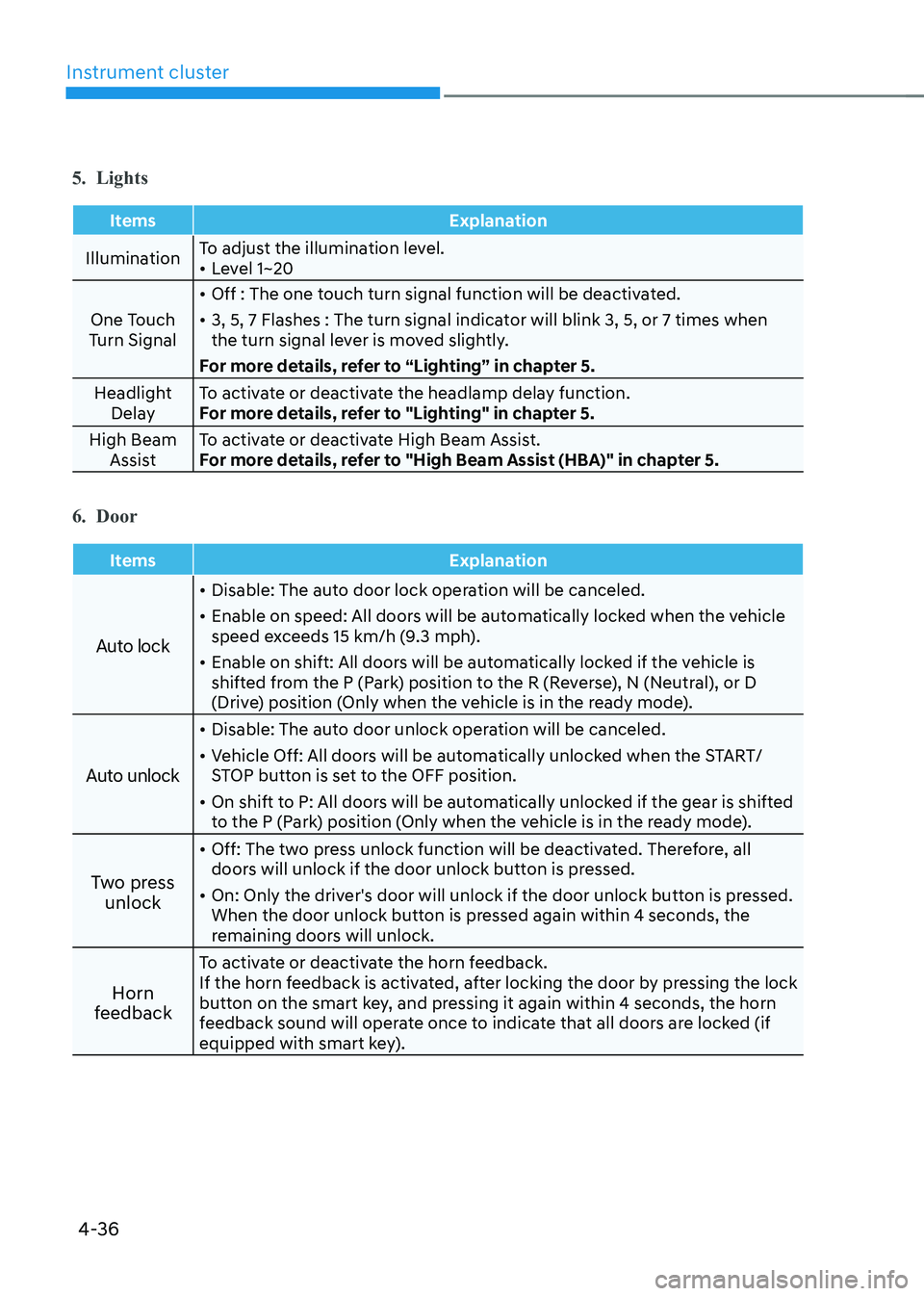
5. Lights
Items Explanation
IlluminationTo adjust the illumination level. •
Level 1~20
One Touch
Turn Signal •
Off : The one touch turn signal function will be deactivated.
• 3, 5, 7 Flashes : The turn signal indicator will blink 3, 5, or 7 times when
the turn signal lever is moved slightly.
For more details, refer to “Lighting” in chapter 5.
Headlight Delay To activate or deactivate the headlamp delay function.
For more details, refer to "Lighting" in chapter 5.
High Beam Assist To activate or deactivate High Beam Assist.
For more details, refer to "High Beam Assist (HBA)" in chapter 5.
6. Door
Items Explanation
Auto lock
•
Disable: The auto door lock operation will be canceled.
• Enable on speed: All doors will be automatically locked when the vehicle
speed exceeds 15 km/h (9.3 mph).
• Enable on shift: All doors will be automatically locked if the vehicle is
shifted from the P (Park) position to the R (Reverse), N (Neutral), or D
(Drive) position (Only when the vehicle is in the ready mode).
Auto unlock
• Disable: The auto door unlock operation will be canceled.
• Vehicle Off: All doors will be automatically unlocked when the START/
STOP button is set to the OFF position.
• On shift to P: All doors will be automatically unlocked if the gear is shifted
to the P (Park) position (Only when the vehicle is in the ready mode).
Two press unlock •
Off: The two press unlock function will be deactivated. Therefore, all
doors will unlock if the door unlock button is pressed.
• On: Only the driver's door will unlock if the door unlock button is pressed.
When the door unlock button is pressed again within 4 seconds, the
remaining doors will unlock.
Horn
feedback To activate or deactivate the horn feedback.
If the horn feedback is activated, after locking the door by pressing the lock
button on the smart key, and pressing it again within 4 seconds, the horn
feedback sound will operate once to indicate that all doors are locked (if
equipped with smart key).
Page 201 of 548
05
5-17
Tilt steering/Telescopic steering
WARNING
Never adjust the steering wheel while
driving. You may lose steering control
and cause severe personal injury, death
or accidents.
Information
After adjustment, sometimes the lock-
release lever may not lock the steering wheel.
It is not a malfunction. This occurs when
two gears are not engaged correctly. In this case, adjust the steering wheel again and then lock the steering wheel.OOS047006
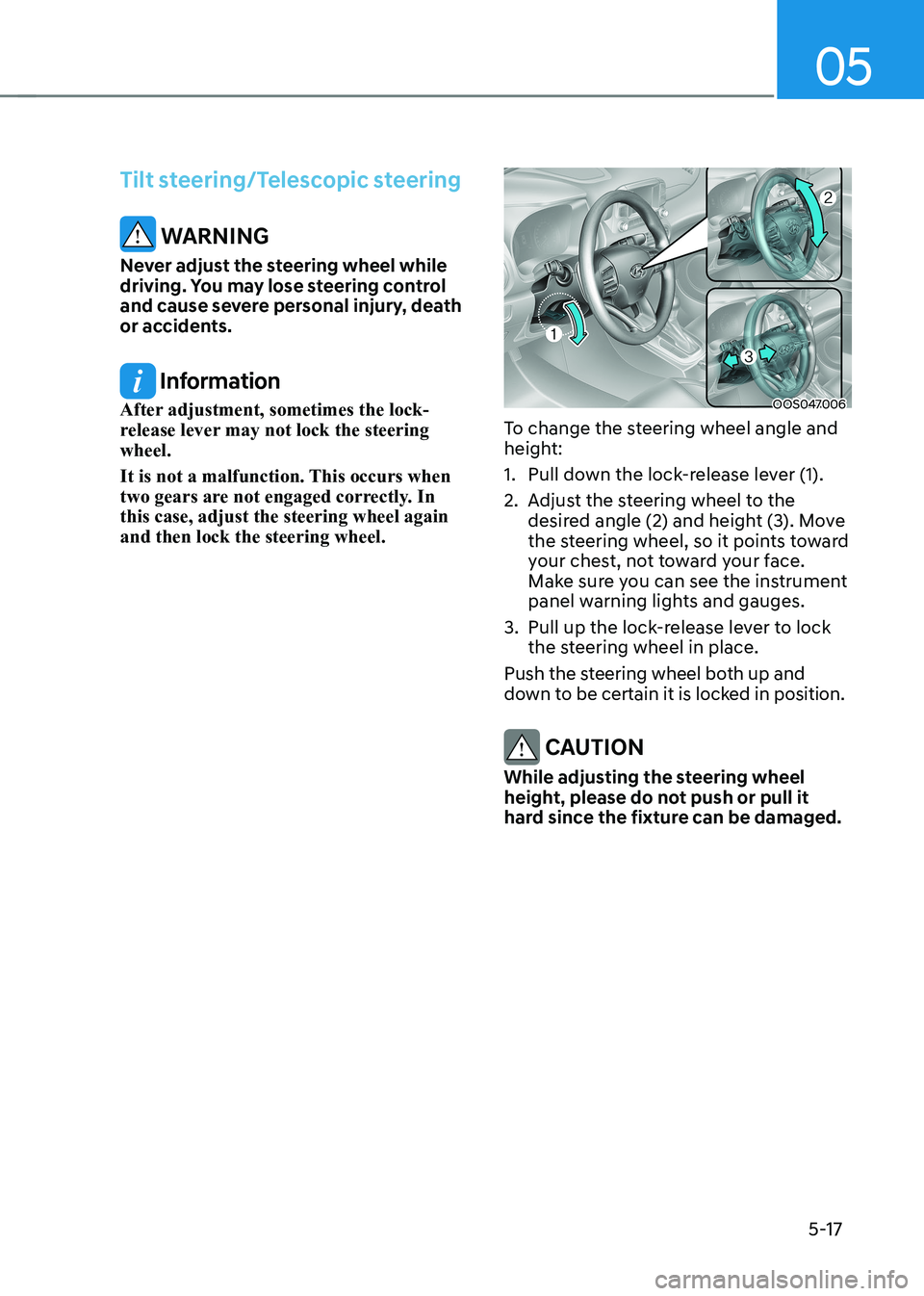
To change the steering wheel angle and
height:
1. Pull down the lock-release lever (1).
2. Adjust the steering wheel to the desired angle (2) and height (3). Move
the steering wheel, so it points toward
your chest, not toward your face.
Make sure you can see the instrument
panel warning lights and gauges.
3. Pull up the lock-release lever to lock the steering wheel in place.
Push the steering wheel both up and
down to be certain it is locked in position.
CAUTION
While adjusting the steering wheel
height, please do not push or pull it
hard since the fixture can be damaged.
Page 204 of 548
![HYUNDAI KONA EV 2022 User Guide Convenient features
5-20
Electric Chromic Mirror (ECM) (if equipped)
OOSEV048006L
[A] : Indicator
The electric chromic rearview mirror
automatically controls the glare from
the headlamp of the v](/img/35/56171/w960_56171-203.png "HYUNDAI KONA EV 2022 User Guide Convenient features
5-20
Electric Chromic Mirror (ECM) (if equipped)
OOSEV048006L
[A] : Indicator
The electric chromic rearview mirror
automatically controls the glare from
the headlamp of the v")
Convenient features
5-20
Electric Chromic Mirror (ECM) (if equipped)
OOSEV048006L
[A] : Indicator
The electric chromic rearview mirror
automatically controls the glare from
the headlamp of the vehicle behind
you in nighttime or low light driving
conditions. When the vehicle is ON, the
glare is automatically controlled by the
sensor mounted in the rearview mirror.
The sensor detects the light level around
the vehicle, and automatically adjusts
to control the headlamp glare from
vehicles behind you. Whenever the gear
is shifted to R (Reverse), the mirror will
automatically go to the brightest setting
in order to improve the driver’s view
behind the vehicle. Electrochromic mirror (ECM) with
HomeLink® system and Genesis
Connected Service (if equipped)
Your vehicle may be equipped with
a Gentex Automatic-Dimming Mirror
with an Integrated HomeLink® Wireless
Control System.
During nighttime driving, this feature will
automatically detect and help reduce
rearview mirror glare. The HomeLink®
Universal Transceiver allows you to
activate your garage door(s), electric
gate, home lighting, etc.
OOS040477N
(1) HomeLink Channel 1
(2) HomeLink Channel 2
(3) HomeLink Channel 3
(4) Garage Door Opener Status Indicator : Closing or Closed
(5) HomeLink Operation Indicator
(6) Garage Door Opener Status Indicator : Opening or Opened
(7) HomeLink User Interface Indicator
Page 230 of 548
Convenient features
5-46
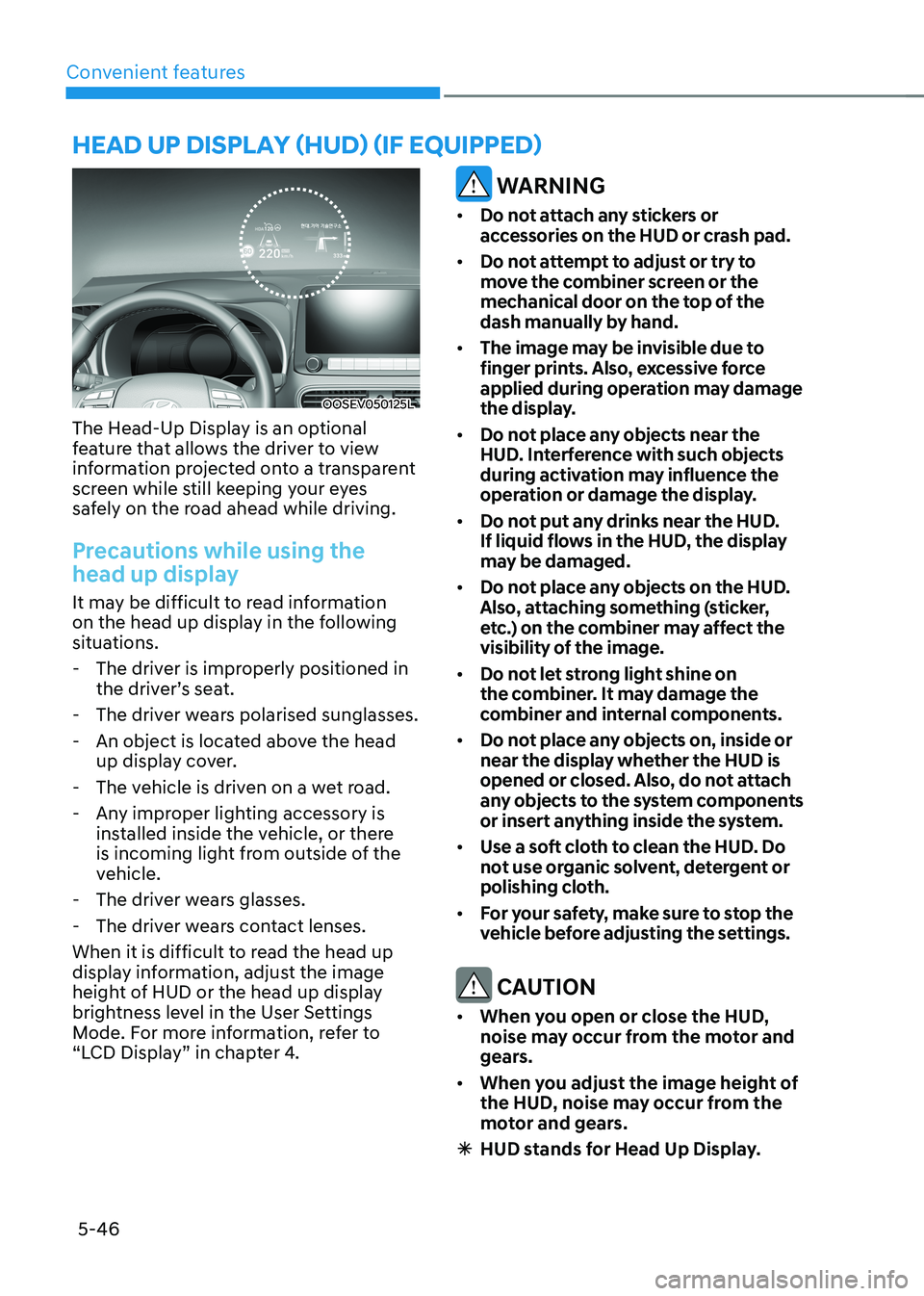
OOSEV050125L
The Head-Up Display is an optional
feature that allows the driver to view
information projected onto a transparent
screen while still keeping your eyes
safely on the road ahead while driving.
Precautions while using the
head up display
It may be difficult to read information
on the head up display in the following
situations. - The driver is improperly positioned in the driver’s seat.
- The driver wears polarised sunglasses.
- An object is located above the head up display cover.
- The vehicle is driven on a wet road.
- Any improper lighting accessory is installed inside the vehicle, or there
is incoming light from outside of the
vehicle.
- The driver wears glasses.
- The driver wears contact lenses.
When it is difficult to read the head up
display information, adjust the image
height of HUD or the head up display
brightness level in the User Settings
Mode. For more information, refer to
“LCD Display” in chapter 4.
WARNING
• Do not attach any stickers or
accessories on the HUD or crash pad.
• Do not attempt to adjust or try to
move the combiner screen or the
mechanical door on the top of the
dash manually by hand.
• The image may be invisible due to
finger prints. Also, excessive force
applied during operation may damage
the display.
• Do not place any objects near the
HUD. Interference with such objects
during activation may influence the
operation or damage the display.
• Do not put any drinks near the HUD.
If liquid flows in the HUD, the display
may be damaged.
• Do not place any objects on the HUD.
Also, attaching something (sticker,
etc.) on the combiner may affect the
visibility of the image.
• Do not let strong light shine on
the combiner. It may damage the
combiner and internal components.
• Do not place any objects on, inside or
near the display whether the HUD is
opened or closed. Also, do not attach
any objects to the system components
or insert anything inside the system.
• Use a soft cloth to clean the HUD. Do
not use organic solvent, detergent or
polishing cloth.
• For your safety, make sure to stop the
vehicle before adjusting the settings.
CAUTION
• When you open or close the HUD,
noise may occur from the motor and
gears.
• When you adjust the image height of
the HUD, noise may occur from the
motor and gears.
à HUD stands for Head Up Display.
head up display (hud) (if equipped)