reduction HYUNDAI KONA EV 2022 Owners Manual
[x] Cancel search | Manufacturer: HYUNDAI, Model Year: 2022, Model line: KONA EV, Model: HYUNDAI KONA EV 2022Pages: 548, PDF Size: 49.14 MB
Page 6 of 548
1
1. Foreword / Electric Vehicle System Overview
Foreword ............................................................................................................ 1-3
Hyundai Auto Canada ........................................................................................ 1-3
How to use this manual ..................................................................................... 1-4
Safety messages ................................................................................................ 1-4
Vehicle modifications ........................................................................................ 1-5
Electric Vehicle................................................................................................... 1-6 Electric Vehicle ............................................................................................................. 1-6
Characteristics of Electric Vehicles ............................................................................. 1-6
Battery Information ...................................................................................................... 1-6
Main Components of Electric Vehicle .............................................................. 1 -7
Main Components of Electric Vehicle ......................................................................... 1 -7
High Voltage Battery (lithium-ion polymer) ................................................................1 -7
High Voltage Battery Warmer System ........................................................................ 1-8
EV Mode ............................................................................................................. 1-9
Nearby Stations ............................................................................................................ 1-9
Energy Information ..................................................................................................... 1-10
Battery information .................................................................................................. 1-10
Energy consumption ............................................................................................... 1-10
Charge Management ................................................................................................... 1-11
Charging and climate ................................................................................................ 1-11
Charging limit ............................................................................................................ 1-12
Charging current ....................................................................................................... 1-13
ECO Driving ................................................................................................................. 1-13
CO2 reduction ........................................................................................................... 1-13
Driving history ........................................................................................................... 1-13
EV Settings ................................................................................................................... 1-14
Utility Mode ............................................................................................................... 1-14
Winter mode ............................................................................................................. 1-15
Warning ..................................................................................................................... 1-16
EV route ..................................................................................................................... 1-16
Charge Types for Electric Vehicle .................................................................... 1-16
Charging Information .................................................................................................. 1-16
Charging Time Information ........................................................................................ 1-17
Charging Types ............................................................................................................ 1-18
Charge Indicator Lamp for Electric Vehicle ....................................................1-19
Charging Status ........................................................................................................... 1-19
Page 11 of 548
Foreword / Electric Vehicle System Overview
1-6
Electric Vehicle (EVs)
An electric vehicle is driven using a
battery and an electric motor. While
general vehicles use an internal
combustion engine and gasoline as fuel,
electric vehicles use electrical energy
that is charged inside the high voltage
battery. As a result, electric vehicles are
eco-friendly in that they do not require
fuel and do not emit exhaust gases.
Characteristics of Electric
Vehicles (EVs)
1. EVs are using the electrical energy that is charged inside the high voltage
battery. In terms of air pollution and
greenhouse gas emissions, EVs are
cleaner than conventional vehicles.
2. A 150 kW electric drive motor mated to a reduction gearbox comprises
the vehicle drivetrain. This electric-
only powertrain significantly reduces
engine room noise and vibration while driving.
3. When decelerating or driving downhill, regenerative braking is
utilized to charge the high voltage
battery. This helps to minimize energy
loss and increases vehicle range.
4. When the state of charge (SOC) of the
battery is low, the EV battery can be
recharged through several different
charging methods. Refer to “Charging
Information” later in this section.
Information
What does regenerative braking do?
It uses an electric motor when decelerating and braking and transforms kinetic
energy to electrical energy in order to
charge the high voltage battery. (Torque
is applied in the opposite direction when
decelerating to generate braking force and
electric energy.)
Battery Information
• The vehicle is composed of a high
voltage battery that drives the motor
and air-conditioner, and an auxiliary
battery (12 V) that drives the lamps,
wipers, and audio system.
• The auxiliary battery is automatically
charged when the vehicle is in the
ready (
) mode or the high voltage
battery is being charged.
eleCTriC VeHiCle
Page 12 of 548
01
1 -7
main ComponenTs oF eleCTriC VeHiCle
Main Components of Electric
Vehicle
• On-Board Charger (OBC) : A device
that charges the high voltage battery
by converting AC power from a
charging station to DC power. Inverter
: A device that transforms direct
current (DC) from the high voltage
battery into alternating current (AC)
to supply power to the electric motor
and transforms AC back into DC when
available to charge the high voltage
battery.
• LDC : An LDC is a Low Voltage DC-to-
DC converter that transforms power
from the high voltage battery to the
low voltage battery (12V) in order
to supply electrical power to the
vehicle to operate the lights, wipers,
multimedia, etc.
• Electric Motor : A device that
converts electrical energy from the
high voltage battery into mechanical
energy which is then transferred as
rotational torque to the wheels in
order to drive the vehicle.
• Reduction gear : Delivers rotational
force of the motor to the tires at
appropriate speeds and torque.
• EV Battery (Lithium-ion) : On board
high voltage storage device with a
capacity up to 64 kWh
à OBC : On-Board Charger
à LDC : Low Voltage DC-DC Converter
WARNING
• Do not intentionally remove
or disassemble high voltage
components and high voltage
battery connectors and wires. Also,
be careful not to damage high
voltage components and the high
voltage battery. It may cause serious
injury and significantly impact the
performance and durability of the
vehicle.
• When inspection and maintenance
is required for high voltage
components and the high voltage
battery, we recommend that you
contact an authorized HYUNDAI
dealer.
High Voltage Battery
(lithium-ion polymer)
• The charge amount of the high
voltage battery may gradually
decrease when the vehicle is not
being driven.
• The battery capacity of the high
voltage battery may decrease when
the vehicle is stored in high/low
temperatures.
• Electric range may vary depending
on the driving conditions, even if the
charge amount is the same. The high
voltage battery may expend more
energy when driving at high speed or
uphill. These actions may reduce the
vehicle electric range.
• The high voltage battery is used when
using the air-conditioner / heater. This
may reduce the vehicle range. Make
sure to set moderate temperatures
when using the air-conditioner/heater.
• Natural degradation may occur with
the high voltage battery depending
on the number of years the vehicle
is used. This may reduce the vehicle
range.
Page 18 of 548
01
1-13
Charging current
OOSEV040493L
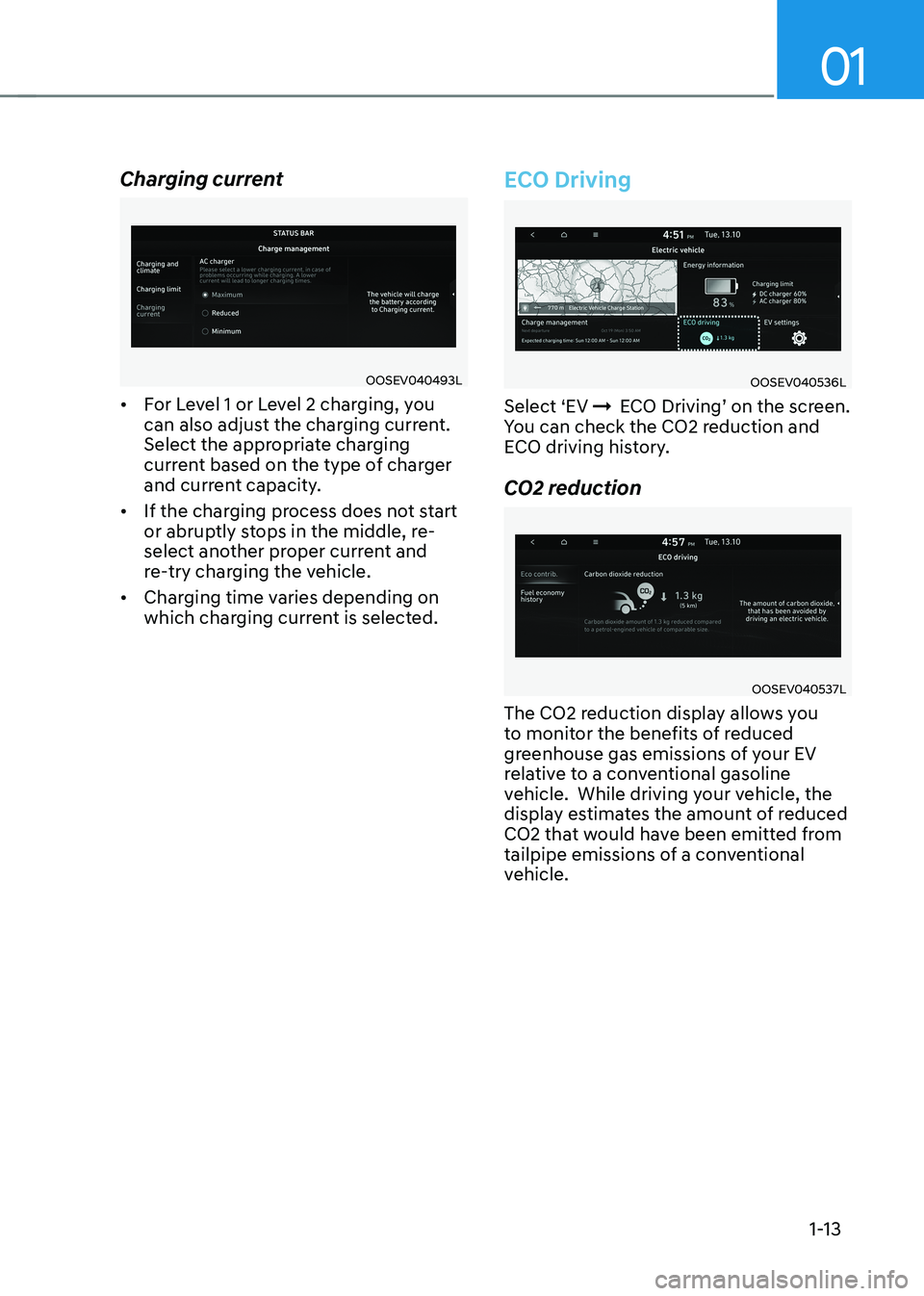
• For Level 1 or Level 2 charging, you
can also adjust the charging current.
Select the appropriate charging
current based on the type of charger
and current capacity.
• If the charging process does not start
or abruptly stops in the middle, re-
select another proper current and
re-try charging the vehicle.
• Charging time varies depending on
which charging current is selected.
ECO Driving
OOSEV040536L
Select ‘EV ÞECO Driving’ on the screen.
You can check the CO2 reduction and
ECO driving history.
CO2 reduction
OOSEV040537L
The CO2 reduction display allows you
to monitor the benefits of reduced
greenhouse gas emissions of your EV
relative to a conventional gasoline
vehicle. While driving your vehicle, the
display estimates the amount of reduced
CO2 that would have been emitted from
tailpipe emissions of a conventional
vehicle.
Page 70 of 548
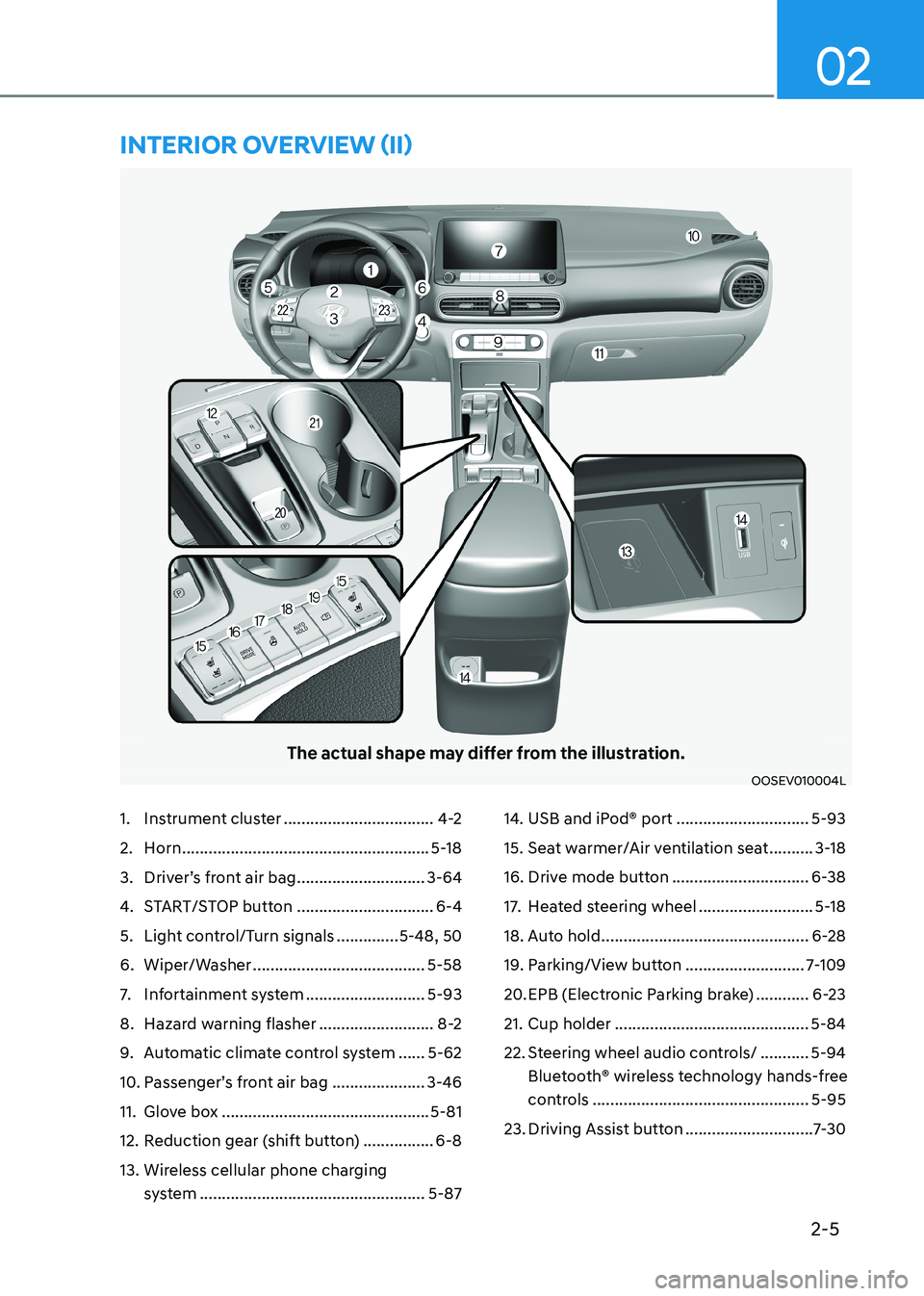
2-5
02
The actual shape may differ from the illustration.
OOSEV010004L
1. Instrument cluster ..................................4-2
2. Horn ........................................................ 5-18
3. Driver’s front air bag .............................3-64
4. START/STOP button ...............................6-4
5. Light control/Turn signals ..............5-48, 50
6. Wiper/Washer ....................................... 5-58
7. Infortainment system ...........................5-93
8. Hazard warning flasher ..........................8-2
9. Automatic climate control system ......5-62
10. Passenger’s front air bag ..................... 3-46
11. Glove box ............................................... 5-81
12. Reduction gear (shift button) ................6-8
13. Wireless cellular phone charging system ................................................... 5-8714. USB and iPod® port
..............................5-93
15. Seat warmer/Air ventilation seat ..........3-18
16. Drive mode button ...............................6-38
17. Heated steering wheel ..........................5-18
18. Auto hold ............................................... 6-28
19. Parking/View button ...........................7-109
20. EPB (Electronic Parking brake) ............6-23
21. Cup holder ............................................ 5-84
22. Steering wheel audio controls/ ...........5-94
Bluetooth® wireless technology hands-free
controls ................................................. 5-95
23. Driving Assist button .............................7-30
intErior ovErviEw (ii)
Page 76 of 548

02
2-11
To help achieve proper vehicle performance and durability, use only lubricants of the
proper quality.
These lubricants and fluids are recommended for use in your vehicle.
Lubricant Volume Classification
Reduction gear fluid
1.0 ~ 1.1 ℓ
(1.0 ~ 1.1 US qt.) 70W, API GL-4,
TCGO-9(MS517-14)
Coolant without heat
pump 12.5 ~13 ℓ
(13.2 ~ 13.7 US qt.) Designated coolant water
for electric vehicles
with heat
pump 13 ~13.4 ℓ
(13.7 ~ 14.2 US qt.)
Brake fluid 0.7 ~ 0.8 ℓ
(0.74 ~ 0.85 US qt.) SAE J1704 DOT-4 LV,
FMVSS 116 DOT-4,
ISO 4925 CLASS-6
recoMMenDeD LuBricants anD capacities
Page 144 of 548
4
Instrument cluster ............................................................................................ 4-2
Instrument cluster control ........................................................................................... 4-3
Instrument panel illumination ................................................................................... 4-3
Gauges and meters ...................................................................................................... 4-3
Speedometer ............................................................................................................. 4-3
Power/Charge gauge................................................................................................. 4-3
State of Charge (SOC) gauge for high voltage battery ..........................................4-4
Outside Temperature Gauge .................................................................................... 4-4
Odometer ................................................................................................................... 4-5
Distance to empty ..................................................................................................... 4-5
Reduction gear shift indicator ................................................................................. 4-6
Regenerative braking level indicator ....................................................................... 4-6
Warning and indicator lights ....................................................................................... 4 -7
LCD display messages ..................................................................................... 4-17
LCD display ....................................................................................................... 4-27
LCD display control .................................................................................................... 4-27
View modes ................................................................................................................ 4-28
Trip computer mode ................................................................................................ 4-29
Turn By Turn (TBT) mode ......................................................................................... 4-29
Driving assist mode ................................................................................................. 4-29
Master warning group ............................................................................................ 4-30
User settings mode .................................................................................................... 4-31
Trip computer .................................................................................................. 4-39
Trip modes ................................................................................................................ 4-39
Drive Info ................................................................................................................. 4-40
After Recharging ..................................................................................................... 4-40
Accumulated info ..................................................................................................... 4-41
Energy flow .............................................................................................................. 4-41
Digital speedometer ................................................................................................ 4-41
4. Instrument cluster
Page 149 of 548
Instrument cluster
4-6
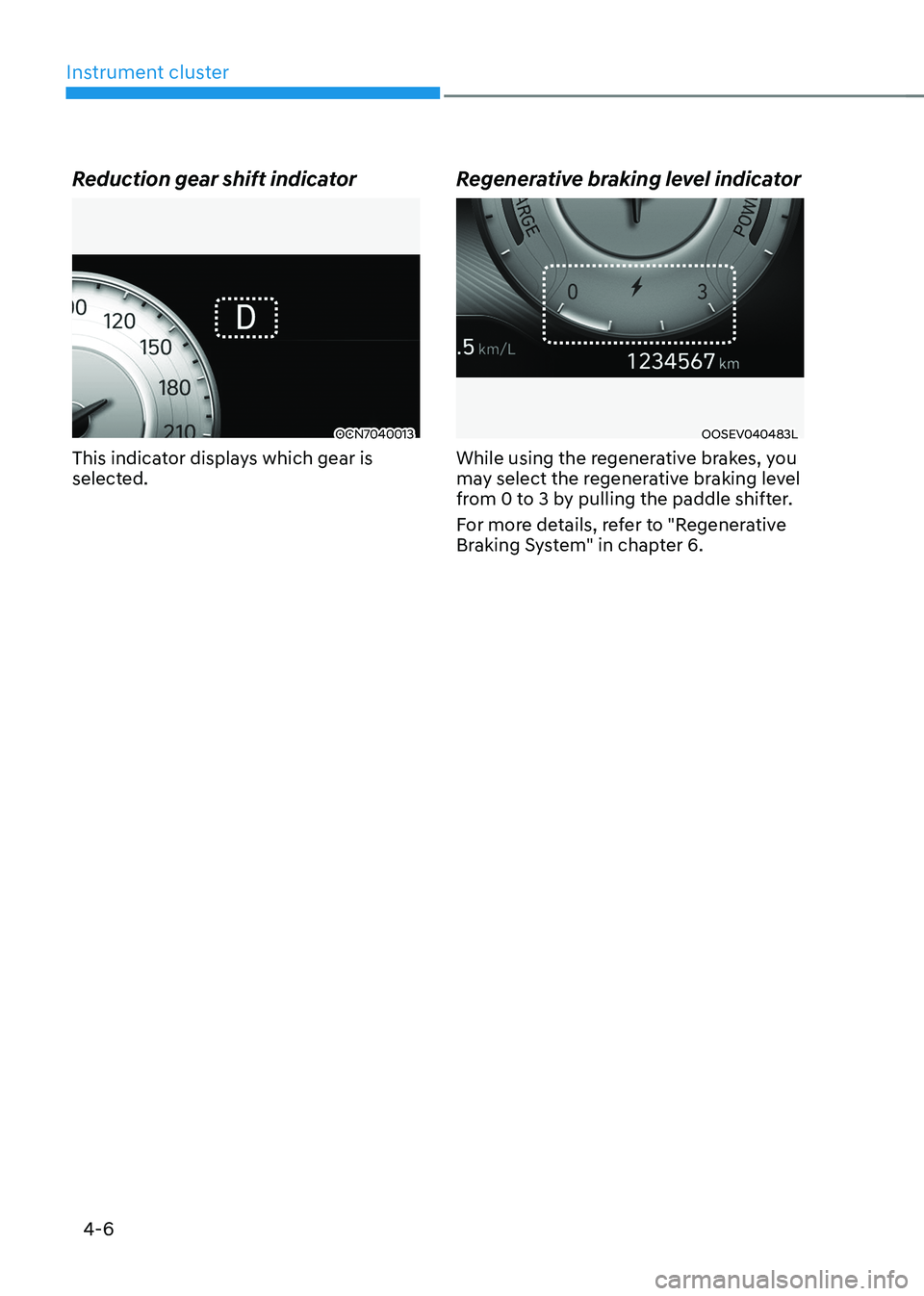
Reduction gear shift indicator
OCN7040013
This indicator displays which gear is
selected. Regenerative braking level indicatorOOSEV040483L
While using the regenerative brakes, you
may select the regenerative braking level
from 0 to 3 by pulling the paddle shifter.
For more details, refer to "Regenerative
Braking System" in chapter 6.
Page 281 of 548
6
Before driving .................................................................................................... 6-3
Before entering the vehicle ........................................................................................ 6-3
Before starting ............................................................................................................. 6-3
START/STOP button .......................................................................................... 6-4
START/STOP button positions ..................................................................................... 6-5
Starting the vehicle ..................................................................................................... 6-6
Turning off the vehicle ................................................................................................. 6 -7
Reduction gear .................................................................................................. 6-8
Reduction gear operation .......................................................................................... 6-8
LCD display messages ............................................................................................... 6-10
Good driving practices ............................................................................................... 6-13
Regenerative braking system .......................................................................... 6-14
Regenerative braking (Paddle shifter) ...................................................................... 6-14
One pedal driving ....................................................................................................... 6-15
Smart recuperation system
(if equipped with smart cruise control system) ............................................6-16
System setting ............................................................................................................ 6-16
To activate smart recuperation system..................................................................... 6-16
Smart recuperation system will be temporarily cancelled when: ..........................6-18
To resume smart recuperation system ..................................................................... 6-18
To turn smart recuperation system off ..................................................................... 6-18
Vehicle-to-vehicle distance recognition sensor (front radar) .................................6-18
System malfunction ................................................................................................... 6-19
Limitations of the system .......................................................................................... 6-19
Braking system ................................................................................................ 6-22
Power brakes ............................................................................................................. 6-22
Disc brakes wear indicator ........................................................................................ 6-22
Electronic Parking Brake (EPB) .................................................................................. 6-23
Auto Hold .................................................................................................................... 6-27
Anti-Lock Brake System (ABS) ................................................................................... 6-31
Electronic Stability Control (ESC) ............................................................................. 6-32
Vehicle Stability Management (VSM) ....................................................................... 6-35
Hill-Start Assist Control (FAC) .................................................................................. 6-36
Good braking practices ............................................................................................. 6-37
Drive mode integrated control system ..........................................................6-38
Initial setting for each drive mode ............................................................................ 6-39
6. Driving your vehicle
Page 288 of 548
Driving your vehicle
6-8
REDuCTION GEAR
Reduction gear operation
WARNING
To reduce the risk of serious injury or
death: • ALWAYS check the surrounding
areas near your vehicle for people,
especially children, before shifting a
vehicle into D (Drive) or R (Reverse).
• Before leaving the driver's seat,
always make sure the gear is in
the P (Park) position, then set the
parking brake, and place the START/
STOP button in the OFF position.
Unexpected and sudden vehicle
movement can occur if these
precautions are not followed.
OOSEV058004L
Select gear positions by pressing the
shift button.
For your safety, always depress the brake
pedal while shifting to another gear.
WARNING
The reduction gear button or interior
parts might get hot when a vehicle is
parked outside during hot weather.
Always be careful when the vehicle is
hot. Gear position
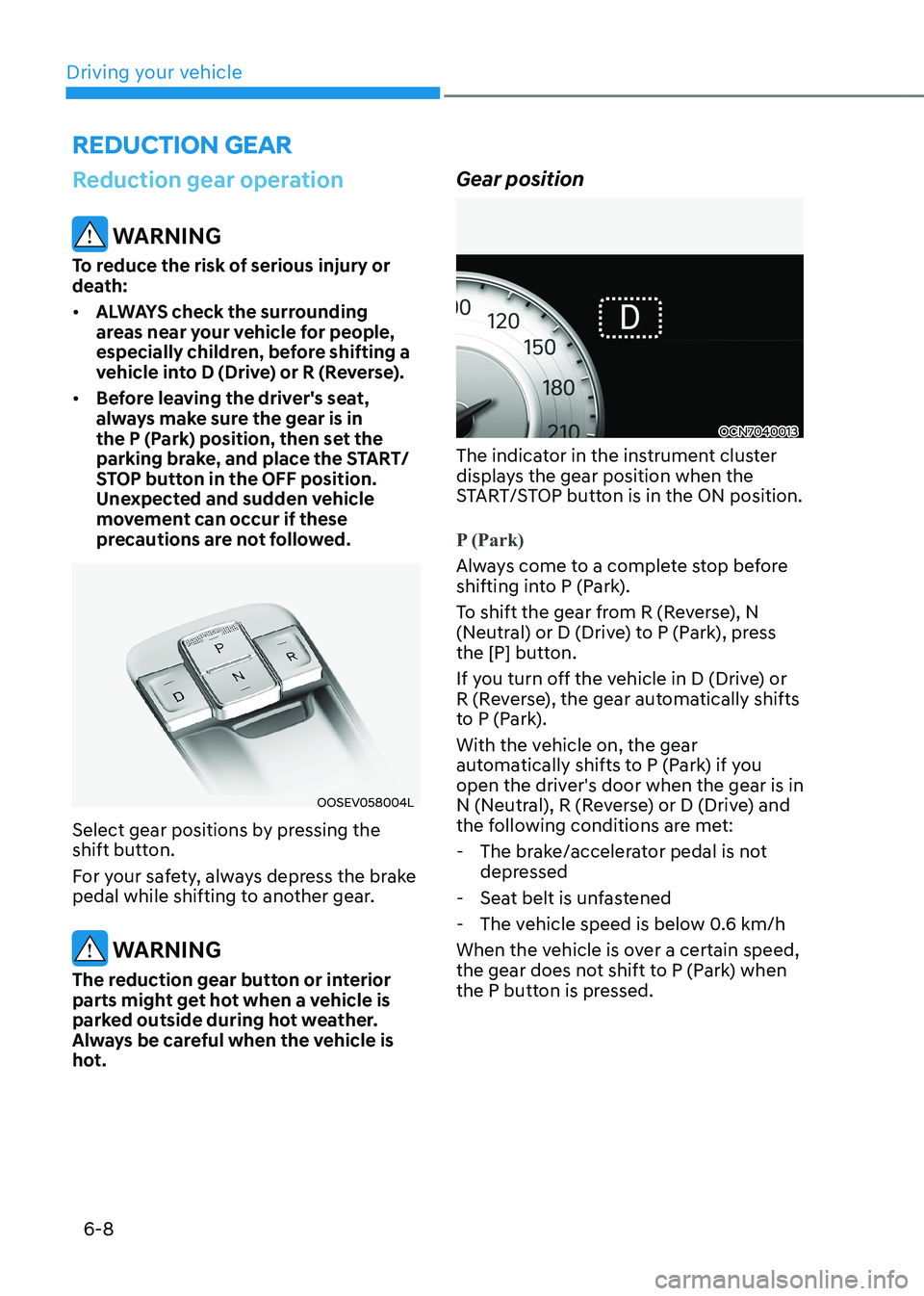
OCN7040013
The indicator in the instrument cluster
displays the gear position when the
START/STOP button is in the ON position.
P (Park)
Always come to a complete stop before
shifting into P (Park).
To shift the gear from R (Reverse), N
(Neutral) or D (Drive) to P (Park), press
the [P] button.
If you turn off the vehicle in D (Drive) or
R (Reverse), the gear automatically shifts
to P (Park).
With the vehicle on, the gear
automatically shifts to P (Park) if you
open the driver's door when the gear is in
N (Neutral), R (Reverse) or D (Drive) and
the following conditions are met:
- The brake/accelerator pedal is not depressed
- Seat belt is unfastened
- The vehicle speed is below 0.6 km/h
When the vehicle is over a certain speed,
the gear does not shift to P (Park) when
the P button is pressed.