lock Hyundai Matrix 2005 Owners Manual
[x] Cancel search | Manufacturer: HYUNDAI, Model Year: 2005, Model line: Matrix, Model: Hyundai Matrix 2005Pages: 407, PDF Size: 10.31 MB
Page 244 of 407
1FEATURES OF YOUR HYUNDAI
80
!
STEERING WHEEL TILT LEVER
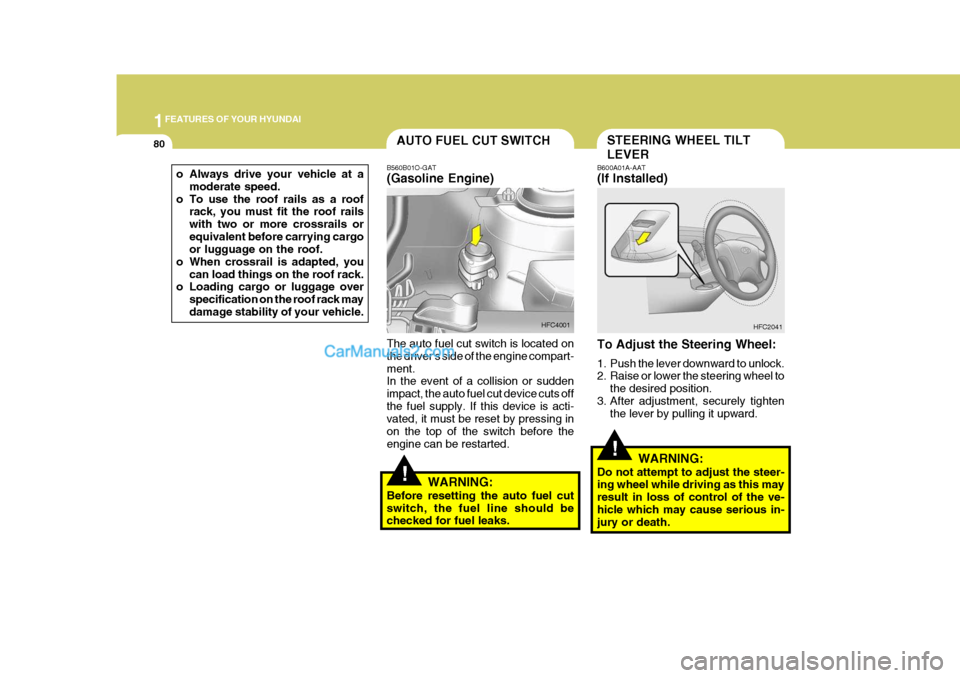
B600A01A-AAT (If Installed) To Adjust the Steering Wheel:
1. Push the lever downward to unlock.
2. Raise or lower the steering wheel to
the desired position.
3. After adjustment, securely tighten the lever by pulling it upward. HFC2041
WARNING:
Do not attempt to adjust the steer-ing wheel while driving as this may result in loss of control of the ve-hicle which may cause serious in- jury or death.AUTO FUEL CUT SWITCH
!
B560B01O-GAT (Gasoline Engine) The auto fuel cut switch is located on the driver's side of the engine compart-ment. In the event of a collision or sudden impact, the auto fuel cut device cuts offthe fuel supply. If this device is acti- vated, it must be reset by pressing in on the top of the switch before theengine can be restarted.
WARNING:
Before resetting the auto fuel cutswitch, the fuel line should be checked for fuel leaks. HFC4001
o Always drive your vehicle at a
moderate speed.
o To use the roof rails as a roof rack, you must fit the roof rails with two or more crossrails orequivalent before carrying cargo or lugguage on the roof.
o When crossrail is adapted, you can load things on the roof rack.
o Loading cargo or luggage over
specification on the roof rack may damage stability of your vehicle.
Page 252 of 407
1FEATURES OF YOUR HYUNDAI
88
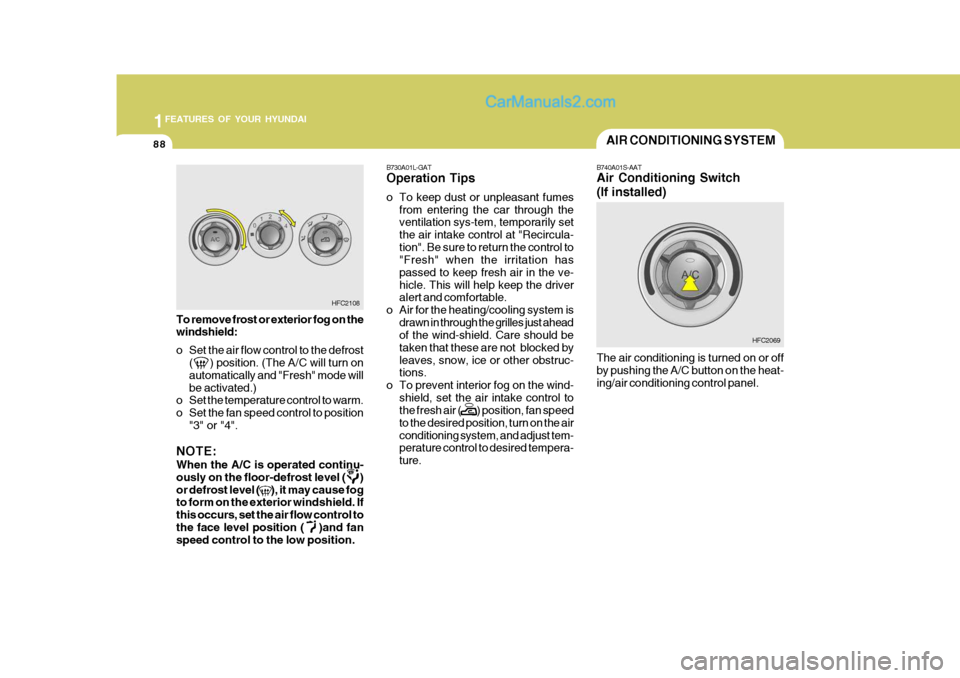
To remove frost or exterior fog on the windshield:
o Set the air flow control to the defrost
( ) position. (The A/C will turn on automatically and "Fresh" mode willbe activated.)
o Set the temperature control to warm.
o Set the fan speed control to position
"3" or "4".
NOTE: When the A/C is operated continu- ously on the floor-defrost level ( )or defrost level ( ), it may cause fog to form on the exterior windshield. If this occurs, set the air flow control tothe face level position ( )and fan speed control to the low position. B730A01L-GAT Operation Tips
o To keep dust or unpleasant fumes
from entering the car through the ventilation sys-tem, temporarily set the air intake control at "Recircula-tion". Be sure to return the control to "Fresh" when the irritation has passed to keep fresh air in the ve-hicle. This will help keep the driver alert and comfortable.
o Air for the heating/cooling system is
drawn in through the grilles just aheadof the wind-shield. Care should be taken that these are not blocked byleaves, snow, ice or other obstruc- tions.
o To prevent interior fog on the wind-
shield, set the air intake control tothe fresh air ( ) position, fan speed to the desired position, turn on the airconditioning system, and adjust tem- perature control to desired tempera- ture.
HFC2108
AIR CONDITIONING SYSTEM
B740A01S-AAT Air Conditioning Switch (If installed) The air conditioning is turned on or off by pushing the A/C button on the heat- ing/air conditioning control panel. HFC2069
Page 256 of 407
1FEATURES OF YOUR HYUNDAI
92
!
B750A04L
B750A05LB750B02Y-AAT Using a cellular phone or a two- way radio When a cellular phone is used inside the vehicle, noise may be producedfrom the audio equipment. This does not mean that something is wrong with the audio equipment. In such a case,use the cellular phone at a place as far as possible from the audio equipment.
!
CAUTION:
When using a communication sys- tem such as a cellular phone or a radio inside the vehicle, a separateexternal antenna must be fitted. When a cellular phone or a radio set is used with an internal antenna alone, itmay interfere with the vehicle's elec- trical system and adversely affect safe operation of the vehicle.
WARNING:
Don't use a cellular phone when youare driving, you must stop at a safeplace to use a cellular phone.
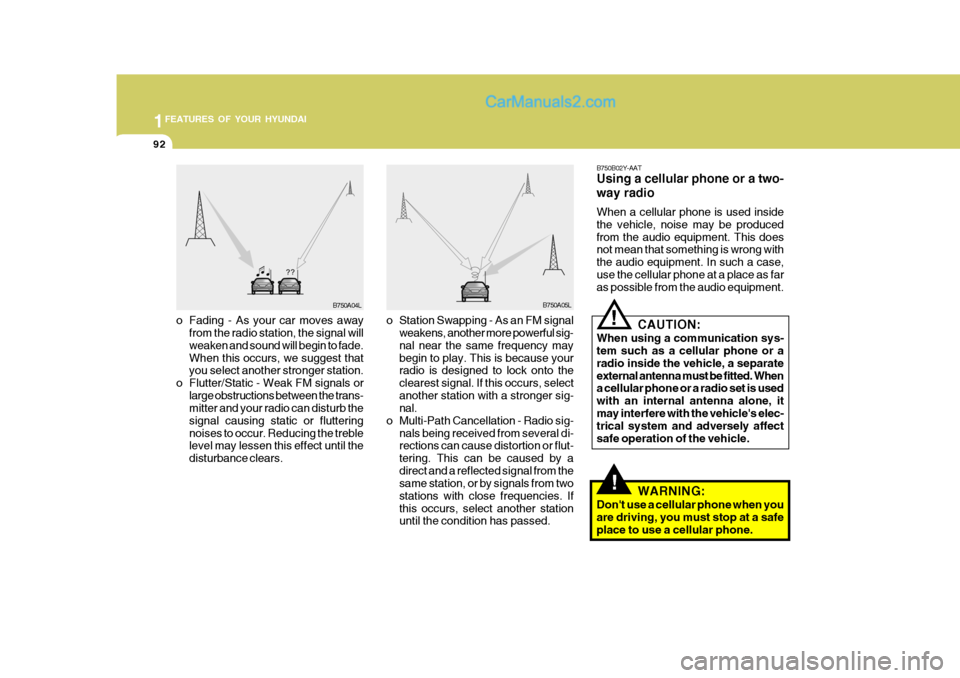
o Fading - As your car moves away
from the radio station, the signal will weaken and sound will begin to fade. When this occurs, we suggest that you select another stronger station.
o Flutter/Static - Weak FM signals or large obstructions between the trans-mitter and your radio can disturb the signal causing static or flutteringnoises to occur. Reducing the treble level may lessen this effect until the disturbance clears. o Station Swapping - As an FM signal
weakens, another more powerful sig- nal near the same frequency may begin to play. This is because your radio is designed to lock onto the clearest signal. If this occurs, selectanother station with a stronger sig- nal.
o Multi-Path Cancellation - Radio sig- nals being received from several di-rections can cause distortion or flut- tering. This can be caused by adirect and a reflected signal from the same station, or by signals from two stations with close frequencies. Ifthis occurs, select another station until the condition has passed.
Page 258 of 407

1FEATURES OF YOUR HYUNDAI
94
H210B03O-AAT
1. POWER ON-OFF/VOLUME
Control Knob
The radio unit may be operated when the ignition key is in the "ACC" or "ON"position. Rotate the knob clockwise to switch the radio unit on and to increase the volume.The LCD shows the radio frequency in the radio mode. Turn the knob counter- clockwise to reduce the volume and toswitch the radio unit off. BAL (Balance Control) Knob Pull and turn the control knob clockwise to emphasize right speaker sound (left speaker sound will be attenuated). When the control knob is turned counterclock-wise, left speaker sound will be empha- sized (right speaker soundwill be at- tenuated).After adjusting the balance, push the knob again to use the other function. 4. BAND Selector Pressing the button changes the AM, FM1 and FM2 bands. The modeselected is displayed on LCD. 5. TUNE (Manual) Select Button Press the ( ) side or ( ) side to increase or to decrease the frequency. With the button held down for 1 sec. or more, thestop signal (broadcasting radio wave) is ignored and channel selection contin- ues. SEEK Operation (Automatic Channel Selection) Press the TUNE select button for 1 sec. or more. When the ( ) side is pressed,the unit will automatically tune to the next higher frequency and when the ( ) side is pressed, it will automaticallytune to the next lower frequency.
SCAN Knob When the scan knob is pressed, the frequency will increase and the receiv-able stations will be tuned in one after another, receiving each station for 5 seconds. To stop scanning, press thescan knob again.
2. FAD (Fader Control) Knob Turn the control knob counterclockwise to emphasize front speaker sound (rear speaker sound will be attenuated). Whenthe control knob is turned clockwise, rear speaker sound will be emphasized (front speaker sound will be attenu-ated). 3. BASS Control Knob Press to pop the knob out and turn to the left or right for the desired bass tone. TREBLE Control Knob. Further pull-lock position of popped-up knob. Turn to the left or right for thedesired treble tone.
FM
AM
Page 261 of 407
1
FEATURES OF YOUR HYUNDAI
97
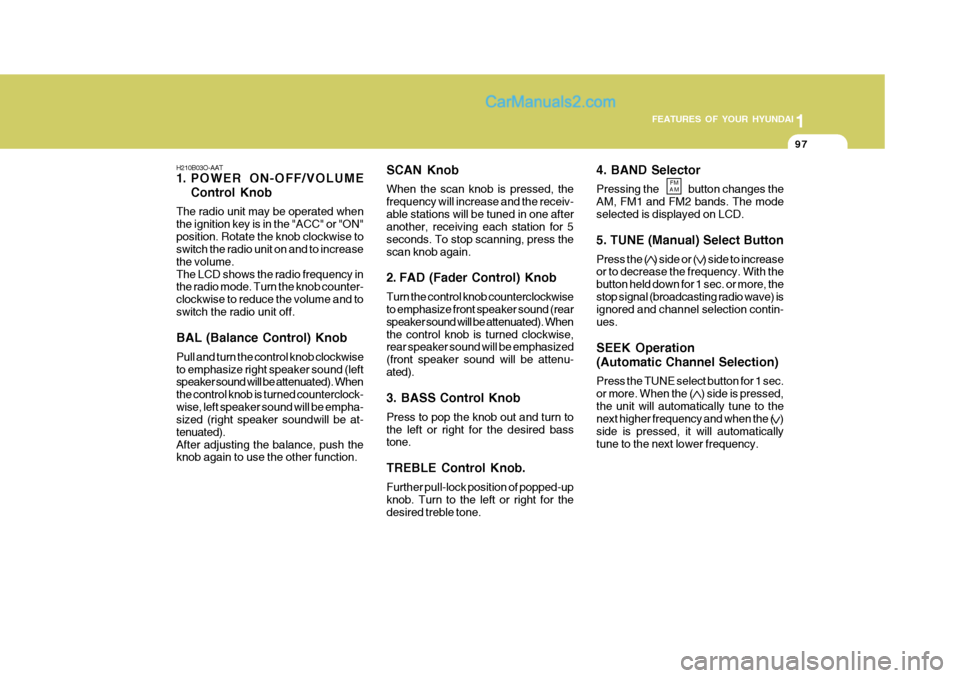
4. BAND Selector Pressing the button changes the AM, FM1 and FM2 bands. The modeselected is displayed on LCD. 5. TUNE (Manual) Select Button Press the ( ) side or ( ) side to increase or to decrease the frequency. With the button held down for 1 sec. or more, thestop signal (broadcasting radio wave) is ignored and channel selection contin- ues. SEEK Operation (Automatic Channel Selection) Press the TUNE select button for 1 sec. or more. When the ( ) side is pressed,the unit will automatically tune to the next higher frequency and when the ( ) side is pressed, it will automaticallytune to the next lower frequency.
H210B03O-AAT
1. POWER ON-OFF/VOLUME
Control Knob
The radio unit may be operated when the ignition key is in the "ACC" or "ON"position. Rotate the knob clockwise to switch the radio unit on and to increase the volume.The LCD shows the radio frequency in the radio mode. Turn the knob counter- clockwise to reduce the volume and toswitch the radio unit off. BAL (Balance Control) Knob Pull and turn the control knob clockwise to emphasize right speaker sound (left speaker sound will be attenuated). When the control knob is turned counterclock-wise, left speaker sound will be empha- sized (right speaker soundwill be at- tenuated).After adjusting the balance, push the knob again to use the other function. SCAN Knob When the scan knob is pressed, the frequency will increase and the receiv-able stations will be tuned in one after another, receiving each station for 5 seconds. To stop scanning, press thescan knob again.
2. FAD (Fader Control) Knob Turn the control knob counterclockwise to emphasize front speaker sound (rear speaker sound will be attenuated). Whenthe control knob is turned clockwise, rear speaker sound will be emphasized (front speaker sound will be attenu-ated). 3. BASS Control Knob Press to pop the knob out and turn to the left or right for the desired bass tone. TREBLE Control Knob. Further pull-lock position of popped-up knob. Turn to the left or right for thedesired treble tone.
FM
AM
Page 266 of 407

1FEATURES OF YOUR HYUNDAI
102
H260B03E-AAT
1. POWER ON-OFF ControlKnob
The radio unit may be operated when the ignition key is in the "ACC" or "ON"position. Press the knob to switch the power on. The LCD shows the radio frequency in the radio mode or the CDtrack indicator in either the CD mode or CD AUTO CHANGER mode. To switch the power off, press the knob again. VOLUME Control Rotate the knob clockwise to increase the volume and turn the knob counter-clockwise to reduce the volume. BALANCE Control Pull and turn the control knob clockwise to emphasize right speaker sound (left speaker sound will be attenuated). Whenthe control knob is turned counterclock- wise, left speaker sound will be empha- sized (right speaker sound will be at-tenuated). 2. FAD (Fader Control) Knob Turn the control knob counterclockwise to emphasize front speaker sound (rearspeaker sound will be attenuated). When the control knob is turned clockwise, rear speaker sound will be emphasized(front speaker sound will be attenu- ated).
3. BASS Control Knob Press to pop the knob out and turn to the left or right for the desired basstone. TREB (Treble Control) Knob Pull the bass control knob further out. Turn to the left or right for the desired treble tone.
4. SCAN Button When the scan button is pressed, the frequency will increase and the receiv-able stations will be tuned in one after another, receiving each station for 5 seconds. To stop scanning, press thescan button again. 5. TUNE (Manual) Select Button Press the ( ) side or ( ) side to increase or to decrease the frequency. Presseither button and hold down to continu- ously scroll. Release button once the desired station is reached. SEEK Operation (Automatic Channel Selection) Press the TUNE select button for 0.5 sec or more. Releasing it will automati-cally tune to the next available station with a beep sound. When the ( ) side is pressed longerthan 0.5 second and releasing will automatically tune to the next higher
frequency and when the ( ) side ispressed longer than 0.5 second, re- leasing will automatically tune the next lower frequency. 6. BAND Selector Pressing the button changes the AM, FM1 and FM2 bands. The mode selected is displayed on LCD.
FM/AM
Page 275 of 407
1
FEATURES OF YOUR HYUNDAI
111
4. TUNE (Manual) Select Button Press the ( ) side or ( ) side to increase or to decrease the frequency. Presseither button and hold down to continu- ously scroll. Release button once the desired station is reached. SEEK Operation (Automatic Channel Selection) Press the TUNE select button for 0.5 sec or more. Releasing it will automati-cally tune to the next available station with a beep sound. When the ( ) side is pressed longerthan 0.5 second and releasing will auto- matically tune to the next higher fre- quency and when the ( ) side ispressed longer than 0.5 second, releas- ing will automatically tune to the next lower frequency.
5. PRESET STATION Select Buttons
Six (6) stations for AM, FM1 and FM2 respectively can be preset in the elec-tronic memory circuit.
BALANCE Control knob Pull the Bass control knob out further. Rotate the knob clockwise to empha-size right speaker sound (left speaker sound will be attenuated). When the control knob is turned counterclock-wise, left speaker sound will be empha- sized (right speaker sound will be at- tenuated).
3. TREBLE/FAD Knob TREBLE Control Knob Press to pop the knob out and turn to the left or right for the desired treble tone. FAD (Fader Control) Knob Pull the Treble control knob out further. Turn the control knob counterclockwiseto emphasize front speaker sound (rear speaker sound will be attenuated). When the control knob is turned clockwise,rear speaker sound will be emphasized (front speaker sound will be attenu- ated).
H290B03E-GAT
1. POWER ON-OFF Control
Knob
The radio unit may be operated when the ignition key is in the "ACC" or "ON"position. Press the button to switch the power on. The display shows the radio frequency in the radio mode, the tapedirection indicator in the tape mode or CD track in either the CD mode or CD AUTO CHANGER mode. To switch thepower off, press the button again. VOLUME Control Rotate the knob clockwise to increase the volume and turn the knob counter- clockwise to reduce the volume.
2. BASS/BALANCE Control Knob
BASS Control Knob Press to pop the knob out. To increase the bass, rotate the knob clockwise,while to decrease the bass, rotate the knob counterclockwise.
E/FAD Konb
Page 288 of 407

1FEATURES OF YOUR HYUNDAI
124ANTENNA
o The playback head, capstan and pinch rollers will develop a coating of tape residue that can result in dete- rioration of sound quality, such as awavering sound. They should be cleaned monthly using a commer- cially available head cleaning tape orspecial solution available from audio specialty shops. Follow the supplier's directions carefully and never oil anypart of the tape player unit.
o Always be sure that the tape is tightly
wound on its reel before inserting inthe player. Rotate a pencil in the drive sprockets to wind up any slack. B860A03L
NOTE: Look at a tape before you insert it. If the tape is loose, tighten it by turning one of the hubs with a pencil or your finger. If the label is peeling off, donot put it in the drive mechanism. Do not leave tapes sitting where they are exposed to hot, warm or, highhumidity, such as on top of the dash- board or in the player. If a tape is exposed to excessivelyhot or cold, let it reach a moderate temperature before putting it in the player. B870D01FC-GAT Roof Antenna Your car uses a roof antenna to receive both AM and FM broadcast signals. This antenna is a removable type. To remove the antenna, turn the antennacounterclockwise. To install the an- tenna, turn the antenna clockwise.
HFC2100
Head
Cotton applicator B860A02L
Page 290 of 407

2
Before Starting the Engine ........................................... 2-3
Key Positions ................................................................ 2-4Starting......................................................................... 2-5
Operating the Manual Transaxle ................................. 2-7
Automatic Transaxle .................................................... 2-9
Anti-Lock Brake System (ABS) .................................. 2-13
Brake Traction Control System (BTCS) ..................... 2-14
Driving for Economy ................................................... 2-16
Smooth Cornering ...................................................... 2-18
Winter Driving ............................................................. 2-18
Trailer or Vehicle Towing ........................................... 2-21
DRIVING YOUR HYUNDAI
2
Page 292 of 407

2
DRIVING YOUR HYUNDAI
3
!
TO START THE ENGINEBEFORE STARTING THE ENGINE
C020A01O-GAT Before you start the engine, you should always:
1. Look around the vehicle to be sure
there are no flat tires, puddles of oil, water or other indications of pos- sible trouble.
2. After entering the car, check to be sure the parking brake is engaged.
3. Check that all windows, and lights are clean.
4. Check that the interior and exterior
mirrors are clean and in position.
5. Check your seat, seatback and headrest to be sure they are in theirproper positions.
6. Lock all the doors.
7. Fasten your seat belt and be sure
that all other occupants have fas- tened theirs.
8. Turn off all lights and accessories
that are not needed. C030A01A-GAT COMBINATION IGNITION SWITCH Before starting the engine:
o If your Hyundai is equipped with a
manual transaxle, place the shift lever in neutral and depress theclutch pedal fully.
o If your Hyundai has an automatic
transaxle, place the shift lever in "P"(park).
o To start the engine, insert the igni-
tion key and turn it to the "START"position. Release it as soon as the engine starts. Do not hold the key in the "START" position for more than15 seconds.
NOTE: For safety, the engine will not start if the shift lever is not in "P" or "N"Position (Automatic Transaxle).
WARNING: (DIESEL ENGINE)
To ensure that sufficient vacuum exists within the brake system dur- ing cold weather start-up condi-tions, it is necessary to run the engine at idle for several seconds after starting the engine.
9. When you turn the ignition switch to
"ON", check that all appropriatewarning lights are operating and that you have sufficient fuel.
10.Check the operation of warning lights and all bulbs when key is inthe "ON" position.