radio Hyundai Matrix 2005 Owner's Manual
[x] Cancel search | Manufacturer: HYUNDAI, Model Year: 2005, Model line: Matrix, Model: Hyundai Matrix 2005Pages: 407, PDF Size: 10.31 MB
Page 5 of 407
SA040A1-ECAUTION: MODIFICATIONS TO ORIGINAL VEHICLE SPECIFICATION
Modification to the original vehicle specification may invalidate the manufactur- ers warranty and may adversely affect the safety and durability of the vehicle. Components which are subject to modification or are added to the original vehicle specification without the express approval of the manufacturer and resultin consequential loss or damage are not covered by the vehicle manufacturers warranty.
SA050A1-E TWO WAY RADIO INSTALLATION
This vehicle is fitted with electronically controlled fuel injection or other micro processor controlled equipment. It is possible for incorrectly installed two way radio equipment including mobile telephones to adversely affect these systems.Before radio equipment of this kind is installed, please contact your Hyundai authorised repairer for recommendation regarding the suitability of the particular radio equipment concerned and the recommended method of installation andequipment location. Incorrectly installed or unsuitable equipment which gives rise to incorrect functioning of or damage to electronic vehicle components will not fall within the scope of the vehicle manufacturers warranty.
Page 70 of 407

CONTROLS AND EQUIPMENT
1- 62
FM broadcasts are transmitted at high fre- quency and do not bend to follow the earth'ssurface. Because of this, FM broadcasts gen-erally begin to fade at short distances from thestation. Also, FM signals are easily affected bybuildings, mountains, or other obstructions.These can result in certain listening conditionswhich might lead you to believe a problemexists with your radio. The following conditionsare normal and do not indicate radio trouble:
Buildings
Obstructed area
Unobstructed area
FM radio station
SSAR012A
Mountains
Iron bridges
B750A02A-AAT STEREO SOUND SYSTEM How Car Audio Works
IonosphereFM reception
SSAR010A
AM and FM radio signals are broadcast from transmitter towers located around your city.They are intercepted by the radio antenna onyour car. This signal is then received by theradio and sent to your car speakers.When a strong radio signal has reached yourvehicle, the precise engineering of your audiosystem ensures high quality reproduction. How-ever, in some cases the signal coming to yourvehicle is not strong and clear. This can be dueto factors such as the distance from the radiostation, closeness of other strong radio stationsor the presence of buildings, bridges and otherlarge obstructions in the area.
Ionosphere
SSAR011A
AM reception
AM broadcasts can be received at greater distances than FM broadcasts. This is becauseAM radio waves are transmitted at low fre-quency. These long, low frequency radio wavescan follow the curvature of the earth rather thantravelling straight out into the atmosphere. Inaddition, they curve around obstructions sothat they can provide better signal coverage.
Page 71 of 407
1- 63
CONTROLS AND EQUIPMENTB750B02Y-AAT Using a cellular phone or a two-way radio When a cellular phone is used inside the vehicle, noise may be produced from theaudio equipment. This does not mean thatsomething is wrong with the audio equipment.In such a case, use the cellular phone at aplace as far as possible from the audio equip-ment. CAUTION: When using a communication system such as a mobile phone or a radio inside thevehicle, a separate external antenna mustbe fitted.When a mobile phone or a radio set isused with an internal antenna alone, it mayinterfere with the vehicle's electrical sys-tem and adversely affect safe operation ofthe vehicle. WARNING: Don't use a mobile phone when you are driving, you must stop at a safe place touse a mobile phone.
SSAR014A
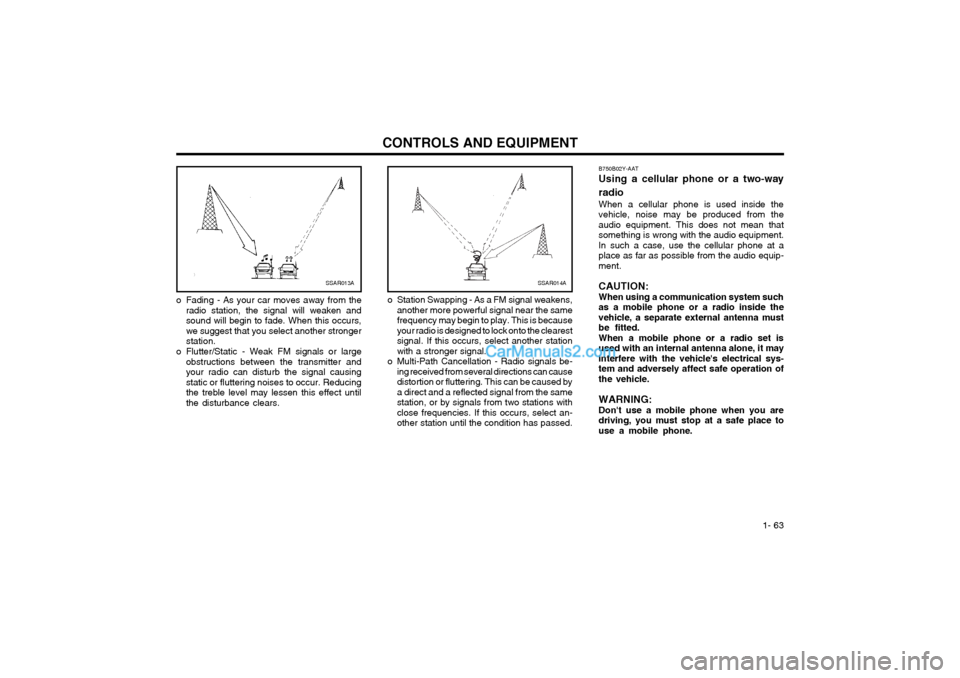
o Station Swapping - As a FM signal weakens, another more powerful signal near the same frequency may begin to play. This is becauseyour radio is designed to lock onto the clearestsignal. If this occurs, select another stationwith a stronger signal.
o Multi-Path Cancellation - Radio signals be- ing received from several directions can causedistortion or fluttering. This can be caused bya direct and a reflected signal from the samestation, or by signals from two stations withclose frequencies. If this occurs, select an-other station until the condition has passed.SSAR013A
o Fading - As your car moves away from the radio station, the signal will weaken and sound will begin to fade. When this occurs,we suggest that you select another strongerstation.
o Flutter/Static - Weak FM signals or large obstructions between the transmitter andyour radio can disturb the signal causingstatic or fluttering noises to occur. Reducingthe treble level may lessen this effect untilthe disturbance clears.
Page 75 of 407
DRIVING YOUR HYUNDAI 2- 3
SB050B1-E STEERING WHEEL LOCKWhen the key is removed, the steering col- umn lock will be activated and will engage when the steering wheel is turned to the appropriate position. It is not necessary to turn the wheel until locked each time the key is removed since in the event of any unauthorised attempt at removal, the lock will become effective as soon as the steering wheel is turned. To unlock the steering, insert the key and turn to the "ACC" position. If the steering is locked, it may be necessary to rock the steering wheel slightly to facilitate turning the key. Under no circumstances should the key be forced since breakage of the key will occur. SC060A1-E STARTING THE GASOLINE ENGINE
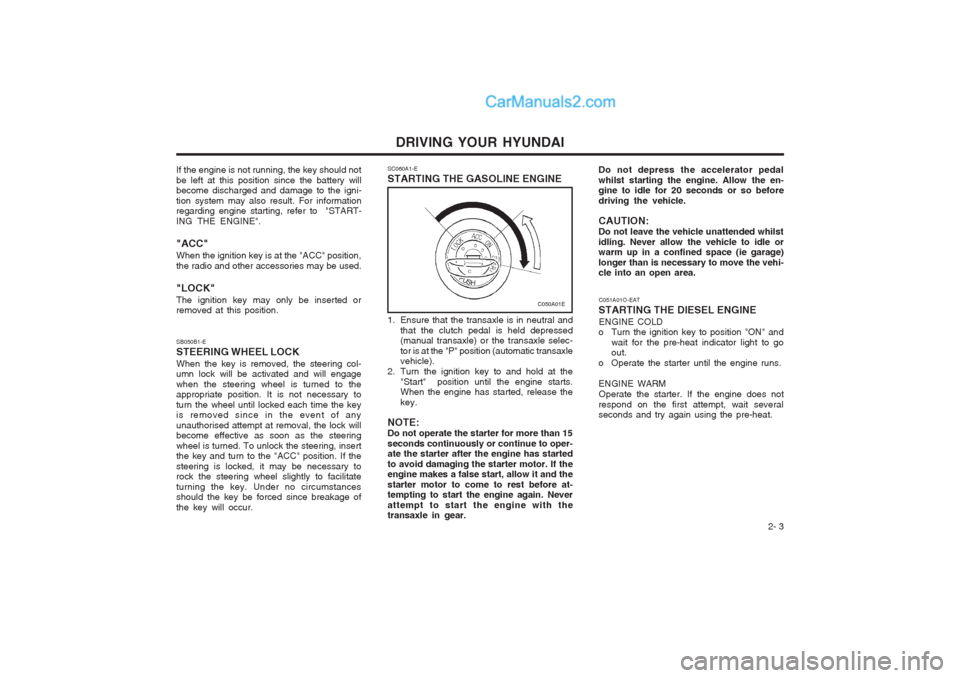
1. Ensure that the transaxle is in neutral and
that the clutch pedal is held depressed (manual transaxle) or the transaxle selec- tor is at the "P" position (automatic transaxle vehicle).
2. Turn the ignition key to and hold at the "Start" position until the engine starts.When the engine has started, release the key.
NOTE:Do not operate the starter for more than 15seconds continuously or continue to oper- ate the starter after the engine has started to avoid damaging the starter motor. If the engine makes a false start, allow it and the starter motor to come to rest before at- tempting to start the engine again. Never attempt to start the engine with the transaxle in gear.
C050A01E
If the engine is not running, the key should not be left at this position since the battery will become discharged and damage to the igni- tion system may also result. For information regarding engine starting, refer to "START- ING THE ENGINE". "ACC" When the ignition key is at the "ACC" position, the radio and other accessories may be used. "LOCK" The ignition key may only be inserted or removed at this position. Do not depress the accelerator pedal whilst starting the engine. Allow the en- gine to idle for 20 seconds or so before driving the vehicle. CAUTION: Do not leave the vehicle unattended whilstidling. Never allow the vehicle to idle or warm up in a confined space (ie garage) longer than is necessary to move the vehi- cle into an open area.
C051A01O-EAT
STARTING THE DIESEL ENGINE ENGINE COLD
o Turn the ignition key to position "ON" and
wait for the pre-heat indicator light to goout.
o Operate the starter until the engine runs. ENGINE WARM Operate the starter. If the engine does not
respond on the first attempt, wait several seconds and try again using the pre-heat.
Page 156 of 407
TWO-WAY RADIO OR CELLULAR TELEPHONE INSTALLATION
Your vehicle is equipped with electronic fuel injection and other electronic compo- nents. It is possible for an improperly installed/adjusted two-way radio or cellular telephone to adversely affect electronic systems. For this reason, we recommendthat you carefully follow the radio manufacturer's instructions or consult your Hyundai dealer for precautionary measures or special instructions if you choose to install one of these devices.
A080A01S-AAT
A070A01A-GAT!
CAUTION: MODIFICATIONS TO YOUR HYUNDAI
Modification of components may void the manufacturer's warranty Your Hyundai should not be modified in any way. Modifications may adversely affect the safety, durability and performance of your Hyundai. Components which are subjected to modification or are added to the vehicle resulting in consequentialdamage are not covered by the vehicle manufacturer's warranty.
Page 255 of 407

1
FEATURES OF YOUR HYUNDAI
91STEREO SOUND SYSTEM
AM reception
Ionosphere
FM reception
B750A01L
B750A02A-AAT How Car Audio Works
Ionosphere
B750A02L Mountains
Buildings Unobstructed
area
FM radio station
B750A03L
Obstructed area
AM and FM radio signals are broadcast from transmitter towers located around your city. They are intercepted by the radio antenna on your car. This signal isthen received by the radio and sent to your car speakers. When a strong radio signal has reachedyour vehicle, the precise engineering of your audio system ensures high quality reproduction. However, in some casesthe signal coming to your vehicle may not be strong and clear. This can be due to factors such as the distance from theradio station, closeness of other strong radio stations or the presence of build- ings, bridges and other large obstruc-tions in the area. Iron bridges
AM broadcasts can be received atgreater distances than FM broadcasts. This is because AM radio waves are transmitted at low frequencies. These long, low frequency radio waves can follow the curvature of the earth ratherthan travelling straight out into the at- mosphere. In addition, they curve around obstructions so that they canprovide better signal coverage. FM broadcasts are transmitted at highfrequencies and do not bend to follow the earth's surface. Because of this, FM broadcasts generally begin to fade at short distances from the station. Also, FM signals are easily affected bybuildings, mountains, or other obstruc- tions. These can result in certain listen- ing conditions which might lead you tobelieve a problem exists with your ra- dio. The following conditions are normal and do not indicate radio trouble:
Page 256 of 407
1FEATURES OF YOUR HYUNDAI
92
!
B750A04L
B750A05LB750B02Y-AAT Using a cellular phone or a two- way radio When a cellular phone is used inside the vehicle, noise may be producedfrom the audio equipment. This does not mean that something is wrong with the audio equipment. In such a case,use the cellular phone at a place as far as possible from the audio equipment.
!
CAUTION:
When using a communication sys- tem such as a cellular phone or a radio inside the vehicle, a separateexternal antenna must be fitted. When a cellular phone or a radio set is used with an internal antenna alone, itmay interfere with the vehicle's elec- trical system and adversely affect safe operation of the vehicle.
WARNING:
Don't use a cellular phone when youare driving, you must stop at a safeplace to use a cellular phone.
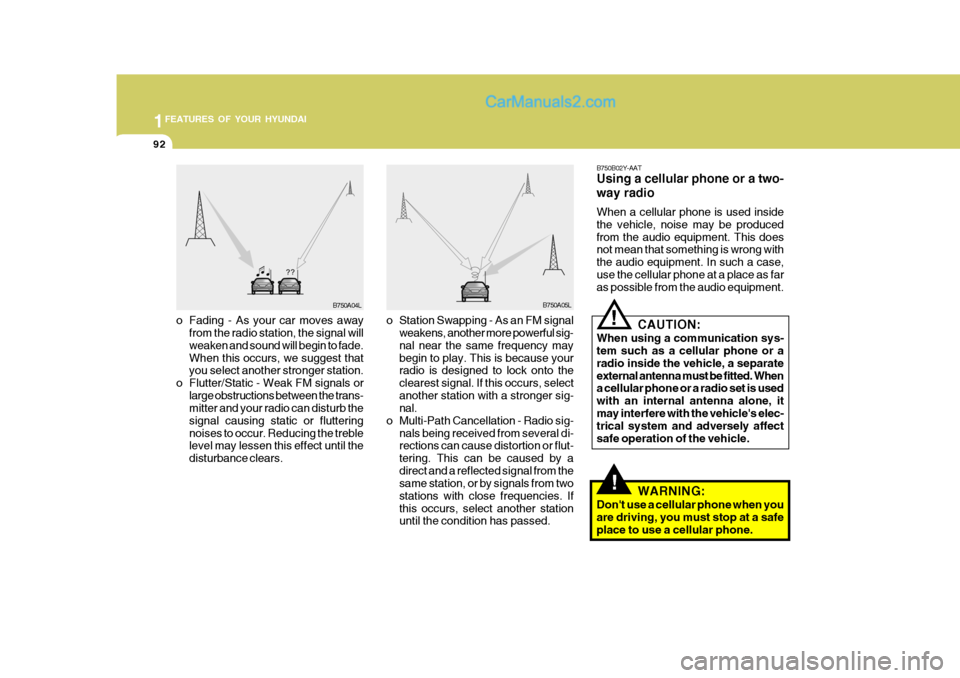
o Fading - As your car moves away
from the radio station, the signal will weaken and sound will begin to fade. When this occurs, we suggest that you select another stronger station.
o Flutter/Static - Weak FM signals or large obstructions between the trans-mitter and your radio can disturb the signal causing static or flutteringnoises to occur. Reducing the treble level may lessen this effect until the disturbance clears. o Station Swapping - As an FM signal
weakens, another more powerful sig- nal near the same frequency may begin to play. This is because your radio is designed to lock onto the clearest signal. If this occurs, selectanother station with a stronger sig- nal.
o Multi-Path Cancellation - Radio sig- nals being received from several di-rections can cause distortion or flut- tering. This can be caused by adirect and a reflected signal from the same station, or by signals from two stations with close frequencies. Ifthis occurs, select another station until the condition has passed.
Page 257 of 407
1
FEATURES OF YOUR HYUNDAI
93
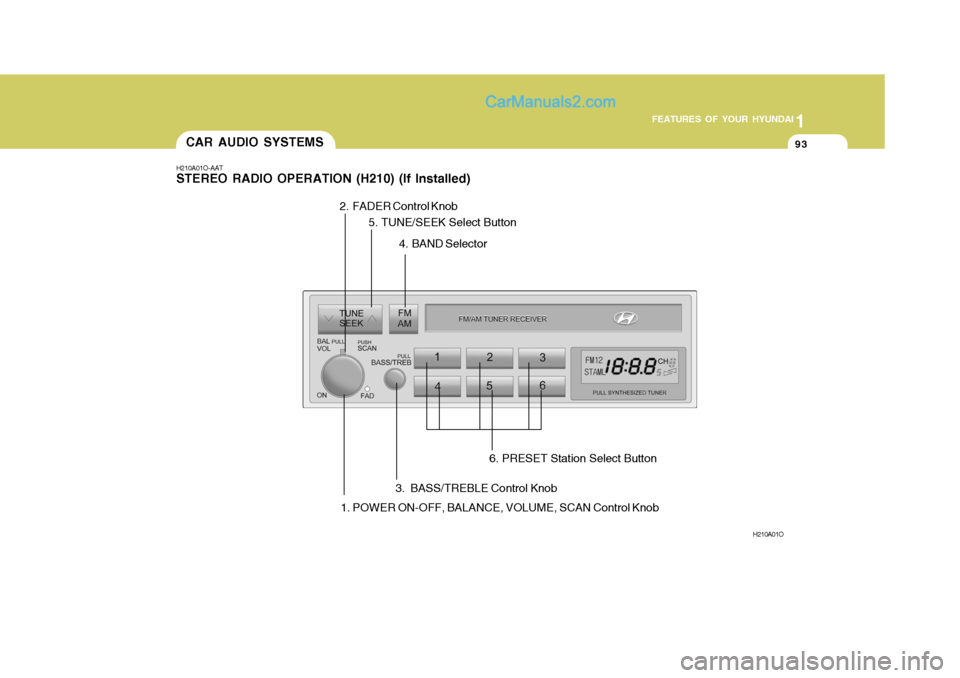
H210A01O-AAT STEREO RADIO OPERATION (H210) (If Installed)
H210A01O
1. POWER ON-OFF, BALANCE, VOLUME, SCAN Control Knob
CAR AUDIO SYSTEMS
2. FADER Control Knob
3. BASS/TREBLE Control Knob4. BAND Selector
6. PRESET Station Select Button
5. TUNE/SEEK Select Button
Page 258 of 407

1FEATURES OF YOUR HYUNDAI
94
H210B03O-AAT
1. POWER ON-OFF/VOLUME
Control Knob
The radio unit may be operated when the ignition key is in the "ACC" or "ON"position. Rotate the knob clockwise to switch the radio unit on and to increase the volume.The LCD shows the radio frequency in the radio mode. Turn the knob counter- clockwise to reduce the volume and toswitch the radio unit off. BAL (Balance Control) Knob Pull and turn the control knob clockwise to emphasize right speaker sound (left speaker sound will be attenuated). When the control knob is turned counterclock-wise, left speaker sound will be empha- sized (right speaker soundwill be at- tenuated).After adjusting the balance, push the knob again to use the other function. 4. BAND Selector Pressing the button changes the AM, FM1 and FM2 bands. The modeselected is displayed on LCD. 5. TUNE (Manual) Select Button Press the ( ) side or ( ) side to increase or to decrease the frequency. With the button held down for 1 sec. or more, thestop signal (broadcasting radio wave) is ignored and channel selection contin- ues. SEEK Operation (Automatic Channel Selection) Press the TUNE select button for 1 sec. or more. When the ( ) side is pressed,the unit will automatically tune to the next higher frequency and when the ( ) side is pressed, it will automaticallytune to the next lower frequency.
SCAN Knob When the scan knob is pressed, the frequency will increase and the receiv-able stations will be tuned in one after another, receiving each station for 5 seconds. To stop scanning, press thescan knob again.
2. FAD (Fader Control) Knob Turn the control knob counterclockwise to emphasize front speaker sound (rear speaker sound will be attenuated). Whenthe control knob is turned clockwise, rear speaker sound will be emphasized (front speaker sound will be attenu-ated). 3. BASS Control Knob Press to pop the knob out and turn to the left or right for the desired bass tone. TREBLE Control Knob. Further pull-lock position of popped-up knob. Turn to the left or right for thedesired treble tone.
FM
AM
Page 259 of 407
1
FEATURES OF YOUR HYUNDAI
95
!
6. PRESET STATION SELECT
Button
Six (6) stations for AM, FM1 and FM2 respectively can be preset in the elec-tronic memory circuit on this unit. HOW TO PRESET STATIONS Six AM and twelve FM stations may be programmed into the memory of the radio. Then, by simply pressing the band select button and/or one of the sixstation select buttons, you may recall any of these stations instantly. To pro- gram the stations, follow these steps:
o Press band selector to set the band for AM, FM1, and FM2.
o Select the desired station to be stored by seek, scan or manual tuning.
o Determine the preset station select button you wish to use to access that station.
o Press the station select button for more than two seconds. A selectbutton indicator will show in the dis- play indicating which select buttonyou have depressed. You should then release the button, and proceed to program the next desired station. A total of 18 stations can be pro-grammed by selecting one AM andtwo FM stations per button.
o When completed, any preset station
may be recalled by selecting AM,FM1 or FM2 band and the appropri- ate station button.
CAUTION:
o Do not place beverages close to the audio system. The playbackmechanism may be damaged if you spill them.
o Do not impact on the audio sys- tem, or the playback mechanismcould be damaged.