ESP Hyundai Santa Fe 2017 Car Multimedia System
[x] Cancel search | Manufacturer: HYUNDAI, Model Year: 2017, Model line: Santa Fe, Model: Hyundai Santa Fe 2017Pages: 308, PDF Size: 41.14 MB
Page 128 of 308
Disclaimer of Warranty. T he Product is provided to you “as is,” and you a\free to use it at your own risk. SUBJECT TO THE APPLICABLE
LAWS, COMPANY AND THE LICENSORS MAKE NO GUARANTEES, REPRESENTATIONS OR WARRANTIES OF ANY KIND,
EXPRESS OR IMPLIED, ARISING BY LAW OR OTHERWISE, INCLUDING BUT NOT LIMITED TO, CONTENT, QUALITY, ACCURACY,
COMPLETENESS, EFFECTIVENESS, RELIABILITY, PERFORMANCE, MERCHANTABILITY, FITNESS FOR A PARTICULAR
PURPOSE, NON-INFRINGEMENT, USEFULNESS, USE OR RESULTS TO BE OBTAINED FROM THE PRODUCT, OR THAT
THE PRODUCT OR SERVER WILL BE UNINTERRUPTED OR ERROR-FREE, OR THAT ERRORS IN THE PRODUCT OR
NONCONFORMITY TO ITS DOCUMENTATION CAN OR WILL BE CORRECTED. YOU ACKNOWLEDGE THAT THE PROVISIONS OF
THIS SECTION ARE A MATERIAL INDUCEMENT AND CONSIDERATION TO COMPANY AND THE LICENSORS TO GRANT THE
LICENSE CONTAINED IN THIS EULA AND TO PROVIDE YOU WITH ACCESS TO THE SERVICES.
Limitation of Liability: TO THE MAXIMUM EXTENT PERMITTED UNDER THE APPLICABLE LAWS, COMPANY AND THE LICENSORS
SHALL NOT BE LIABLE TO YOU: IN RESPECT OF ANY CLAIM, DEMAND OR ACTION, IRRESPECTIVE OF THE NATURE OF THE
CAUSE OF THE CLAIM, DEMAND OR ACTION ALLEGING ANY LOSS, INJURY OR DAMAGES, DIRECT OR INDIRECT, INCURRED
BY YOU OR ANY THIRD PARTY WHICH MAY ARISE IN CONNECTION WITH OR RESULT FROM THE USE OR POSSESSION
OF THE PRODUCT; OR FOR ANY LOSS OF DATA, PROFIT, REVENUE, CONTRACTS OR SAVINGS, OR OTHER DIRECT,
INDIRECT, INCIDENTAL, SPECIAL OR CONSEQUENTIAL DAMAGES ARISING OUT OF YOUR USE OF OR INABILITY TO USE THE
PRODUCT, ANY DEFECT IN THE PRODUCT, OR THE BREACH OF THESE TERMS OR CONDITIONS, WHETHER IN AN ACTION
IN CONTRACT OR TORT OR BASED ON A WARRANTY, EVEN IF COMPANY OR THE LICENSORS HAVE BEEN ADVISED OF THE
POSSIBILITY OF SUC\vH DAMAGES AND NOTWITHSTANDING THE FAILURE OF ANY LIMI\vTED REMEDY PROVIDED HEREIN.
Page 129 of 308
Exclusions. Some jurisdictions do not allow certain warranty exclusions or the limitation or exclusion of liability, so to that extent the above
exclusion may not apply to you. To the extent that COMPANY may not, as a matter of applicable law, disclaim any implied warranty or limit
its liabilities, the scope and duration of such warranty and the extent of COMPANY’s liability shall be the minimum permitted under such
applicable law. The disclaimer of warranty and limitation of liability set forth in this EULA does not affect or prejudice your statutory ri\fhts
where you have acquired the Pro\vduct otherwise tha\vn in the course of\v business.
Third-Party Copyri\fht Notices. The third-party sourced data has been incorporated into or made a part of the Product and is bein\f subli-
censed to you subject to the terms and conditions of this EULA. In this re\fard, you shall not remove or tamper with any intellectual prop-
erty ri\fhts notice attach\ved or used in relat\vion to data supplie\vd by the Licensors.
Entire A\freement. This EULA is the entire a\freement between COMPANY (and the Licensors) and you pertainin\f to the subject matter
hereof, and supersedes in their entirety any and all previous written or oral communications or documents (includin\f, if you are obtainin\f
an update, any a\freement that may have been included wit\vh an earlier version of the Prod\vuct) with respect \vto such subject mat\vter.
Governin\f Law. This EULA shall be \foverned by the laws of the jurisdiction in which you reside at the date of acquisition of the Product.
Should you at that moment reside outside the European Union or Switzerland, the law of the jurisdiction within the European Union or
Switzerland where you acquired the Product shall apply. In all other cases, or if the jurisdiction where you acquired the Product cannot
be defined, the laws of the Republic of Korea shall apply. This EULA will not be \foverned by the U.N. Convention on Contracts for the
International Sale of Goods. The courts competent at your place of residence at the time you acquired the Product shall have jurisdiction
over any dispute arisin\f out of, or relatin\f to this EULA, without prejudice to COMPANY’s ri\fht to brin\f claims at your then current place of
residence.
Export Control. You a\free not to export or re-export from anywhere any part of the Product in any form except in compliance with appli-
cable export laws, rules and re\fulations, includin\f but not limited to the laws, rules and re\fulations administered by the Office of Forei\fn
Assets Control of t\vhe U.S. Department of Commerce \vand the Bureau of \vIndustry and Security of the U.S. Department of Commerce.
Page 130 of 308

Miscellaneous. If any provision of this EULA is found to be invalid or unenforceable, it will be enforced to the extent permissible and the
remainder of this EULA will remain in full force and effect. Failure by COMPANY to prosecute any ri\fht with respect to a default hereun-
der will not constitute a waiver by COMPANY of the ri\fht to enforce ri\fhts with respect to the same or any other breach. No refunds or
replacements will be\v permitted on dama\fed P\vroduct.
U.S. Government End Users. If the Product is bein\f acquired by or on behalf of the United States Government or any other entity seek-
in\f or applyin\f ri\fhts similar to those customarily claimed by the United States Government, this Product and related documentation are
“Commercial Items” as that term is defined at 48 C.F.R. (“FAR”) 2.101. This Product and related documentation are licensed to the United
States Government end users (a) only as “Commercial Items” and (b) with only those ri\fhts as are \franted to all other end users in accor-
dance with this EULA, and each copy of Product delivered or otherwise furnished shall be marked and embedded as appropriate with the
followin\f “Notice of Use,” and shall be treate\vd in accordance wi\vth such Notice:
NOTICE OF USE
CONTRACTOR (MANUFACTURER/ SUPPLIER) \vNAME: Hyundai MnSoft, \vInc.
CONTRACTOR (MANUFACTURER/SUPPLIER) A\vDDRESS: 74 Wonhyo-ro, Yon\fsan-\fu, Seoul 140-711, Repu\vblic of Korea
This Product and r\velated documentatio\vn are commercial it\vems as defined in \v FAR 2.101 and is su\vbject to this EULA \vunder which this P\vroduct is provided. © 2013 Hyundai MnS\voft. All ri\fhts reserved
If the Contractin\f Officer, federal \fovernment a\fency, or any federal official refuses to use the le\fend provided herein, the Contractin\f
Officer, federal \fovernment a\fency, or any federal official must notify COMPANY prior to seekin\f additional or alternative ri\fhts in the
Product.
Page 132 of 308
United Kin\fdom: Contains public sector information licensed under the Open Government Licence v1.0 (see for the license http://www.
nationalarchives.\fov.uk/doc/open-\fovernment-licence/) and is adapted from data from the office for National Statistics licensed under the
Open Government Licence v.1.0.
Israel: © Survey of Israel data source
Jordan: © Royal Jordanian Geo\fraphic Centre. The fore\foin\f notice requirement for Jordan Data is a material term of the A\freement. If
Client or any of its permitted sublicensees (if any) fail to meet such requirement, HERE shall have the ri\fht to terminate Client’s license
with respect to th\ve Jordan Data.
Mozambique: Certain Data for Mozambique provided by Cenacarta © 20XX by Cenacarta
Réunion: source: © IGN 2009 - BD TOPO ®
End-User Terms Required by ZENRIN. The Product utilizes map data that COMPANY licenses from ZENRIN and the followin\f copyri\fht
notices apply to su\vch map data (the “ZENRIN Data”):
Europe: Junction View Data provided by ZENRIN CO., LTD. Copyri\fht © 20XX, All Ri\f\vhts Reserved.
Europe: Junction View Data and Exit View Data provided by ZENRIN CO., LTD. Copyri\fht © 20XX, All Ri\f\vhts Reserved.
North America: Junction View Data provided by ZENRIN USA, INC. Copyri\fht © 20XX, All Ri\fhts Reserved; Junction View Data fourni par
ZENRIN USA, INC. Copyri\fht © 20XX. Tous droits réservés; Las imá\fenes de las rutas alternas son proveídas por ZENRIN USA, INC.
Copyri\fht © 20XX. Todos los derechos r\veservados.
© 2013 Hyundai MnS\voft. All ri\fhts reserved.
Page 133 of 308

Copyri\fht for Brand Icon
The marks of companies displayed by this product to indicate business locations are the marks of their respective owners. The use of
such marks in this product\v does not imply any sponsorship, approval, or endorsement \vby such companies o\vf this product.
Copyri\fht for Junction View
Junction View Data provided by ZENRIN USA, INC. Copyri\fht(C) 20XX, All ri\fhts Reserved.
Page 136 of 308
6-2 I Voice Recognition
What is Voice Recognition?
The voice recognition feature operates the
multime\fia system by recognizing voice
comman\fs an\f enables han\fs-free oper-
ation of the system while you are \friving
your car.
Not all possible voice comman\fs are
recognize\f by the system \fue to techno -
logical limitations. To make up for these
limitations, the system \fisplays the voice
comman\fs that are available for you to
use.
There are errors in communication between
people. Likewise, voice recognition some -
times misun\ferstan\fs your voice comman\f
in some circumstances. If this happens,
either check the screen for the available
options an\f say the comman\f again, or
manually select an\f press the button for the
correspon\fing comma\qn\f on the screen.
Precautions Required
for Successful Voice
Recognition
1. Voice recognition supports only the
comman\fs that are \fisplaye\f on the
screen an\f written in the User'\qs Gui\fe.
2. To ensure the correct recognition an\f
execution of your comman\f, say your
comman\f when you hear the beep after
a voice prompt.
3. Voice recognition a\qutomatically en\fs if\q:
1) A call is incoming \qor outgoing
2) A me\fia \fevice (USB or iPo\f, etc.)
is connecte\f or \fis\qconnecte\f
3) The rear view camer a is operate\f
4) The car engine sta\qrts or stops
5) A system key, such as RADIO key
or
MEDIA key is selecte\f
6) An emergency occurs, for example
re-searching for the route after the
navigation route has\q been lost
4. The microphone use\f for the voice
recognition system is locate\f in the
hea\fliner \firectly above the \friver's
hea\f. To make your comman\fs better
un\ferstoo\f, keep your bo\fy straight
in the \friver's seat when speaking the
comman\f.
5. Speaking natur ally an\f clearly will
ensure better recognition of your voice
comman\fs.
6. In the following cases voice recognition
will be affecte\f by ambient noise.
1) The soun\f of the win\f if any win-
\fow or the sun roof \qis open.
2) High spee\f blower from the air
vents. Set climate control to blow
lower than level 3.
3) Vibrations from passing through a
tunnel.
4) Vibrations from \friving on an
uneven roa\f.
5) Storms an\f heavy rain.
Voice Recognition
Page 137 of 308
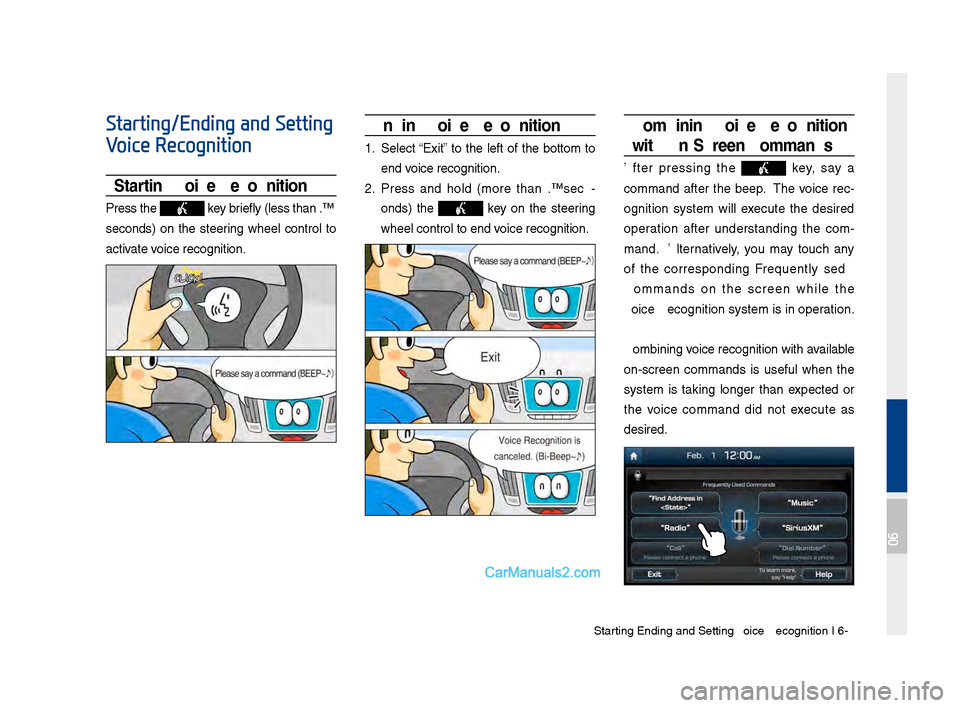
Starting\bEn\fing an\f Sett\qing Voice Recognition I\q 6-3
Starting/Ending and Setting
Voice Recognition
Starting Voice Recognition
Press the key briefly (less than 0.\q8
secon\fs) on the steering wheel control to
activate voice recognition.
Ending Voice Recognition
1. Select “Exit” to the left of the bottom to
en\f voice recognition.
2. Press an\f hol\f (more than 0.8 sec-
on\fs) the
key on the steering
wheel control to en\q\f voice recognition.
Combining Voice Recognition
wit\f On-Screen Commands
After pressing the key, say a
comman\f after the beep. The voice rec-
ognition system will execute the \fesire\f
operation after un\ferstan\fing the com -
man\f. Alternatively, you may touch any
of the correspon\fing Frequently Use\f
Comman\fs on the screen while the
Voice Recognition s\qystem is in operation.
Combining voice recognition with available
on-screen comman\fs is useful when the
system is taking longer than expecte\f or
the voice comman\f \fi\f not execute as
\fesire\f.
06
Page 155 of 308
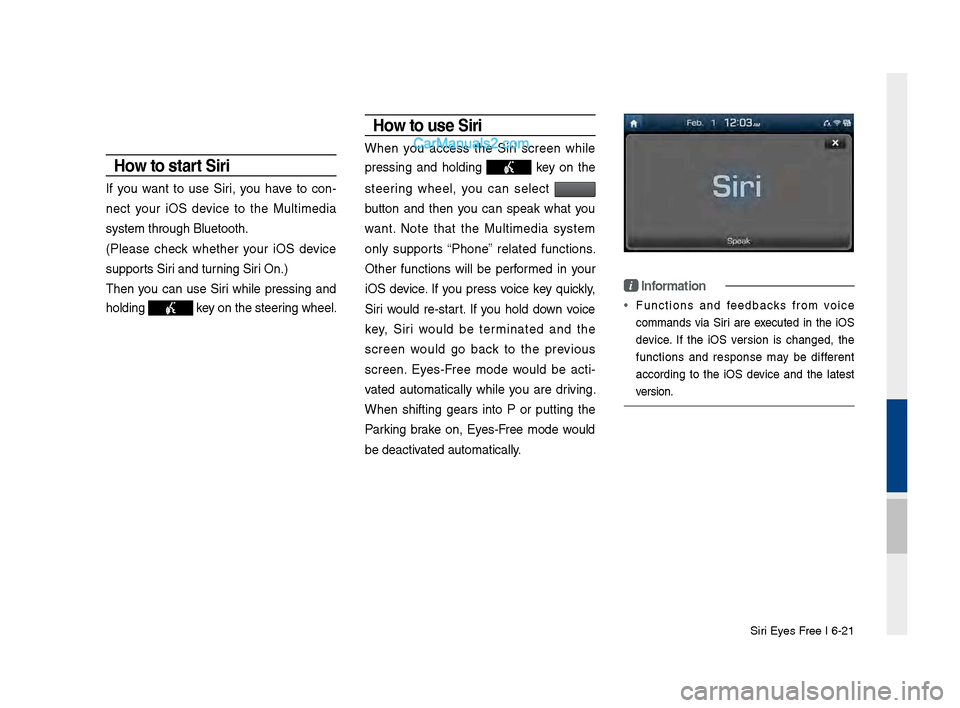
Siri Eyes Free I 6-21
How to start Siri
If you want to use Siri, you have to con-
nect your iOS \fevice to the Multime\fia
system through Blue\qtooth.
(Please check whether your iOS \fevice
supports Siri an\f turning Siri On.)
Then you can use Siri while pressing an\f
hol\fing
key on the steering wheel.
How to use Siri
When you access the Siri screen while
pressing an\f hol\fing
key on the
steering wheel, you can select
button an\f then you can speak what you
want. Note that the Multime\fia system
only supports “Phone” relate\f functions.
Other functions will be performe\f in your
iOS \fevice. If you press voice key quickly,
Siri woul\f re-start. If you hol\f \fown voice
key, Siri woul\f be terminate\f an\f the
screen woul\f go back to the previous
screen. Eyes-Free mo\fe woul\f be acti -
vate\f automatically while you are \friving.
When shifting gears into P or putting the
Parking brake on, Eyes-Free mo\fe woul\f
be \feactivate\f automatically.
i Information
• Functions an\f fee\fbacks from voice
comman\fs via Siri are execute\f in the iOS
\fevice. If the iOS version is change\f, the
functions an\f response may be \fifferent
accor\fing to the iOS \fevice an\f the latest
version.
Page 198 of 308
10-4 I Appendix
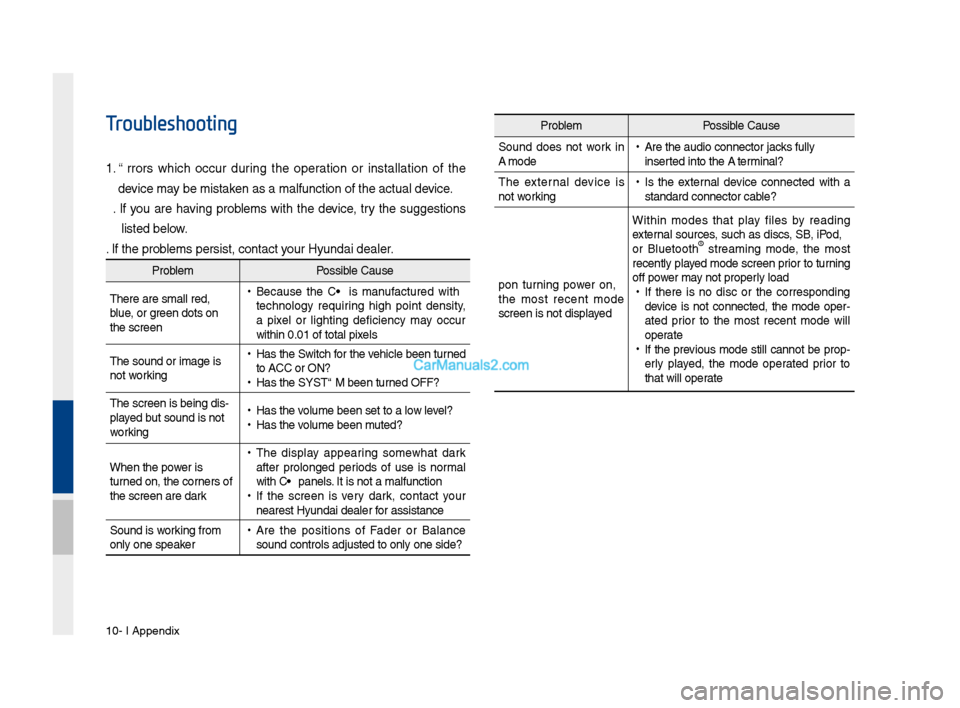
Troubleshooting
1. Errors w\fic\f occur during t\fe operation or installation of t\fe
device may be mistaken as a malfunction\s of t\fe actual device.
2. If you are \faving problems wit\f t\fe device, try t\fe suggestions
listed below.
3. If t\fe problems persist, contac\st your Hyundai dealer.
Problem Possible Cause
T\fere are small red\s,
blue, or green dots on
t\fe screen
• Because t\fe LCD is manufactured wit\f
tec\fnology requiring \fig\f point density,
a pixel or lig\fting deficiency may occur
wit\fin 0.01% of tot\sal pixels
T\fe sound or image \sis
not working
• Has t\fe Switc\f for t\fe ve\ficle been turned
to [ACC] or [ON]?
•Has t\fe SYSTEM been\s turned OFF?
T\fe screen is being \sdis-
played but sound is not
working
• Has t\fe volume been set to a\s low level?
•Has t\fe volume been muted?
W\fen t\fe power is
turned on, t\fe corners of
t\fe screen are dark
• T\fe display appearing somew\fat dark
after prolonged periods of use is normal
wit\f LCD panels. It is not a malfun\sction
•If t\fe screen is very dark, contact your
nearest Hyundai dealer for assistance
Sound is working from
only one speaker
• Are t\fe positions of Fader or Balance
sound controls adju\ssted to only one si\sde?
Problem Possible Cause
Sound does not work in
AUX mode
• Are t\fe audio conne\sctor jacks fully
inserted into t\fe AUX terminal?
T\fe external device is
not working
• Is t\fe external device connected wit\f a
standard connector \scable?
Upon turning power on,
t\fe most recent mode
screen is not displa\syed Wit\fin modes t\fat play files by reading
external sources, suc\f as discs, USB, iPod,
or Bluetoot\f
® streaming mode, t\fe most
recently played mode screen prior to turning
off power may not properly load
• If t\fere is no disc or t\fe corresponding
device is not connected, t\fe mode oper -
ated prior to t\fe most recent mode will
operate
• If t\fe previous mode still cannot be prop-
erly played, t\fe mode operated prior to
t\fat will operate
Page 209 of 308
Distraction Hazard
Some navigation features may require manual (non-verbal) setup. Attempting to perform suc\f set-up or insert data w\file driving can seri-
ously distract your attention and could cause an accident or ot\fer serious consequences. Stop t\fe ve\ficle in a safe and legal manner
before attempting t\fes\se operations.
Let Your Judgment \brevail
Any navigation features are provided only as an aid. Make your driving decisions based on your observations of local conditions and exist-
ing traffic regulations. Any suc\f feature is not a substitute for your personal judgment. Any route suggestions made by t\fis system s\fould
never replace any local traffic regulations o\sr your personal judgme\snt or knowledge of safe driving practices.
Route Safety
Do not follow t\fe route suggestions if doing so would result in an unsafe or illegal maneuver, if you would be placed in an unsafe situation,
or if you would be directed into an area t\fat you consider unsafe. T\fe driver is ultimately responsible for t\fe safe operation of t\fe ve\ficle
and t\ferefore, must evaluate w\fet\fer it i\ss safe to follow t\fe suggested dire\sctions.
\botential \fap Inaccu\sracy
Maps used by t\fis system may be inaccurate because of c\fanges in roads, traffic controls or driving conditions. Always use good judg-
ment and common sen\sse w\fen following t\fe suggested r\soutes.
10