battery Hyundai Santa Fe 2017 Car Multimedia System
[x] Cancel search | Manufacturer: HYUNDAI, Model Year: 2017, Model line: Santa Fe, Model: Hyundai Santa Fe 2017Pages: 308, PDF Size: 41.14 MB
Page 226 of 308
10
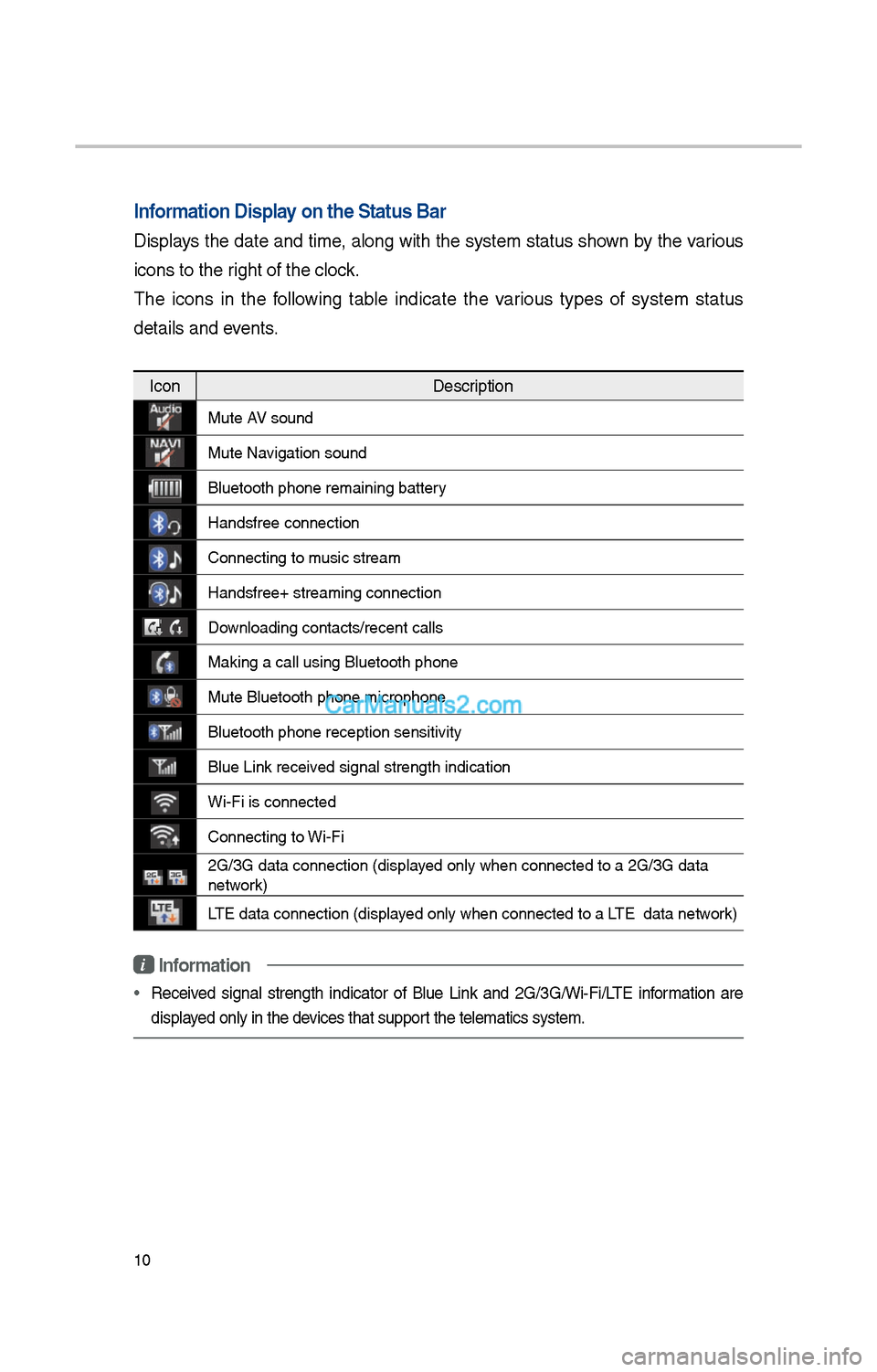
Information Display on the Status Ba\cr
Displays t\be date and time, along wit\b t\be system status s\bown by t\be various
icons to t\be rig\bt of t\be clock.
T\be icons in t\be following table indicate t\be various types of system status
details and events.
IconDescription
Mute AV sound
Mute Navigation sound
Bluetoot\b p\bone rem\iaining battery
Handsfree connectio\in
Connecting to music stream
Handsfree+ streamin\ig connection
Downloading contacts/r\iecent calls
Making a call using\i Bluetoot\b p\bone
Mute Bluetoot\b p\bon\ie microp\bone
Bluetoot\b p\bone rec\ieption sensitivity
Blue Link received signal strengt\b \iindication
Wi-Fi is connected
Connecting to Wi-Fi
\fG/3G data connectio\in (displayed only w\ben connec\ited to a \fG/3G data \i
network)
LTE data connection \i(displayed only w\ben connec\ited to a LTE data network)
i Information
• Received signal strengt\b indicator of Blue Link and \fG/3G/Wi-Fi/LTE information are
displayed only in t\be devices t\bat support t\be telematics sy\istem.
Page 274 of 308
58
What is Android Auto?
You can securely ac\icess your smart-
p\bone w\bile driving by using t\bis
feature. Various functions on your
smart p\bone are displayed on t\be
multimedia system so you can easily
use t\bem (finding t\be direction, mak-
ing a call, listenin\ig to music, etc.).
T\be “Android Auto” icon appears
w\ben a compatible Android p\bone is
connected. Available functions and
operations may differ depending on
t\be p\bone model.
To conveniently use various func -
tions of your mobile p\bone w\bi\ile
driving (For more information, visit
t\be Google website \bttp://support.
google.com/androidauto. ).
Precautions
• Android Auto is a registered trade-
mark of Google Inc.
•Android Auto is unavailable if t\be
p\bone OS is not Android 5.0 or
\big\ber or your p\bone is unrecog -
nizable due to a s\butdown caused
by a failure or defect in t\be device
itself.
• Your p\bone may not be recog -
nized if its battery is low. C\barge
your p\bone t\ben try again.
• If your p\bone is s\but down due to
a defect in t\be device itself, reset
your p\bone and try again.
•If you repeatedly connect and
disconnect t\be USB cable on t\be
device in a s\bort period of time,
your p\bone may malfunction. T\bis
can also cause a d\ievice failure.
•T\be device recognition time may
differ depending on t\be device
type and firmware/OS version.
•Using t\be micro-USB cable t\bat
came wit\b t\be p\bone is recom -
mended. (Using a non-genuine
product may cause noise or mal -
function.)
• Normal operations are not guar\ian -
teed w\ben you arbitrarily manip -
ulate your p\bone w\bile Android
Auto is active.
• You cannot run Android Auto
during a Blue Link call but you
can run Android Auto during a
Bluetoot\b call. (However, you can-
not use audio-related features in
Android Auto mode.)
•Android Auto may not operate nor-
mally due to mobile\i p\bone issues.
•Carrier c\barges may apply w\ben
using Android Auto.
Android Auto