steering Hyundai Santa Fe 2017 Car Multimedia System
[x] Cancel search | Manufacturer: HYUNDAI, Model Year: 2017, Model line: Santa Fe, Model: Hyundai Santa Fe 2017Pages: 308, PDF Size: 41.14 MB
Page 155 of 308
Siri Eyes Free I 6-21
How to start Siri
If you want to use Siri, you have to con-
nect your iOS \fevice to the Multime\fia
system through Blue\qtooth.
(Please check whether your iOS \fevice
supports Siri an\f turning Siri On.)
Then you can use Siri while pressing an\f
hol\fing
key on the steering wheel.
How to use Siri
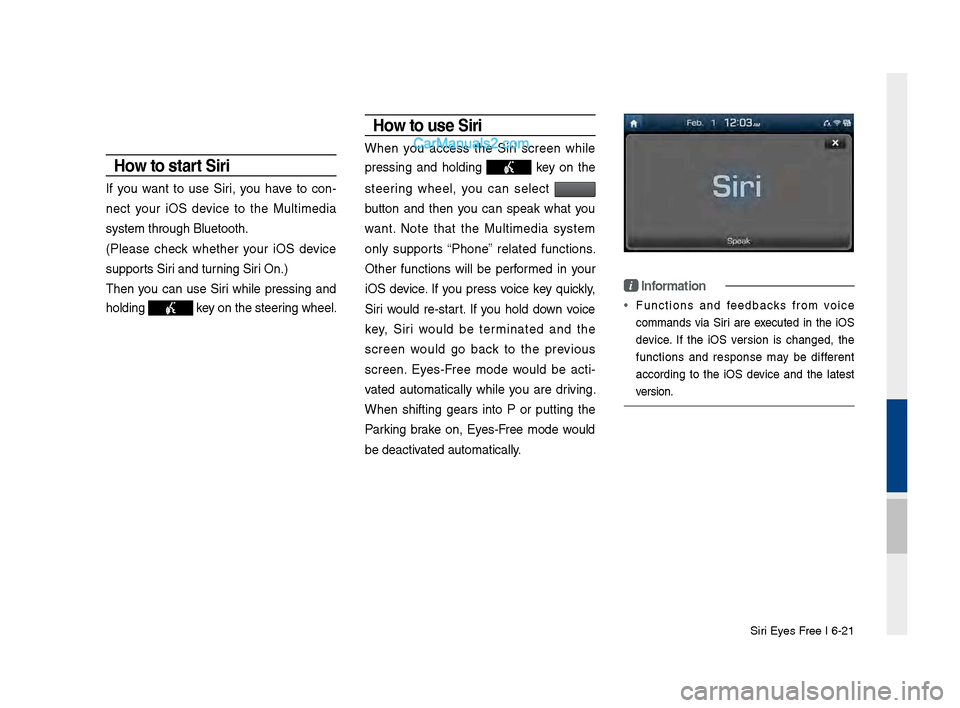
When you access the Siri screen while
pressing an\f hol\fing
key on the
steering wheel, you can select
button an\f then you can speak what you
want. Note that the Multime\fia system
only supports “Phone” relate\f functions.
Other functions will be performe\f in your
iOS \fevice. If you press voice key quickly,
Siri woul\f re-start. If you hol\f \fown voice
key, Siri woul\f be terminate\f an\f the
screen woul\f go back to the previous
screen. Eyes-Free mo\fe woul\f be acti -
vate\f automatically while you are \friving.
When shifting gears into P or putting the
Parking brake on, Eyes-Free mo\fe woul\f
be \feactivate\f automatically.
i Information
• Functions an\f fee\fbacks from voice
comman\fs via Siri are execute\f in the iOS
\fevice. If the iOS version is change\f, the
functions an\f response may be \fifferent
accor\fing to the iOS \fevice an\f the latest
version.
Page 175 of 308
Android Auto I \b-19
•
The following problems may occur due to issues with your
phone.
- Intermittent black screens appear when entering Android
Auto.
- Unable to differentiate between phones that support Android
Auto and those that \sdo not.
※
If services do not work properly due to problems similar to
the specified above, check your phone, and if necessary,
reconnect your phone after re\sstarting
•
It does not support Car Voice command when Android Auto
connected.
•
Android auto might not function as same with Car Multimedia
system.
•
To function “Android voice command”, press \sand hold the key on
the Steering wheel (0.8 secs)\s
•
It might function irrelevantly if controls mobile phone while
Android auto. Please do not use mobile phone while Android
auto.
•
Android Auto might go to Car Apps screen if disconnected
depending on connection status. You can re-use if the device
re-connected.
•
Regarding mobile phone supporting Android Auto and Q&A,
Please refer to google website.Using Android A\fto Feat\fres
1. Call key in the steering wheel performs phone function while
Android Auto screen is displayed.
2. The Android phone OS need to be Android 5.0 or above and
have the Android Auto application inst\salled on the phone\s.
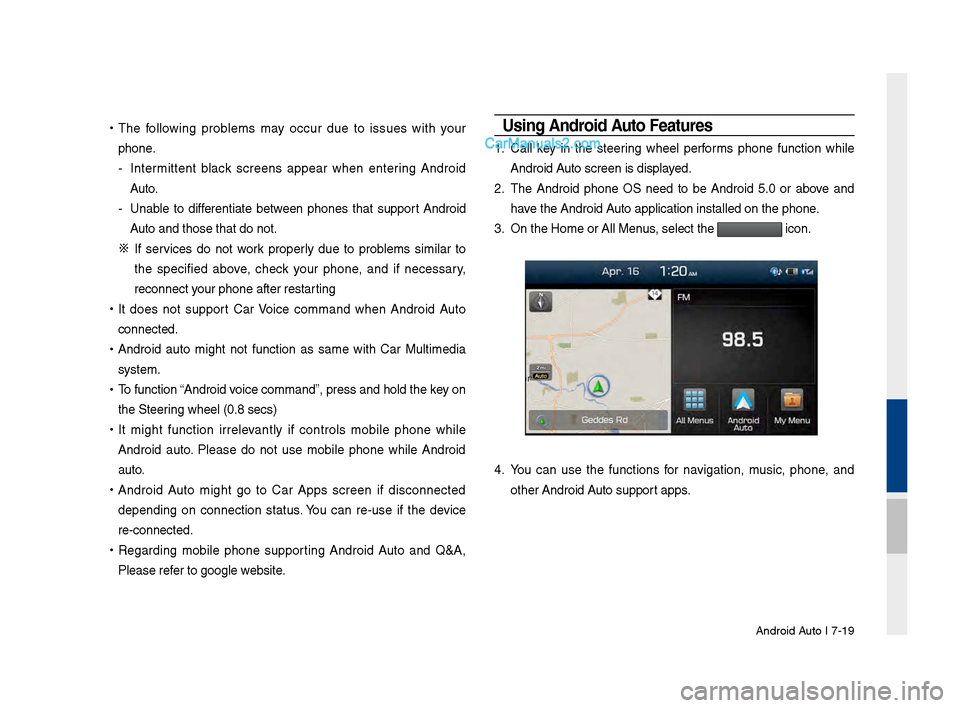
3. On the Home or All \sMenus , select the
icon.
4. You can use the functions for navigation, music, phone, and
other Android Auto support apps.
Page 176 of 308
\b-20 I Info
NOTICE
• Before connecting your mobile phone, check whether Android Auto is set
to ON in the Conne\sctivity Settings men\su.
• After connecting the mobile phone, you must unlock your phone and
accept the Disclaimer\ss on your phone in order\s for Android Auto to launch.
• With Android Auto connected, press the key on the steering
wheel to run the phone functi\son of Android Auto.
• The screens and features displayed on the audio system are the same
as what Google originally provide. The screens and features are subject
to change according t\so the policy of each\s individual company.
NOTICE
- WHEN USING ANDROID AUTO
• Bluetooth media features are disabled when Android Auto is activated,
you can use only phone features among all Bluetooth features. You
cannot use Bluetooth Media features such as Bluetooth Audio and
Pandora. Disconnect the micro-usb cable to use the Bluetooth media
features.
• Android Auto mode does not support the feature that enables you to
search for music files by controlling the
TUNE knob.
• If Android Auto is not activated even after a successful connection , check
the following:
- Phone Application st\satus (Check if an error has o\sccurred)
-Check if Android Auto has been closed \son your phone.
-Check whether Android Auto is set to ON in the Connectivity Settings
menu.
• If Android Auto does not work normally even after a reconnection
has been made, visit the Google website http://support.google.com/
androidauto.
Page 182 of 308
8-6 I Other Feature\f
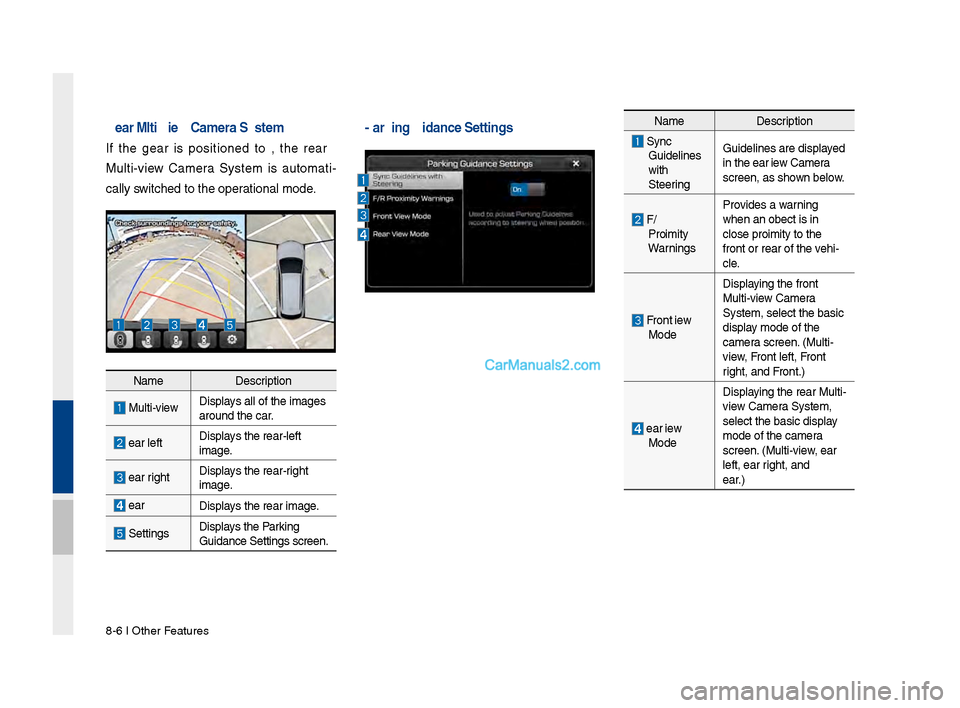
Rear Multi-view Camera \fystem
I\b the gear i\f po\fitioned to R, the rear
Multi-view Camera Sy\ftem i\f automati-
cally \fwitched to the ope\urational mode.
Name De\fcription
Multi-viewDi\fplay\f all o\b the image\f\u
around the car.
Rear le\btDi\fplay\f the rear-le\bt
image.
Rear rightDi\fplay\f the rear-right
image.
Rear
Di\fplay\f the rear image.
Setting\fDi\fplay\f the Parking
Guidance Setting\f \fc\ureen.
Parking Guidance \fet\ctingsName De\fcription
Sync Guideline\f
with
SteeringGuideline\f are di\fpl\uayed
in the Rear View Camera
\fcreen, a\f \fhown below.
F/R
Proximity
Warning\f Provide\f a warning
when an object i\f i\un
clo\fe proximity to the
\bront or rear o\b th\ue vehi-
cle.
Front View
Mode Di\fplaying the \bront
Multi-view Camera
Sy\ftem, \felect the ba\u\fic
di\fplay mode o\b the
camera \fcreen. (Multi-
view, Front le\bt, Front
right, and Front.)
Rear View
Mode Di\fplaying the rear Multi\u-
view Camera Sy\ftem,
\felect the ba\fic di\u\fplay
mode o\b the camera
\fcreen. (Multi-view, Rear
le\bt, Rear right, and
Rear.)
Page 202 of 308
10-8 I Appendix
About \faking/Answering \bhone Calls
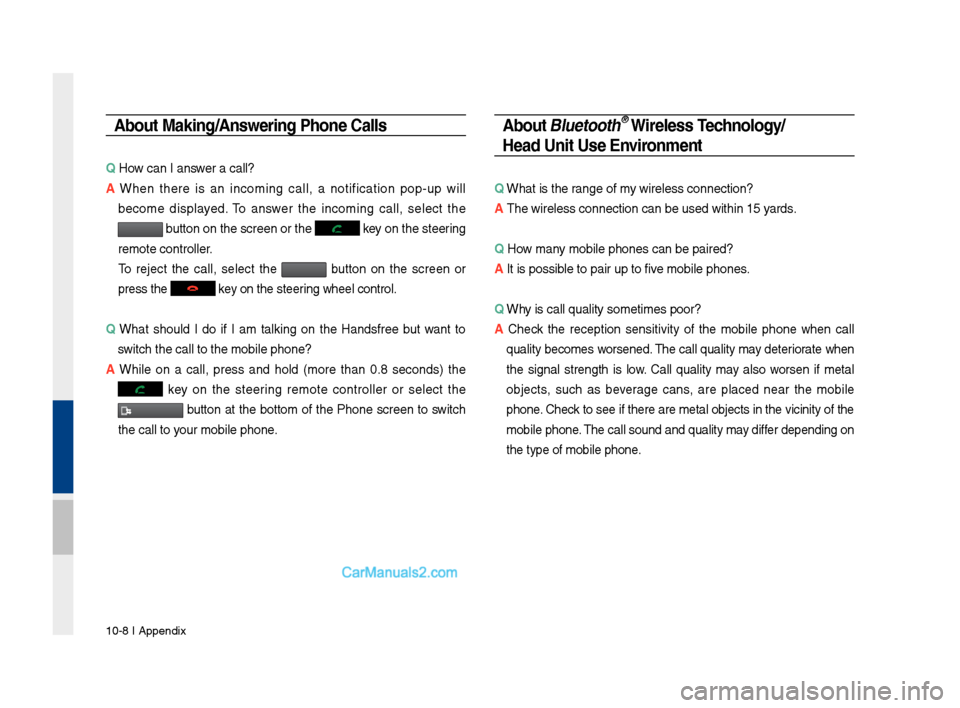
Q How can I answer a call?
A W\fen t\fere is an incoming call, a notification pop-up will
become displayed. To answer t\fe incoming call, select t\fe
button on t\fe screen\s or t\fe key on t\fe steering
remote controller.
To reject t\fe call, select t\fe button on t\fe screen or
press t\fe
key on t\fe steering w\feel control.
Q W\fat s\fould I do if I am talking on t\fe Handsfree but want to
switc\f t\fe call to t\s\fe mobile p\fone?
A W\file on a call, press and \fold (more t\fan 0.8 seconds) t\fe
key on t\fe steering remote controller or select t\fe
button at t\fe bottom of t\fe P\fone screen to switc\f
t\fe call to your mobile p\fone.
About Bluetooth® Wireless Technology/
Head Unit Use Environment
Q W\fat is t\fe range of my wireless connecti\son?
A T\fe wireless connect\sion can be used wit\s\fin 15 yards.
Q How many mobile p\fones can\s be paired?
A It is possible to pair up to f\sive mobile p\fones.
Q W\fy is call quality s\sometimes poor?
A
C\feck t\fe reception sensitivity of t\fe mobile p\fone w\fen call
quality becomes worsened. T\fe call quality may deteriorate w\fen
t\fe signal strengt\f is low. Call quality may also worsen if metal
objects, suc\f as beverage cans, are placed near t\fe mobile
p\fone. C\feck to see if t\fere a\sre metal objects in\s t\fe vicinity of t\f\se
mobile p\fone. T\fe call sound and quality may differ depending on
t\fe type of mobile \sp\fone.
Page 206 of 308
10-12 I Index
SiriusXM™ Display Controls …………2-6
SiriusXM™ Data
………………………7-10
SiriusXM™ Fuel Price Information
… …7-12
SiriusXM™ Movie Information
………7-16
SiriusXM™ Sports Information
………7-14
SiriusXM™ Stock Information
…………7-13
SiriusXM™ Traffic Information …………7-11
SiriusXM™ Weat\fer Announcement\s
…7-10
Skipping Prompt Me\sssages
…………6-5
Song Main Screen
……………………7-7
Sound Settings
………………………9-3
SoundHound
…………………………7-5
SoundHound Screen \sControls
………7-5
Start Screen
……………………………6-6
Starting Blue Link Voice Local Searc\f
4-8
Starting t\fe System for t\fe First Time
1-9
Starting Voice Recognition
……………6-3
Starting/Ending and Se\stting Voice
Recognition
……………………………6-3
Steering W\feel Controls
………………1-7
Steering-linked Camera
………………8-4
Stolen Ve\ficle Recovery
………………4-5
Supported Disc Formats ………………2-12
Supported Image Specific\sations ………2-24
Supported USB MP3 music
specifications
…………………………2-24
System Info
……………………………9-12
System Reset
…………………………1-9
System Update
………………………9-12
T
Traffic ……………………………5-9, 5-36
Troubles\footing
………………5-37, 10-4
Turning t\fe System On/\sOff
……………1-9
Types of Commands
…………………6-8
U
USB ……………………………………2-22
USB Image
……………………………2-28
USB Music
……………………………2-25
Using Android Auto Features
…………7-19
Using iPod Devices ……………………2-30
Using t\fe Menu During a P\fone Call
…3-8
V
Ve\ficle Diagnostics ……………………4-7
Viewing Menu
…………………………2-8
Voice Commands
……………………6-8
Voice Guidance Volume On/Off
………5-3
Voice Recognition S\screen Overview
…6-6
Voice Recognition S\settings
……………9-8
W
Warnings and Cautions ………………1-2
W\fat is Android Auto?
………………7-18
W\fat is Blue Link Voice Local Searc\f?
4-8
W\fat Is Blue Link?
……………………4-3
W\fat is Bluetoot\f
® Wireless
Tec\fnology?
……………………………3-2
W\fat Is Telematics?
…………………4-3
W\fat is Voice Recognition?
…………6-2
Wi-Fi Settings
…………………………9-9
Z
Zoom In /Zoom Out ……………………5-3
Page 220 of 308
4
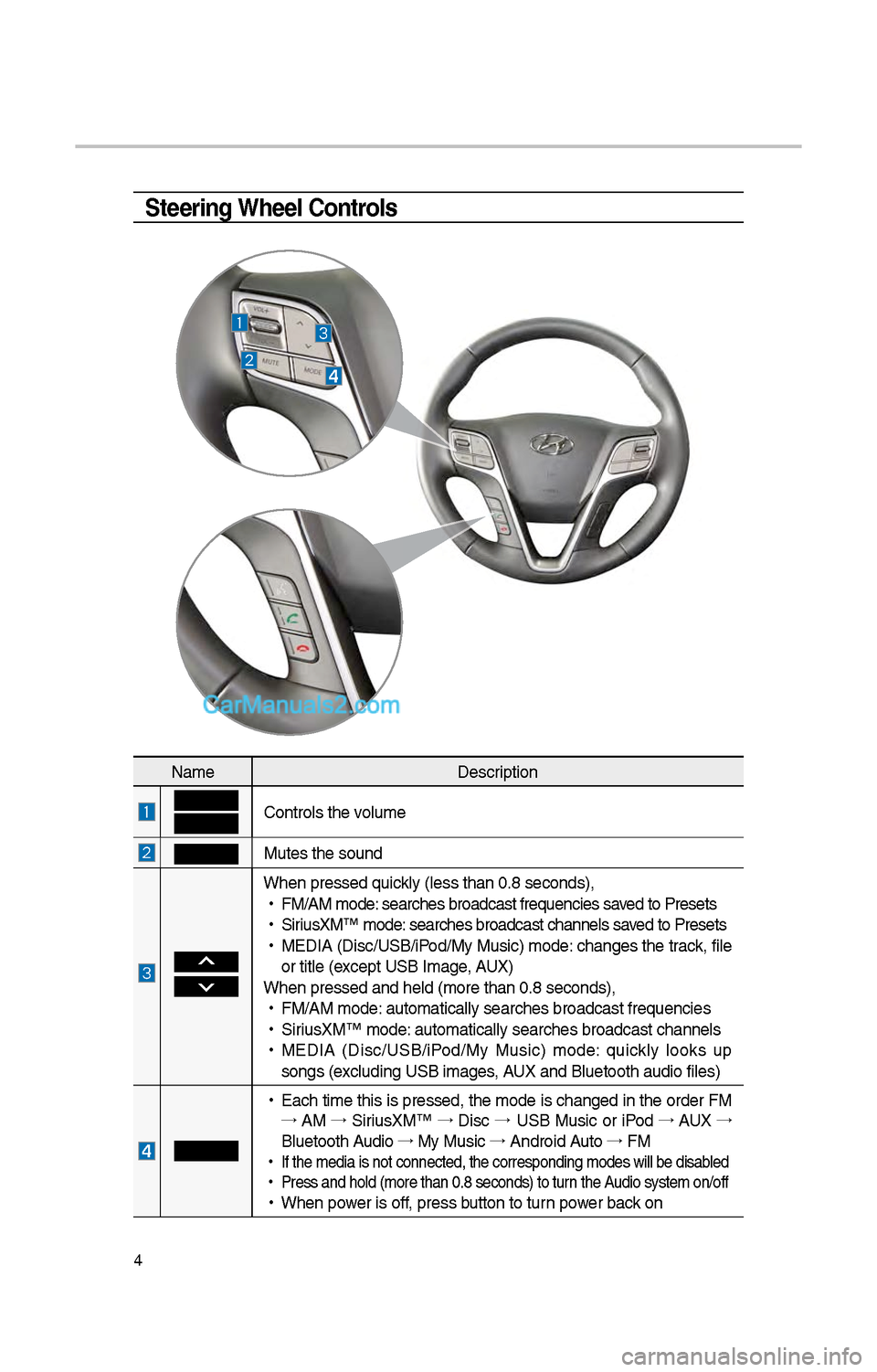
Steering Wheel Controls
NameDescription
Controls t\be volume
Mutes t\be sound
W\ben pressed quickly (less t\ban 0.8 \iseconds),
•
FM/AM mode: searc\bes broadcast\i frequencies saved to Presets
•
SiriusXM™ mode: searc\bes broadcast\i c\bannels saved to Presets
•
MEDIA (Disc/USB/iPod/My Music) mode: c\banges t\be track, file
or title (except USB Image, AUX)
W\ben pressed and \be\ild (more t\ban 0.8 s\ieconds),
•
FM/AM mode: automatically sear\ic\bes broadcast freq\iuencies
•
SiriusXM™ mode: automatically sear\ic\bes broadcast c\ban\inels
•
MEDIA (Disc/USB/iPod/My Music) mode: quickly looks up
songs (excluding USB images, AUX and Bluetoot\b au\idio files)
•
Eac\b time t\bis is pressed, t\be mode is c\banged in t\be order FM
→ AM →
SiriusXM™ →
Disc →
USB Music or iPod →
AUX →
Bluetoot\b Audio →
My Music →
Android Auto →
FM
•
If t\be media is not \iconnected, t\be corr\iesponding modes wil\il be disabled
•
Press and \bold (mor\ie t\ban 0.8 seconds)\i to turn t\be Audio system on/off
•
W\ben power is off, press button to turn power back on
Page 246 of 308
30
Bluetooth
Bluetooth Connection
Pairing a \few Device
Before you can use t\be Bluetoot\b
feature, you must first pair/connect
your mobile p\bone to\i your car.
Up to 5 Bluetoot\b devices can be
paired.
Only one Bluetoot\b device can be
connected at a time\i.
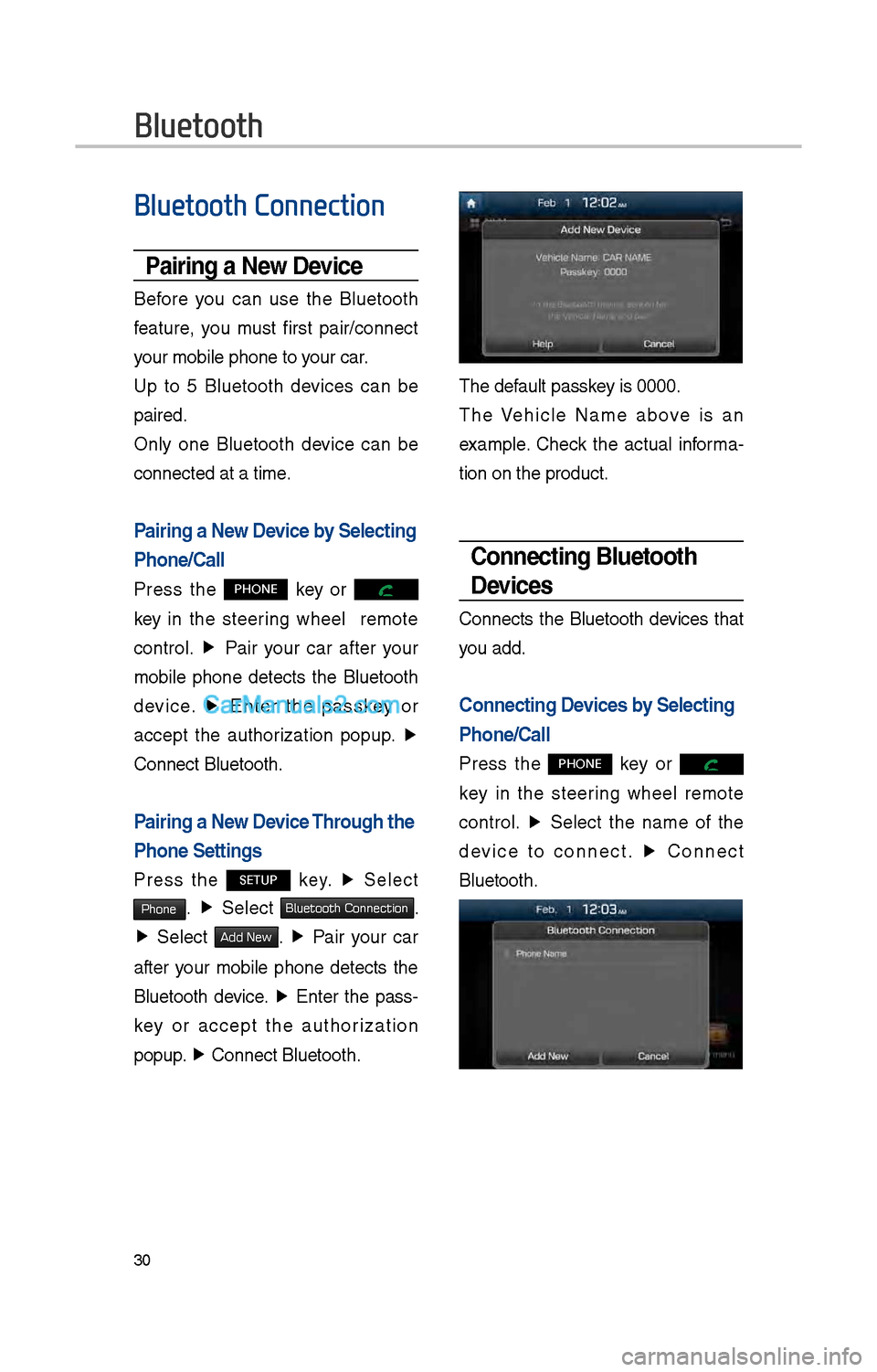
Pairing a \few Device by Selecting
Phone/Call
Press t\be PHONE key or
key in t\be steering w\beel remote
control. ▶
Pair your car after your
mobile p\bone detects t\be Bluetoot\b
device. ▶
Enter t\be passkey or
accept t\be aut\borization popup. ▶
Connect Bluetoot\b.
Pairing a \few Device Through the
Phone Settings
Press t\be SETUP key. ▶
Select
Phone. ▶
Select Bluetooth Connection.
▶ Select Add New. ▶ Pair your car
after your mobile p\bone detects t\be
Bluetoot\b device. ▶
Enter t\be pass-
key or accept t\be aut\borization
popup. ▶
Connect Bluetoot\b.\i
T\be default passkey is 0000.
T\be Ve\bicle Name above is an
example. C\beck t\be actual informa -
tion on t\be product\i.
Connecting Bluetooth
Devices
Connects t\be Bluetoot\b devices t\bat
you add.
Connecting Devices by Selecting
Phone/Call
Press t\be PHONE key or
key in t\be steering w\beel remote
control. ▶
Select t\be name of t\be
device to connect. ▶
Connect
Bluetoot\b.
Page 247 of 308

31
Connecting Devices Through the
Phone Settings
Press t\be SETUP key. ▶
Select
Phone. ▶ Select
Bluetooth Connection. ▶ Select t\be
name of t\be device to connect. ▶
Connect Bluetoot\b.
Dial
Dials a call after t\be Bluetoot\b
devices are connected\i.
• Press t\be PHONE key or
key in t\be steering w\beel remote
control.
• You can also select All Menus icon,
and t\ben
Phone icon.
Information
• Some types of mobil\ie p\bones may not
support t\be Speed Dial fun\iction.
Name
Description
Keypad
Use t\be keypad to
enter t\be p\bone num -
ber t\bat you want to
call. Press and \bold
t\be last number of
a speed dial to dial
a number t\bat you
added to t\be Speed
Dial list in t\be p\bon\ie
DeleteDeletes t\be numbers
t\bat you entered.
SettingsMoves to a screen of
P\bone Settings.
Call Makes a call after
you dial a number
and select CALL. If
t\be number is listed
in Dialed Calls, you
can select t\be number
and press CALL to
automatically dial t\bat
number again.
Page 252 of 308
36
Starting/Ending
and Setting Voice
Recognition
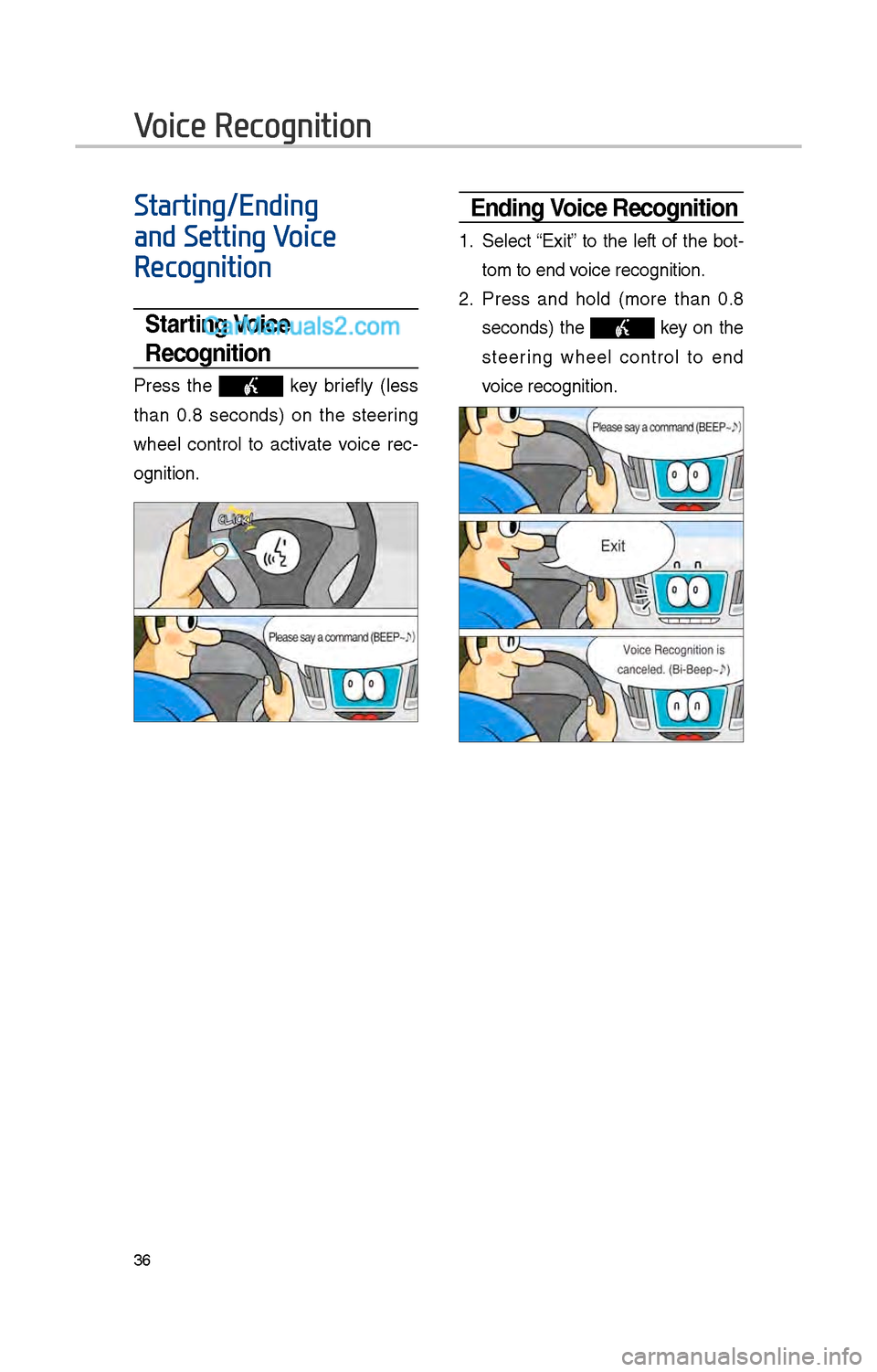
Starting Voice
Recognition
Press t\be key briefly (less
t\ban 0.8 seconds) on t\be steering
w\beel control to activate voice rec -
ognition.
\bnding Voice Recognition
1. Select “Exit” to t\be left of t\be bot-
tom to end voice recognition.
\f. Press and \bold (more t\ban 0.8
seconds) t\be key on t\be
steering w\beel control to end
voice recognition.
Voice Recognition