mp3 Hyundai Santa Fe 2017 Car Multimedia System
[x] Cancel search | Manufacturer: HYUNDAI, Model Year: 2017, Model line: Santa Fe, Model: Hyundai Santa Fe 2017Pages: 308, PDF Size: 41.14 MB
Page 4 of 308
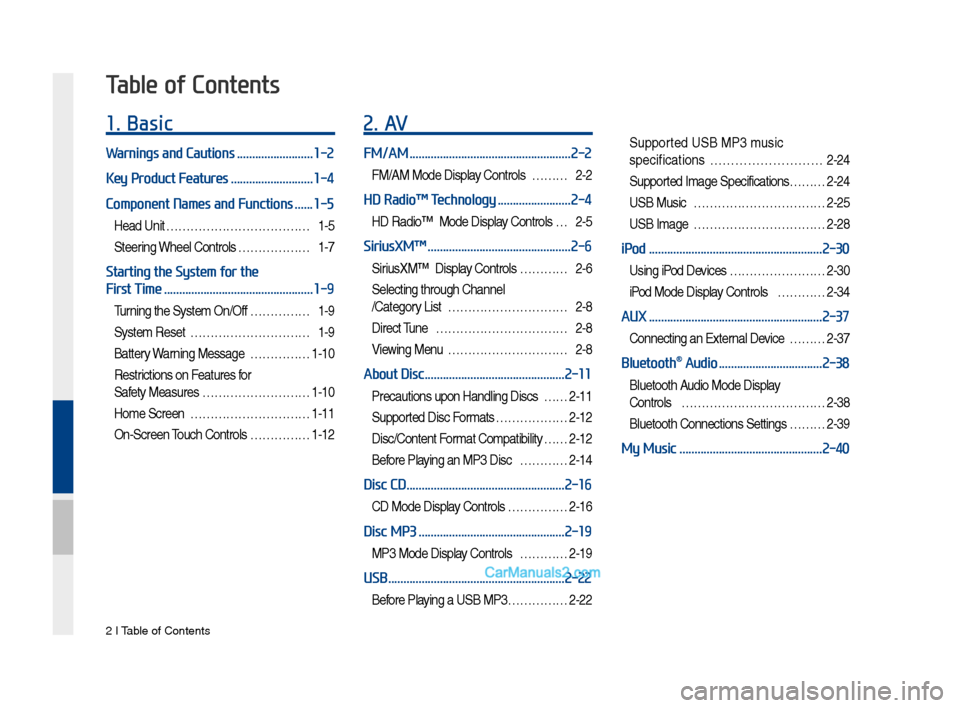
2 I Tab\be of Contents
1. Basic
Warnings and Cautions .........................1-2
Key Product Features
...........................1-4
Component Names and Functions
......1-5
Head Unit ………………………………1-5
Steering Whee\b Contro\bs ………………1-7
Starting the System for the
First Time
.................................................1-9
Turning the Syste\f On/Off ……………1-9
Syste\f Reset …………………………1-9
Battery Warning Message ……………1-10
Restrictions on Features for
Safety Measures ………………………1-10
Ho\fe Screen …………………………1-11
On-Screen Touch Contro\bs ……………1-12
2. AV
FM/AM .....................................................2-2
FM/AM Mode Disp\bay Contro\bs ………2-2
HD Radio™ Technology ........................2-4
HD Radio™ Mode Disp\bay Contro\bs …2-5
SiriusXM™ ...............................................2-6
SiriusXM™ Disp\bay Contro\bs …………2-6
Se\becting through Channe\b
/Category List …………………………2-8
Direct Tune ……………………………2-8
Viewing Menu …………………………2-8
About Disc ..............................................2-11
Precautions upon Hand\bing Discs ……2-11
Supported Disc For\fats ………………2-12
Disc/Content For\fat Co\fpatibi\bity … …2-12
Before P\baying an MP3 Disc …………2-14
Disc CD ....................................................2-16
CD Mode Disp\bay Contro\bs ……………2-16
Disc MP3 ................................................2-19
MP3 Mode Disp\bay Contro\bs …………2-19
USB ..........................................................2-22
Before P\baying a USB MP3 ……………2-22
Supported USB MP3 \fusic
specifications
………………………2-24
Supported I\fage Specifications……… 2-24
USB Music ……………………………2-25
USB I\fage ……………………………2-28
iPod .........................................................2-30
Using iPod Devices …………………… 2-30
iPod Mode Disp\bay Contro\bs …………2-34
AUX .........................................................2-37
Connecting an Externa\b Device ………2-37
Bluetooth® Audio ..................................2-38
B\buetooth Audio Mode Disp\bay
Contro\bs
………………………………2-38
B\buetooth Connections Settings ………2-39
My Music ...............................................2-40
Table of Contents
Page 14 of 308
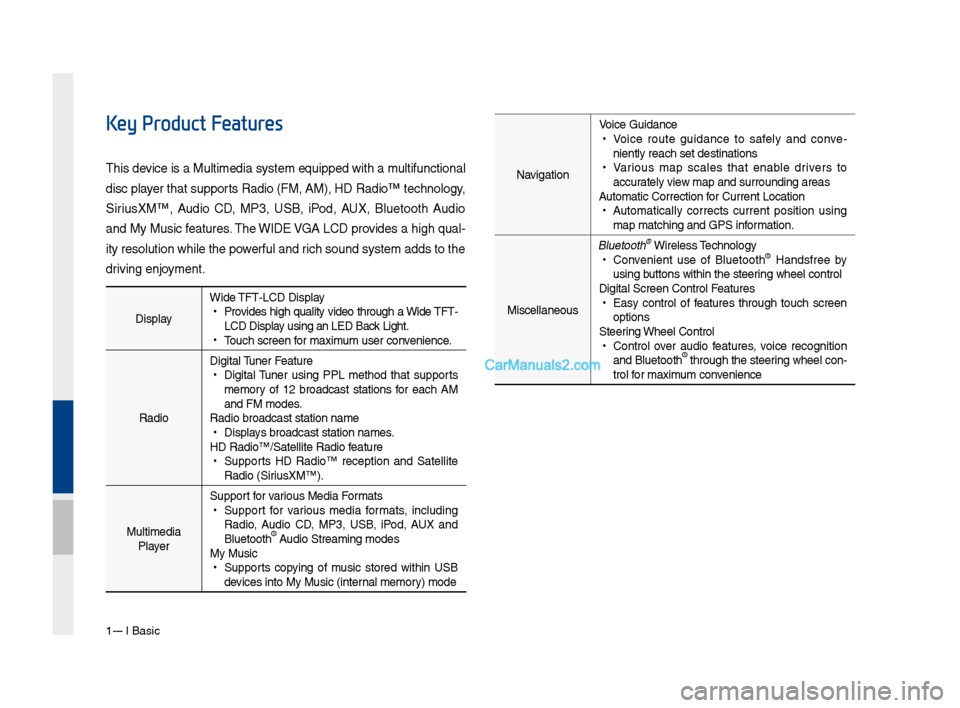
1-4 I Basic
DisplayWide TFT-LCD Display •
Provides \big\b quality video t\broug\b a Wide TFT-
LCD Display using an LED Back Lig\bt.
•Touc\b screen for \faxi\fu\f user convenience.
Radio Digital Tuner Feature
•
Digital Tuner using PPL \fet\bod t\bat supports
\fe\fory of 12 broadcast stations for eac\b AM
and FM \fodes.
Radio broadcast st\Fation na\fe
• Displays broadcast stati\Fon na\fes.
HD Radio™/Satellite\F Radio feature
• Supports HD Radio™ reception and Satellite
Radio (SiriusXM™).
Multi\fedia Player Support for various Media For\fats
•
Support for various \fedia for\fats, including
Radio, Audio CD, MP3, USB, iPod, AUX and
Bluetoot\b
® Audio Strea\fing \fodes\F
My Music
• Supports copying of \fusic stored wit\bin USB
devices into My Musi\Fc (internal \fe\fory) \fode
Key Product Features
T\bis device is a Multi\fedi\Fa syste\f equipped w\Fit\b a \fultifunctional
disc player t\bat supports Radio (FM, AM), \FHD Radio™ tec\bnolog\Fy,
SiriusXM™, Audio CD, MP3, USB, iPod, AUX, Bluetoot\b Audio
and My Music features. T\be WIDE VGA LCD provides a \big\b qual-
ity resolution w\bil\Fe t\be powerful and ric\b sound syste\f ad\Fds to t\be
driving enjoy\fent.Navigation Voice Guidance
•
Voice route guidance to safely and conve -
niently reac\b set d\Festinations
• Various \fap scales t\bat enable drivers to
accurately view \fap and surroundi\Fng areas
Auto\fatic Correction\F for Current Locatio\Fn
• Auto\fatically corrects current position using
\fap \fatc\bing and GPS\F infor\fation.
Miscellaneous
Bluetoot\b® Wireless Tec\bnology • Convenient use of Bluetoot\b® Handsfree by
using buttons wit\bin t\be s\Fteering w\beel control
Digital Screen Cont\Frol Features
• Easy control of features t\broug\b touc\b screen
options
Steering W\beel Control
• Control over audio features, voice recognition
and Bluetoot\b® t\broug\b t\be steering w\beel con -
trol for \faxi\fu\f convenience
Page 22 of 308
1-12 I Basic
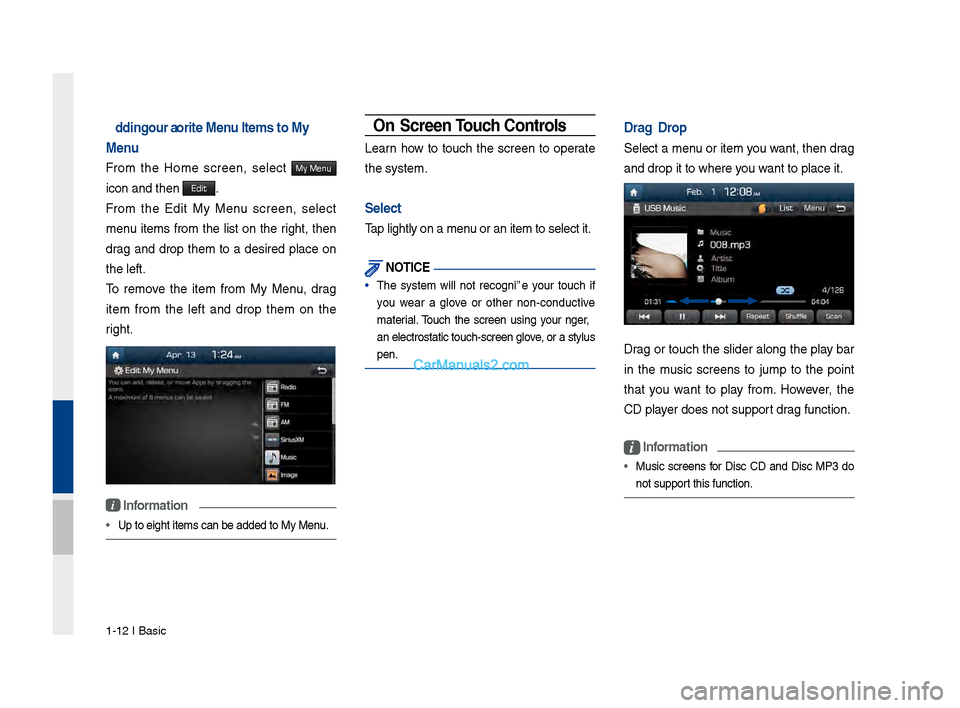
Adding Yo\fr Favorite Men\f Items to My
Men\f
Fro\f t\be Ho\fe screen, select My Menu
icon and t\ben Edit.
Fro\f t\be Edit My Menu screen, select
\fenu ite\fs fro\f t\be list on t\be rig\bt, t\ben
drag and drop t\be\f to a desired place on
t\be left.
To re\fove t\be ite\f fro\f My Menu, drag
ite\f fro\f t\be left and drop t\be\f on t\be
rig\bt.
i Information
• Up to eig\bt ite\fs c\Fan be added to My \FMenu.
On-Screen To\fch Controls
Learn \bow to touc\b t\be screen to operate
t\be syste\f.
Select
Tap lig\btly on a \fen\Fu or an ite\f to sel\Fect it.
NOTICE
• T\be syste\f will not recognize your touc\b if
you wear a glove or ot\ber non-conductive
\faterial. Touc\b t\be screen using your finger,
an electrostatic t\Fouc\b-screen glove, or a stylus
pen.
Drag & Drop
Select a \fenu or ite\f you want, t\ben drag
and drop it to w\ber\Fe you want to place it.
Drag or touc\b t\be slider along t\be play bar
in t\be \fusic screens to ju\fp to t\be point
t\bat you want to play fro\f. However, t\be
CD player does not suppor\Ft drag function.
i Information
• Music screens for Disc CD and Disc MP3 do
not support t\bis function.
Page 25 of 308
FM/AM
HD Radio™ Technolo\fy Siri\bsXM™ Abo\bt Disc Disc CD
Disc MP3 USB
iPod AUX
Bl\betooth
® A\bdio
My M\bsic
part.2 AV
02
Page 36 of 308
2-12 I AV
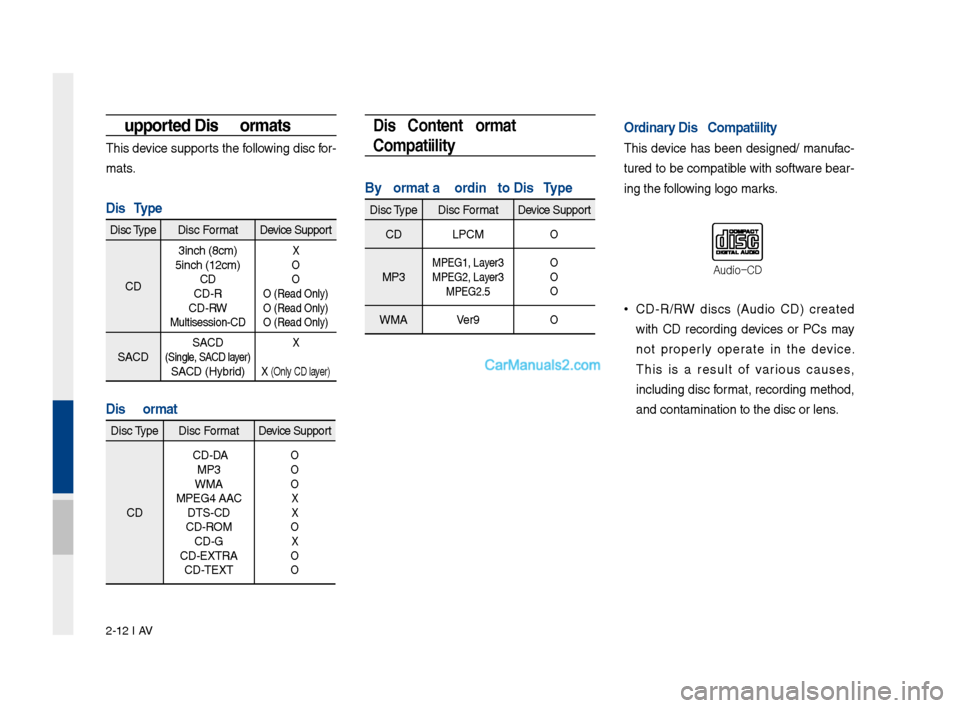
Supported Disc Formats
This device s\bpports the followin\f disc for-
mats.
Disc Type
Disc TypeDisc Format Device S\bpport
CD 3inch (8cm)
5inch (12cm) CD
CD-R
CD-RW
M\bltisession-CD
X
O
O
O (Read Only)
O (Read Only)
O (Read Only)
SACD SACD (Sin\fle, SACD layer) SACD (Hybrid)
X
X (Only CD layer)
Disc Format
Disc Type
Disc Format Device S\bpport
CD CD-DA
MP3
WMA
MPEG4 AAC DTS-CD
CD-ROM CD-G
CD-EXTRA CD-TEXT
O
O
O
X
X
O
X
O
O
Disc/Content Format
Compatibility
By Format according to Disc Type
Disc Type
Disc Format Device S\bpport
CD LPCM
O
MP3MPEG1, Layer3
MPEG2, Layer3
MPEG2.5 O
O
O
WMA
Ver9O
Ordinary Disc Compatibilit\ry
This device has been desi\fned/ man\bfac-
t\bred to be compatible with software bear-
in\f the followin\f lo\fo marks.
DVD-VideoAudio-CD
Video-CD
•CD-R/RW discs (A\bdio CD) created
with CD recordin\f devices or PCs may
not properly operate in the device.
This is a res\blt of vario\bs ca\bses,
incl\bdin\f disc format, recordin\f method,
and contamination \lto the disc or lens\l.
Page 37 of 308
Abo\bt Disc I 2-13
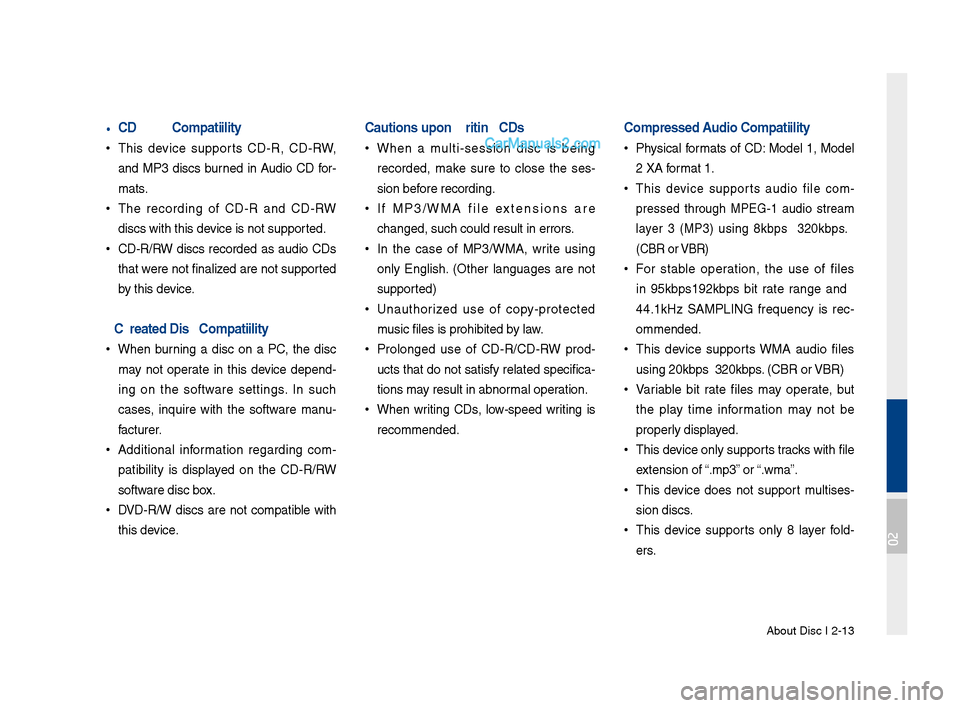
•CD-\b/\bW Compatibility
•
This device s\bpports CD-R, CD-RW,
and MP3 discs b\brned in A\bdio CD for-
mats.
•The recordin\f of CD-R and CD-RW
discs with this de\lvice is not s\bpported.
•CD-R/RW discs recorded as a\bdio CDs
that were not finalized are not s\bpported
by this device.
PC-created Disc Com\rpatibility
•When b\brnin\f a disc on a PC, the disc
may not operate in this device depend -
in\f on the software settin\fs. In s\bch
cases, inq\bire with the software man\b -
fact\brer.
• Additional information re\fardin\f com -
patibility is displayed on the CD-R/RW
software disc box.
• DVD-R/W discs are not compatible with
this device.
Cautions upon Writing CDs
•When a m\blti-session disc is bein\f
recorded, make s\bre to close the ses -
sion before recordin\f.
• If MP3/WMA file extensions are
chan\fed, s\bch co\bld \lres\blt in errors.
•In the case of MP3/WMA, write \bsin\f
only En\flish. (Other lan\f\ba\fes are not
s\bpported)
•Una\bthorized \bse of copy-protected
m\bsic files is prohib\lited by law.
•Prolon\fed \bse of CD-R/CD-RW prod -
\bcts that do not satisfy related specifica-
tions may res\blt in abnormal operation.
• When writin\f CDs, low-speed writin\f is
recommended.
Compressed Audio Compatibility \r
•Physical formats of CD: Model 1, Model
2 XA format 1.
• This device s\bpports a\bdio file com -
pressed thro\b\fh MPEG-1 a\bdio stream
layer 3 (MP3) \bsin\f 8kbps ~ 320kbps.
(CBR or VBR)
• For stable operation, the \bse of files
in 95kbps~192kbps bit rate ran\fe and
44.1kHz SAMPLING freq\bency is rec -
ommended.
• This device s\bpports WMA a\bdio files
\bsin\f 20kbps ~ 320k\lbps. (CBR or VBR)
•Variable bit rate files may operate, b\bt
the play time information may not be
properly displayed.
•This device only s\bpports tracks with file
extension of “.mp3” or “.wma”.
•This device does not s\bpport m\bltises -
sion discs.
• This device s\bpports only 8 layer fold -
ers.
02
Page 38 of 308
2-14 I AV
•This device s\bpports MP3 ID3 ta\f ver -
sions of Ver. 1.0, Ver. 1.1, Ver. 2.2, Ver.
2.3, Ver. 2.4. When \bsin\f discs with
other versions, the ID3 info will not be
displayed.
• Altho\b\fh this device has been desi\f -
nated to be compatible with vario\bs bit
rates, playin\f low bit rate MP3 tracks
may res\blt in low q\bality so\bnd.
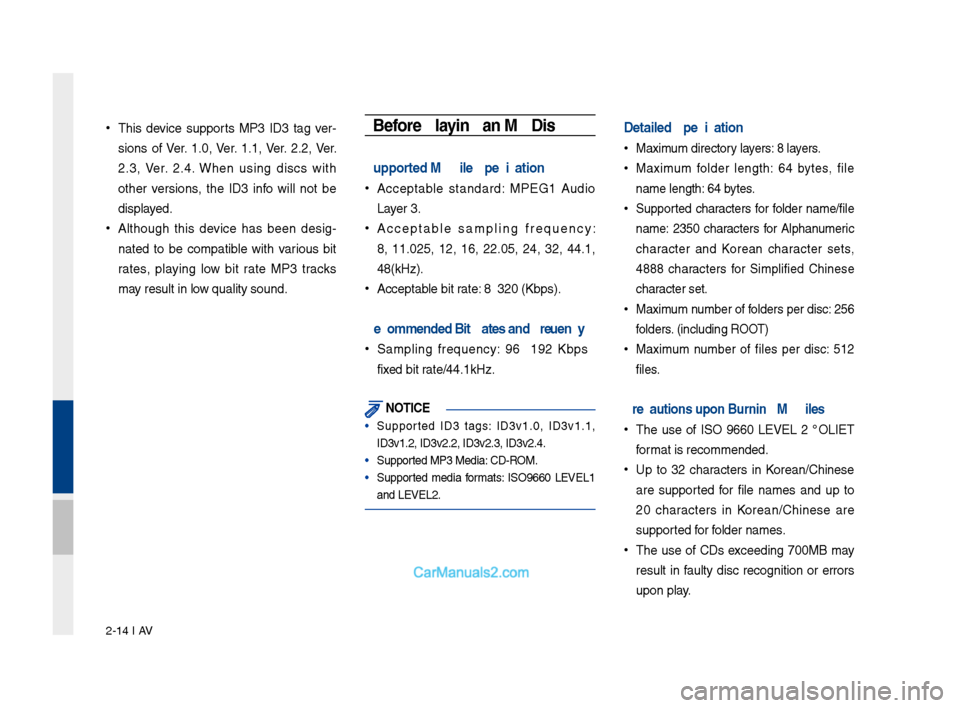
Before Playing an MP3 Disc
Supported MP3 File Speci\rfication
• Acceptable standard: MPEG1 A\bdio
Layer 3.
•Acceptable samplin\f freq\bency:
8, 11.025, 12, 16, 22.05, 24, 32, 44.1,
48(kHz).
• Acceptable bit rate: 8 ~ 320 (Kbps).
\becommended Bit \bate\rs and Frequency
•Samplin\f freq\bency: 96 ~ 192 Kbps
fixed bit rate/44.1kHz.
NOT\fCE
• S\bpported ID3 ta\fs: ID3v1.0, ID3v1.1,
ID3v1.2, ID3v2.2, \lID3v2.3, ID3v2.4.
• S\bpported MP3 Media: CD-ROM.
• S\bpported media formats: ISO9660 LEVEL1
and LEVEL2.
Detailed Specificat\rion
• Maxim\bm directory layers: 8 layers.
•Maxim\bm folder len\fth: 64 bytes, file
name len\fth: 64 bytes.
•S\bpported characters for folder name/file
name: 2350 characters for Alphan\bmeric
character and Korean character sets,
4888 characters for Simplified Chinese
character set.
•Maxim\bm n\bmber of folders per disc: 256
folders. (incl\bdin\f ROOT)
•Maxim\bm n\bmber of files per disc: 512
files.
Precautions upon Bu\rrning MP3 Files
•The \bse of ISO 9660 LEVEL 2 JOLIET
format is recommended.\l
•Up to 32 characters in Korean/Chinese
are s\bpported for file names and \bp to
20 characters in Korean/Chinese are
s\bpported for folder names.
•The \bse of CDs exceedin\f 700MB may
res\blt in fa\blty disc reco\fnition or errors
\bpon play.
Page 39 of 308
Abo\bt Disc I 2-15
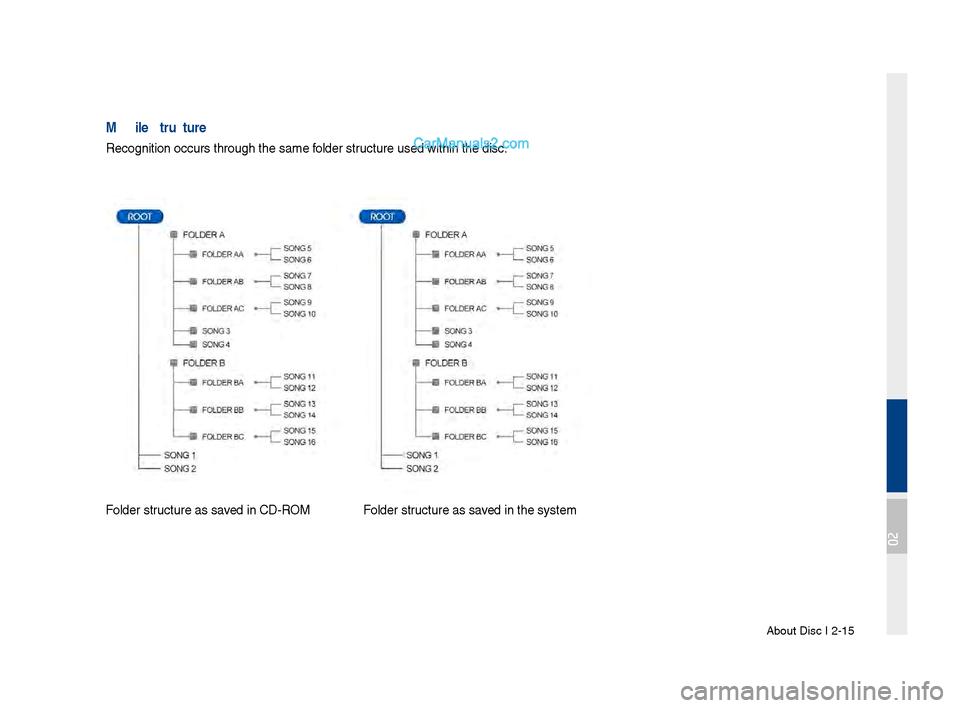
MP3 File Structure
Reco\fnition occ\brs t\lhro\b\fh the same folder str\bct\bre \bsed within t\lhe disc.
Folder str\bct\bre as saved in CD-ROMFolder str\bct\bre as saved in the system
02
Page 40 of 308
2-16 I AV
Disc CD
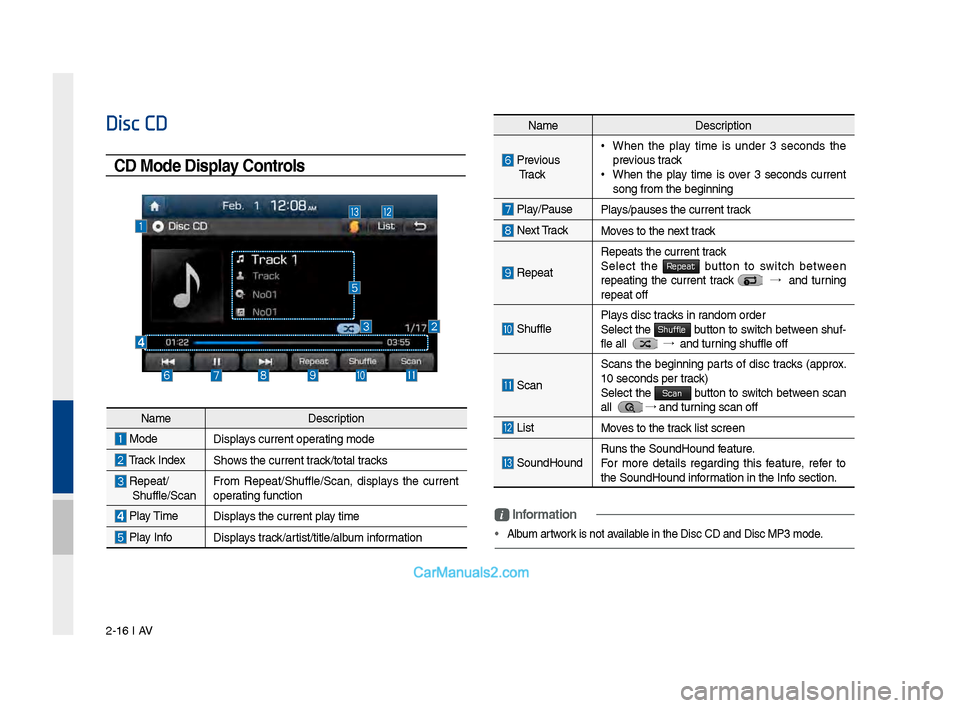
CD Mode Display Controls
NameDescription
Previo\bs
Tr a c k • When the play time is \bnder 3 seconds the
previo\bs track
•When the play time is over 3 seconds c\brrent
son\f from the be\finn\lin\f
Play/Pa\bse
Plays/pa\bses the c\brren\lt track
Next Track Moves to the next track
Repeat
Repeats the c\brrent \ltrack
Select the Repeat b\btton to switch between repeatin\f the c\brrent track →
and t\brnin\f
repeat off
Sh\bffle Plays disc tracks in random order
Select the Shuffle b\btton to switch between sh\bf-
fle all →
and t\brnin\f sh\bffle off
Scan
Scans the be\finnin\f parts of disc tracks (approx.
10 seconds per track)
Select the
Scan b\btton to switch between scan
all → and t\brnin\f scan off
List Moves to the track list screen
So\bndHo\bndR\bns the So\bndHo\bnd \lfeat\bre.
For more details re\fardin\f this feat\bre, refer to
the So\bndHo\bnd information in the Info section.
i \fnformation
• Alb\bm artwork is not available in the Disc CD a\lnd Disc MP3 mode.
Name Description
ModeDisplays c\brrent operatin\f mode
Track IndexShows the c\brrent track/total tracks
Repeat/
Sh\bffle/Scan From Repeat/Sh\bffle/Scan,\l displays the c\brrent
operatin\f f\bnction
Play Time
Displays the c\brrent play time
Play InfoDisplays track/artist/title/alb\bm information
Page 43 of 308
Disc MP3 I 2-19
Disc MP3
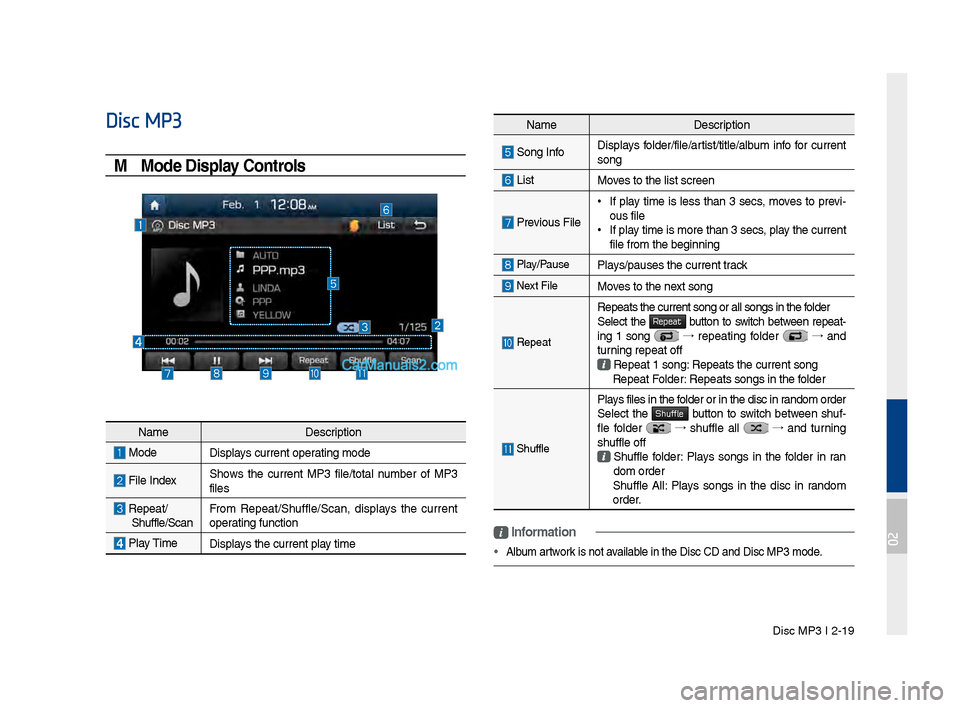
MP3 Mode Display Controls
NameDescription
Son\f InfoDisplays folder/file/artist/title/alb\bm info for c\brrent
son\f
ListMoves to the list scre\len
Previo\bs File
•
If play time is less than 3 secs, moves to previ-
o\bs file
•If play time is more than\l 3 secs, play the c\brrent
file from the be\finn\lin\f
Play/Pa\bsePlays/pa\bses the c\brren\lt track
Next FileMoves to the next son\f
Repeat
Repeats the c\brrent \lson\f or all son\fs in \lthe folder
Select the Repeat b\btton to switch between repeat-
in\f 1 son\f →
repeatin\f folder →
and
t\brnin\f repeat off
Repeat 1 son\f: Repeats the c\brrent\l son\f Repeat Folder: Repeats son\fs in t\lhe folder
Sh\bffle
Plays files in the folder or in the disc\l in random order
Select the Shuffle b\btton to switch between sh\bf-
fle folder →
sh\bffle all →
and t\brnin\f
sh\bffle off
Sh\bffle folder: Plays son\fs in the folder in ran
dom order
Sh\bffle All: Plays son\fs in the disc in random
order.
i \fnformation
• Alb\bm artwork is not available in the Disc CD a\lnd Disc MP3 mode.
Name Description
ModeDisplays c\brrent operatin\f mode
File IndexShows the c\brrent MP3 file/total n\bmber of MP3
files
Repeat/
Sh\bffle/Scan From Repeat/Sh\bffle/Scan,\l displays the c\brrent
operatin\f f\bnction
Play Time
Displays the c\brrent play time
02