Led Hyundai Sonata 2015 Owners Manual
[x] Cancel search | Manufacturer: HYUNDAI, Model Year: 2015, Model line: Sonata, Model: Hyundai Sonata 2015Pages: 603, PDF Size: 14.7 MB
Page 382 of 603
5-24
Driving your vehicle
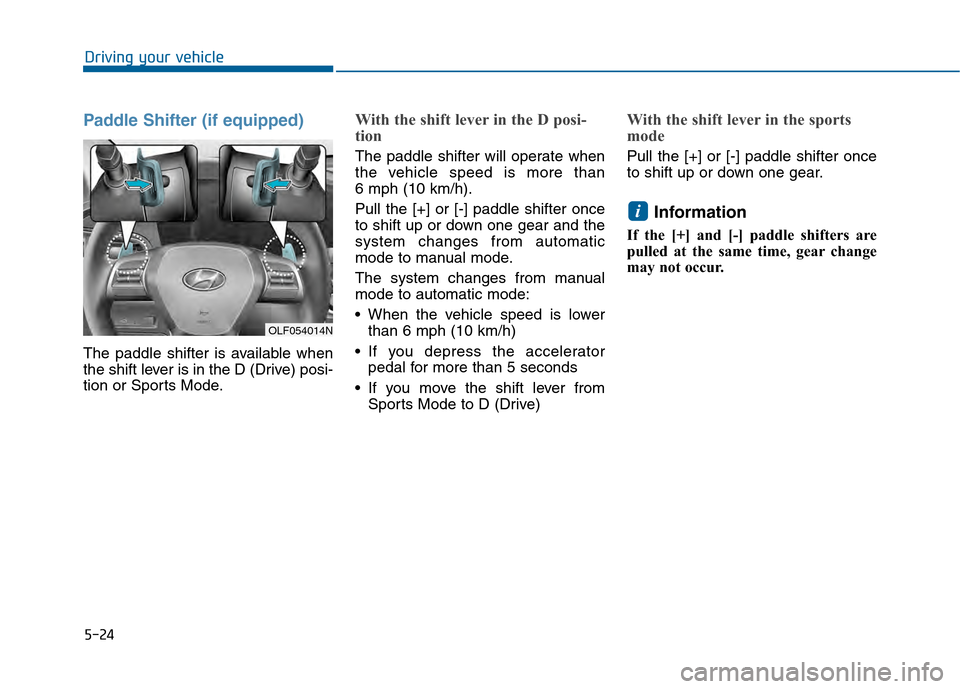
Paddle Shifter (if equipped)
The paddle shifter is available when
the shift lever is in the D (Drive) posi-
tion or Sports Mode.
With the shift lever in the D posi-
tion
The paddle shifter will operate when
the vehicle speed is more than
6 mph (10 km/h).
Pull the [+] or [-] paddle shifter once
to shift up or down one gear and the
system changes from automatic
mode to manual mode.
The system changes from manual
mode to automatic mode:
When the vehicle speed is lowerthan 6 mph (10 km/h)
If you depress the accelerator pedal for more than 5 seconds
If you move the shift lever from Sports Mode to D (Drive)
With the shift lever in the sports
mode
Pull the [+] or [-] paddle shifter once
to shift up or down one gear.
Information
If the [+] and [-] paddle shifters are
pulled at the same time, gear change
may not occur.
i
OLF054014N
Page 385 of 603
5-27
Driving your vehicle
5
Information - Kickdown
Mechanism
Use the kickdown mechanism for
maximum acceleration. Depress the
accelerator pedal beyond the pressure
point. The automatic transmission will
shift to a lower gear depending on the
engine speed. i
To reduce the risk of SERIOUS
INJURY or DEATH:
ALWAYS wear your seatbelt.
In a collision, an unbelted
occupant is significantly more
likely to be seriously injured
or killed than a properly belt-
ed occupant.
Avoid high speeds when cor-
nering or turning.
Do not make quick steering
wheel movements, such as
sharp lane changes or fast,
sharp turns.
The risk of rollover is greatly
increased if you lose control
of your vehicle at highway
speeds.
Loss of control often occurs if
two or more wheels drop off
the roadway and the driver
over steers to reenter the
roadway. (Continued)
(Continued)
In the event your vehicle
leaves the roadway, do not
steer sharply. Instead, slow
down before pulling back into
the travel lanes.
HYUNDAI recommends you
follow all posted speed limits.
WARNING
Page 394 of 603
5-36
Driving your vehicle
If the EPB Malfunction Indicator is still on, have the system
checked by an authorized
HYUNDAI dealer.
If the Parking Brake Warning Light does not illuminate or
blinks even though the EPB
switch was pulled up, the EPB
may not be applied.
If the Parking Brake Warning Light blinks when the EPB
Malfunction Indicator is on,
press the EPB switch, then pull
it up. Once more, press the
switch back to its original posi-
tion and pull it back up. If the
EPB Malfunction Indicator does
not go off, have your vehicle
checked by an authorized
HYUNDAI dealer.
Emergency braking
If there is a problem with the brake
pedal while driving, emergency brak-
ing is possible by pulling up and
holding the EPB switch. Braking is
possible only while you are holding
the EPB switch. However, braking
distance will be longer than normal. During emergency braking the
Parking Brake Warning Light will
illuminate to indicate that the sys-
tem is operating.
If there is a noise or burning smell
after using the emergency brake,
have your vehicle checked by an
authorized HYUNDAI dealer as
soon as possible.
NOTICE
NOTICENOTICE
Do not operate the parking
brake while the vehicle is mov-
ing except in an emergency sit-
uation. It could damage the
brake system and lead to a
severe accident.
WARNING
Page 395 of 603
5-37
Driving your vehicle
5
AUTO HOLD (if equipped)
This feature keeps the brake applied
when the shift lever is in D (Drive), R
(Reverse), N (Neutral) or Sports
Mode with the feature enabled and
when the brake pedal has been
depressed to stop the vehicle.
To apply:
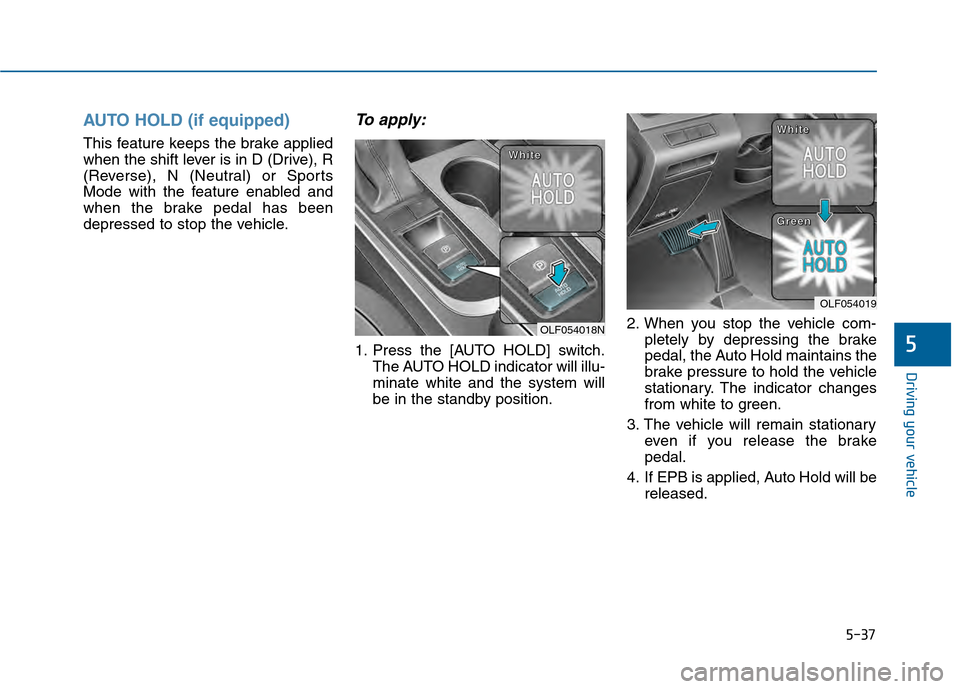
1. Press the [AUTO HOLD] switch.The AUTO HOLD indicator will illu-
minate white and the system will
be in the standby position. 2. When you stop the vehicle com-
pletely by depressing the brake
pedal, the Auto Hold maintains the
brake pressure to hold the vehicle
stationary. The indicator changes
from white to green.
3. The vehicle will remain stationary even if you release the brake
pedal.
4. If EPB is applied, Auto Hold will be released.
OLF054018N
W
W
W
W
h
h
h
h
i
i
i
i
t
t
t
t
e
e
e
e
OLF054019
W
W
W
W
h
h
h
h
i
i
i
i
t
t
t
t
e
e
e
e
G
G
G
G
r
r
r
r
e
e
e
e
e
e
e
e
n
n
n
n
Page 396 of 603
5-38
Driving your vehicle
To release:
Press the accelerator pedal with the
shift lever in R (Reverse), D (Drive)
or Sports Mode, the Auto Hold will be
released automatically and the vehi-
cle will start to move. The indicator
changes from green to white.
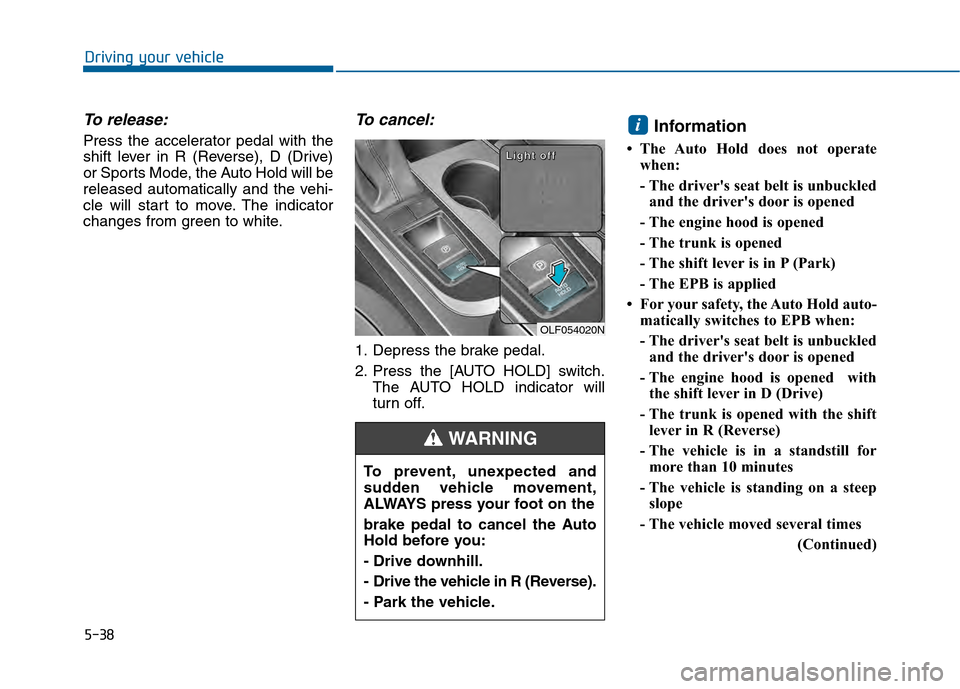
To cancel:
1. Depress the brake pedal.
2. Press the [AUTO HOLD] switch.The AUTO HOLD indicator will
turn off.
Information
• The Auto Hold does not operatewhen:
- The driver's seat belt is unbuckledand the driver's door is opened
- The engine hood is opened
- The trunk is opened
- The shift lever is in P (Park)
- The EPB is applied
• For your safety, the Auto Hold auto- matically switches to EPB when:
- The driver's seat belt is unbuckledand the driver's door is opened
- The engine hood is opened with the shift lever in D (Drive)
- The trunk is opened with the shift lever in R (Reverse)
- The vehicle is in a standstill for more than 10 minutes
- The vehicle is standing on a steep slope
- The vehicle moved several times (Continued)
i
To prevent, unexpected and
sudden vehicle movement,
ALWAYS press your foot on the
brake pedal to cancel the Auto
Hold before you:
- Drive downhill.
- Drive the vehicle in R (Reverse).
- Park the vehicle.
WARNING
OLF054020N
L
L
L
L
i
i
i
i
g
g
g
g
h
h
h
h
t
t
t
t
o
o
o
o
f
f
f
f
f
f
f
f
Page 399 of 603
5-41
Driving your vehicle
5
ABS is an electronic braking system
that helps prevent a braking skid.
ABS allows the driver to steer and
brake at the same time.
Using ABS
To obtain the maximum benefit from
your ABS in an emergency situation,
do not attempt to modulate your
brake pressure and do not try to
pump your brakes. Depress your
brake pedal as hard as possible.
When you apply your brakes under
conditions which may lock the
wheels, you may hear sounds from
the brakes, or feel a corresponding
sensation in the brake pedal. This is
normal and it means your ABS is
active.
ABS does not reduce the time or dis-
tance it takes to stop the vehicle.
Always maintain a safe distance from
the vehicle in front of you.
ABS will not prevent a skid that
results from sudden changes in
direction, such as trying to take a
corner too fast or making a sudden
lane change. Always drive at a safe
speed for the road and weather con-
ditions.ABS cannot prevent a loss of stabili-
ty. Always steer moderately when
braking hard. Severe or sharp steer-
ing wheel movement can still cause
your vehicle to veer into oncoming
traffic or off the road.
On loose or uneven road surfaces,
operation of the anti-lock brake sys-
tem may result in a longer stopping
distance than for vehicles equipped
with a conventional brake system.
The ABS warning light ( ) will stay
on for several seconds after the igni-
tion switch is in the ON position.
During that time, the ABS will go
through self-diagnosis and the light
will go off if everything is normal. If
the light stays on, you may have a
problem with your ABS. Contact an
authorized HYUNDAI dealer as soon
as possible(Continued)
Drive your vehicle at reduced
speeds during the following
conditions:
Rough, gravel or snow-cov-
ered roads.
On roads where the road sur-
face is pitted or has different
surface height.
Tire chains are installed on
your vehicle.
The safety features of an ABS
or ESC equipped vehicle should
not be tested by high speed
driving or cornering. This could
endanger the safety of yourself
or others.
Page 410 of 603
5-52
Driving your vehicle
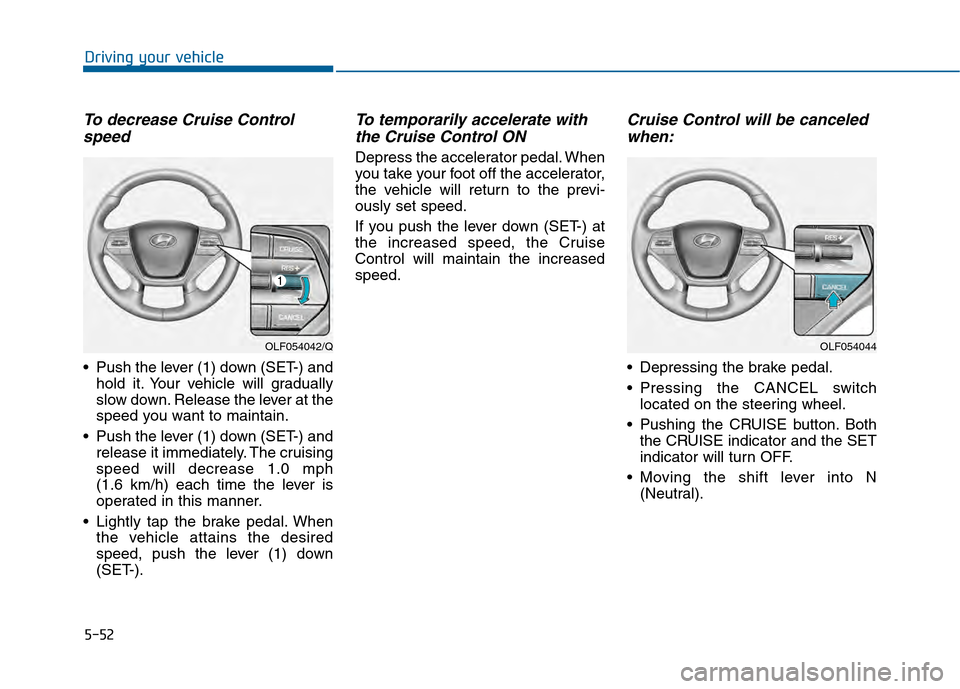
To decrease Cruise Controlspeed
Push the lever (1) down (SET-) and
hold it. Your vehicle will gradually
slow down. Release the lever at the
speed you want to maintain.
Push the lever (1) down (SET-) and release it immediately. The cruising
speed will decrease 1.0 mph
(1.6 km/h) each time the lever is
operated in this manner.
Lightly tap the brake pedal. When the vehicle attains the desired
speed, push the lever (1) down
(SET-).
To temporarily accelerate withthe Cruise Control ON
Depress the accelerator pedal. When
you take your foot off the accelerator,
the vehicle will return to the previ-
ously set speed.
If you push the lever down (SET-) at
the increased speed, the Cruise
Control will maintain the increased
speed.
Cruise Control will be canceledwhen:
Depressing the brake pedal.
Pressing the CANCEL switch
located on the steering wheel.
Pushing the CRUISE button. Both the CRUISE indicator and the SET
indicator will turn OFF.
Moving the shift lever into N (Neutral).
OLF054042/QOLF054044
Page 414 of 603
5-56
Driving your vehicle
1.Turn the Smart Cruise Control System on (the cruise indicator
light will be on but the system will
not be activated).
2.Push and hold the Vehicle-to- Vehicle Distance button for more
than 2 seconds.
3.Choose between "Smart Cruise Control (SCC) Mode" and "Cruise
Control (CC) Mode".
When the system is canceled using
the CRUISE button or the CRUISE
button is used after the engine is
turned on, the SCC Mode will turn
on.
Smart Cruise Control Speed
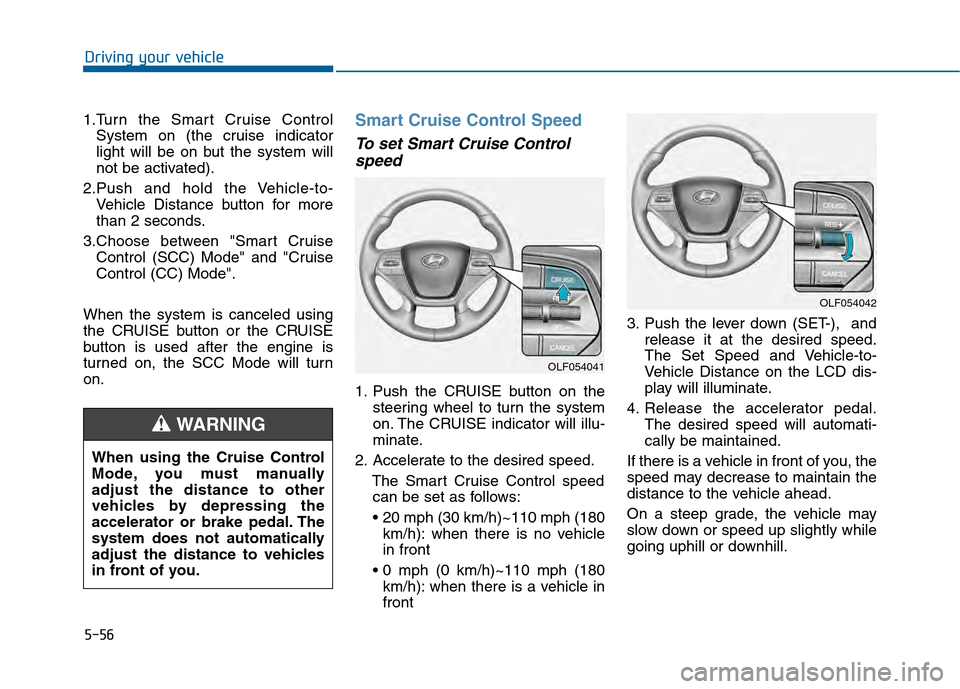
To set Smart Cruise Control speed
1. Push the CRUISE button on the
steering wheel to turn the system
on. The CRUISE indicator will illu-
minate.
2. Accelerate to the desired speed. The Smart Cruise Control speedcan be set as follows:
km/h): when there is no vehicle
in front
km/h): when there is a vehicle in
front 3. Push the lever down (SET-), and
release it at the desired speed.
The Set Speed and Vehicle-to-
Vehicle Distance on the LCD dis-
play will illuminate.
4. Release the accelerator pedal. The desired speed will automati-
cally be maintained.
If there is a vehicle in front of you, the
speed may decrease to maintain the
distance to the vehicle ahead.
On a steep grade, the vehicle may
slow down or speed up slightly while
going uphill or downhill.
OLF054042
OLF054041
When using the Cruise Control
Mode, you must manually
adjust the distance to other
vehicles by depressing the
accelerator or brake pedal. The
system does not automatically
adjust the distance to vehicles
in front of you.
WARNING
Page 415 of 603
5-57
Driving your vehicle
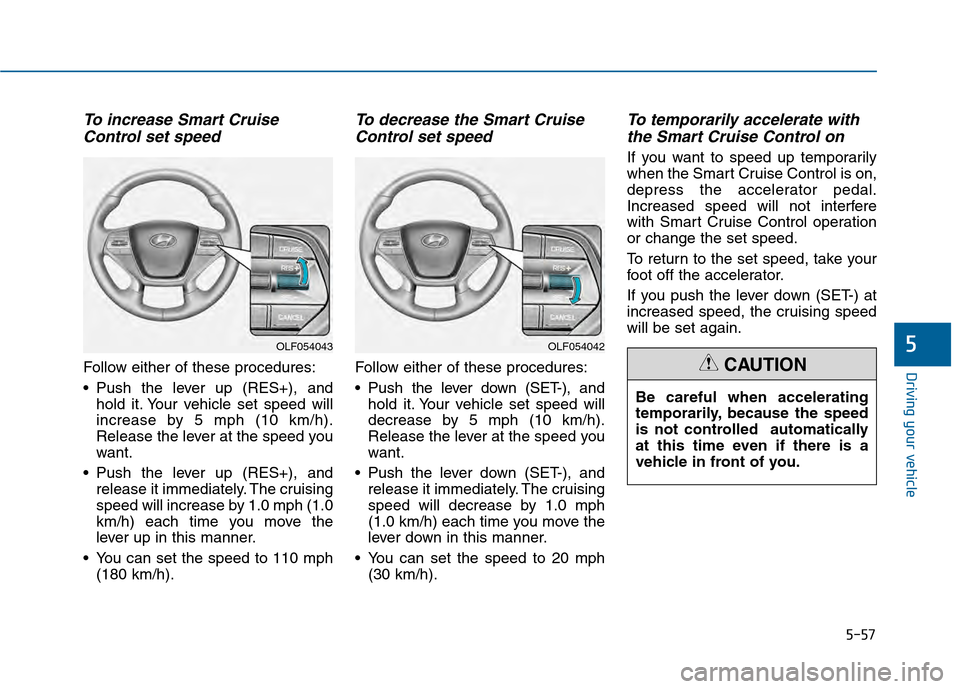
To increase Smart CruiseControl set speed
Follow either of these procedures:
Push the lever up (RES+), and
hold it. Your vehicle set speed will
increase by 5 mph (10 km/h).
Release the lever at the speed you
want.
Push the lever up (RES+), and release it immediately. The cruising
speed will increase by 1.0 mph (1.0
km/h) each time you move the
lever up in this manner.
You can set the speed to 110 mph (180 km/h).
To decrease the Smart CruiseControl set speed
Follow either of these procedures:
Push the lever down (SET-), and
hold it. Your vehicle set speed will
decrease by 5 mph (10 km/h).
Release the lever at the speed you
want.
Push the lever down (SET-), and release it immediately. The cruising
speed will decrease by 1.0 mph
(1.0 km/h) each time you move the
lever down in this manner.
You can set the speed to 20 mph (30 km/h).
To temporarily accelerate withthe Smart Cruise Control on
If you want to speed up temporarily
when the Smart Cruise Control is on,
depress the accelerator pedal.
Increased speed will not interfere
with Smart Cruise Control operation
or change the set speed.
To return to the set speed, take your
foot off the accelerator.
If you push the lever down (SET-) at
increased speed, the cruising speed
will be set again.
5
Be careful when accelerating
temporarily, because the speed
is not controlled automatically
at this time even if there is a
vehicle in front of you.
CAUTION
OLF054042OLF054043
Page 416 of 603
5-58
Driving your vehicle
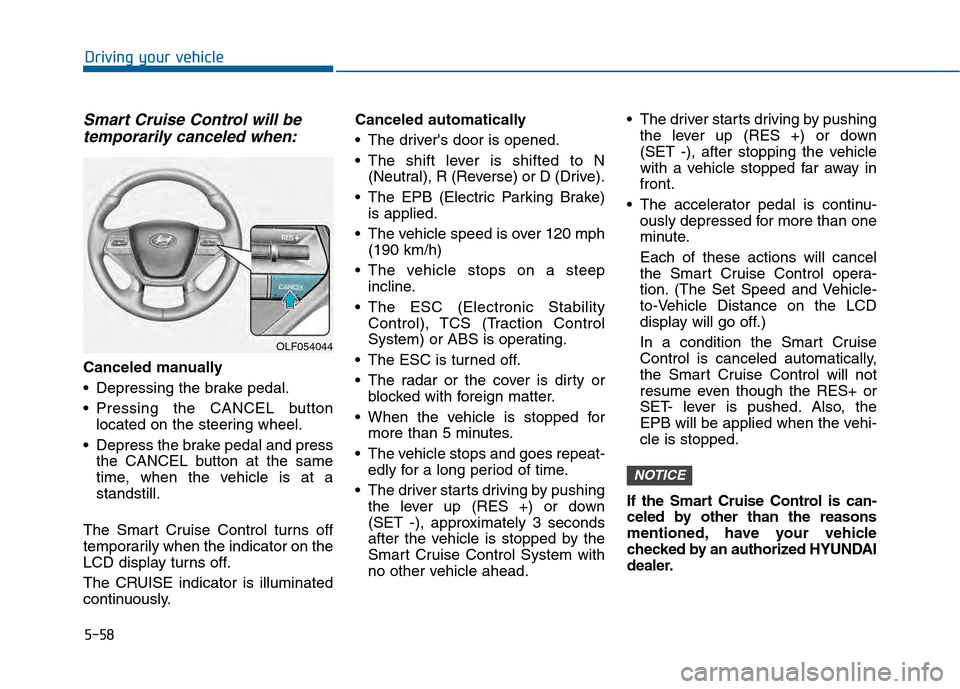
Smart Cruise Control will betemporarily canceled when:
Canceled manually
Depressing the brake pedal.
Pressing the CANCEL button
located on the steering wheel.
Depress the brake pedal and press the CANCEL button at the same
time, when the vehicle is at a
standstill.
The Smart Cruise Control turns off
temporarily when the indicator on the
LCD display turns off.
The CRUISE indicator is illuminated
continuously. Canceled automatically
The driver's door is opened.
The shift lever is shifted to N
(Neutral), R (Reverse) or D (Drive).
The EPB (Electric Parking Brake) is applied.
The vehicle speed is over 120 mph (190 km/h)
The vehicle stops on a steep incline.
The ESC (Electronic Stability Control), TCS (Traction Control
System) or ABS is operating.
The ESC is turned off.
The radar or the cover is dirty or blocked with foreign matter.
When the vehicle is stopped for more than 5 minutes.
The vehicle stops and goes repeat- edly for a long period of time.
The driver starts driving by pushing the lever up (RES +) or down
(SET -), approximately 3 seconds
after the vehicle is stopped by the
Smart Cruise Control System with
no other vehicle ahead. The driver starts driving by pushing
the lever up (RES +) or down
(SET -), after stopping the vehicle
with a vehicle stopped far away in
front.
The accelerator pedal is continu- ously depressed for more than one
minute.
Each of these actions will cancel
the Smart Cruise Control opera-
tion. (The Set Speed and Vehicle-
to-Vehicle Distance on the LCD
display will go off.)
In a condition the Smart Cruise
Control is canceled automatically,
the Smart Cruise Control will not
resume even though the RES+ or
SET- lever is pushed. Also, the
EPB will be applied when the vehi-
cle is stopped.
If the Smart Cruise Control is can-
celed by other than the reasons
mentioned, have your vehicle
checked by an authorized HYUNDAI
dealer.
NOTICE
OLF054044