Led Hyundai Sonata 2015 Owner's Manual
[x] Cancel search | Manufacturer: HYUNDAI, Model Year: 2015, Model line: Sonata, Model: Hyundai Sonata 2015Pages: 603, PDF Size: 14.7 MB
Page 417 of 603
5-59
Driving your vehicle
5
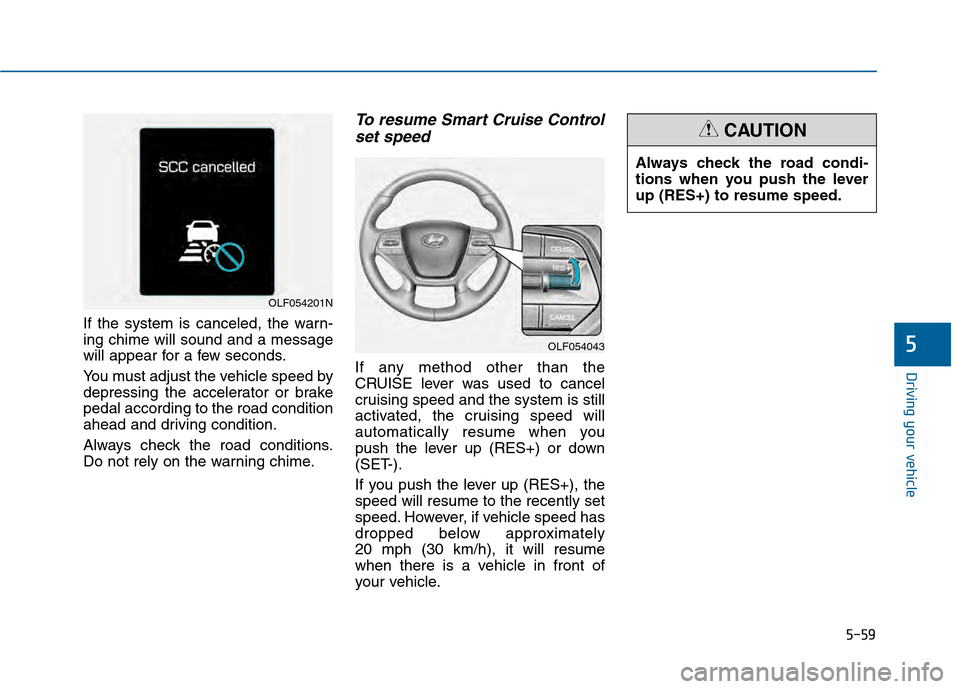
If the system is canceled, the warn-
ing chime will sound and a message
will appear for a few seconds.
You must adjust the vehicle speed by
depressing the accelerator or brake
pedal according to the road condition
ahead and driving condition.
Always check the road conditions.
Do not rely on the warning chime.
To resume Smart Cruise Controlset speed
If any method other than the
CRUISE lever was used to cancel
cruising speed and the system is still
activated, the cruising speed will
automatically resume when you
push the lever up (RES+) or down
(SET-).
If you push the lever up (RES+), the
speed will resume to the recently set
speed. However, if vehicle speed has
dropped below approximately
20 mph (30 km/h), it will resume
when there is a vehicle in front of
your vehicle.
OLF054201N
OLF054043
Always check the road condi-
tions when you push the lever
up (RES+) to resume speed.
CAUTION
Page 418 of 603
5-60
Driving your vehicle
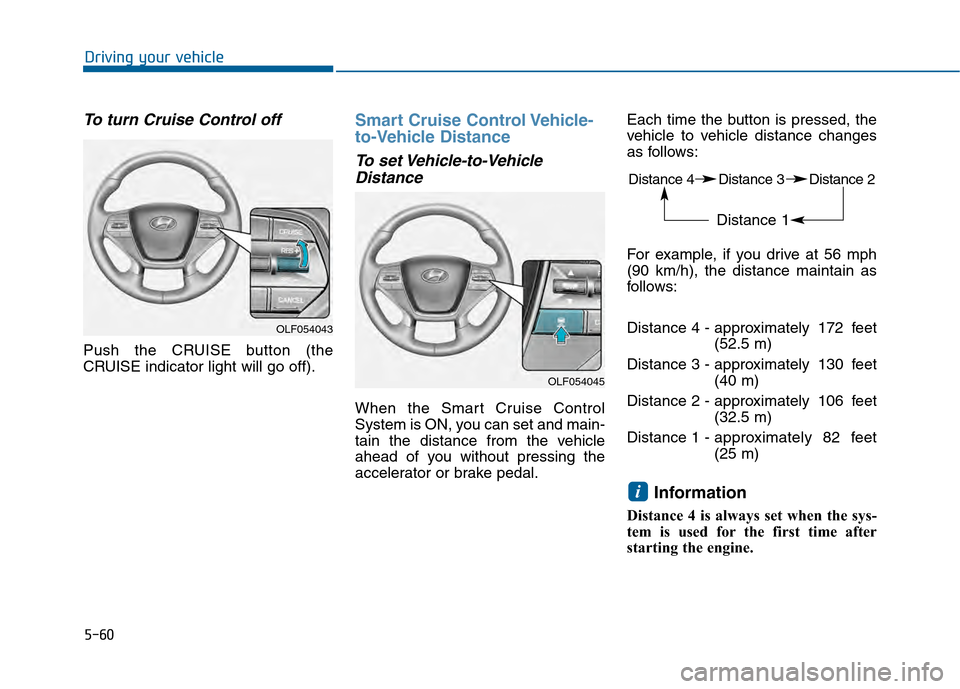
To turn Cruise Control off
Push the CRUISE button (the
CRUISE indicator light will go off).
Smart Cruise Control Vehicle-
to-Vehicle Distance
To set Vehicle-to-VehicleDistance
When the Smart Cruise Control
System is ON, you can set and main-
tain the distance from the vehicle
ahead of you without pressing the
accelerator or brake pedal. Each time the button is pressed, the
vehicle to vehicle distance changes
as follows:
For example, if you drive at 56 mph
(90 km/h), the distance maintain as
follows:
Distance 4 - approximately 172 feet
(52.5 m)
Distance 3 - approximately 130 feet (40 m)
Distance 2 - approximately 106 feet (32.5 m)
Distance 1 - approximately 82 feet
(25 m)
Information
Distance 4 is always set when the sys-
tem is used for the first time after
starting the engine.
i
OLF054043
OLF054045
Distance 4 Distance 3 Distance 2
Distance 1
Page 433 of 603
5-75
Driving your vehicle
5
- An unusual shape vehicle is aheadsuch as a trailer, special access
vehicle or a truck with unique
shaped cargo.
- The rear lamps of the vehicle ahead is missing, installed on an
unusual place or installed unevenly.
- The front vehicle installs a separate lamp or LED lamp at the rear of the
vehicle.
- Coming in or out a tunnel, where the illumination intensity is high.
- Driving with the sun in front of you.
- The approaching vehicle has the high beam on.
- The vehicle vibrates heavily due to road conditions.
- The vehicle is tilted from a flat tire or being towed.
- The vehicle ahead is not distin- guishable due to similar shape
lamps.
- The vehicle ahead is not distin- guishable due to objects that can
be mistaken for a vehicle.Information
This device complies with Part 15 of
the FCC rules.
Operation is subject to the following
two conditions:
1. This device may not cause harmful interference, and
2. This device must accept any inter- ference received, including interfer-
ence that may cause undesired
operation.
i
Page 439 of 603
5-81
Driving your vehicle
5
Information
• If the detected vehicle is out of thesensing range of your vehicle, move
the vehicle away from the detected
object slowly; the warning will be
canceled.
• The system may not operate proper- ly due to other factors or circum-
stances. Always pay attention to
your surrounding.
• If your vehicle's left or right side bumper is blinded by barrier or
vehicles, the system sensing ability
may be reduced.
i
The warning light on the out-
side rearview mirror will illu-
minate whenever a vehicle is
detected at the rear side by
the system.
To avoid accidents, do not
focus only on the warning
light and neglect to see the
surrounding of the vehicle.
Drive safely even though the
vehicle is equipped with a
Blind Spot Detection System
(BSD) and Rear Cross Traffic
Alert (RCTA). Do not solely
rely on the system but check
your surrounding before
changing lanes or backing the
vehicle up.
The system may not alert the
driver in some conditions so
always check the surround-
ings while driving.
(Continued)
(Continued)
The Blind Spot Detection
System (BSD) and Rear Cross
Traffic Alert (RCTA) are not a
substitute for proper and safe
driving practices. Always
drive safely and use caution
when changing lanes or back-
ing the vehicles up. The Blind
Spot Detection System (BSD)
may not detect every object
alongside the vehicle.
WARNING
Page 441 of 603
5-83
Driving your vehicle
5
(Continued)
- Metal substances are near thevehicles such as in a construc-
tion area.
- A big vehicle is near such as a bus or truck.
- A motorcycle or bicycle is near.
- A flat trailer is near.
- If the vehicle has started at the same time as the vehicle next to
you and has accelerated.
- When the other vehicle passes by at a higher rate of speed.
- When changing lanes.
- When going down or up a steep road where the height of the lane
is different.
- When the other vehicle drives very close.
- When a trailer or carrier is installed.
- When the temperature of the rear bumper is high.
- When the radars are covered by a wall or a pillar of a parking lot.
(Continued)(Continued)
- When your vehicle is backing up,
if the detected vehicle also backs
up.
- Small objects like shopping carts and strollers.
- If there is a vehicle with decreased ride height (lowered).
- When the vehicle is close to another vehicle.
- When the vehicle in the next lane moves two lanes away from you
OR when the vehicle two lanes
away moves to the next lane
from you.Information
This device complies with Part 15 of
the FCC rules.
Operation is subject to the following
two conditions:
1. This device may not cause harmful interference, and
2. This device must accept any inter- ference received, including interfer-
ence that may cause undesired
operation.
i
Page 443 of 603
5-85
Driving your vehicle
5
If you are still stuck after rocking
the vehicle a few times, have the
vehicle pulled out by a tow vehicle
to avoid engine overheating, pos-
sible damage to the transmission,
and tire damage. See “Towing” in
chapter 6.
To prevent damage to the trans-
mission, turn OFF the ESC prior to
rocking the vehicle.
Smooth Cornering
Avoid braking or gear changing in
corners, especially when roads are
wet. Ideally, corners should always
be taken under gentle acceleration.
Driving at Night
Night driving presents more hazards
than driving in the daylight. Here are
some important tips to remember:
Slow down and keep more dis-tance between you and other vehi-
cles, as it may be more difficult to
see at night, especially in areas
where there may not be any street
lights.
Adjust your mirrors to reduce the glare from other driver's head-
lamps.
Keep your headlamps clean and properly aimed. Dirty or improperly
aimed headlamps will make it
much more difficult to see at night.
Avoid staring directly at the head- lamps of oncoming vehicles. You
could be temporarily blinded, and it
will take several seconds for your
eyes to readjust to the darkness.
NOTICE
Page 446 of 603
5-88
Driving your vehicle
Information
• Install tire chains on the front tires.It should be noted that installing tire
chains on the tires will provide a
greater driving force, but will not
prevent side skids.
• Do not install studded tires without first checking local, state and
municipal regulations for possible
restrictions against their use.
Chain installation
When installing tire chains, follow the
manufacturer's instructions and
mount them as tightly possible. Drive
slowly (less than 20 mph (30 km/h))
with chains installed. If you hear the
chains contacting the body or chas-
sis, stop and tighten them. If they still
make contact, slow down until the
noise stops. Remove the tire chains
as soon as you begin driving on
cleared roads.
When mounting snow chains, park
the vehicle on level ground away
from traffic. Turn on the vehicle
Hazard Warning Flasher and place a
triangular emergency warning device
behind the vehicle (if available).
Always place the vehicle in P (Park),
apply the parking brake and turn off
the engine before installing snow
chains.i
The use of tire chains may
adversely affect vehicle han-
dling:
Drive less than 20 mph
(30 km/h) or the chain manu-
facturer’s recommended speed
limit, whichever is lower.
Drive carefully and avoid
bumps, holes, sharp turns,
and other road hazards, which
may cause the vehicle to
bounce.
Avoid sharp turns or locked
wheel braking.
WARNING
Page 447 of 603
5-89
Driving your vehicle
5
- When using tire chains:
Wrong size chains or improperlyinstalled chains can damage
your vehicle's brake lines, sus-
pension, body and wheels.
Use SAE “S” class or wire chains.
If you hear noise caused by chains contacting the body,
retighten the chain to prevent
contact with the vehicle body.
To prevent body damage, retighten the chains after driving
0.3~0.6 miles (0.5~1.0 km).
Do not use tire chains on vehi- cles equipped with aluminum
wheels. If unavoidable, use a
wire type chain.
Use wire chains less than 0.47 inch (12 mm) wide to prevent
damage to the chain’s connec-
tion.
Winter Precautions
Use high quality ethylene glycolcoolant
Your vehicle is delivered with high
quality ethylene glycol coolant in the
cooling system. It is the only type of
coolant that should be used because
it helps prevent corrosion in the cool-
ing system, lubricates the water
pump and prevents freezing. Be sure
to replace or replenish your coolant
in accordance with the maintenance
schedule in chapter 7. Before winter,
have your coolant tested to assure
that its freezing point is sufficient for
the temperatures anticipated during
the winter.
Change to "winter weight" oil ifnecessary
In some climates it is recommended
that a lower viscosity "winter weight"
oil be used during cold weather. See
chapter 8 for recommendations. If
you aren't sure what weight oil you
should use, consult an authorized
HYUNDAI dealer.
Check battery and cables
Winter puts additional burdens on
the battery system. Visually inspect
the battery and cables as described
in chapter 7. The level of charge in
your battery can be checked by an
authorized HYUNDAI dealer or a
service station.
NOTICE
Page 453 of 603
5-95
Driving your vehicle
5
Certification label
The certification label is located on
the driver's door sill at the center pil-
lar and shows the maximum allow-
able weight of the fully loaded vehi-
cle. This is called the GVWR (Gross
Vehicle Weight Rating). The GVWR
includes the weight of the vehicle, all
occupants, fuel and cargo.
This label also tells you the maxi-
mum weight that can be supported
by the front and rear axles, called
Gross Axle Weight Rating (GAWR).The total weight of the vehicle,
including all occupants, accessories,
cargo, and trailer tongue load must
not exceed the Gross Vehicle Weight
Rating (GVWR) or the Gross Axle
Weight Rating (GAWR). To find out
the actual loads on your front and
rear axles, you need to go to a weigh
station and weigh your vehicle. Be
sure to spread out your load equally
on both sides of the centerline.
OBH059070
Overloading
Never exceed the GVWR for
your vehicle, the GAWR for
either the front or rear axle
and vehicle capacity weight.
Exceeding these ratings can
affect your vehicle’s handling
and braking ability, and cause
an accident.
Do not overload your vehicle.
Overloading your vehicle can
cause heat buildup in your
vehicle's tires and possible
tire failure, increased stop-
ping distances and poor vehi-
cle handling-all of which may
result in a crash.
WARNING
Page 467 of 603
6-13
What to do in an emergency
6
The TPMS Malfunction Indicator
may illuminate after blinking for
one minute if the vehicle is near
electric power supply cables or
radio transmitters such as police
stations, government and public
offices, broadcasting stations,
military installations, airports,
transmitting towers, etc.
Additionally, the TPMS Malfunction
Indicator may illuminate if snow
chains are used or electronic
devices such as computers, charg-
ers, remote starters, navigation,
etc. This may interfere with normal
operation of the TPMS.
Changing a Tire with TPMS
If you have a flat tire, the Low Tire
Pressure and Position telltales will
come on. Have the flat tire repaired
by an authorized HYUNDAI dealer
as soon as possible or replace the
flat tire with the spare tire.
The spare tire (if equipped) does not
come with a tire pressure monitoring
sensor. When the low pressure tire or
the flat tire is replaced with the spare
tire, the Low Tire Pressure Telltale
will remain on. Also, the TPMS
Malfunction Indicator will illuminate
after blinking for one minute if the
vehicle is driven at speed above 15.5
mph (25 km/h) for approximately 20
minutes.Once the original tire equipped with
a tire pressure monitoring sensor is
reinflated to the recommended pres-
sure and reinstalled on the vehicle,
the Low Tire Pressure Telltale and
TPMS Malfunction Indicator will go
off within a few minutes of driving.
If the indicators do not extinguish
after a few minutes, please visit an
authorized HYUNDAI dealer.
Each wheel is equipped with a tire
pressure sensor mounted inside the
tire behind the valve stem (except for
the spare tire). You must use TPMS
specific wheels. It is recommended
that you always have your tires serv-
iced by an authorized HYUNDAI
dealer.
You may not be able to identify a tire
with low pressure by simply looking
at it. Always use a good quality tire
pressure gauge to measure. Please
note that a tire that is hot (from being
driven) will have a higher pressure
measurement than a tire that is cold.
NOTICE
Never use a puncture-repairing
agent not approved by HYUNDAI
dealer to repair and/or inflate a
low pressure tire. Tire sealant
not approved by HYUNDAI deal-
er may damage the tire pressure
sensor.
CAUTION