audio HYUNDAI SONATA LIMITED 2016 Owners Manual
[x] Cancel search | Manufacturer: HYUNDAI, Model Year: 2016, Model line: SONATA LIMITED, Model: HYUNDAI SONATA LIMITED 2016Pages: 708, PDF Size: 25.96 MB
Page 425 of 708
![HYUNDAI SONATA LIMITED 2016 Owners Manual 4-177
Multimedia System
4
Calling by Dialing a Number
Press the key Select [Dial
Number]
1) Dial Pad : Used to enter phonenumber
2) Call : If a number has been entered, calls the number If no
numbe](/img/35/56186/w960_56186-424.png "HYUNDAI SONATA LIMITED 2016 Owners Manual 4-177
Multimedia System
4
Calling by Dialing a Number
Press the key Select [Dial
Number]
1) Dial Pad : Used to enter phonenumber
2) Call : If a number has been entered, calls the number If no
numbe")
4-177
Multimedia System
4
Calling by Dialing a Number
Press the key Select [Dial
Number]
1) Dial Pad : Used to enter phonenumber
2) Call : If a number has been entered, calls the number If no
number has been entered, switch
es to call history screen
3) End : Deletes the entered phone number
4) Delete : Deletes entered numbers one digit at a time
Answering Calls
Answering a Call
Answering a call with a Bluetooth®
Wireless Technology device connect-
ed will display the following screen.
1) Caller : Displays the other party’sname when the incoming caller is
saved within your contacts
2) Incoming Number : Displays the incoming number
3) Accept : Accept the incoming call
4) Reject : Reject the incoming call
Information
• When an incoming call pop-up is displayed, most Audio and SETUP
mode features are disabled. Only
the call volume will operate.
• The telephone number may not be properly displayed in some mobile
phones.
• When a call is answered with the mobile phone, the call mode will
automatically revert to Private
mode.
i
PHONE
Page 427 of 708
![HYUNDAI SONATA LIMITED 2016 Owners Manual 4-179
Multimedia System
4
Contacts
Press the key Select
[Contacts]
The list of saved phone book entries
is displayed. Press the but-
ton to download the call history.
1) Contacts List :- Displays do](/img/35/56186/w960_56186-426.png "HYUNDAI SONATA LIMITED 2016 Owners Manual 4-179
Multimedia System
4
Contacts
Press the key Select
[Contacts]
The list of saved phone book entries
is displayed. Press the but-
ton to download the call history.
1) Contacts List :- Displays do")
4-179
Multimedia System
4
Contacts
Press the key Select
[Contacts]
The list of saved phone book entries
is displayed. Press the but-
ton to download the call history.
1) Contacts List :- Displays downloaded contactsentries
- Connects call upon selection
2) Sort by : Find a contact in an alphabetical order.
3) Download : Download contacts entries
Information
• Up to 1,000 contacts saved in yourBluetooth®Wireless Technology
phone can be downloaded into the
car contacts. Contacts that have
been downloaded to the car cannot
be edited or deleted on the phone.
• Mobile phone contacts are managed separately for each paired Bluetooth
®
Wireless Technology device (max 5
devices x 1,000 contacts each).
Previously downloaded data is main-
tained even if the Bluetooth
®Wireless
Technology device has been discon-
nected.
(However, the contacts and call histo-
ry saved to the phone will be deleted
if a paired phone is deleted.)
• It is possible to download contacts during Bluetooth streaming audio.
• When downloading contacts, the icon will be displayed within the sta-
tus bar.
(Continued)(Continued)
• It is not possible to begin download-
ing a contact list when the contact
download feature has been turned
off within the Bluetooth
®Wireless
Technology device. In addition,
some devices may require device
authorization upon attempting to
download contacts. If downloading
does not normally occur, check the
Bluetooth
®Wireless Technology
device settings or the screen state.
• The contacts download feature may not be supported in some mobile
phones. For more information of
supported Bluetooth
®devices and
function support, refer to your
phone’s user manual.
i
Download
PHONE
Page 428 of 708
![HYUNDAI SONATA LIMITED 2016 Owners Manual 4-180
Multimedia System
Bluetooth®Wireless
Technology Setting
Pairing a New Device
Press the key Select
[Phone] Select [Pair Phone]
(❈ the screen can be different by region.)
Bluetooth®Wireless T](/img/35/56186/w960_56186-427.png "HYUNDAI SONATA LIMITED 2016 Owners Manual 4-180
Multimedia System
Bluetooth®Wireless
Technology Setting
Pairing a New Device
Press the key Select
[Phone] Select [Pair Phone]
(❈ the screen can be different by region.)
Bluetooth®Wireless T")
4-180
Multimedia System
Bluetooth®Wireless
Technology Setting
Pairing a New Device
Press the key Select
[Phone] Select [Pair Phone]
(❈ the screen can be different by region.)
Bluetooth®Wireless Technology
devices can be paired with the audio
system.
For more information, refer to the
“Pairing through Phone Setup” sec-
tion within
Bluetooth®Wireless
Technology.
Viewing Paired Phone List
Press the key Select
[Phone] Select [Paired Phone List]
This feature is used to view mobile
phones that have been paired with
the audio system. Upon selecting a
paired phone, the setup menu is dis-
played.
For more information, refer to the
“Setting
Bluetooth®Wireless
Technology Connection” section with-
in
Bluetooth®Wireless Technology. 1) : Moves to the previous
screen
2) Connect/Disconnect Phone : Connect/ disconnects currently
selected phone
3) Delete : Deletes the currently selected phone
4) Change Priority : Sets currently selected phone to highest connec-
tion priority
SETUP
SETUP
Page 430 of 708
![HYUNDAI SONATA LIMITED 2016 Owners Manual 4-182
Multimedia System
Turning Bluetooth System Off
Press the key Select
[Phone] Select [Bluetooth System Off]
Once
Bluetooth®Wireless Technology
is turned off,
Bluetooth®Wireless
Technology rel](/img/35/56186/w960_56186-429.png "HYUNDAI SONATA LIMITED 2016 Owners Manual 4-182
Multimedia System
Turning Bluetooth System Off
Press the key Select
[Phone] Select [Bluetooth System Off]
Once
Bluetooth®Wireless Technology
is turned off,
Bluetooth®Wireless
Technology rel")
4-182
Multimedia System
Turning Bluetooth System Off
Press the key Select
[Phone] Select [Bluetooth System Off]
Once
Bluetooth®Wireless Technology
is turned off,
Bluetooth®Wireless
Technology related features will not be
supported within the audio system. To turn
Bluetooth®Wireless
Technology back on, go to [Phone] and press “YesSETUP
NOTICE
SETUP
Page 434 of 708
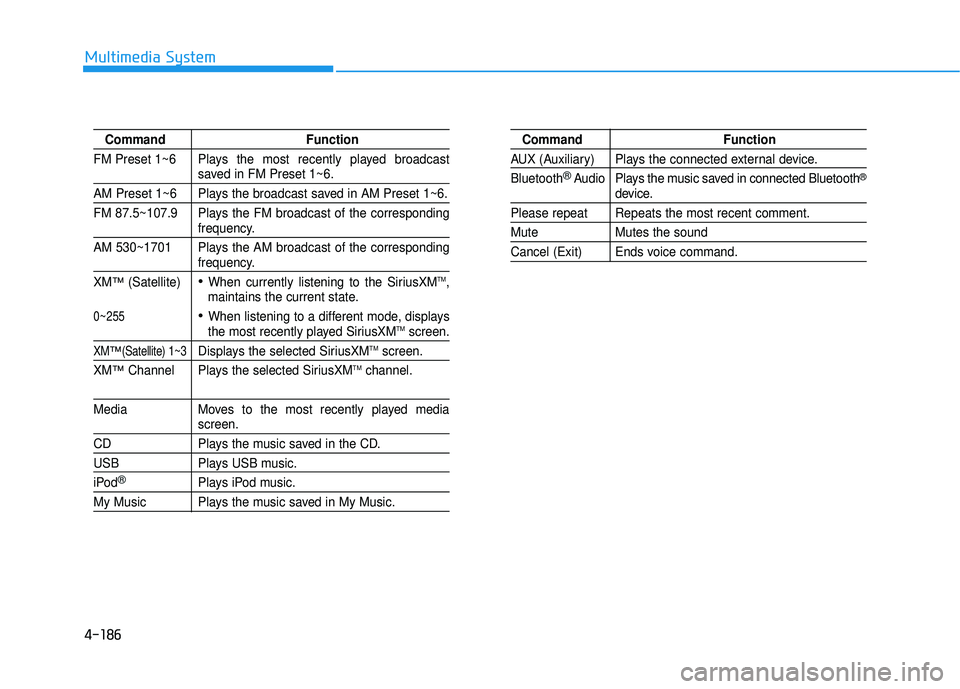
4-186
Multimedia System
CommandFunction
FM Preset 1~6 Plays the most recently played broadcast
saved in FM Preset 1~6.
AM Preset 1~6 Plays the broadcast saved in AM Preset 1~6.
FM 87.5~107.9 Plays the FM broadcast of the corresponding
frequency.
AM 530~1701 Plays the AM broadcast of the corresponding
frequency.
XM
™(Satellite)When currently listening to the SiriusXMTM,
maintains the current state.
When listening to a different mode, displaysthe most recently played SiriusXMTMscreen.
XM™(Satellite) 1~3Displays the selected SiriusXMTMscreen.
XM
™Channel Plays the selected SiriusXMTMchannel.
Media Moves to the most recently played mediascreen.
CD Plays the music saved in the CD.
USBPlays USB music.
iPod®Plays iPod music.
My Music Plays the music saved in My Music.
Command Function
AUX (Auxiliary) Plays the connected external device.
Bluetooth
®Audio Plays the music saved in connected Bluetooth®
device.
Please repeat Repeats the most recent comment.
Mute Mutes the sound
Cancel (Exit) Ends voice command.
0~255
Page 435 of 708
4-187
Multimedia System
4
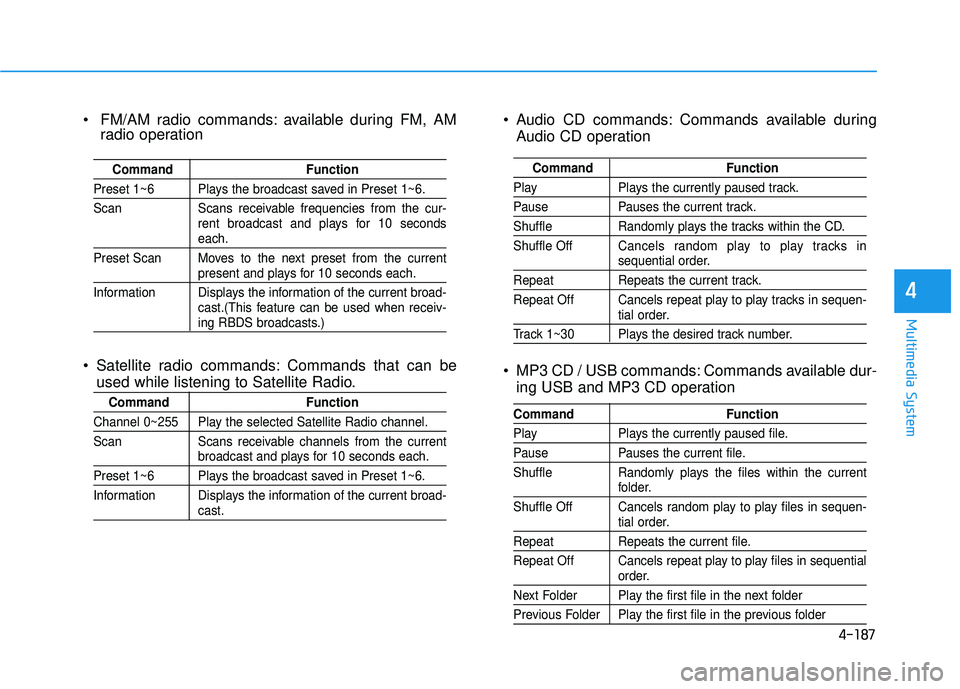
Audio CD commands: Commands available duringAudio CD operation
MP3 CD / USB commands: Commands available dur- ing USB and MP3 CD operation
Command Function
PlayPlays the currently paused track.
PausePauses the current track.
ShuffleRandomly plays the tracks within the CD.
Shuffle Off Cancels random play to play tracks in
sequential order.
Repeat Repeats the current track.
Repeat Off Cancels repeat play to play tracks in sequen-
tial order.
Track 1~30 Plays the desired track number.
Command Function
PlayPlays the currently paused file.
PausePauses the current file.
Shuffle Randomly plays the files within the current
folder.
Shuffle Off Cancels random play to play files in sequen-
tial order.
Repeat Repeats the current file.
Repeat Off Cancels repeat play to play files in sequential
order.
Next Folder Play the first file in the next folder
Previous Folder Play the first file in the previous folder
FM/AM radio commands: available during FM, AM radio operation
Satellite radio commands: Commands that can be used while listening to Satellite Radio.
Command Function
Preset 1~6 Plays the broadcast saved in Preset 1~6.
Scan Scans receivable frequencies from the cur-
rent broadcast and plays for 10 seconds
each.
Preset Scan Moves to the next preset from the current
present and plays for 10 seconds each.
Information Displays the information of the current broad- cast.(This feature can be used when receiv-
ing RBDS broadcasts.)
Command Function
Channel 0~255 Play the selected Satellite Radio channel.
Scan Scans receivable channels from the current
broadcast and plays for 10 seconds each.
Preset 1~6 Plays the broadcast saved in Preset 1~6.
Information Displays the information of the current broad-
cast.
Page 440 of 708
![HYUNDAI SONATA LIMITED 2016 Owners Manual 4-192
Multimedia System
Variable EQ
This is a premium sound system fea-
ture in which the acoustical mode
can be selected according to musical
preferences.
Select [Variable EQ] Set menu
through TUNE](/img/35/56186/w960_56186-439.png "HYUNDAI SONATA LIMITED 2016 Owners Manual 4-192
Multimedia System
Variable EQ
This is a premium sound system fea-
ture in which the acoustical mode
can be selected according to musical
preferences.
Select [Variable EQ] Set menu
through TUNE")
4-192
Multimedia System
Variable EQ
This is a premium sound system fea-
ture in which the acoustical mode
can be selected according to musical
preferences.
Select [Variable EQ] Set menu
through TUNE knob
Natural sound,sound optimized for driver.
Powerful sound emphasizing bass, stereo sound.
Sound similar to a concert or live hall
❈ May differ depending on the
selected audio.
SDVC (Speed Dependent Volume Control)
Press the key Select [Sound]
Select [Speed Dependent Vol.]
The volume level is controlled auto-
matically according to the vehicle
speed. SDVC can be set by selecting
from On / Off.
Voice Recognition Volume
Press the key Select [Sound] Select [Voice Recognition Vol.]
Turn the TUNE knob to adjust the
Voice Recognition volume.
Touch Screen Beep
Press the key Select [Sound] Select [Touch Screen Beep]
This feature is used to turn the touch
screen beep on/off.
Blue Link Voice Volume
Press the key Select [Sound] Select [Blue Link Voice Vol.]
Turn the TUNE knob to adjust the
Blue Link Voice Volume.
❈ Blue Link
®may differ depending
on the selected audio.
SETUP
SETUP
SETUP
SETUP
Page 607 of 708
7-43
7
Maintenance
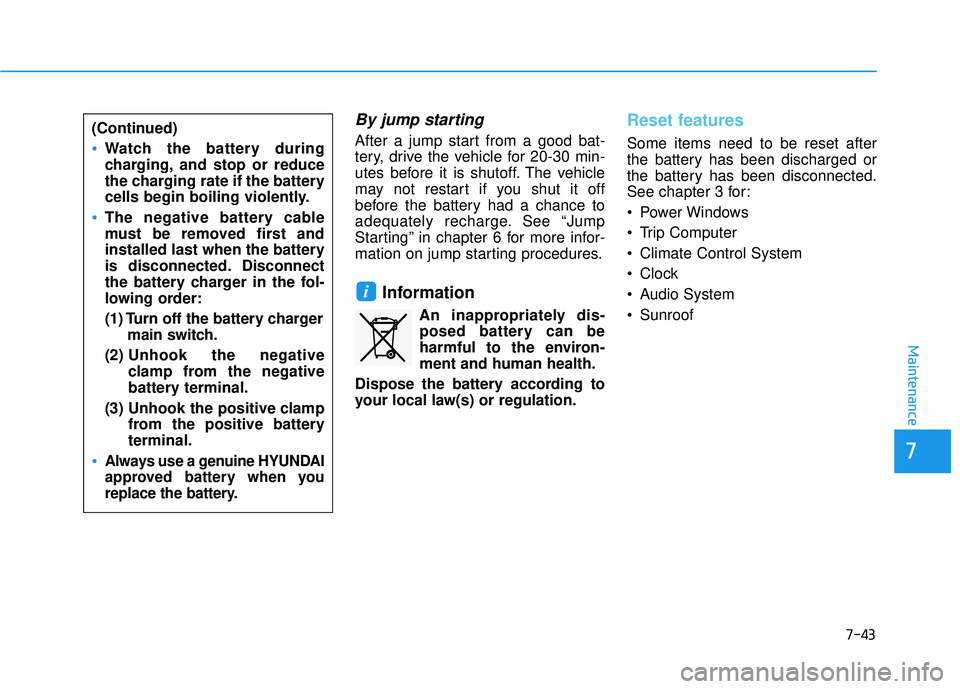
By jump starting
After a jump start from a good bat-
tery, drive the vehicle for 20-30 min-
utes before it is shutoff. The vehicle
may not restart if you shut it off
before the battery had a chance to
adequately recharge. See “Jump
Starting” in chapter 6 for more infor-
mation on jump starting procedures.
Information
An inappropriately dis-posed battery can be
harmful to the environ-
ment and human health.
Dispose the battery according to
your local law(s) or regulation.
Reset features
Some items need to be reset after
the battery has been discharged or
the battery has been disconnected.
See chapter 3 for:
Power Windows
Trip Computer
Climate Control System
Clock
Audio System
Sunroof
i
(Continued)
Watch the battery during
charging, and stop or reduce
the charging rate if the battery
cells begin boiling violently.
The negative battery cable
must be removed first and
installed last when the battery
is disconnected. Disconnect
the battery charger in the fol-
lowing order:
(1) Turn off the battery charger main switch.
(2) Unhook the negative
clamp from the negative
battery terminal.
(3) Unhook the positive clamp from the positive battery
terminal.
Always use a genuine HYUNDAI
approved battery when you
replace the battery.
Page 626 of 708
7-62
Maintenance
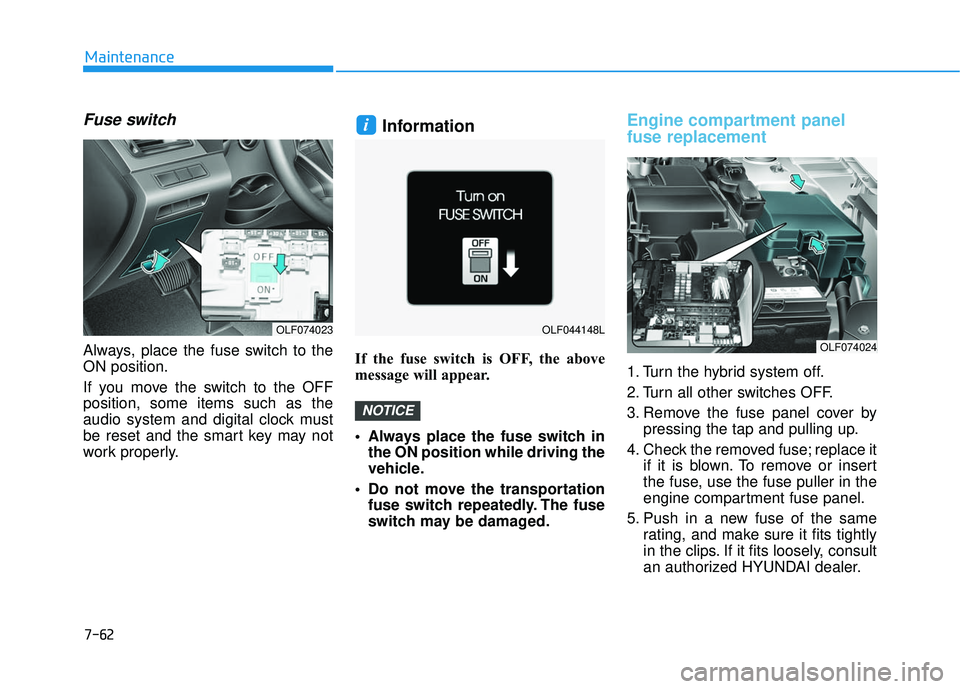
Fuse switch
Always, place the fuse switch to the
ON position.
If you move the switch to the OFF
position, some items such as the
audio system and digital clock must
be reset and the smart key may not
work properly.
Information
If the fuse switch is OFF, the above
message will appear.
Always place the fuse switch inthe ON position while driving the
vehicle.
Do not move the transportation fuse switch repeatedly. The fuse
switch may be damaged.
Engine compartment panel
fuse replacement
1. Turn the hybrid system off.
2. Turn all other switches OFF.
3. Remove the fuse panel cover by pressing the tap and pulling up.
4. Check the removed fuse; replace it if it is blown. To remove or insert
the fuse, use the fuse puller in the
engine compartment fuse panel.
5. Push in a new fuse of the same rating, and make sure it fits tightly
in the clips. If it fits loosely, consult
an authorized HYUNDAI dealer.
NOTICE
i
OLF074023OLF044148L
OLF074024
Page 630 of 708
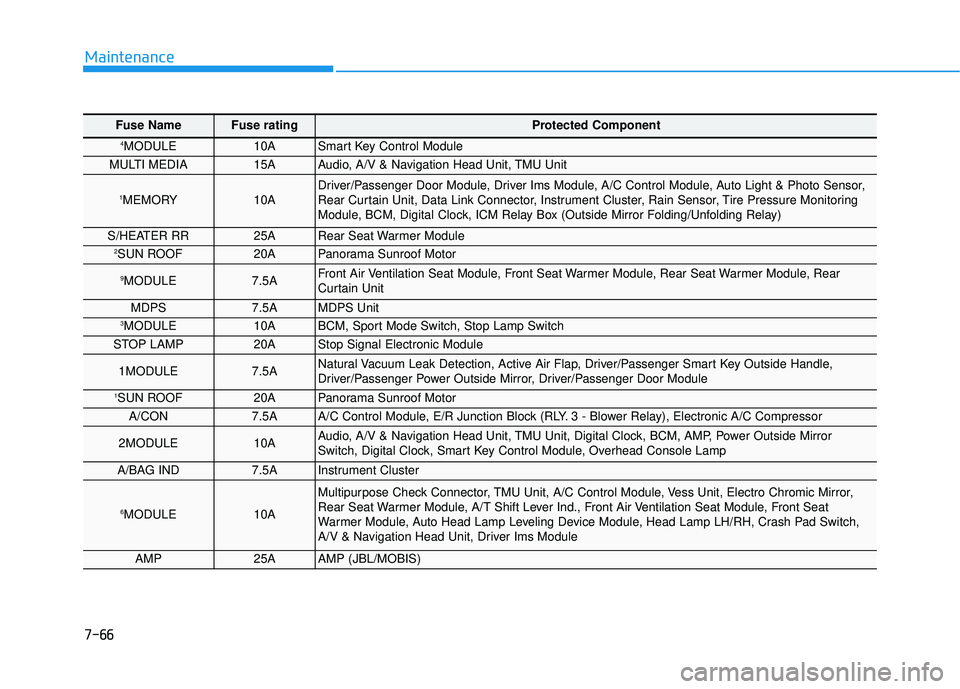
7-66
Maintenance
Fuse Name Fuse rating Protected Component
4MODULE10ASmart Key Control Module
MULTI MEDIA15AAudio, A/V & Navigation Head Unit, TMU Unit
1MEMORY10ADriver/Passenger Door Module, Driver Ims Module, A/C Control Module, Auto Light & Photo Sensor,
Rear Curtain Unit, Data Link Connector, Instrument Cluster, Rain Sensor, Tire Pressure Monitoring
Module, BCM, Digital Clock, ICM Relay Box (Outside Mirror Folding/Unfolding Relay)
S/HEATER RR25ARear Seat Warmer Module2SUN ROOF20APanorama Sunroof Motor
9MODULE7.5AFront Air Ventilation Seat Module, Front Seat Warmer Module, Rear Seat Warmer Module, Rear
Curtain Unit
MDPS7.5AMDPS Unit3MODULE10ABCM, Sport Mode Switch, Stop Lamp Switch
STOP LAMP20AStop Signal Electronic Module
1MODULE7.5ANatural Vacuum Leak Detection, Active Air Flap, Driver/Passenger Smart Key Outside Handle,
Driver/Passenger Power Outside Mirror, Driver/Passenger Door Module
1SUN ROOF20APanorama Sunroof Motor
A/CON7.5AA/C Control Module, E/R Junction Block (RLY. 3 - Blower Relay), Electronic A/C Compressor
2MODULE10AAudio, A/V & Navigation Head Unit, TMU Unit, Digital Clock, BCM, AMP, Power Outside Mirror
Switch, Digital Clock, Smart Key Control Module, Overhead Console Lamp
A/BAG IND7.5AInstrument Cluster
6MODULE10A
Multipurpose Check Connector, TMU Unit, A/C Control Module, Vess Unit, Electro Chromic Mirror,
Rear Seat Warmer Module, A/T Shift Lever Ind., Front Air Ventilation Seat Module, Front Seat
Warmer Module, Auto Head Lamp Leveling Device Module, Head Lamp LH/RH, Crash Pad Switch,
A/V & Navigation Head Unit, Driver Ims Module
AMP25AAMP (JBL/MOBIS)