ignition Hyundai Terracan 2004 Owner's Guide
[x] Cancel search | Manufacturer: HYUNDAI, Model Year: 2004, Model line: Terracan, Model: Hyundai Terracan 2004Pages: 361, PDF Size: 4.69 MB
Page 62 of 361
FEATURES OF YOUR HYUNDAI
1- 54
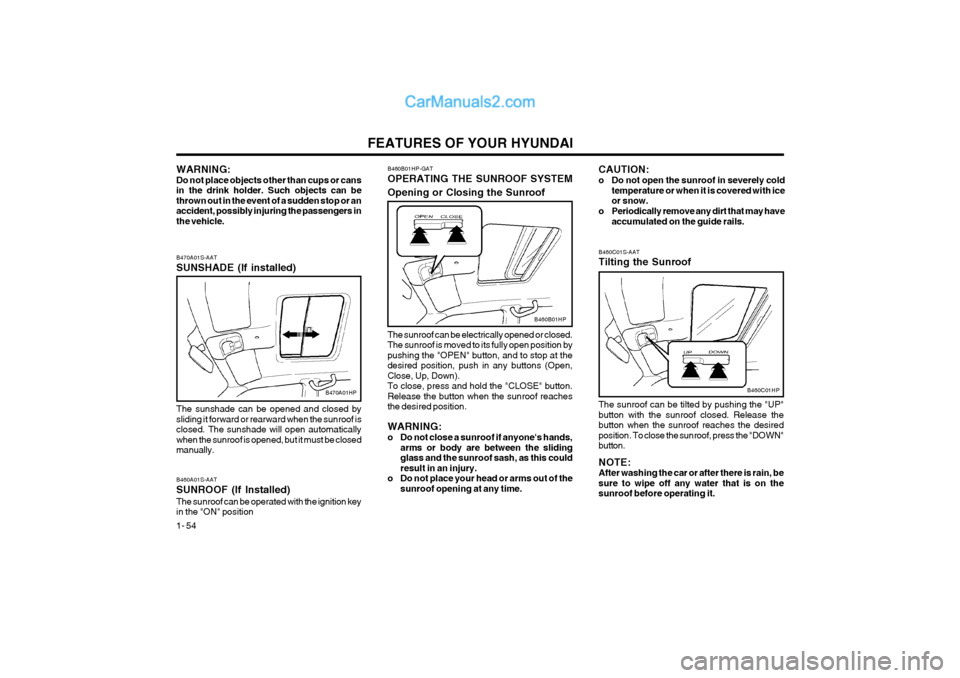
B460C01S-AAT Tilting the Sunroof
B460C01HP
The sunroof can be tilted by pushing the "UP" button with the sunroof closed. Release thebutton when the sunroof reaches the desiredposition. To close the sunroof, press the "DOWN"button. NOTE: After washing the car or after there is rain, besure to wipe off any water that is on thesunroof before operating it.
B460B01HP
B460A01S-AAT SUNROOF (If Installed) The sunroof can be operated with the ignition key in the "ON" position
B470A01S-AAT SUNSHADE (If installed)
B470A01HP
The sunshade can be opened and closed by sliding it forward or rearward when the sunroof isclosed. The sunshade will open automaticallywhen the sunroof is opened, but it must be closedmanually.
WARNING: Do not place objects other than cups or cansin the drink holder. Such objects can bethrown out in the event of a sudden stop or anaccident, possibly injuring the passengers inthe vehicle. B460B01HP-GAT OPERATING THE SUNROOF SYSTEM Opening or Closing the Sunroof The sunroof can be electrically opened or closed. The sunroof is moved to its fully open position by
pushing the "OPEN" button, and to stop at thedesired position, push in any buttons (Open,Close, Up, Down).To close, press and hold the "CLOSE" button.Release the button when the sunroof reachesthe desired position. WARNING:
o Do not close a sunroof if anyone's hands,
arms or body are between the sliding glass and the sunroof sash, as this couldresult in an injury.
o Do not place your head or arms out of the sunroof opening at any time. CAUTION:
o Do not open the sunroof in severely cold
temperature or when it is covered with ice or snow.
o Periodically remove any dirt that may have accumulated on the guide rails.
Page 63 of 361
FEATURES OF YOUR HYUNDAI 1- 55
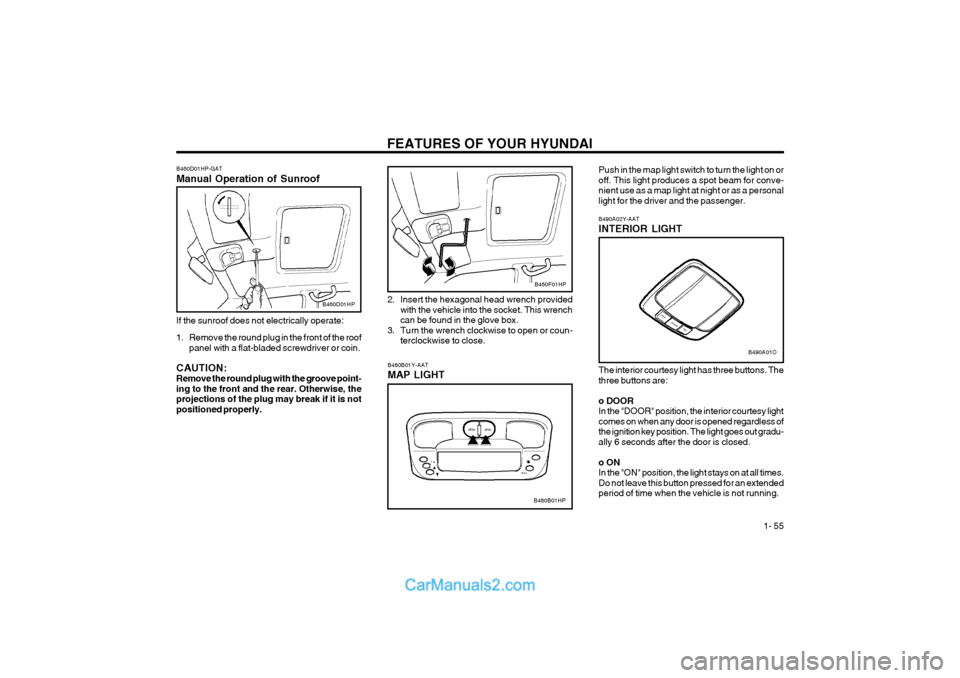
The interior courtesy light has three buttons. The three buttons are: o DOOR
In the "DOOR" position, the interior courtesy lightcomes on when any door is opened regardless ofthe ignition key position. The light goes out gradu-ally 6 seconds after the door is closed. o ON In the "ON" position, the light stays on at all times.Do not leave this button pressed for an extendedperiod of time when the vehicle is not running.
B480B01Y-AAT MAP LIGHT
B480B01HP
B460F01HP
Push in the map light switch to turn the light on or off. This light produces a spot beam for conve-nient use as a map light at night or as a personallight for the driver and the passenger.
B490A01O
B490A02Y-AAT INTERIOR LIGHT
2. Insert the hexagonal head wrench provided
with the vehicle into the socket. This wrench can be found in the glove box.
3. Turn the wrench clockwise to open or coun- terclockwise to close.
B460D01HP-GAT Manual Operation of Sunroof
B460D01HP
If the sunroof does not electrically operate:
1. Remove the round plug in the front of the roof panel with a flat-bladed screwdriver or coin.
CAUTION: Remove the round plug with the groove point-ing to the front and the rear. Otherwise, theprojections of the plug may break if it is notpositioned properly.
Page 68 of 361
FEATURES OF YOUR HYUNDAI
1- 60
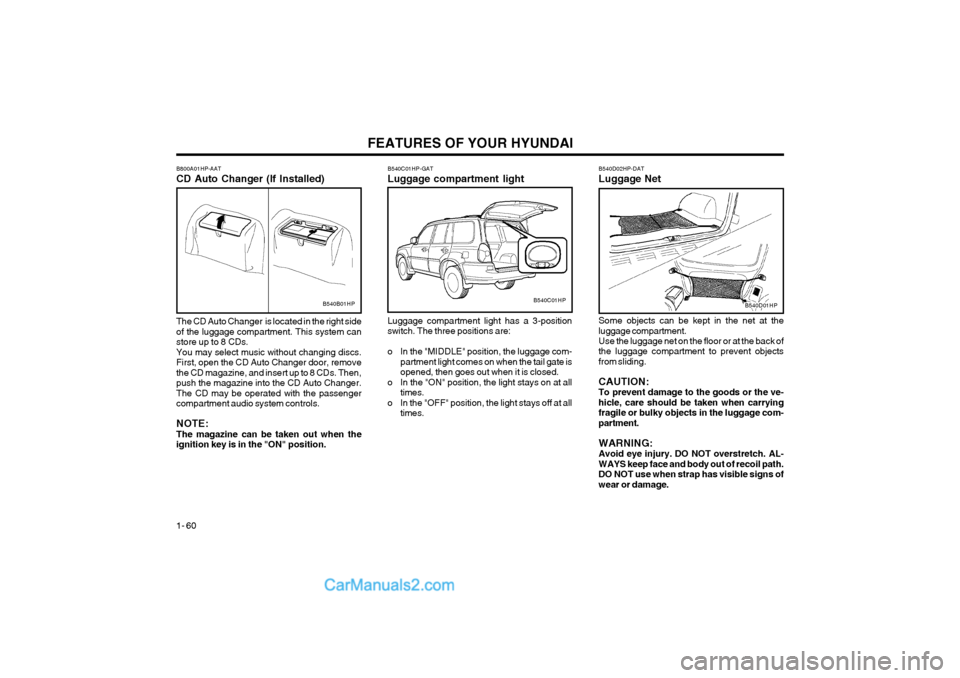
B540B01HP B540C01HP-GAT Luggage compartment light Luggage compartment light has a 3-position switch. The three positions are:
o In the "MIDDLE" position, the luggage com-
partment light comes on when the tail gate is opened, then goes out when it is closed.
o In the "ON" position, the light stays on at all times.
o In the "OFF" position, the light stays off at all times.B540C01HPB540D01HP
B800A01HP-AAT CD Auto Changer (If Installed) The CD Auto Changer is located in the right side of the luggage compartment. This system canstore up to 8 CDs.You may select music without changing discs.First, open the CD Auto Changer door, removethe CD magazine, and insert up to 8 CDs. Then,push the magazine into the CD Auto Changer.The CD may be operated with the passengercompartment audio system controls. NOTE: The magazine can be taken out when theignition key is in the "ON" position. B540D02HP-DAT Luggage Net Some objects can be kept in the net at the luggage compartment. Use the luggage net on the floor or at the back of the luggage compartment to prevent objectsfrom sliding. CAUTION: To prevent damage to the goods or the ve-hicle, care should be taken when carryingfragile or bulky objects in the luggage com-partment. WARNING: Avoid eye injury. DO NOT overstretch. AL-WAYS keep face and body out of recoil path.DO NOT use when strap has visible signs ofwear or damage.
Page 76 of 361
FEATURES OF YOUR HYUNDAI
1- 68
NOTE:
o It should be noted that prolonged opera- tion of the heating system in " " modewill give rise to fogging of the windshieldand side windows and the air within thepassenger compartment will become stale.In addition prolonged use of the air condi-tioning with the " " mode selected mayresult in the air within the passenger com-partment becoming excessively dry.
o When the ignition switch is turned "ON", the air intake control will change to " "mode (regardless of switch position). Thisis normal operation.
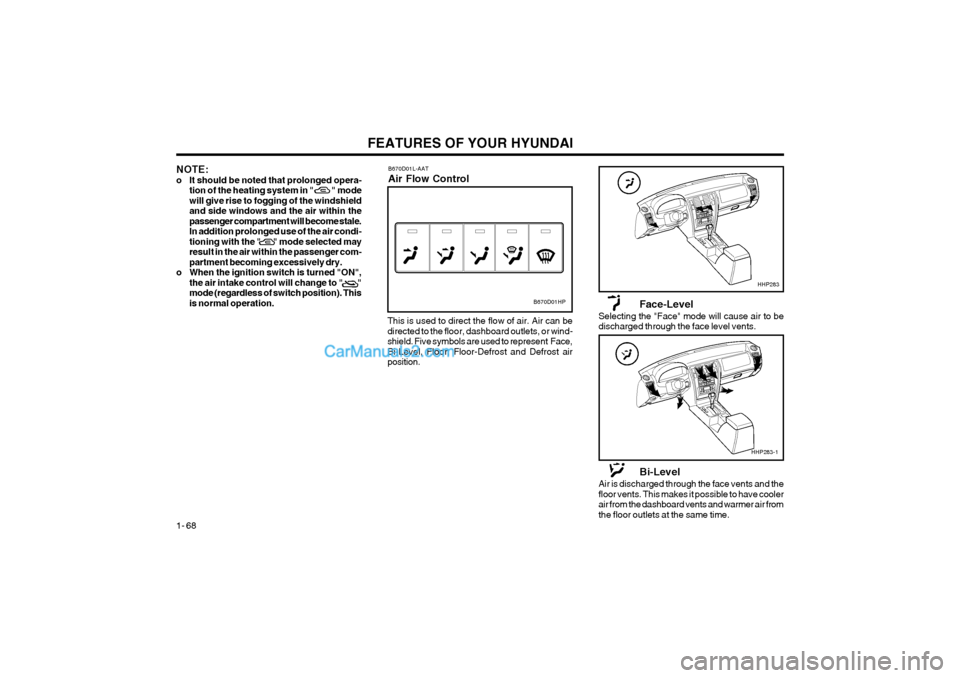
Face-Level
Selecting the "Face" mode will cause air to be discharged through the face level vents.
Bi-Level
Air is discharged through the face vents and thefloor vents. This makes it possible to have coolerair from the dashboard vents and warmer air fromthe floor outlets at the same time.
B670D01L-AAT Air Flow Control
This is used to direct the flow of air. Air can be directed to the floor, dashboard outlets, or wind-shield. Five symbols are used to represent Face,Bi-Level, Floor, Floor-Defrost and Defrost airposition.
B670D01HP
HHP283
HHP283-1
Page 85 of 361
FEATURES OF YOUR HYUNDAI 1- 77
B980D01Y-AAT Heating and Cooling System OffPress the "OFF" button to stop the operation of the heating and cooling system.
NOTE:
o It should be noted that prolonged opera-
tion of the heating system in "Recircula-tion" mode will give rise to fogging of thewindshield and side windows and the airwithin the passenger compartment willbecome stale. In addition, prolonged useof the air conditioning with the "Recircu-lation" mode selected may result in the airwithin the passenger compartment be-coming excessively dry.
o When the ignition switch is turned "ON",
the air intake control will change to ( )
mode (regardless of the switch position).
This is normal operation. The air intake
control operates in "AUTO" mode when turning the ignition to the ON position if the"AUTO" mode was used before shuttingoff the engine.
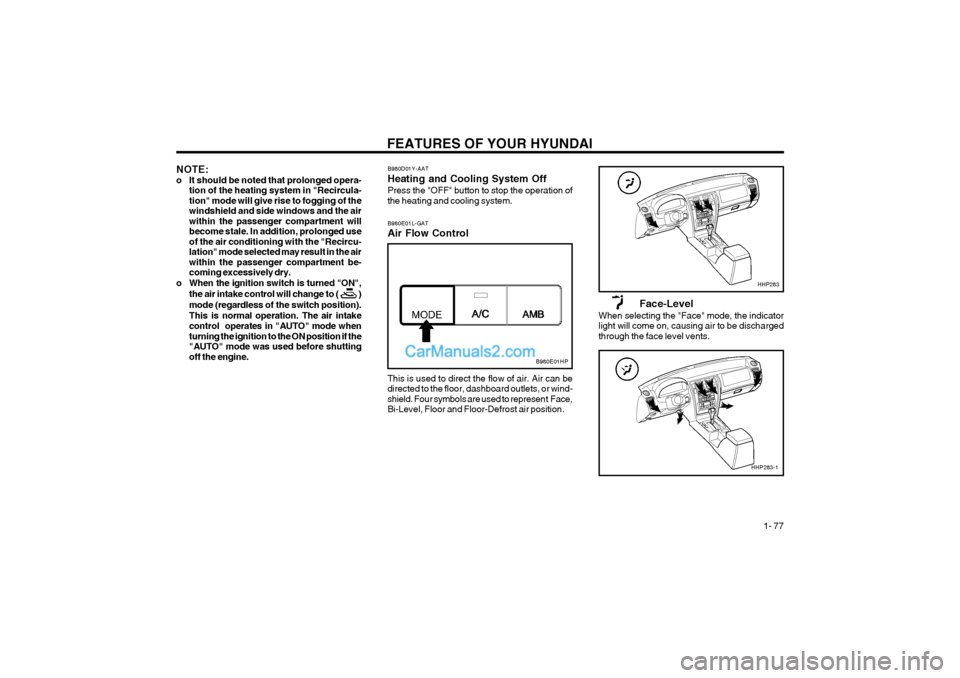
This is used to direct the flow of air. Air can be directed to the floor, dashboard outlets, or wind-shield. Four symbols are used to represent Face,Bi-Level, Floor and Floor-Defrost air position.
B980E01L-GAT Air Flow Control
Face-Level
When selecting the "Face" mode, the indicator light will come on, causing air to be dischargedthrough the face level vents.
B980E01HP
HHP283
HHP283-1
Page 91 of 361
FEATURES OF YOUR HYUNDAI 1- 83
FM/AM
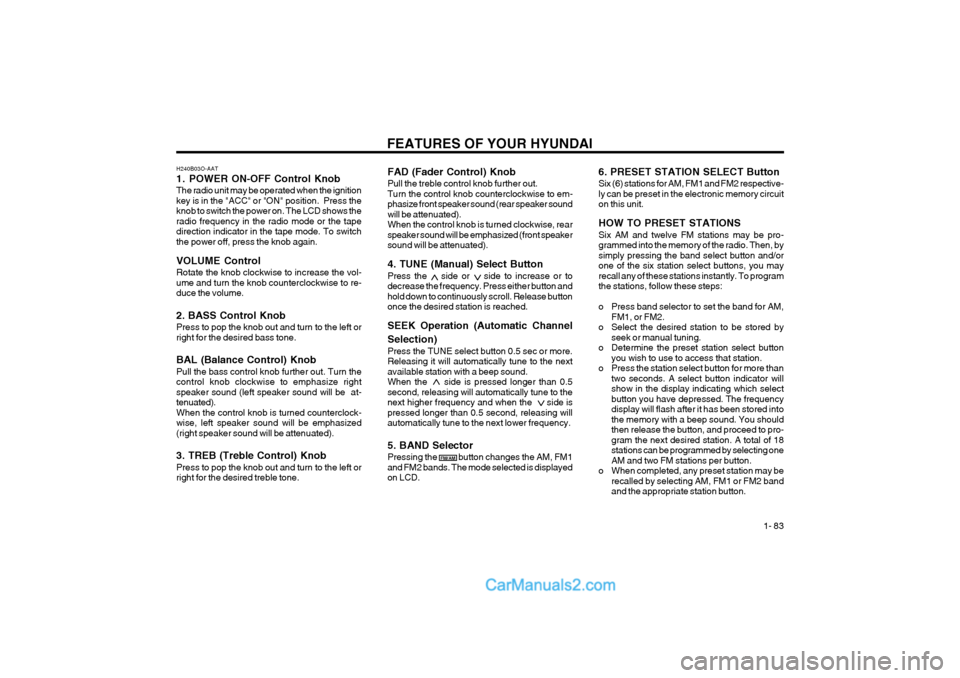
FAD (Fader Control) Knob Pull the treble control knob further out. Turn the control knob counterclockwise to em-phasize front speaker sound (rear speaker soundwill be attenuated).When the control knob is turned clockwise, rearspeaker sound will be emphasized (front speakersound will be attenuated). 4. TUNE (Manual) Select Button Press the side or side to increase or to decrease the frequency. Press either button andhold down to continuously scroll. Release buttononce the desired station is reached. SEEK Operation (Automatic Channel Selection) Press the TUNE select button 0.5 sec or more. Releasing it will automatically tune to the nextavailable station with a beep sound.When the side is pressed longer than 0.5second, releasing will automatically tune to thenext higher frequency and when the side ispressed longer than 0.5 second, releasing willautomatically tune to the next lower frequency. 5. BAND Selector Pressing the button changes the AM, FM1 and FM2 bands. The mode selected is displayedon LCD.6. PRESET STATION SELECT Button Six (6) stations for AM, FM1 and FM2 respective- ly can be preset in the electronic memory circuiton this unit. HOW TO PRESET STATIONS Six AM and twelve FM stations may be pro- grammed into the memory of the radio. Then, bysimply pressing the band select button and/orone of the six station select buttons, you mayrecall any of these stations instantly. To programthe stations, follow these steps:
o Press band selector to set the band for AM,
FM1, or FM2.
o Select the desired station to be stored by seek or manual tuning.
o Determine the preset station select button you wish to use to access that station.
o Press the station select button for more than two seconds. A select button indicator will show in the display indicating which selectbutton you have depressed. The frequencydisplay will flash after it has been stored intothe memory with a beep sound. You shouldthen release the button, and proceed to pro-gram the next desired station. A total of 18stations can be programmed by selecting oneAM and two FM stations per button.
o When completed, any preset station may be recalled by selecting AM, FM1 or FM2 bandand the appropriate station button.
H240B03O-AAT
1. POWER ON-OFF Control KnobThe radio unit may be operated when the ignition key is in the "ACC" or "ON" position. Press theknob to switch the power on. The LCD shows theradio frequency in the radio mode or the tapedirection indicator in the tape mode. To switchthe power off, press the knob again. VOLUME Control Rotate the knob clockwise to increase the vol- ume and turn the knob counterclockwise to re-duce the volume. 2. BASS Control Knob Press to pop the knob out and turn to the left or right for the desired bass tone. BAL (Balance Control) Knob Pull the bass control knob further out. Turn the control knob clockwise to emphasize rightspeaker sound (left speaker sound will be at-tenuated).When the control knob is turned counterclock-wise, left speaker sound will be emphasized(right speaker sound will be attenuated). 3. TREB (Treble Control) Knob Press to pop the knob out and turn to the left or right for the desired treble tone.
Page 96 of 361
FEATURES OF YOUR HYUNDAI
1- 88
H290B03E-AAT
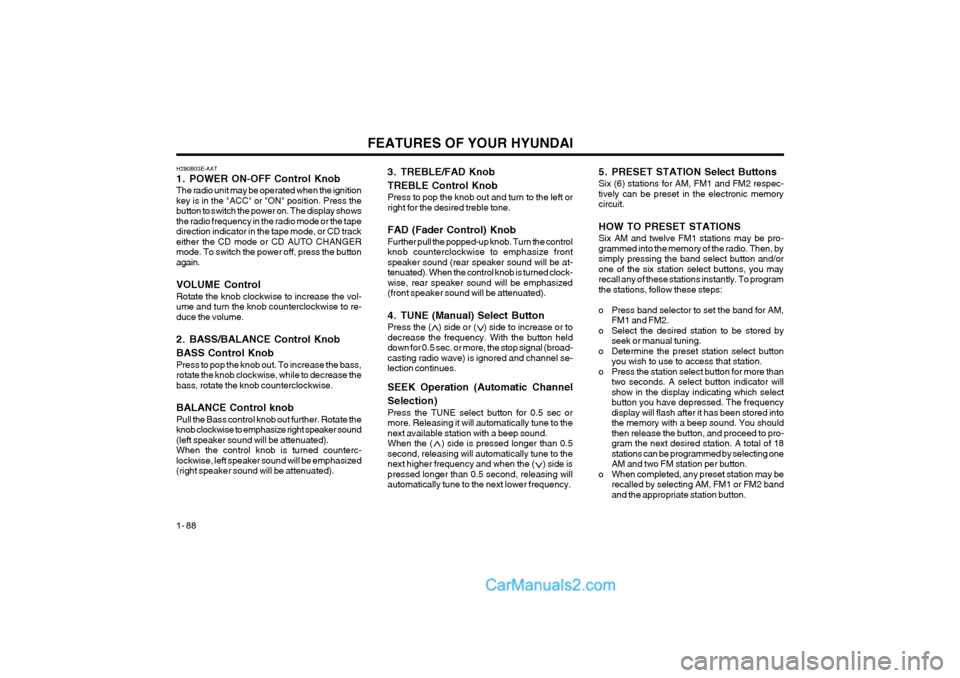
1. POWER ON-OFF Control KnobThe radio unit may be operated when the ignition key is in the "ACC" or "ON" position. Press thebutton to switch the power on. The display showsthe radio frequency in the radio mode or the tapedirection indicator in the tape mode, or CD trackeither the CD mode or CD AUTO CHANGERmode. To switch the power off, press the buttonagain. VOLUME Control Rotate the knob clockwise to increase the vol- ume and turn the knob counterclockwise to re-duce the volume.
2. BASS/BALANCE Control Knob BASS Control Knob Press to pop the knob out. To increase the bass, rotate the knob clockwise, while to decrease thebass, rotate the knob counterclockwise. BALANCE Control knob Pull the Bass control knob out further. Rotate the knob clockwise to emphasize right speaker sound(left speaker sound will be attenuated).When the control knob is turned counterc-lockwise, left speaker sound will be emphasized(right speaker sound will be attenuated). 3. TREBLE/FAD Knob TREBLE Control Knob Press to pop the knob out and turn to the left or right for the desired treble tone. FAD (Fader Control) Knob Further pull the popped-up knob. Turn the control knob counterclockwise to emphasize frontspeaker sound (rear speaker sound will be at-tenuated). When the control knob is turned clock-wise, rear speaker sound will be emphasized(front speaker sound will be attenuated).
4. TUNE (Manual) Select Button Press the ( ) side or ( ) side to increase or to decrease the frequency. With the button helddown for 0.5 sec. or more, the stop signal (broad-casting radio wave) is ignored and channel se-lection continues. SEEK Operation (Automatic Channel Selection) Press the TUNE select button for 0.5 sec or more. Releasing it will automatically tune to thenext available station with a beep sound.When the ( ) side is pressed longer than 0.5second, releasing will automatically tune to thenext higher frequency and when the ( ) side ispressed longer than 0.5 second, releasing willautomatically tune to the next lower frequency.5. PRESET STATION Select Buttons Six (6) stations for AM, FM1 and FM2 respec- tively can be preset in the electronic memorycircuit. HOW TO PRESET STATIONS Six AM and twelve FM1 stations may be pro- grammed into the memory of the radio. Then, bysimply pressing the band select button and/orone of the six station select buttons, you mayrecall any of these stations instantly. To programthe stations, follow these steps:
o Press band selector to set the band for AM,
FM1 and FM2.
o Select the desired station to be stored by seek or manual tuning.
o Determine the preset station select button you wish to use to access that station.
o Press the station select button for more than two seconds. A select button indicator will show in the display indicating which selectbutton you have depressed. The frequencydisplay will flash after it has been stored intothe memory with a beep sound. You shouldthen release the button, and proceed to pro-gram the next desired station. A total of 18stations can be programmed by selecting oneAM and two FM station per button.
o When completed, any preset station may be recalled by selecting AM, FM1 or FM2 bandand the appropriate station button.
Page 101 of 361
FEATURES OF YOUR HYUNDAI 1- 93
H290F03O-GAT
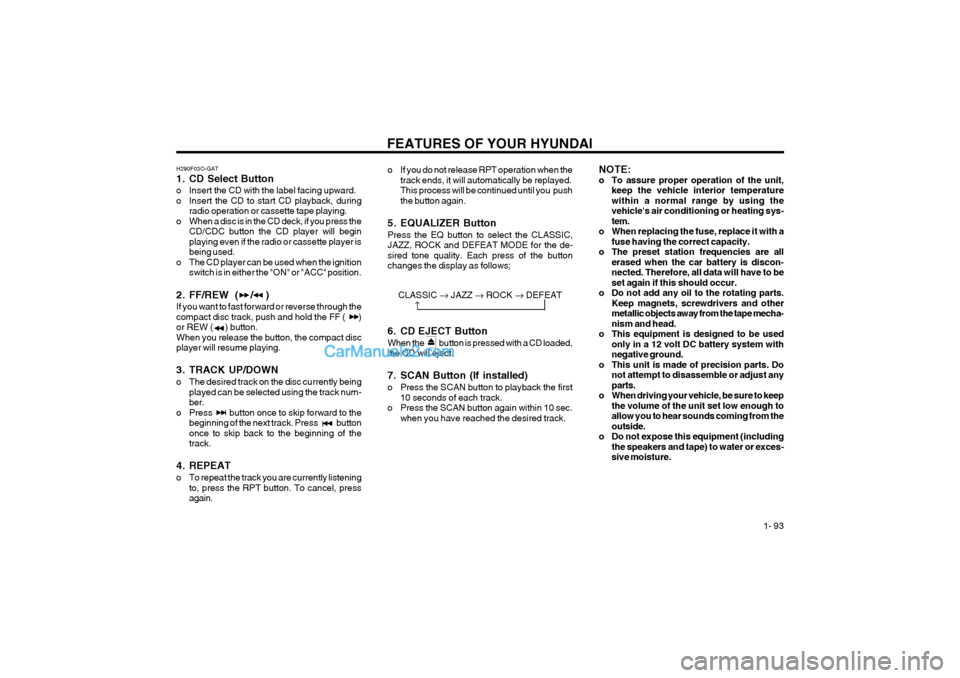
1. CD Select Button
o Insert the CD with the label facing upward.
o Insert the CD to start CD playback, during
radio operation or cassette tape playing.
o When a disc is in the CD deck, if you press the CD/CDC button the CD player will beginplaying even if the radio or cassette player isbeing used.
o The CD player can be used when the ignition switch is in either the "ON" or "ACC" position.
2. FF/REW ( / ) If you want to fast forward or reverse through the compact disc track, push and hold the FF ( )or REW ( ) button.When you release the button, the compact discplayer will resume playing.
3. TRACK UP/DOWN
o The desired track on the disc currently being played can be selected using the track num- ber.
o Press button once to skip forward to the beginning of the next track. Press buttononce to skip back to the beginning of thetrack.
4. REPEAT
o To repeat the track you are currently listening to, press the RPT button. To cancel, press again. o If you do not release RPT operation when the
track ends, it will automatically be replayed.This process will be continued until you pushthe button again.
5. EQUALIZER Button Press the EQ button to select the CLASSIC, JAZZ, ROCK and DEFEAT MODE for the de-sired tone quality. Each press of the buttonchanges the display as follows; NOTE:
o To assure proper operation of the unit,
keep the vehicle interior temperaturewithin a normal range by using thevehicle's air conditioning or heating sys-tem.
o When replacing the fuse, replace it with a fuse having the correct capacity.
o The preset station frequencies are all erased when the car battery is discon-nected. Therefore, all data will have to beset again if this should occur.
o Do not add any oil to the rotating parts. Keep magnets, screwdrivers and othermetallic objects away from the tape mecha-nism and head.
o This equipment is designed to be used only in a 12 volt DC battery system withnegative ground.
o This unit is made of precision parts. Do not attempt to disassemble or adjust anyparts.
o When driving your vehicle, be sure to keep the volume of the unit set low enough toallow you to hear sounds coming from theoutside.
o Do not expose this equipment (including the speakers and tape) to water or exces-sive moisture.
CLASSIC JAZZ ROCK DEFEAT
6. CD EJECT Button When the button is pressed with a CD loaded, the CD will eject.
7. SCAN Button (If installed)
o Press the SCAN button to playback the first 10 seconds of each track.
o Press the SCAN button again within 10 sec. when you have reached the desired track.
Page 104 of 361
FEATURES OF YOUR HYUNDAI
1- 96
3. TRACK UP/DOWN
o The desired track on the disc currently being played can be selected using the track num- ber.
o Press once to skip forward to the begin- ning of the next track. Press once to skipback to the beginning of the track.
4. FF/REW ( / ) If you want to fast forward or reverse through the compact disc track, push and hold in the FF ( )or REW ( ) button.When you release the button, the compact discplayer will resume playing. 5. REPEAT
o To repeat the track you are listening to, press the RPT button. To cancel, press again.
o If you do not release RPT operation when the track ends, it will automatically be replayed. This process will be continued until you pushthe button again.B290H03HP-GAT The CD auto changer is located in the right side of the luggage compartment.
o To use the CD auto changer.
1. Open the sliding lid of the CD auto chang- er.
2. To eject the compact disc magazine, press the EJECT button located inside the CD auto changer.
3. Insert the discs into the magazine.
4. Push the magazine into the CD auto chang- er and close the sliding lid.
o The CD auto changer can be used when the ignition switch is in either "ON" or "ACC"position.
1. CD CHANGER Select Button When the CD changer magazine contains discs, press the "CD/CDC" button and the CD changercan be used even if the radio or cassette playeris being used. The Hyundai CD changer can holdup to eight discs. The disc number will be lit, andthe track number, and elapsed time will be dis-played. 2. DISC Select Button To select the CD you want, push " " to change the disc number. 6. SCAN Button (If installed)
o Press the SCAN button to playback the first
10 seconds of each track.
o Press the SCAN button again within 10 sec. for the desired track.
7. EQ Button Press the EQ button to select the CLASSIC, JAZZ, ROCK and DEFEAT MODE for the de-sired tone quality. Each press of the buttonchanges the display as follows;
CLASSIC JAZZ ROCK DEFEAT
NOTE:
o When replacing the fuse, replace it with a fuse having the correct capacity.
o This equipment is designed to be used only in a 12 volt DC battery system withnegative ground.
o This unit is made of precision parts. Do not attempt to disassemble or adjust anyparts.
o When driving your vehicle, be sure to keep the volume of the unit set low enough toallow you to hear sounds coming from theoutside.
TUNEDISC
Page 109 of 361
FEATURES OF YOUR HYUNDAI 1- 101
B870C01HPB880C02B-GAT Glass Antenna (If installed)When the radio power switch is turned on while the ignition key is in either the "ON" or "ACC"position, your car will receive both AM and FMbroadcast signals through the antenna in the rearquarter glass. CAUTION:
o Do not clean the inner side of the rear
quarter glass with an abrasive type ofglass cleaner or use a scraper to removeforeign deposits from the inner surface ofthe glass as this may cause damage to theantenna elements.
o Avoid adding metallic coating such as Ni, Cd, and so on. These can disturb receiv-ing AM and FM broadcast signals.
B870D01HP
B870A01A-GAT ANTENNA Fixed Rod Antenna Your car uses a fixed rod antenna to receive both AM and FM broadcast signals.This antenna is a removable type. To remove theantenna, turn the antenna counterclockwise. Toinstall the antenna, turn the antenna clockwise. CAUTION: Be sure to remove the antenna before wash-ing the car in an automatic car wash or theantenna may be damaged.