air condition HYUNDAI TUCSON 2016 Owner's Guide
[x] Cancel search | Manufacturer: HYUNDAI, Model Year: 2016, Model line: TUCSON, Model: HYUNDAI TUCSON 2016Pages: 642, PDF Size: 9.78 MB
Page 245 of 642
3-147
Convenient features of your vehicle
3
Air conditioning system operation
tips
If the vehicle has been parked indirect sunlight during hot weather,
open the windows for a short time
to let the hot air inside the vehicle
escape.
After sufficient cooling has been achieved, switch back from therecirculated air to the fresh outsideair position.
To help reduce moisture inside of the windows on rainy or humid
days, decrease the humidity inside
the vehicle by operating the airconditioning system with the win-
dows and sunroof closed.
Use the air conditioning system every month for a few minutes to
ensure maximum system perform-
ance. If you operate the air conditioner
excessively, the difference
between the temperature of theoutside air and that of the wind-shield could cause the outer sur-
face of the windshield to fog up,
causing loss of visibility. In this
case, toggle the mode selection
button to the position and set
the fan speed control knob to the
lowest speed setting.
System Maintenance
Climate control air filter
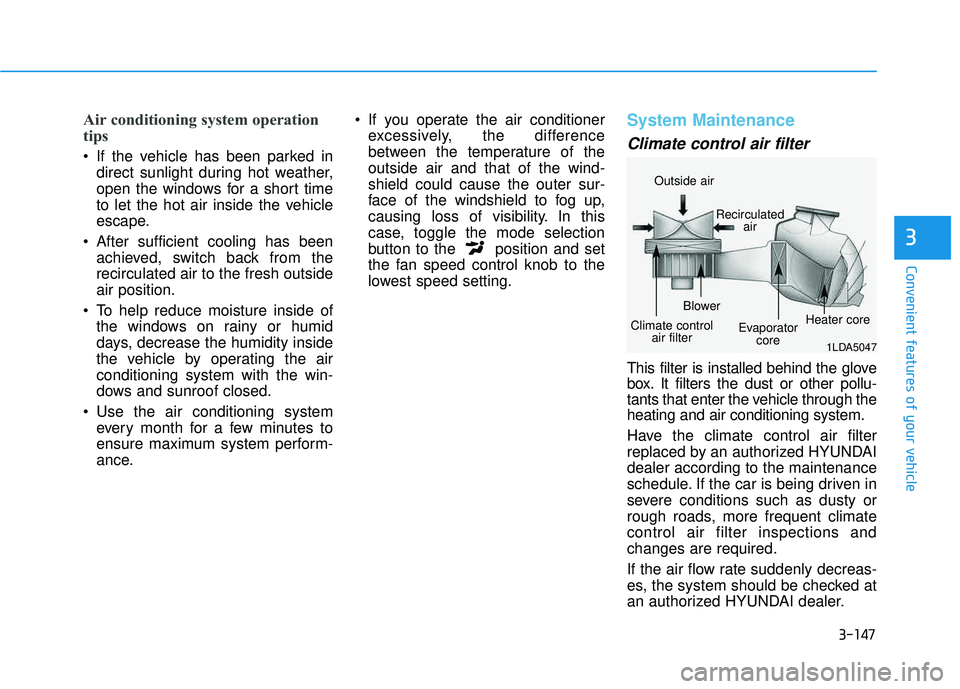
This filter is installed behind the glove
box. It filters the dust or other pollu-
tants that enter the vehicle through theheating and air conditioning system.
Have the climate control air filter
replaced by an authorized HYUNDAIdealer according to the maintenance
schedule. If the car is being driven in
severe conditions such as dusty or
rough roads, more frequent climatecontrol air filter inspections andchanges are required.
If the air flow rate suddenly decreas-
es, the system should be checked at
an authorized HYUNDAI dealer.
1LDA5047
Outside air
Recirculatedair
Climate control air filter Blower
Evaporatorcore Heater core
Page 246 of 642
3-148
Convenient features of your vehicle
Checking the amount of air conditioner refrigerant andcompressor lubricant
When the amount of refrigerant is
low, the performance of the air con-
ditioning is reduced. Overfilling also
has a negative influence on the airconditioning system.
Therefore, if abnormal operation is
found, have the system inspected by
an authorized HYUNDAI dealer.
It is important that the correct type and amount of oil and refrig-
erant is used. Otherwise, damageto the compressor and abnormal
system operation may occur. The air conditioning system should
be serviced by an authorized
HYUNDAI dealer.
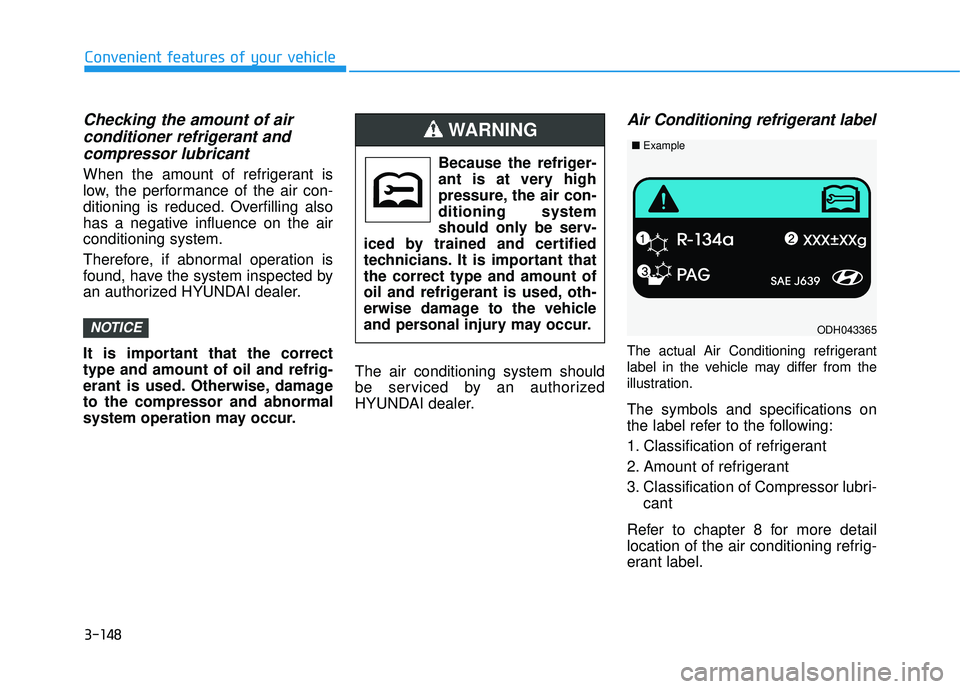
Air Conditioning refrigerant label
The actual Air Conditioning refrigerant
label in the vehicle may differ from the
illustration.
The symbols and specifications on
the label refer to the following:
1. Classification of refrigerant
2. Amount of refrigerant
3. Classification of Compressor lubri-
cant
Refer to chapter 8 for more detail
location of the air conditioning refrig-
erant label.
NOTICE
Because the refriger-
ant is at very high
pressure, the air con-ditioning system
should only be serv-
iced by trained and certified
technicians. It is important thatthe correct type and amount of
oil and refrigerant is used, oth-
erwise damage to the vehicle
and personal injury may occur.
WARNING
ODH043365
■ Example
Page 247 of 642
3-149
Convenient features of your vehicle
3
WWIINN DDSSHH IIEE LLDD DD EEFFRR OO SSTT IINN GG AA NN DD DD EEFFOO GGGGIINN GG
For maximum windshield defrost-
ing, set the temperature control
knob to the highest temperature
setting and the fan control knob to
the highest fan speed. Select the
front defrost button on the climate
control display. After the engine
warm-up period, warm air will bedirected to the front windshield.
If warm air to the floor is desired while defrosting or defogging, set themode to the floor-defrost position.
Before driving, clear all snow and ice from the windshield, rear win-
dow, outside rear view mirrors, and
all side windows.
Clear all snow and ice from the hood and air inlet in the cowl grill to
improve heater and defroster effi-ciency and to reduce the probability
of fogging up the inside of the wind-shield.
If the engine temperature is still
cold after starting, then a brief
engine warm up period may be
required for the vented air flow tobecome warm or hot.Manual Climate Control System
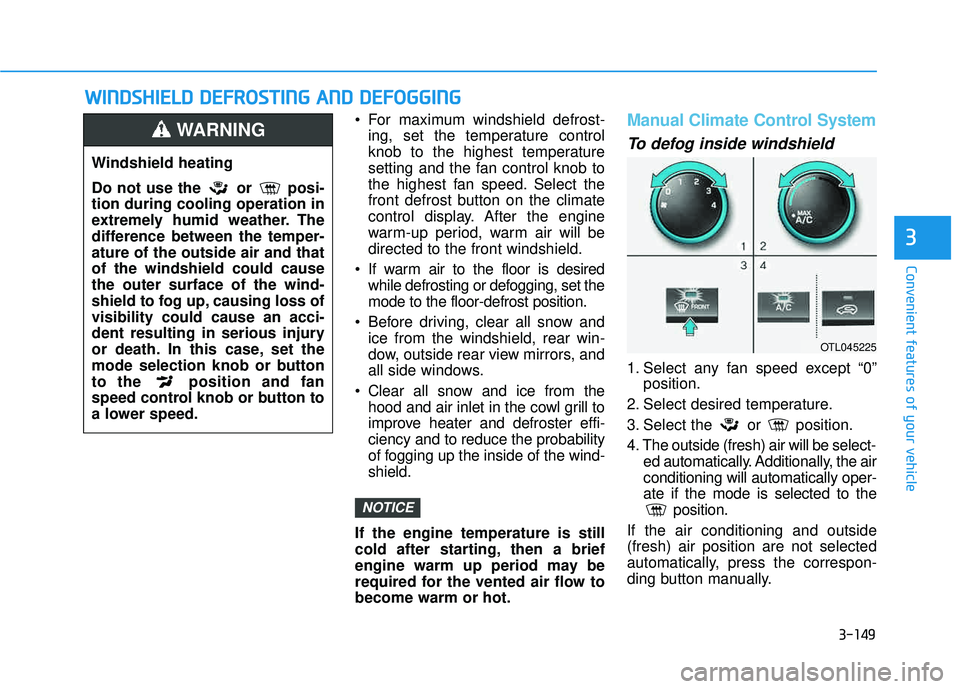
To defog inside windshield
1. Select any fan speed except “0” position.
2. Select desired temperature.
3. Select the or position.
4. The outside (fresh) air will be select- ed automatically. Additionally, the air conditioning will automatically oper-ate if the mode is selected to the position.
If the air conditioning and outside(fresh) air position are not selected
automatically, press the correspon-
ding button manually.
NOTICE
Windshield heating
Do not use the or posi- tion during cooling operation in
extremely humid weather. The
difference between the temper-ature of the outside air and thatof the windshield could causethe outer surface of the wind-
shield to fog up, causing loss ofvisibility could cause an acci-
dent resulting in serious injury
or death. In this case, set the
mode selection knob or button
to the position and fan
speed control knob or button to
a lower speed.
WARNING
OTL045225
Page 249 of 642
3-151
Convenient features of your vehicle
3
Defogging logic
To reduce the probability of fogging up the inside of the windshield, the
air intake or air conditioning are con-trolled automatically according to
certain conditions such as or
position. To cancel or return the
defogging logic, do the following.
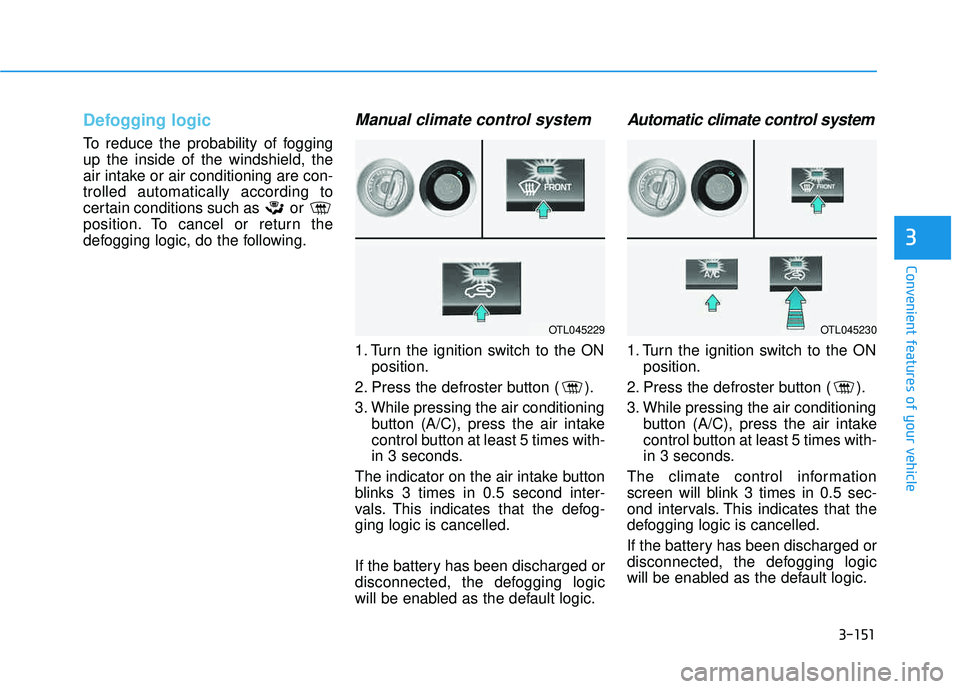
Manual climate control system
1. Turn the ignition switch to the ONposition.
2. Press the defroster button ( ).
3. While pressing the air conditioning button (A/C), press the air intake
control button at least 5 times with-
in 3 seconds.
The indicator on the air intake button
blinks 3 times in 0.5 second inter-
vals. This indicates that the defog-ging logic is cancelled.
If the battery has been discharged or
disconnected, the defogging logic
will be enabled as the default logic.
Automatic climate control system
1. Turn the ignition switch to the ON position.
2. Press the defroster button ( ).
3. While pressing the air conditioning button (A/C), press the air intake
control button at least 5 times with-
in 3 seconds.
The climate control information
screen will blink 3 times in 0.5 sec-
ond intervals. This indicates that the
defogging logic is cancelled.
If the battery has been discharged or
disconnected, the defogging logic
will be enabled as the default logic.
OTL045229OTL045230
Page 250 of 642
3-152
Convenient features of your vehicle
CCLLIIMM AATTEE CC OO NNTTRR OO LL AA DDDDIITT IIOO NNAALL FF EE AA TTUU RREESS
Automatic Ventilation
When the ignition is ON or when the
engine is running and the outside
temperature is below 59°F (15°C),
the automatic ventilation feature will
activate if the recirculated air intake
position is selected for more than 5
minutes while A/C is off and floor
mode is selected. In this condition
the air intake position will automati-
cally switch to the outside (fresh) air
intake position.
To cancel or reset the Automatic
Ventilation
When the air conditioning system is
on, select Face Level mode and
while pressing the A/C button, press
the recirculated air position button
five times within three seconds.
Sunroof Inside Air
Recirculation
When the heater or air conditioning system is on with the sunroofopened, the outside (fresh) air posi-
tion will be automatically selected. At
this time, if you press the recirculated
air position button, the recirculated
air position will be selected but will
change back to the outside (fresh) air
position after 3 minutes. When the sunroof is closed, the air
intake position will return to the orig-
inal position that was selected.
Page 255 of 642
3-157
Convenient features of your vehicle
3
To prevent damage to the Power Outlets :
Use the power outlet only whenthe engine is running and
remove the accessory plug after
use. Using the accessory plug
for prolonged periods of timewith the engine off could cause
the battery to discharge.
Only use 12V electric acces- sories which are less than 180 W
in electric capacity.
Adjust the air-conditioner or heater to the lowest operating
level when using the power outlet.
(Continued)(Continued)
Close the cover when not in use.
Some electronic devices can
cause electronic interference
when plugged into a vehicle’s
power outlet. These devices may
cause excessive audio staticand malfunctions in other elec-
tronic systems or devices used
in your vehicle.
Push the plug in as far as it will go. If good contact is not made,
the plug may overheat and the
fuse may blow.
Plug in battery equipped electri- cal/electronic devices with
reverse current protection. The
current from the battery may
flow into the vehicle’s electri-
cal/electronic system and causesystem malfunction.
Clock
NOTICE
Avoid electrical shocks. Do not
place your fingers or foreign
objects (pin, etc.) into a power
outlet or touch the power outletwith a wet hand.
WARNING
Do not adjust the clock while
driving, you may lose your
steering control and cause an
accident that results in severe
personal injury or death.
WARNING
Page 413 of 642
5-29
Driving your vehicle
5
Disc Brakes Wear Indicator
When your brake pads are worn and
new pads are required, you will hear
a high pitched warning sound from
your front or rear brakes. You mayhear this sound come and go or it
may occur whenever you depress
the brake pedal.
Note that some driving conditions or
climates may cause a brake squeal
when you first apply (or lightly apply)
the brakes. This is normal and does
not indicate a problem with your
brakes.
To avoid costly brake repairs, do
not continue to drive with wornbrake pads.
Information
Always replace brake pads as com-
plete front or rear axle sets.
Parking Brake
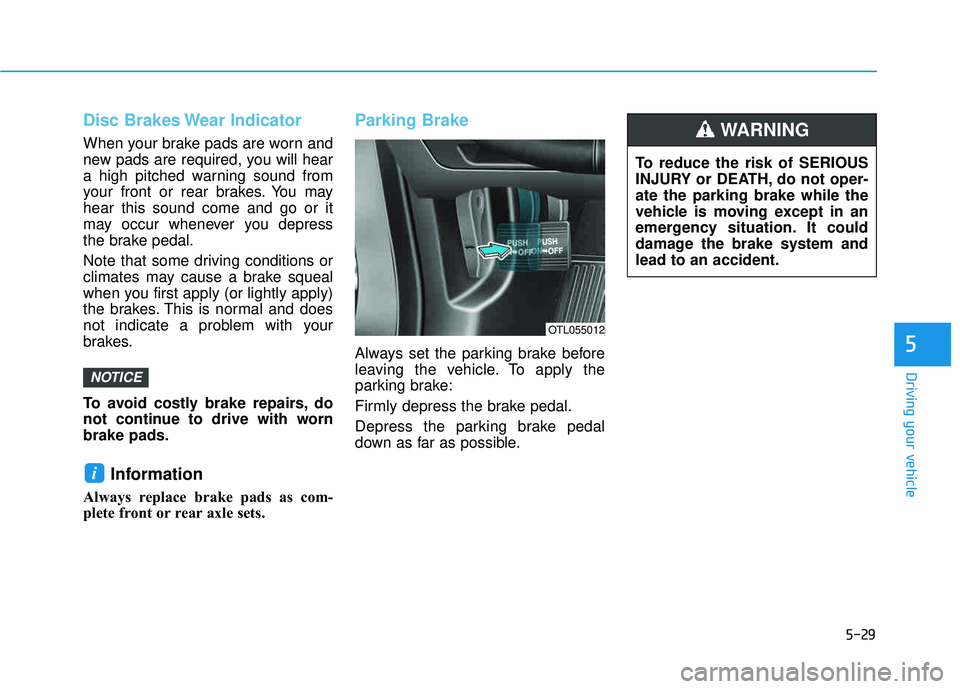
Always set the parking brake before
leaving the vehicle. To apply the
parking brake:
Firmly depress the brake pedal.
Depress the parking brake pedal
down as far as possible.
i
NOTICE
OTL055012
To reduce the risk of SERIOUS
INJURY or DEATH, do not oper-ate the parking brake while the
vehicle is moving except in an
emergency situation. It could
damage the brake system andlead to an accident.
WARNING
Page 434 of 642
5-50
When the ECO mode is activated:
The acceleration response may beslightly reduced as the accelerator
pedal is depressed moderately.
The air conditioner performance may be limited.
The shift pattern of the automatic transmission or dual clutch trans-
mission may change.
The engine noise may get louder.
The above situations are normal conditions when the ECO mode is
activated to improve fuel efficiency. Limitation of the ECO mode oper-ation:
If the following conditions occur while
the ECO mode is operating, the sys-
tem operation is limited even thoughthere is no change in the ECO indi-
cator.
When the coolant temperature is
low: The system will be limited until
engine performance becomes nor-mal.
When driving up a hill:
The system will be limited to gain
power when driving uphill because
engine torque is restricted.
When driving the vehicle with the automatic transmission or the dual
clutch transmission gear shift lever
in manual shift mode. The system will be limited accord- ing to the shift location.SPORT mode
SPORT mode manages
the driving dynamics byautomatically adjusting the
electric power steering
and the engine and transmission
control logic for enhanced driver per-
formance.
When SPORT mode is selected by pressing the DRIVE MODE button,
the SPORT indicator (yellow color)
will illuminate.
Whenever the engine is restarted, the Drive Mode will revert back to
NORMAL mode. If SPORT mode is
desired, re-select SPORT mode
from the DRIVE MODE button.
When SPORT mode is activated: - The engine rpm will tend toremain raised over a certain
length of time even after releas-
ing the accelerator
- Upshifts are delayed when accel- erating
Information
In SPORT mode, the fuel efficiency
may decrease.
i
Driving your vehicle
Page 441 of 642
5-57
Driving your vehicle The system may not work prop-erly when the bumper has been
damaged, or if the rear bumperhas been replaced or repaired.
The sensing range differs some- what according to the width of
the road. When the road is nar-
row, the system may detect
other vehicles in the next lane.
The system may turn off due to strong electromagnetic waves.
Non-operating condition
The BSD indicator on the outer side
view mirror may not illuminate
properly when:
- The outer side view mirror housingis damaged
- The mirror is covered with dirt, snow, or debris
- The window is covered with dirt, snow, or debris
- The window is tinted
NOTICE5
The warning light on the outer
side view mirror will illumi-
nate whenever a vehicle is
detected at the rear side bythe system.
To avoid accidents, do not
focus only on the warning lightand neglect to see the sur-
rounding of the vehicle.
Drive safely even though the
vehicle is equipped with aBlind Spot Detection System
(BSD) and Rear Cross Traffic
Alert (RCTA). Do not solely rely
on the system but check your
surrounding before changing
lanes or backing the vehicleup.
The system may not alert the driver in some conditions so
always check your surround-ings while driving. (Continued)
(Continued)
The Blind Spot Detection
System (BSD) and Rear Cross
Traffic Alert (RCTA) are not a
substitute for proper and safe
driving practices. Always drive
safely and use caution when
changing lanes or backing up
your vehicle. The Blind Spot
Detection System (BSD) may
not detect every object along-
side the vehicle.
WARNING
Page 455 of 642
5-71
Driving your vehicle
5
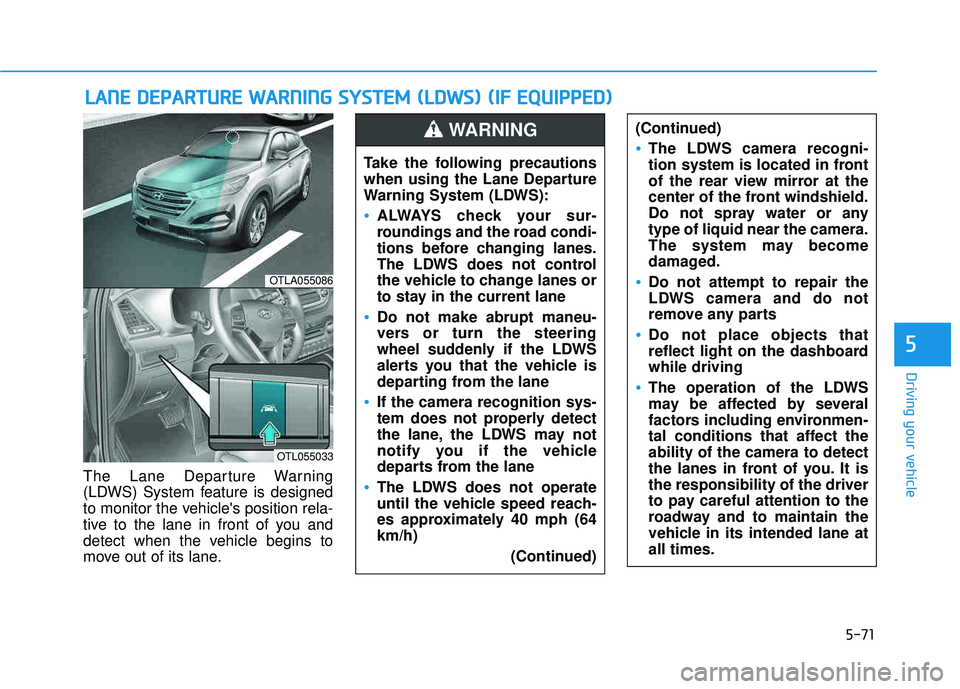
The Lane Departure Warning
(LDWS) System feature is designed
to monitor the vehicle's position rela-
tive to the lane in front of you and
detect when the vehicle begins to
move out of its lane.
LLAA NN EE DD EEPP AA RRTTUU RREE WW AARRNN IINN GG SS YY SSTT EEMM (( LL DD WW SS)) (( IIFF EE QQ UUIIPP PPEEDD ))
OTLA055086
OTL055033
Take the following precautions
when using the Lane Departure
Warning System (LDWS):
ALWAYS check your sur-
roundings and the road condi-
tions before changing lanes.
The LDWS does not control
the vehicle to change lanes or
to stay in the current lane
Do not make abrupt maneu-
vers or turn the steering
wheel suddenly if the LDWS
alerts you that the vehicle is
departing from the lane
If the camera recognition sys-
tem does not properly detect
the lane, the LDWS may not
notify you if the vehicle
departs from the lane
The LDWS does not operate
until the vehicle speed reach-
es approximately 40 mph (64km/h)
(Continued)
(Continued)
The LDWS camera recogni-
tion system is located in front
of the rear view mirror at the
center of the front windshield.
Do not spray water or anytype of liquid near the camera.
The system may become
damaged.
Do not attempt to repair the
LDWS camera and do not
remove any parts
Do not place objects that
reflect light on the dashboardwhile driving
The operation of the LDWS
may be affected by several
factors including environmen-
tal conditions that affect theability of the camera to detect
the lanes in front of you. It isthe responsibility of the driver
to pay careful attention to the
roadway and to maintain the
vehicle in its intended lane atall times.
WARNING