air condition INFINITI FX35 2004 Service Manual
[x] Cancel search | Manufacturer: INFINITI, Model Year: 2004, Model line: FX35, Model: INFINITI FX35 2004Pages: 4449, PDF Size: 99.66 MB
Page 4193 of 4449

SE-64
AUTOMATIC DRIVE POSITIONER
Revision: 2004 November 2004 FX35/FX45
3. CHECK HARNESS CONTINUITY 1
1. Disconnect automatic drive positioner control unit and door mirror (passenger side) connector.
2. Check continuity between automatic drive positioner control unit connector M50 terminal 33 (G/W), 41 (B/
Y) and door mirror (passenger side) connector D32 terminal 5 (BR), 12 (G).
3. Check continuity between automatic drive positioner control unit
connector M50 terminals 33 (G/W), 41 (B/P) and ground.
OK or NG
OK >> GO TO 3.
NG >> Repair or replace harness between automatic drive
positioner control unit and door mirror (passenger side).
4. CHECK HARNESS CONTINUITY 2
1. Check continuity between automatic drive positioner control unit connector M49 terminal 5 (OR), 21 (G/Y)
and door mirror (passenger side) connector D32 terminal 4 (LG), 11 (P).
2. Check continuity between automatic drive positioner control unit
connector M49 terminal 5 (OR), 21 (G/Y) and ground.
OK or NG
OK >> Check the condition of the harness and connector.
NG >> Repair or replace harness between automatic drive
positioner control unit and door mirror (passenger side).
Steering and Door Mirror Sensor Power and Ground Circuit CheckAIS003GA
1. CHECK MIRROR SENSOR POWER SUPPLY
1. Turn ignition switch OFF.
2. Check voltage between automatic drive positioner control unit connector M50 terminal 33 and ground.
OK or NG
OK >> GO TO 2.
NG >> Replace automatic drive positioner control unit.33 (G/W) – 5 (BR) : Continuity should exist.
41 (B/Y) – 12 (G) : Continuity should exist.
33 (G/W) – Ground : Continuity should not exist.
41 (B/Y) – Ground : Continuity should not exist.
PIIA6127E
5 (OR) – 4 (LG) : Continuity should exist.
21 (G/Y) – 11 (P) : Continuity should exist.
5 (OR) – Ground : Continuity should not exist.
21 (G/Y) – Ground : Continuity should not exist.
PIIA6128E
33 (G/W) – Ground : Approx. 5V
PIIA4778E
Page 4194 of 4449
AUTOMATIC DRIVE POSITIONER
SE-65
C
D
E
F
G
H
J
K
L
MA
B
SE
Revision: 2004 November 2004 FX35/FX45
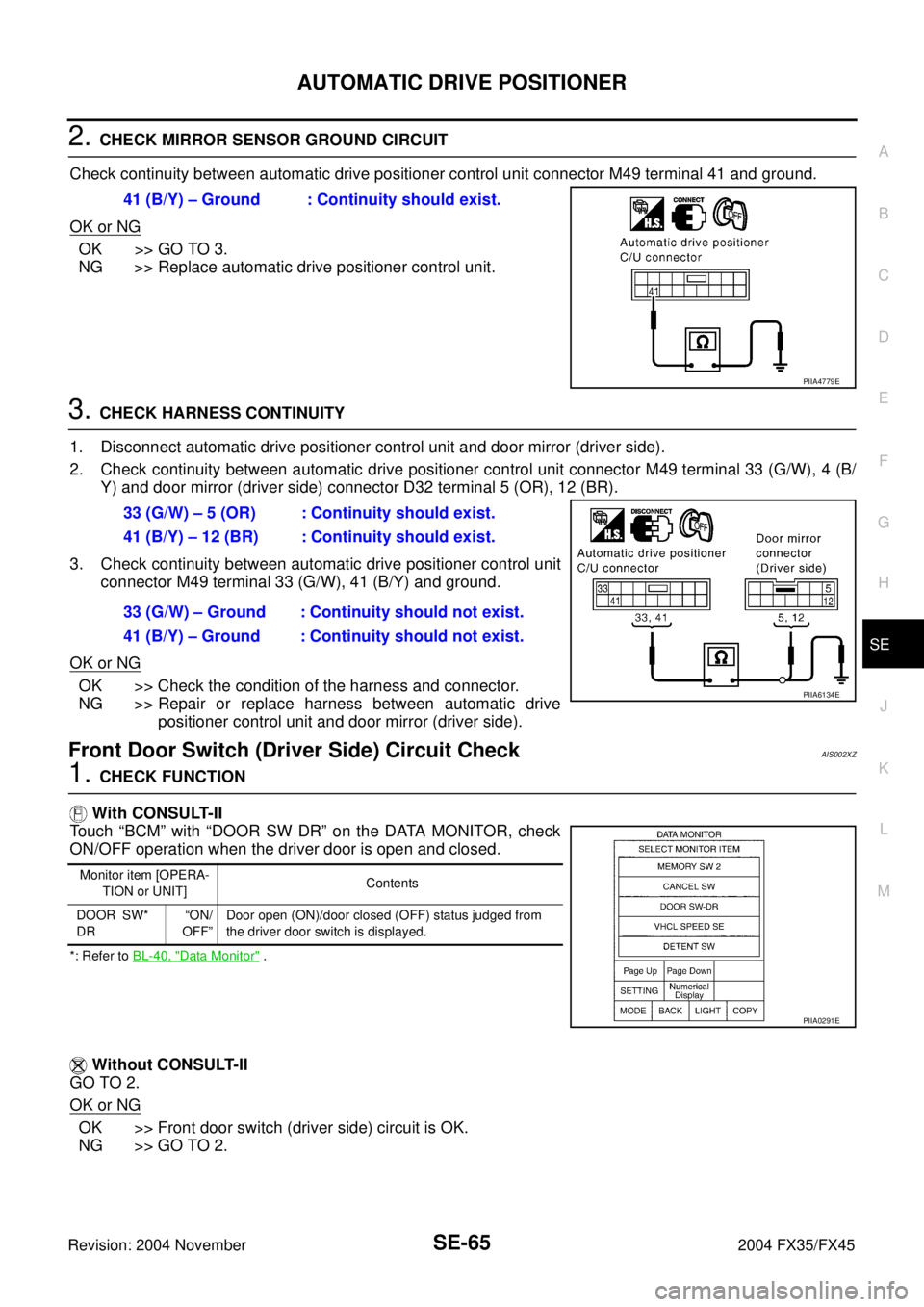
2. CHECK MIRROR SENSOR GROUND CIRCUIT
Check continuity between automatic drive positioner control unit connector M49 terminal 41 and ground.
OK or NG
OK >> GO TO 3.
NG >> Replace automatic drive positioner control unit.
3. CHECK HARNESS CONTINUITY
1. Disconnect automatic drive positioner control unit and door mirror (driver side).
2. Check continuity between automatic drive positioner control unit connector M49 terminal 33 (G/W), 4 (B/
Y) and door mirror (driver side) connector D32 terminal 5 (OR), 12 (BR).
3. Check continuity between automatic drive positioner control unit
connector M49 terminal 33 (G/W), 41 (B/Y) and ground.
OK or NG
OK >> Check the condition of the harness and connector.
NG >> Repair or replace harness between automatic drive
positioner control unit and door mirror (driver side).
Front Door Switch (Driver Side) Circuit CheckAIS002XZ
1. CHECK FUNCTION
With CONSULT-II
Touch “BCM” with “DOOR SW DR” on the DATA MONITOR, check
ON/OFF operation when the driver door is open and closed.
*: Refer to BL-40, "Data Monitor" .
Without CONSULT-II
GO TO 2.
OK or NG
OK >> Front door switch (driver side) circuit is OK.
NG >> GO TO 2.41 (B/Y) – Ground : Continuity should exist.
PIIA4779E
33 (G/W) – 5 (OR) : Continuity should exist.
41 (B/Y) – 12 (BR) : Continuity should exist.
33 (G/W) – Ground : Continuity should not exist.
41 (B/Y) – Ground : Continuity should not exist.
PIIA6134E
Monitor item [OPERA-
TION or UNIT]Contents
DOOR SW*
DR“ON/
OFF”Door open (ON)/door closed (OFF) status judged from
the driver door switch is displayed.
PIIA0291E
Page 4195 of 4449
SE-66
AUTOMATIC DRIVE POSITIONER
Revision: 2004 November 2004 FX35/FX45
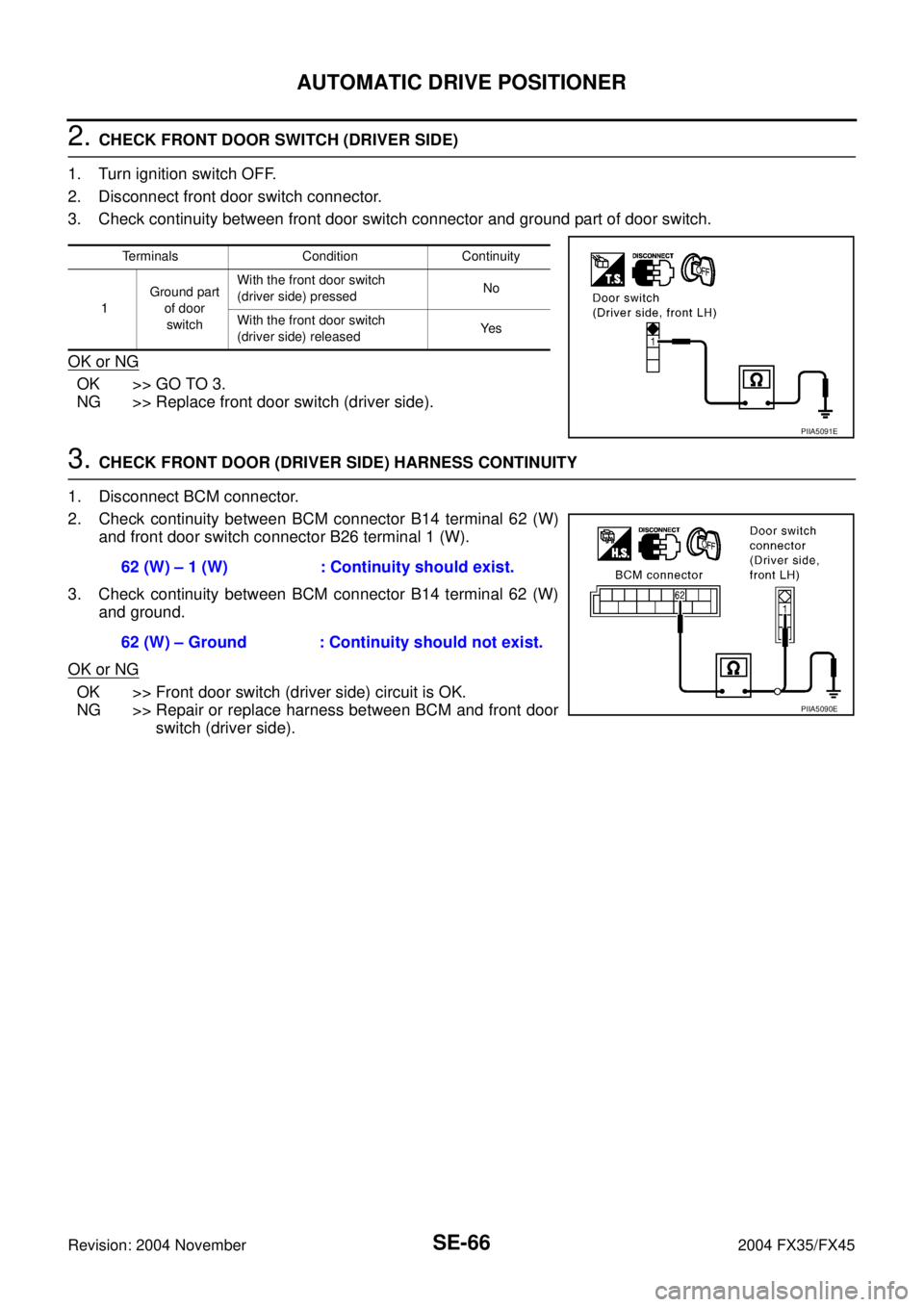
2. CHECK FRONT DOOR SWITCH (DRIVER SIDE)
1. Turn ignition switch OFF.
2. Disconnect front door switch connector.
3. Check continuity between front door switch connector and ground part of door switch.
OK or NG
OK >> GO TO 3.
NG >> Replace front door switch (driver side).
3. CHECK FRONT DOOR (DRIVER SIDE) HARNESS CONTINUITY
1. Disconnect BCM connector.
2. Check continuity between BCM connector B14 terminal 62 (W)
and front door switch connector B26 terminal 1 (W).
3. Check continuity between BCM connector B14 terminal 62 (W)
and ground.
OK or NG
OK >> Front door switch (driver side) circuit is OK.
NG >> Repair or replace harness between BCM and front door
switch (driver side).
Terminals Condition Continuity
1Ground part
of door
switchWith the front door switch
(driver side) pressedNo
With the front door switch
(driver side) releasedYe s
PIIA5091E
62 (W) – 1 (W) : Continuity should exist.
62 (W) – Ground : Continuity should not exist.
PIIA5090E
Page 4196 of 4449
AUTOMATIC DRIVE POSITIONER
SE-67
C
D
E
F
G
H
J
K
L
MA
B
SE
Revision: 2004 November 2004 FX35/FX45
Sliding Switch Circuit CheckAIS002Y1
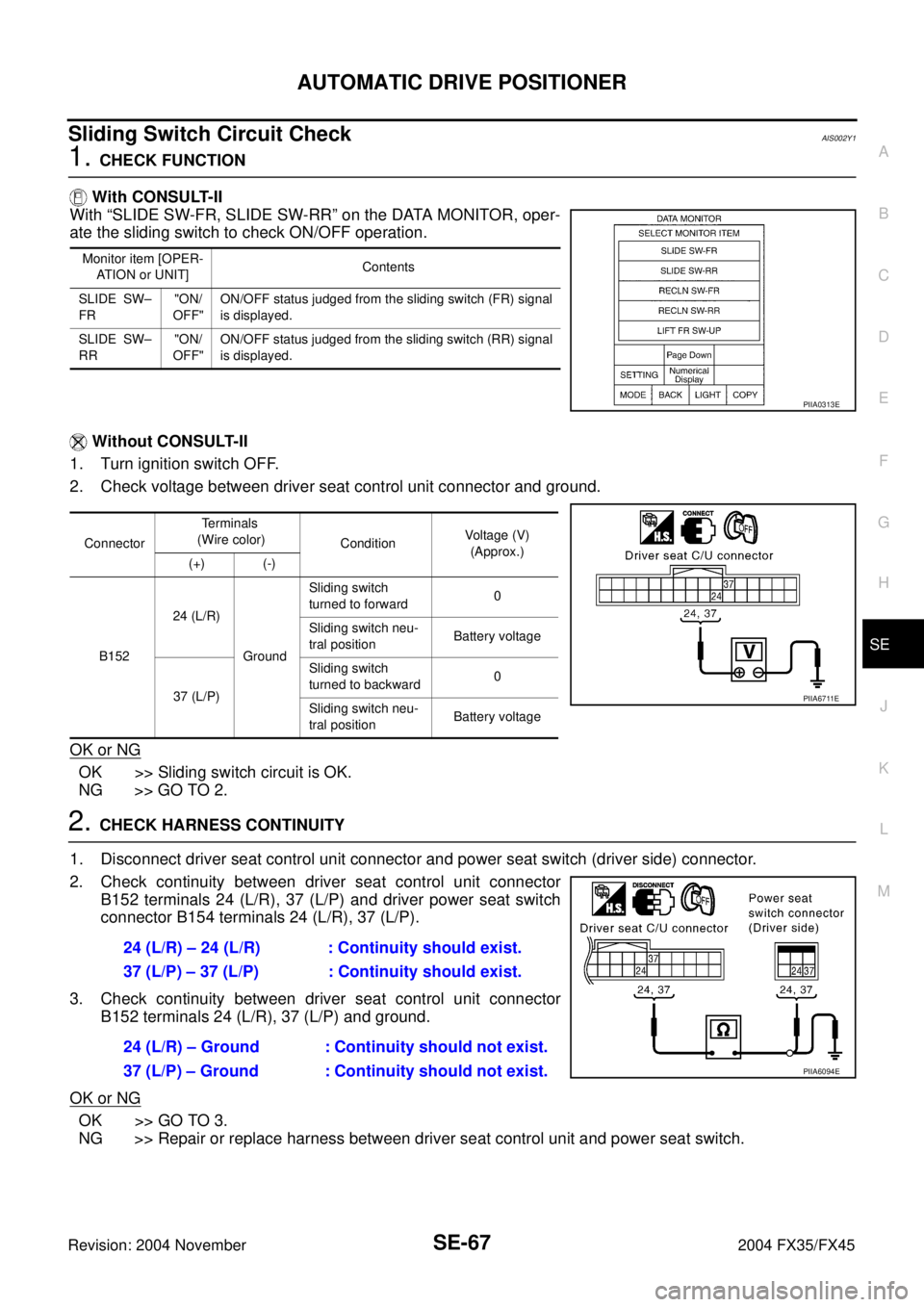
1. CHECK FUNCTION
With CONSULT-II
With “SLIDE SW-FR, SLIDE SW-RR” on the DATA MONITOR, oper-
ate the sliding switch to check ON/OFF operation.
Without CONSULT-II
1. Turn ignition switch OFF.
2. Check voltage between driver seat control unit connector and ground.
OK or NG
OK >> Sliding switch circuit is OK.
NG >> GO TO 2.
2. CHECK HARNESS CONTINUITY
1. Disconnect driver seat control unit connector and power seat switch (driver side) connector.
2. Check continuity between driver seat control unit connector
B152 terminals 24 (L/R), 37 (L/P) and driver power seat switch
connector B154 terminals 24 (L/R), 37 (L/P).
3. Check continuity between driver seat control unit connector
B152 terminals 24 (L/R), 37 (L/P) and ground.
OK or NG
OK >> GO TO 3.
NG >> Repair or replace harness between driver seat control unit and power seat switch.
Monitor item [OPER-
ATION or UNIT]Contents
SLIDE SW–
FR"ON/
OFF"ON/OFF status judged from the sliding switch (FR) signal
is displayed.
SLIDE SW–
RR"ON/
OFF"ON/OFF status judged from the sliding switch (RR) signal
is displayed.
PIIA0313E
ConnectorTe r m i n a l s
(Wire color)
ConditionVoltage (V)
(Approx.)
(+) (-)
B15224 (L/R)
GroundSliding switch
turned to forward0
Sliding switch neu-
tral positionBattery voltage
37 (L/P)Sliding switch
turned to backward0
Sliding switch neu-
tral positionBattery voltage
PIIA6711E
24 (L/R) – 24 (L/R) : Continuity should exist.
37 (L/P) – 37 (L/P) : Continuity should exist.
24 (L/R) – Ground : Continuity should not exist.
37 (L/P) – Ground : Continuity should not exist.
PIIA6094E
Page 4198 of 4449
AUTOMATIC DRIVE POSITIONER
SE-69
C
D
E
F
G
H
J
K
L
MA
B
SE
Revision: 2004 November 2004 FX35/FX45
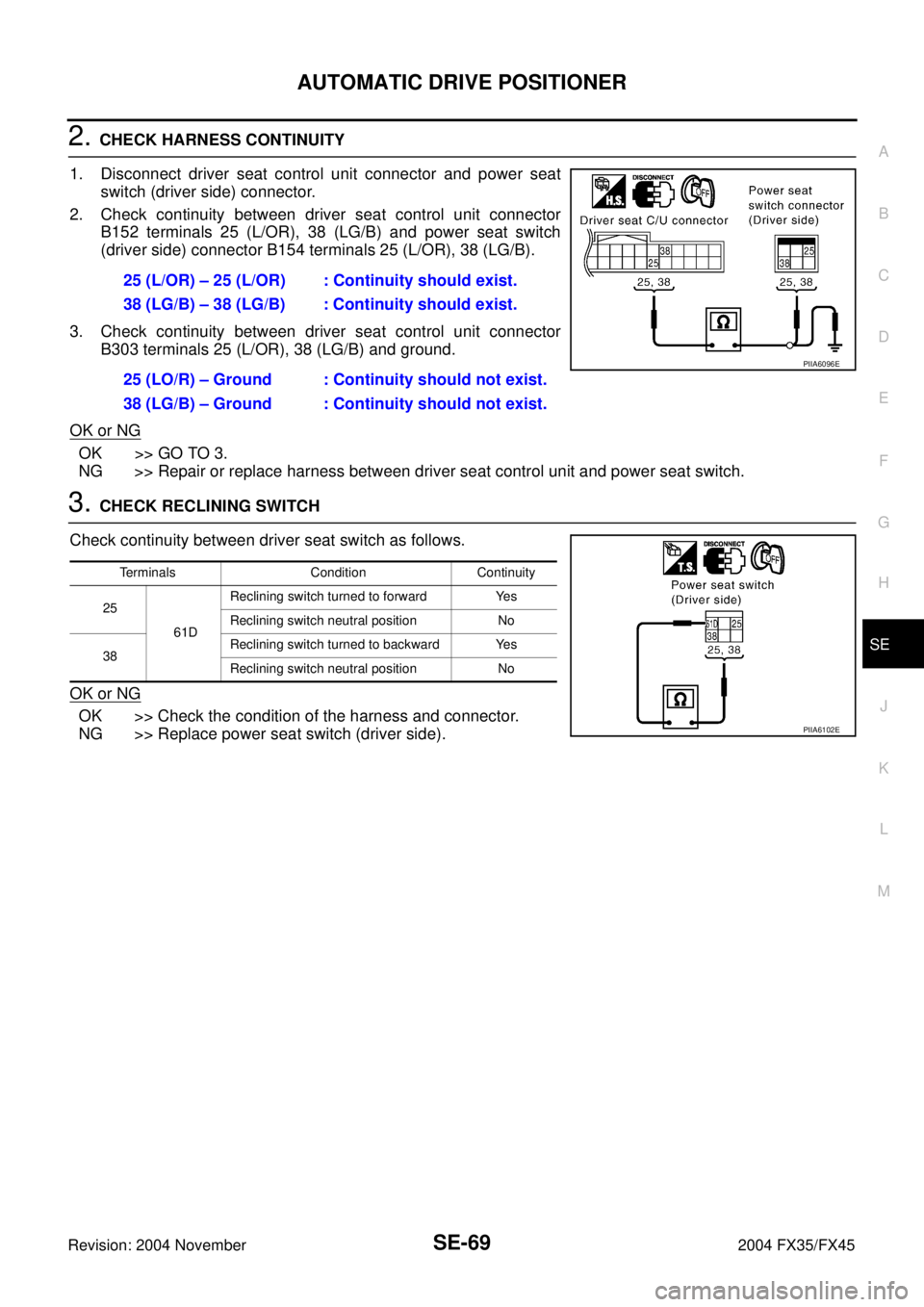
2. CHECK HARNESS CONTINUITY
1. Disconnect driver seat control unit connector and power seat
switch (driver side) connector.
2. Check continuity between driver seat control unit connector
B152 terminals 25 (L/OR), 38 (LG/B) and power seat switch
(driver side) connector B154 terminals 25 (L/OR), 38 (LG/B).
3. Check continuity between driver seat control unit connector
B303 terminals 25 (L/OR), 38 (LG/B) and ground.
OK or NG
OK >> GO TO 3.
NG >> Repair or replace harness between driver seat control unit and power seat switch.
3. CHECK RECLINING SWITCH
Check continuity between driver seat switch as follows.
OK or NG
OK >> Check the condition of the harness and connector.
NG >> Replace power seat switch (driver side).25 (L/OR) – 25 (L/OR) : Continuity should exist.
38 (LG/B) – 38 (LG/B) : Continuity should exist.
25 (LO/R) – Ground : Continuity should not exist.
38 (LG/B) – Ground : Continuity should not exist.
PIIA6096E
Terminals Condition Continuity
25
61DReclining switch turned to forward Yes
Reclining switch neutral position No
38Reclining switch turned to backward Yes
Reclining switch neutral position No
PIIA6102E
Page 4199 of 4449
SE-70
AUTOMATIC DRIVE POSITIONER
Revision: 2004 November 2004 FX35/FX45
Front Lifting Switch Circuit CheckAIS002Y3
1. CHECK FUNCTION
With CONSULT-II
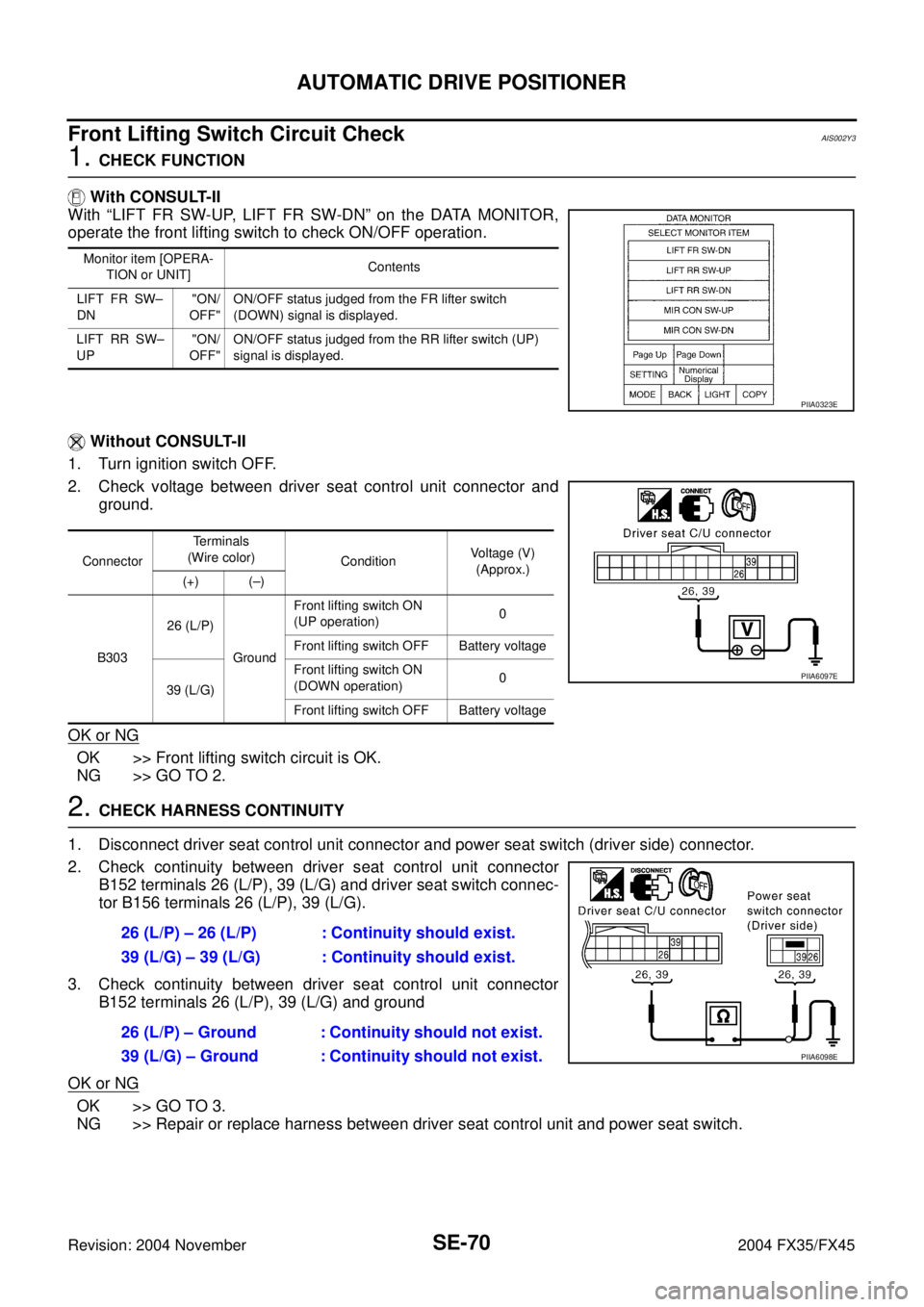
With “LIFT FR SW-UP, LIFT FR SW-DN” on the DATA MONITOR,
operate the front lifting switch to check ON/OFF operation.
Without CONSULT-II
1. Turn ignition switch OFF.
2. Check voltage between driver seat control unit connector and
ground.
OK or NG
OK >> Front lifting switch circuit is OK.
NG >> GO TO 2.
2. CHECK HARNESS CONTINUITY
1. Disconnect driver seat control unit connector and power seat switch (driver side) connector.
2. Check continuity between driver seat control unit connector
B152 terminals 26 (L/P), 39 (L/G) and driver seat switch connec-
tor B156 terminals 26 (L/P), 39 (L/G).
3. Check continuity between driver seat control unit connector
B152 terminals 26 (L/P), 39 (L/G) and ground
OK or NG
OK >> GO TO 3.
NG >> Repair or replace harness between driver seat control unit and power seat switch.
Monitor item [OPERA-
TION or UNIT]Contents
LIFT FR SW–
DN"ON/
OFF"ON/OFF status judged from the FR lifter switch
(DOWN) signal is displayed.
LIFT RR SW–
UP"ON/
OFF"ON/OFF status judged from the RR lifter switch (UP)
signal is displayed.
PIIA0323E
ConnectorTerminals
(Wire color)
ConditionVoltage (V)
(Approx.)
(+) (–)
B30326 (L/P)
GroundFront lifting switch ON
(UP operation)0
Front lifting switch OFF Battery voltage
39 (L/G)Front lifting switch ON
(DOWN operation)0
Front lifting switch OFF Battery voltage
PIIA6097E
26 (L/P) – 26 (L/P) : Continuity should exist.
39 (L/G) – 39 (L/G) : Continuity should exist.
26 (L/P) – Ground : Continuity should not exist.
39 (L/G) – Ground : Continuity should not exist.
PIIA6098E
Page 4201 of 4449
SE-72
AUTOMATIC DRIVE POSITIONER
Revision: 2004 November 2004 FX35/FX45
2. CHECK REAR LIFTING SWITCH HARNESS CONTINUITY
1. Disconnect driver seat control unit connector and driver power seat switch connector.
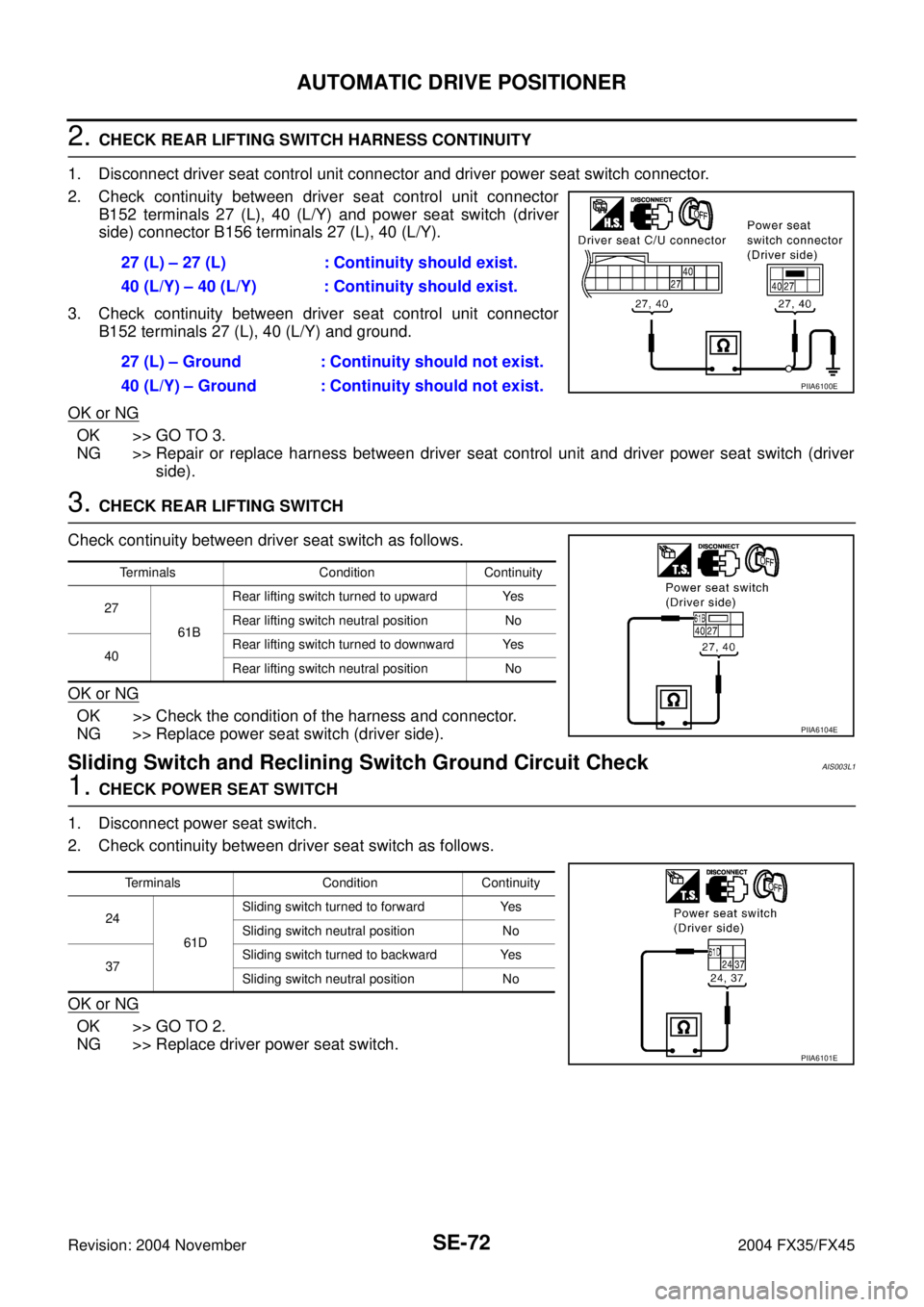
2. Check continuity between driver seat control unit connector
B152 terminals 27 (L), 40 (L/Y) and power seat switch (driver
side) connector B156 terminals 27 (L), 40 (L/Y).
3. Check continuity between driver seat control unit connector
B152 terminals 27 (L), 40 (L/Y) and ground.
OK or NG
OK >> GO TO 3.
NG >> Repair or replace harness between driver seat control unit and driver power seat switch (driver
side).
3. CHECK REAR LIFTING SWITCH
Check continuity between driver seat switch as follows.
OK or NG
OK >> Check the condition of the harness and connector.
NG >> Replace power seat switch (driver side).
Sliding Switch and Reclining Switch Ground Circuit CheckAIS003L1
1. CHECK POWER SEAT SWITCH
1. Disconnect power seat switch.
2. Check continuity between driver seat switch as follows.
OK or NG
OK >> GO TO 2.
NG >> Replace driver power seat switch.27 (L) – 27 (L) : Continuity should exist.
40 (L/Y) – 40 (L/Y) : Continuity should exist.
27 (L) – Ground : Continuity should not exist.
40 (L/Y) – Ground : Continuity should not exist.
PIIA6100E
Terminals Condition Continuity
27
61BRear lifting switch turned to upward Yes
Rear lifting switch neutral position No
40Rear lifting switch turned to downward Yes
Rear lifting switch neutral position No
PIIA6104E
Terminals Condition Continuity
24
61DSliding switch turned to forward Yes
Sliding switch neutral position No
37Sliding switch turned to backward Yes
Sliding switch neutral position No
PIIA6101E
Page 4202 of 4449
AUTOMATIC DRIVE POSITIONER
SE-73
C
D
E
F
G
H
J
K
L
MA
B
SE
Revision: 2004 November 2004 FX35/FX45
2. CHECK POWER SEAT SWITCH GROUND CIRCUIT
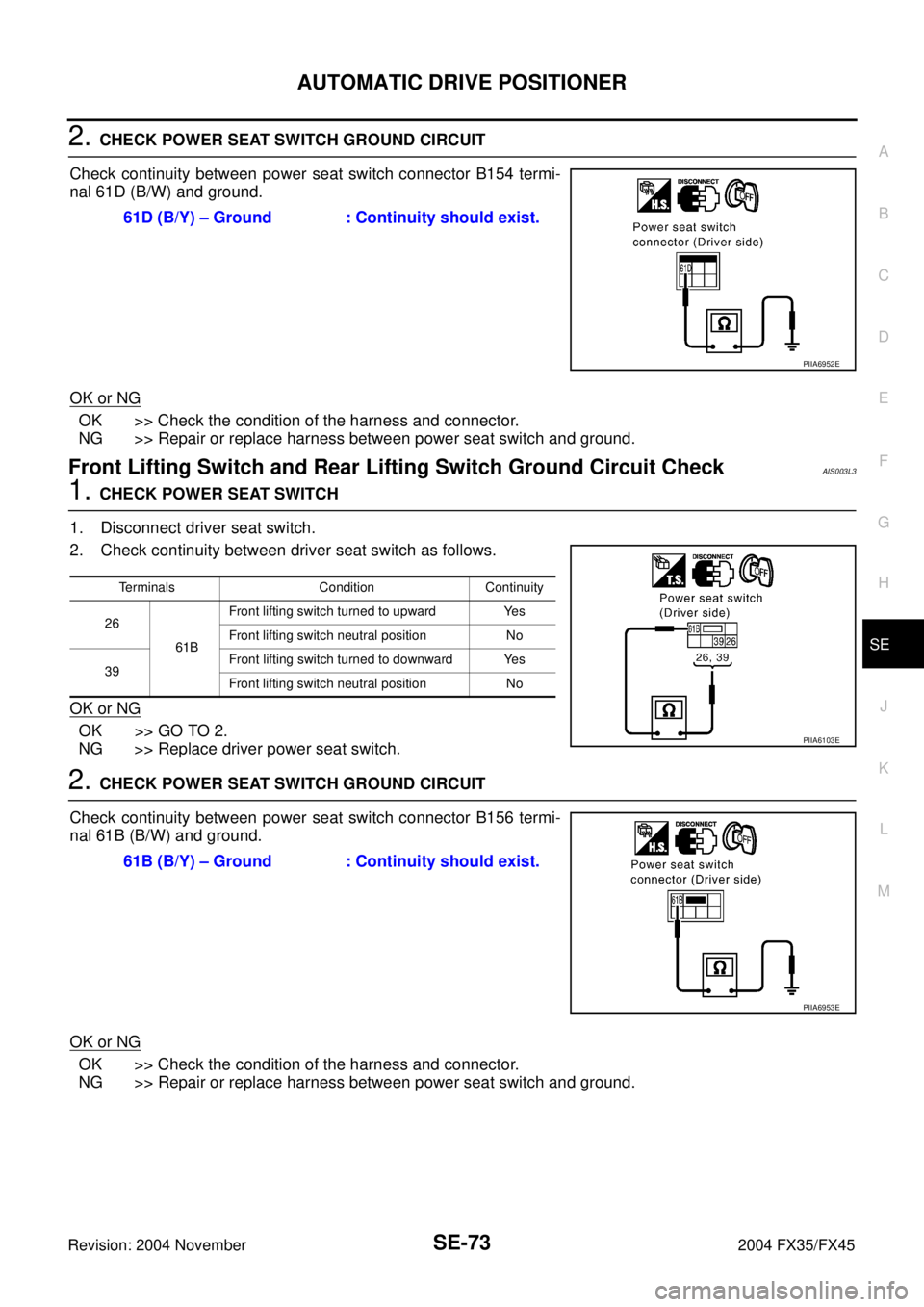
Check continuity between power seat switch connector B154 termi-
nal 61D (B/W) and ground.
OK or NG
OK >> Check the condition of the harness and connector.
NG >> Repair or replace harness between power seat switch and ground.
Front Lifting Switch and Rear Lifting Switch Ground Circuit CheckAIS003L3
1. CHECK POWER SEAT SWITCH
1. Disconnect driver seat switch.
2. Check continuity between driver seat switch as follows.
OK or NG
OK >> GO TO 2.
NG >> Replace driver power seat switch.
2. CHECK POWER SEAT SWITCH GROUND CIRCUIT
Check continuity between power seat switch connector B156 termi-
nal 61B (B/W) and ground.
OK or NG
OK >> Check the condition of the harness and connector.
NG >> Repair or replace harness between power seat switch and ground.61D (B/Y) – Ground : Continuity should exist.
PIIA6952E
Terminals Condition Continuity
26
61BFront lifting switch turned to upward Yes
Front lifting switch neutral position No
39Front lifting switch turned to downward Yes
Front lifting switch neutral position No
PIIA6103E
61B (B/Y) – Ground : Continuity should exist.
PIIA6953E
Page 4203 of 4449

SE-74
AUTOMATIC DRIVE POSITIONER
Revision: 2004 November 2004 FX35/FX45
Telescopic Switch Circuit CheckAIS002YD
1. CHECK FUNCTION
With CONSULT-II
With "TELESCO SW-FR, TELESCO SWRR"RR" on the DATA MON-
ITOR, operate the ADP steering switch to check ON/OFF operation.
Without CONSULT-II
1. Turn ignition switch OFF.
2. Check voltage between automatic drive positioner control unit
connector and ground.
OK or NG
OK >> Telescopic switch circuit is OK.
NG >> GO TO 2.
2. CHECK TELESCOPIC CIRCUIT HARNESS CONTINUITY
1. Disconnect automatic drive positioner control unit connector and ADP steering switch connector.
2. Check continuity between automatic drive positioner control unit
connector M49 terminals 11 (BR), 27 (LG) and ADP steering
switch connector M13 terminals 4 (LG), 5 (BR).
3. Check continuity between automatic drive positioner control unit
connector M49 terminals 11 (BR), 27 (LG) and ground.
OK or NG
OK >> GO TO 3.
NG >> Repair or replace harness between automatic drive positioner control unit and ADP steering
switch.
Monitor item [OPERATION or
UNIT]Contents
TELESCO SW-FR "ON/OFF"(ON/OFF) status judged from the tele-
scoping switch (FR) signal is displayed.
TELESCO SW-RR "ON/OFF" (ON/OFF) status judged from the tele-
scoping switch (RR) signal is displayed.
PIIA0315E
ConnectorTerminals
(Wire color)
ConditionVoltage (V)
(Approx.)
(+) (–)
M4911 ( B R )
GroundTelescopic switch turned to
forward0
Telescopic switch neutral
position5
27 (LG)Telescopic switch turned to
backward0
Telescopic switch neutral
position5
PIIA5073E
11 (BR) – 5 (BR) : Continuity should exist.
27 (LG) – 4 (LG) : Continuity should exist.
11 (BR) – Ground : Continuity should not exist.
27 (LG) – Ground : Continuity should not exist.
PIIA5071E
Page 4205 of 4449

SE-76
AUTOMATIC DRIVE POSITIONER
Revision: 2004 November 2004 FX35/FX45
Tilt Switch Circuit CheckAIS002YE
1. CHECK FUNCTION
With CONSULT-II
With “TILT SW-UP,TILT SW-DOWN” on the DATA MONITOR, oper-
ate the ADP steering switch to check ON/OFF operation.
Without CONSULT-II
1. Turn ignition switch OFF.
2. Check voltage between automatic drive positioner control unit
connector and ground.
OK or NG
OK >> Tilt switch circuit is OK.
NG >> GO TO 2.
2. CHECK TILT SWITCH CIRCUIT HARNESS CONTINUITY
1. Disconnect automatic drive positioner control unit connector and ADP steering switch connector.
2. Check continuity between automatic drive positioner control unit
connector M49 terminals 1 (LG/R), 17 (R/B) and ADP steering
switch connector M13 terminals 2 (LG/R), 3 (R/B).
3. Check continuity between automatic drive positioner control unit
connector M49 terminals 1 (LG/R), 17 (R/B) and ground.
OK or NG
OK >> GO TO 3.
NG >> Repair or replace harness between automatic drive positioner control unit and ADP steering
switch.
Monitor item [OPERATION or
UNIT]Contents
TILT SW-UP “ON/OFF” (ON/OFF) status judged from the tilt
switch (UP) signal is displayed.
TILT SW-DOWN “ON/OFF”(ON/OFF) status judged from the tilt
switch (DOWN) signal is displayed.
PIIA0315E
ConnectorTe r m i n a l s
(Wire color)
ConditionVoltage (V)
(Approx.)
(+) (–)
M491 (LG/R)
GroundTilt switch turned to upward 0
Tilt switch neutral position 5
17 (R/B)Tilt switch turned to downward 0
Tilt switch neutral position 5
PIIA5074E
1 (LG/R) – 2 (LG/R) : Continuity should exist.
17 (R/B) – 3 (R/B) : Continuity should exist.
1 (LG/R) – Ground : Continuity should not exist.
17 (R/B) – GRound : Continuity should not exist.
PIIA5072E