transmission INFINITI FX35 2008 Service Manual
[x] Cancel search | Manufacturer: INFINITI, Model Year: 2008, Model line: FX35, Model: INFINITI FX35 2008Pages: 3924, PDF Size: 81.37 MB
Page 399 of 3924

AT-326
< SERVICE INFORMATION >
ASSEMBLY
g. Install control valve with TCM in transmission case.CAUTION:
Make sure that turbine revolu tion sensor securely installs
turbine revolution sensor hole.
Hang down revolution senso r harness toward outside so
as not to disturb installation of control valve with TCM.
Adjust A/T assembly harness co nnector of control valve
with TCM to terminal hole of transmission case.
Assemble it so that manual valve cutout is engaged with manual plate projection.
h. Install bolts A, B and C to control valve with TCM. : Front
i. Tighten bolt 1, 2 and 3 temporarily to prevent dislocation. After that tighten them in order (1 → 2 → 3), and then tighten other
bolts to the specified torque. Refer to AT-249, "
Component".
: Front
SCIA5034E
SCIA5035E
Bolt symbol Length mm (in) Number of bolts
A 42 (1.65) 5
B 55 (2.17) 6
C 40 (1.57) 1
SCIA8077E
SCIA8078E
3AA93ABC3ACD3AC03ACA3AC03AC63AC53A913A773A893A873A873A8E3A773A983AC73AC93AC03AC3
3A893A873A873A8F3A773A9D3AAF3A8A3A8C3A863A9D3AAF3A8B3A8C
Page 401 of 3924
AT-328
< SERVICE INFORMATION >
ASSEMBLY
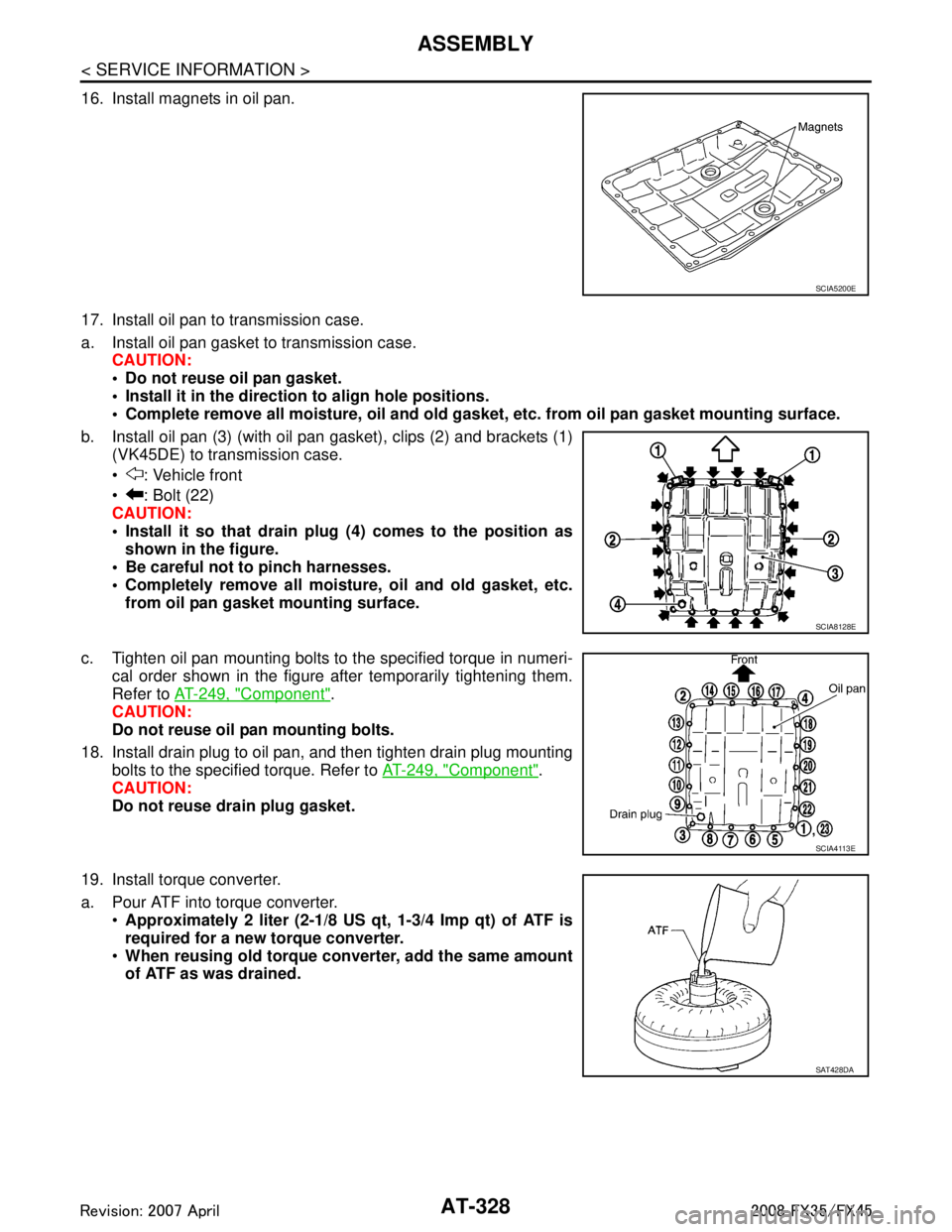
16. Install magnets in oil pan.
17. Install oil pan to transmission case.
a. Install oil pan gasket to transmission case.CAUTION:
Do not reuse oil pan gasket.
Install it in the direction to align hole positions.
Complete remove all moisture, oil and old gasket, etc. from oil pan gasket mounting surface.
b. Install oil pan (3) (with oil pan gasket), clips (2) and brackets (1) (VK45DE) to transmission case.
: Vehicle front
: Bolt (22)
CAUTION:
Install it so that drain plug (4) comes to the position as
shown in the figure.
Be careful not to pinch harnesses.
Completely remove all moisture, oil and old gasket, etc. from oil pan gasket mounting surface.
c. Tighten oil pan mounting bolts to the specified torque in numeri- cal order shown in the figure after temporarily tightening them.
Refer to AT-249, "
Component".
CAUTION:
Do not reuse oil pan mounting bolts.
18. Install drain plug to oil pan, and then tighten drain plug mounting bolts to the specified torque. Refer to AT-249, "
Component".
CAUTION:
Do not reuse drain plug gasket.
19. Install torque converter.
a. Pour ATF into torque converter. Approximately 2 liter (2-1/8 US qt, 1-3/4 Imp qt) of ATF is
required for a new torque converter.
When reusing old torque converter, add the same amount
of ATF as was drained.
SCIA5200E
SCIA8128E
SCIA4113E
SAT428DA
3AA93ABC3ACD3AC03ACA3AC03AC63AC53A913A773A893A873A873A8E3A773A983AC73AC93AC03AC3
3A893A873A873A8F3A773A9D3AAF3A8A3A8C3A863A9D3AAF3A8B3A8C
Page 403 of 3924
AT-330
< SERVICE INFORMATION >
SERVICE DATA AND SPECIFICATIONS (SDS)
SERVICE DATA AND SPECIFICATIONS (SDS)
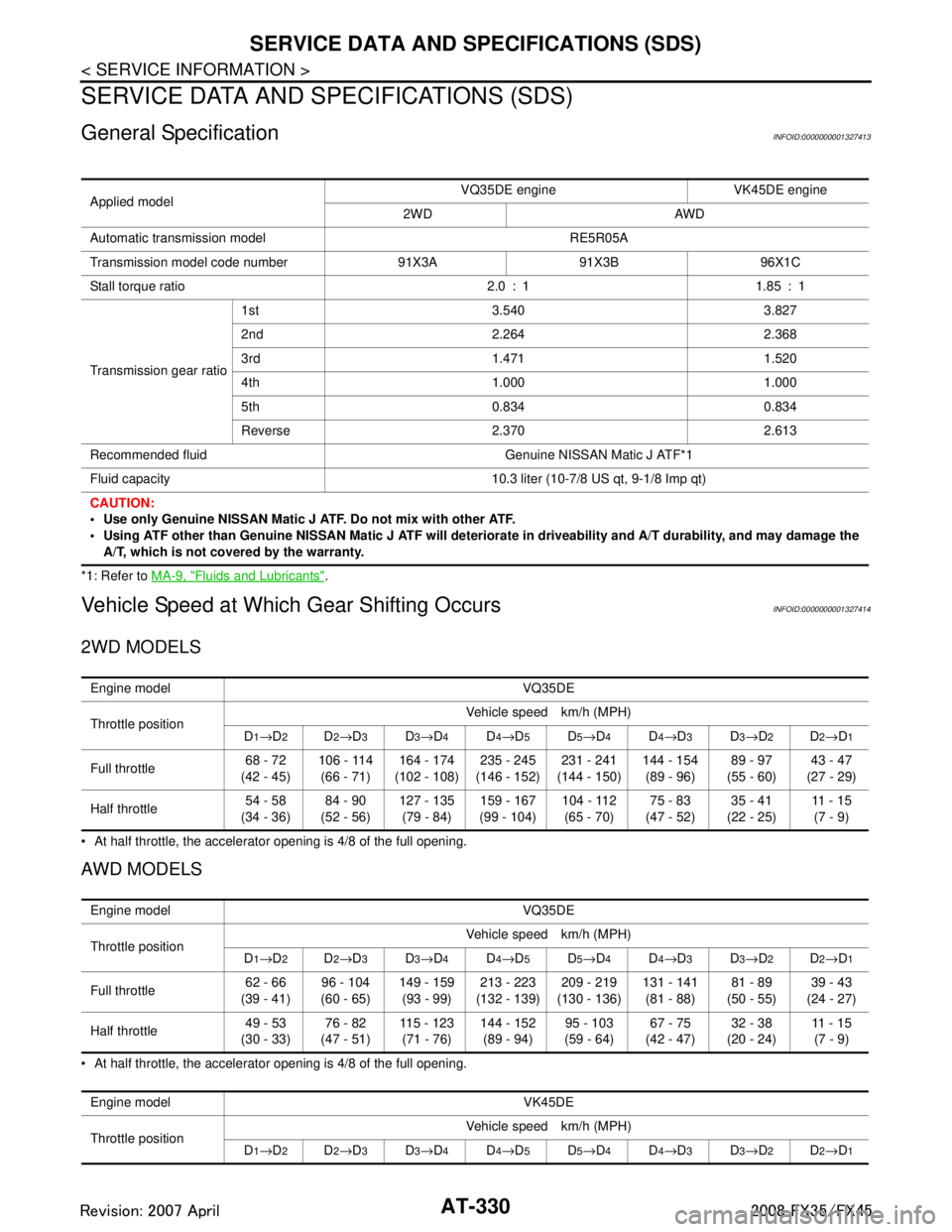
General SpecificationINFOID:0000000001327413
*1: Refer to MA-9, "Fluids and Lubricants".
Vehicle Speed at Which Gear Shifting OccursINFOID:0000000001327414
2WD MODELS
At half throttle, the accelerator opening is 4/8 of the full opening.
AWD MODELS
At half throttle, the accelerator opening is 4/8 of the full opening.Applied model
VQ35DE engine VK45DE engine
2WD AWD
Automatic transmission model RE5R05A
Transmission model code number 91X3A 91X3B 96X1C
Stall torque ratio 2.0 : 1 1.85 : 1
Transmission gear ratio 1st 3.540 3.827
2nd 2.264 2.368
3rd 1.471 1.520
4th 1.000 1.000
5th 0.834 0.834
Reverse 2.370 2.613
Recommended flui d Genuine NISSAN Matic J ATF*1
Fluid capacity 10.3 liter (10-7/8 US qt, 9-1/8 Imp qt)
CAUTION:
Use only Genuine NISSAN Matic J ATF. Do not mix with other ATF.
Using ATF other than Genuine NISSAN Matic J ATF will deteriorate in driveability and A/T durability, and may damage the A/T, which is not covered by the warranty.
Engine model VQ35DE
Throttle position Vehicle speed km/h (MPH)
D
1→ D2D2→D3D3→D4D4→D5D5→D4D4→D3D3→D2D2→D1
Full throttle 68 - 72
(42 - 45) 106 - 114
(66 - 71) 164 - 174
(102 - 108) 235 - 245
(146 - 152) 231 - 241
(144 - 150) 144 - 154
(89 - 96) 89 - 97
(55 - 60) 43 - 47
(27 - 29)
Half throttle 54 - 58
(34 - 36) 84 - 90
(52 - 56) 127 - 135
(79 - 84) 159 - 167
(99 - 104) 104 - 112
(65 - 70) 75 - 83
(47 - 52) 35 - 41
(22 - 25) 11 - 1 5
(7 - 9)
Engine model VQ35DE
Throttle position Vehicle speed km/h (MPH)
D
1→ D2D2→D3D3→D4D4→D5D5→D4D4→D3D3→D2D2→D1
Full throttle 62 - 66
(39 - 41) 96 - 104
(60 - 65) 149 - 159
(93 - 99) 213 - 223
(132 - 139) 209 - 219
(130 - 136) 131 - 141
(81 - 88) 81 - 89
(50 - 55) 39 - 43
(24 - 27)
Half throttle 49 - 53
(30 - 33) 76 - 82
(47 - 51) 115 - 123
(71 - 76) 144 - 152
(89 - 94) 95 - 103
(59 - 64) 67 - 75
(42 - 47) 32 - 38
(20 - 24) 11 - 1 5
(7 - 9)
Engine model VK45DE
Throttle position Vehicle speed km/h (MPH)
D
1→ D2D2→D3D3→D4D4→D5D5→D4D4→D3D3→D2D2→D1
3AA93ABC3ACD3AC03ACA3AC03AC63AC53A913A773A893A873A873A8E3A773A983AC73AC93AC03AC3
3A893A873A873A8F3A773A9D3AAF3A8A3A8C3A863A9D3AAF3A8B3A8C
Page 429 of 3924

ATC-24
< SERVICE INFORMATION >
AIR CONDITIONER CONTROL
AIR CONDITIONER CONTROL
Description of Air Conditioner LAN Control SystemINFOID:0000000001328167
The LAN (Local Area Network) syst em consists of unified meter and A/C amp., mode door motor, air mix door
motors and intake door motor.
A configuration of these component s is shown in the figure below.
System ConstructionINFOID:0000000001328168
A small network is constructed between the unifi ed meter and A/C amp., air mix door motors, mode door
motor and intake door motor. The unified meter and A/C amp. and motors are connected by data transmission
lines and motor power supply lines. The LAN network is built through the ground circuits of each door motor.
Addresses, motor opening angle signals, motor stop si gnals and error checking messages are all transmitted
through the data transmission lines connecting the unified meter and A/C amp. and each door motor.
The following functions are contained in LCUs built into the air mix door motors, the mode door motor and the
intake door motor.
Address
Motor opening angle signals
Data transmission
Motor stop and drive decision
Opening angle sensor (PBR function)
Comparison
Decision (Unified meter and A/C amp. indicated value and motor opening angle comparison)
OPERATION
The unified meter and A/C amp. receives data from each of the sensors. The unified meter and A/C amp.
sends mode door, air mix door and intake door opening angle data to the mode door motor LCU, air mix door
motor LCU and intake door motor LCU.
The mode door motor, air mix door motors and intake door motor read their respective signals according to the
address signal. Opening angle indication signals received from the unified meter and A/C amp. and each of
the motor position sensors is compared by the LCUs in each door motor with the existing decision and open-
ing angles. Subsequently, HOT/COLD, DEF/VENT and FRE/ REC operation is selected. The new selection
data is returned to the unified meter and A/C amp.
SJIA1609E
RJIA1747E
3AA93ABC3ACD3AC03ACA3AC03AC63AC53A913A773A893A873A873A8E3A773A983AC73AC93AC03AC3
3A893A873A873A8F3A773A9D3AAF3A8A3A8C3A863A9D3AAF3A8B3A8C
Page 430 of 3924
AIR CONDITIONER CONTROLATC-25
< SERVICE INFORMATION >
C
DE
F
G H
I
K L
M A
B
AT C
N
O P
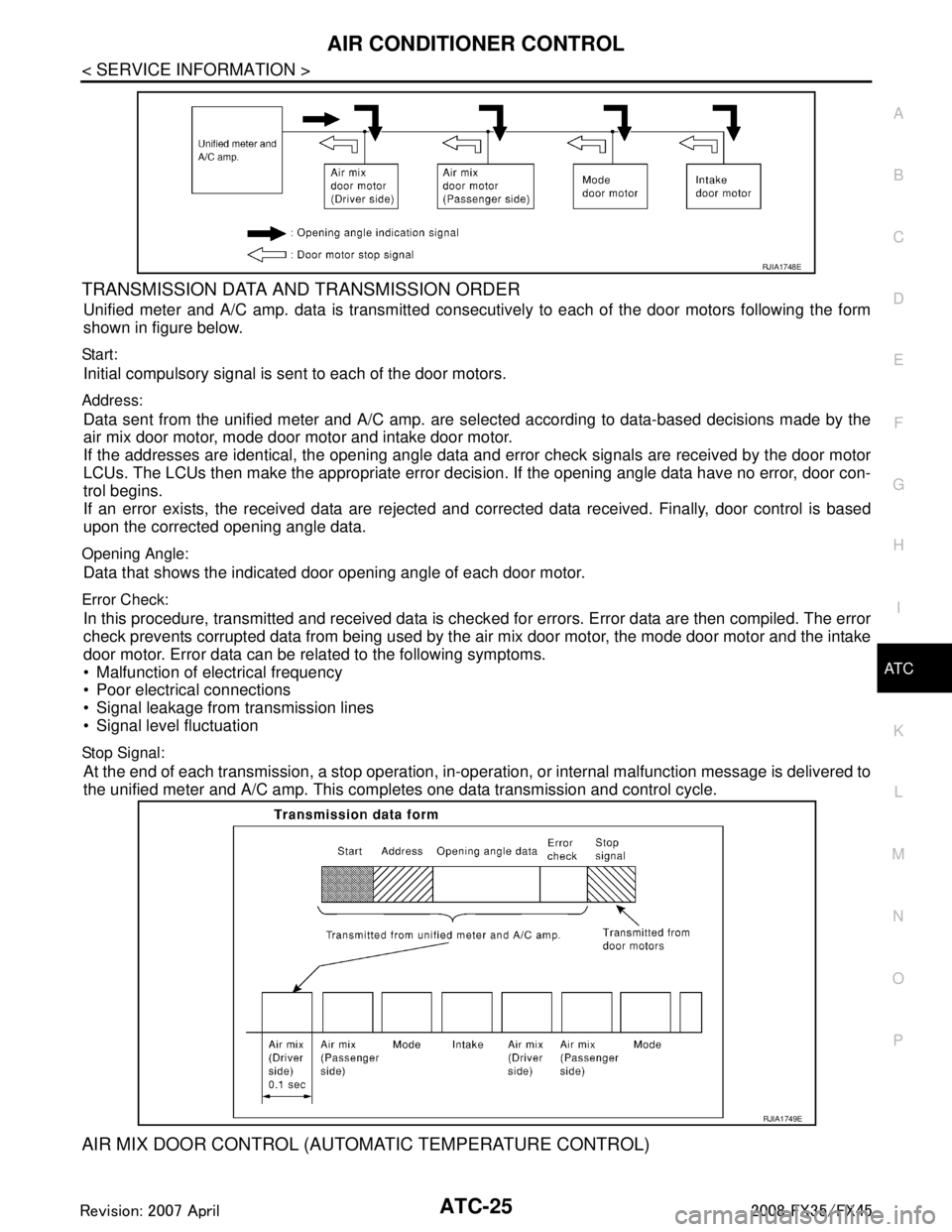
TRANSMISSION DATA AND TRANSMISSION ORDER
Unified meter and A/C amp. data is transmitted consecut ively to each of the door motors following the form
shown in figure below.
Sta rt:
Initial compulsory signal is sent to each of the door motors.
Address:
Data sent from the unified meter and A/C amp. are selected according to data-based decisions made by the
air mix door motor, mode door motor and intake door motor.
If the addresses are identical, the opening angle data and error check signals are received by the door motor
LCUs. The LCUs then make the appropriate error decis ion. If the opening angle data have no error, door con-
trol begins.
If an error exists, the received data are rejected and corrected data received. Finally, door control is based
upon the corrected opening angle data.
Opening Angle:
Data that shows the indicated door opening angle of each door motor.
Error Check:
In this procedure, transmitted and received data is check ed for errors. Error data are then compiled. The error
check prevents corrupted data from being used by the ai r mix door motor, the mode door motor and the intake
door motor. Error data can be related to the following symptoms.
Malfunction of electrical frequency
Poor electrical connections
Signal leakage from transmission lines
Signal level fluctuation
Stop Signal:
At the end of each transmission, a stop operation, in-oper ation, or internal malfunction message is delivered to
the unified meter and A/C amp. This comple tes one data transmission and control cycle.
AIR MIX DOOR CONTROL (AUTOMATIC TEMPERATURE CONTROL)
RJIA1748E
RJIA1749E
3AA93ABC3ACD3AC03ACA3AC03AC63AC53A913A773A893A873A873A8E3A773A983AC73AC93AC03AC3
3A893A873A873A8F3A773A9D3AAF3A8A3A8C3A863A9D3AAF3A8B3A8C
Page 436 of 3924

AIR CONDITIONER CONTROLATC-31
< SERVICE INFORMATION >
C
DE
F
G H
I
K L
M A
B
AT C
N
O P
tronic control units are equipped onto a vehicle, and each control unit shares information and links with other
control units during operation (not independent). In CAN communication, control units are connected with 2
communication lines (CAN-H line, CAN-L line) allowing a high rate of information transmission with less wiring.
Each control unit transmits/receives data but selectively reads required data only. For details, refer to LAN-43,
"CAN System Specification Chart".
3AA93ABC3ACD3AC03ACA3AC03AC63AC53A913A773A893A873A873A8E3A773A983AC73AC93AC03AC3
3A893A873A873A8F3A773A9D3AAF3A8A3A8C3A863A9D3AAF3A8B3A8C
Page 700 of 3924

INFINITI MOBILE ENTERTAINMENT SYSTEMAV-153
< SERVICE INFORMATION >
C
DE
F
G H
I
J
L
M A
B
AV
N
O P
Check the inspection items below to diagnose the malfunction.
Check that the signal is received at the rear seat.
Check that transmission part has any seals or dirt that interrupts signal.
Check that the head phone battery has run down.
OK or NG
OK >> GO TO 2.
NG >> Receive signal with head phone at the rear seat. Remove seal or dirt that is interrupting signal.
If the battery has run down, replace it with new one.
2.CHECK HEAD PHONE
Check that sound is heard with another head phone.
OK or NG
OK >> Replace malfunction head phone.
NG >> GO TO 3.
3.CHECK HARNESS
1. Turn ignition switch OFF.
2. Disconnect DVD player and DVD display connectors.
3. Check continuity between DVD player harness connector B19 terminals 17, 18, 19, 20 and DVD display harness connector
B61 terminals 1, 2, 3, 4.
4. Check continuity between DVD player harness connector B19 terminals 17, 18, 19, 20 and ground.
OK or NG
OK >> GO TO 4.
NG >> Repair harness or connector.
4.CHECK MES SOUND SIGNAL
1. Connect DVD player and DVD display connectors.
2. Turn the ignition switch ACC and Press “POWER” switch of DVD player.
3. Check the signal between DVD player harness connector B19 terminals 17, 18, 20 and 19 with CONSULT-III or oscilloscope.
OK or NG
OK >> Replace DVD display.
NG >> Replace DVD player.
Remote Controller Does Not WorkINFOID:0000000001328785
1.CHECK DVD PLAYER OPERATION SWITCH
SKIA5852E
17 – 1 : Continuity should exist.
18 – 2 : Continuity should exist.
19 – 3 : Continuity should exist.
20 – 4 : Continuity should exist.
17, 18, 19, 20 – Ground : Co ntinuity should not exist.
SKIA7033E
Te r m i n a l
Condition Reference value
(+) (–)
17 19 Play CD or DVD video. Refer to
AV- 1 4 6 , "
Terminal and Ref-
erence Value for DVD Player".
18
20
SKIA7047E
3AA93ABC3ACD3AC03ACA3AC03AC63AC53A913A773A893A873A873A8E3A773A983AC73AC93AC03AC3
3A893A873A873A8F3A773A9D3AAF3A8A3A8C3A863A9D3AAF3A8B3A8C
Page 726 of 3924

BCS-6
< SERVICE INFORMATION >
BCM (BODY CONTROL MODULE)
When BCM is in sleep status, transistors of OUTPUT 1 and 5 stop the output, and BCM enters low power
mode. Mean while OUTPUT 2, 3, and 4 send out ON signal every 60 ms, and accept input from lighting
switch system.
CAN COMMUNICATION CONTROL
CAN communication allows a high rate of information transmission through the two communication lines (CAN
L line, CAN H line) connecting the various control units in the system. Each control unit transmits/receives
data but selectively reads required data only. For details of signals that are transmitted/received by BCM via
CAN communication, refer to LAN-43, "
CAN System Specification Chart".
BCM STATUS CONTROL
BCM changes its status depending on the operation stat us in order to save power consumption.
1. CAN communication status With ignition switch ON, CAN communicates with other control units normally.
Control by BCM is being operated properly.
When ignition switch is OFF, switching to sleep mode is possible.
Even when ignition switch is OFF, if CAN communication with IPDM E/R and combination meter isactive, CAN communication status is active.
2. Sleep transient status This status shuts down CAN communication when ignition switch is turned OFF.
It transmits sleep request signal to IPDM E/R and combination meter.
2 seconds after CAN communication of all control units stops, sleep transient status is switched to CAN
communication inactive status.
3. CAN communication inactive status With ignition switch OFF, CAN communication is not active.
With ignition switch OFF, control performed only by BCM is active.
3 seconds after CAN communication of all control units stops, CAN communication inactive status is
switched to sleep status.
4. Sleep status BCM is activated with low power mode.
CAN communication is not active.
When CAN communication operation is detected, it switches to CAN communication status.
When a state of the following switches changes , it switches to CAN communication state.
- Key switch
- Hazard switch
PKIC4919E
3AA93ABC3ACD3AC03ACA3AC03AC63AC53A913A773A893A873A873A8E3A773A983AC73AC93AC03AC3
3A893A873A873A8F3A773A9D3AAF3A8A3A8C3A863A9D3AAF3A8B3A8C
Page 733 of 3924

BCM (BODY CONTROL MODULE)BCS-13
< SERVICE INFORMATION >
C
DE
F
G H
I
J
L
M A
B
BCS
N
O P
SELF-DIAG RESULTS
U1000 CAN Communication CircuitINFOID:0000000001606767
1.PERFORM SELF DIAGNOSTIC
1. Turn ignition switch ON and wait for 2 seconds or more.
2. Check “Self Diagnostic Result” of BCM.
Is
“CAN COMM CIRCUIT” displayed?
YES >> Refer to LAN-14, "Trouble Diagnosis Flow Chart".
NO >> Refer to GI-25, "
How to Perform Efficient Diagnosis for an Electrical Incident".
Removal and Installation of BCMINFOID:0000000001328613
REMOVAL
1. Remove the dash side finisher (LH). Refer to EI-38.
2. Disconnect BCM connector.
3. Remove bracket mounting screws (3) to remove BCM and fuse block with bracket.
Item Description
RESET SETTING VALUE Return a value set with WORK SUPPORT of each system to a default value in factory shipment.
DTC DTC Detection Condition Possible cause
U1000: CAN COMM CIRCUIT When BCM cannot communicate CAN com-
munication signal continuously for 2 sec-
onds or more. Any item (or items) of the following listed below is
malfunctioning in CAN communication system.
Transmission
Receiving (ECM)
Receiving (IPDM E/R)
Receiving (METER/M&A)
Receiving (I-KEY)
SKIA4964E
3AA93ABC3ACD3AC03ACA3AC03AC63AC53A913A773A893A873A873A8E3A773A983AC73AC93AC03AC3
3A893A873A873A8F3A773A9D3AAF3A8A3A8C3A863A9D3AAF3A8B3A8C
Page 757 of 3924

POWER DOOR LOCK SYSTEMBL-23
< SERVICE INFORMATION >
C
DE
F
G H
J
K L
M A
B
BL
N
O P
When the front door switch (passenger side) is ON (door is OPEN), ground is supplied
to BCM terminal 12
through front door switch (passenger side) terminal 1
through front door switch (passenger side) case ground.
When the rear door switch LH is ON (door is OPEN), ground is supplied
to BCM terminal 63
through front door switch LH terminal 1
through rear door switch LH case ground.
When the rear door switch RH is ON (door is OPEN), ground is supplied
to BCM terminal 13
through front door switch RH terminal 1
through rear door switch RH case ground.
When the back door switch is ON (door is OPEN), ground is supplied
to BCM terminal 58
through back door closure motor (door switch) terminal 7 and 8
through grounds B15 and B45.
OUTLINE
Functions Available by Operating the Door Lock and Unlo ck Switches on Driver's Door and Passenger's Door
Interlocked with the locking operation of door lock and unlock switch, door lock actuators of all doors and
fuel lid lock actuator are locked.
Interlocked with the unlocking operation of door lock and unlock switch, door lock actuators of all doors and
fuel lid lock actuator are unlocked.
Functions Available by Operating th e Key Cylinder Switch on Driver's
Interlocked with the locking operation of door key cyli nder, door lock actuators of all doors and fuel lid lock
actuator are locked.
Select Unlo ck Operation
When door key cylinder is unlocked, door lock actuator driver side and fuel lid lock actuator are unlocked.
When door key cylinder is unlocked for the second time within 5 seconds after the first operation, door lock
actuators on all doors are unlocked.
Select unlock operation mode can be changed using “DOOR LOCK-UNLOCK SET”\
mode in “WORK SUP-
PORT”. Refer to BL-36, "
CONSULT-III Function (BCM)".
Select unlock operation mode can be changed also on the display.
Key Reminder Door System
When door lock and unlock switch is operated to lock doors with ignition key put in key cylinder and any door
open, all door lock actuators are locked and then unlocked.
Key reminder door mode can be changed using “WOR K SUPPORT” mode in “ANTI-LOCK OUT SET”.
Refer to BL-36, "
CONSULT-III Function (BCM)".
CAN Communication System DescriptionINFOID:0000000001327791
CAN (Controller Area Network) is a serial communication li ne for real time application. It is an on-vehicle mul-
tiplex communication line with high data communication speed and excellent error detection ability. Many elec-
tronic control units are equipped onto a vehicle, and each control unit shares information and links with other
control units during operation (not independent). In CAN communication, control units are connected with 2
communication lines (CAN H line, CAN L line) allowing a high rate of information transmission with less wiring.
Each control unit transmits/receives data but selectively reads required data only.
CAN Communication UnitINFOID:0000000001327792
Refer to LAN-43, "CAN System Specification Chart".
3AA93ABC3ACD3AC03ACA3AC03AC63AC53A913A773A893A873A873A8E3A773A983AC73AC93AC03AC3
3A893A873A873A8F3A773A9D3AAF3A8A3A8C3A863A9D3AAF3A8B3A8C