power steering INFINITI FX35 2008 User Guide
[x] Cancel search | Manufacturer: INFINITI, Model Year: 2008, Model line: FX35, Model: INFINITI FX35 2008Pages: 3924, PDF Size: 81.37 MB
Page 548 of 3924

AV-1
ELECTRICAL
C
DE
F
G H
I
J
L
M
SECTION AV
A
B
AV
N
O P
CONTENTS
AUDIO VISUAL, NAVIGATION & TELEPHONE SYS- TEM
SERVICE INFORMATION ............................3
PRECAUTIONS .............................................. .....3
Precaution for Supplemental Restraint System
(SRS) "AIR BAG" and "SEAT BELT PRE-TEN-
SIONER" ............................................................. ......
3
PREPARATION ...................................................4
Commercial Service Tool .................................... ......4
AUDIO .................................................................5
System Description ............................................. ......5
Component Parts Location ........................................6
Schematic - AUDIO - / with Navigation System ........7
Wiring Diagram - AUDIO - / with Navigation Sys-
tem ............................................................................
8
Schematic - AUDIO - without Navigation System ....18
Wiring Diagram - AUDIO - / without Navigation
System ....................................................................
19
Terminal and Reference Value for Audio Unit .........28
Terminal and Reference Value for BOSE Speaker
Amp .........................................................................
30
Terminal and Reference Value for A/C and AV
Switch ......................................................................
32
Terminal and Reference Value for Woofer ..............33
Terminal and Reference Value for Satellite Radio
Tuner ................................................................... ....
34
A/C and AV Switch Self-Diagnosis Function ...........34
Trouble Diagnosis ...................................................35
Power Supply Circuit Inspection .............................36
Audio Steering Wheel Switch Inspection ................37
A/C and AV Switch Inspection ................................39
BOSE Speaker Amp. Inspection .............................39
Vehicle Speed Signal Inspection .............................40
Locking CD Auto-Changer Mechanism ...................41
Removal and Installation of Audio Unit ...................41
Disassembly and Assembly of Audio Unit ...............42
Removal and Installation for A/C and AV Switch ....42
Removal and Installation for Front Door Speaker ....43
Removal and Installation for Rear Door Speaker ....43
Removal and Installation for Instrument Speaker ....43
Removal and Installation for Tweeter .................. ....44
Removal and Installation for Woofer (BOSE Sys-
tem) .........................................................................
44
Removal and Installation for BOSE Speaker Amp ....44
Removal and Installation of Satellite Radio Tuner ....45
Removal and Installation of Satellite Radio Anten-
na ......................................................................... ....
45
ANTENNA .........................................................46
System Description ..................................................46
Wiring Diagram - M/ANT - .......................................47
Terminal and Reference Value for Audio Unit .........48
Antenna Amp. Inspection ........................................48
Location of Antenna .................................................49
Window Antenna Repair ..........................................49
Removal and Installation of Roof Antenna ..............51
Removal and Installation of Satellite Radio Anten-
na ......................................................................... ....
51
INTEGRATED DISPLAY SYSTEM ...................52
System Description ..................................................52
Component Description ...........................................52
CAN Communication Unit ........................................53
Component Parts Location ......................................53
Schematic - INF/D - .................................................54
Wiring Diagram - INF/D - .........................................55
Schematic - COMM - ...............................................61
Wiring Diagram - COMM - .......................................62
Terminal and Reference Value for Display Control
Unit ...................................................................... ....
67
Terminal and Reference Value for Display ..............69
Terminal and Reference Value for A/C and AV
Switch ......................................................................
71
Special Note for Trouble Diagnosis .........................72
On Board Self-Diagnosis Function ..........................72
Self-Diagnosis Mode (DCU) ....................................73
Confirmation/Adjustment Mode ...............................75
CAN Diagnostic Support Monitor .............................77
A/C and AV Switch Self-Diagnosis Function ...........78
CAN Communication Check ....................................79
3AA93ABC3ACD3AC03ACA3AC03AC63AC53A913A773A893A873A873A8E3A773A983AC73AC93AC03AC3
3A893A873A873A8F3A773A9D3AAF3A8A3A8C3A863A9D3AAF3A8B3A8C
Page 552 of 3924

AUDIOAV-5
< SERVICE INFORMATION >
C
DE
F
G H
I
J
L
M A
B
AV
N
O P
AUDIO
System DescriptionINFOID:0000000001328672
AUDIO SYSTEM
Refer to Owner's Manual for audio system operating instructions.
Power is supplied at all times
through 15A fuse (No. 32, located in the fuse and fusible link block)
to audio unit terminal 6
to A/C and AV switch terminal 1
to display control unit terminal 1
to woofer terminal 1
to satellite radio tuner terminal 12 (With satellite radio) and
to option connector–2 for satellite radio tuner terminal 12 (Without satellite radio),
through 20A fuse [No.17, located in the fuse block (J/B)]
to BOSE speaker amp. terminal 1.
With the ignition switch in the ACC or ON position, power is supplied
through 10A fuse [No. 6, located in the fuse block (J/B)]
to audio unit terminal 10
to A/C and AV switch terminal 2
to display control unit terminal 10
to satellite radio tuner terminal 16 (With satellite radio) and
to option connector–2 for satellite radio t uner terminal 11 (Without satellite radio).
Ground is supplied through the case of the audio unit.
Ground is also supplied
to BOSE speaker amp. terminal 17
to woofer terminal 2
to satellite radio tuner terminal 15 (With satellite radio) and
to option connector–2 for satellite radio receiver terminal 10 (Without satellite radio)
through body ground B203 and B210,
to A/C and AV switch terminal 5
to display control unit terminals 3,13 and
to display terminal 1
through body ground M35, M45 and M85.
Audio unit, A/C and audio controller are c onnected by FPC (Flexible Print Circuit).
A/C and audio controller integrates A/C switches and audio switches.
When A/C and audio controller is pressed to audio swit ch, it sends audio signal to audio unit. Then audio sig-
nals are supplied
through audio unit terminals 1, 2, 3, 4, 13, 14, 15, and 16
to BOSE speaker amp. terminals 23, 24, 25, 26, 27, 28, 29, and 30.
Audio signals are amplified by the BOSE speaker amp.
The amplified audio signals are supplied
through BOSE speaker amp. terminals 2, 3, 4, 9,10,11,12, 13, 14, 15, 16, 18, 19 and 20
to terminals 1 and 2 of front door speaker LH and RH
to terminals 1 and 2 of rear door speaker LH and RH
to terminals 1 and 2 of tweeter LH and RH
to terminals 1 and 2 of instrument speaker LH, RH, and CENTER, and
to terminals 7 and 8 of woofer.
When one of audio steering wheel switch is press ed to ON (With telephone system), mode ON (Without
telephone system), seek up, or volume up, resistanc e in steering switch circuit changes depending on which
button is pressed.
When one of audio steering wheel switch is pressed to mode ON (With telephone system), power ON (Without
telephone system), seek down, or volume down, resi stance in audio steering wheel switch circuit changes
depending on which button is pressed.
SPEED SENSITIVE VOLUME SYSTEM
Volume level of this system gone up and down automatical ly in proportion to the vehicle speed. And the con-
trol level can be selected by the customer.
3AA93ABC3ACD3AC03ACA3AC03AC63AC53A913A773A893A873A873A8E3A773A983AC73AC93AC03AC3
3A893A873A873A8F3A773A9D3AAF3A8A3A8C3A863A9D3AAF3A8B3A8C
Page 580 of 3924
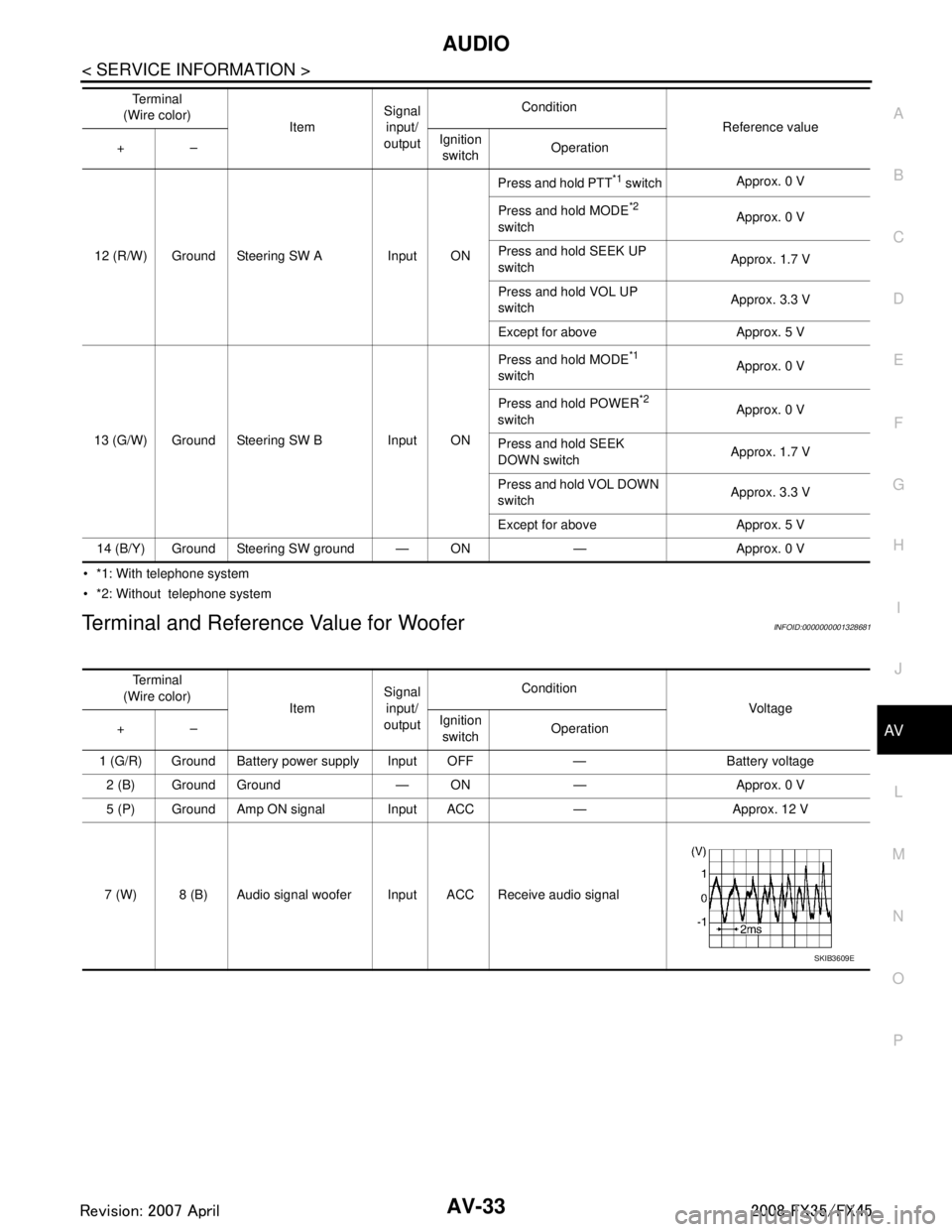
AUDIOAV-33
< SERVICE INFORMATION >
C
DE
F
G H
I
J
L
M A
B
AV
N
O P
*1: With telephone system
*2: Without telephone system
Terminal and Reference Value for WooferINFOID:0000000001328681
12 (R/W) Ground Steering SW A Input ON Press and hold PTT
*1 switch
Approx. 0 V
Press and hold MODE
*2
switch Approx. 0 V
Press and hold SEEK UP
switch Approx. 1.7 V
Press and hold VOL UP
switch Approx. 3.3 V
Except for above Approx. 5 V
13 (G/W) Ground Steering SW B Input ON Press and hold MODE
*1
switch Approx. 0 V
Press and hold POWER
*2
switch Approx. 0 V
Press and hold SEEK
DOWN switch Approx. 1.7 V
Press and hold VOL DOWN
switch Approx. 3.3 V
Except for above Approx. 5 V
14 (B/Y) Ground Steering SW ground — ON — Approx. 0 V Te r m i n a l
(Wire color) ItemSignal
input/
output Condition
Reference value
+– Ignition
switch Operation
Te r m i n a l
(Wire color) ItemSignal
input/
output Condition
Voltag e
+– Ignition
switch Operation
1 (G/R) Ground Battery power supply Input OFF — Battery voltage 2 (B) Ground Ground — ON — Approx. 0 V
5 (P) Ground Amp ON signal Input ACC — Approx. 12 V
7 (W) 8 (B) Audio signal woofer Input ACC Receive audio signal
SKIB3609E
3AA93ABC3ACD3AC03ACA3AC03AC63AC53A913A773A893A873A873A8E3A773A983AC73AC93AC03AC3
3A893A873A873A8F3A773A9D3AAF3A8A3A8C3A863A9D3AAF3A8B3A8C
Page 581 of 3924

AV-34
< SERVICE INFORMATION >
AUDIO
Terminal and Reference Valu e for Satellite Radio Tuner
INFOID:0000000001328682
A/C and AV Switch Self-Diagnosis FunctionINFOID:0000000001328683
It can check ON/OFF operation of each switch in the A/C and AV sw itch and diagnose the input signals to the
audio steering wheel switch.
Te r m i n a l
(Wire color) ItemSignal
input/
output Condition
Reference value
+– Ignition
switch Operation
2 (B) 1 (R) Satellite radio audio
signal LH
Output ONReceive satellite radio audio
signal
4 (G) 3 (W) Satellite radio audio
signal RH Output ONReceive satellite radio audio
signal
5—Shield —— — —
6—Shield —— — —
8 (L) Ground Communication signal
REQ (SAT-AUDIO)
Output ONWhen setting to satellite ra-
dio mode
9 (L/R) Ground Communication signal
Tx (SAT-AUDIO) Output ONWhen setting to satellite ra-
dio mode
10 (L/W) Ground Communication signal
Rx (AUDIO-SAT) Input ON
When setting to satellite ra-
dio mode
12 (Y) Ground Battery power supply Input OFF — Battery voltage
15 (B) Ground Ground — ON — Approx. 0 V
16 (P) Ground ACC power supply Input ACC — Battery voltage
17 — Satellite radio antenna — — — —
SKIB3609E
SKIB3609E
SKIB7338E
SKIB7337E
SKIB7336E
3AA93ABC3ACD3AC03ACA3AC03AC63AC53A913A773A893A873A873A8E3A773A983AC73AC93AC03AC3
3A893A873A873A8F3A773A9D3AAF3A8A3A8C3A863A9D3AAF3A8B3A8C
Page 582 of 3924

AUDIOAV-35
< SERVICE INFORMATION >
C
DE
F
G H
I
J
L
M A
B
AV
N
O P
STARTING THE SELF-DIAGNOSIS MODE
1. Turn ignition switch from OFF to ACC.
2. Within 10 seconds press and hold the switches “1” and “6” simultaneously for 3 seconds.
DIAGNOSIS FUNCTION
The following are checked: All the indicators (LED) in the A/C and AV switch.
Continuity of the switches by sounding the buzze r when the A/C and AV switch and audio steering wheel
switch is pressed.
Continuity of harness between A/C and AV switch and audio steering switch.
NOTE:
Rear window defogger switch operation is not checked. (No beep sound even under normal status)
EXITING THE SELF-DIAGNOSIS MODE
Turn ignition switch OFF.
Trouble DiagnosisINFOID:0000000001328684
The majority of the audio malfunctions are the result of outside causes (bad CD, electromagnetic interfer-
ence, etc.). Check the symptoms below to diagnose the malfunction.
The vehicle itself can be a source of noise if noise prevention parts or electrical equipment is malfunctioning.
Check if noise is caused and/or changed by engine speed, ignition switch turned to each position, and oper-
ation of each piece of electrical equipment, and then determine the cause.
Make sure that other operation except audio system can be performed with A/C and AV switch. If these
operations are inoperative with A/C and AV switch, refer to AV-79, "
Unable to Operate System with A/C and
AV Switch" (Without navigation system), or AV-127, "Unable to Operate System with A/C and AV Switch"
(With navigation system).
Refer to "SERVICE BULLETIN ITB04-055" for the diagnosis of satellite radio.
SKIB8660E
Symptom Possible malfunction location
Audio system does not work properly. Audio unit power supply circuit
Communication signal circuit between audio unit and display control unit
A/C and AV switch
Audio unit
No sound can be heard from all speakers. BOSE speaker amp. power supply and ground circuit
BOSE speaker amp. ON signal circuit
Audio unit
BOSE speaker amp.
No sound can be heard from one or several speakers. Audio signal circuit between audio unit and BOSE speaker amp.
Audio signal circuit between BOSE speaker amp. and speaker
Speaker
Tweeter
Audio unit
BOSE speaker amp.
No sound can be heard from woofer. Audio signal circuit between BOSE speaker amp. and woofer
Woofer
BOSE speaker amp.
3AA93ABC3ACD3AC03ACA3AC03AC63AC53A913A773A893A873A873A8E3A773A983AC73AC93AC03AC3
3A893A873A873A8F3A773A9D3AAF3A8A3A8C3A863A9D3AAF3A8B3A8C
Page 583 of 3924

AV-36
< SERVICE INFORMATION >
AUDIO
NOTE:
Noise resulting from variations in field strength, such as fading noise and multi-path noise, or external noise
from trains and other source s. It is not a malfunction.
Fading noise: This noise occurs because of variations in the field strength in a narrow range due to moun- tains or buildings blocking the signal.
Multi-path noise: This noise results from a time di fference between the broadcast waves directly from the
station arriving at the antenna and the waves reflected by mountains or buildings.
Power Supply Circuit InspectionINFOID:0000000001328685
1.CHECK FUSE
Make sure that the following fuses of the BOSE speaker amp., woofer, and audio unit are not blown.
OK or NG
OK >> GO TO 2.
NG >> If fuse is blown, be sure to eliminate caus e of malfunction before installing new fuse. Refer to PG-
3.
2.CHECK POWER SUPPLY CIRCUIT
1. Check voltage between audio unit harness connector terminals and ground.
No sound can be heard from radio or noise is caught. Antenna amp. ON signal circuit
Antenna feeder
Roof antenna
Antenna amp.
Audio unit
Audio steering switch does not operate properly. Remote control signal circuit between audio steering switch and A/C and
AV switch
Audio steering switch
Spiral cable
TEL adapter unit (With telephone system)
A/C and AV switch
Symptom Possible malfunction location
Unit Terminal Signal name Fuse No.
Audio unit 6 Battery power supply 32
10 ACC power supply 6
BOSE speaker amp. 1 Battery power supply 17
Woofer 1 Battery power supply 32
Te r m i n a l s Ignition
switch Vo l ta g e
(+)
(–)
Connector Terminal
M58 6 Ground OFF Battery voltage
10 Ground ACC Battery voltage
PKIA3814E
3AA93ABC3ACD3AC03ACA3AC03AC63AC53A913A773A893A873A873A8E3A773A983AC73AC93AC03AC3
3A893A873A873A8F3A773A9D3AAF3A8A3A8C3A863A9D3AAF3A8B3A8C
Page 586 of 3924

AUDIOAV-39
< SERVICE INFORMATION >
C
DE
F
G H
I
J
L
M A
B
AV
N
O P
2. Check continuity between spiral cable connector M15 terminals 24, 31, 32 and spiral cable connector M203 terminals 20, 17, 16.
OK or NG
OK >> GO TO 6.
NG >> Replace spiral cable.
6.CHECK AUDIO STEERING WHEEL SWITCH RESISTANCE
Check resistance audio steering wheel switch terminals.
*1: Without telephone system
*2: With telephone system
OK or NG
OK >> INSPECTION END
NG >> Replace audio steering wheel switch.
A/C and AV Switch InspectionINFOID:0000000001328687
1.A/C AND AV SWITCH SELF-DIAGNOSIS FUNCTION
1. Start A/C and AV switch self-diagnosis function. Refer to AV-34, "
A/C and AV Switch Self-Diagnosis Func-
tion".
2. Operate A/C and AV switch.
Does the A/C and AV switch is operated normally?
YES >> INSPECTION END (System is OK)
NO >> Replace A/C and AV switch.
BOSE Speaker Amp. InspectionINFOID:0000000001328688
1.CHECK HARNESS
1. Turn ignition switch OFF.
2. Disconnect audio unit and BOSE speaker amp. connectors. 24 – 20 : Continuity should exist.
31 – 17 : Continuity should exist.
32 – 16 : Continuity should exist.
SKIA5874E
Terminal Signal name Condition
Resistance
(Ω )
16 17Power
*1Depress power switch. Approx. 0
Mode
*2Depress mode switch. Approx. 0
Seek down Depress (station) down switch. Approx. 165
Volume (down) Depress volume down switch. Approx. 652
20 Mode
*1Depress mode switch. Approx. 0
PTT
*2Depress PTT switch. Approx. 0
Seek up Depress (station) up switch. Approx. 165
Volume (up) Depress volume up switch. Approx. 652
SKIA5010E
3AA93ABC3ACD3AC03ACA3AC03AC63AC53A913A773A893A873A873A8E3A773A983AC73AC93AC03AC3
3A893A873A873A8F3A773A9D3AAF3A8A3A8C3A863A9D3AAF3A8B3A8C
Page 619 of 3924

AV-72
< SERVICE INFORMATION >
INTEGRATED DISPLAY SYSTEM
*1: With telephone system
*2: Without telephone system
Special Note for Trouble DiagnosisINFOID:0000000001328721
Prior to performing trouble diagnosis, make sure there are no corresponding description in the “Example of
Symptoms Possible No Malfunction”. Refer to AV-86, "
Example of Symptom Possible No Malfunction".
On Board Self-Diagnosis FunctionINFOID:0000000001328722
DESCRIPTION
Trouble diagnosis function of navigation system has a Self Diagnosis mode by automatic operation and a
Confirmation/Adjustment mode by manual operation.
Self Diagnosis mode checks for connections between the uni ts constituting this system, analyzes each indi-
vidual unit at the same time, and displays the results on the display.
Confirmation/Adjustment mode displays trouble diagnos is that require an operation and a judgment by a
human (auto-decision cannot be performed by the system) , confirmation of preset value, and an error his-
tory.
DIAGNOSIS ITEM
8 (LG) Ground Communication
signal (–) Input/
Output ON —
12 (R/W) Ground Steering SW A Input ON Press and hold PTT
*1
switch Approx. 0 V
Press and hold MODE
*2
switch Approx. 0 V
Press and hold SEEK UP
switch Approx. 1.7 V
Press and hold VOL UP
switch Approx. 3.3 V
Except for above Approx. 5 V
13 (G/W) Ground Steering SW B Input ON Press and hold MODE
*1
switch Approx. 0 V
Press and hold POWER
*2
switch Approx. 0 V
Press and hold SEEK
DOWN switch Approx. 1.7 V
Press and hold VOL DOWN
switch Approx. 3.3 V
Except for above Approx. 5 V
14 (B/Y) Ground Steering SW ground — ON — Approx. 0 V Te r m i n a l
(Wire color) ItemSignal
input/
output Condition
Reference value
+– Ignition
switch Operation
SKIB7379E
3AA93ABC3ACD3AC03ACA3AC03AC63AC53A913A773A893A873A873A8E3A773A983AC73AC93AC03AC3
3A893A873A873A8F3A773A9D3AAF3A8A3A8C3A863A9D3AAF3A8B3A8C
Page 717 of 3924

AV-170
< SERVICE INFORMATION >
TELEPHONE
2. Check continuity between spiral cable connector M15 terminals24, 31, 32 and spiral cable connector M203 terminals 20, 17, 16.
OK or NG
OK >> GO TO 4.
NG >> Replace spiral cable.
4.CHECK AUDIO STEERING WHEEL SWITCH RESISTANCE
Check resistance audio steering wheel switch terminals.
OK or NG
OK >> INSPECTION END
NG >> Replace audio steering wheel switch.
Voice Activated Control Function Does Not OperateINFOID:0000000001328797
NOTE:
Even under the normal condition, TE L voice guidance may not occur when pressing audio steering wheel
switch.
TEL VOICE GUIDANCE IS HEARD WHEN PR ESSING AUDIO STEERING WHEEL SWITCH
1.CHECK HARNESS BETWEEN TEL ADAPTER UNIT AND MICROPHONE UNIT
1. Turn ignition switch OFF.
2. Disconnect TEL adapter unit and microphone unit connectors.
3. Check continuity between TEL adapter unit harness connector (A) M102 terminals 7, 8, 29 and microphone unit harness con-
nector (B) R59 terminals 5, 6, 4.
4. Check continuity between TEL adapter unit harness connector (A) M102 terminals 7, 8, 29 and ground.
OK or NG
OK >> GO TO 2.
NG >> Repair harness or connector.
2.CHECK MIC. POWER SUPPLY
1. Connect TEL adapter unit and microphone unit connectors.
2. Turn ignition switch ON. 24 – 20 : Continuity should exist.
31 – 17 : Continuity should exist.
32 – 16 : Continuity should exist.
SKIA5874E
Terminal Signal name Condition
Resistance
(Ω )
16 17Mode Depress mode switch. Approx. 0
Seek down Depress (station) down switch. Approx. 165
Volume (down) Depress volume down switch. Approx. 652
20 PTT Depress PTT switch. Approx. 0
Seek up Depress (station) up switch. Approx. 165
Volume (up) Depress volume up switch. Approx. 652
SKIA5010E
7 – 5 : Continuity should exist.
8 – 6 : Continuity should exist.
29 – 4 : Continuity should exist.
7, 8, 29 – Ground : Continuity should not exist.
SKIB7348E
3AA93ABC3ACD3AC03ACA3AC03AC63AC53A913A773A893A873A873A8E3A773A983AC73AC93AC03AC3
3A893A873A873A8F3A773A9D3AAF3A8A3A8C3A863A9D3AAF3A8B3A8C
Page 735 of 3924

BL-1
BODY
C
DE
F
G H
J
K L
M
SECTION BL
A
B
BL
N
O P
CONTENTS
BODY, LOCK & SECURITY SYSTEM
SERVICE INFORMATION .. ..........................4
DTC INDEX ..................................................... .....4
INTELLGENT KEY UNIT U1000 ...............................4
INTELLGENT KEY UNIT B2013-B2014 ............. ......4
ECM P1610-P1615 ...................................................4
PRECAUTIONS ...................................................5
Precaution for Supplemental Restraint System
(SRS) "AIR BAG" and "SEAT BELT PRE-TEN-
SIONER" ............................................................. ......
5
Precaution Necessary for Steering Wheel Rota-
tion After Battery Disconnect .....................................
5
Precaution for Work ..................................................5
PREPARATION ...................................................6
Special Service Tool ........................................... ......6
Commercial Service Tool ..........................................6
SQUEAK AND RATTLE TROUBLE DIAGNO-
SIS .......................................................................
7
Work Flow ........................................................... ......7
Generic Squeak and Rattle Troubleshooting ............9
Diagnostic Worksheet .............................................11
HOOD .................................................................13
Fitting Adjustment ............................................... ....13
Removal and Installation of Hood Assembly ...........14
Removal and Installation of Hood Lock Control ......15
Hood Lock Control Inspection ............................. ....16
RADIATOR CORE SUPPORT ...........................18
Removal and Installation ..................................... ....18
FRONT FENDER ................................................20
Removal and Installation ..................................... ....20
POWER DOOR LOCK SYSTEM ........................21
Component Parts and Harness Connector Loca-
tion ...................................................................... ....
21
System Description .................................................22
CAN Communication System Description ...............23
CAN Communication Unit .................................... ....23
Schematic/With Intelligent Key ................................24
Wiring Diagram - D/LOCK -/With Intelligent Key .....25
Schematic/Without Intellig ent Key ...........................30
Wiring Diagram - D/LOCK -/Without Intelligent
Key ...................................................................... ....
31
Terminal and Reference Value for BCM ..................35
Terminal and Reference Value for Intelligent Key
Unit (With Intelligent Key System) ...........................
35
Work Flow ................................................................36
CONSULT-III Function (BCM) .................................36
Trouble Diagnosis Chart by Symptom .....................37
Check BCM Power Supply and Ground Circuit .......37
Check Door Switch ..................................................38
Check Key Switch ....................................................42
Check Door Lock and Unlock Switch ......................43
Check Door Lock Actuator (Driver Side) .................45
Check Door Lock Actuator (Passenger Side and
Rear LH/RH) ............................................................
45
Check Fuel Lid Lock Actuator ..................................46
Check Front Door Key Cylinder Switch (Lock) ........47
Check Front Door Key Cylinder Switch (Unlock) .....47
Check Select Unlock Relay Circuit ..........................48
REMOTE KEYLESS ENTRY SYSTEM .............50
Component Parts and Harness Connector Loca-
tion ...........................................................................
50
System Description ..................................................50
CAN Communication System Description ...............53
CAN Communication Unit ........................................53
Schematic ................................................................54
Wiring Diagram - KEYLES - ....................................55
Terminal and Reference Value for BCM ..................58
Terminal and Reference Value for IPDM E/R ..........59
CONSULT-III Function (BCM) .................................60
Work Flow ................................................................62
Trouble Diagnosis Chart by Symptom .....................62
Check Key Fob Battery and Function ......................63
Check ACC Switch ..................................................64
Check Door Switch ..................................................65
Check Key Switch ....................................................68
3AA93ABC3ACD3AC03ACA3AC03AC63AC53A913A773A893A873A873A8E3A773A983AC73AC93AC03AC3
3A893A873A873A8F3A773A9D3AAF3A8A3A8C3A863A9D3AAF3A8B3A8C