steering wheel INFINITI FX35 2008 Owner's Manual
[x] Cancel search | Manufacturer: INFINITI, Model Year: 2008, Model line: FX35, Model: INFINITI FX35 2008Pages: 3924, PDF Size: 81.37 MB
Page 716 of 3924
TELEPHONEAV-169
< SERVICE INFORMATION >
C
DE
F
G H
I
J
L
M A
B
AV
N
O P
1. Turn ignition switch ACC.
2. Check the indicator is blinking.
OK or NG
OK >> GO TO 2
NG >> Check indicator circuit and MIC. circuit.
2.CHECK AUDIO STEERING WHEEL SWITCH OPERATION
1. Press the switch.
2. Check the indicator is blinking.
OK or NG
OK >> INSPECTION END
NG >> Check audio steering wheel switch circuit.
Audio Steering Wheel S witch Does Not OperateINFOID:0000000001328796
1.CHECK HARNESS
1. Turn ignition switch OFF.
2. Disconnect A/C and AV switch and TEL adapter unit connectors.
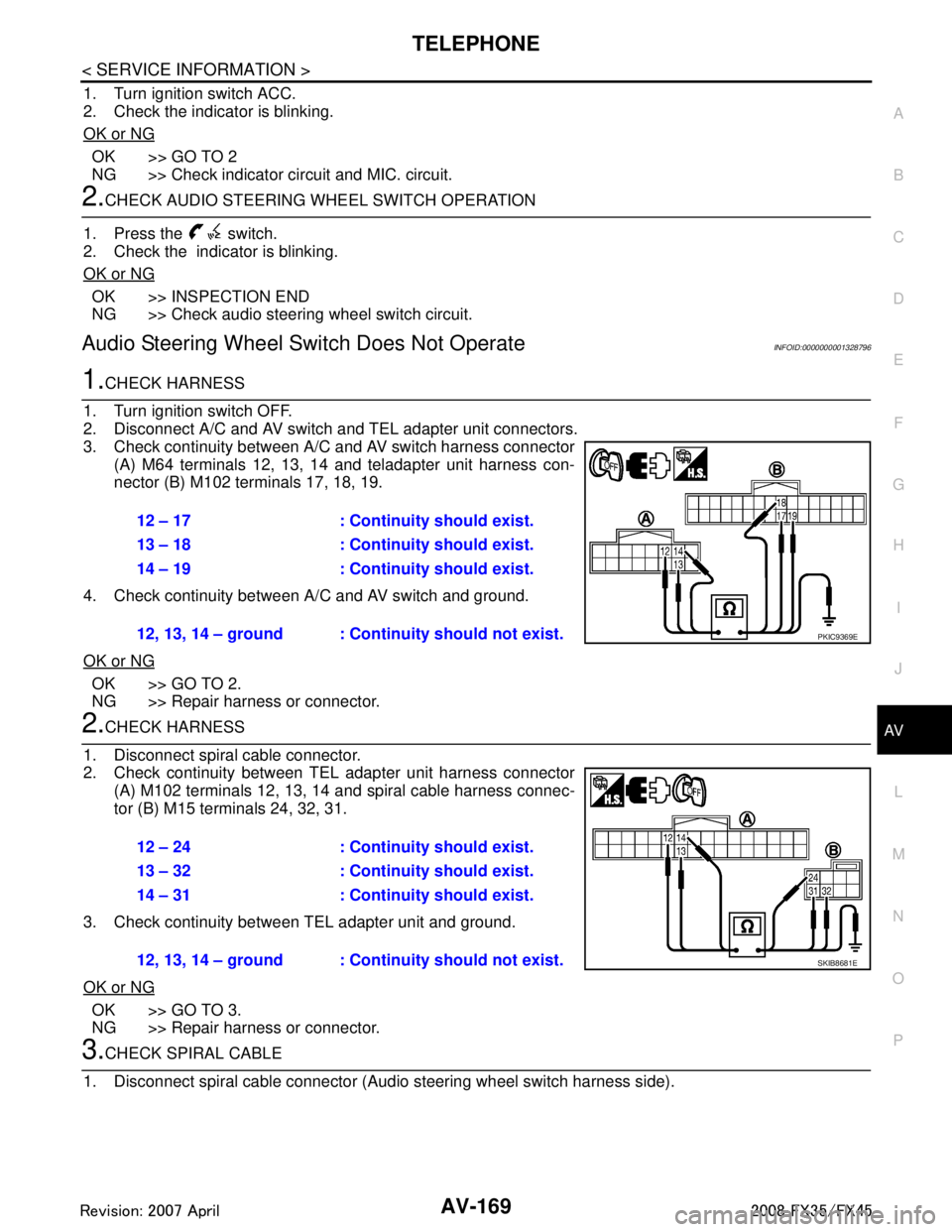
3. Check continuity between A/C and AV switch harness connector (A) M64 terminals 12, 13, 14 and teladapter unit harness con-
nector (B) M102 terminals 17, 18, 19.
4. Check continuity between A/C and AV switch and ground.
OK or NG
OK >> GO TO 2.
NG >> Repair harness or connector.
2.CHECK HARNESS
1. Disconnect spiral cable connector.
2. Check continuity between TEL adapter unit harness connector (A) M102 terminals 12, 13, 14 and spiral cable harness connec-
tor (B) M15 terminals 24, 32, 31.
3. Check continuity between TEL adapter unit and ground.
OK or NG
OK >> GO TO 3.
NG >> Repair harness or connector.
3.CHECK SPIRAL CABLE
1. Disconnect spiral cable connector (Audio steering wheel switch harness side).
12 – 17 : Continuity should exist.
13 – 18 : Continuity should exist.
14 – 19 : Continuity should exist.
12, 13, 14 – ground : Contin uity should not exist.
PKIC9369E
12 – 24 : Continuity should exist.
13 – 32 : Continuity should exist.
14 – 31 : Continuity should exist.
12, 13, 14 – ground : Continuity should not exist.
SKIB8681E
3AA93ABC3ACD3AC03ACA3AC03AC63AC53A913A773A893A873A873A8E3A773A983AC73AC93AC03AC3
3A893A873A873A8F3A773A9D3AAF3A8A3A8C3A863A9D3AAF3A8B3A8C
Page 717 of 3924

AV-170
< SERVICE INFORMATION >
TELEPHONE
2. Check continuity between spiral cable connector M15 terminals24, 31, 32 and spiral cable connector M203 terminals 20, 17, 16.
OK or NG
OK >> GO TO 4.
NG >> Replace spiral cable.
4.CHECK AUDIO STEERING WHEEL SWITCH RESISTANCE
Check resistance audio steering wheel switch terminals.
OK or NG
OK >> INSPECTION END
NG >> Replace audio steering wheel switch.
Voice Activated Control Function Does Not OperateINFOID:0000000001328797
NOTE:
Even under the normal condition, TE L voice guidance may not occur when pressing audio steering wheel
switch.
TEL VOICE GUIDANCE IS HEARD WHEN PR ESSING AUDIO STEERING WHEEL SWITCH
1.CHECK HARNESS BETWEEN TEL ADAPTER UNIT AND MICROPHONE UNIT
1. Turn ignition switch OFF.
2. Disconnect TEL adapter unit and microphone unit connectors.
3. Check continuity between TEL adapter unit harness connector (A) M102 terminals 7, 8, 29 and microphone unit harness con-
nector (B) R59 terminals 5, 6, 4.
4. Check continuity between TEL adapter unit harness connector (A) M102 terminals 7, 8, 29 and ground.
OK or NG
OK >> GO TO 2.
NG >> Repair harness or connector.
2.CHECK MIC. POWER SUPPLY
1. Connect TEL adapter unit and microphone unit connectors.
2. Turn ignition switch ON. 24 – 20 : Continuity should exist.
31 – 17 : Continuity should exist.
32 – 16 : Continuity should exist.
SKIA5874E
Terminal Signal name Condition
Resistance
(Ω )
16 17Mode Depress mode switch. Approx. 0
Seek down Depress (station) down switch. Approx. 165
Volume (down) Depress volume down switch. Approx. 652
20 PTT Depress PTT switch. Approx. 0
Seek up Depress (station) up switch. Approx. 165
Volume (up) Depress volume up switch. Approx. 652
SKIA5010E
7 – 5 : Continuity should exist.
8 – 6 : Continuity should exist.
29 – 4 : Continuity should exist.
7, 8, 29 – Ground : Continuity should not exist.
SKIB7348E
3AA93ABC3ACD3AC03ACA3AC03AC63AC53A913A773A893A873A873A8E3A773A983AC73AC93AC03AC3
3A893A873A873A8F3A773A9D3AAF3A8A3A8C3A863A9D3AAF3A8B3A8C
Page 718 of 3924
TELEPHONEAV-171
< SERVICE INFORMATION >
C
DE
F
G H
I
J
L
M A
B
AV
N
O P
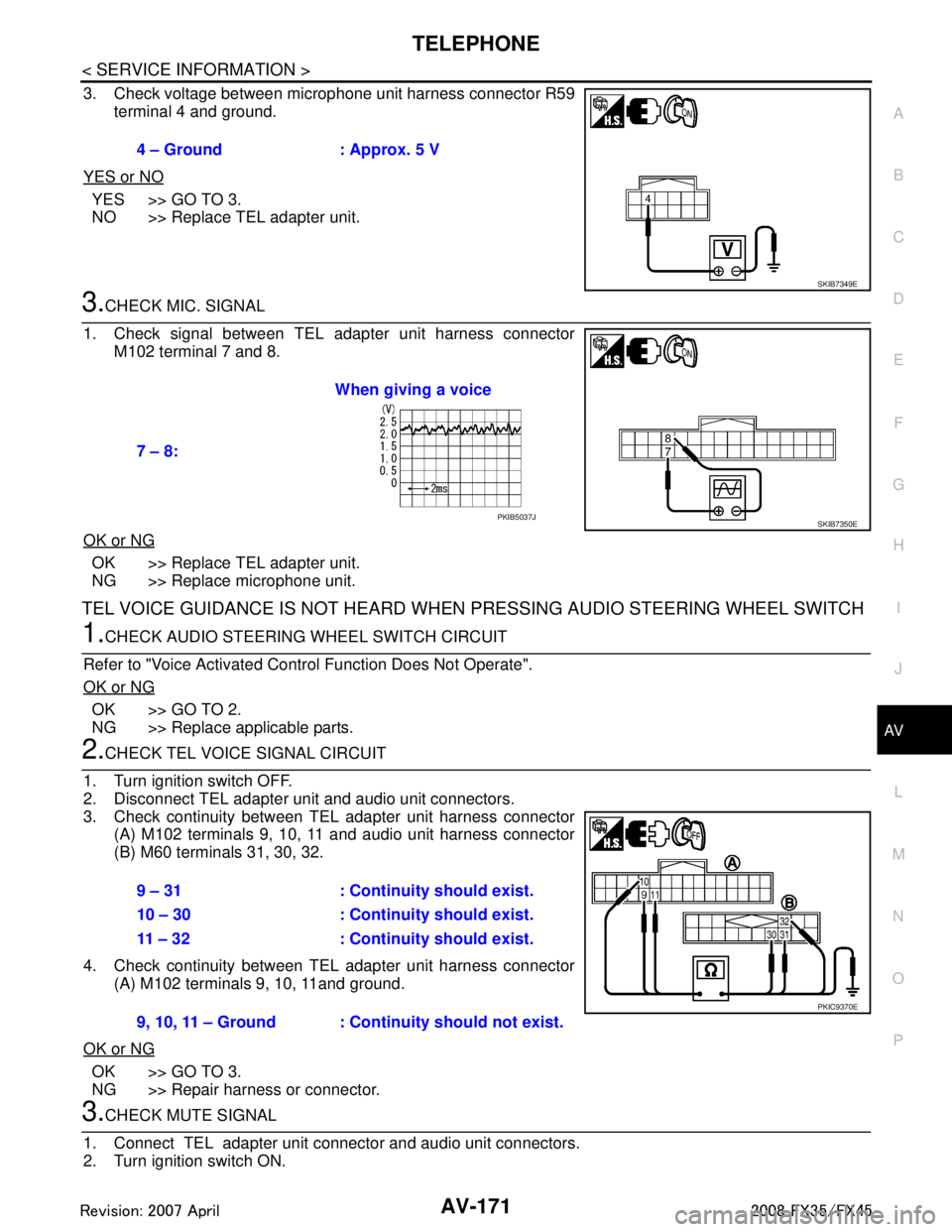
3. Check voltage between microphone unit harness connector R59 terminal 4 and ground.
YES or NO
YES >> GO TO 3.
NO >> Replace TEL adapter unit.
3.CHECK MIC. SIGNAL
1. Check signal between TEL adapter unit harness connector M102 terminal 7 and 8.
OK or NG
OK >> Replace TEL adapter unit.
NG >> Replace microphone unit.
TEL VOICE GUIDANCE IS NOT HEARD WHEN PRESSING AUDIO STEERING WHEEL SWITCH
1.CHECK AUDIO STEERING WHEEL SWITCH CIRCUIT
Refer to "Voice Activated Control Function Does Not Operate".
OK or NG
OK >> GO TO 2.
NG >> Replace applicable parts.
2.CHECK TEL VOICE SIGNAL CIRCUIT
1. Turn ignition switch OFF.
2. Disconnect TEL adapter unit and audio unit connectors.
3. Check continuity between TEL adapter unit harness connector (A) M102 terminals 9, 10, 11 and audio unit harness connector
(B) M60 terminals 31, 30, 32.
4. Check continuity between TEL adapter unit harness connector (A) M102 terminals 9, 10, 11and ground.
OK or NG
OK >> GO TO 3.
NG >> Repair harness or connector.
3.CHECK MUTE SIGNAL
1. Connect TEL adapter unit connector and audio unit connectors.
2. Turn ignition switch ON. 4 – Ground : Approx. 5 V
SKIB7349E
7 – 8:
When giving a voice
SKIB7350EPKIB5037J
9 – 31 : Continuity should exist.
10 – 30 : Continuity should exist.
11 – 32 : Continuity should exist.
9, 10, 11 – Ground : Continuity should not exist.
PKIC9370E
3AA93ABC3ACD3AC03ACA3AC03AC63AC53A913A773A893A873A873A8E3A773A983AC73AC93AC03AC3
3A893A873A873A8F3A773A9D3AAF3A8A3A8C3A863A9D3AAF3A8B3A8C
Page 735 of 3924

BL-1
BODY
C
DE
F
G H
J
K L
M
SECTION BL
A
B
BL
N
O P
CONTENTS
BODY, LOCK & SECURITY SYSTEM
SERVICE INFORMATION .. ..........................4
DTC INDEX ..................................................... .....4
INTELLGENT KEY UNIT U1000 ...............................4
INTELLGENT KEY UNIT B2013-B2014 ............. ......4
ECM P1610-P1615 ...................................................4
PRECAUTIONS ...................................................5
Precaution for Supplemental Restraint System
(SRS) "AIR BAG" and "SEAT BELT PRE-TEN-
SIONER" ............................................................. ......
5
Precaution Necessary for Steering Wheel Rota-
tion After Battery Disconnect .....................................
5
Precaution for Work ..................................................5
PREPARATION ...................................................6
Special Service Tool ........................................... ......6
Commercial Service Tool ..........................................6
SQUEAK AND RATTLE TROUBLE DIAGNO-
SIS .......................................................................
7
Work Flow ........................................................... ......7
Generic Squeak and Rattle Troubleshooting ............9
Diagnostic Worksheet .............................................11
HOOD .................................................................13
Fitting Adjustment ............................................... ....13
Removal and Installation of Hood Assembly ...........14
Removal and Installation of Hood Lock Control ......15
Hood Lock Control Inspection ............................. ....16
RADIATOR CORE SUPPORT ...........................18
Removal and Installation ..................................... ....18
FRONT FENDER ................................................20
Removal and Installation ..................................... ....20
POWER DOOR LOCK SYSTEM ........................21
Component Parts and Harness Connector Loca-
tion ...................................................................... ....
21
System Description .................................................22
CAN Communication System Description ...............23
CAN Communication Unit .................................... ....23
Schematic/With Intelligent Key ................................24
Wiring Diagram - D/LOCK -/With Intelligent Key .....25
Schematic/Without Intellig ent Key ...........................30
Wiring Diagram - D/LOCK -/Without Intelligent
Key ...................................................................... ....
31
Terminal and Reference Value for BCM ..................35
Terminal and Reference Value for Intelligent Key
Unit (With Intelligent Key System) ...........................
35
Work Flow ................................................................36
CONSULT-III Function (BCM) .................................36
Trouble Diagnosis Chart by Symptom .....................37
Check BCM Power Supply and Ground Circuit .......37
Check Door Switch ..................................................38
Check Key Switch ....................................................42
Check Door Lock and Unlock Switch ......................43
Check Door Lock Actuator (Driver Side) .................45
Check Door Lock Actuator (Passenger Side and
Rear LH/RH) ............................................................
45
Check Fuel Lid Lock Actuator ..................................46
Check Front Door Key Cylinder Switch (Lock) ........47
Check Front Door Key Cylinder Switch (Unlock) .....47
Check Select Unlock Relay Circuit ..........................48
REMOTE KEYLESS ENTRY SYSTEM .............50
Component Parts and Harness Connector Loca-
tion ...........................................................................
50
System Description ..................................................50
CAN Communication System Description ...............53
CAN Communication Unit ........................................53
Schematic ................................................................54
Wiring Diagram - KEYLES - ....................................55
Terminal and Reference Value for BCM ..................58
Terminal and Reference Value for IPDM E/R ..........59
CONSULT-III Function (BCM) .................................60
Work Flow ................................................................62
Trouble Diagnosis Chart by Symptom .....................62
Check Key Fob Battery and Function ......................63
Check ACC Switch ..................................................64
Check Door Switch ..................................................65
Check Key Switch ....................................................68
3AA93ABC3ACD3AC03ACA3AC03AC63AC53A913A773A893A873A873A8E3A773A983AC73AC93AC03AC3
3A893A873A873A8F3A773A9D3AAF3A8A3A8C3A863A9D3AAF3A8B3A8C
Page 739 of 3924

PRECAUTIONSBL-5
< SERVICE INFORMATION >
C
DE
F
G H
J
K L
M A
B
BL
N
O P
PRECAUTIONS
Precaution for Supplemental Restraint System (SRS) "AIR BAG" and "SEAT BELT
PRE-TENSIONER"
INFOID:0000000001612892
The Supplemental Restraint System such as “A IR BAG” and “SEAT BELT PRE-TENSIONER”, used along
with a front seat belt, helps to reduce the risk or severi ty of injury to the driver and front passenger for certain
types of collision. This system includes seat belt switch inputs and dual stage front air bag modules. The SRS
system uses the seat belt switches to determine the front air bag deployment, and may only deploy one front
air bag, depending on the severity of a collision and whether the front occupants are belted or unbelted.
Information necessary to service the system safely is included in the “SUPPLEMENTAL RESTRAINT SYS-
TEM” and “SEAT BELTS” of this Service Manual.
WARNING:
• To avoid rendering the SRS inoper ative, which could increase the risk of personal injury or death in
the event of a collision which would result in air bag inflation, all maintenance must be performed by
an authorized NISSAN/INFINITI dealer.
Improper maintenance, including in correct removal and installation of the SRS, can lead to personal
injury caused by unintentional act ivation of the system. For removal of Spiral Cable and Air Bag
Module, see the “SUPPLEMEN TAL RESTRAINT SYSTEM”.
Do not use electrical test equipm ent on any circuit related to the SRS unless instructed to in this
Service Manual. SRS wiring harnesses can be identi fied by yellow and/or orange harnesses or har-
ness connectors.
Precaution Necessary for Steering Wh eel Rotation After Battery Disconnect
INFOID:0000000001612889
NOTE:
This Procedure is applied only to models with Intell igent Key system and NVIS/IVIS (NISSAN/INFINITI
VEHICLE IMMOBILIZER SYSTEM - NATS).
Remove and install all control units after disconnecti ng both battery cables with the ignition knob in the
″ LOCK ″ position.
Always use CONSULT-III to perform self-diagnosis as a part of each function inspection after finishing work.
If DTC is detected, perform trouble diagnosis according to self-diagnostic results.
For models equipped with the Intelligent Key system and NVIS/IVIS, an electrically controlled steering lock
mechanism is adopted on the key cylinder.
For this reason, if the battery is disconnected or if the battery is discharged, the steering wheel will lock and
steering wheel rotation will become impossible.
If steering wheel rotation is required when battery pow er is interrupted, follow the procedure below before
starting the repair operation.
OPERATION PROCEDURE
1. Connect both battery cables. NOTE:
Supply power using jumper cables if battery is discharged.
2. Use the Intelligent Key or mechanical key to turn the ignition switch to the ″ACC ″ position. At this time, the
steering lock will be released.
3. Disconnect both battery cables. The steering lock will remain released and the steering wheel can be
rotated.
4. Perform the necessary repair operation.
5. When the repair work is completed, return the ignition switch to the ″LOCK ″ position before connecting
the battery cables. (At this time, the steering lock mechanism will engage.)
6. Perform a self-diagnosis check of all control units using CONSULT-III.
Precaution for WorkINFOID:0000000001327777
After removing and installing the opening/closing parts, be sure to carry out fitting adjustments to check their
operation.
Check the lubrication level, damage, and wear of each part. If necessary, grease or replace it.
3AA93ABC3ACD3AC03ACA3AC03AC63AC53A913A773A893A873A873A8E3A773A983AC73AC93AC03AC3
3A893A873A873A8F3A773A9D3AAF3A8A3A8C3A863A9D3AAF3A8B3A8C
Page 988 of 3924

BR-4
< SERVICE INFORMATION >
NOISE, VIBRATION AND HARSHNESS (NVH) TROUBLESHOOTING
NOISE, VIBRATION AND HARSHNESS (NVH) TROUBLESHOOTING
NVH Troubleshooting ChartINFOID:0000000001327606
Use the chart below to help you find the cause of the sy mptom. If necessary, repair or replace these parts.
×: ApplicableReference page
BR-18
,
BR-24
BR-18
, BR-24
BR-18
, BR-24—
—
BR-20, BR-26—
—
—
BR-20, BR-26—
NVH in PR section
NVH in FFD an d RFD section
NVH in FAX, RAX and FSU, RSU section
NVH in WT section
NVH in WT section
NVH in FAX and RAX section
NVH in PS section
Possible cause and
SUSPECTED PARTS
Pads - damaged
Pads - uneven wear
Shims damaged
Rotor imbalance
Rotor damage
Rotor runout
Rotor deformation
Rotor deflection
Rotor rust
Rotor thickness variation
Drum out of round
PROPELLER SHAFT
DIFFERENTIAL
AXLE AND SUSPENSION
TIRE
ROAD WHEEL
DRIVE SHAFT
STEERING
Symptom BRAKE Noise
××× ×× ×××
××
Shake ×××××
××
Shimmy, Judder ××××××× ××× ×
3AA93ABC3ACD3AC03ACA3AC03AC63AC53A913A773A893A873A873A8E3A773A983AC73AC93AC03AC3
3A893A873A873A8F3A773A9D3AAF3A8A3A8C3A863A9D3AAF3A8B3A8C
Page 1004 of 3924
BR-20
< SERVICE INFORMATION >
FRONT DISC BRAKE
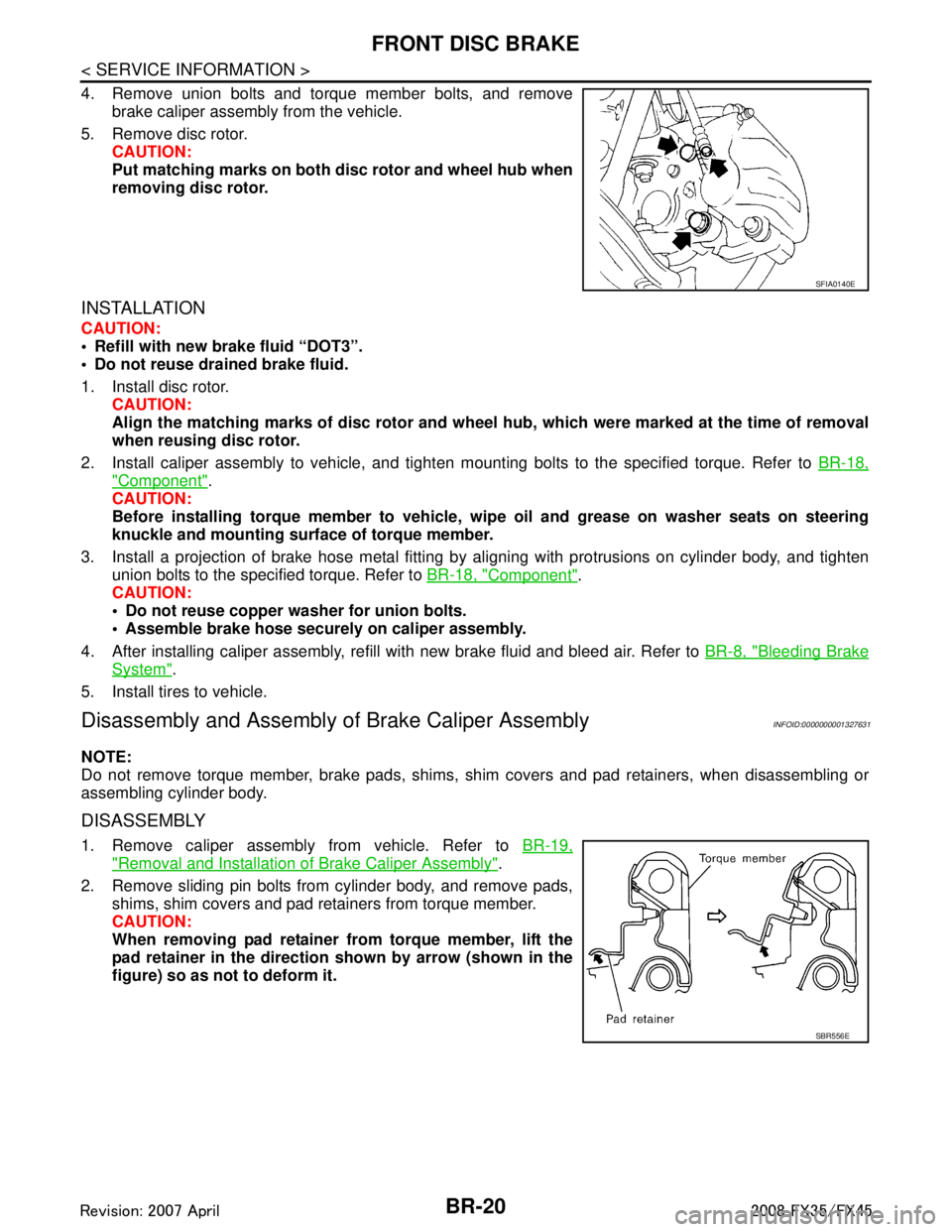
4. Remove union bolts and torque member bolts, and removebrake caliper assembly from the vehicle.
5. Remove disc rotor. CAUTION:
Put matching marks on both disc rotor and wheel hub when
removing disc rotor.
INSTALLATION
CAUTION:
Refill with new brake fluid “DOT3”.
Do not reuse drained brake fluid.
1. Install disc rotor.
CAUTION:
Align the matching marks of disc rotor and wheel hub, which were marked at the time of removal
when reusing disc rotor.
2. Install caliper assembly to vehicle, and tighten mounting bolts to the specified torque. Refer to BR-18,
"Component".
CAUTION:
Before installing torque member to vehicle, wipe oil and grease on washer seats on steering
knuckle and mounting surface of torque member.
3. Install a projection of brake hose metal fitting by aligning with protrusions on cylinder body, and tighten
union bolts to the specified torque. Refer to BR-18, "
Component".
CAUTION:
Do not reuse copper washer for union bolts.
Assemble brake hose securely on caliper assembly.
4. After installing caliper assembly, refill with new brake fluid and bleed air. Refer to BR-8, "
Bleeding Brake
System".
5. Install tires to vehicle.
Disassembly and Assembly of Brake Caliper AssemblyINFOID:0000000001327631
NOTE:
Do not remove torque member, brake pads, shims, shim covers and pad retainers, when disassembling or
assembling cylinder body.
DISASSEMBLY
1. Remove caliper assembly from vehicle. Refer to BR-19,
"Removal and Installation of Brake Caliper Assembly".
2. Remove sliding pin bolts from cylinder body, and remove pads, shims, shim covers and pad retainers from torque member.
CAUTION:
When removing pad retainer fr om torque member, lift the
pad retainer in the direction shown by arrow (shown in the
figure) so as not to deform it.
SFIA0140E
SBR556E
3AA93ABC3ACD3AC03ACA3AC03AC63AC53A913A773A893A873A873A8E3A773A983AC73AC93AC03AC3
3A893A873A873A8F3A773A9D3AAF3A8A3A8C3A863A9D3AAF3A8B3A8C
Page 1006 of 3924

BR-22
< SERVICE INFORMATION >
FRONT DISC BRAKE
2. Apply rubber grease to piston boot. Cover the piston end withpiston boot, and install cylinder side lip on piston boot properly
into groove on cylinder body.
CAUTION:
Do not reuse piston boot.
3. Apply brake fluid to piston, and press piston into cylinder body by hand to assemble piston side lip on piston boot properly into
groove on piston.
CAUTION:
Press piston evenly and vary the pressing point to prevent
cylinder inner wall from being rubbed.
4. Install sliding pins and sliding pin boots to torque member.
5. Install the torque member to the knuckle spindle and tighten the mounting bolts to the specified torque. Refer to BR-18, "
Compo-
nent".
CAUTION:
Before installing torque member to vehicle, wipe oil and
grease on the washer seats on steering knuckle and the
mounting surface of the torque member.
6. Install pad retainers to torque member.
7. After assembling shims and shim covers to pad, install it to torque member.
CAUTION:
Inner pad and outer pad have pad-return mechanism on the
upper side of the pad retainer. When installing pad, be sure to install pad return lever to pad wear
sensor securely as shown in the figure.
8. Install cylinder body, and tighten sliding pin bolt to specified torque. Refer to BR-18, "
Component".
9. Install a projection of brake hose metal fitting by aligning with protrusions on cylinder body, and then tighten union bolts to specified torque. Refer to BR-10, "
Hydraulic Circuit".
CAUTION:
Assemble brake hose securely to protrusions on cylinder body.
Do not reuse copper washer for union bolts.
10. After installing caliper assembly, refill with new brake fluid and bleed air. Refer to BR-8, "
Bleeding Brake
System".
DISC ROTOR INSPECTION
Visual Inspection
Check surface of disc rotor for uneven wear, cracks, and serious damage. If any of them is detected, replace
applicable part.
Runout Inspection
1. Using wheel nuts, fix disc rotor to wheels hub. (2 or more positions)
SFIA2432E
SFIA2279E
SBR557E
3AA93ABC3ACD3AC03ACA3AC03AC63AC53A913A773A893A873A873A8E3A773A983AC73AC93AC03AC3
3A893A873A873A8F3A773A9D3AAF3A8A3A8C3A863A9D3AAF3A8B3A8C
Page 1017 of 3924

BRC-2
DTC C1156 ST ANG SEN COM CIR .....................47
DTC C1160 DECEL G SEN SET ...........................47
DTC C1164 CV 1 ....................................................47
DTC C1165 CV 2 ....................................................47
DTC C1166 SV 1 ....................................................47
DTC C1167 SV 2 ....................................................47
DTC C1170 VARIANT CODING .............................48
DTC U1000 CAN COMM CIRCUIT ........................48
Component Inspection ............................................48
TROUBLE DIAGNOSIS FOR SYMPTOMS .......49
Excessive ABS Function Operation Frequency ......49
Unexpected Pedal Reaction ................................ ...49
The Braking Distance Is Long ................................49
The ABS Function Does Not Operate ....................50
Pedal Vibration or ABS O peration Sound Occurs ...50
Vehicle Jerks During VDC/TCS/ABS Control ...... ...50
WHEEL SENSORS ......................................... ...52
Removal and Installation ...................................... ...52
SENSOR ROTOR ..............................................53
Removal and Installation ...................................... ...53
ACTUATOR AND ELECTRIC UNIT (ASSEM-
BLY) ...................................................................
54
Removal and Installation ...................................... ...54
G SENSOR ........................................................55
Removal and Installation ...................................... ...55
STEERING ANGLE SENSOR ...........................56
Removal and Installation ...................................... ...56
3AA93ABC3ACD3AC03ACA3AC03AC63AC53A913A773A893A873A873A8E3A773A983AC73AC93AC03AC3
3A893A873A873A8F3A773A9D3AAF3A8A3A8C3A863A9D3AAF3A8B3A8C
Page 1023 of 3924
![INFINITI FX35 2008 Owners Manual
BRC-8
< SERVICE INFORMATION >[VDC/TCS/ABS]
ON-VEHICLE SERVICE
ON-VEHICLE SERVICE
Adjustment of Steering Angl
e Sensor Neutral PositionINFOID:0000000001327658
In case of doing work that applies to the](/img/42/57017/w960_57017-1022.png "INFINITI FX35 2008 Owners Manual
BRC-8
< SERVICE INFORMATION >[VDC/TCS/ABS]
ON-VEHICLE SERVICE
ON-VEHICLE SERVICE
Adjustment of Steering Angl
e Sensor Neutral PositionINFOID:0000000001327658
In case of doing work that applies to the")
BRC-8
< SERVICE INFORMATION >[VDC/TCS/ABS]
ON-VEHICLE SERVICE
ON-VEHICLE SERVICE
Adjustment of Steering Angl
e Sensor Neutral PositionINFOID:0000000001327658
In case of doing work that applies to the list below, make sure to adjust neutral position of steering angle sen-
sor before running vehicle.
CAUTION:
To adjust neutral position of steering angl e sensor, make sure to use CONSULT-III.
(Adjustment can not be done without CONSULT-III.)
1. Stop vehicle with front wheels in straight-ahead position.
2. Touch “WORK SUPPORT” and “ST ANGLE SENSOR ADJUSTMENT” on CONSULT-III screen in this order.
3. Touch “START”. CAUTION:
Do not touch steering wheel whil e adjusting steering angle sensor.
4. After approximately 10 seconds, touch “END”. (After approximately 60 seconds, it ends automatically.)
5. Turn ignition switch OFF, then turn it ON again. CAUTION:
Be sure to perform above operation.
6. Run vehicle with front wheels in straight-ahead position, then stop.
7. Select “DATA MONITOR”, “SELECTION FROM ME NU”, and “STR ANGLE SIG” on CONSULT-III screen.
Then make sure “STR ANGLE SIG” is within 0 ± 3.5 deg. If value is more than specification, repeat steps
1 to 6.
8. Erase memory of ABS actuator and electric unit (control unit) and ECM.
9. Turn ignition switch OFF.
Calibration of Decel G Sensor (AWD Models)INFOID:0000000001327659
NOTE:
After removing/installing or replacing yaw rate/side/dec el G sensor, ABS actuator and electric unit (control
unit), suspension components, or after adjusting wheel ali gnment, make sure to calibration of decel G sensor
before running vehicle.
CAUTION:
To calibrate decel G sensor, make sure to use CONS ULT-III. (Adjustment can not be done without CON-
SULT-III.)
1. Stop vehicle with front wheels in straight-ahead position.
CAUTION:
The work should be done at a horizontal place when vehicle is in the unloaded vehicle condition.
Keep all tires inflated to correct pressures. Ad just the tire pressure to the specified pressure
value.
2. Touch “WORK SUPPORT” and “DECEL G-SEN CALI BRATION” on CONSULT-III screen in this order.
3. Touch “START”. CAUTION:
Set vehicle as shown in the display.
4. After approximately 10 seconds, touch “END”. (After approximately 60 seconds, it ends automatically.)
Situation Adjustment of Steering Angle Sensor Neutral Position
Removing/Installing ABS actuator and electric unit (control unit) —
Replacing ABS actuator and electric unit (control unit) ×
Removing/Installing steering angle sensor ×
Removing/Installing steering components ×
Removing/Installing suspension components ×
Change 4 tires to new ones —
Tire rotation —
Adjusting wheel alignment ×
3AA93ABC3ACD3AC03ACA3AC03AC63AC53A913A773A893A873A873A8E3A773A983AC73AC93AC03AC3
3A893A873A873A8F3A773A9D3AAF3A8A3A8C3A863A9D3AAF3A8B3A8C