audio INFINITI FX35 2008 Repair Manual
[x] Cancel search | Manufacturer: INFINITI, Model Year: 2008, Model line: FX35, Model: INFINITI FX35 2008Pages: 3924, PDF Size: 81.37 MB
Page 638 of 3924

NAVIGATION SYSTEMAV-91
< SERVICE INFORMATION >
C
DE
F
G H
I
J
L
M A
B
AV
N
O P
Images on the display include RGB image such as map screen.
Display control unit controls images on the display.
A/C AND AV SWITCH
A/C and AV switch, an integrated combination of audio and air con- ditioner switches, are adopted.
Operation signal of audio is transmitted to the audio unit through
display control unit with the communication line. Operation signal
of air conditioner is transmitted to meter and A/C amp. through dis-
play control unit with CAN communication.
CAN Communication UnitINFOID:0000000001328741
Refer to LAN-43, "CAN System Specification Chart".
Component Parts LocationINFOID:0000000001328742
SKIB8639E
SKIB8639E
SKIB8641E
3AA93ABC3ACD3AC03ACA3AC03AC63AC53A913A773A893A873A873A8E3A773A983AC73AC93AC03AC3
3A893A873A873A8F3A773A9D3AAF3A8A3A8C3A863A9D3AAF3A8B3A8C
Page 656 of 3924

NAVIGATION SYSTEMAV-109
< SERVICE INFORMATION >
C
DE
F
G H
I
J
L
M A
B
AV
N
O P
36 (PU) Ground Communication signal
(DCU-DSP) Output ON —
37 — Shield — — — —
38 (LG) Ground Communication signal
(DSP-DCU)
Input ON —
39 — Shield — — — —
40 (LG) Ground Communication signal
(DCU-AUD) Output ONOperate audio volume
switch
41 — Shield — — — —
42 (PU) Ground Communication signal
(AUD-DCU)
Input ONOperate audio volume
switch
43 (G) Ground RGB synchronizing
signal Input ONWhen displaying RGB im-
age
44 (W) Ground RGB signal (R: red) Input ON Start Confirmation/Adjust-
ment (Navigation) mode,
and then display color bar by
selecting “Color Spectrum
bar” on Display Diagnosis
screen
45 — Shield — — — — Te r m i n a l
(Wire color) ItemSignal
input/
output Condition
Reference value
+– Ignition
switch Operation
SKIB3607E
SKIB3606E
SKIB3607E
SKIB3606E
SKIB3603E
SKIB7360E
3AA93ABC3ACD3AC03ACA3AC03AC63AC53A913A773A893A873A873A8E3A773A983AC73AC93AC03AC3
3A893A873A873A8F3A773A9D3AAF3A8A3A8C3A863A9D3AAF3A8B3A8C
Page 661 of 3924
AV-114
< SERVICE INFORMATION >
NAVIGATION SYSTEM
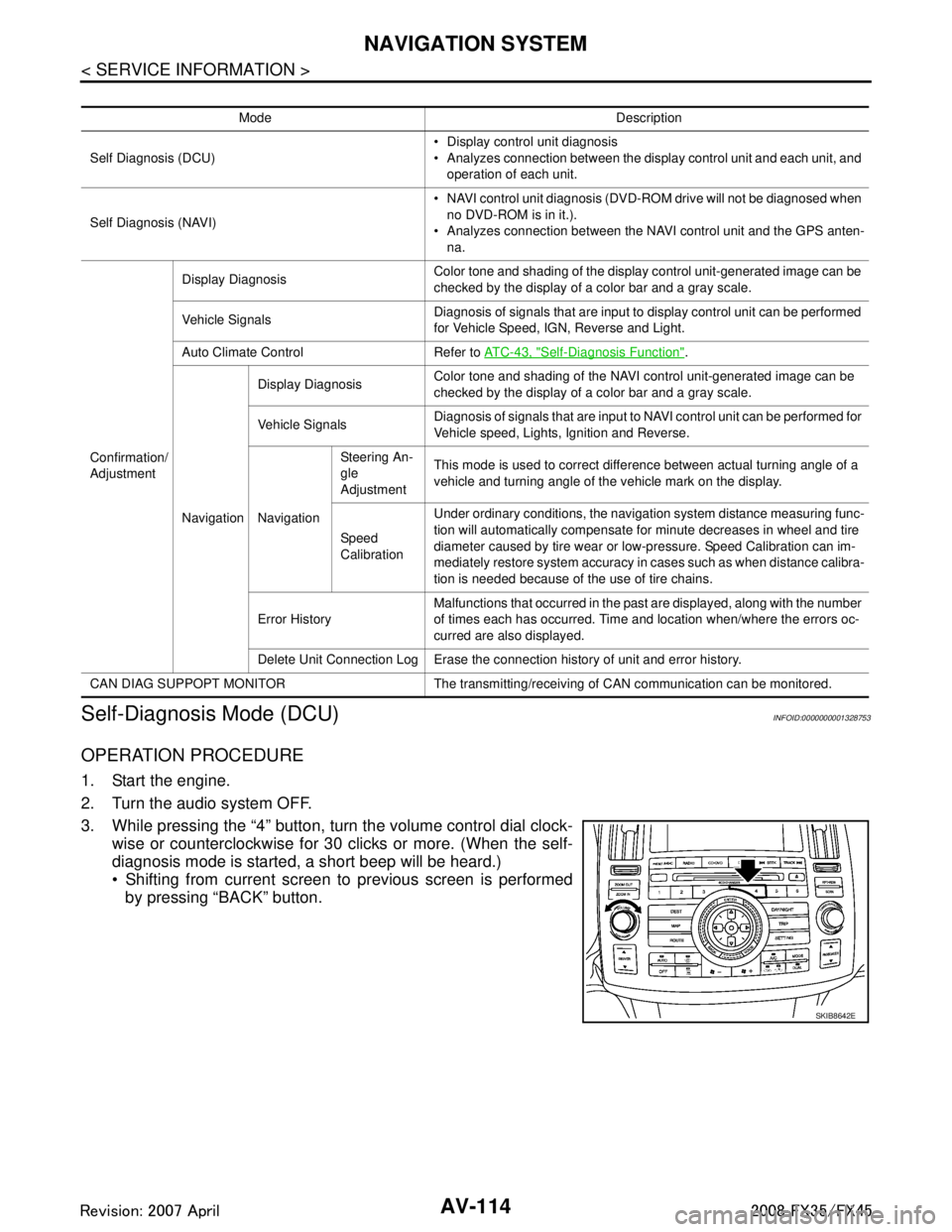
Self-Diagnosis Mode (DCU)
INFOID:0000000001328753
OPERATION PROCEDURE
1. Start the engine.
2. Turn the audio system OFF.
3. While pressing the “4” button, turn the volume control dial clock- wise or counterclockwise for 30 clicks or more. (When the self-
diagnosis mode is started, a short beep will be heard.)
Shifting from current screen to previous screen is performed
by pressing “BACK” button.
Mode Description
Self Diagnosis (DCU) Display control unit diagnosis
Analyzes connection between the display control unit and each unit, and
operation of each unit.
Self Diagnosis (NAVI) NAVI control unit diagnosis (DVD-ROM drive will not be diagnosed when
no DVD-ROM is in it.).
Analyzes connection between the NAVI control unit and the GPS anten-
na.
Confirmation/
Adjustment Display Diagnosis
Color tone and shading of the display control unit-generated image can be
checked by the display of a color bar and a gray scale.
Vehicle Signals Diagnosis of signals that are input to display control unit can be performed
for Vehicle Speed, IGN, Reverse and Light.
Auto Climate Control Refer to AT C - 4 3 , "
Self-Diagnosis Function".
Navigation Display Diagnosis
Color tone and shading of the NAVI control unit-generated image can be
checked by the display of a color bar and a gray scale.
Vehicle Signals Diagnosis of signals that are input to NAVI control unit can be performed for
Vehicle speed, Lights, Ignition and Reverse.
Navigation Steering An-
gle
Adjustment
This mode is used to correct difference between actual turning angle of a
vehicle and turning angle of the vehicle mark on the display.
Speed
Calibration Under ordinary conditions, the navigation system distance measuring func-
tion will automatically compensate for minute decreases in wheel and tire
diameter caused by tire wear or low-pressure. Speed Calibration can im-
mediately restore system accuracy in cases such as when distance calibra-
tion is needed because of the use of tire chains.
Error History Malfunctions that occurred in the past are displayed, along with the number
of times each has occurred. Time and location when/where the errors oc-
curred are also displayed.
Delete Unit Connection Log Erase the connection history of unit and error history.
CAN DIAG SUPPOPT MONITOR The transmitting/recei ving of CAN communication can be monitored.
SKIB8642E
3AA93ABC3ACD3AC03ACA3AC03AC63AC53A913A773A893A873A873A8E3A773A983AC73AC93AC03AC3
3A893A873A873A8F3A773A9D3AAF3A8A3A8C3A863A9D3AAF3A8B3A8C
Page 663 of 3924

AV-116
< SERVICE INFORMATION >
NAVIGATION SYSTEM
8. Select a switch on the diagnosis results screen, and commentsfor the diagnosis results will be shown.
SELF-DIAGNOSIS RESULT
Quick Reference Table
1. Select the applicable diagnosis number in the quick reference table of diagnosis result.
2. Confirm the possible malfunction with the diagnosis table, and then perform inspection.
3. Turn ignition switch OFF and perform self-diagnosis again.
When A/C and AV switch has a malfunction, the self-diagnosis cannot be started. Refer to AV-126, "
A/C and
AV Switch Self-Diagnosis Function".
When display has a malfunction, the self-diagnosis cannot be started. Refer to AV-128, "
All Images Are Not
Displayed".
Self-Diagnosis Codes
SKIA4211E
Switch colorScreen switch
Diagnosis
No.
DCU Display Audio Unit Na vigation GPS Satellite
Red × 1
Gray ×
2
×× 3
×× 4
× 5
× 6
Diagnosis
No. Possible cause Action to take
1 Display control unit malfunction is detected. Replace display control unit.
2 Malfunction is detected on communication signal between
display control unit and display. 1. Check communication circuit between display control
unit and display.
2. Check communication signal between display control
unit and display.
3. If the results from the above checkup show no mal- function, replace either display control unit or display,
and then start self-diagnosis.
4. If self-diagnosis results still show any malfunction, re- place the other unit.
3 Audio unit power supply circuit malfunction is detected.
Malfunction is detected on communication signal be-
tween display control unit and audio unit. 1. Check audio unit power supply circuit.
2. Check communication circuit between display control
unit and audio unit.
3. Check communication signal between display control
unit and audio unit.
4. If the results from the above checkup show no mal- function, replace either display control unit or audio
unit, and then start self-diagnosis.
5. If self-diagnosis results still show any malfunction, re- place the other unit.
3AA93ABC3ACD3AC03ACA3AC03AC63AC53A913A773A893A873A873A8E3A773A983AC73AC93AC03AC3
3A893A873A873A8F3A773A9D3AAF3A8A3A8C3A863A9D3AAF3A8B3A8C
Page 664 of 3924

NAVIGATION SYSTEMAV-117
< SERVICE INFORMATION >
C
DE
F
G H
I
J
L
M A
B
AV
N
O P
Self-Diagnosis Mode (NAVI)INFOID:0000000001328754
OPERATION PROCEDURE
1. Start the engine.
2. Turn the audio system OFF.
3. While pressing the “4” button, turn the volume control dial clock- wise or counterclockwise for 30 clicks or more. (When the self-
diagnosis mode is started, a short beep will be heard.)
Shifting from current screen to previous screen is performedby pressing “BACK” button.
4. The initial trouble diagnosis screen will be shown, and items “Self Diagnosis (DCU)”, “Self Diagnosis (NAVI)”, “Confirmation/
Adjustment” and “CAN DIAG SUPPORT MONITOR” will
become selective.
NOTE:
Select “Self Diagnosis (DCU)” when “Self Diagnosis (NAVI)” is
not available. Repair malfunctioning part.
4 NAVI control unit power supply and ground circuit mal-
function is detected.
Malfunction is detected on communication signal be-
tween display control unit and NAVI control unit. 1. Check NAVI control unit power supply and ground cir-
cuit.
2. Check communication circuit between display control unit and NAVI control unit.
3. If the results from the above checkup show no mal- function, replace either display control unit or NAVI
control unit, and then start self-diagnosis.
4. If self-diagnosis results still show any malfunction, re- place the other unit.
5 GPS antenna connection malfunction is detected. 1. Check if GPS antenna feeder line is snapped or
pinched.
2. If the results from the above checkup show no mal- function, replace GPS antenna, and then restart self-
diagnosis.
3. If self-diagnosis results still show any malfunction, re- place NAVI control unit.
6 Satellite radio tuner power supply and ground circuit mal-
function is detected.
Malfunction is detected on communication signal be-
tween audio unit and satellite radio tuner. 1. Check satellite radio tuner power supply and ground
circuit.
2. Check communication circuit between audio unit and satellite radio tuner.
3. Check communication signal between audio unit and
satellite radio tuner.
4. If the results from the above checkup show no mal- function, replace either audio unit or satellite radio tun-
er, and then start self-diagnosis.
5. If self-diagnosis results still show any malfunction, re- place the other unit.
Diagnosis
No. Possible cause Action to take
SKIB8642E
SKIB7874E
3AA93ABC3ACD3AC03ACA3AC03AC63AC53A913A773A893A873A873A8E3A773A983AC73AC93AC03AC3
3A893A873A873A8F3A773A9D3AAF3A8A3A8C3A863A9D3AAF3A8B3A8C
Page 666 of 3924

NAVIGATION SYSTEMAV-119
< SERVICE INFORMATION >
C
DE
F
G H
I
J
L
M A
B
AV
N
O P
Confirmation/Adjustment ModeINFOID:0000000001328755
OPERATION PROCEDURE
1. Start the engine.
2. Turn the audio system OFF.
Self-diagnosis result screen Possible cause Action to take
NAVI control unit malfunction is detect-
ed. Replace NAVI control unit.
Refer to
AV- 1 4 1 , "
Removal and Installa-
tion of NAVI Control Unit".
Malfunction is detected on DVD- ROM drive pickup lens in NAVI con-
trol unit.
There is dirt and damage on the
DVD-ROM. 1. Check if the inserted DVD-ROM is
specified for this navigation system,
and the DVD-ROM is dirty, scratched
or warped.
2. If the results from the above checkup show no malfunction, insert the
same DVD-ROM, and then restart
self-diagnosis.
3. If self-diagnosis results still show any malfunction, replace NAVI control
unit.
DVD-ROM not inserted is detected. Insert DVD-ROM.
GPS antenna connection malfunction
is detected. 1. Check if GPS antenna feeder line is
snapped or pinched.
2. If the results from the above checkup
show no malfunction, replace GPS
antenna, and then restart self-diag-
nosis.
3. If self-diagnosis results still show any malfunction, replace NAVI control
unit.
SKIB7773E
SKIB7774E
SKIB7775E
SKIB7776E
3AA93ABC3ACD3AC03ACA3AC03AC63AC53A913A773A893A873A873A8E3A773A983AC73AC93AC03AC3
3A893A873A873A8F3A773A9D3AAF3A8A3A8C3A863A9D3AAF3A8B3A8C
Page 672 of 3924

NAVIGATION SYSTEMAV-125
< SERVICE INFORMATION >
C
DE
F
G H
I
J
L
M A
B
AV
N
O P
Erase the connection history of unit and error history that is recorded
in NAVI control unit (clear the connection history of the removed
unit).
CAN Diagnostic Support MonitorINFOID:0000000001328756
OPERATION PROCEDURE
1. Start the engine.
2. Turn the audio system OFF.
3. While pressing the “4” button, turn the volume control dial clock- wise or counterclockwise for 30 clicks or more. (When the self-
diagnosis mode is started, a short beep will be heard.)
Shifting from current screen to previous screen is performedby pressing “BACK” button.
4. The initial trouble diagnosis screen will be shown, and items “Self Diagnosis (DCU)”, “Self Diagnosis (NAVI)”, “Confirmation/
Adjustment” and “CAN DIAG SUPPORT MONITOR” will
become selective.
5. Select “CAN DIAG SUPPORT MONITOR”.
6. The transmitting/receiving of CAN communication can be moni- tored.
SKIB6979E
SKIB8642E
SKIB7874E
Item Content Error counter
(Reference value)
CAN_COMM OK/NG 0 - 50
CAN_CIRC_1 OK/UNKWN 0 - 50
CAN_CIRC_2 OK/UNKWN 0 - 50
CAN_CIRC_3 OK/UNKWN 0 - 50
CAN_CIRC_4 OK/UNKWN 0 - 50
CAN_CIRC_5 OK/UNKWN 0 - 50
CAN_CIRC_6 OK/UNKWN 0 - 50
CAN_CIRC_7 OK/UNKWN 0 - 50
SKIA4288E
3AA93ABC3ACD3AC03ACA3AC03AC63AC53A913A773A893A873A873A8E3A773A983AC73AC93AC03AC3
3A893A873A873A8F3A773A9D3AAF3A8A3A8C3A863A9D3AAF3A8B3A8C
Page 673 of 3924

AV-126
< SERVICE INFORMATION >
NAVIGATION SYSTEM
NOTE:
Counter shows the status of CAN communication.
A/C and AV Switch Self-Diagnosis FunctionINFOID:0000000001328757
Performing self-diagnosis makes it possible to check operation of A/C and AV switch indicator (LED) and other
switch.
STARTING THE SELF-DIAGNOSIS MODE
1. Turn ignition switch from OFF to ACC.
2. Within 10 seconds press and hold the switches “1” and “6”simultaneously for 3 seconds.
DIAGNOSIS FUNCTION
The following are checked: All the indicators (LED) in the A/C and AV switch.
Continuity of the switches by sounding the buzze r when the A/C and AV switch and audio steering wheel
switch is pressed.
Continuity of harness between A/C and AV switch and audio steering wheel switch.
NOTE:
Rear window defogger switch operation is not checked (No beep sound even under normal status).
EXITING THE SELF-DIAGNOSIS MODE
Turn ignition switch OFF.
CAN Communication CheckINFOID:0000000001328758
1.CHECK MONITOR DESCRIPTION
1. Start self-diagnosis of DCU. Refer to AV-114, "
Self-Diagnosis Mode (DCU)".
2. Select “CAN DIAG SUPPORT MONITOR”. Refer to AV-125,
"CAN Diagnostic Support Monitor".
CAN_CIRC_8 OK/UNKWN 0 - 50
CAN_CIRC_9 OK/UNKWN 0 - 50
SKIB8660E
Item content
Error counter
(Reference value)
Normal conditio n Error (Example)
CAN_COMM OK NG 0 - 50
CAN_CIRC_1 OK UNKWN 0 - 50
CAN_CIRC_2 OK UNKWN 0 - 50
CAN_CIRC_3 OK UNKWN 0 - 50
CAN_CIRC_4 OK UNKWN 0 - 50
CAN_CIRC_5 OK UNKWN 0 - 50
CAN_CIRC_6 OK UNKWN 0 - 50
CAN_CIRC_7 OK UNKWN 0 - 50
CAN_CIRC_8 OK UNKWN 0 - 50
CAN_CIRC_9 UNKWN UNKWN 0 - 50
PKIB6080E
3AA93ABC3ACD3AC03ACA3AC03AC63AC53A913A773A893A873A873A8E3A773A983AC73AC93AC03AC3
3A893A873A873A8F3A773A9D3AAF3A8A3A8C3A863A9D3AAF3A8B3A8C
Page 674 of 3924

NAVIGATION SYSTEMAV-127
< SERVICE INFORMATION >
C
DE
F
G H
I
J
L
M A
B
AV
N
O P
3. Record each item display description (OK/NG/UNK WN) displayed on the following CAN DIAG SUPPORT
MONITOR Check Sheet.
CAN DIAG SUPPORT MONITOR Check Sheet
>> After filling in CAN DIAG SUPPORT MONITOR Check Sheet, Go to LAN-43, "CAN System Spec-
ification Chart".
Unable to Operate System with A/C and AV SwitchINFOID:0000000001328759
Symptom: Unable to operate A/C system, audio sys tem and navigation system with A/C and AV switch.
(Unable to start self-diagnosis.)
1.CHECK CONDITION
1. Turn ignition switch ON.
2. Check if an image is displayed on the screen.
Is an image displayed on the screen?
YES >> GO TO 2.
NO >> Repair malfunctioning part. Refer to AV-128, "
All Images Are Not Displayed".
2.SELF-DIAGNOSIS OF A/C AND AV SWITCH
Start self-diagnosis of A/C and AV switch, and check the self-diagnosis result. Refer to AV-126, "
A/C and AV
Switch Self-Diagnosis Function".
OK or NG
OK >> GO TO 4.
NG >> GO TO 3.
3.CHECK A/C AND AV SWITCH POWE R SUPPLY AND GROUND CIRCUIT
1. Check voltage between A/C and AV switch harness connector terminals and ground.
2. Turn ignition switch OFF.
3. Disconnect A/C and AV switch connector.
Diagnosis item Screen display Diagnosis item Screen display CAN_COMM OK NG CAN_CIRC_5 OK UNKWN
CAN_CIRC_1 OK UNKWN CAN_CIRC_6 OK UNKWN
CAN_CIRC_2 OK UNKWN CAN_CIRC_7 OK UNKWN
CAN_CIRC_3 OK UNKWN CAN_CIRC_8 OK UNKWN
CAN_CIRC_4 OK UNKWN CAN_CIRC_9 OK UNKWN
Te r m i n a l s OFF ACC ON
(+)
(–)
Connector Terminal
M64 1
Ground Battery
voltage Battery
voltage Battery
voltage
20 V Battery
voltage Battery
voltage
SKIB7836E
3AA93ABC3ACD3AC03ACA3AC03AC63AC53A913A773A893A873A873A8E3A773A983AC73AC93AC03AC3
3A893A873A873A8F3A773A9D3AAF3A8A3A8C3A863A9D3AAF3A8B3A8C
Page 675 of 3924

AV-128
< SERVICE INFORMATION >
NAVIGATION SYSTEM
4. Check continuity between A/C and AV switch harness connectorM64 terminal 5 and ground.
OK or NG
OK >> Replace A/C and AV switch.
NG >> Repair harness or connector.
4.CHECK HARNESS
1. Turn ignition switch OFF.
2. Disconnect display control unit and A/C and AV switch connectors.
3. Check continuity between display control unit harness connector (A) M76 terminals 28, 30 and A/C and AV switch harness con-
nector (B) M64 terminals 6, 8.
4. Check continuity between display control unit harness connector (A) M76 terminals 28, 30 and ground.
OK or NG
OK >> GO TO 5.
NG >> Repair harness or connector.
5.CHECK A/C AND AV SWITCH AND DISPLAY CONTROL UNIT
1. Replace A/C and AV switch or display control unit.
2. Make sure that A/C system, audio system and navi gation system can be operated by A/C and AV switch.
OK or NG
OK >> INSPECTION END
NG >> Replace the other unit.
All Images Are Not DisplayedINFOID:0000000001328760
Symptom: RGB image is not displayed.
1.CHECK CONDITION
When operating audio and air conditioner, make sure that they operate correctly.
Do audio and air conditioner operate normally?
YES >> GO TO 2.
NO >> GO TO 5.
2.CHECK DISPLAY GROUND CIRCUIT
1. Turn ignition switch OFF.
2. Disconnect display connector. 5 – Ground : Continuity should exist.
SKIB7837E
28 – 6 : Continuity should exist.
30 – 8 : Continuity should exist.
28, 30 – Ground : Continuity should not exist.
SKIB7838E
3AA93ABC3ACD3AC03ACA3AC03AC63AC53A913A773A893A873A873A8E3A773A983AC73AC93AC03AC3
3A893A873A873A8F3A773A9D3AAF3A8A3A8C3A863A9D3AAF3A8B3A8C