instrument INFINITI FX35 2008 Repair Manual
[x] Cancel search | Manufacturer: INFINITI, Model Year: 2008, Model line: FX35, Model: INFINITI FX35 2008Pages: 3924, PDF Size: 81.37 MB
Page 3015 of 3924

IP-14
< SERVICE INFORMATION >
INSTRUMENT PANEL ASSEMBLY
2. Remove data link connector.
3. Pull to disengage clip and pawl by removing panel in horizontal direction.
4. Disconnect in-vehicle sensor and each electrical parts.
5. Remove the grommet, and remove hood lock cable.
(L) Steering Column Front Lower Cover
1. Remove screw with power tool.
2. Disengage the tab, then remove steering column front lower cover.
NOTE:
Move the steering column telescopic to the rear most position
Move the steering column tilt to the top position.
(M) Steering Column Lower Cover
1. Remove screws with power tool.
2. Disengage the tab, then remove steering column lower cover.
(N) Steering Column Upper Cover
Remove the steering column upper cover.
(O) Wiper and Washer Switch
Remove wiper and washer switch.
Refer to WW-28, "
Removal and Installation of Front Wiper and Washer Switch".
(P) Lighting and Turn Signal Switch
Remove lighting and turn signal switch. Refer to LT-96, "Removal and Installation".
(Q) Steering Lock Escutcheon
Pull back to your side, and remove steering lock escutcheon.
(R) Combination Meter Assembly
1. Remove bolts with power tool, and then remove connector
bracket.
PIIA4998E
PIIA5002E
3AA93ABC3ACD3AC03ACA3AC03AC63AC53A913A773A893A873A873A8E3A773A983AC73AC93AC03AC3
3A893A873A873A8F3A773A9D3AAF3A8A3A8C3A863A9D3AAF3A8B3A8C
Page 3016 of 3924

INSTRUMENT PANEL ASSEMBLYIP-15
< SERVICE INFORMATION >
C
DE
F
G H
J
K L
M A
B
IP
N
O P
2. Remove bolts with power tool and then disconnect harness con- nector.
CAUTION:
To prevent it from damaged by interference with the combina-
tion meter assembly, protect the combination meter assembly
with cloths.
(S) Cluster Lid C
1. Insert a remover into gap between instrument panel and pad, pull back to your side, and disconnect metal clips below.
2. Disconnect harness connectors, and remove cluster lid C. CAUTION:
Cover surroundings with cloth to avoid scratches or dam-
ages.
(T) Display Unit and Audio Unit
1. Remove screws with power tool.
2. Disconnect harness connector, and remove display unit and
audio unit.
CAUTION:
Unit is heavy, so be careful not to pinch your fingers when
working.
(U) Front Defroster Grille (RH/LH)
Insert a remover into gaps between front defroster grille (RH/LH) and
instrument panel and pad, lift front defroster grille up, and remove
front defroster grille (RH/LH).
(V) Combination Meter Bracket
PIIA5003E
: Clip
: Pawl
PIIB8533E
PIIB1335E
PIIA5009E
3AA93ABC3ACD3AC03ACA3AC03AC63AC53A913A773A893A873A873A8E3A773A983AC73AC93AC03AC3
3A893A873A873A8F3A773A9D3AAF3A8A3A8C3A863A9D3AAF3A8B3A8C
Page 3017 of 3924

IP-16
< SERVICE INFORMATION >
INSTRUMENT PANEL ASSEMBLY
1. Remove bolts.
2. The installation bolts of the harness clip and steering columnassembly is removed, steering column assembly is pulled back-
ward, and set combination meter bracket free from the instru-
ment panel and pad. Refer to PS-12
.
(W) Side Ventilation (RH/LH)
1. Insert a remover into gaps between instrument panel and pad,
pull back to your side, and disconnect metal clips below.
2. Disconnect door mirror switch harness connectors, and remove side ventilation (RH/LH).
(X) Instrument Panel and Pad
1. Remove bolts and screws.
2. Remove front passenger air bag module. Refer to SRS-38, "
Removal and Installation".
3. Disconnect harness connectors, and remove instrum ent panel and pad from passenger door opening por-
tion.
INSTALLATION
Install in the reverse order of removal.
Disassembly and AssemblyINFOID:0000000001328089
A/T CONSOLE FINISHER
PIIA5010E
PIIA5011E
3AA93ABC3ACD3AC03ACA3AC03AC63AC53A913A773A893A873A873A8E3A773A983AC73AC93AC03AC3
3A893A873A873A8F3A773A9D3AAF3A8A3A8C3A863A9D3AAF3A8B3A8C
Page 3018 of 3924
INSTRUMENT PANEL ASSEMBLYIP-17
< SERVICE INFORMATION >
C
DE
F
G H
J
K L
M A
B
IP
N
O P
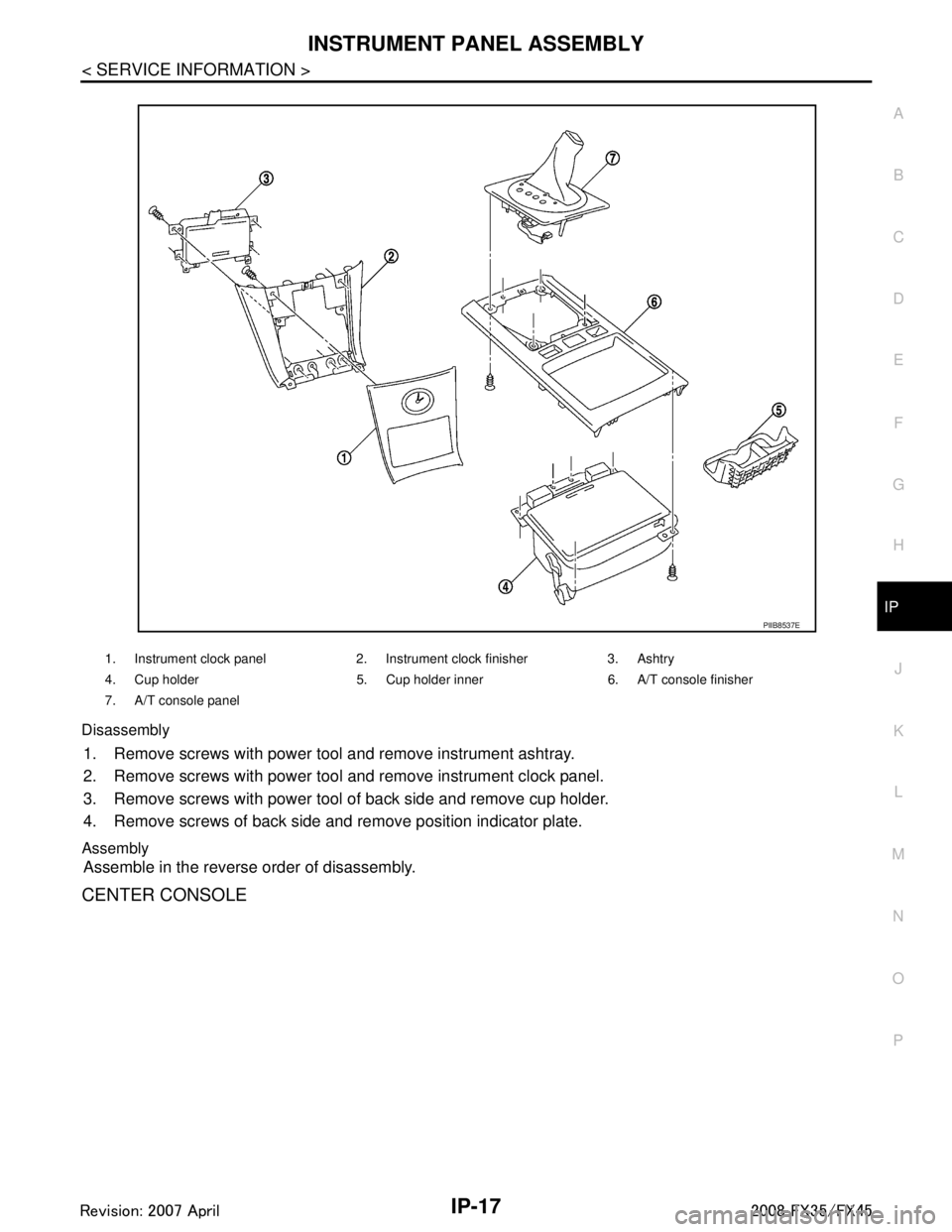
Disassembly
1. Remove screws with power tool and remove instrument ashtray.
2. Remove screws with power tool and remove instrument clock panel.
3. Remove screws with power tool of back side and remove cup holder.
4. Remove screws of back side and remove position indicator plate.
Assembly
Assemble in the reverse order of disassembly.
CENTER CONSOLE
1. Instrument clock panel 2. Instrument clock finisher 3. Ashtry
4. Cup holder 5. Cup holder inner 6. A/T console finisher
7. A/T console panel
PIIB8537E
3AA93ABC3ACD3AC03ACA3AC03AC63AC53A913A773A893A873A873A8E3A773A983AC73AC93AC03AC3
3A893A873A873A8F3A773A9D3AAF3A8A3A8C3A863A9D3AAF3A8B3A8C
Page 3019 of 3924

IP-18
< SERVICE INFORMATION >
INSTRUMENT PANEL ASSEMBLY
Disassembly
1. Insert a remover into side between gaps console rear finisher and pull back to your side, and disconnectpawls below.
2. Disconnect harness connector and remove console rear finisher.
3. Insert a remover into side between gaps of console mask and pull back to your side.
4. Remove screws with power tool and remove console lid.
5. Remove screws fixing DVD player with power tool.
6. Disconnect harness connectors, and remove DVD player.
Assembly
Assemble in the reverse order of disassembly.
INSTRUMENT PASSENGER LOWER PANEL
1. Console lid 2. Console mask 3. Console body
4. DVD player bracket 5. DVD player 6. Console rear finisher
Clip Pawl
PIIB8538E
3AA93ABC3ACD3AC03ACA3AC03AC63AC53A913A773A893A873A873A8E3A773A983AC73AC93AC03AC3
3A893A873A873A8F3A773A9D3AAF3A8A3A8C3A863A9D3AAF3A8B3A8C
Page 3020 of 3924
INSTRUMENT PANEL ASSEMBLYIP-19
< SERVICE INFORMATION >
C
DE
F
G H
J
K L
M A
B
IP
N
O P
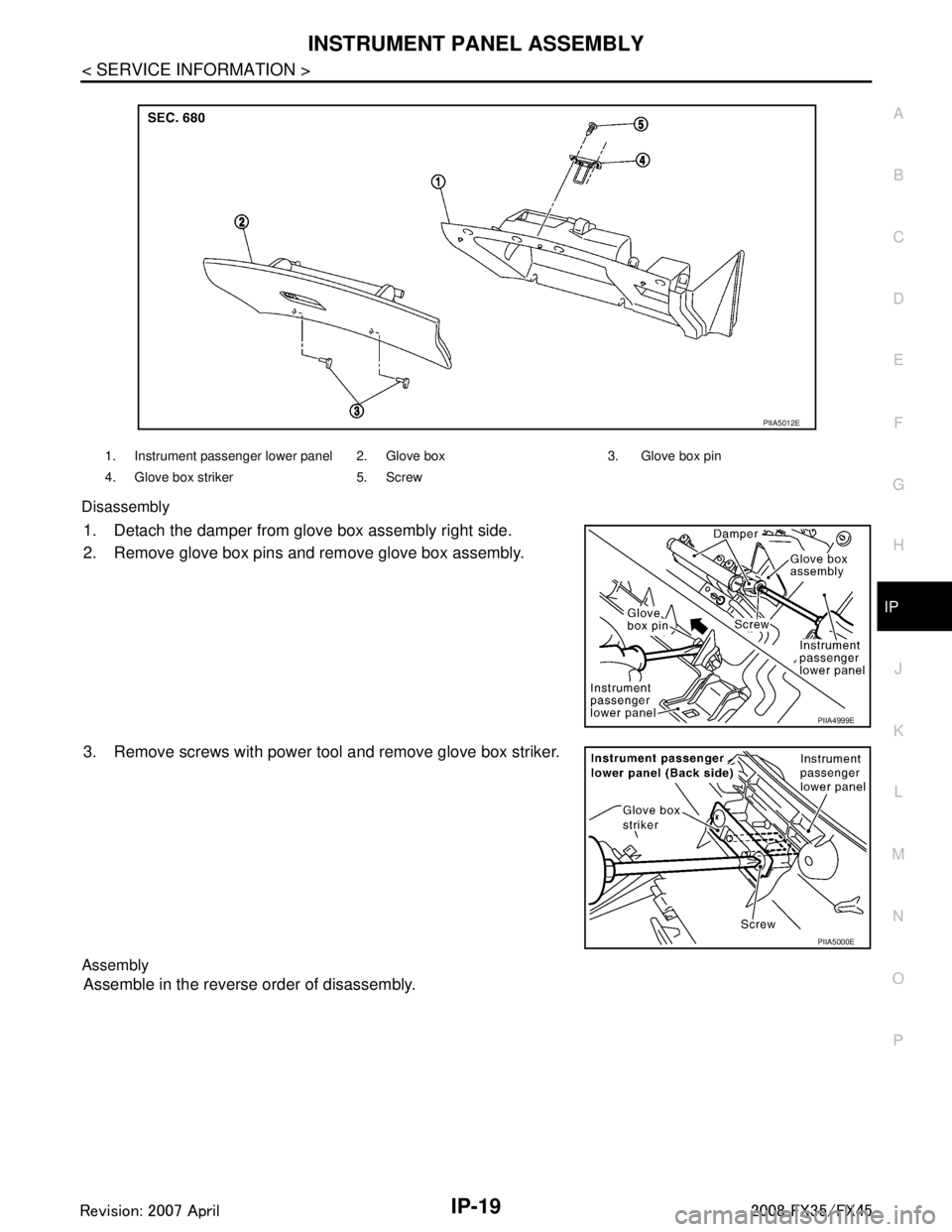
Disassembly
1. Detach the damper from glove box assembly right side.
2. Remove glove box pins and remove glove box assembly.
3. Remove screws with power tool and remove glove box striker.
Assembly
Assemble in the reverse order of disassembly.
1. Instrument passenger lower panel 2. Glove box 3. Glove box pin
4. Glove box striker 5. Screw
PIIA5012E
PIIA4999E
PIIA5000E
3AA93ABC3ACD3AC03ACA3AC03AC63AC53A913A773A893A873A873A8E3A773A983AC73AC93AC03AC3
3A893A873A873A8F3A773A9D3AAF3A8A3A8C3A863A9D3AAF3A8B3A8C
Page 3267 of 3924
INTERIOR ROOM LAMPLT-165
< SERVICE INFORMATION >
C
DE
F
G H
I
J
L
M A
B
LT
N
O P
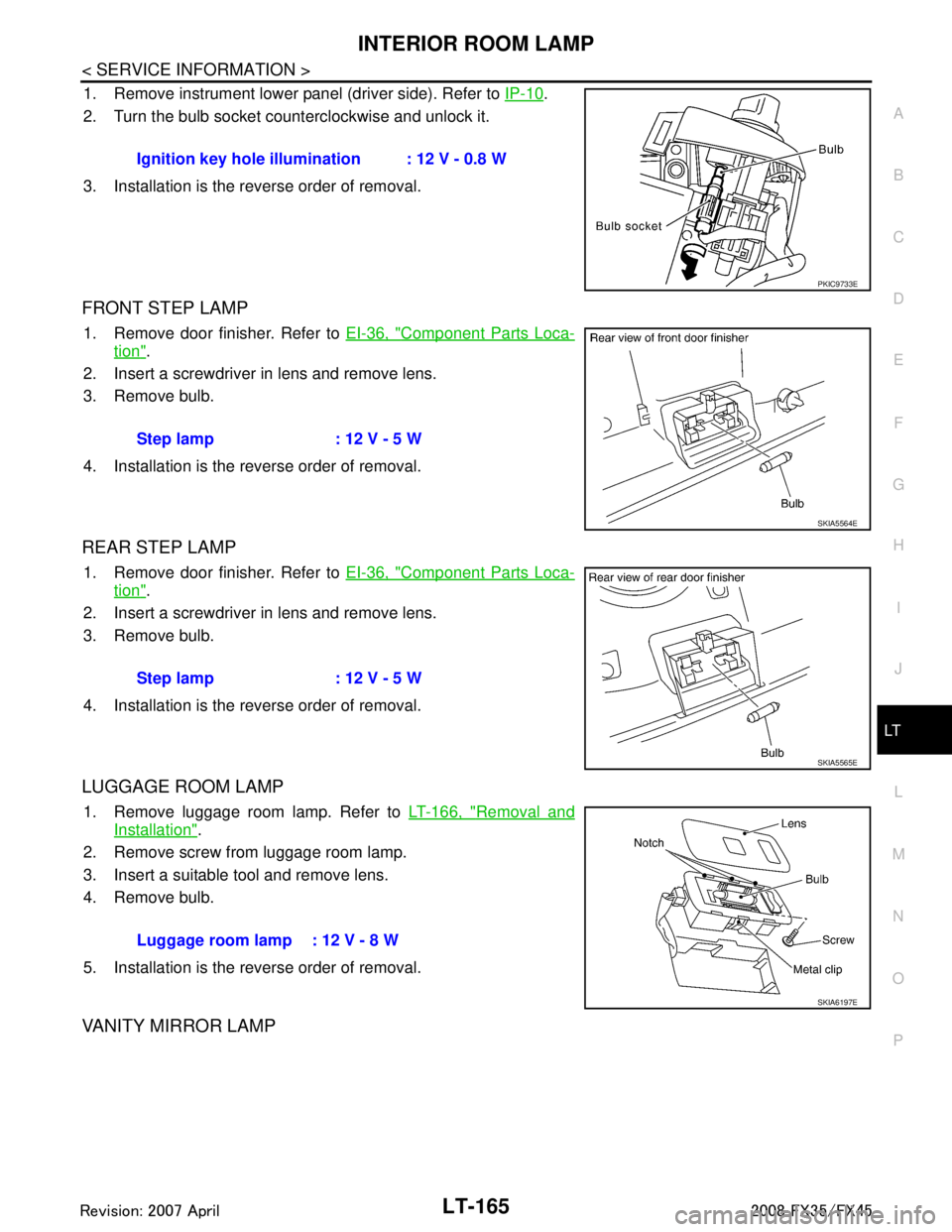
1. Remove instrument lower panel (driver side). Refer to IP-10.
2. Turn the bulb socket counterclockwise and unlock it.
3. Installation is the reverse order of removal.
FRONT STEP LAMP
1. Remove door finisher. Refer to EI-36, "Component Parts Loca-
tion".
2. Insert a screwdriver in lens and remove lens.
3. Remove bulb.
4. Installation is the reverse order of removal.
REAR STEP LAMP
1. Remove door finisher. Refer to EI-36, "Component Parts Loca-
tion".
2. Insert a screwdriver in lens and remove lens.
3. Remove bulb.
4. Installation is the reverse order of removal.
LUGGAGE ROOM LAMP
1. Remove luggage room lamp. Refer to LT-166, "Removal and
Installation".
2. Remove screw from luggage room lamp.
3. Insert a suitable tool and remove lens.
4. Remove bulb.
5. Installation is the reverse order of removal.
VANITY MIRROR LAMP
Ignition key hole illumination : 12 V - 0.8 W
PKIC9733E
Step lamp : 12 V - 5 W
SKIA5564E
Step lamp : 12 V - 5 W
SKIA5565E
Luggage room lamp : 12 V - 8 W
SKIA6197E
3AA93ABC3ACD3AC03ACA3AC03AC63AC53A913A773A893A873A873A8E3A773A983AC73AC93AC03AC3
3A893A873A873A8F3A773A9D3AAF3A8A3A8C3A863A9D3AAF3A8B3A8C
Page 3283 of 3924
ILLUMINATIONLT-181
< SERVICE INFORMATION >
C
DE
F
G H
I
J
L
M A
B
LT
N
O P
Bulb ReplacementINFOID:0000000001328427
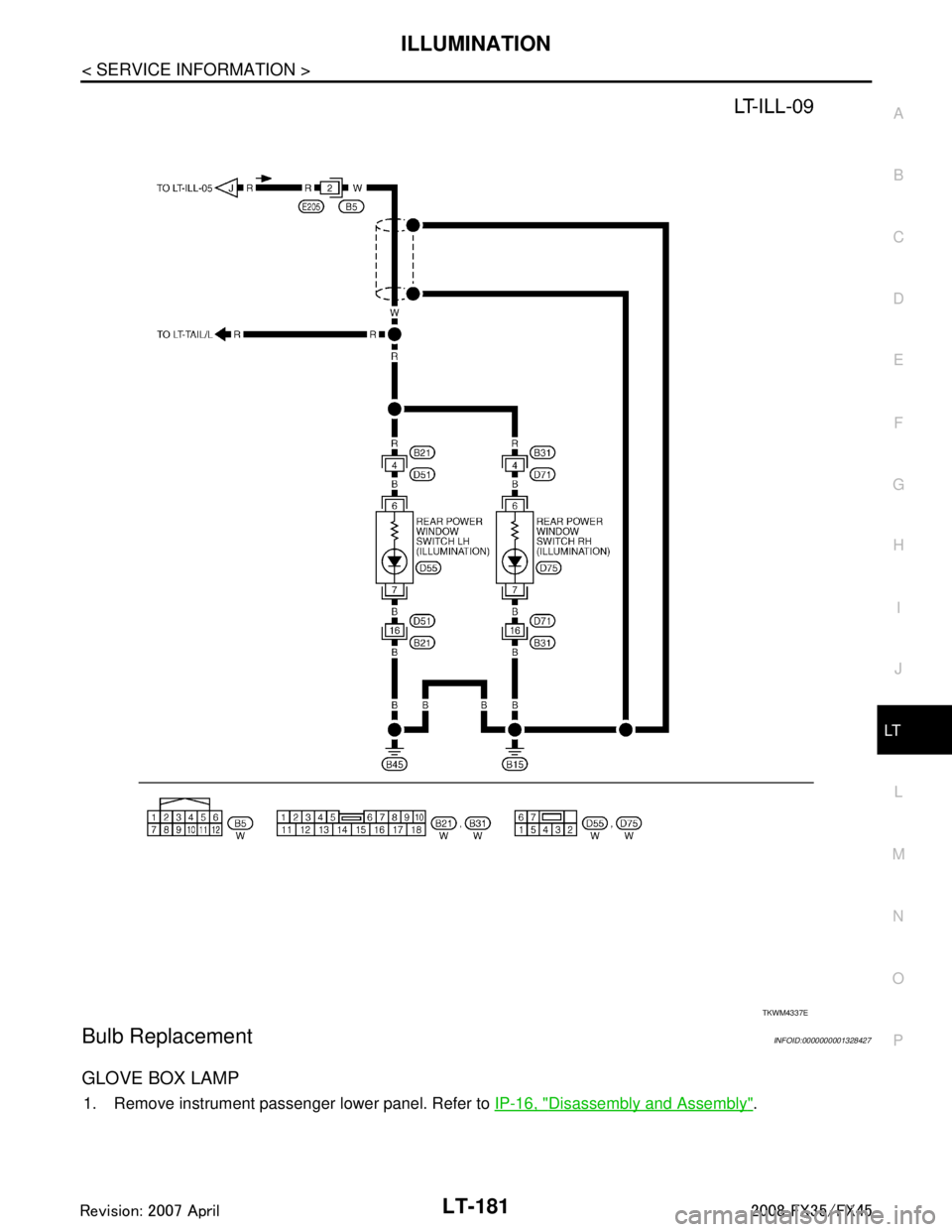
GLOVE BOX LAMP
1. Remove instrument passenger lower panel. Refer to IP-16, "Disassembly and Assembly".
TKWM4337E
3AA93ABC3ACD3AC03ACA3AC03AC63AC53A913A773A893A873A873A8E3A773A983AC73AC93AC03AC3
3A893A873A873A8F3A773A9D3AAF3A8A3A8C3A863A9D3AAF3A8B3A8C
Page 3284 of 3924
LT-182
< SERVICE INFORMATION >
ILLUMINATION
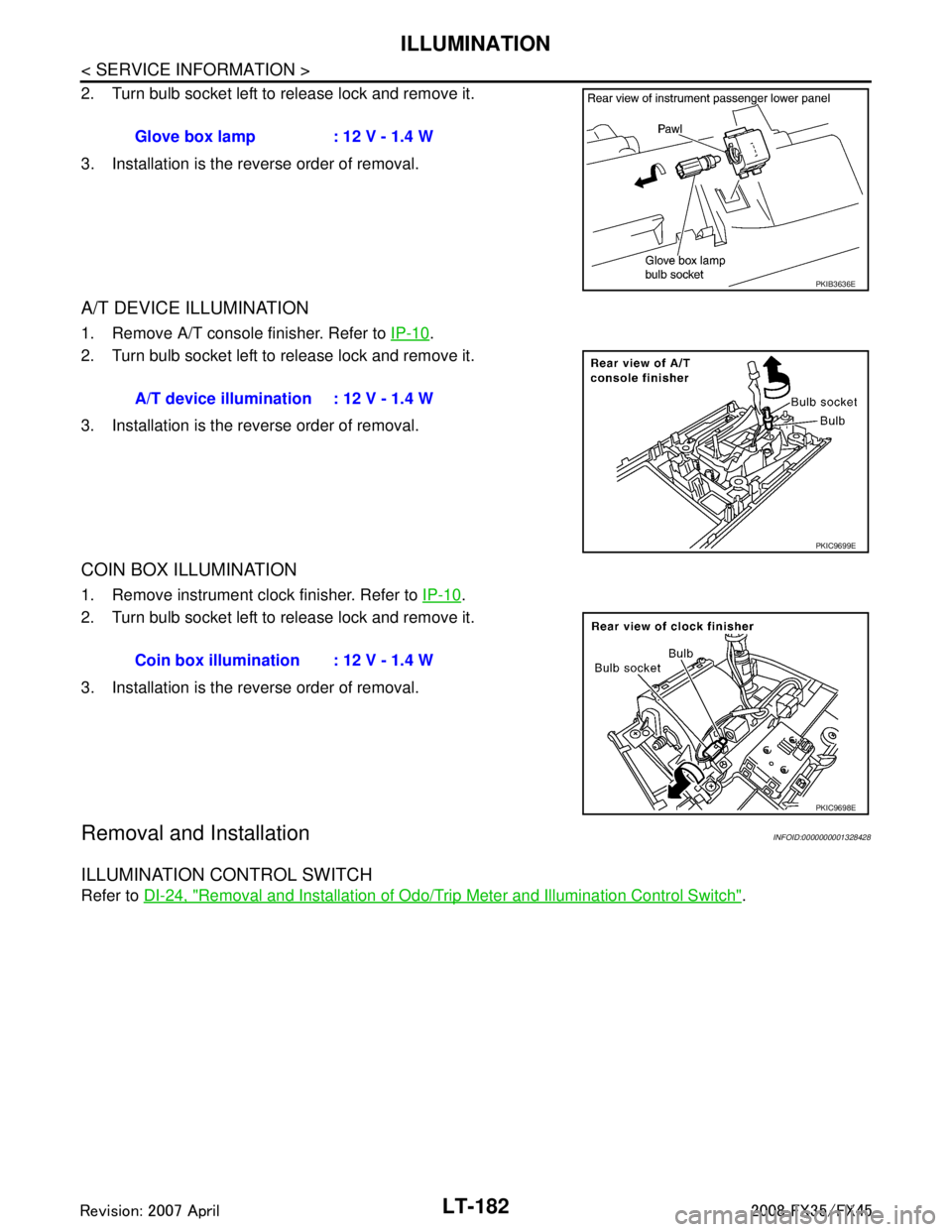
2. Turn bulb socket left to release lock and remove it.
3. Installation is the reverse order of removal.
A/T DEVICE ILLUMINATION
1. Remove A/T console finisher. Refer to IP-10.
2. Turn bulb socket left to release lock and remove it.
3. Installation is the reverse order of removal.
COIN BOX ILLUMINATION
1. Remove instrument clock finisher. Refer to IP-10.
2. Turn bulb socket left to release lock and remove it.
3. Installation is the reverse order of removal.
Removal and InstallationINFOID:0000000001328428
ILLUMINATION CONTROL SWITCH
Refer to DI-24, "Removal and Installation of Odo/Trip Meter and Illumination Control Switch".
Glove box lamp : 12 V - 1.4 W
PKIB3636E
A/T device illumination : 12 V - 1.4 W
PKIC9699E
Coin box illumination : 12 V - 1.4 W
PKIC9698E
3AA93ABC3ACD3AC03ACA3AC03AC63AC53A913A773A893A873A873A8E3A773A983AC73AC93AC03AC3
3A893A873A873A8F3A773A9D3AAF3A8A3A8C3A863A9D3AAF3A8B3A8C
Page 3359 of 3924
PB-4
< SERVICE INFORMATION >
PARKING BRAKE CONTROL
PARKING BRAKE CONTROL
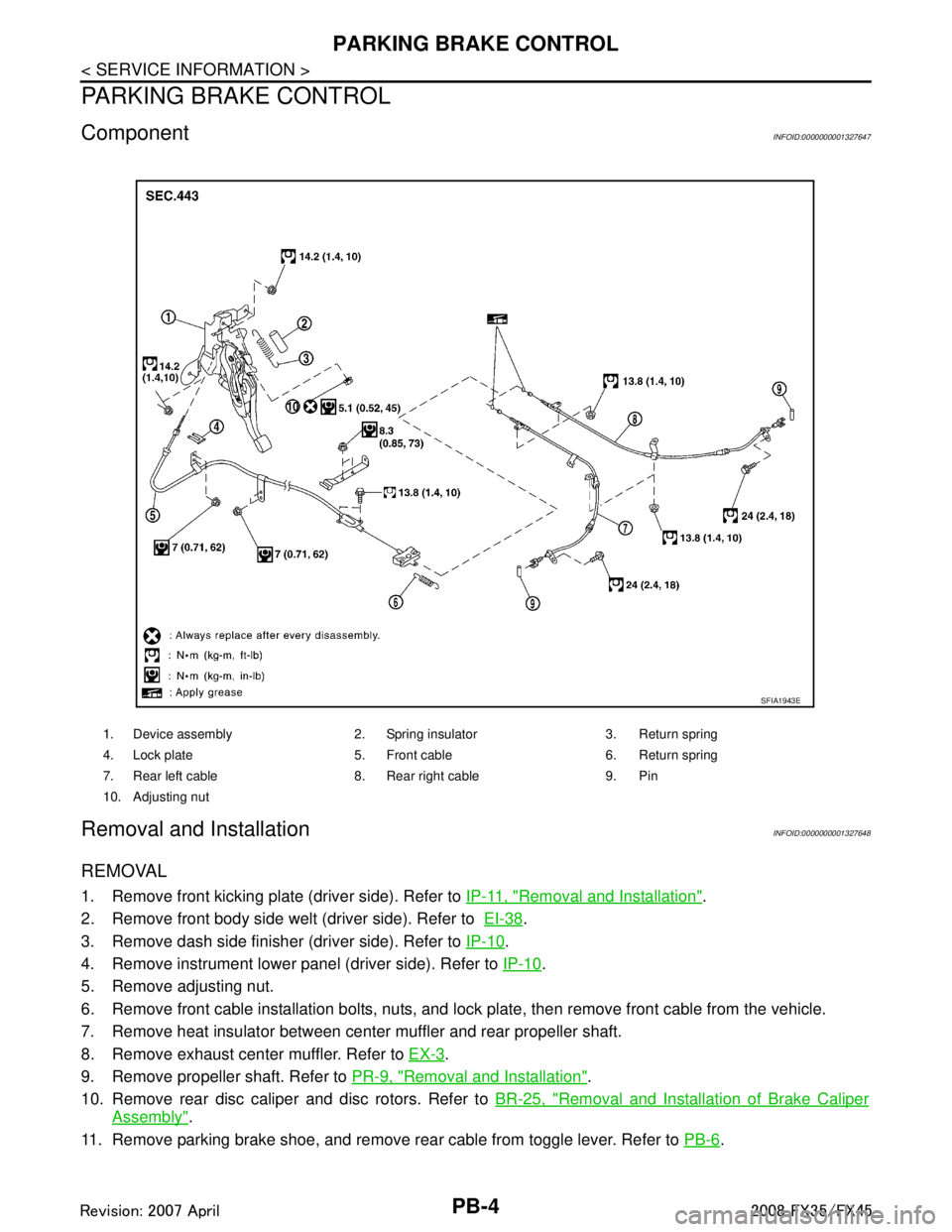
ComponentINFOID:0000000001327647
Removal and InstallationINFOID:0000000001327648
REMOVAL
1. Remove front kicking plate (driver side). Refer to IP-11, "Removal and Installation".
2. Remove front body side welt (driver side). Refer to EI-38
.
3. Remove dash side finisher (driver side). Refer to IP-10
.
4. Remove instrument lower panel (driver side). Refer to IP-10
.
5. Remove adjusting nut.
6. Remove front cable installation bolts, nuts, and lock plate, then remove front cable from the vehicle.
7. Remove heat insulator between center muffler and rear propeller shaft.
8. Remove exhaust center muffler. Refer to EX-3
.
9. Remove propeller shaft. Refer to PR-9, "
Removal and Installation".
10. Remove rear disc caliper and disc rotors. Refer to BR-25, "
Removal and Installation of Brake Caliper
Assembly".
11. Remove parking brake shoe, and remove r ear cable from toggle lever. Refer to PB-6
.
1. Device assembly 2. Spring insulator 3. Return spring
4. Lock plate 5. Front cable 6. Return spring
7. Rear left cable 8. Rear right cable 9. Pin
10. Adjusting nut
SFIA1943E
3AA93ABC3ACD3AC03ACA3AC03AC63AC53A913A773A893A873A873A8E3A773A983AC73AC93AC03AC3
3A893A873A873A8F3A773A9D3AAF3A8A3A8C3A863A9D3AAF3A8B3A8C