INFINITI FX35 2008 Service Manual
Manufacturer: INFINITI, Model Year: 2008, Model line: FX35, Model: INFINITI FX35 2008Pages: 3924, PDF Size: 81.37 MB
Page 931 of 3924

IVIS (INFINITI VEHICLE IMMOBILIZER SYSTEM-NATS)
BL-197
< SERVICE INFORMATION >
C
D E
F
G H
J
K L
M A
B
BL
N
O P
Replace ECM.
Perform initialization or re-communicating function.
- For re-communicating function, refer to BL-187, "
ECM Re-Communicating Function".
- For initialization, refer to “CONSULT -III Operation Manual NATS-IVIS/NVIS”.
Diagnosis Procedure 2INFOID:0000000001327935
Self-diagnostic results:
“DIFFERENCE OF KEY” is displayed on CONSULT-III screen
1.CONFIRM SELF-DIAGNOSTIC RESULTS
Confirm that SELF-DIAGNOSTIC RESULTS “DIFFERENCE OF KEY” is displayed on CONSULT-III screen.
Does CONSULT-III screen display as shown in figure?
YES >> GO TO 2.
NO >> Refer to BL-195, "
Trouble Diagnosis Symptom Chart".
2.PERFORM INITIALIZATION WITH CONSULT-III
Perform initialization with CONS ULT-III. Re-register all ignition key or mechanical key IDs.
For initialization and registration of ignition key or mec hanical key IDs, refer to “CONSULT-III Operation Man-
ual NATS-IVIS/NVIS”.
NOTE:
If the initialization is not completed or ma lfunction, CONSULT-III shows message on the screen.
Can the system be initialized and can the engine be started with re-registered ignition key or mechanical key?
YES >> Ignition key ID was unregistered.
NO >> BCM is malfunctioning.
Replace BCM.
Perform initialization with CONSULT-III.
For initialization, refer to “CONSULT -III Operation Manual NATS-IVIS/NVIS”.
Diagnosis Procedure 3INFOID:0000000001327936
Self-diagnostic results:
“ID DISCORD, IMM-ECM” is displayed on CONSULT-III screen
1.CONFIRM SELF-DIAGNOSTIC RESULTS
Confirm that SELF-DIAGNOSTIC RESULTS “ID DISCO RD, IMM-ECM” is displayed on CONSULT-III screen.
NOTE:
“ID DISCORD IMM-ECM”:
Registered ID of BCM is in discord with that of ECM.
Does CONSULT-III screen display as shown in figure?
YES >> GO TO 2.
NO >> Refer to BL-195, "
Trouble Diagnosis Symptom Chart".
2.PERFORM INITIALIZATION WITH CONSULT-III
Perform initialization with CONS ULT-III. Re-register all ignition key or mechanical key IDs.
For initialization, refer to “CONSULT -III Operation Manual NATS-IVIS/NVIS”.
NOTE:
If the initialization is not completed or ma lfunction, CONSULT-III shows message on the screen.
Can the system be initialized?
YES >> Start engine. (END) System initialization had not been completed.
NO >> ECM is malfunctioning. Replace ECM.
Perform initialization or re-communicating function.
- For initialization, refer to “CONSULT -III Operation Manual NATS-IVIS/NVIS”.
- For re-communicating function, refer to BL-187, "
ECM Re-Communicating Function".
Diagnosis Procedure 4INFOID:0000000001327937
Self-diagnostic results:
3AA93ABC3ACD3AC03ACA3AC03AC63AC53A913A773A893A873A873A8E3A773A983AC73AC93AC03AC3
3A893A873A873A8F3A773A9D3AAF3A8A3A8C3A863A9D3AAF3A8B3A8C
Page 932 of 3924

BL-198
< SERVICE INFORMATION >
IVIS (INFINITI VEHICLE IMMOBILIZER SYSTEM-NATS)
“LOCK MODE” displayed on CONSULT-III screen
1.CONFIRM SELF-DIAGNOSTIC RESULTS
Confirm SELF-DIAGNOSTIC RESULTS “LOCK MO DE” is displayed on CONSULT-III screen.
Does CONSULT-III screen disp lay as shown in figure?
YES >> GO TO 2.
NO >> Refer to BL-195, "
Trouble Diagnosis Symptom Chart".
2.ESCAPE FROM LOCK MODE
1. Turn ignition switch OFF.
2. Turn ignition switch ON with registered key. (Do not start engine.) Wait 5 seconds.
3. Return the key to OFF position. Wait 5 seconds.
4. Repeat steps 2 and 3 twice (total of three cycles).
5. Start the engine.
Does engine start?
YES >> System is OK (Now system is escaped from “LOCK MODE”).
NO >> GO TO 3.
3.PERFORM INITIALIZATION WITH CONSULT-III
Perform initialization with CONSULT-III.
For initialization, refer to “CONSULT -III Operation Manual NATS-IVIS/NVIS”.
NOTE:
If the initialization is not completed or malf unction, CONSULT-III shows the message on the screen.
Can the system be initialized?
YES >> System is OK.
NO >> GO TO 4.
4.PERFORM INITIALIZATION WITH CONSULT-III AGAIN
1. Replace BCM.
2. Perform initialization with CONSULT-III. For initialization, refer to “CONSULT -III Operation Manual NATS-IVIS/NVIS”.
NOTE:
If the initialization is not completed or malf unctions, CONSULT-III shows the message on the screen.
Can the system be initialized?
YES >> System is OK. BCM is malfunctioning. Replace BCM.
Perform initialization with CONSULT-III.
For initialization, refer to “CONSULT -III Operation Manual NATS-IVIS/NVIS”.
NO >> ECM is malfunctioning. Replace ECM.
Perform initialization or re-communicating function.
- For initialization, refer to “CONSULT -III Operation Manual NATS-IVIS/NVIS”.
- For re-communicating function, refer to BL-187, "
ECM Re-Communicating Function".
Diagnosis Procedure 5INFOID:0000000001327938
Self-diagnostic results:
“CHAIN OF IMMU-KEY” is displayed on CONSULT-III screen
1.CONFIRM SELF-DIAGNOSTIC RESULTS
Confirm self-diagnostic results “CHAIN OF IM MU-KEY” is displayed on CONSULT-III screen.
Does CONSULT-III screen display as shown?
YES >> GO TO 2.
NO >> Refer to BL-195, "
Trouble Diagnosis Symptom Chart".
2.CHECK NATS ANTENNA AMP. INSTALLATION
Check NATS antenna amp. installation. Refer to BL-201, "
Removal and Installation NATS Antenna Amp".
OK or NG
OK >> GO TO 3.
3AA93ABC3ACD3AC03ACA3AC03AC63AC53A913A773A893A873A873A8E3A773A983AC73AC93AC03AC3
3A893A873A873A8F3A773A9D3AAF3A8A3A8C3A863A9D3AAF3A8B3A8C
Page 933 of 3924

IVIS (INFINITI VEHICLE IMMOBILIZER SYSTEM-NATS)
BL-199
< SERVICE INFORMATION >
C
D E
F
G H
J
K L
M A
B
BL
N
O P
NG >> Reinstall NATS antenna amp. correctly.
3.CHECK KEY ID CHIP
Start engine with another registered ignition key or mechanical key.
Does the engine start?
YES >> Ignition key or mechanical key ID chip is malfunctioning. Replace the ignition key or mechanical key.
Perform initialization with CONSULT-III.
For initialization, refer to “CONSULT -III Operation Manual NATS–IVIS/NVIS”.
NO >> GO TO 4.
4.CHECK POWER SUPPLY FOR NATS ANTENNA AMP.
Check voltage between NATS antenna amp. connector M25 terminal 1 (L/R) and ground with CONSULT-III or
tester.
OK or NG
OK >> GO TO 5.
NG >> Check harness for open or short between NATS antenna amp. and fuse.
5.CHECK NATS ANTENNA AMP. SIGNAL LINE- 1
Check voltage between NATS antenna amp. connector M25 terminal 2 (G/B) and ground with analogue tester.
OK or NG
OK >> GO TO 6.
NG >> Check harness for open or short between NATS antenna amp. and BCM.
NOTE:
If harness is OK, replace BCM, perform initialization
with CONSULT-III. For initialization, refer to “CONSULT-III Operation Manual NATS–IVIS/NVIS”.
6.CHECK NATS ANTENNA AMP. SIGNAL LINE- 2
Check voltage between NATS antenna amp. connector M 25 terminal 4 (BR) and ground with analogue tester.
OK or NG
OK >> GO TO 7.
NG >> Check harness for open or short between NATS antenna amp. and BCM.
NOTE:
If harness is OK, replace BCM, perform initialization
with CONSULT-III. For initialization, refer to “CONSULT-III Operation Manual NATS–IVIS/NVIS”.
1 (L/R) – Ground : Battery voltage
PIIA6145E
Before inserting mechani
cal key in ignition knob
Voltage: 0V
Just after inserting mechanical key in ignition knob : Pointer of tester should move.
PIIA6146E
Before inserting mechani cal key in ignition knob
Voltage: 0V
Just after inserting mechanical key in ignition knob : Pointer of tester should move.
PIIA6147E
3AA93ABC3ACD3AC03ACA3AC03AC63AC53A913A773A893A873A873A8E3A773A983AC73AC93AC03AC3
3A893A873A873A8F3A773A9D3AAF3A8A3A8C3A863A9D3AAF3A8B3A8C
Page 934 of 3924
BL-200
< SERVICE INFORMATION >
IVIS (INFINITI VEHICLE IMMOBILIZER SYSTEM-NATS)
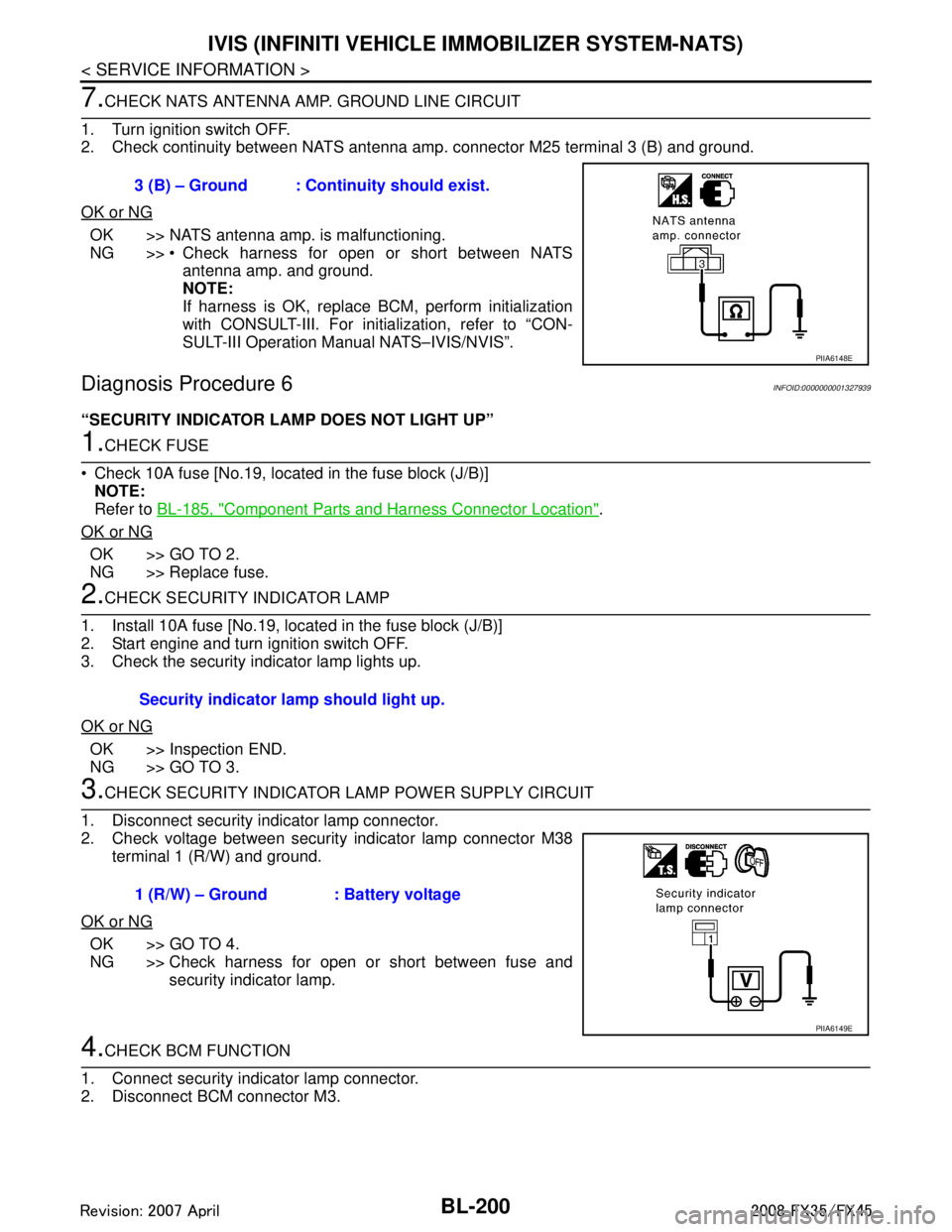
7.CHECK NATS ANTENNA AMP. GROUND LINE CIRCUIT
1. Turn ignition switch OFF.
2. Check continuity between NATS antenna am p. connector M25 terminal 3 (B) and ground.
OK or NG
OK >> NATS antenna amp. is malfunctioning.
NG >> Check harness for open or short between NATS antenna amp. and ground.
NOTE:
If harness is OK, replace BCM, perform initialization
with CONSULT-III. For initialization, refer to “CON-
SULT-III Operation Manual NATS–IVIS/NVIS”.
Diagnosis Procedure 6INFOID:0000000001327939
“SECURITY INDICATOR LAMP DOES NOT LIGHT UP”
1.CHECK FUSE
Check 10A fuse [No.19, located in the fuse block (J/B)] NOTE:
Refer to BL-185, "
Component Parts and Harness Connector Location".
OK or NG
OK >> GO TO 2.
NG >> Replace fuse.
2.CHECK SECURITY INDICATOR LAMP
1. Install 10A fuse [No.19, located in the fuse block (J/B)]
2. Start engine and turn ignition switch OFF.
3. Check the security indicator lamp lights up.
OK or NG
OK >> Inspection END.
NG >> GO TO 3.
3.CHECK SECURITY INDICATOR LA MP POWER SUPPLY CIRCUIT
1. Disconnect security indicator lamp connector.
2. Check voltage between security indicator lamp connector M38 terminal 1 (R/W) and ground.
OK or NG
OK >> GO TO 4.
NG >> Check harness for open or short between fuse and security indicator lamp.
4.CHECK BCM FUNCTION
1. Connect security indicator lamp connector.
2. Disconnect BCM connector M3. 3 (B) – Ground : Continuity should exist.
PIIA6148E
Security indicator lamp should light up.
1 (R/W) – Ground : Battery voltage
PIIA6149E
3AA93ABC3ACD3AC03ACA3AC03AC63AC53A913A773A893A873A873A8E3A773A983AC73AC93AC03AC3
3A893A873A873A8F3A773A9D3AAF3A8A3A8C3A863A9D3AAF3A8B3A8C
Page 935 of 3924
IVIS (INFINITI VEHICLE IMMOBILIZER SYSTEM-NATS)
BL-201
< SERVICE INFORMATION >
C
D E
F
G H
J
K L
M A
B
BL
N
O P
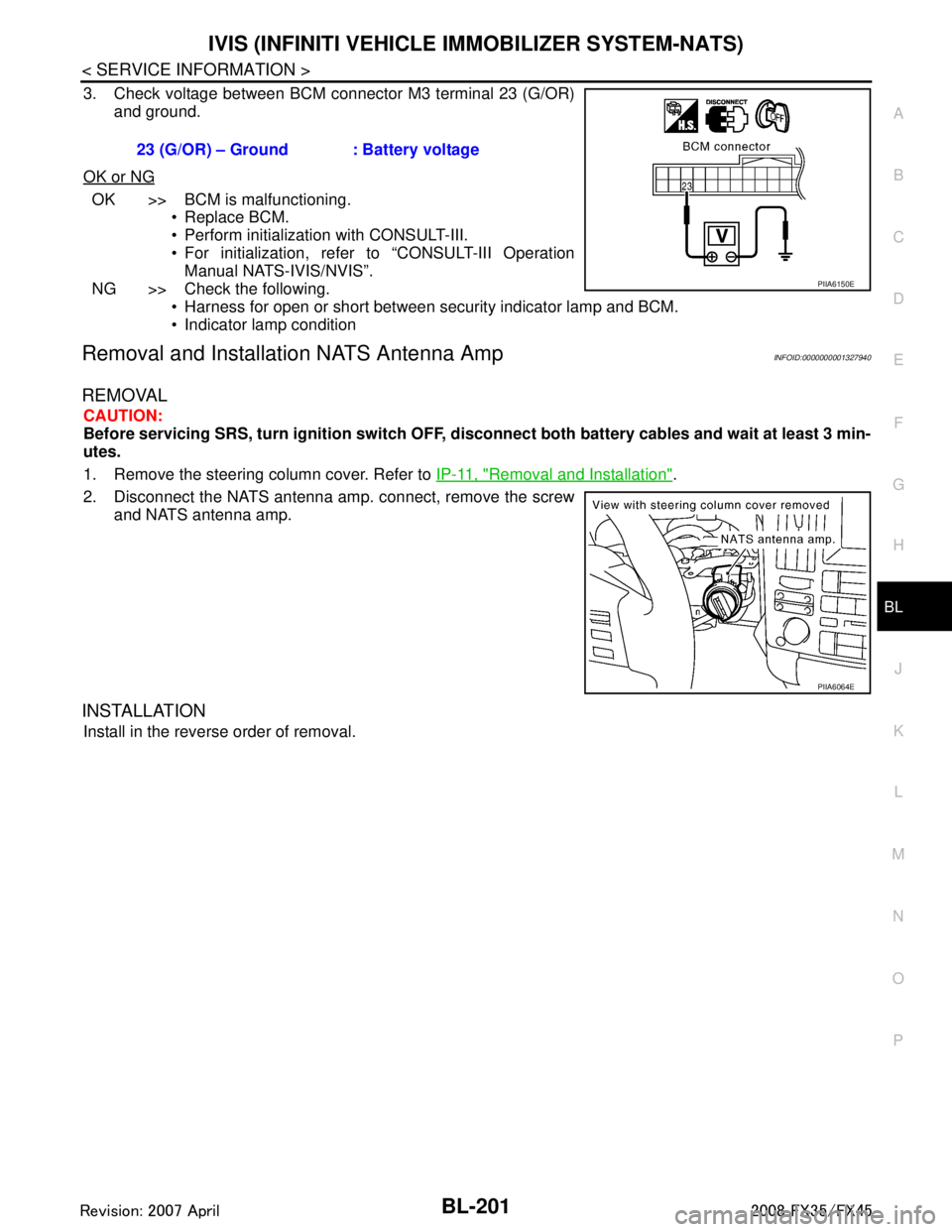
3. Check voltage between BCM connector M3 terminal 23 (G/OR) and ground.
OK or NG
OK >> BCM is malfunctioning. Replace BCM.
Perform initialization with CONSULT-III.
For initialization, refer to “CONSULT-III OperationManual NATS-IVIS/NVIS”.
NG >> Check the following. Harness for open or short between security indicator lamp and BCM.
Indicator lamp condition
Removal and Installa tion NATS Antenna AmpINFOID:0000000001327940
REMOVAL
CAUTION:
Before servicing SRS, turn ignition switch OFF, disconnect both battery cables and wait at least 3 min-
utes.
1. Remove the steering column cover. Refer to IP-11, "
Removal and Installation".
2. Disconnect the NATS antenna amp. connect, remove the screw and NATS antenna amp.
INSTALLATION
Install in the reverse order of removal. 23 (G/OR) – Ground : Battery voltage
PIIA6150E
PIIA6064E
3AA93ABC3ACD3AC03ACA3AC03AC63AC53A913A773A893A873A873A8E3A773A983AC73AC93AC03AC3
3A893A873A873A8F3A773A9D3AAF3A8A3A8C3A863A9D3AAF3A8B3A8C
Page 936 of 3924

BL-202
< SERVICE INFORMATION >
INTEGRATED HOMELINK TRANSMITTER
INTEGRATED HOMELINK TRANSMITTER
Wiring Diagram - TRNSCV -INFOID:0000000001327941
Trouble DiagnosisINFOID:0000000001327942
DIAGNOSTIC PROCEDURE
SYMPTOM: Transmitter Does Not Activate Receiver.
TIWM1680E
3AA93ABC3ACD3AC03ACA3AC03AC63AC53A913A773A893A873A873A8E3A773A983AC73AC93AC03AC3
3A893A873A873A8F3A773A9D3AAF3A8A3A8C3A863A9D3AAF3A8B3A8C
Page 937 of 3924
INTEGRATED HOMELINK TRANSMITTERBL-203
< SERVICE INFORMATION >
C
DE
F
G H
J
K L
M A
B
BL
N
O P
Before conducting the procedure given below, make su re that system receiver (garage door opener, etc.)
operates with original, hand-held transmitter. If NG, re ceiver or hand-held transmitter is malfunctioning, not
vehicle related.
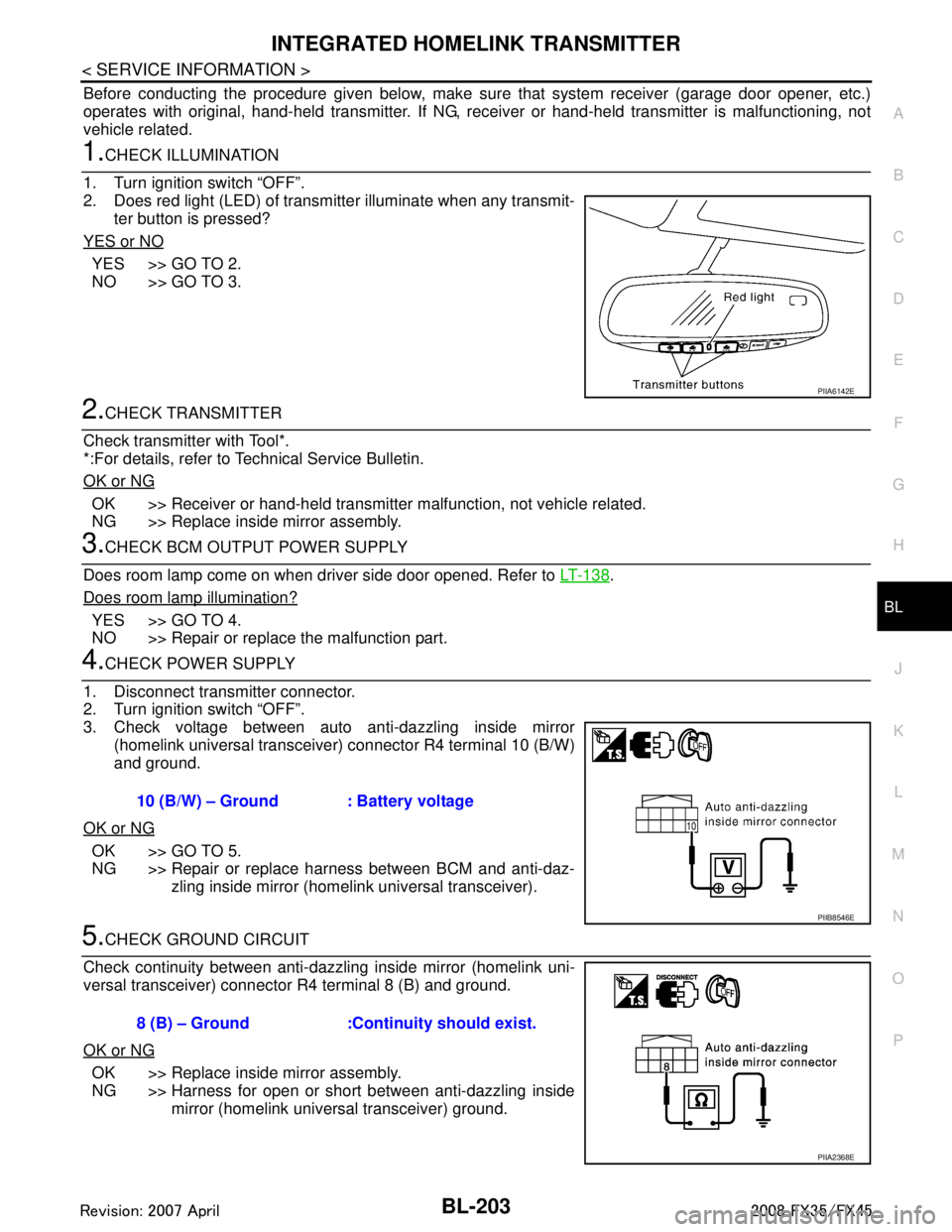
1.CHECK ILLUMINATION
1. Turn ignition switch “OFF”.
2. Does red light (LED) of transmitter illuminate when any transmit- ter button is pressed?
YES or NO
YES >> GO TO 2.
NO >> GO TO 3.
2.CHECK TRANSMITTER
Check transmitter with Tool*.
*:For details, refer to Technical Service Bulletin.
OK or NG
OK >> Receiver or hand-held transmitter malfunction, not vehicle related.
NG >> Replace inside mirror assembly.
3.CHECK BCM OUTPUT POWER SUPPLY
Does room lamp come on when driver side door opened. Refer to LT-138
.
Does room lamp illumination?
YES >> GO TO 4.
NO >> Repair or replace the malfunction part.
4.CHECK POWER SUPPLY
1. Disconnect transmitter connector.
2. Turn ignition switch “OFF”.
3. Check voltage between auto anti-dazzling inside mirror (homelink universal transceive r) connector R4 terminal 10 (B/W)
and ground.
OK or NG
OK >> GO TO 5.
NG >> Repair or replace harness between BCM and anti-daz- zling inside mirror (homelink universal transceiver).
5.CHECK GROUND CIRCUIT
Check continuity between anti-dazzling inside mirror (homelink uni-
versal transceiver) connector R4 terminal 8 (B) and ground.
OK or NG
OK >> Replace inside mirror assembly.
NG >> Harness for open or short between anti-dazzling inside mirror (homelink universal transceiver) ground.
PIIA6142E
10 (B/W) – Ground : Battery voltage
PIIB8546E
8 (B) – Ground :Continuity should exist.
PIIA2368E
3AA93ABC3ACD3AC03ACA3AC03AC63AC53A913A773A893A873A873A8E3A773A983AC73AC93AC03AC3
3A893A873A873A8F3A773A9D3AAF3A8A3A8C3A863A9D3AAF3A8B3A8C
Page 938 of 3924
BL-204
< SERVICE INFORMATION >
BODY REPAIR
BODY REPAIR
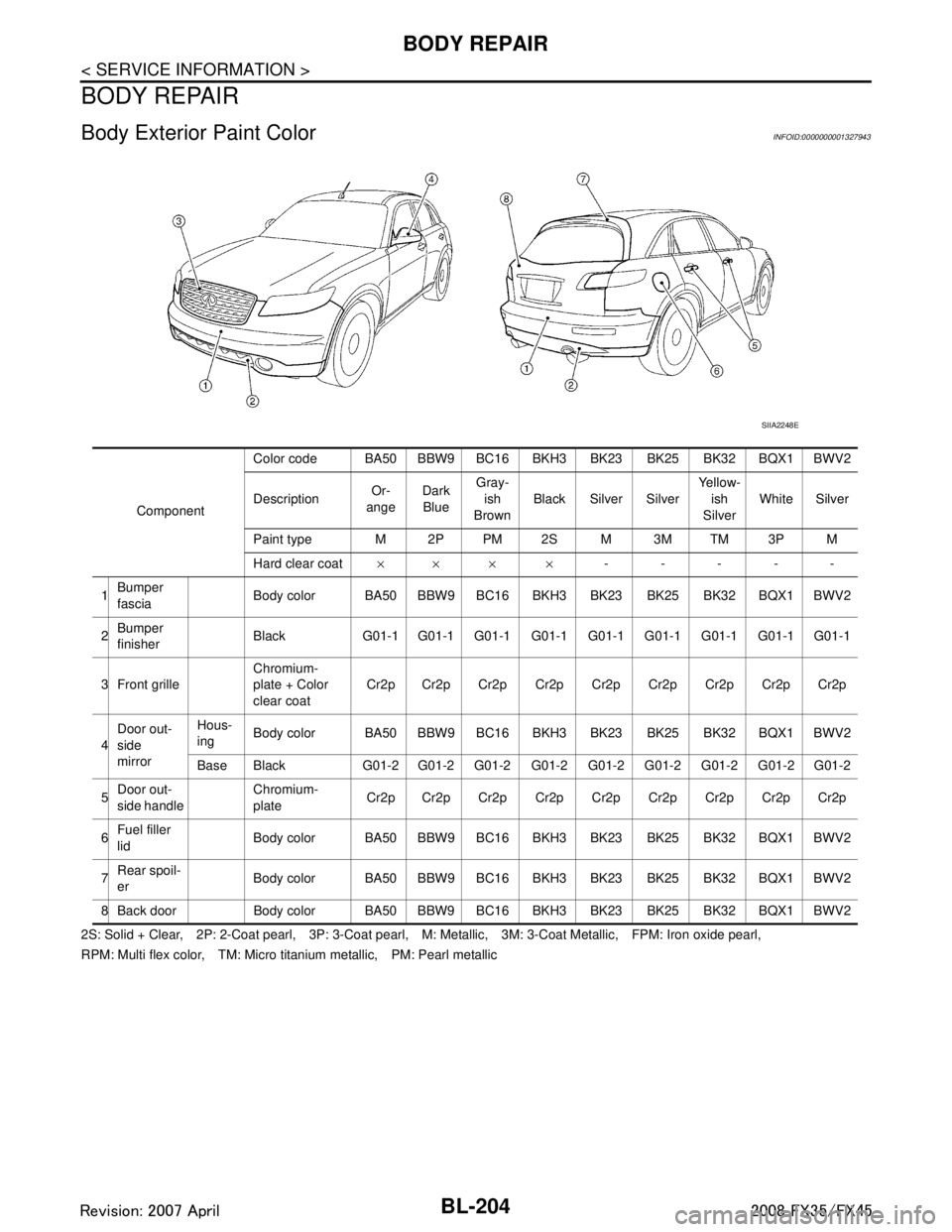
Body Exterior Paint ColorINFOID:0000000001327943
2S: Solid + Clear, 2P: 2-Coat pearl, 3P: 3-Coat pearl, M: Metallic, 3M: 3-Coat Metallic, FPM: Iron oxide pearl,
RPM: Multi flex color, TM: Micro titanium metallic, PM: Pearl metallic
SIIA2248E
ComponentColor code BA50 BBW9 BC16 BKH
3 BK23 BK25 BK32 BQX1 BWV2
Description Or-
ange Dark
Blue Gray-
ish
Brown Black Silver Silver Yellow-
ish
Silver White Silver
Paint type M 2P PM 2S M 3M TM 3P M
Hard clear coat ×× × × -----
1 Bumper
fascia Body color BA50 BBW9 BC16
BKH3 BK23 BK25 BK32 BQX1 BWV2
2 Bumper
finisher Black G01-1 G01-1 G01-1 G01-1 G01-1 G01-1 G01-1 G01-1 G01-1
3 Front grille Chromium-
plate + Color
clear coatCr2p Cr2p Cr2p Cr2p Cr2p Cr2p Cr2p Cr2p Cr2p
4 Door out-
side
mirror Hous-
ing
Body color BA50 BBW9 BC16
BKH3 BK23 BK25 BK32 BQX1 BWV2
Base Black G01-2 G01-2 G01-2 G01-2 G01-2 G01-2 G01-2 G01-2 G01-2
5 Door out-
side handle Chromium-
plate
Cr2p Cr2p Cr2p Cr2p Cr2p Cr2p Cr2p Cr2p Cr2p
6 Fuel filler
lid Body color BA50 BBW9 BC16
BKH3 BK23 BK25 BK32 BQX1 BWV2
7 Rear spoil-
er Body color BA50 BBW9 BC16
BKH3 BK23 BK25 BK32 BQX1 BWV2
8 Back door Body color BA50 BBW9 B C16 BKH3 BK23 BK25 BK32 BQX1 BWV2
3AA93ABC3ACD3AC03ACA3AC03AC63AC53A913A773A893A873A873A8E3A773A983AC73AC93AC03AC3
3A893A873A873A8F3A773A9D3AAF3A8A3A8C3A863A9D3AAF3A8B3A8C
Page 939 of 3924
BODY REPAIRBL-205
< SERVICE INFORMATION >
C
DE
F
G H
J
K L
M A
B
BL
N
O P
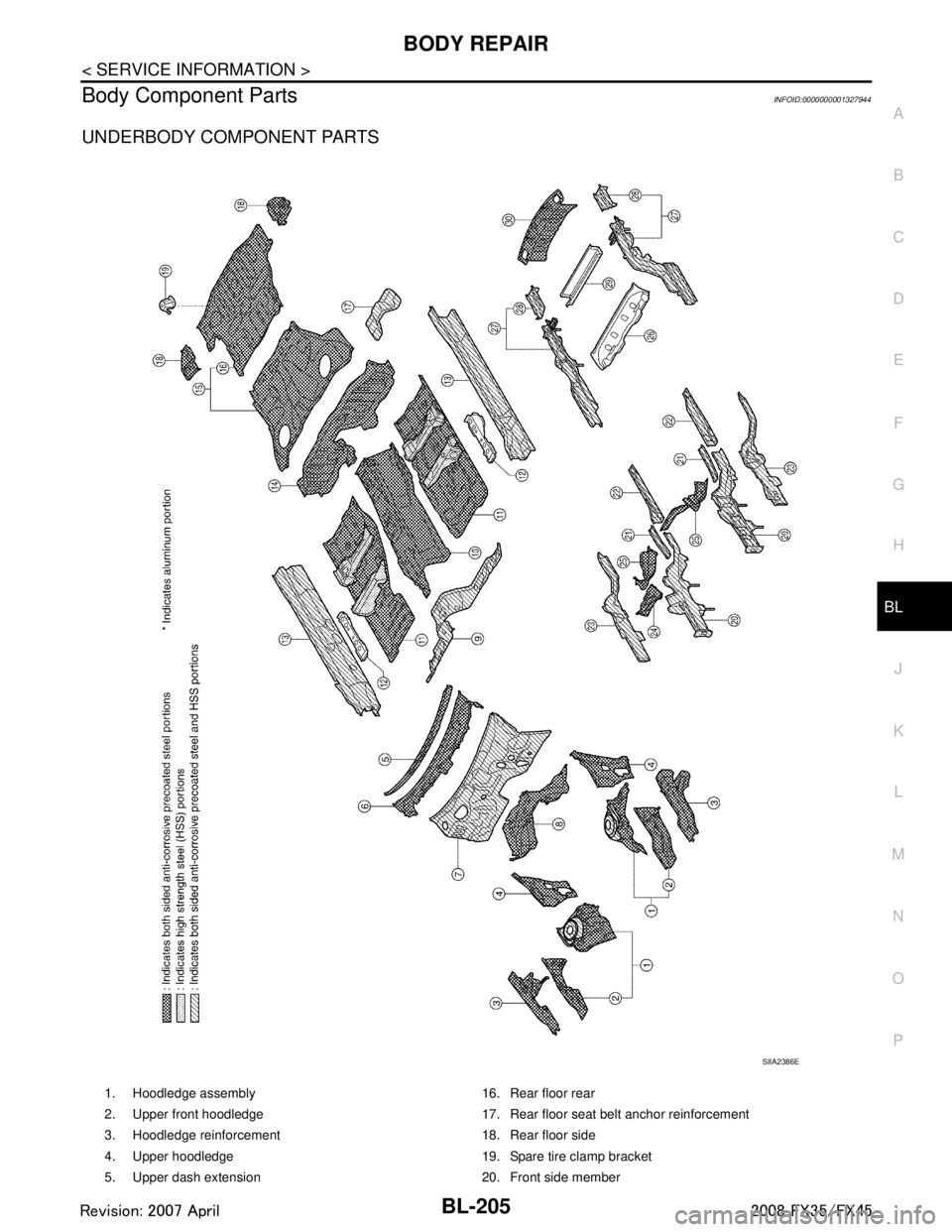
Body Component PartsINFOID:0000000001327944
UNDERBODY COMPONENT PARTS
SIIA2386E
1. Hoodledge assembly 16. Rear floor rear
2. Upper front hoodledge 17. Rear floor seat belt anchor reinforcement
3. Hoodledge reinforcement 18. Rear floor side
4. Upper hoodledge 19. Spare tire clamp bracket
5. Upper dash extension 20. Front side member
3AA93ABC3ACD3AC03ACA3AC03AC63AC53A913A773A893A873A873A8E3A773A983AC73AC93AC03AC3
3A893A873A873A8F3A773A9D3AAF3A8A3A8C3A863A9D3AAF3A8B3A8C
Page 940 of 3924

BL-206
< SERVICE INFORMATION >
BODY REPAIR
6. Upper dash crossmember assembly 21. Front side member rear reinforcement
7. Upper dash assembly 22. Front side member front extension
8. Front cowl top assembly 23. Front side member closing plate
9. Lower dash 24. Front side member outrigger assembly (RH&LH)
10. Front floor center 25. Front crossmember
11. Front floor 26. 2ND rear crossmember
12. Front floor reinforcement 27. Rear side member assembly
13. Inner sill 28. Rear side member extension
14. Lower rear seat crossmember 29. Rear center crossmember assembly
15. Rear floor front 30. Rear end crossmember assembly
3AA93ABC3ACD3AC03ACA3AC03AC63AC53A913A773A893A873A873A8E3A773A983AC73AC93AC03AC3
3A893A873A873A8F3A773A9D3AAF3A8A3A8C3A863A9D3AAF3A8B3A8C