Body INFINITI FX35 2008 Service Manual
[x] Cancel search | Manufacturer: INFINITI, Model Year: 2008, Model line: FX35, Model: INFINITI FX35 2008Pages: 3924, PDF Size: 81.37 MB
Page 1 of 3924
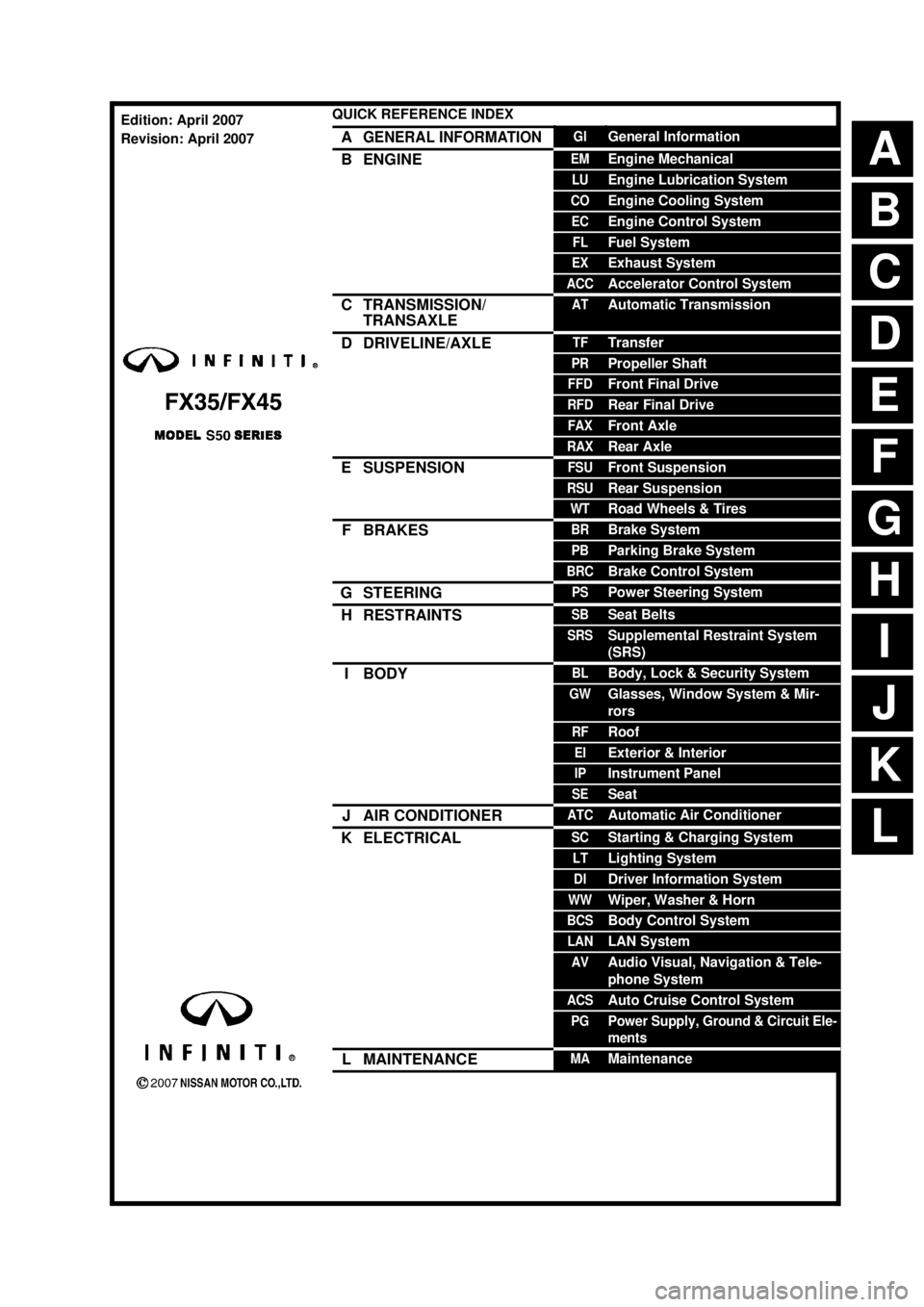
ABCDEFGHIJKLQUICK REFERENCE INDEX AGENERAL INFORMATIONGIGeneral InformationBENGINEEMEngine MechanicalLUEngine Lubrication SystemCOEngine Cooling SystemECEngine Control SystemFLFuel SystemEXExhaust SystemACCAccelerator Control SystemCTRANSMISSION/
TRANSAXLEATAutomatic TransmissionDDRIVELINE/AXLETFTransferPRPropeller ShaftFFDFront Final DriveRFDRear Final DriveFAXFront AxleRAXRear AxleESUSPENSIONFSUFront SuspensionRSURear SuspensionWTRoad Wheels & TiresFBRAKESBRBrake SystemPBParking Brake SystemBRCBrake Control SystemGSTEERINGPSPower Steering SystemHRESTRAINTSSBSeat BeltsSRSSupplemental Restraint System
(SRS)IBODYBLBody, Lock & Security SystemGWGlasses, Window System & Mir-
rorsRFRoofEIExterior & InteriorIPInstrument PanelSESeatJAIR CONDITIONERATCAutomatic Air ConditionerKELECTRICALSCStarting & Charging SystemLTLighting SystemDIDriver Information SystemWWWiper, Washer & HornBCSBody Control SystemLANLAN SystemAVAudio Visual, Navigation & Tele-
phone SystemACSAuto Cruise Control SystemPGPower Supply, Ground & Circuit Ele-
mentsLMAINTENANCEMAMaintenanceEdition: April 2007
Revision: April 2007
Page 21 of 3924
![INFINITI FX35 2008 Service Manual
ACS-14
< SERVICE INFORMATION >[ICC]
LASER BEAM AIMING ADJUSTMENT
LASER BEAM AIMING ADJUSTMENT
OutlineINFOID:0000000001328812
Adjust the laser beam aiming every time the ICC sensor is removed or insta](/img/42/57017/w960_57017-20.png "INFINITI FX35 2008 Service Manual
ACS-14
< SERVICE INFORMATION >[ICC]
LASER BEAM AIMING ADJUSTMENT
LASER BEAM AIMING ADJUSTMENT
OutlineINFOID:0000000001328812
Adjust the laser beam aiming every time the ICC sensor is removed or insta")
ACS-14
< SERVICE INFORMATION >[ICC]
LASER BEAM AIMING ADJUSTMENT
LASER BEAM AIMING ADJUSTMENT
OutlineINFOID:0000000001328812
Adjust the laser beam aiming every time the ICC sensor is removed or installed.
CAUTION:
Adjust laser beam aiming at a horizontal place as
far as 12 m (39 ft) forward the vehicle can be seen.
Adjust laser beam aiming 5 seconds after starting engine.
Never view ICC sensor integrated un it body window directly during laser beam aiming adjustment.
Follow the CONSULT-III when adju sting the laser beam aiming (laser beam aiming adjustment can-
not be operated without CONSULT-III).
Never ride on vehicle during l aser beam aiming adjustment.
Idle and turn headlamps OFF duri ng laser beam aiming adjustment.
PreparationINFOID:0000000001328813
Adjust the tire pressure to the specified value.
See that there is no load in the vehicle.
Coolant, engine oil filled up to correct level and full fuel tank.
Shift the gear into “P” position and release the parking brake.
Clean the ICC sensor with a soft cloth.
Outline of Adjustment ProcedureINFOID:0000000001328814
1. Set up the ICC target board [KV99110100 (J-45718)].
2. Adjust the sensor following the procedure on CONSUL T-III. (Turn manually the screw for up-down position
adjustment. ICC sensor automatically adjust the right-left position.)
Setting the ICC Target BoardINFOID:0000000001328815
Accurate ICC target board setting is required for the laser beam aiming adjustment.
CAUTION:
ICC system does not function normally if laser beam aiming is not accurate.
ADJUSTING HEIGHT OF THE TARGET
1. Attach a triangle scale at the center.
SKIA6179E
SKIA5974E
3AA93ABC3ACD3AC03ACA3AC03AC63AC53A913A773A893A873A873A8E3A773A983AC73AC93AC03AC3
3A893A873A873A8F3A773A9D3AAF3A8A3A8C3A863A9D3AAF3A8B3A8C
Page 23 of 3924
![INFINITI FX35 2008 Service Manual
ACS-16
< SERVICE INFORMATION >[ICC]
LASER BEAM AIMING ADJUSTMENT
5. Pivot the edge of the target board 20
° to either side.
NOTE:
Approx. 50 mm (1.97 in) shift rates the 20 ° movement.
6. Do not pl](/img/42/57017/w960_57017-22.png "INFINITI FX35 2008 Service Manual
ACS-16
< SERVICE INFORMATION >[ICC]
LASER BEAM AIMING ADJUSTMENT
5. Pivot the edge of the target board 20
° to either side.
NOTE:
Approx. 50 mm (1.97 in) shift rates the 20 ° movement.
6. Do not pl")
ACS-16
< SERVICE INFORMATION >[ICC]
LASER BEAM AIMING ADJUSTMENT
5. Pivot the edge of the target board 20
° to either side.
NOTE:
Approx. 50 mm (1.97 in) shift rates the 20 ° movement.
6. Do not place anything in the space shown in the figure (view from top). NOTE:
In case the space shown in the figure is not availabl e, make space by covering the side of the target board
with a 400 mm (15.75 in)-size frosted black board or black cloth.
Aiming AdjustmentINFOID:0000000001328816
CAUTION:
Never view ICC sensor integrated unit body windo w directly during laser beam aiming adjustment.
NOTE:
Complete all necessary work for laser beam adjustment until the adjustment completes as shown in the proce-
dure. If the procedure does not complete, the ICC system is inoperable.
1. Connect CONSULT-III and select “Work Support” of “ICC”.
2. Select “LASER BEAM ADJUST”.
3. Touch “START”.
NOTE:
If the adjustment screen does not appear on the CO NSULT-III screen in 10 seconds. After touching
“LASER BEAM ADJUST” screen, the following causes may be considered:
Target is not set accurately.
There is not enough space beside the target.
Deformation of vehicle or the surrounding equipm ent unit, bracket, or the surrounding equipment is
causing inappropriate installation of sensor and aiming may be set out of the adjustable range.
The area is not suitable for the adjustment work.
ICC sensor is not clean.
The ICC system warning lamp illuminates.
4. After the CONSULT-III displays “ADJUST THE VER TICAL OF LASER BEAM AIMING” turn the up-down
direction adjusting screw until “U/D CO RRECT” value is set in the range of ±4.
PKIA2589E
SKIA5976E
SKIA1216E
3AA93ABC3ACD3AC03ACA3AC03AC63AC53A913A773A893A873A873A8E3A773A983AC73AC93AC03AC3
3A893A873A873A8F3A773A9D3AAF3A8A3A8C3A863A9D3AAF3A8B3A8C
Page 43 of 3924
![INFINITI FX35 2008 Service Manual
ACS-36
< SERVICE INFORMATION >[ICC]
TROUBLE DIAGNOSIS FOR
SELF-DIAGNOSTIC ITEMS
DTC 11 CONTROL UNIT
INFOID:0000000001328826
1.PERFORM SELF-DIAGNOSIS OF ICC SYSTEM
1. Perform self-diagnosis of ICC sy](/img/42/57017/w960_57017-42.png "INFINITI FX35 2008 Service Manual
ACS-36
< SERVICE INFORMATION >[ICC]
TROUBLE DIAGNOSIS FOR
SELF-DIAGNOSTIC ITEMS
DTC 11 CONTROL UNIT
INFOID:0000000001328826
1.PERFORM SELF-DIAGNOSIS OF ICC SYSTEM
1. Perform self-diagnosis of ICC sy")
ACS-36
< SERVICE INFORMATION >[ICC]
TROUBLE DIAGNOSIS FOR
SELF-DIAGNOSTIC ITEMS
DTC 11 CONTROL UNIT
INFOID:0000000001328826
1.PERFORM SELF-DIAGNOSIS OF ICC SYSTEM
1. Perform self-diagnosis of ICC system.
2. Check if any item other than “DTC 11 CONTRO L UNIT” is indicated on self-diagnosis display.
Is any indicated?
YES >> 1. Repair or replace applicable item. 2. Erase DTC and perform ICC system running test. Then perform self-diagnosis of ICC system
again.
NO >> 1. Replace ICC unit.
2. Erase DTC and perform ICC system running test. Then perform self-diagnosis of ICC system
again.
DTC 20 CAN COMM CIRCUITINFOID:0000000001328827
1.PERFORM SELF-DIAGNOSIS OF ICC SYSTEM
1. Turn ignition switch ON and wait for 2 second or more.
2. Check self-diagnosis of ICC system.
Is
“CAN COMM CIRCUIT” displayed?
YES >> Refer to LAN-14, "Trouble Diagnosis Flow Chart".
NO >> Refer to GI-35, "
CONSULT-III/GST Data Link Connector (DLC) Circuit".
92 ECM CIRCUIT ×××× ECM malfunction
Accelerator pedal position sensor
malfunction
ICC unit malfunction ACS-50
96 NP RANGE
××× Park/neutral position switch har-
ness is open or shorted.
Park/neutral position switch mal- function.
TCM malfunction ACS-51
97 AT CIRCUIT
××× TCM malfunctionACS-52
98 GEAR POSITION ××× TCM malfunction
AT turbine revolution sensor mal-
function
AT vehicle speed sensor malfunc-
tion ACS-52
102 RADAR STAIN
×× × ICC sensor body window has con-
tamination. ACS-53
103 LASER SENSOR FAIL
×× × ICC sensor internal malfunctionACS-53
104 LASER AIMING INCMP ×× × Laser beam aiming of ICC sensor
is not adjusted. ACS-54
107 LASER COMM FAIL
×× × CAN data received by ICC sensor
is strange (from ICC unit, combina-
tion meter or ECM). ACS-54
109 LASER HIGH TEMP
×× × Temperature around ICC sensor is
excessively high. ACS-54
DTC
No. CONSULT-III
screen terms ICC
system
warning lamp Fail-safe
Malfunctions detected where... Refer-
ence
page
Vehicle-
to-
vehicle
distance control mode Conven-
tional
(fixed
speed) cruise
control mode Brake as-
sist (with
preview
function)
3AA93ABC3ACD3AC03ACA3AC03AC63AC53A913A773A893A873A873A8E3A773A983AC73AC93AC03AC3
3A893A873A873A8F3A773A9D3AAF3A8A3A8C3A863A9D3AAF3A8B3A8C
Page 60 of 3924
![INFINITI FX35 2008 Service Manual
TROUBLE DIAGNOSIS FOR SELF-DIAGNOSTIC ITEMS
ACS-53
< SERVICE INFORMATION > [ICC]
C
D
E
F
G H
I
J
L
M A
B
ACS
N
O P
OK or NG
OK >> GO TO 5.
NG >> GO TO 4.
4.CHECK TCM GEAR POSITION SIGNAL
With “Dat](/img/42/57017/w960_57017-59.png "INFINITI FX35 2008 Service Manual
TROUBLE DIAGNOSIS FOR SELF-DIAGNOSTIC ITEMS
ACS-53
< SERVICE INFORMATION > [ICC]
C
D
E
F
G H
I
J
L
M A
B
ACS
N
O P
OK or NG
OK >> GO TO 5.
NG >> GO TO 4.
4.CHECK TCM GEAR POSITION SIGNAL
With “Dat")
TROUBLE DIAGNOSIS FOR SELF-DIAGNOSTIC ITEMS
ACS-53
< SERVICE INFORMATION > [ICC]
C
D
E
F
G H
I
J
L
M A
B
ACS
N
O P
OK or NG
OK >> GO TO 5.
NG >> GO TO 4.
4.CHECK TCM GEAR POSITION SIGNAL
With “Data Monitor” of “TCM”, chec k that gear positions are correct.
OK or NG
OK >> 1. Replace ICC unit. 2. Erase DTC and perform ICC syst em running test. Then perform self-diagnosis of ICC system
again.
NG >> 1. Perform TCM self-diagnosis. 2. After repairing or replacing applicable item , erase DTC and perform ICC system running test.
Then perform self-diagnosis of ICC system again.
5.CHECK TCM TURBINE ROTATION
With TCM diagnosis, check that turbine rpm is normal. Refer to AT-106, "
Diagnosis Procedure".
OK or NG
OK >> 1. Replace ICC unit. 2. Erase DTC and perform ICC syst em running test. Then perform self-diagnosis of ICC system
again.
NG >> 1. Perform TCM self-diagnosis. 2. After repairing or replacing applicable item , erase DTC and perform ICC system running test.
Then perform self-diagnosis of ICC system again.
DTC 102 RADAR STAININFOID:0000000001328843
1.VISUAL INSPECTION 1
Check that there is no contamination and fo reign material on ICC sensor body window.
OK or NG
OK >> GO TO 2.
NG >> 1. If any, remove them. 2. Erase DTC and perform ICC syst em running test. Then perform self-diagnosis of ICC system
again.
2.VISUAL INSPECTION 2
Check ICC sensor body window for cracks.
OK or NG
OK >> GO TO 3.
NG >> 1. Replace ICC sensor, and adjust laser beam aiming. 2. Erase DTC and perform ICC syst em running test. Then perform self-diagnosis of ICC system
again.
3.ASKING COMPLAINTS
1. Ask if there is any trace of contamination or foreign material on ICC sensor.
2. Ask if vehicle was driven in snow or ICC sensor was frosted.
3. Ask if ICC sensor was fogged temporarily. (Fr ont window glass may have also tended to be fogged.)
Is there any symptom?
YES >> Explain difference in displays between cont amination detection result and current indication to
customer, and tell them “This is not malfunction”.
NO >> 1. Replace ICC sensor, and adjust laser beam aiming. 2. Erase DTC and perform ICC syst em running test. Then perform self-diagnosis of ICC system
again.
DTC 103 LASER SENSOR FAILINFOID:0000000001328844
1.PERFORM SELF-DIAGNOSIS OF ICC SYSTEM
1. Perform self-diagnosis of ICC system.
3AA93ABC3ACD3AC03ACA3AC03AC63AC53A913A773A893A873A873A8E3A773A983AC73AC93AC03AC3
3A893A873A873A8F3A773A9D3AAF3A8A3A8C3A863A9D3AAF3A8B3A8C
Page 65 of 3924
![INFINITI FX35 2008 Service Manual
ACS-58
< SERVICE INFORMATION >[ICC]
TROUBLE DIAGNOSIS FOR SYMPTOMS
Chime does not sound when the system does not det
ect any vehicle ahead. (Diagnose the conditions under
which the system is detect](/img/42/57017/w960_57017-64.png "INFINITI FX35 2008 Service Manual
ACS-58
< SERVICE INFORMATION >[ICC]
TROUBLE DIAGNOSIS FOR SYMPTOMS
Chime does not sound when the system does not det
ect any vehicle ahead. (Diagnose the conditions under
which the system is detect")
ACS-58
< SERVICE INFORMATION >[ICC]
TROUBLE DIAGNOSIS FOR SYMPTOMS
Chime does not sound when the system does not det
ect any vehicle ahead. (Diagnose the conditions under
which the system is detecting the vehicle ahead and when the system is malfunctioning. If there is any mal-
function in detecting the vehicle ahead, check the system following the ACS-58, "
Symptom 7 ICC System
Frequently Cannot Detect the Vehicl e Ahead/ Detection Zone Is Short".
1.CHECK ICC WARNING CHIME
With “Active Test” of “ICC”, check t hat ICC warning chime operates normally.
OK or NG
OK >> Determine preceding vehicle detection status when malfunction occurred. If chime should have
sounded: after replacing ICC unit. Perform ICC system running test, and then perform self-diag-
nosis of ICC system again.
NG >> GO TO 2.
2.PERFORM SELF-DIAGNOSIS OF ICC SYSTEM
1. Perform self-diagnosis of ICC system.
2. Check if “DTC 20 CAN COMM CIRCUIT” is indicated.
Is it indicated?
YES >> Refer to ACS-36, "DTC 20 CAN COMM CIRCUIT".
NO >> GO TO 3.
3.PERFORM SELF-DIAGNOSIS OF UNIFIED METER AND A/C AMP.
Perform self-diagnosis of unified meter and A/C amp. Refer to DI-27, "
CONSULT-III Function (METER/M&A)".
OK or NG
OK >> 1. Replace combination meter. 2. Erase DTC and perform ICC system running test. Then perform self-diagnosis of ICC system
again.
NG >> 1. Repair or replace applicable item.
2. Erase DTC and perform ICC system running test. Then perform self-diagnosis of ICC system
again.
Symptom 6 Driving Force Is HuntingINFOID:0000000001328854
1.CHECK SELF-DIAGNOSIS OF ECM
Perform self-diagnosis of ECM.
OK or NG
OK >> Refer to ACS-58, "Symptom 7 ICC System Frequently Cannot Detect the Vehicle Ahead/ Detec-
tion Zone Is Short".
NG >> 1. Repair or replace applicable parts.
2. Erase DTC and perform ICC system running test. Then perform self-diagnosis of ICC system
again.
Symptom 7 ICC System Frequent ly Cannot Detect the Vehicle Ahead/ Detection Zone
Is Short
INFOID:0000000001328855
The detection function may become unstable in the following cases.
When the reflector of the vehicle ahead is def icient/ not clean enough to reflect the radar.
When driving a road with extremely sharp corners.
When the radar cannot detect the reflector of the vehicle ahead as the vehicle ahead is passing a hill or
passing the peak.
1.VISUAL CHECK
Check ICC sensor body window for contamination and foreign materials.
OK or NG
OK >> If any contamination or foreign materials ar e found, remove them. Then perform ICC system run-
ning test.
NG >> GO TO 2.
2.CHECK FUNCTION
3AA93ABC3ACD3AC03ACA3AC03AC63AC53A913A773A893A873A873A8E3A773A983AC73AC93AC03AC3
3A893A873A873A8F3A773A9D3AAF3A8A3A8C3A863A9D3AAF3A8B3A8C
Page 66 of 3924
![INFINITI FX35 2008 Service Manual
TROUBLE DIAGNOSIS FOR SYMPTOMSACS-59
< SERVICE INFORMATION > [ICC]
C
D
E
F
G H
I
J
L
M A
B
ACS
N
O P
After adjusting ICC sensor beam aiming, perform ICC system running test. Check that preceding veh](/img/42/57017/w960_57017-65.png "INFINITI FX35 2008 Service Manual
TROUBLE DIAGNOSIS FOR SYMPTOMSACS-59
< SERVICE INFORMATION > [ICC]
C
D
E
F
G H
I
J
L
M A
B
ACS
N
O P
After adjusting ICC sensor beam aiming, perform ICC system running test. Check that preceding veh")
TROUBLE DIAGNOSIS FOR SYMPTOMSACS-59
< SERVICE INFORMATION > [ICC]
C
D
E
F
G H
I
J
L
M A
B
ACS
N
O P
After adjusting ICC sensor beam aiming, perform ICC system running test. Check that preceding vehicle
detection performance has been improved.
OK or NG
OK >> INSPECTION END
NG >> 1. Replace ICC sensor, and perform laser beam aiming adjustment. 2. Erase DTC and perform ICC syst em running test. Then perform self-diagnosis of ICC system
again.
Symptom 8 the System Does Not De tect the Vehicle Ahead at AllINFOID:0000000001328856
1.VISUAL CHECK 1
With ignition switch turned ON (engine not started), che ck that all indicator lamps in ICC system display are
continuously lit. (Check for a missing segm ent in preceding vehicle detection display.)
OK or NG
OK >> GO TO 2.
NG >> Check for combination meter. Refer to DI-15, "
Trouble Diagnosis".
2. VISUAL CHECK 2
Check ICC sensor body window for c ontamination and foreign materials.
OK or NG
OK >> If any contamination or foreign materials are found, remove them. Perform ICC system running
test.
NG >> GO TO 3.
3.VISUAL CHECK 3
Check ICC sensor body window for cracks and scratches.
OK or NG
OK >> GO TO 4.
NG >> 1. Replace ICC sensor, and perform laser beam aiming adjustment. 2. Erase DTC and perform ICC syst em running test. Then perform self-diagnosis of ICC system
again.
4.ADJUST ICC SENSOR
After adjusting ICC sensor beam aiming, perform ICC system running test. Check that preceding vehicle
detection performance has been improved.
OK or NG
OK >> INSPECTION END
NG >> 1. Replace ICC sensor, and perform laser beam aiming adjustment.
2. Erase DTC and perform ICC syst em running test. Then perform self-diagnosis of ICC system
again.
SELF-DIAGNOSIS BY ICC SYST EM DISPLAY WILL NOT RUNINFOID:0000000001544638
PKIB4144E
3AA93ABC3ACD3AC03ACA3AC03AC63AC53A913A773A893A873A873A8E3A773A983AC73AC93AC03AC3
3A893A873A873A8F3A773A9D3AAF3A8A3A8C3A863A9D3AAF3A8B3A8C
Page 81 of 3924
AT-8
< SERVICE INFORMATION >
PRECAUTIONS
After performing each TROUBLE DIAGNOSIS, perform “DTC
(Diagnostic Trouble Code) Confirmation Procedure”.
If the repair is completed the DTC should not be displayed in
the “DTC Confirmation Procedure”.
Always use the specified brand of ATF. Refer to MA-9, "
Fluids and Lubricants".
Use lint-free paper not cloth rags during work.
After replacing the ATF, dispose of the waste oil using the methods prescribed by law, ordinance, etc.
Before proceeding with disassembly, thoroughly clean the out side of the transmission. It is important to pre-
vent the internal parts from becoming cont aminated by dirt or other foreign matter.
Disassembly should be done in a clean work area.
Use lint-free paper or towels for wiping parts clean. Common shop rags can leave fibers that could interfere
with the operation of the transmission.
Place disassembled parts in order for easier and proper assembly.
All parts should be carefully cleansed with a general purpose, non-flammable solvent before inspection or
reassembly.
Gaskets, seals and O-rings should be replaced any time the transmission is disassembled.
It is very important to perform functional tests whenever they are indicated.
The valve body contains precision parts and requires extreme care when parts are removed and serviced. Place disassembled valve body parts in order for easier and proper assembly. Care will also prevent springs
and small parts from becoming scattered or lost.
Properly installed valves, sleeves, plugs, etc. will s lide along bores in valve body under their own weight.
Before assembly, apply a coat of recommended ATF to all parts. Apply petroleum jelly to protect O-rings and
seals, or hold bearings and washers in place during assembly. Do not use grease.
Extreme care should be taken to avoid damage to O-rings, seals and gaskets when assembling.
After overhaul, refill the transmission with new ATF.
When the A/T drain plug is removed, only some of t he ATF is drained. Old ATF will remain in torque con-
verter and ATF cooling system.
Always follow the procedures under “Changing A/T Fluid” in the AT section when changing A/T fluid. Refer to
AT- 11 , "
Changing A/T Fluid", AT- 11 , "Checking A/T Fluid".
Service Notice or PrecautionINFOID:0000000001327125
ATF COOLER SERVICE
If ATF contains frictional material (clutches, bands, etc. ), or if an A/T is repaired, overhauled, or replaced,
inspect and clean the A/T fluid cooler mounted in the radiat or or replace the radiator. Flush cooler lines using
cleaning solvent and compressed air after repair. For A/T fluid cooler cleaning procedure, refer to AT-13, "
A/T
Fluid Cooler Cleaning". For radiator replacement, refer to CO-13 (for VQ35DE), CO-40 (for VK45DE).
OBD-II SELF-DIAGNOSIS
A/T self-diagnosis is performed by the TCM in comb ination with the ECM. The results can be read through
the blinking pattern of the A/T CHECK indicator or the malfunction indicator lamp (MIL). Refer to the table on
AT-84, "
CONSULT-III Function (TRANSMISSION)" for the indicator used to display each self-diagnostic
result.
The self-diagnostic results indicated by the MIL ar e automatically stored in both the ECM and TCM memo-
ries.
Always perform the procedure on AT-38, "
OBD-II Diagnostic Trouble Code (DTC)" to complete the
repair and avoid unnecessary blinking of the MIL.
For details of OBD-II, refer to EC-54
(for VQ35DE) or EC-632 (for VK45DE).
Certain systems and components, especially those re lated to OBD, may use the new style slide-lock-
ing type harness connector. For descrip tion and how to disconnect, refer to PG-68
.
SEF217U
3AA93ABC3ACD3AC03ACA3AC03AC63AC53A913A773A893A873A873A8E3A773A983AC73AC93AC03AC3
3A893A873A873A8F3A773A9D3AAF3A8A3A8C3A863A9D3AAF3A8B3A8C
Page 280 of 3924

SHIFT CONTROL SYSTEMAT-207
< SERVICE INFORMATION >
DE
F
G H
I
J
K L
M A
B
AT
N
O P
1. Disconnect lower lever of control device and control rod.
2. Remove manual lever from A/T assembly.
3. Remove control rod from vehicle.
INSTALLATION
Install in reverse order of removal. Be careful of the following:
After installation is completed, adjust and check A/T position. Refer to AT-207, "
Adjustment of A/T Position"
and AT-207, "Checking of A/T Position".
Adjustment of A/T PositionINFOID:0000000001327385
1. Loosen nut of control rod.
2. Place PNP switch and selector lever in “P” position.
3. While pressing lower lever toward rear of vehicle (in “P” position
direction), tighten nut to the specified torque. Refer to AT-206,
"Control Rod Removal and Installation".
CAUTION:
Do not push the bracket.
Checking of A/T PositionINFOID:0000000001327386
1. Place selector lever in “P” posit ion, and turn ignition switch ON.
2. Check selector lever can be shifted to other than “P” position when brake pedal is depressed. Also check
selector lever can be shifted from “P” position only when brake pedal is depressed.
3. Move the selector lever and check for excessive effort, sticking, noise or rattle.
4. Check the selector lever stops at each position wit h the feel of engagement when it is moved through all
the positions. Check whether or not t he actual position the selector lever is in matches the position shown
by the shift position indicator and the transmission body.
5. The method of operating the lever to individual positions cor- rectly should be as shown in the figure.
6. When selector button is pressed in “P”, “R”, or “N” position with-
out applying forward/backward force to selector lever, check but-
ton operation for sticking.
7. Check the back-up lamps illuminate only when lever is placed in the “R” position. Check the back-up lamps does not illuminate
when selector lever is pushed against “R” position in the “P” or
“N” position.
8. Check the engine can only be started with the selector lever in the “P” and “N” positions. (With selector lever in the “P” position,
engine can be started even when selector lever is moved for-
ward and backward.)
9. Check transmission is locked completely in “P” position.
10. When selector lever is set to manual shift gate, check manual mode is displayed on combination meter. Shift selector lever to “+” and “-” sides, and check set shift position changes. (Only while a vehicle is oper-
ating.)
SCIA5736E
SCIA2119E
SCIA7465E
3AA93ABC3ACD3AC03ACA3AC03AC63AC53A913A773A893A873A873A8E3A773A983AC73AC93AC03AC3
3A893A873A873A8F3A773A9D3AAF3A8A3A8C3A863A9D3AAF3A8B3A8C
Page 319 of 3924
AT-246
< SERVICE INFORMATION >
TRANSMISSION ASSEMBLY
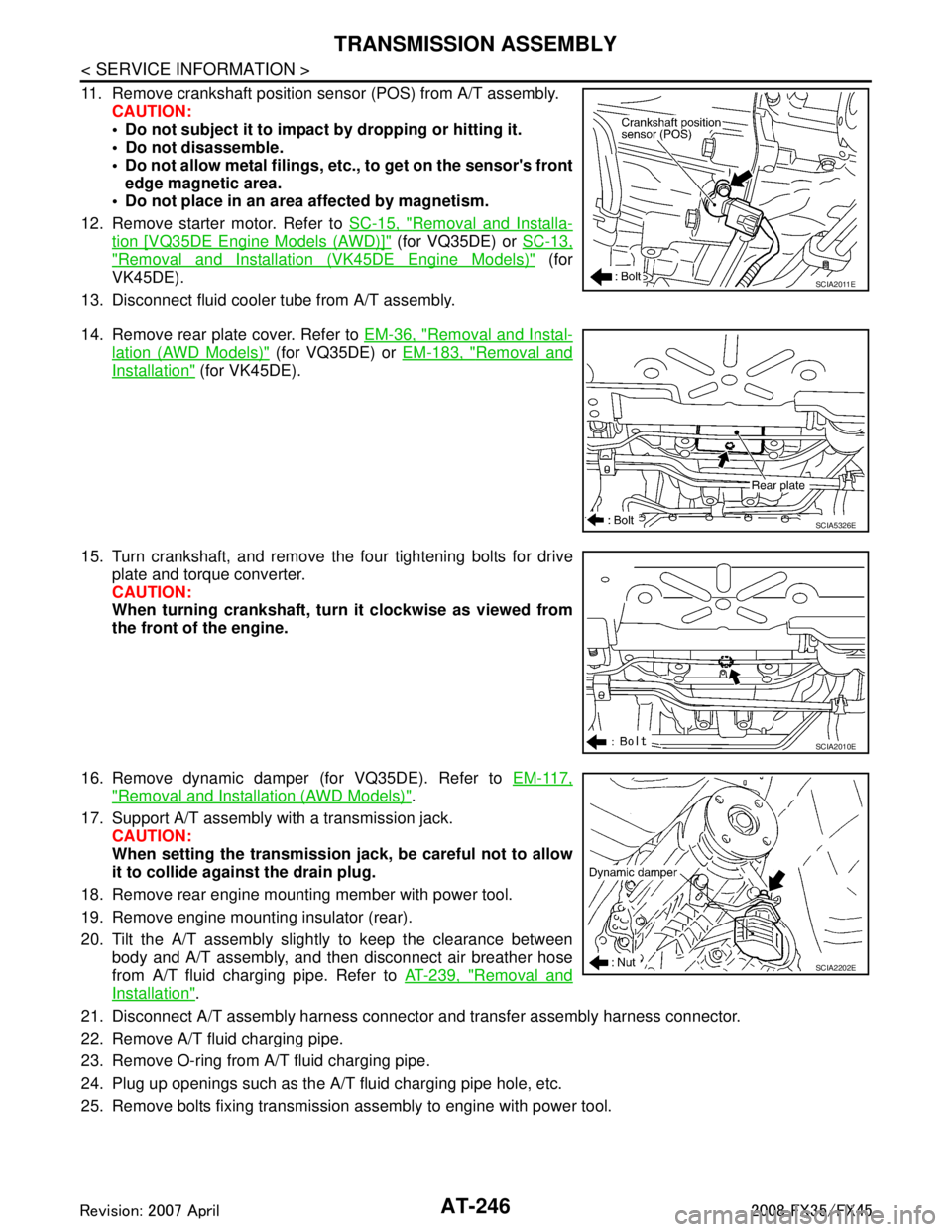
11. Remove crankshaft position sensor (POS) from A/T assembly.CAUTION:
Do not subject it to impact by dropping or hitting it.
Do not disassemble.
Do not allow metal filings, et c., to get on the sensor's front
edge magnetic area.
Do not place in an area affected by magnetism.
12. Remove starter motor. Refer to SC-15, "
Removal and Installa-
tion [VQ35DE Engine Models (AWD)]" (for VQ35DE) or SC-13,
"Removal and Installation (VK45DE Engine Models)" (for
VK45DE).
13. Disconnect fluid cooler tube from A/T assembly.
14. Remove rear plate cover. Refer to EM-36, "
Removal and Instal-
lation (AWD Models)" (for VQ35DE) or EM-183, "Removal and
Installation" (for VK45DE).
15. Turn crankshaft, and remove the four tightening bolts for drive plate and torque converter.
CAUTION:
When turning crankshaft, turn it clockwise as viewed from
the front of the engine.
16. Remove dynamic damper (for VQ35DE). Refer to EM-117,
"Removal and Installation (AWD Models)".
17. Support A/T assembly with a transmission jack. CAUTION:
When setting the transmission j ack, be careful not to allow
it to collide agai nst the drain plug.
18. Remove rear engine mounting member with power tool.
19. Remove engine mounting insulator (rear).
20. Tilt the A/T assembly slightly to keep the clearance between body and A/T assembly, and then disconnect air breather hose
from A/T fluid charging pipe. Refer to AT-239, "
Removal and
Installation".
21. Disconnect A/T assembly harness connector and transfer assembly harness connector.
22. Remove A/T fluid charging pipe.
23. Remove O-ring from A/T fluid charging pipe.
24. Plug up openings such as the A/T fluid charging pipe hole, etc.
25. Remove bolts fixing transmission assembly to engine with power tool.
SCIA2011E
SCIA5326E
SCIA2010E
SCIA2202E
3AA93ABC3ACD3AC03ACA3AC03AC63AC53A913A773A893A873A873A8E3A773A983AC73AC93AC03AC3
3A893A873A873A8F3A773A9D3AAF3A8A3A8C3A863A9D3AAF3A8B3A8C