bulb INFINITI FX35 2008 Service Manual
[x] Cancel search | Manufacturer: INFINITI, Model Year: 2008, Model line: FX35, Model: INFINITI FX35 2008Pages: 3924, PDF Size: 81.37 MB
Page 113 of 3924

AT-40
< SERVICE INFORMATION >
ON BOARD DIAGNOSTIC (OBD) SYSTEM
Malfunction Indicator Lamp (MIL)
INFOID:0000000001327147
DESCRIPTION
The MIL is located on the instrument panel.
1. The MIL will light up when the ignition switch is turned ON with- out the engine running. This is a bulb check.
If the MIL does not light up, refer to DI-34
, or see EC-591 (for
VQ35DE) or EC-1194
(for VK45DE).
2. When the engine is started, the MIL should go off. If the MIL remains on, the on board diagnostic system has
detected an engine system malfunction.
SEF217U
3AA93ABC3ACD3AC03ACA3AC03AC63AC53A913A773A893A873A873A8E3A773A983AC73AC93AC03AC3
3A893A873A873A8F3A773A9D3AAF3A8A3A8C3A863A9D3AAF3A8B3A8C
Page 1311 of 3924
![INFINITI FX35 2008 Service Manual
ON BOARD DIAGNOSTIC (OBD) SYSTEMEC-71
< SERVICE INFORMATION > [VQ35DE]
C
D
E
F
G H
I
J
K L
M A
EC
NP
O
1. If the ignition switch stays ON after repair work, be su
re to turn ignition switch OFF once.](/img/42/57017/w960_57017-1310.png "INFINITI FX35 2008 Service Manual
ON BOARD DIAGNOSTIC (OBD) SYSTEMEC-71
< SERVICE INFORMATION > [VQ35DE]
C
D
E
F
G H
I
J
K L
M A
EC
NP
O
1. If the ignition switch stays ON after repair work, be su
re to turn ignition switch OFF once.")
ON BOARD DIAGNOSTIC (OBD) SYSTEMEC-71
< SERVICE INFORMATION > [VQ35DE]
C
D
E
F
G H
I
J
K L
M A
EC
NP
O
1. If the ignition switch stays ON after repair work, be su
re to turn ignition switch OFF once. Wait at least 10
seconds and then turn it ON (engine stopped) again.
2. Perform AT-38, "
OBD-II Diagnostic Trouble Code (DTC)". (The DTC in TCM will be erased.)
3. Select Service $04 with GST (Generic Scan Tool).
No Tools
NOTE:
If the DTC is not for A/T related items (see EC-17
), skip step 2.
1. If the ignition switch stays ON after repair work, be sure to turn ignition switch OFF once.
Wait at least 10 seconds and then turn it ON (engine stopped) again.
2. Perform AT-38, "
OBD-II Diagnostic Trouble Code (DTC)". (The DTC in TCM will be erased.)
3. Change the diagnostic test mode from Mode II to Mode I by depressing the accelerator pedal. Refer to
EC-71, "
Malfunction Indicator Lamp (MIL)".
If the battery is disconnected, the emission-relate d diagnostic information will be lost within 24
hours.
The following data are cleared when the ECM memory is erased.
- Diagnostic trouble codes
- 1st trip diagnostic trouble codes
- Freeze frame data
- 1st trip freeze frame data
- System readiness test (SRT) codes
- Test values
Actual work procedures are explained using a DTC as an ex ample. Be careful so that not only the DTC, but all
of the data listed above, are cleared from the ECM memory during work procedures.
Malfunction Indicator Lamp (MIL)INFOID:0000000001325917
DESCRIPTION
The MIL is located on the instrument panel.
1. The MIL will light up when the ignition switch is turned ON with-
out the engine running. This is a bulb check.
If the MIL does not light up, refer to DI-34
or see EC-591.
2. When the engine is start ed, the MIL should go off.
If the MIL remains on, the on board diagnostic system has
detected an engine system malfunction.
ON BOARD DIAGNOSTIC SYSTEM FUNCTION
The on board diagnostic system has the following three functions.
SEF217U
3AA93ABC3ACD3AC03ACA3AC03AC63AC53A913A773A893A873A873A8E3A773A983AC73AC93AC03AC3
3A893A873A873A8F3A773A9D3AAF3A8A3A8C3A863A9D3AAF3A8B3A8C
Page 1312 of 3924
![INFINITI FX35 2008 Service Manual
EC-72
< SERVICE INFORMATION >[VQ35DE]
ON BOARD DIAGNOSTIC (OBD) SYSTEM
When there is an open circuit on MIL circuit, the ECM c
annot warn the driver by lighting up MIL when there is
malfunction on en](/img/42/57017/w960_57017-1311.png "INFINITI FX35 2008 Service Manual
EC-72
< SERVICE INFORMATION >[VQ35DE]
ON BOARD DIAGNOSTIC (OBD) SYSTEM
When there is an open circuit on MIL circuit, the ECM c
annot warn the driver by lighting up MIL when there is
malfunction on en")
EC-72
< SERVICE INFORMATION >[VQ35DE]
ON BOARD DIAGNOSTIC (OBD) SYSTEM
When there is an open circuit on MIL circuit, the ECM c
annot warn the driver by lighting up MIL when there is
malfunction on engine control system.
Therefore, when electrical controlled throttle and part of ECM related diagnoses are continuously detected as
NG for 5 trips, ECM warns the driver that engine cont rol system malfunctions and MIL circuit is open by means
of operating fail-safe function.
The fail-safe function also operates when above diagnos es except MIL circuit are detected and demands the
driver to repair the malfunction.
MIL Flashing Without DTC
When any SRT codes are not set, MIL may fl ash without DTC. For the details, refer to EC-55, "Emission-
Related Diagnostic Information".
HOW TO SWITCH DIAGNOSTIC TEST MODE
NOTE:
It is better to count the ti me accurately with a clock.
It is impossible to switch the di agnostic mode when an accelerator pedal position sensor circuit has
a malfunction.
Always ECM returns to Diagnostic Test Mode I after ignition switch is turned OFF.
How to Set Diagnostic Test Mode II (Self-Diagnostic Results)
1. Confirm that accelerator pedal is fully released, turn ignition switch ON and wait 3 seconds.
2. Repeat the following procedure quickly 5 times within 5 seconds.
a. Fully depress the accelerator pedal.
b. Fully release the accelerator pedal.
3. Wait 7 seconds, fully depress the accelerator pedal and keep it for approx. 10 seconds until the MIL starts
blinking.
NOTE:
Diagnostic Test
Mode KEY and ENG.
Status Function Explanation of Function
Mode I Ignition switch in ON position
Engine stopped BULB CHECK This function checks the MIL bulb for damage (blown, open
circuit, etc.).
If the MIL does not come on, check MIL circuit.
Engine running MALFUNCTION WARNING This is a usual driving condition. When a malfunction is de-
tected twice in two consecutive driving cycles (two trip de-
tection logic), the MIL will light up to inform the driver that a
malfunction has been detected.
The following malfunctions will light up or blink the MIL in
the 1st trip.
Misfire (Possible three way catalyst damage)
One trip detection diagnoses
Mode II Ignition switch in ON position
Engine stopped SELF-DIAGNOSTIC
RESULTS
This function allows DTCs an
d 1st trip DTCs to be read.
Engine operating condition in fail-safe mode Engine speed will not rise more than 2,500 rpm due to the fuel cut
3AA93ABC3ACD3AC03ACA3AC03AC63AC53A913A773A893A873A873A8E3A773A983AC73AC93AC03AC3
3A893A873A873A8F3A773A9D3AAF3A8A3A8C3A863A9D3AAF3A8B3A8C
Page 1313 of 3924
![INFINITI FX35 2008 Service Manual
ON BOARD DIAGNOSTIC (OBD) SYSTEMEC-73
< SERVICE INFORMATION > [VQ35DE]
C
D
E
F
G H
I
J
K L
M A
EC
NP
O
Do not release the accelerator pedal for 10 seconds if
MIL may start blinking on the halfway of](/img/42/57017/w960_57017-1312.png "INFINITI FX35 2008 Service Manual
ON BOARD DIAGNOSTIC (OBD) SYSTEMEC-73
< SERVICE INFORMATION > [VQ35DE]
C
D
E
F
G H
I
J
K L
M A
EC
NP
O
Do not release the accelerator pedal for 10 seconds if
MIL may start blinking on the halfway of")
ON BOARD DIAGNOSTIC (OBD) SYSTEMEC-73
< SERVICE INFORMATION > [VQ35DE]
C
D
E
F
G H
I
J
K L
M A
EC
NP
O
Do not release the accelerator pedal for 10 seconds if
MIL may start blinking on the halfway of this
10 seconds. This blinking is displaying SRT stat us and is continued for another 10 seconds. For
the details, refer to EC-55, "
Emission-Related Diagnostic Information".
4. Fully release the accelerator pedal. ECM has entered to Diagnostic Test Mode II (Self-diagnostic results).
NOTE:
Wait until the same DTC (or 1st trip DTC) appears to confirm all DTCs certainly.
How to Erase Diagnostic Test Mode II (Self-Diagnostic Results)
1. Set ECM in Diagnostic Test Mode II (Self-diagnostic re sults). Refer to "How to Set Diagnostic Test Mode II
(Self-diagnostic Results)".
2. Fully depress the accelerator pedal and keep it for more than 10 seconds. The emission-related diagnostic information has been erased from the backup memory in the ECM.
3. Fully release the accelerator pedal, and confirm the DTC 0000 is displayed.
DIAGNOSTIC TEST MODE I — BULB CHECK
In this mode, the MIL on the instrument panel should st ay ON. If it remains OFF, check the bulb. Refer to DI-34
or see EC-591.
DIAGNOSTIC TEST MODE I — MALFUNCTION WARNING
This DTC number is clarified in Diagnostic Test Mode II (SELF-DIAGNOSTIC RESULTS)
DIAGNOSTIC TEST MODE II — SELF-DIAGNOSTIC RESULTS
In this mode, the DTC and 1st trip DTC are indicated by the number of blinks of the MIL as shown below.
The DTC and 1st trip DTC are displayed at the same time. If the MIL does not illuminate in diagnostic test
mode I (Malfunction warning), all displa yed items are 1st trip DTCs. If only one code is displayed when the MIL
illuminates in diagnostic test mode II (SELF-DIAGNOSTIC RESULTS), it is a DTC; if two or more codes are
displayed, they may be either DTCs or 1st trip DTCs. DTC No. is same as that of 1st trip DTC. These uniden-
PBIB0092E
MIL Condition
ON When the malfunction is detected.
OFF No malfunction.
3AA93ABC3ACD3AC03ACA3AC03AC63AC53A913A773A893A873A873A8E3A773A983AC73AC93AC03AC3
3A893A873A873A8F3A773A9D3AAF3A8A3A8C3A863A9D3AAF3A8B3A8C
Page 1889 of 3924
![INFINITI FX35 2008 Service Manual
ON BOARD DIAGNOSTIC (OBD) SYSTEMEC-649
< SERVICE INFORMATION > [VK45DE]
C
D
E
F
G H
I
J
K L
M A
EC
NP
O
Wait at least 10 seconds and then turn it ON (engine stopped) again.
2. Perform AT-38, "
OBD-I](/img/42/57017/w960_57017-1888.png "INFINITI FX35 2008 Service Manual
ON BOARD DIAGNOSTIC (OBD) SYSTEMEC-649
< SERVICE INFORMATION > [VK45DE]
C
D
E
F
G H
I
J
K L
M A
EC
NP
O
Wait at least 10 seconds and then turn it ON (engine stopped) again.
2. Perform AT-38, \"
OBD-I")
ON BOARD DIAGNOSTIC (OBD) SYSTEMEC-649
< SERVICE INFORMATION > [VK45DE]
C
D
E
F
G H
I
J
K L
M A
EC
NP
O
Wait at least 10 seconds and then turn it ON (engine stopped) again.
2. Perform AT-38, "
OBD-II Diagnostic Trouble Code (DTC)". (The DTC in TCM will be erased)
3. Select Service $04 with GST (Generic Scan Tool).
NO TOOLS
NOTE:
If the DTC is not for AT related items (see EC-595
), skip step 2.
1. If the ignition switch stays ON after repair work, be sure to turn ignition switch OFF once.
Wait at least 10 seconds and then turn it ON (engine stopped) again.
2. Perform AT-38, "
OBD-II Diagnostic Trouble Code (DTC)". (The DTC in the TCM will be erased.)
3. Change the diagnostic test mode from Mode II to Mode I by depressing the accelerator pedal. Refer to
EC-649, "
Malfunction Indicator Lamp (MIL)".
If the battery is disconnected, the emission-relate d diagnostic information will be lost within 24
hours.
The following data are cleared when the ECM memory is erased.
- Diagnostic trouble codes
- 1st trip diagnostic trouble codes
- Freeze frame data
- 1st trip freeze frame data
- System readiness test (SRT) codes
- Test values
Actual work procedures are explained using a DTC as an ex ample. Be careful so that not only the DTC, but all
of the data listed above, are cleared from the ECM memory during work procedures.
Malfunction Indicator Lamp (MIL)INFOID:0000000001326513
DESCRIPTION
The MIL is located on the instrument panel.
1. The MIL will light up when the ignition switch is turned ON with- out the engine running. This is a bulb check.
If the MIL does not light up, refer to DI-34
, or see EC-1194.
2. When the engine is start ed, the MIL should go off.
If the MIL remains on, the on board diagnostic system has
detected an engine system malfunction.
ON BOARD DIAGNOSTIC SYSTEM FUNCTION
The on board diagnostic system has the following three functions.
SEF217U
3AA93ABC3ACD3AC03ACA3AC03AC63AC53A913A773A893A873A873A8E3A773A983AC73AC93AC03AC3
3A893A873A873A8F3A773A9D3AAF3A8A3A8C3A863A9D3AAF3A8B3A8C
Page 1890 of 3924
![INFINITI FX35 2008 Service Manual
EC-650
< SERVICE INFORMATION >[VK45DE]
ON BOARD DIAGNOSTIC (OBD) SYSTEM
When there is an open circuit on MIL circuit, the ECM c
annot warn the driver by lighting up MIL when there is
malfunction on e](/img/42/57017/w960_57017-1889.png "INFINITI FX35 2008 Service Manual
EC-650
< SERVICE INFORMATION >[VK45DE]
ON BOARD DIAGNOSTIC (OBD) SYSTEM
When there is an open circuit on MIL circuit, the ECM c
annot warn the driver by lighting up MIL when there is
malfunction on e")
EC-650
< SERVICE INFORMATION >[VK45DE]
ON BOARD DIAGNOSTIC (OBD) SYSTEM
When there is an open circuit on MIL circuit, the ECM c
annot warn the driver by lighting up MIL when there is
malfunction on engine control system.
Therefore, when electrical controlled throttle and part of ECM related diagnoses are continuously detected as
NG for 5 trips, ECM warns the driver that engine cont rol system malfunctions and MIL circuit is open by means
of operating fail-safe function.
The fail-safe function also operates when above diagnos es except MIL circuit are detected and demands the
driver to repair the malfunction.
MIL Flashing Without DTC
When any SRT codes are not set, MIL may fl ash without DTC. For the details, refer to EC-633, "Emission-
related Diagnostic Information".
HOW TO SWITCH DIAGNOSTIC TEST MODE
NOTE:
It is better to count the ti me accurately with a clock.
It is impossible to switch the di agnostic mode when an accelerator pedal position sensor circuit has
a malfunction.
Always ECM returns to Diagnostic Test Mode I after ignition switch is turned OFF.
How to Set Diagnostic Test Mode II (Self-diagnostic Results)
1. Confirm that accelerator pedal is fully released, turn ignition switch ON and wait 3 seconds.
2. Repeat the following procedure quickly five times within 5 seconds.
a. Fully depress the accelerator pedal.
b. Fully release the accelerator pedal.
3. Wait 7 seconds, fully depress the accelerator pedal and keep it for approx. 10 seconds until the MIL starts
blinking.
NOTE:
Diagnostic Test
Mode KEY and ENG.
Status Function Explanation of Function
Mode I Ignition switch in ON position
Engine stopped BULB CHECK This function checks the MIL bulb for damage (blown, open
circuit, etc.).
If the MIL does not come on, check MIL circuit.
Engine running MALFUNCTION WARNING This is a usual driving condition. When a malfunction is de-
tected twice in two consecutive driving cycles (two trip de-
tection logic), the MIL will light up to inform the driver that a
malfunction has been detected.
The following malfunctions will light up or blink the MIL in
the 1st trip.
Misfire (Possible three way catalyst damage)
One trip detection diagnoses
Mode II Ignition switch in ON position
Engine stopped SELF-DIAGNOSTIC
RESULTS
This function allows DTCs an
d 1st trip DTCs to be read.
Engine operating condition in fail-safe mode Engine speed will not rise more than 2,500 rpm due to the fuel cut
3AA93ABC3ACD3AC03ACA3AC03AC63AC53A913A773A893A873A873A8E3A773A983AC73AC93AC03AC3
3A893A873A873A8F3A773A9D3AAF3A8A3A8C3A863A9D3AAF3A8B3A8C
Page 1891 of 3924
![INFINITI FX35 2008 Service Manual
ON BOARD DIAGNOSTIC (OBD) SYSTEMEC-651
< SERVICE INFORMATION > [VK45DE]
C
D
E
F
G H
I
J
K L
M A
EC
NP
O
Do not release the accelerator pedal for 10 seconds if
MIL may start blinking on the halfway o](/img/42/57017/w960_57017-1890.png "INFINITI FX35 2008 Service Manual
ON BOARD DIAGNOSTIC (OBD) SYSTEMEC-651
< SERVICE INFORMATION > [VK45DE]
C
D
E
F
G H
I
J
K L
M A
EC
NP
O
Do not release the accelerator pedal for 10 seconds if
MIL may start blinking on the halfway o")
ON BOARD DIAGNOSTIC (OBD) SYSTEMEC-651
< SERVICE INFORMATION > [VK45DE]
C
D
E
F
G H
I
J
K L
M A
EC
NP
O
Do not release the accelerator pedal for 10 seconds if
MIL may start blinking on the halfway of this
10 seconds. This blinking is displaying SRT stat us and is continued for another 10 seconds. For
the details, refer to EC-633, "
Emission-related Diagnostic Information".
4. Fully release the accelerator pedal. ECM has entered to Diagnostic Test Mode II (Self-diagnostic results).
NOTE:
Wait until the same DTC (or 1st trip DTC) appears to confirm all DTCs certainly.
How to Erase Diagnostic Test Mode II (Self-diagnostic Results)
1. Set ECM in Diagnostic Test Mode II (Self-diagnostic re sults). Refer to "How to Set Diagnostic Test Mode II
(Self-diagnostic Results)".
2. Fully depress the accelerator pedal and keep it for more than 10 seconds. The emission-related diagnostic information has been erased from the backup memory in the ECM.
3. Fully release the accelerator pedal, and confirm the DTC 0000 is displayed.
DIAGNOSTIC TEST MODE I — BULB CHECK
In this mode, the MIL on the instrument panel should st ay ON. If it remains OFF, check the bulb. Refer to DI-34
or see EC-1194.
DIAGNOSTIC TEST MODE I — MALFUNCTION WARNING
This DTC number is clarified in Diagnostic Test Mode II (SELF-DIAGNOSTIC RESULTS)
DIAGNOSTIC TEST MODE II — SELF-DIAGNOSTIC RESULTS
In this mode, the DTC and 1st trip DTC are indicated by the number of blinks of the MIL as shown below.
The DTC and 1st trip DTC are displayed at the same time. If the MIL does not illuminate in diagnostic test
mode I (Malfunction warning), all displa yed items are 1st trip DTCs. If only one code is displayed when the MIL
illuminates in diagnostic test mode II (SELF-DIAGNOSTIC RESULTS), it is a DTC; if two or more codes are
displayed, they may be either DTCs or 1st trip DTCs. DTC No. is same as that of 1st trip DTC. These uniden-
PBIB0092E
MIL Condition
ON When the malfunction is detected.
OFF No malfunction.
3AA93ABC3ACD3AC03ACA3AC03AC63AC53A913A773A893A873A873A8E3A773A983AC73AC93AC03AC3
3A893A873A873A8F3A773A9D3AAF3A8A3A8C3A863A9D3AAF3A8B3A8C
Page 2893 of 3924
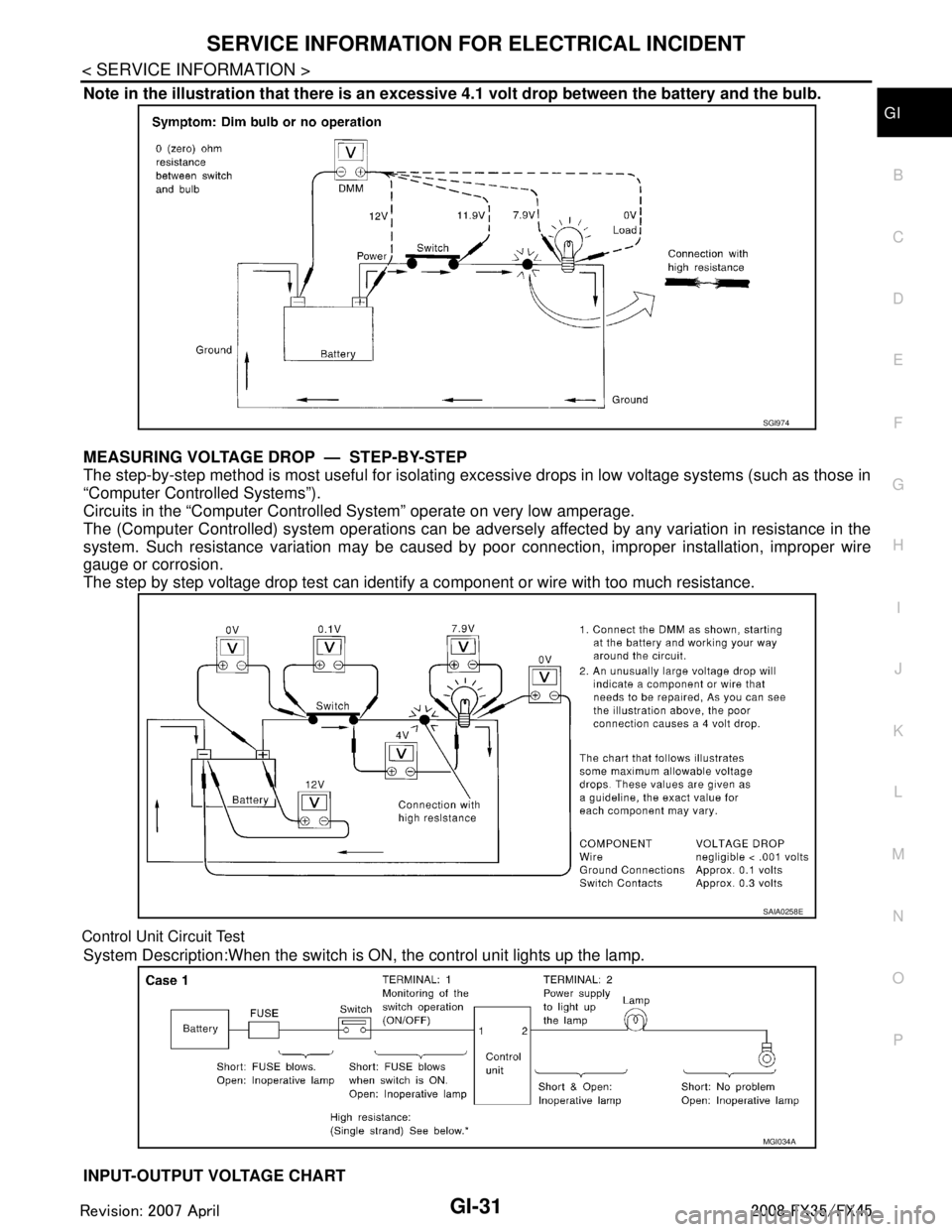
SERVICE INFORMATION FOR ELECTRICAL INCIDENTGI-31
< SERVICE INFORMATION >
C
DE
F
G H
I
J
K L
M B
GI
N
O P
Note in the illustration that there is an excessi ve 4.1 volt drop between the battery and the bulb.
MEASURING VOLTAGE DRO P — STEP-BY-STEP
The step-by-step method is most useful for isolating ex cessive drops in low voltage systems (such as those in
“Computer Controlled Systems”).
Circuits in the “Computer Controlled System” operate on very low amperage.
The (Computer Controlled) system oper ations can be adversely affected by any variation in resistance in the
system. Such resistance variation may be caused by poor connection, improper installation, improper wire
gauge or corrosion.
The step by step voltage drop test can identify a component or wire with too much resistance.
Control Unit Circuit Test
System Description:When the switch is ON, the control unit lights up the lamp.
INPUT-OUTPUT VOLTAGE CHART
SGI974
SAIA0258E
MGI034A
3AA93ABC3ACD3AC03ACA3AC03AC63AC53A913A773A893A873A873A8E3A773A983AC73AC93AC03AC3
3A893A873A873A8F3A773A9D3AAF3A8A3A8C3A863A9D3AAF3A8B3A8C
Page 3103 of 3924

LT-1
ELECTRICAL
C
DE
F
G H
I
J
L
M
SECTION LT
A
B
LT
N
O P
CONTENTS
LIGHTING SYSTEM
SERVICE INFORMATION .. ..........................4
PRECAUTIONS .............................................. .....4
Precaution for Supplemental Restraint System
(SRS) "AIR BAG" and "SEAT BELT PRE-TEN-
SIONER" ............................................................. ......
4
General Precaution for Service Operation ................4
HEADLAMP - XENON TYPE - ............................5
Component Parts and Harness Connector Loca-
tion ...................................................................... ......
5
System Description ...................................................5
CAN Communication System Description .................7
CAN Communication Unit .........................................7
Schematic .................................................................8
Wiring Diagram - H/LAMP - .......................................9
Terminal and Reference Value for BCM .................12
Terminal and Reference Value for IPDM E/R .........14
How to Proceed with Trouble Diagnosis .................14
Preliminary Check ...................................................15
CONSULT-III Functions (BCM) ...............................16
CONSULT-III Functions (IPDM E/R) .......................17
Headlamp Does Not Change To High Beam (Both
Sides) ......................................................................
18
Headlamp Does Not Change To High Beam (One
Side) ........................................................................
20
Headlamp Low Beam Does Not Illuminate (Both
Sides) .................................................................. ....
21
Headlamp Low Beam Does Not Illuminate (One
Side) .................................................................... ....
23
Headlamp RH Low Beam and High Beam Does
Not Illuminate ..........................................................
24
Headlamp LH Low Beam and High Beam Does
Not Illuminate ..........................................................
25
Headlamps Does Not Turn OFF .............................26
General Information for Xenon Headlamp Trouble
Diagnosis ................................................................
26
Caution: ...................................................................26
Xenon Headlamp Trouble Diagnosis ......................27
Aiming Adjustment ..................................................27
Bulb Replacement ...................................................28
Removal and Installation ..................................... ....30
Disassembly and Assembly .....................................30
DAYTIME LIGHT SYSTEM ...............................32
Component Parts and Harness Connector Loca-
tion ....................................................................... ....
32
System Description ..................................................32
CAN Communication System Description ...............33
CAN Communication Unit ........................................33
Schematic ................................................................34
Wiring Diagram - DTRL - .........................................35
Terminal and Reference Value for BCM ..................38
How to Proceed with Trouble Diagnosis ..................41
Preliminary Check ...................................................41
CONSULT-III Functions (BCM) ...............................43
Daytime Light Control Does Not Operate Properly ....44
Aiming Adjustment ...................................................46
Bulb Replacement ...................................................46
Removal and Installation .........................................46
Disassembly and Assembly .....................................46
AUTO LIGHT SYSTEM .....................................47
Component Parts and Harness Connector Loca-
tion ...........................................................................
47
System Description ..................................................47
CAN Communication System Description ...............48
CAN Communication Unit ........................................48
Major Component and Functions ............................48
Schematic ................................................................49
Wiring Diagram - AUTO/L - .....................................50
Terminal and Reference Value for BCM ..................52
Terminal and Reference Value for IPDM E/R ..........54
How to Proceed with Trouble Diagnosis ..................54
Preliminary Check ...................................................55
CONSULT-III Functions (BCM) ...............................56
CONSULT-III Functions (IPDM E/R) .......................57
Symptom Chart ........................................................58
Lighting Switch Inspection .......................................58
Optical sensor System Inspection ...........................59
Removal and Installation of Optical Sensor .............60
3AA93ABC3ACD3AC03ACA3AC03AC63AC53A913A773A893A873A873A8E3A773A983AC73AC93AC03AC3
3A893A873A873A8F3A773A9D3AAF3A8A3A8C3A863A9D3AAF3A8B3A8C
Page 3104 of 3924

LT-2
HEADLAMP AIMING CONTROL ......................61
Schematic ............................................................ ...61
Wiring Diagram - H/AIM - .......................................62
Removal and Installation ........................................64
Switch Circuit Inspection ........................................65
FRONT FOG LAMP ...........................................66
Component Parts and Harness Connector Loca-
tion ....................................................................... ...
66
System Description .................................................66
CAN Communication System Description ..............67
CAN Communication Unit .......................................67
Wiring Diagram - F/FOG - ......................................68
Terminal and Reference Value for BCM .................69
Terminal and Reference Value for IPDM E/R .........70
How to Proceed with Trouble Diagnosis .................71
Preliminary Check ..................................................71
CONSULT-III Functions (BCM) ..............................72
CONSULT-III Functions (IPDM E/R) ......................72
Front Fog Lamps Do Not Illuminate (Both Sides) ...72
Front Fog Lamp Does Not Illuminate (One Side) ...74
Aiming Adjustment ..................................................75
Bulb Replacement ..................................................76
Removal and Installation ........................................76
TURN SIGNAL AND HAZARD WARNING
LAMPS ...............................................................
78
Component Parts and Harness Connector Loca-
tion ....................................................................... ...
78
System Description .................................................78
CAN Communication System Description ..............80
CAN Communication Unit .......................................80
Schematic ...............................................................81
Wiring Diagram - TURN - ........................................82
Terminal and Reference Value for BCM .................84
Terminal and Reference Value for Rear Combina-
tion Lamp Control Unit ............................................
86
How to Proceed with Trouble Diagnosis .................88
Preliminary Check ..................................................88
CONSULT-III Functions (BCM) ..............................89
Turn Signal Lamp Does Not Operate .....................90
Rear Turn Signal Lamp Does Not Operate ............92
Hazard Warning Lamp Does Not Operate But
Turn Signal Lamp Operates ...................................
94
Bulb Replacement (Front Turn Signal Lamp) .........95
Bulb Replacement (Rear Turn Signal Lamp) ..........95
Removal and Installation of Front Turn Signal
Lamp .......................................................................
95
Removal and Installation of Rear Turn Signal
Lamp .......................................................................
95
Removal and Installation of Rear Combination
Lamp Control Unit ...................................................
95
LIGHTING AND TURN SIGNAL SWITCH .........96
Removal and Installation ..................................... ...96
HAZARD SWITCH .............................................97
Removal and Installation ..................................... ...97
COMBINATION SWITCH ..................................98
Wiring Diagram - COMBSW - .............................. ...98
Combination Switch Reading Function ...................98
Terminal and Reference Value for BCM .................99
CONSULT-III Functions (BCM) .............................103
Combination Switch Inspection .............................104
Removal and Installation .......................................107
STOP LAMP .....................................................108
Component Parts and Harness Connector Loca-
tion ....................................................................... .
108
System Description ...............................................108
Schematic .............................................................109
Wiring Diagram - STOP/L - ...................................110
Terminal and Reference Value for Rear Combina-
tion Lamp Control Unit ......................................... .
112
Stop Lamp Does Not Operate ...............................112
High-Mounted Stop Lamp .....................................114
Stop Lamp .............................................................115
Rear Combination Lamp Control Unit ...................115
BACK-UP LAMP ............................................ ..116
Wiring Diagram - BACK/L - .................................. .116
Bulb Replacement .................................................117
Removal and Installation .......................................117
PARKING, LICENSE PLATE AND TAIL
LAMPS ..............................................................
118
Component Parts and Harness Connector Loca-
tion ....................................................................... .
118
System Description ...............................................118
CAN Communication System Description ............120
CAN Communication Unit .....................................120
Schematic .............................................................121
Wiring Diagram - TAIL/L - .....................................122
Terminal and Reference Value for BCM ...............126
Terminal and Reference Value for IPDM E/R .......127
Terminal and Reference Value for Rear Combina-
tion Lamp Control Unit ......................................... .
128
How to Proceed with Trouble Diagnosis ...............128
Preliminary Check .................................................128
CONSULT-III Functions (BCM) .............................129
CONSULT-III Functions (IPDM E/R) .....................129
Parking, License Plate and Side Marker Lamps
Do Not Illuminate ..................................................
129
Tail Lamp Does Not Operate ................................133
Parking, License Plate, Side Maker and Tail
Lamps Do Not Turn OFF (After Approx. 10 Min-
utes) ......................................................................
134
License Plate Lamp ..............................................135
Front Parking Lamp ..............................................135
Tail Lamp ..............................................................135
Front Side Marker Lamp .......................................135
Rear Side Marker Lamp ........................................136
Rear Combination Lamp Control Unit ...................136
REAR COMBINATION LAMP ..........................137
Bulb Replacement ................................................ .137
Removal and Installation .......................................137
INTERIOR ROOM LAMP ..................................138
3AA93ABC3ACD3AC03ACA3AC03AC63AC53A913A773A893A873A873A8E3A773A983AC73AC93AC03AC3
3A893A873A873A8F3A773A9D3AAF3A8A3A8C3A863A9D3AAF3A8B3A8C