light INFINITI G35 2003 Service Manual
[x] Cancel search | Manufacturer: INFINITI, Model Year: 2003, Model line: G35, Model: INFINITI G35 2003Pages: 256, PDF Size: 3.37 MB
Page 102 of 256
Continue to press the UNLOCK button for 3
seconds. All the door windows will be lowered.
Continue to press the UNLOCK button until
windows are fully open.
To stop lowering the windows, release the
UNLOCK button.
To start lowering the windows, press the UN-
LOCK button again for more than 3 seconds.
The rear door windows will operate 0.5 sec-
onds after the front windows' operation (if so
equipped).
Releasing the trunk lid 1. Push the TRUNK button on the keyfob for
longer than 0.5 seconds with the key re-
moved from the ignition key cylinder.
2. The trunk lid opens.
Using the panic alarm If you are near your vehicle and feel threat-
ened, you may activate the alarm to call atten-
tion as follows:
1. Push the PANIC button on the keyfob for
longer than 0.5 seconds with the key
removed from the ignition key cylinder.
2. The theft warning alarm and headlights will
stay on for 30 seconds. 3. The panic alarm stops when:
O It has run for 30 seconds, or
O The LOCK or the UNLOCK button is
pressed, or
O The PANIC or the TRUNK button is pushed
on the keyfob for longer than 0.5 seconds.
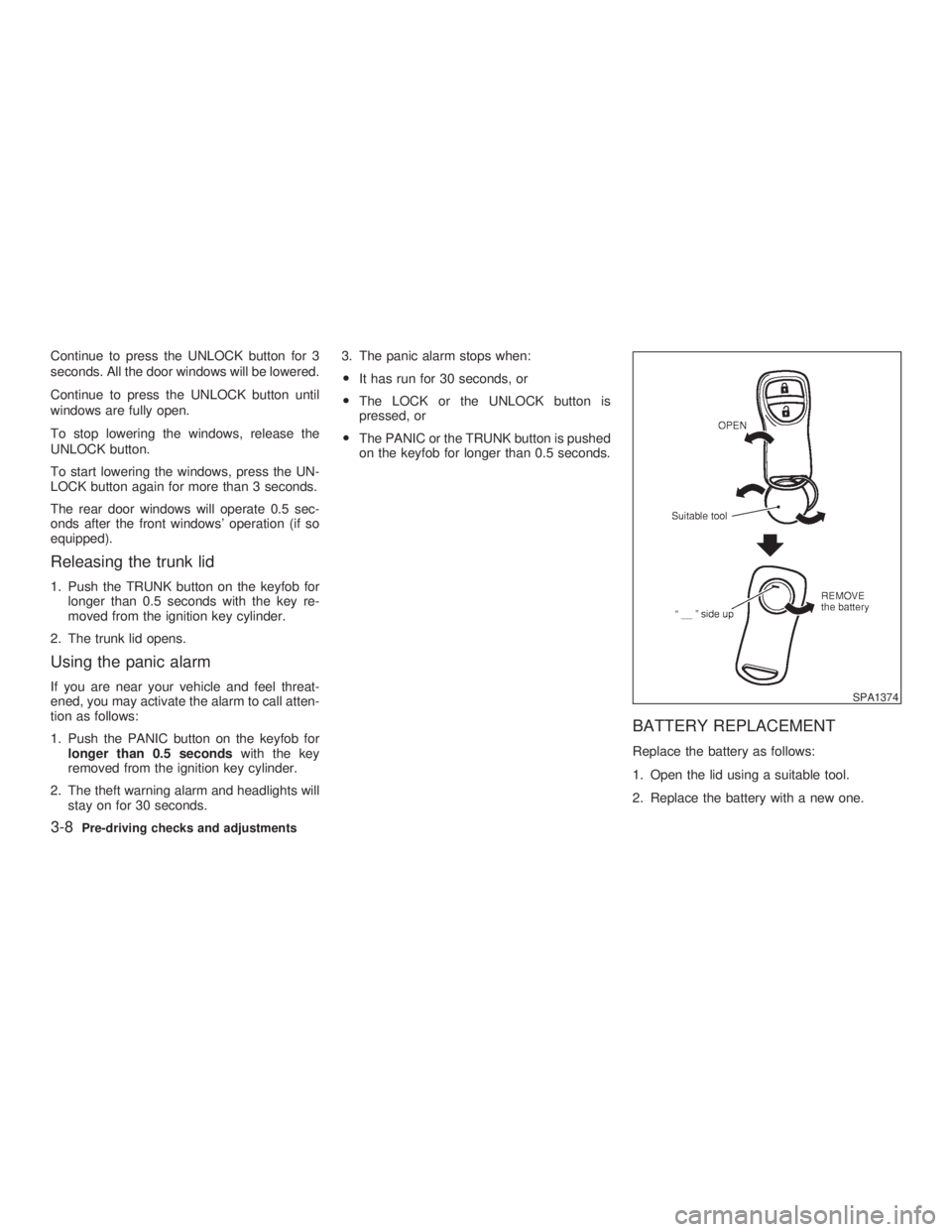
BATTERY REPLACEMENT Replace the battery as follows:
1. Open the lid using a suitable tool.
2. Replace the battery with a new one. SPA1374
3-8 Pre-driving checks and adjustments
Z 02.11.1/V35-D/V5.0
X
Page 104 of 256

1. Pull the hood lock release handle
j 1
lo-
cated below the instrument panel; the hood
will then spring up slightly.
2. Raise the lever
j 2
at the front of the hood
with your fingertips and raise the hood.
3. Insert the assist bar into the slot
j 3
in the
front edge of the hood.
4. When closing the hood, reset the assist bar
to its original position, then slowly close the
hood and make sure it locks into place.
WARNING O Make sure the hood is completely
closed and latched before driving.
Failure to do so could cause the hood
to fly open and result in an accident.
O If you see steam or smoke coming
from the engine compartment, to
avoid injury do not open the hood. WARNING O Do not drive with the trunk lid open.
This could allow dangerous exhaust
gases to be drawn into the vehicle.
See ªPrecautions when starting and
drivingº in the ª5. Starting and driv-
ingº section for exhaust gas.
O Closely supervise children when they
are around cars to prevent them from
playing and becoming locked in the
trunk where they could be seriously
injured. Keep the car locked with the
trunk closed when not in use, and
prevent children's access to car keys. SPA1423
HOOD TRUNK LID
3-10 Pre-driving checks and adjustments
Z 02.7.29/V35-D/V5.0
X
Page 106 of 256

INTERIOR TRUNK LID RELEASE
WARNINGClosely supervise children when they
are around cars to prevent them from
playing and becoming locked in the
trunk where they could be seriously in-
jured. Keep the car locked, with the
trunk closed, when not in use, and pre-
vent children's access to car keys. The interior trunk lid release mechanism pro-
vides a means of escape for children and
adults in the event they become locked inside
the trunk.
The handle is located on the back side of the
trunk lid inside the trunk compartment.
To open the trunk lid from the inside, pull
the release handle towards you until the
lock releases and push up on the trunk lid.
The release lever is made of a material that
glows in the dark after a brief exposure to
ambient light.SPA1591 SPA1426A SPA1561
3-12 Pre-driving checks and adjustments
Z 02.7.29/V35-D/V5.0
X
Page 111 of 256
CAUTIONStore the main sun visor after storing
the extension sun visor.
AUTOMATIC ANTI-GLARE INSIDE
MIRROR (if so equipped)
WARNING Use the AUTO position only when nec-
essary, because it reduces rear view
clarity.
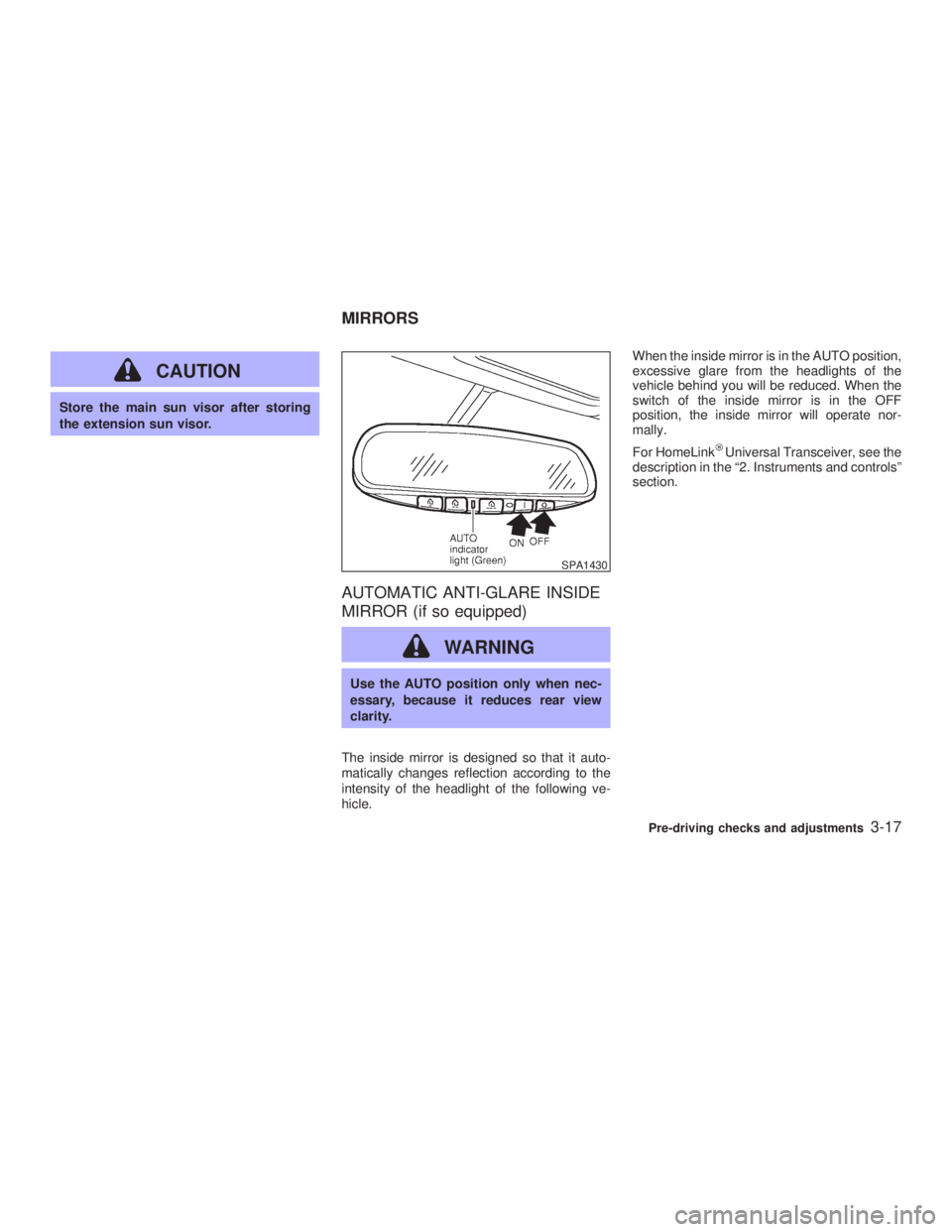
The inside mirror is designed so that it auto-
matically changes reflection according to the
intensity of the headlight of the following ve-
hicle. When the inside mirror is in the AUTO position,
excessive glare from the headlights of the
vehicle behind you will be reduced. When the
switch of the inside mirror is in the OFF
position, the inside mirror will operate nor-
mally.
For HomeLink Universal Transceiver, see the
description in the ª2. Instruments and controlsº
section. SPA1430
MIRRORS
Pre-driving checks and adjustments
3-17
Z 02.7.29/V35-D/V5.0
X
Page 114 of 256
any positions other than ON.
4. Push the SET switch and, within 5 seconds,
push the memory switch 1 or 2 fully for at
least 1 second.
The indicator light for the pushed memory
switch will come on and stay on for approxi-
mately 5 seconds after pushing the switch.
After the indicator light goes off, the se-
lected positions are stored in the selected
memory (1 or 2).
If memory is stored in the same memory
switch, the previous memory will be de-
leted.
Confirming memory storage O Turn the ignition ON and push the SET
switch. If the main memory has not been
stored, the indicator light will come on for
approximately 0.5 seconds. When the
memory has stored the position, the indica-
tor light will stay on for approximately 5
seconds.
O If the battery cable is disconnected, or if the
fuse blows, the memory will be canceled. In
such a case, reset the desired positions
using the following procedures.
1. Open and close the driver's door more than two times with the ignition key in the LOCK
position.
2. Reset the desired position using the previ-
ous procedure.
Selecting the memorized position 1. A/T models:
Set the automatic transmission selector le-
ver to the P (Park) position.
M/T models:
Apply the parking brake securely when the
vehicle is stopped.
2. Turn the ignition ON.
3. Push the memory switch 1 or 2 fully for at
least 1 second.
The driver's seat will move to the memo-
rized position with the indicator light flash-
ing. Then the light will stay on for approxi-
mately 5 seconds.
When memory switch 1 or 2 is pushed with the
driver's door open and then the key inserted
into the ignition switch within approximately 1
minute, the driver's seat will move to the
memorized position. (AT models only) System operation The automatic drive positioner system will not
work or will stop operating under the following
conditions:
O when the vehicle speed is above 4 MPH (7
km/h).
O when any two or more of the memory
switches are simultaneously pressed while
the automatic drive positioner is operating.
O when the adjusting switch for the driver's
seat is turned on while the automatic drive
positioner is operating.
O when the cancel switch is pushed to cancel.
O when the memory switch 1 or 2 is not
pushed for at least 1 second.
O when the seat has already been moved to
the memorized position.
O when no seat position is stored in the
memory switch.
O when the parking brake is not applied. Ð
M/T models
O when the vehicle speed is above 4 MPH (7
km/h) while the parking brake is applied. Ð
M/T models
To restart the drive positioner system,
move the parking brake to off and on.
3-20 Pre-driving checks and adjustments
Z 02.7.29/V35-D/V5.0
X
Page 120 of 256
AUTOMATIC OPERATION
Cooling and/or dehumidified heating
(AUTO) This mode may be normally used all year
round as the system automatically works to
keep a constant temperature. Air flow distribu-
tion and fan speed are also controlled auto-
matically.
1. Push the AUTO/ECON button on. (AUTO
will be displayed.)
2. If the A/C button indicator is off, push the
A/C button to activate air conditioner. The
A/C button indicator will come on.
3. Push the temperature set button to set the
desired temperature.
O Adjust the temperature to about 75ÉF
(24ÉC) for normal operation.
O The temperature of the passenger compart-
ment will be maintained automatically. Air
flow distribution and fan speed are also
controlled automatically.
Economical operation (ECON) Economical operation reduces some load to
the engine to improve the fuel economy. It
allows higher humidity than normal operation. Pushing the AUTO/ECON button changes op-
erations as follows while the A/C button indi-
cator is on. AUTO ! ECON ! AUTO
Heating (A/C off) The air conditioner does not activate. When
you need to heat only, use this mode.
1. Push the AUTO button. (AUTO will be
displayed.)
2. Push the A/C button to turn off the air
conditioner. The A/C button indicator will
turn off.
3. Push the temperature set button to set the
desired temperature.
O The temperature of the passenger compart-
ment will be maintained automatically. Air
flow distribution and fan speed are also
controlled automatically.
O Do not set the temperature lower than the
outside air temperature. Otherwise the sys-
tem may not work properly.
O Not recommended if windows fog up.
Dehumidified defrosting or defogging 1. Push the DEF button on. (The indica-
tor light on the button will come on.) 2. Push the temperature set button to set the
desired temperature.
O To quickly remove ice from the outside of
the windows, push the manual fan control
button m and set to the maximum position.
O As soon as possible after the windshield is
clean, push the AUTO button to return to
the auto mode.
O When the DEF button is pushed, the
air conditioner will automatically be turned
on at outside temperatures above 23ÉF
(þ5ÉC) to defog the windshield, and the air
recirculate mode will automatically be
turned off.
Outside air is drawn into the passenger
compartment to improve the defogging per-
formance.
MANUAL OPERATION
Fan speed control Push the fan control button . or m to manually
control the fan speed.
Push the AUTO button to return to automatic
control of the fan speed.
Fresh air Push the fresh air button to draw outside
4-4 Heater, air conditioner and audio systems
Z 02.7.29/V35-D/V5.0
X
Page 121 of 256

air into the passenger compartment. The indi-
cator light on the button will come on.
Air recirculation Push the air recirculation button to recir-
culate interior air inside the vehicle. The indi-
cator light on the button will come on.
The air recirculation button will not be acti-
vated when the air conditioner is in DEF mode.
Air flow control (MODE) Pushing the MODE button selects the air outlet
to:
: Air flows from center and side ventila-
tors.
: Air flows from center and side ventila-
tors and foot outlets.
: Air flows mainly from foot outlets.
: Air flows from defroster and foot out-
lets.
To turn the system off Push the OFF button.
DUAL ZONE BUTTON (if so
equipped) You can set the temperature of the driver and front passenger sides individually.
Pushing the DUAL zone button changes the
setting position as follows:
Driver/Passenger ! Driver ! Passenger
If selecting the Driver/Passenger position
again after the temperature is individually set,
the display will show the temperature set for
the driver side.
AMBIENT TEMPERATURE The outside ambient temperature will be
shown on the center display.
The ambient temperature sensor is located in
front of the radiator. The sensor may be af-
fected by road or engine heat, wind direction
and other driving conditions. The display may
differ from the actual outside temperature or
the temperature displayed on various signs or
billboards.
OPERATING TIPS When the engine coolant temperature and
outside air temperature are low, the air flow
from the foot outlets may not operate for a
maximum of 150 seconds. However, this is not
a malfunction. After the coolant temperature
warms up, the air flow from the foot outlets will
operate normally. The sensor on the instrument panel helps
maintain a constant temperature; do not put
anything on or around this sensor.
IN-CABIN MICROFILTER The air conditioning system is equipped with a
in-cabin microfilter which collects dirt, pollen,
dust, etc. To make sure air conditioner heats,
defogs, and ventilates efficiently, replace the
filter in accordance with the maintenance
schedule in this manual. To replace the filter,
contact your INFINITI retailer.
The filter should be replaced if air flow
decreases significantly or if windows fog HA1011
Heater, air conditioner and audio systems
4-5
Z 02.7.29/V35-D/V5.0
X
Page 123 of 256

movement, reception conditions will constantly
change. Buildings, terrain, signal distance and
interference from other vehicles can work
against ideal reception. Described below are
some of the factors that can affect your radio
reception.
FM RADIO RECEPTION Range: FM range is normally limited to 25 to
30 miles (40 to 48 km), with monaural (single
channel) FM having slightly more range than
stereo FM. External influences may some-
times interfere with FM station reception even
if the FM station is within 25 miles (40 km). The
strength of the FM signal is directly related to
the distance between the transmitter and re-
ceiver. FM signals follow a line-of-sight path,
exhibiting many of the same characteristics as
light. For example they will reflect off objects.
Fade and drift: As your vehicle moves away from a station transmitter, the signals will tend
to fade and/or drift.
Static and flutter: During signal interference
from buildings, large hills or due to antenna
position, usually in conjunction with increased
distance from the station transmitter, static or
flutter can be heard. This can be reduced by
adjusting the treble control counterclockwise
to reduce treble response.
Multipath reception: Because of the reflective
characteristics of FM signals, direct and re-
flected signals reach the receiver at the same
time. The signals may cancel each other,
resulting in momentary flutter or loss of sound.
AM RADIO RECEPTION AM signals, because of their low frequency,
can bend around objects and skip along the
ground. In addition, the signals can be
bounced off the ionosphere and bent back to
earth. Because of these characteristics. AM
signals are also subject to interference as they
travel from transmitter to receiver.
Fading: Occurs while the vehicle is passing
through freeway underpasses or in areas with
many tall buildings. It can also occur for sev-
eral seconds during ionospheric turbulence
even in areas where no obstacles exist.
Static: Caused by thunderstorms, electrical SAA0306
Heater, air conditioner and audio systems
4-7
Z 02.7.29/V35-D/V5.0
X
Page 124 of 256

power lines, electric signs and even traffic
lights.
SATELLITE RADIO RECEPTION When the satellite radio is first installed or the
battery has been replaced, the satellite radio
may not work properly. This is not a malfunc-
tion. Wait more than 10 minutes with satellite
radio ON for satellite radio to receive all of the
necessary data.
AUDIO OPERATION
PRECAUTIONS
Cassette player O To maintain good quality sound,
INFINITI recommends using cassette
tapes of 60 minutes or shorter in length.
O Cassette tapes should be removed from
the player when not in use. Store cas-
settes in their protective cases and away
from direct sunlight, heat, dust, mois-
ture and magnetic sources.
O Direct sunlight can cause the cassette to
become deformed. The use of deformed
cassettes may cause the cassette to jam
in the player.
O Do not use cassettes with labels which
are peeling and loose. If used, the label could jam in the player.
O If a cassette has loose tape, insert a
pencil through one of the cassette hubs
and rewind the tape firmly around the
hubs. Loose tape may cause tape jam-
ming and wavering sound quality.
O Over a period of time, the playback
head, capstan and pinch roller may col-
lect a tape coating residue as the tape is
played. This residue accumulation can
cause weak or wavering sound, and
should be removed periodically with a
head cleaning tape. If the residue is not
removed periodically, the player may
need to be disassembled for cleaning.
Compact Disc (CD) player O During cold weather or rainy days, the
player may malfunction due to the hu-
midity. If this occurs, remove the CD and
dehumidify or ventilate the player com-
pletely.
O The player may skip while driving on
rough roads.
O The CD player sometimes cannot func-
tion when the compartment temperature
is extremely high. Decrease the tem-
perature before use. O Only use high quality 4.7 inches (12 cm)
round discs that have the ªCOMPACT
disc DIGITAL AUDIOº logo on the disc
or packaging.
O Do not expose the CD to direct sunlight. SAA0480
4-8 Heater, air conditioner and audio systems
Z 02.7.29/V35-D/V5.0
X
Page 130 of 256

button again during this 5 second period will
stop SCAN tuning and the radio will remain
tuned to that station. If the SCAN tuning
button is not pushed within 5 seconds,
SCAN tuning moves to the next station.
Cassette tape player operation Turn the ignition key to ACC or ON, and then
lightly insert the cassette tape into the tape
door. The cassette tape will be automatically
pulled into the player.
The radio or CD will turn off (if it is on) and the
cassette tape will begin to play.
CAUTIONDo not force the cassette tape into the
tape door. This could cause player dam-
age.
If the system is turned off by pushing the
ON z OFF/VOL control knob with the cassette
tape still in the player, the tape will resume
playing when the system is turned back on.
PLAY:
O When the TAPE button is pushed with the
system turned off and a tape loaded, the
system will come on and the tape will play. O When the TAPE button is pushed with
either the radio or compact disc turned on
and a tape loaded, the compact disc or the
radio will automatically be turned off and
the tape will play.
O When the TAPE button is pushed with the
TAPE playing, the tape will play the pro-
gram recorded on the reverse side.
FF (Fast Forward), REW
(Rewind):
Push the (fast forward) button to fast
forward the tape. To rewind the tape, push the
(rewind) button. Either the FF or REW
symbol illuminates on the right side of the
display window. To stop the FF or REW func-
tion, press the (fast forward) or (re-
wind) again, or the TAPE button.
APS (Automatic
Program Search) FF,
APS REW:
When the (APS FF) button is pushed
while the tape is being played, the next pro-
gram will start to play from the beginning. Push
the (APS FF) button several times to skip
through programs. The tape will advance the
number of times the button is pushed (up to
nine programs).
When the (APS REW) button is pushed once, the program being played starts over
from the beginning. Push the (APS
REW) button several times to skip back sev-
eral selections. The tape will go back the
number of times the button is pushed. Either
the FF or REW symbol flashes on the right
side of the display window while searching for
the selection.
This system searches for the blank intervals
between selections. If there is a blank interval
within one program or there is no interval
between programs, the system may not stop in
the desired or expected location.
SCAN tuning:
Push the SCAN tuning button while playing a
tape, and it will stop at the next tape program
for 5 seconds. Pushing the button again during
this 5 second period will stop SCAN tuning and
the tape program is continued. If the SCAN
tuning button is not pushed within 5 seconds,
SCAN tuning moves to the next tape program.
TAPE EJECT:
When this button is pushed with the tape
loaded, the tape will be ejected.
When the tape is ejected while it is being
played, the system will be turned off.
4-14 Heater, air conditioner and audio systems
Z 02.7.29/V35-D/V5.0
X