light INFINITI G35 2003 Workshop Manual
[x] Cancel search | Manufacturer: INFINITI, Model Year: 2003, Model line: G35, Model: INFINITI G35 2003Pages: 256, PDF Size: 3.37 MB
Page 133 of 256

STEERING SWITCH FOR AUDIO
CONTROL (if so equipped) The audio system can be operated using the
controls on the steering wheel.
POWER on/off switch With the ignition key turned to the ACC or ON
position, push the POWER switch to turn the
audio system on or off.
MODE select switch Push the mode select switch to change the
mode in the sequence of AM, FM1, FM2,
SAT1, SAT2, CD and Tape. Volume control switches Push the volume control switch to increase or
decrease the volume.
TuningMemory change (radio):
Push the tuning switch or for less
than 1.5 seconds to change the radio fre-
quency.
Seek tuning (radio):
Push the tuning switch or for more
than 1.5 seconds to seek the next or previous
radio station.
APS (Automatic Program Search) FF, APS
REW (tape and CD):
Push the tuning switch or for less
1.5 seconds to return to the beginning of the
present program or skip to the next program.
Push several times to skip back or skip
through programs.
This system searches for the blank intervals
between selections. If there is a blank interval
within one program or there is no interval
between programs, the system may not stop in
the desired or expected location. FF REW (tape or CD):
Push the tuning switch or for more
than 1.5 seconds to rewind or fast forward the
tape or to change the playing disc up or down.
To stop the FF or REW function, press the
or button for more than 1.5 sec-
onds again.
ANTENNA
Window antenna The antenna pattern is printed inside the rear
window.
CAUTION O Do not place metalized film near the
rear window glass or attach any metal
parts to it. This may cause poor re-
ception or noise.
O When cleaning the inside of the rear
window, be careful not to scratch or
damage the rear window antenna.
Lightly wipe along the antenna with a
dampened soft cloth.SAA0567
Heater, air conditioner and audio systems
4-17
Z 02.7.29/V35-D/V5.0
X
Page 139 of 256
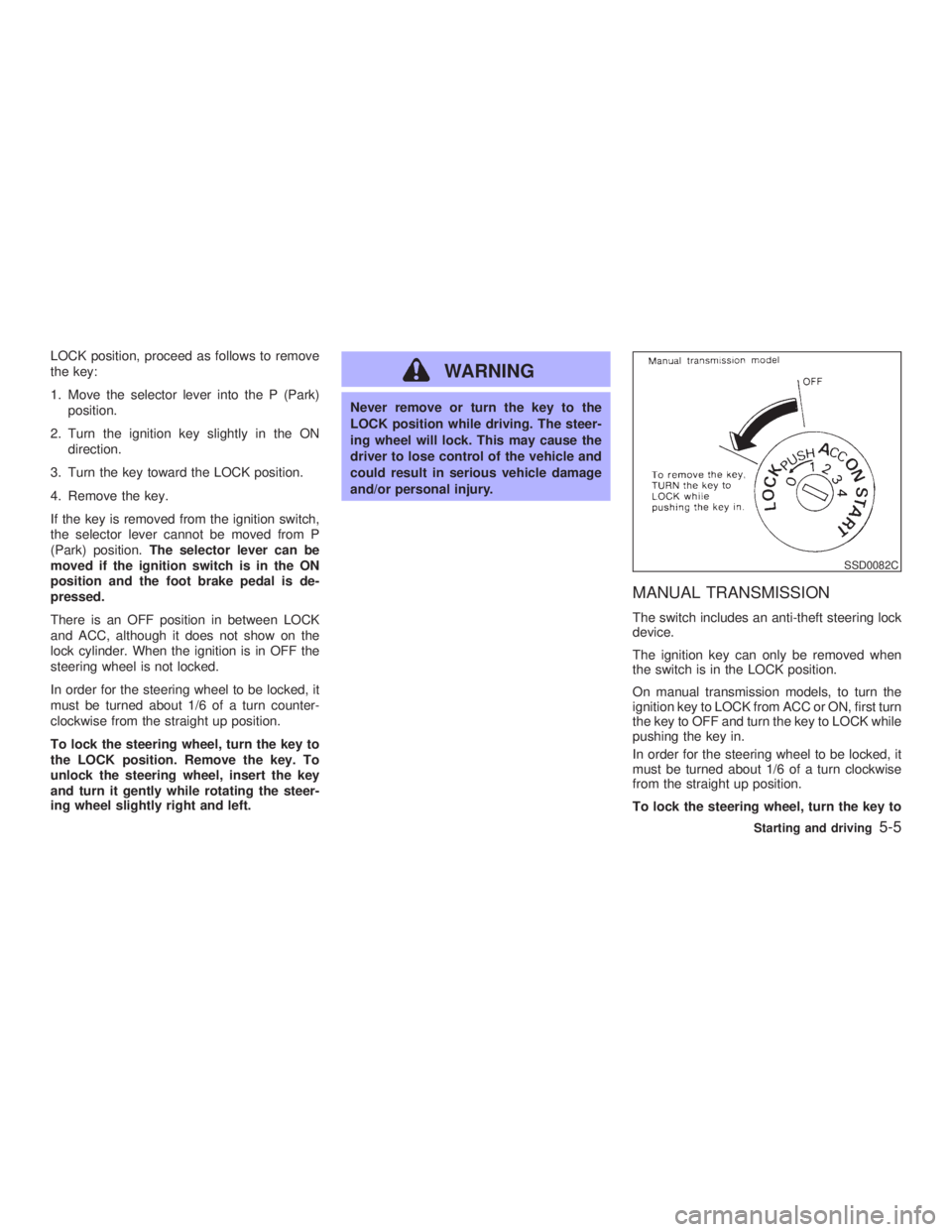
LOCK position, proceed as follows to remove
the key:
1. Move the selector lever into the P (Park)
position.
2. Turn the ignition key slightly in the ON
direction.
3. Turn the key toward the LOCK position.
4. Remove the key.
If the key is removed from the ignition switch,
the selector lever cannot be moved from P
(Park) position. The selector lever can be
moved if the ignition switch is in the ON
position and the foot brake pedal is de-
pressed.
There is an OFF position in between LOCK
and ACC, although it does not show on the
lock cylinder. When the ignition is in OFF the
steering wheel is not locked.
In order for the steering wheel to be locked, it
must be turned about 1/6 of a turn counter-
clockwise from the straight up position.
To lock the steering wheel, turn the key to
the LOCK position. Remove the key. To
unlock the steering wheel, insert the key
and turn it gently while rotating the steer-
ing wheel slightly right and left. WARNING Never remove or turn the key to the
LOCK position while driving. The steer-
ing wheel will lock. This may cause the
driver to lose control of the vehicle and
could result in serious vehicle damage
and/or personal injury.
MANUAL TRANSMISSION The switch includes an anti-theft steering lock
device.
The ignition key can only be removed when
the switch is in the LOCK position.
On manual transmission models, to turn the
ignition key to LOCK from ACC or ON, first turn
the key to OFF and turn the key to LOCK while
pushing the key in.
In order for the steering wheel to be locked, it
must be turned about 1/6 of a turn clockwise
from the straight up position.
To lock the steering wheel, turn the key to SSD0082C
Starting and driving
5-5
Z 02.7.29/V35-D/V5.0
X
Page 140 of 256

the LOCK position. Remove the key. To
unlock the steering wheel, insert the key
and turn it gently while rotating the steer-
ing wheel slightly right and left.
WARNINGNever remove or turn the key to the
LOCK position while driving. The steer-
ing wheel will lock. This may cause the
driver to lose control of the vehicle and
could result in serious vehicle damage
and/or personal injury.
KEY POSITIONS The switch includes an anti-theft steering lock
device.
LOCK (Normal parking position) (0)
The ignition key can only be removed when
the switch is in this position.
OFF (1)
The engine can be turned off without locking
the steering wheel.
The ignition lock is designed so that the key
cannot be turned to LOCK and removed until the selector lever is moved to the P (Park)
position.
ACC (Accessories) (2)
This position activates electrical accessories
such as the radio when the engine is not
running.
ON (Normal operating position) (3)
This position turns on the ignition system and
the electrical accessories.
START (4)
This position activates the starter motor, start-
ing the engine.
INFINITI VEHICLE IMMOBILIZER
SYSTEM The Infiniti Vehicle Immobilizer System will not
allow the engine to start without the use of the
registered Infiniti Vehicle Immobilizer System
key.
If the engine fails to start using the registered
Infiniti Vehicle Immobilizer System key, it may
be due to interference caused by another
Infiniti Vehicle Immobilizer System key, an
automated toll road device or automated pay-
ment device on the key ring. Restart the en-
gine using the following procedures: 1. Leave the ignition switch in the ON position
for approximately 5 seconds.
2. Turn the ignition switch to the OFF or LOCK
position and wait approximately 10 sec-
onds.
3. Repeat step 1 and 2 again.
4. Restart the engine while holding the device
(which may have caused the interference)
separate from the registered Infiniti Vehicle
Immobilizer System key.
If this procedure allows the engine to start,
INFINITI recommends placing the registered
Infiniti Vehicle Immobilizer System key on a
separate key ring to avoid interference from
other devices.
5-6 Starting and driving
Z 02.7.29/V35-D/V5.0
X
Page 141 of 256
O Make sure the area around the vehicle is
clear.
O Maintenance items should be checked pe-
riodically, e.g., each time you check engine
oil.
O Check that all windows and lights are clean.
O Visually inspect tires for their appearance
and condition. Also, check tires for proper
inflation.
O Lock all doors.
O Position seat and adjust head restraints.
O Adjust inside and outside mirrors.
O Fasten seat belts and ask all passengers to
do likewise.
O Check the operation of warning lights when
key is turned to the ON (3) position. 1. Apply the parking brake.
2. Automatic transmission:
Move the selector lever to P (Park) or N
(Neutral). (P preferred.)
The starter is designed not to operate if the
selector lever is in one of the driving posi-
tions.
Manual transmission:
Move the shift lever to N (Neutral) position,
and depress the clutch pedal to the floor
while cranking the engine.
The starter is designed not to operate un-
less the clutch pedal is fully depressed.
3. Crank the engine with your foot off the
accelerator pedal by turning the ignition
key to START. Release the key when the
engine starts. If the engine starts, but fails
to run, repeat the above procedure.
O If the engine is very hard to start in ex-
tremely cold weather or when restarting,
depress the accelerator pedal a little (ap-
proximately 1/5 to the floor) and hold it then
crank the engine. Release the key and the
accelerator pedal when the engine starts.
O If the engine is very hard to start because it
is flooded, depress the accelerator pedal all the way to the floor and hold it. Crank the
engine for 5 to 6 seconds. After cranking
the engine, release the accelerator pedal.
Crank the engine with your foot off the
accelerator pedal by turning the ignition
key to START. Release the key when the
engine starts. If the engine starts, but fails
to run, repeat the above procedure.
CAUTION Do not operate the starter for more than
15 seconds at a time. If the engine does
not start, turn the key off and wait 10
seconds before cranking again, other-
wise the starter could be damaged.
4. Warm-up
Allow the engine to idle for at least 30
seconds after starting. Drive at moderate
speed for a short distance first, especially in
cold weather.BEFORE STARTING THE ENGINE STARTING THE ENGINE
Starting and driving
5-7
Z 02.7.29/V35-D/V5.0
X
Page 145 of 256

sand or mud, or for maximum engine braking
on steep downhill grades.
O Remember not to drive at high speeds for
extended periods of time in lower than M
4
range. This reduces the fuel economy.
O When shifting up, move the selector lever to
the + (up) side. (Shifts to higher range.)
O When shifting down, move the selector
lever to the þ (down) side. (Shifts to lower
range.)
O Moving the selector lever to the same side
twice will shift the ranges in succession.
However, if this motion is rapidly done, the
second shifting may not be completed prop-
erly.
O In the manual shift mode, the transmis-
sion automatically shifts down to 1st
gear before the vehicle comes to a stop.
When accelerating again, it is necessary
to shift up to the desired range.
O When canceling the manual shift mode,
return the selector lever to the D position.
The transmission returns to the normal
driving mode.
O In the manual shift mode, the transmis-
sion may not shift to the selected gear.
This helps maintain driving performance and reduces the chance of vehicle dam-
age or loss of control.
Accelerator downshift
Ð In D position Ð For passing or hill climbing, fully depress the
accelerator pedal to the floor. This shifts the
transmission down into the lower gear, de-
pending on the vehicle speed.
Fail-safe When the fail-safe operation occurs, the next
time the key is turned to the ON position, the
light will blink for approximately 8 sec-
onds after coming on for 2 seconds. While the
vehicle can be driven under these circum-
stances please note that the gears in the
automatic transmission will be locked in 4th
gear.
If the vehicle is driven under extreme con-
ditions, such as excessive wheel spinning
and subsequent hard braking, the fail-safe
system may be activated. This will occur
even if all electrical circuits are functioning
properly. In this case, turn the ignition key
OFF and wait for 3 seconds. Then turn the
key back to the ON position. The vehicle
should return to its normal operating con-
dition. If it does not return to its normal
operating condition, have your INFINITI re- tailer check the transmission and repair if
necessary.
Starting and driving
5-11
Z 02.7.29/V35-D/V5.0
X
Page 147 of 256

If it is difficult to move the shift lever into R
(Reverse) or 1 (Low gear), shift into N (Neu-
tral), then release the clutch pedal and shift
into R or 1 again.
WARNINGO Do not downshift abruptly on slippery
roads. This may cause a loss of con-
trol.
O Do not over-rev the engine when
shifting to a lower gear. This may
cause a loss of control or engine
damage.
CAUTIONO Do not rest your foot on the clutch
pedal while driving. This may damage
the clutch.
O Stop your vehicle completely before
shifting into R (Reverse).
O When the vehicle is stopped for a
period of time, for example at a stop
light, shift to N (Neutral) and release the clutch pedal with the foot brake
applied.
Suggested up-shift speeds Shown below are suggested vehicle speeds
for shifting into a higher gear. These sugges-
tions relate to fuel economy and vehicle per-
formance. Actual up-shift speeds will vary ac-
cording to road conditions, the weather and
individual driving habits.
For normal acceleration in low altitude areas
[less than 4,000 ft (1,219 m)]:
Gear change MPH (km/h)
1st to 2nd 8 (13)
2nd to 3rd 16 (26)
3rd to 4th 25 (40)
4th to 5th 28 (45)
5th to 6th 33 (53)
For quick acceleration in low altitude areas or
in high altitude areas [over 4,000 ft (1,219 m)]:
Gear change MPH (km/h)
1st to 2nd 15 (24)
2nd to 3rd 25 (40)
3rd to 4th 40 (64)
4th to 5th 45 (72)
5th to 6th 50 (80) Suggested maximum speed in each
gear Downshift to a lower gear if the engine is not
running smoothly, or if you need to accelerate.
Do not exceed the maximum suggested speed
(shown below) in any gear. For level road
driving, use the highest gear suggested for
that speed. Always observe posted speed
limits, and drive according to the road condi-
tions, which will ensure safe operation. Do not
over-rev the engine when shifting to a lower
gear as it may cause engine damage or loss of
vehicle control.
Gear MPH (km/h)
1st 35 (56)
2nd 60 (96)
3rd 85 (136)
4th Ð
5th Ð
6th Ð
Starting and driving
5-13
Z 02.7.29/V35-D/V5.0
X
Page 148 of 256

Automatic transmission model To apply: Fully depress the parking brake
pedal.
To release:
1. Firmly apply the foot brake.
2. Depress the parking brake pedal and the
parking brake will be released.
3. Before driving, be sure the brake warning
light goes out. Manual transmission model To apply: Pull the lever up.
To release:
1. Firmly apply foot brake.
2. Place the shift lever in the N (Neutral)
position.
3. While pulling up on the lever slightly, push
the button and lower completely.
4. Before driving, be sure the brake warning
light goes out. WARNING O Be sure the parking brake is fully
released before driving. Failure to do
so can cause brake failure and lead to
an accident.
O Do not release the parking brake from
outside the vehicle.
O Do not use the gear shift in place of
the parking brake. When parking, be
sure the parking brake is fully en-
gaged.
O Do not leave children unattended in a
vehicle. They could release the park-
ing brake and cause an accident.SPA1286 PD1001M
PARKING BRAKE
5-14 Starting and driving
Z 02.7.29/V35-D/V5.0
X
Page 149 of 256

WARNINGDo not use the cruise control when driv-
ing under the following conditions:
O it is not possible to keep the vehicle
at a set speed.
O in heavy traffic or in traffic that varies
in speed.
O on winding or hilly roads.
O on slippery roads (rain, snow, ice,
etc.).
O in very windy areas.
Doing so could cause a loss of vehicle
control and result in an accident.
CAUTIONOn manual transmission models, do not
shift into N (Neutral) without depressing
the clutch pedal when the cruise control
is set. Should this occur, depress the
clutch pedal and turn the main switch off
immediately. Failure to do so may cause engine damage.
PRECAUTIONS ON CRUISE
CONTROL O If the cruise control system malfunctions, it
cancels automatically. The SET indicator
light on the meter panel then blinks to warn
the driver.
O If the engine coolant temperature becomes
excessively high, the cruise control system
will be canceled automatically.
O If the SET indicator light blinks, turn the
cruise control main switch off and have the
system checked by your INFINITI retailer.
O The SET indicator light may blink when the
cruise control main switch is turned on
while pushing the RES/ACCEL, COAST/
SET, or CANCEL switch (located on the
steering wheel). To properly set the cruise
control system, perform the preceding
steps in the order indicated. 1. RESUME or ACCEL switch
2. COAST or SET switch
3. ON/OFF switch
4. CANCEL switch
CRUISE CONTROL OPERATIONS The cruise control allows driving at a speed
between 25 to 89 MPH (40 to 144 km/h)
without keeping your foot on the accelerator
pedal.
To turn on the cruise control, push the main
switch on. The CRUISE indicator light on the
meter panel will come on. SSD0297
CRUISE CONTROL
Starting and driving
5-15
Z 02.7.29/V35-D/V5.0
X
Page 150 of 256

To set at cruising speed, accelerate your
vehicle to the desired speed, push the
COAST/SET switch and release it. (The SET
indicator light will come on.) Take your foot off
the accelerator pedal. Your vehicle will main-
tain the set speed.
O To pass another vehicle, depress the
accelerator pedal. When you release the
pedal, the vehicle will return to the previ-
ously set speed.
O The vehicle may not maintain the set speed
when going up or down steep hills. If this
happens, drive without the cruise control.
To cancel the preset speed, follow either of
these three methods:
a) Push the cancel switch; The SET indicator
light will go out.
b) Tap the brake pedal; The SET indicator
light will go out.
c) Turn the main switch off. Both the CRUISE
indicator and SET indicator lights will go
out.
O If you depress the brake pedal while push-
ing the RES/ACCEL set switch and reset at
the cruising speed, turn the main switch off
once and then turn it on again.
O The cruise control will automatically be can- celled if the vehicle slows down below
approximately 8 MPH (13 km/h).
O Depress the clutch pedal (manual transmis-
sion), or move the selector lever to N (Neu-
tral) position (automatic transmission). The
SET indicator light will go out.
To reset at a faster cruising speed, use one
of the following three methods:
a) Depress the accelerator pedal. When the
vehicle attains the desired speed, push and
release the COAST/SET switch.
b) Push and hold the RES/ACCEL set switch.
When the vehicle attains the speed you
desire, release the switch.
c) Push, then quickly release the RES/ACCEL
set switch. Each time you do this, the set
speed will increase by about 1 MPH (1.6
km/h).
To reset at a slower cruising speed, use one
of the following three methods:
a) Lightly tap the brake pedal. When the ve-
hicle attains the desired speed, push the
COAST/SET switch and release it.
b) Push and hold the COAST/SET switch.
Release the switch when the vehicle slows
down to the desired speed. c) Push, then quickly release the COAST/
SET switch. Each time you do this, the set
speed will decrease by about 1 MPH (1.6
km/h).
To resume the preset speed, push and re-
lease the RES/ACCEL set switch. The vehicle
will resume the last set cruising speed when
the vehicle speed is over 25 MPH (40 km/h).
5-16 Starting and driving
Z 02.7.29/V35-D/V5.0
X
Page 153 of 256

O HEADED UPHILL WITH CURB:
j 2
Turn the wheels away from the curb and
move the vehicle back until the curb side
wheel gently touches the curb.
O HEADED UPHILL OR DOWNHILL, NO
CURB:
j 3
Turn the wheels toward the side of the road
so the vehicle will move away from the
center of the road if it moves.
4. Turn the ignition key to the LOCK position
and remove the key. The power assisted steering is designed to
use a hydraulic pump, driven by the engine, to
assist steering.
If the engine stops or the drive belt breaks, you
will still have control of the vehicle. However,
much greater steering effort is needed, espe-
cially in sharp turns or at low speeds.
WARNING If the engine is not running or is turned
off while driving, the power assist for the
steering will not work. Steering will be
much harder to operate. BRAKING PRECAUTIONS The brake system has two separate hydraulic
circuits. If one circuit malfunctions, you will still
have braking at two wheels.
Vacuum assisted brake
The brake booster aids braking by using en-
gine vacuum. If the engine stops, you can stop
the vehicle by depressing the brake pedal.
However, greater foot pressure on the brake
pedal will be required to stop the vehicle and
the stopping distance will be longer.
Wet brakes
When the vehicle is washed or driven through
water, the brakes may get wet. As a result,
your braking distance will be longer and the
vehicle may pull to one side during braking.
To dry brakes, drive the vehicle at a safe
speed while lightly pressing the brake pedal to
heat-up the brakes. Do this until the brakes
return to normal. Avoid driving the vehicle at
high speeds until the brakes function correctly.
Using the brakes
Avoid resting your foot on the brake pedal
while driving. This overheats the brakes, in-
creases wear on the brake linings and pads,
and reduces gas mileage.POWER STEERING BRAKE SYSTEM
Starting and driving
5-19
Z 02.7.29/V35-D/V5.0
X