ESP INFINITI G35 2003 Owners Manual
[x] Cancel search | Manufacturer: INFINITI, Model Year: 2003, Model line: G35, Model: INFINITI G35 2003Pages: 256, PDF Size: 3.37 MB
Page 21 of 256

WARNINGSupplemental side air bag and curtain
side-impact air bag:
O The supplemental side air bag and
curtain side-impact air bag ordinarily
will not inflate in the event of a frontal
impact, rear impact, rollover or lower
severity side collision. Always wear
your seat belts to help reduce the risk
or severity of injury in various kinds
of accidents. O The seat belts, the supplemental side
air bag and curtain side-impact air
bag are most effective when you are
sitting well back and upright in the
seat. The side air bag and curtain
side-impact air bag inflate with great
force. Do not allow anyone to place
their hand, leg or face near the side
air bag on the side of the seatback of
the front seat or near the side roof
rails. Do not allow anyone sitting in
the front seat or rear outboard seats to extend their hand out of the win-
dow or lean against the door. Some
examples of dangerous riding posi-
tions are shown in the previous illus-
trations.
O When sitting in the rear seat, do not
hold onto the seatback of the front
seat. If the supplemental side air bag
inflates, you may be seriously in-
jured. Be especially careful with chil-
dren, who should always be properly
restrained.SSS0101
SSS0188 SSS0140
Seats, restraints and supplemental air bag systems
1-15
Z 02.7.29/V35-D/V5.0
X
Page 34 of 256

WARNINGInfants and children need special pro-
tection. The vehicle's seat belts may not
fit them properly. The shoulder belt may
come too close to the face or neck. The
lap belt may not fit over their small hip
bones. In an accident, an improperly
fitting seat belt could cause serious or
fatal injury. Always use appropriate child
restraints. All US states and provinces of Canada require
the use of approved child restraints for infants
and small children. (See ªChild restraintsº later
in this section.)
In addition, there are many types of child
restraints available for larger children which
should be used for maximum protection.
INFINITI recommends that all preteens and
children be restrained in the rear seat if
possible. According to accident statistics,
children are safer when properly restrained
in the rear seat than in the front seat.
This is especially important because your
vehicle has a supplemental restraint sys-
tem (air bag system) for the front passen-
ger. See ªSupplemental Restraint Systemº
earlier in this section for precautions.
Infants and small children INFINITI recommends that infants and small
children be placed in child restraints that com-
ply with Federal Motor Vehicle Safety Stan-
dards or Canadian Motor Vehicle Safety Stan-
dards. You should choose a child restraint that
fits your vehicle and always follow the manu-
facturer's instructions for installation and use. Larger children Children who are too large for child restraint
systems should be seated and restrained by
the seat belts which are provided.
If the child's seating position has a shoulder
belt that fits close to the face or neck, the use
of a booster seat (commercially available) may
help overcome this. The booster seat should
raise the child so that the shoulder belt is
properly positioned across the top, middle
portion of the shoulder and the lap belt is low
on the hips. The booster seat should fit the
vehicle seat and have a label certifying that it
complies with Federal Motor Vehicle Safety
Standards or Canadian Motor Vehicle Safety
Standards. Once the child has grown so the
shoulder belt is no longer on or near the face
and neck, use the shoulder belt without the
booster seat.
WARNING Never let a child stand or kneel on any
seat and do not allow a child in the cargo
areas while the vehicle is moving. The
child could be seriously injured or killed
in an accident or a sudden stop.SSS0014
1-28 Seats, restraints and supplemental air bag systems
Z 02.7.29/V35-D/V5.0
X
Page 69 of 256

2. Turn the ignition switch to the OFF or LOCK
position and wait approximately 10 sec-
onds.
3. Repeat step 1 and 2 again.
4. Restart the engine while holding the device
(which may have caused the interference)
separate from the registered Infiniti Vehicle
Immobilizer System key.
If this procedure allows the engine to start,
INFINITI recommends placing the regis-
tered Infiniti Vehicle Immobilizer System
key on a separate key ring to avoid inter-
ference from other devices.
Statement related to section 15 of FCC
rules for Infiniti Vehicle Immobilizer Sys-
tem (CONT ASSY-BCM, ANT ASSY-
IMMOBILIZER)
This device complies with part 15 of the
FCC Rules and RSS-210 of Industry
Canada. Operation is subject to the follow-
ing two conditions;
(1) This device may not cause harmful
interference, and (2) this device must ac-
cept any interference received, including
interference that may cause undesired op-
eration of the device.
CHANGES OR MODIFICATIONS NOT EX- PRESSLY APPROVED BY THE MANUFAC-
TURE RESPONSIBLE FOR COMPLIANCE
COULD VOID THE USER'S AUTHORITY TO
OPERATE THE EQUIPMENT.
Security indicator light If Infiniti Vehicle Immobilizer System is mal-
functioning, this light will remain on while the
ignition key is in the ON position.
If the light still remains on and/or the en-
gine will not start, see your INFINITI retailer
for Infiniti Vehicle Immobilizer System ser-
vice as soon as possible. Please bring all
Infiniti Vehicle Immobilizer System keys
that you have when visiting your INFINITI
retailer for service. SIC1442
Instruments and controls
2-15
Z 02.7.29/V35-D/V5.0
X
Page 86 of 256

The passenger side switch will open or close
only the corresponding window. To open or
close the window, hold the switch down or up.
Locking passenger's windows When the lock button is pushed in, only the
driver side window can be opened or closed.
Push it in again to cancel.
Automatic operation (For all door
windows or front door windows, if so
equipped) To fully open or close the window, completely
press or lift the switch and release it; it need
not be held. The window will automatically
open or close all the way. To stop the window,
just press or lift the switch in the opposite
direction.
Auto reverse function If the control unit detects something caught in
a window as it moves up, the window will be
immediately lowered.SIC1852A SIC1892B SIC1853A
2-32 Instruments and controls
Z 02.7.29/V35-D/V5.0
X
Page 94 of 256

O press and hold both the HomeLink and
hand-held transmitter buttons without inter-
ruption.
O position the hand-held transmitter 2 to 5
inches (50 to 127 mm) away from the
HomeLink surface. Hold the transmitter in
that position for up to 15 seconds. If
HomeLink is not programmed within that
time, try holding the transmitter in another
position - keeping the indicator light in view
at all times.
If you continue to have programming difficul-
ties, please contact the INFINITI Consumer
Affairs Department. The phone numbers are
located in the Foreword of this Owner's
Manual.
CLEARING THE PROGRAMMED
INFORMATION Individual buttons cannot be cleared, however
to clear all programming, press and hold the
two outside buttons and release when the
indicator light begins to flash (approximately
20 seconds). REPROGRAMMING A SINGLE
HomeLink BUTTONTo reprogram a HomeLink Universal Trans-
ceiver button, complete the following.
1. Press and hold the desired HomeLink
button. Do not release the button until step
4 has been completed.
2. When the indicator light begins to flash
slowly (after 20 seconds), position the
hand-held transmitter 2 to 5 inches (50 to
127 mm) away from the HomeLink sur-
face.
3. Press and hold the hand-held transmitter
button.
4. The HomeLink indicator light will flash,
first slowly and then rapidly. When the
indicator light begins to flash rapidly, re-
lease both buttons.
The HomeLink Universal Transceiver button
has now been reprogrammed. The new device
can be activated by pushing the HomeLink
button that was just programmed. This proce-
dure will not affect any other programmed
HomeLink buttons.
IF YOUR VEHICLE IS STOLEN If your vehicle is stolen, you should change the codes of any non-rolling code device that has
been programmed into HomeLink . Consult
the Owner's Manual of each device or call the
manufacturer or dealer of those devices for
additional information.
When your vehicle is recovered, you will
need to reprogram the HomeLink Univer-
sal Transceiver with your new transmitter
information.
FCC Notice:
This device complies with FCC rules part
15. Operation is subject to the following
two conditions: (1) This device may not
cause harmful interference and (2) This
device must accept any interference that
may be received, including interference
that may cause undesired operation.
The transmitter has been tested and com-
plies with FCC and DOC/MDC rules.
Changes or modifications not expressly
approved by the party responsible for com-
pliance could void the user's authority to
operate the device.
DOC: ISTC 1763K1313
FCC I.D.: CB2V67690
2-40 Instruments and controls
Z 02.7.29/V35-D/V5.0
X
Page 99 of 256
CHILD SAFETY REAR DOOR
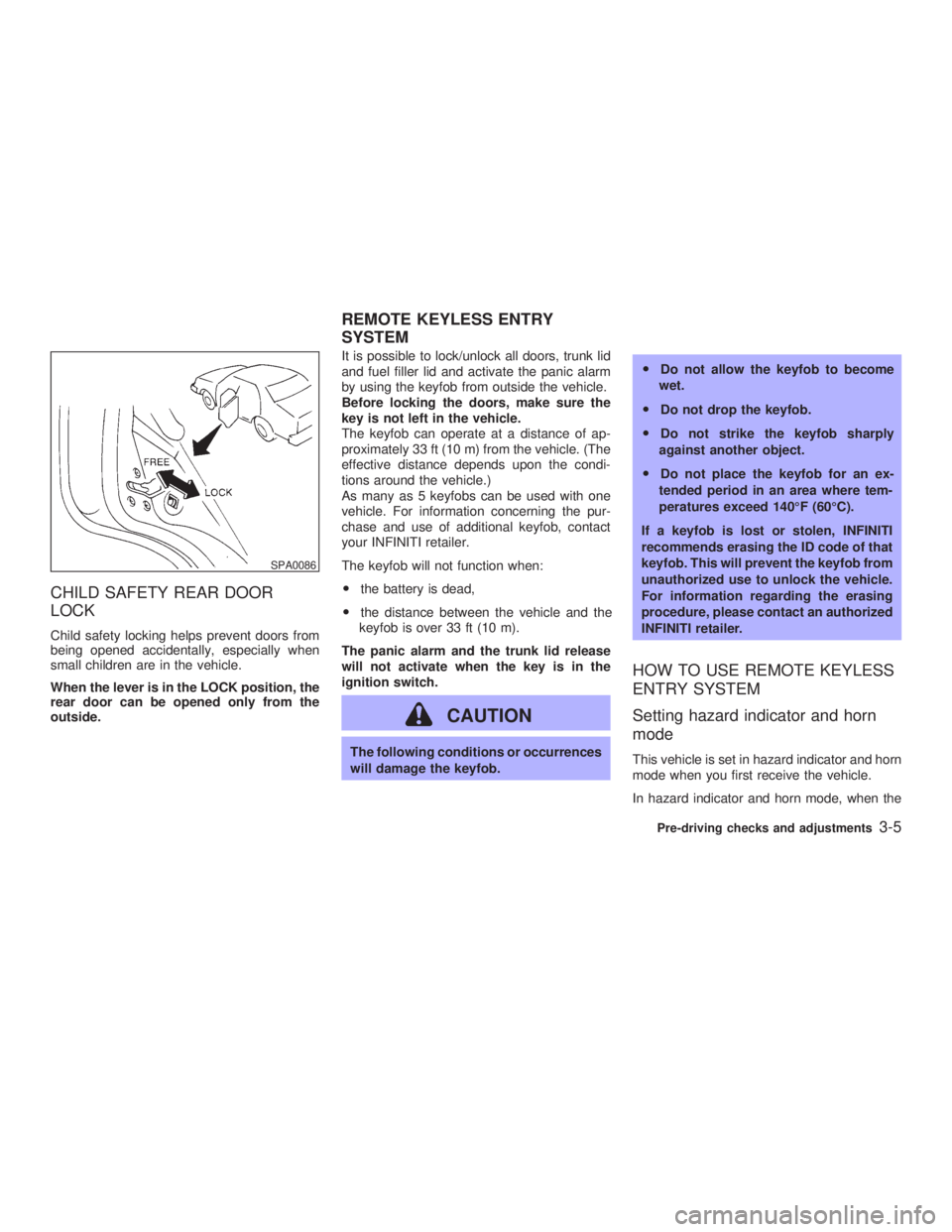
LOCK Child safety locking helps prevent doors from
being opened accidentally, especially when
small children are in the vehicle.
When the lever is in the LOCK position, the
rear door can be opened only from the
outside. It is possible to lock/unlock all doors, trunk lid
and fuel filler lid and activate the panic alarm
by using the keyfob from outside the vehicle.
Before locking the doors, make sure the
key is not left in the vehicle.
The keyfob can operate at a distance of ap-
proximately 33 ft (10 m) from the vehicle. (The
effective distance depends upon the condi-
tions around the vehicle.)
As many as 5 keyfobs can be used with one
vehicle. For information concerning the pur-
chase and use of additional keyfob, contact
your INFINITI retailer.
The keyfob will not function when:
O the battery is dead,
O the distance between the vehicle and the
keyfob is over 33 ft (10 m).
The panic alarm and the trunk lid release
will not activate when the key is in the
ignition switch.
CAUTION The following conditions or occurrences
will damage the keyfob. O Do not allow the keyfob to become
wet.
O Do not drop the keyfob.
O Do not strike the keyfob sharply
against another object.
O Do not place the keyfob for an ex-
tended period in an area where tem-
peratures exceed 140ÉF (60ÉC).
If a keyfob is lost or stolen, INFINITI
recommends erasing the ID code of that
keyfob. This will prevent the keyfob from
unauthorized use to unlock the vehicle.
For information regarding the erasing
procedure, please contact an authorized
INFINITI retailer.
HOW TO USE REMOTE KEYLESS
ENTRY SYSTEM
Setting hazard indicator and horn
mode This vehicle is set in hazard indicator and horn
mode when you first receive the vehicle.
In hazard indicator and horn mode, when theSPA0086
REMOTE KEYLESS ENTRY
SYSTEM
Pre-driving checks and adjustments
3-5
Z 02.7.29/V35-D/V5.0
X
Page 123 of 256

movement, reception conditions will constantly
change. Buildings, terrain, signal distance and
interference from other vehicles can work
against ideal reception. Described below are
some of the factors that can affect your radio
reception.
FM RADIO RECEPTION Range: FM range is normally limited to 25 to
30 miles (40 to 48 km), with monaural (single
channel) FM having slightly more range than
stereo FM. External influences may some-
times interfere with FM station reception even
if the FM station is within 25 miles (40 km). The
strength of the FM signal is directly related to
the distance between the transmitter and re-
ceiver. FM signals follow a line-of-sight path,
exhibiting many of the same characteristics as
light. For example they will reflect off objects.
Fade and drift: As your vehicle moves away from a station transmitter, the signals will tend
to fade and/or drift.
Static and flutter: During signal interference
from buildings, large hills or due to antenna
position, usually in conjunction with increased
distance from the station transmitter, static or
flutter can be heard. This can be reduced by
adjusting the treble control counterclockwise
to reduce treble response.
Multipath reception: Because of the reflective
characteristics of FM signals, direct and re-
flected signals reach the receiver at the same
time. The signals may cancel each other,
resulting in momentary flutter or loss of sound.
AM RADIO RECEPTION AM signals, because of their low frequency,
can bend around objects and skip along the
ground. In addition, the signals can be
bounced off the ionosphere and bent back to
earth. Because of these characteristics. AM
signals are also subject to interference as they
travel from transmitter to receiver.
Fading: Occurs while the vehicle is passing
through freeway underpasses or in areas with
many tall buildings. It can also occur for sev-
eral seconds during ionospheric turbulence
even in areas where no obstacles exist.
Static: Caused by thunderstorms, electrical SAA0306
Heater, air conditioner and audio systems
4-7
Z 02.7.29/V35-D/V5.0
X
Page 141 of 256
O Make sure the area around the vehicle is
clear.
O Maintenance items should be checked pe-
riodically, e.g., each time you check engine
oil.
O Check that all windows and lights are clean.
O Visually inspect tires for their appearance
and condition. Also, check tires for proper
inflation.
O Lock all doors.
O Position seat and adjust head restraints.
O Adjust inside and outside mirrors.
O Fasten seat belts and ask all passengers to
do likewise.
O Check the operation of warning lights when
key is turned to the ON (3) position. 1. Apply the parking brake.
2. Automatic transmission:
Move the selector lever to P (Park) or N
(Neutral). (P preferred.)
The starter is designed not to operate if the
selector lever is in one of the driving posi-
tions.
Manual transmission:
Move the shift lever to N (Neutral) position,
and depress the clutch pedal to the floor
while cranking the engine.
The starter is designed not to operate un-
less the clutch pedal is fully depressed.
3. Crank the engine with your foot off the
accelerator pedal by turning the ignition
key to START. Release the key when the
engine starts. If the engine starts, but fails
to run, repeat the above procedure.
O If the engine is very hard to start in ex-
tremely cold weather or when restarting,
depress the accelerator pedal a little (ap-
proximately 1/5 to the floor) and hold it then
crank the engine. Release the key and the
accelerator pedal when the engine starts.
O If the engine is very hard to start because it
is flooded, depress the accelerator pedal all the way to the floor and hold it. Crank the
engine for 5 to 6 seconds. After cranking
the engine, release the accelerator pedal.
Crank the engine with your foot off the
accelerator pedal by turning the ignition
key to START. Release the key when the
engine starts. If the engine starts, but fails
to run, repeat the above procedure.
CAUTION Do not operate the starter for more than
15 seconds at a time. If the engine does
not start, turn the key off and wait 10
seconds before cranking again, other-
wise the starter could be damaged.
4. Warm-up
Allow the engine to idle for at least 30
seconds after starting. Drive at moderate
speed for a short distance first, especially in
cold weather.BEFORE STARTING THE ENGINE STARTING THE ENGINE
Starting and driving
5-7
Z 02.7.29/V35-D/V5.0
X
Page 153 of 256

O HEADED UPHILL WITH CURB:
j 2
Turn the wheels away from the curb and
move the vehicle back until the curb side
wheel gently touches the curb.
O HEADED UPHILL OR DOWNHILL, NO
CURB:
j 3
Turn the wheels toward the side of the road
so the vehicle will move away from the
center of the road if it moves.
4. Turn the ignition key to the LOCK position
and remove the key. The power assisted steering is designed to
use a hydraulic pump, driven by the engine, to
assist steering.
If the engine stops or the drive belt breaks, you
will still have control of the vehicle. However,
much greater steering effort is needed, espe-
cially in sharp turns or at low speeds.
WARNING If the engine is not running or is turned
off while driving, the power assist for the
steering will not work. Steering will be
much harder to operate. BRAKING PRECAUTIONS The brake system has two separate hydraulic
circuits. If one circuit malfunctions, you will still
have braking at two wheels.
Vacuum assisted brake
The brake booster aids braking by using en-
gine vacuum. If the engine stops, you can stop
the vehicle by depressing the brake pedal.
However, greater foot pressure on the brake
pedal will be required to stop the vehicle and
the stopping distance will be longer.
Wet brakes
When the vehicle is washed or driven through
water, the brakes may get wet. As a result,
your braking distance will be longer and the
vehicle may pull to one side during braking.
To dry brakes, drive the vehicle at a safe
speed while lightly pressing the brake pedal to
heat-up the brakes. Do this until the brakes
return to normal. Avoid driving the vehicle at
high speeds until the brakes function correctly.
Using the brakes
Avoid resting your foot on the brake pedal
while driving. This overheats the brakes, in-
creases wear on the brake linings and pads,
and reduces gas mileage.POWER STEERING BRAKE SYSTEM
Starting and driving
5-19
Z 02.7.29/V35-D/V5.0
X
Page 155 of 256
cidents resulting from careless or dan-
gerous driving techniques. It can help
maintain vehicle control during braking
on slippery surfaces, but remember that
the stopping distance on slippery sur-
faces will be longer than on normal
surfaces, even with the anti-lock sys-
tem. Stopping distances may also be
longer on rough, gravel or snow covered
roads, or if you are using tire chains.
Always maintain a safe distance from
the vehicle in front of you. Ultimately,
the responsibility for safety of yourself
and others rests in the hands of the
driver.
Tire type and condition of tires may also
affect braking effectiveness.
O When replacing tires, install the
specified size of tires on all four
wheels.
O When installing a spare tire, make
sure it is the proper size and type as
specified on the tire placard. See ªVe-
hicle identificationº in the ª10. Tech-
nical and consumer informationº sec- tion for tire placard location. When driving on slippery surfaces or suddenly
avoiding obstacles on roads, the vehicle might
swerve or slip. With the vehicle dynamics
control (VDC) system, sensors detect these
movements and control the braking and en-
gine output to help improve vehicle stability
while driving.
O When the vehicle dynamics control system
is operating, the slip indicator in the instru-
ment panel blinks.
O When only the traction control system por-
tion of the vehicle dynamics control system
is operating, the slip indicator will also blink.
O If the slip indicator blinks, the vehicle is
under slippery conditions. Be sure to drive
carefully. See ªSlip indicator lightº, and ªVe-
hicle dynamics control off indicator lightº in
the ª2. Instruments and controlsº section.
O Indicator light
If a malfunction occurs in the system, the
SLIP and indicator lights come on in
the meter panel.
As long as these warning lights are on, the
traction control function is canceled.
The VDC system uses a Brake Limited Slip
Differential (LSD) system to improve vehicle
traction. The brake LSD system works when
one of the driving wheels is spinning on aVEHICLE DYNAMICS CONTROL
(VDC) SYSTEM
Starting and driving
5-21
Z 02.7.29/V35-D/V5.0
X