warning INFINITI G35 2006 Manual Online
[x] Cancel search | Manufacturer: INFINITI, Model Year: 2006, Model line: G35, Model: INFINITI G35 2006Pages: 344, PDF Size: 6.81 MB
Page 152 of 344
cause fuel overflow, resulting in fuel-
spray and possibly a fire.
O Use only an original equipment type
fuel-filler cap as a replacement. It has a
built-in safety valve needed for proper
operation of the fuel system and emis-
sion control system. An incorrect cap can
result in a serious malfunction and pos-
sible injury. An incorrect cap could also
cause the
malfunction indicator
lamp to illuminate.
O Do not fill a portable fuel container in the
vehicle or trailer. Static electricity can
cause an explosion of flammable liquid,
vapor or gas in any vehicle or trailer. To
reduce the risk of serious injury or death
when filling portable fuel containers:
Ð Always place the container on the
ground when filling.
Ð Do not use electronic devices when
filling.
Ð Keep the pump nozzle in contact with
the container while you are filling it.
Ð Use only approved portable fuel con-
tainers for flammable liquid.
O Never pour fuel into the throttle body to
attempt to start your vehicle. CAUTION O If fuel is spilled on the vehicle body,
flush it away with water to avoid paint
damage.
O Tighten until the fuel-filler cap clicks.
Failure to tighten the fuel-filler cap prop-
erly may cause the
malfunction in-
dicator lamp (MIL) to illuminate. If the
lamp illuminates because the fuel-
filler cap is loose or missing, tighten or
install the cap and continue to drive the
vehicle. The
lamp should turn off
after a few driving trips. If the
lamp
does not turn off after a few driving trips,
have the vehicle inspected by an INFINITI
dealer.
O For additional information, see the ªMal-
function indicator lamp (MIL)º in the ª2.
Instruments and controlsº section.
MANUAL OPERATION
WARNING Do not adjust the steering wheel while
driving. You could lose control of your ve-
hicle and cause an accident.
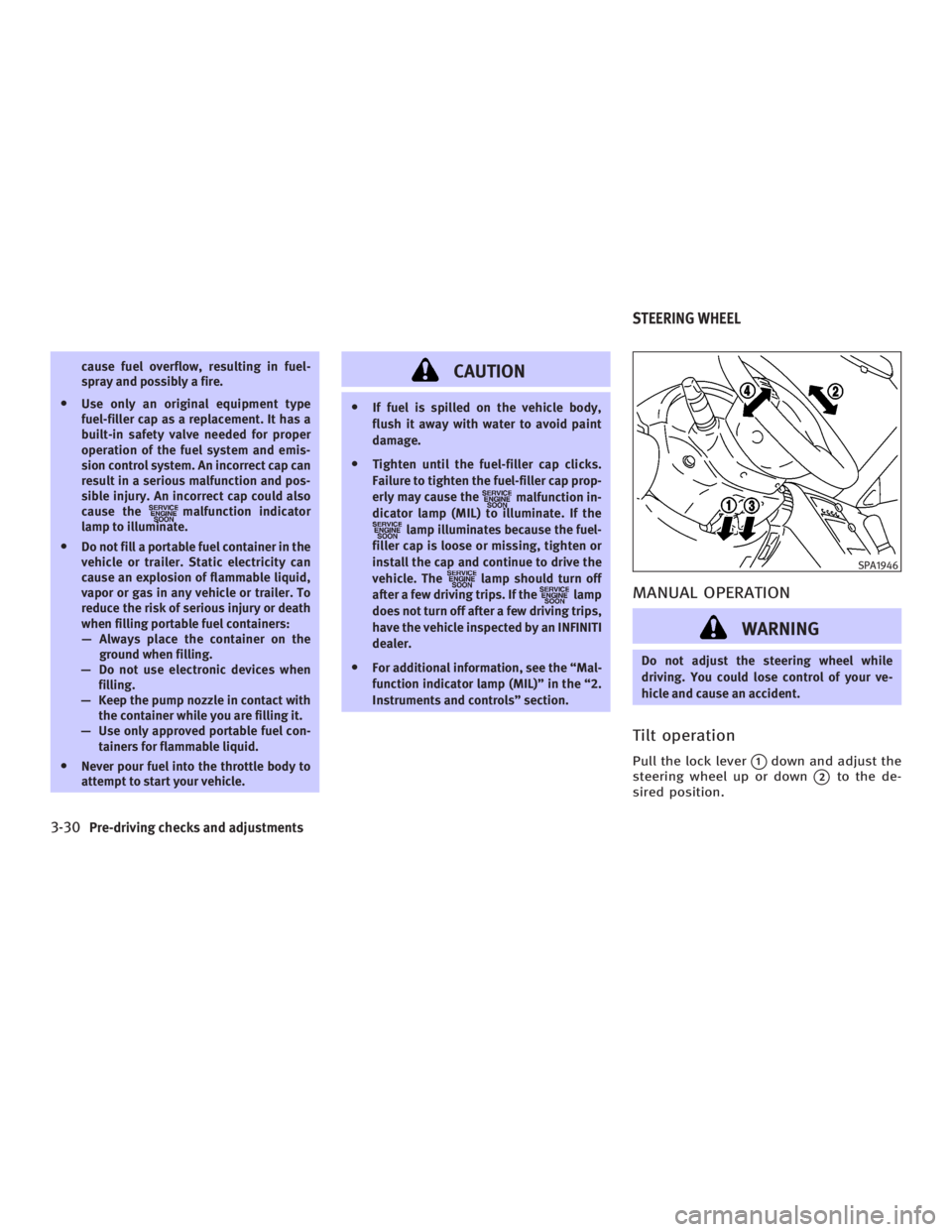
Tilt operation Pull the lock lever
q 1
down and adjust the
steering wheel up or down
q 2
to the de-
sired position. SPA1946
STEERING WHEEL
3-30 Pre-driving checks and adjustments
w 06.1.4/V35-D/V5.0
X
Page 153 of 344
Push the lock lever up securely to lock
the steering wheel in place.
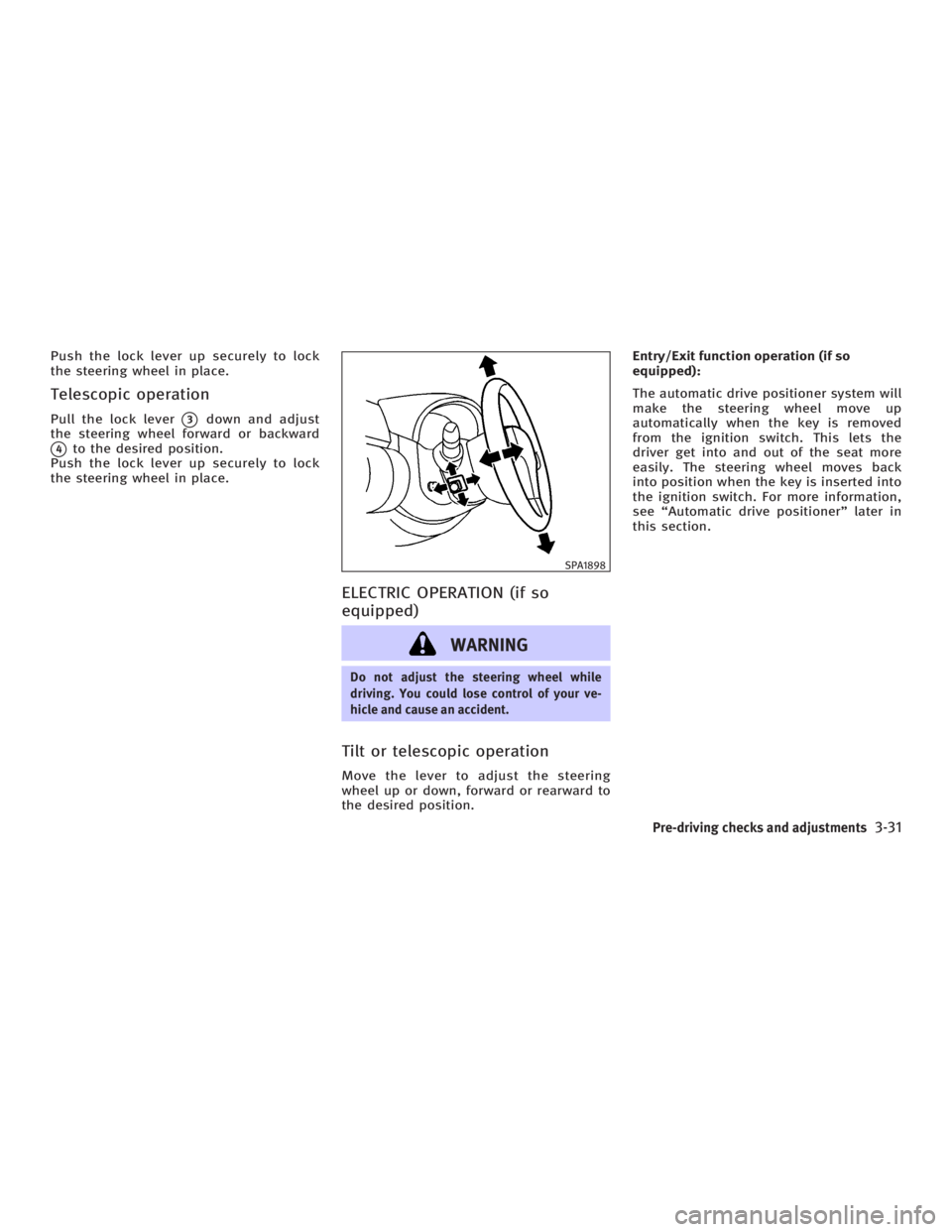
Telescopic operation Pull the lock lever
q 3
down and adjust
the steering wheel forward or backward
q 4
to the desired position.
Push the lock lever up securely to lock
the steering wheel in place.
ELECTRIC OPERATION (if so
equipped)
WARNING Do not adjust the steering wheel while
driving. You could lose control of your ve-
hicle and cause an accident.
Tilt or telescopic operation Move the lever to adjust the steering
wheel up or down, forward or rearward to
the desired position. Entry/Exit function operation (if so
equipped):
The automatic drive positioner system will
make the steering wheel move up
automatically when the key is removed
from the ignition switch. This lets the
driver get into and out of the seat more
easily. The steering wheel moves back
into position when the key is inserted into
the ignition switch. For more information,
see ªAutomatic drive positionerº later in
this section. SPA1898
Pre-driving checks and adjustments
3-31
w 06.1.4/V35-D/V5.0
X
Page 155 of 344
For HomeLink Universal Transceiver, see
the description in the ª2. Instruments and
controlsº section.
OUTSIDE MIRRORS
WARNING Objects viewed in the outside mirror on the
passenger side are closer than they appear.
Be careful when moving to the right. Using
only this mirror could cause an accident. Use
the inside mirror or glance over your
shoulder to properly judge distances to
other objects. The outside mirror adjustment will op-
erate only when the ignition switch is in
the ACC or ON position.
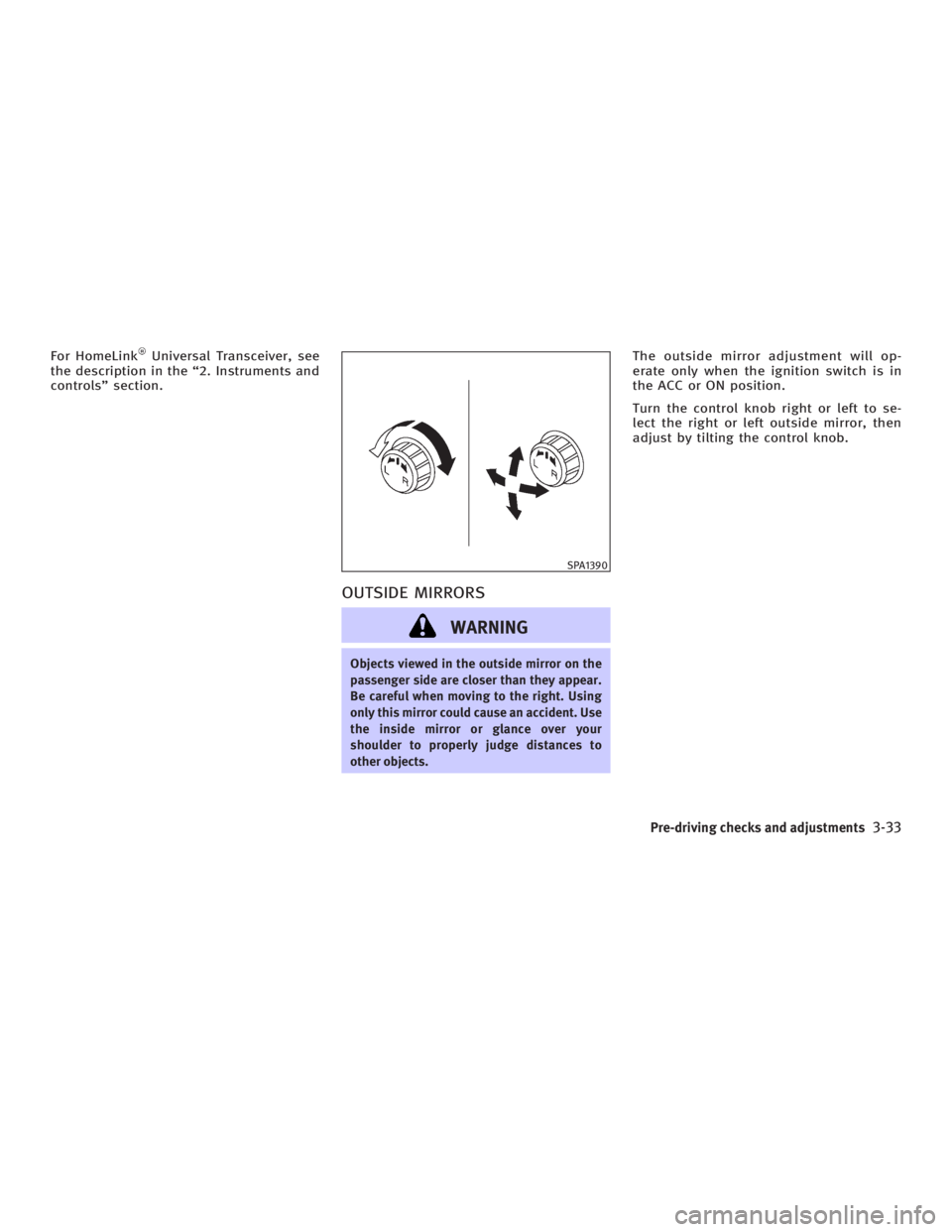
Turn the control knob right or left to se-
lect the right or left outside mirror, then
adjust by tilting the control knob. SPA1390
Pre-driving checks and adjustments
3-33
w 06.1.4/V35-D/V5.0
X
Page 162 of 344

WARNINGO Positioning of the heating or air condi-
tioning controls and display controls
should not be done while driving, in
order that full attention may be given to
driving operation.
O Do not disassemble or modify this
system. If you do, it may result in acci-
dents, fire, or electric shock.
O Do not use this system if you notice any
abnormality, such as a frozen screen or
lack of sound. Continued use of the
system may result in accident, fire or
electric shock.
O In case you notice any foreign object in
the system hardware, spill liquid on it, or
notice smoke or smell coming from it,
stop using the system immediately and
contact an INFINITI dealer. Ignoring such
conditions may lead to accidents, fire, or
electric shock. When you use this system, make sure the
engine is running.
If you use the system with the engine not
running (ignition ON or ACC) for a long
time, it will use up all the battery power,
and the engine will not start.
Reference symbols:
ªENTERº button Ð This is a button on the
control panel.
ª Display º key Ð This is a select key on
the screen. By selecting this key you can
proceed to the next function. NAMES OF THE COMPONENTS 1., 2., 5., 6., 9., 10. and 11.
For Navigation control buttons: refer to
the separate Navigation Owner's Manual.
3. ªSETTINGº button (P. 4-7)
4. ªINFOº button (P. 4-3)
7. Joystick and ªENTERº button (P. 4-3)
8. brightness control button
(P. 4-9)
12. ªBACKº button (P. 4-3) SAA1301
SAFETY NOTE
CONTROL PANEL BUTTONS Ð WITH
NAVIGATION SYSTEM
4-2 Display screen, heater, air conditioner and audio systems
w 06.1.4/V35-D/V5.0
X
Page 163 of 344

HOW TO USE JOYSTICK AND
ªENTERº BUTTON Choose an item on the display using the
joystick and push the ªENTERº button for
operation.
HOW TO USE ªBACKº BUTTON This button has two functions.
O Go back to the previous display.
When this button is pushed during setup,
setup will be canceled, and the screen
will return to the previous screen.
O Finish setup.
When this button is pushed after setup is
completed, the settings will be renewed
as directed, and the screen will return to
the map.
SETTING UP THE START-UP
SCREEN When you turn the ignition switch to the
ACC or ON position, the SYSTEM
START-UP warning is displayed on the
screen. Read the warning and select the
ª OK º key then push the ªENTERº button. If you do not push the ªENTERº button,
the Navigation system will not proceed to
the next step display.
To proceed to the next step, refer to the
separate Navigation System Owner's
Manual.
HOW TO USE ªINFOº BUTTON The ª Vehicle Information º screen will ap-
pear when the ªINFOº button is pushed.
Choose an item using the joystick and
push the ªENTERº button.
After viewing or adjusting the information
on the following screens, push the
ªBACKº button to return to the VEHICLE
INFORMATION menu. SAA1304
Display screen, heater, air conditioner and audio systems
4-3
w 06.1.4/V35-D/V5.0
X
Page 171 of 344
WARNINGO The air conditioner cooling function op-
erates only when the engine is running.
O On hot, sunny days, temperatures in a
closed vehicle could quickly become
high enough to cause severe or possibly
fatal injuries to people or animals. Do
not leave children or adults who would
normally require the assistance of
others in your vehicle. Unattended pets
should also not be left alone.
O Do not use the recirculation mode for
long periods as it may cause the interior
air to become stale and the windows to
fog up.
O Positioning of the heater and/or air con-
ditioner controls should not be done
while driving so full attention may be
given to vehicle operation.
Start the engine and operate the controls
to activate the air conditioner. AUTOMATIC OPERATION
Cooling and/or dehumidified
heating (AUTO) This mode may be normally used all year
round as the system automatically works
to keep a constant temperature. Air flow
distribution and fan speed are also con-
trolled automatically.
1. Push the AUTO/ECON button on.
(AUTO will be displayed.)
2. If the A/C button indicator is off, push
the A/C button to activate air condi-
tioner. The A/C button indicator will
come on.
3. Turn the temperature control dial to
set the desired temperature.
O Adjust the temperature to about 75ÉF
(24ÉC) for normal operation.
O The temperature of the passenger
compartment will be maintained auto-
matically. Air flow distribution and fan
speed are also controlled automati-
cally.
Economical operation (ECON) Economical operation reduces some load
to the engine to improve the fuel economy. It allows higher humidity than
normal operation.
Pushing the AUTO/ECON button changes
operations as follows while the A/C
button indicator is on. AUTO ! ECON !
AUTO
Heating (A/C off) The air conditioner does not activate.
When you need to heat only, use this
mode.
1. Push the AUTO/ECON button. (AUTO
will be displayed.)
2. Push the A/C button to turn off the air
conditioner. The A/C button indicator
will turn off.
3. Turn the temperature control dial to
set the desired temperature.
O The temperature of the passenger
compartment will be maintained auto-
matically. Air flow distribution and fan
speed are also controlled automati-
cally.
O Do not set the temperature lower than
the outside air temperature. Otherwise
the system may not work properly.
O Not recommended if windows fog up.
Display screen, heater, air conditioner and audio systems
4-11
w 06.1.4/V35-D/V5.0
X
Page 174 of 344
The air conditioning system in your
INFINITI vehicle is charged with a refriger-
ant designed with the environment in
mind. This refrigerant will not harm the
earth's ozone layer. However, special
charging equipment and lubricant are re-
quired when servicing your INFINITI air
conditioner. Using improper refrigerants
or lubricants will cause severe damage to
your air conditioning system. See ªCa-
pacities and recommended fuel/
lubricantsº in the ª9. Technical and con-
sumer informationº section for air condi-
tioning system refrigerant and lubricant
recommendations.
An INFINITI dealer will be able to service
your environmentally friendly air condi-
tioning system.
WARNINGThe air conditioner system contains refriger-
ant under high pressure. To avoid personal
injury, any air conditioner service should be
done only by an experienced technician with
proper equipment. Turn the ignition switch to the ACC or ON
position and push the POWER or RADIO
button to turn on the radio. If you listen to
the radio with the engine not running, the
key should be turned to the ACC position.
Radio reception is affected by station sig-
nal strength, distance from radio trans-
mitter, buildings, bridges, mountains and
other external influences. Intermittent
changes in reception quality normally are
caused by these external influences.
Using a cellular phone in or near the ve-
hicle may influence radio reception
quality.
Radio reception Your radio system is equipped with state-
of-the-art electronic circuits to enhance
radio reception. These circuits are de-
signed to extend reception range, and to
enhance the quality of that reception.
However there are some general charac-
teristics of FM, AM and satellite radio sig-
nals that can affect radio reception
quality in a moving vehicle, even when
the finest equipment is used. These char-
acteristics are completely normal in a
given reception area, and do not indicate
any malfunction in your radio system. Remember that a moving vehicle is not
the ideal place to listen to a radio. Be-
cause of the movement, reception condi-
tions will constantly change. Buildings,
terrain, signal distance and interference
from other vehicles can work against
ideal reception. Described below are
some of the factors that can affect your
radio reception.
SERVICING AIR CONDITIONER AUDIO SYSTEM
4-14 Display screen, heater, air conditioner and audio systems
w 06.1.4/V35-D/V5.0
X
Page 183 of 344

(With satellite radio)
AM ! FM1 ! FM2 ! SAT1 ! SAT2 ! AM
No satellite radio reception is available
unless optional satellite receiver and an-
tenna are installed and an XM or SIRI-
US TM
satellite radio service subscription
is active.
Satellite radio is not available in Alaska
and Hawaii.
When the RADIO band select button is
pushed while the ignition switch is in the
ACC or ON position, the radio will come
on at the station last played.
The last station/channel played will also
come on when the ON z OFF/VOL control
knob is pushed to ON.
If another audio source is playing when
the RADIO button is turned to ON, the
other audio source will automatically be
turned off and the last radio station
played will come on.
The FM stereo indicator ST will glow
during FM stereo reception. When the ste-
reo broadcast signal is weak, the radio
will automatically change from stereo to
monaural reception. TUNE (Tuning):
WARNING The radio should not be tuned while driving
so full attention may be given to vehicle op-
eration.
Push these buttons for manual tuning. To
move quickly through the channels, push
and hold either of the TUNE buttons down
for more than 0.5 second.
SEEK tuning:
For AM and FM radio:
Push the SEEK button or ,to
tune from high to low or low to high fre-
quencies and stops at the next broadcast-
ing station.
For satellite radio:
Push the SEEK button or to
seek channels of the next or previous cat-
egory. SCAN tuning:
Push the SCAN tuning button to tune from
low to high frequencies and stops at each
broadcasting station for 5 seconds. Push-
ing the button again during this 5 sec-
onds period will stop SCAN tuning and
the radio will remain tuned to that sta-
tion.
If the SCAN tuning button is not pushed
within 5 seconds, SCAN tuning moves to
the next station.
DISPLAY:
O By pushing the DISP button for more
than 1.5 seconds while receiving FM
radio waves, ªPS NAMEº switches be-
tween ON and OFF (Type A only).
O Pushing the DISP button will display
additional information about the satel-
lite radio broadcast (for example:
Artist name, Title).
Keep pushing the DISP button, and it
will change the information of the sat-
ellite radio broadcast to be displayed
as follows:
CH Number ! CH Name ! Artist
Name ! Song Title ! CH Number
Display screen, heater, air conditioner and audio systems
4-23
w 06.1.4/V35-D/V5.0
X
Page 189 of 344
This system searches for the blank inter-
vals between selections. If there is a
blank interval within one program or there
is no interval between programs, the sys-
tem may not stop in the desired or ex-
pected location.
FOLDER change (CD with MP3/WMA):
Push up/down the tuning switch or
for more than 1.5 seconds to change
the folders (if it has folders).
Push up/down the tuning switch or
for less than 1.5 seconds to return to
the beginning of the present program or
skip to the next program.
DISC change (CD without MP3/WMA):
Push up/down the tuning switch or
for more than 1.5 seconds to change
the playing disc up or down.
ANTENNA
Window antenna The antenna pattern is printed inside the
rear window. CAUTION O Do not place metalized film near the rear
window glass or attach any metal parts
to it. This may cause poor reception or
noise.
O When cleaning the inside of the rear win-
dow, be careful not to scratch or damage
the rear window antenna. Lightly wipe
along the antenna with a dampened soft
cloth. When installing a CB, ham radio or car
phone in your INFINITI, be sure to observe
the following cautions, otherwise the new
equipment may adversely affect the En-
gine control system and other electronic
parts.
WARNING O A cellular telephone should not be used
while driving so full attention may be
given to vehicle operation. Some juris-
dictions prohibit the use of cellular tele-
phones while driving.
O If you must make a call while your ve-
hicle is in motion, the hands free cellular
phone operational mode (if so equipped)
is highly recommended. Exercise ex-
treme caution at all times so full atten-
tion may be given to vehicle operation.
O If a conversation in a moving vehicle re-
quires you to take notes, pull off the road
to a safe location and stop your vehicle
before doing so.CAR PHONE OR CB RADIO
Display screen, heater, air conditioner and audio systems
4-29
w 06.1.4/V35-D/V5.0
X
Page 190 of 344
CAUTIONO Keep the antenna as far away as pos-
sible from the electronic control mod-
ules.
O Keep the antenna wire more than 8 in
(20 cm) away from the electronic control
system harness. Do not route the an-
tenna wire next to any harness.
O Adjust the antenna standing-wave ratio
as recommended by the manufacturer.
O Connect the ground wire from the CB
radio chassis to the body.
O For details, consult an INFINITI dealer.
WARNING O Use a phone after stopping your vehicle
in a safe location. If you have to use a
phone while driving, exercise extreme
caution at all times so full attention may
be given to vehicle operation.
O If a conversation in a moving vehicle re-
quires you to take notes, pull off the road
to a safe location and stop your vehicle
before doing so.
CAUTION To avoid draining the vehicle battery, use a
phone after starting the engine.BLUETOOTH HANDS-FREE PHONE SYSTEM
WITH INFINITI VOICE RECOGNITION
4-30 Display screen, heater, air conditioner and audio systems
w 06.1.4/V35-D/V5.0
X