speed sensor INFINITI M35 2006 Factory Manual Online
[x] Cancel search | Manufacturer: INFINITI, Model Year: 2006, Model line: M35, Model: INFINITI M35 2006Pages: 5621, PDF Size: 65.56 MB
Page 560 of 5621
TROUBLE DIAGNOSIS
ATC-113
C
D
E
F
G
H
I
K
L
MA
B
AT C
Revision: 2006 January2006 M35/M45
Ambient Sensor CircuitNJS000H0
COMPONENT DESCRIPTION
Ambient Sensor
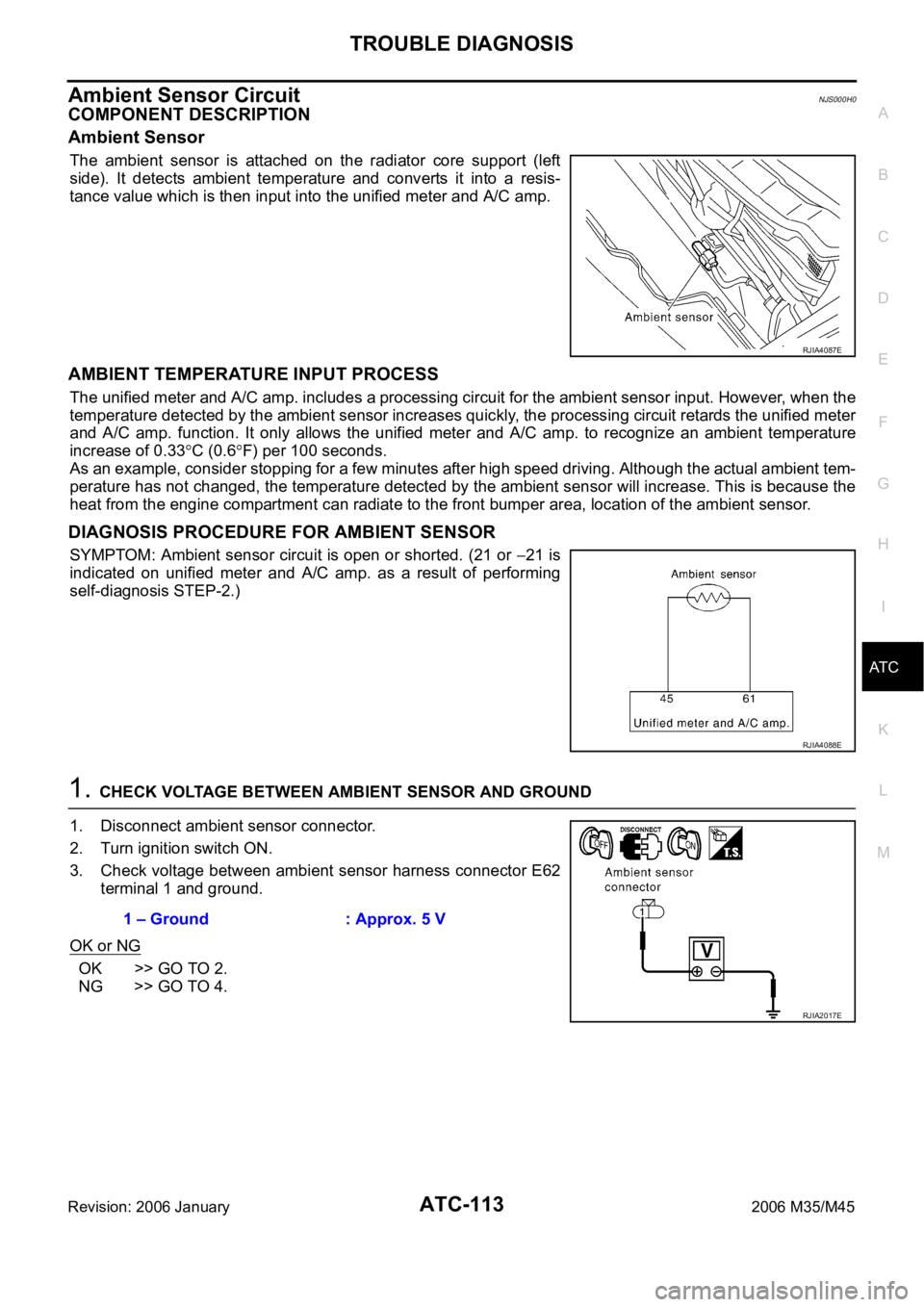
The ambient sensor is attached on the radiator core support (left
side). It detects ambient temperature and converts it into a resis-
tance value which is then input into the unified meter and A/C amp.
AMBIENT TEMPERATURE INPUT PROCESS
The unified meter and A/C amp. includes a processing circuit for the ambient sensor input. However, when the
temperature detected by the ambient sensor increases quickly, the processing circuit retards the unified meter
and A/C amp. function. It only allows the unified meter and A/C amp. to recognize an ambient temperature
increase of 0.33
C (0.6F) per 100 seconds.
As an example, consider stopping for a few minutes after high speed driving. Although the actual ambient tem-
perature has not changed, the temperature detected by the ambient sensor will increase. This is because the
heat from the engine compartment can radiate to the front bumper area, location of the ambient sensor.
DIAGNOSIS PROCEDURE FOR AMBIENT SENSOR
SYMPTOM: Ambient sensor circuit is open or shorted. (21 or 21 is
indicated on unified meter and A/C amp. as a result of performing
self-diagnosis STEP-2.)
1. CHECK VOLTAGE BETWEEN AMBIENT SENSOR AND GROUND
1. Disconnect ambient sensor connector.
2. Turn ignition switch ON.
3. Check voltage between ambient sensor harness connector E62
terminal 1 and ground.
OK or NG
OK >> GO TO 2.
NG >> GO TO 4.
RJIA4087E
RJIA4088E
1 – Ground : Approx. 5 V
RJIA2017E
Page 619 of 5621

ATC-172
REFRIGERANT LINES
Revision: 2006 January2006 M35/M45
CHECKING PROCEDURE
To prevent inaccurate or false readings, make sure there is no refrigerant vapor, shop chemicals, or cigarette
smoke in the vicinity of the vehicle. Perform the leak test in calm area (low air/wind movement) so that the
leaking refrigerant is not dispersed.
1. Stop engine.
2. Connect a suitable A/C manifold gauge set (SST: J-39183)to the A/C service valves.
3. Check if the A/C refrigerant pressure is at least 345 kPa (3.52 kg/cm
2 , 50 psi) above 16C (61F). If less
than specification, recover/evacuate and recharge the system with the specified amount of refrigerant.
NOTE:
At temperatures below 16
C (61F), leaks may not be detected since the system may not reach 345 kPa
(3.52 kg/cm
2 , 50 psi).
4. Perform the leak test from the high-pressure side (compressor discharge a to evaporator inlet h) to the
low-pressure side [evaporator drain hose i to shaft seal m(VQ35DE) or n(VK45DE)]. Refer to ATC-153,
"Components" . Perform a leak check for the following areas carefully. Clean the component to be
checked and move the leak detected probe completely around the connection/component.
Compressor
Check the fitting of high- and low-pressure flexible hoses, relief valve and shaft seal.
Condenser
Check the fitting of high-pressure flexible hose and pipe.
Liquid tank
Check the fitting of refrigerant pressure sensor.
Service valves
Check all around the service valves. Ensure service valve caps are secured on the service valves (to pre-
vent leaks).
NOTE:
After removing A/C manifold gauge set from service valves, wipe any residue from valves to prevent any
false readings by leak detector.
Cooling unit (Evaporator)
With engine OFF, turn blower fan on “High” for at least 15 seconds to dissipate any refrigerant trace in the
cooling unit. Wait a minimum of 10 minutes accumulation time (refer to the manufacturer’s recommended
procedure for actual wait time) before inserting the leak detector probe into the drain hose.
Keep the probe inserted for at least 10 seconds. Use caution not to contaminate the probe tip with water
or dirt that may be in the drain hose.
5. If a leak detector detects a leak, verify at least once by blowing compressed air into area of suspected
leak, then repeat check as outlined above.
6. Do not stop when one leak is found. Continue to check for additional leaks at all system components.
If no leaks are found, perform steps 7 - 10.
7. Start the engine.
8. Set the A/C control as follows;
a. A/C switch: ON
b. MODE door position: VENT (Ventilation)
c. Intake door position: Recirculation
d. Temperature setting: Max. cold
e. Fan speed: High
9. Run engine at 1,500 rpm for at least 2 minutes.
10. Stop the engine and perform leak check again following steps 4
through 6 above.
Refrigerant leaks should be checked immediately after stopping
the engine. Begin with the leak detector at the compressor. The
pressure on the high-pressure side will gradually drop after
refrigerant circulation stops and pressure on the low-pressure
side will gradually rise, as shown in the graph. Some leaks are
more easily detected when pressure is high.
11. Before connecting recovery/recycling recharging equipment to
vehicle, check recovery/recycling recharging equipment gauges.
SHA839E
Page 629 of 5621
![INFINITI M35 2006 Factory Manual Online AV-8
[WITHOUT MOBILE ENTERTAINMENT SYSTEM]
SYSTEM DESCRIPTION
Revision: 2006 January2006 M35/M45
SYSTEM DESCRIPTIONPFP:00000
System FunctionsNKS00489
Here is an example of functions. For details, refe](/img/42/57023/w960_57023-628.png "INFINITI M35 2006 Factory Manual Online AV-8
[WITHOUT MOBILE ENTERTAINMENT SYSTEM]
SYSTEM DESCRIPTION
Revision: 2006 January2006 M35/M45
SYSTEM DESCRIPTIONPFP:00000
System FunctionsNKS00489
Here is an example of functions. For details, refe")
AV-8
[WITHOUT MOBILE ENTERTAINMENT SYSTEM]
SYSTEM DESCRIPTION
Revision: 2006 January2006 M35/M45
SYSTEM DESCRIPTIONPFP:00000
System FunctionsNKS00489
Here is an example of functions. For details, refer to the owner's manual or navigation system owner's manual.
AUDIO
Speed Sensitive Volume (for BASE System)
Volume level of this system gone up and down automatically in proportion to the vehicle speed. And the
control level can be selected by the customer.
The audio unit inputs the vehicle signal that is sent from unified meter and A/C amp via CAN communica-
tion through AV (NAVI) control unit.
Precision Phased Audio (for BASE System)
It plays back the sound using the woofer (ultra-low bass and clear midrange sound) and reproduces the
sound with presence.
When the conventional BASS/TREBLE adjustment is a maximum, the sounds might be unclear because
the volume of midrange sound also rises together with the bass and treble. The precision phased audio
can emphasize ultra-low bass and ultra-high treble without changing the midrange sound by digital pro-
cessing using DSP.
NOTE:
When the radio is played, the noise may increase more than the presence due to the characteristics of
broadcasting waves. Therefore, the amplification rate while playing the radio is controlled lower than the
rate while playing CD.
AudioPilot® (for BOSE System)
AudioPilot® is the sound improving system that picks up any noises and the sound of music coming into the
vehicle by a microphone under the steering, and that the BOSE amp revises the frequency feature of music at
real time in response to the frequency feature of the noise while driving and listening to music.
If low frequency area noise from vehicle is loud, it adjusts low frequency element of music to be bigger
than vehicle noise.
If high frequency area noise from vehicle is loud, it adjusts all frequency element of music to be bigger
than vehicle noise.
Centerpoint® (for BOSE Surround 5.1ch System)
CD and 2.0ch DVD stereo sound played at audio unit and DVD player are subjected to signal processing in
BOSE amp. It can play the surround sound with presence.
VEHICLE INFORMATION SYSTEM
The status of audio, climate control system, fuel consumption, and navigation system (if equipped) are
displayed.
AV (NAVI) control unit receives the data signal from ECM, unified meter and A/C amp and low tire pres-
sure warning control unit via CAN communication. It calculates the values of fuel economy, tire pressure,
and trip computer from the received information and displays them.
NAVIGATION SYSTEM
Location Detection Principle
The navigation system periodically calculates the vehicle's current
position according to the following three signals:
Travel distance of the vehicle as determined by the vehicle
speed sensor
Turning angle of the vehicle as determined by the gyroscope
(angular velocity sensor)
Direction of vehicle travel as determined by the GPS antenna
(GPS information)
The current position of the vehicle is then identified by comparing the
calculated vehicle position with map data read from the map DVD-
ROM, which is stored in the DVD-ROM drive (map-matching), and
SKIB1058E
Page 630 of 5621
![INFINITI M35 2006 Factory Manual Online SYSTEM DESCRIPTION
AV-9
[WITHOUT MOBILE ENTERTAINMENT SYSTEM]
C
D
E
F
G
H
I
J
L
MA
B
AV
Revision: 2006 January2006 M35/M45
indicated on the screen as a vehicle mark. More accurate data is judged and u](/img/42/57023/w960_57023-629.png "INFINITI M35 2006 Factory Manual Online SYSTEM DESCRIPTION
AV-9
[WITHOUT MOBILE ENTERTAINMENT SYSTEM]
C
D
E
F
G
H
I
J
L
MA
B
AV
Revision: 2006 January2006 M35/M45
indicated on the screen as a vehicle mark. More accurate data is judged and u")
SYSTEM DESCRIPTION
AV-9
[WITHOUT MOBILE ENTERTAINMENT SYSTEM]
C
D
E
F
G
H
I
J
L
MA
B
AV
Revision: 2006 January2006 M35/M45
indicated on the screen as a vehicle mark. More accurate data is judged and used by comparing vehicle posi-
tion detection results found by the GPS with the result by map-matching.
The current vehicle position will be calculated by detecting the dis-
tance the vehicle moved from the previous calculation point and its
direction.
Travel distance
Travel distance calculations are based on the vehicle speed
sensor input signal. Therefore, the calculation may become
incorrect as the tires wear down. To prevent this, an automatic
distance correction function has been adopted.
Travel direction
Change in the travel direction of the vehicle is calculated by a
gyroscope (angular velocity sensor) and a GPS antenna (GPS
information). They have both advantages and disadvantages.
More accurate traveling direction is detected because priorities are set for the signals from these two
devices according to the situation.
Map-Matching
Map-matching compares a current location detected by the method
in the “Location Detection Principle” with a road map data from Map
DVD-ROM stored in DVD-ROM drive.
NOTE:
The road map data is based on data stored in the map DVD-ROM.
The vehicle position may not be corrected under the following circumstances and after driving for a certain
time when GPS information is difficult to receive. In this case, the vehicle mark on the display must be cor-
rected manually.
In map-matching, alternative routes to reach the destination will
be shown and prioritized, after the road on which the vehicle is
currently driven has been judged and the vehicle mark has been
repositioned.
If there is an error in distance and/or direction, alternative routes
will be shown in different order of priority, and the incorrect road
can be avoided.
If two roads are running in parallel, they are of the same priority.
Therefore, the vehicle mark may appear on either of them alter-
nately, depending on maneuvering of the steering wheel and
configuration of the road.
SEL684V
Type Advantage Disadvantage
Gyroscope
(angular velocity sensor)Can detect the vehicle's turning angle quite
accurately.Direction errors may accumulate when vehicle is
driven for long distances without stopping.
GPS antenna
(GPS information)Can detect the vehicle's travel direction
(North/South/East/West).Correct direction cannot be detected when vehi-
cle speed is low.
SEL685V
SEL686V
Page 633 of 5621
![INFINITI M35 2006 Factory Manual Online AV-12
[WITHOUT MOBILE ENTERTAINMENT SYSTEM]
SYSTEM DESCRIPTION
Revision: 2006 January2006 M35/M45
BOSE Surround 5.1ch System
It amplifies the sound signal from the audio unit and the DVD](/img/42/57023/w960_57023-632.png "INFINITI M35 2006 Factory Manual Online AV-12
[WITHOUT MOBILE ENTERTAINMENT SYSTEM]
SYSTEM DESCRIPTION
Revision: 2006 January2006 M35/M45
BOSE Surround 5.1ch System
It amplifies the sound signal from the audio unit and the DVD")
AV-12
[WITHOUT MOBILE ENTERTAINMENT SYSTEM]
SYSTEM DESCRIPTION
Revision: 2006 January2006 M35/M45
BOSE Surround 5.1ch System
It amplifies the sound signal from the audio unit and the DVD
sound signal from DVD player, and then output them to each
speaker.
It receives the voice guidance signal from AV (NAVI) control unit
and output it to the front speaker.
It controls sound volume of each speaker when outputting TEL
voice and voice guidance.
It subjects to AudioPilot® processing when receiving sound sig-
nal from microphone for AudioPilot
® .
It subjects to Centerpoint® processing.
SATELLITE TUNER
The satellite tuner is connected with the audio unit via communi-
cation line.
It sends the received sound signal from the satellite radio
antenna to the audio unit.
AV CONTROL UNIT (WITHOUT NAVI)
It controls each unit of the system by the operation signal from
the multifunction switch and sends the image signal of operating
condition or vehicle information, etc. to the front display unit.
It receives the TEL input voice or the input voice at voice control
from the microphone. It receives the received TEL voice, and
then sends it to the audio unit.
It sends the voice guidance signal to BOSE amp (BOSE system)
and audio unit (BASE system).
NAVI CONTROL UNIT (WITH NAVI)
It controls each unit of the system by the operation signal from
the multifunction switch and sends the image signal of operating
condition or vehicle information, etc. to the front display unit.
It receives the TEL input voice or the input voice at voice control
from the microphone. It receives the received TEL voice, and
then sends it to the audio unit.
It sends the voice guidance signal to BOSE amp (BOSE system)
and audio unit (BASE system).
Signals are received from the gyro, the vehicle speed sensor,
and the GPS antenna. Vehicle location is determined by com-
bining this data with the data contained in the DVD-ROM map.
Location information is shown on liquid crystal display panel.
SKIB3887E
SKIB3894E
SKIB3891E
SKIB3892E
Page 720 of 5621
![INFINITI M35 2006 Factory Manual Online DIAGNOSIS SYSTEM
AV-99
[WITHOUT MOBILE ENTERTAINMENT SYSTEM]
C
D
E
F
G
H
I
J
L
MA
B
AV
Revision: 2006 January2006 M35/M45
CAMERA CONT.
There are 2 functions: “Connection Confirmation”, “Adjust o](/img/42/57023/w960_57023-719.png "INFINITI M35 2006 Factory Manual Online DIAGNOSIS SYSTEM
AV-99
[WITHOUT MOBILE ENTERTAINMENT SYSTEM]
C
D
E
F
G
H
I
J
L
MA
B
AV
Revision: 2006 January2006 M35/M45
CAMERA CONT.
There are 2 functions: “Connection Confirmation”, “Adjust o")
DIAGNOSIS SYSTEM
AV-99
[WITHOUT MOBILE ENTERTAINMENT SYSTEM]
C
D
E
F
G
H
I
J
L
MA
B
AV
Revision: 2006 January2006 M35/M45
CAMERA CONT.
There are 2 functions: “Connection Confirmation”, “Adjust offset of rear view camera”.
Connection Confirmation
The input signals of steering angle sensor signal, reverse signal, and
vehicle speed signal can be checked.
Adjust Offset of Rear View Camera
If the adjustment of rear view monitor guiding line display position is
necessary when rear view camera is removed, use this mode to
adjust it.
SKIB3688E
Diagnosis item Display Vehicle status
Steering Angle SensorONIt turns ON when the steering is turning with the ignition switch ON (Once it turns
ON, it does not change during Connection Confirmation mode)
OFFTurn ignition switch ACC
It turns OFF when the steering is not turning with the ignition switch ON
— Camera-connection recognition signal malfunction
Reverse SensorON Selector lever in R position with ignition switch ON
OFFTurn ignition switch ACC
Selector lever in any position other than R with ignition switch ON
— Camera-connection recognition signal malfunction
Vehicle Speed SensorON When vehicle speed is 0 km/h or more with ignition switch ON
OFFTurn ignition switch ACC
When vehicle speed is 0 km/h with ignition switch ON
— Camera-connection recognition signal malfunction
SKIB3689E
Page 744 of 5621
![INFINITI M35 2006 Factory Manual Online TROUBLE DIAGNOSIS
AV-123
[WITHOUT MOBILE ENTERTAINMENT SYSTEM]
C
D
E
F
G
H
I
J
L
MA
B
AV
Revision: 2006 January2006 M35/M45
MAP DVD-ROM
ROUTE CALCULATION AND VISUAL GUIDANCE
The location of vehicle ic](/img/42/57023/w960_57023-743.png "INFINITI M35 2006 Factory Manual Online TROUBLE DIAGNOSIS
AV-123
[WITHOUT MOBILE ENTERTAINMENT SYSTEM]
C
D
E
F
G
H
I
J
L
MA
B
AV
Revision: 2006 January2006 M35/M45
MAP DVD-ROM
ROUTE CALCULATION AND VISUAL GUIDANCE
The location of vehicle ic")
TROUBLE DIAGNOSIS
AV-123
[WITHOUT MOBILE ENTERTAINMENT SYSTEM]
C
D
E
F
G
H
I
J
L
MA
B
AV
Revision: 2006 January2006 M35/M45
MAP DVD-ROM
ROUTE CALCULATION AND VISUAL GUIDANCE
The location of vehicle icon is mis-
aligned from the actual position.When using tire chains or replacing the tires, speed
calculations based on the speed sensor may be
incorrect.Drive the vehicle for a while [at approxi-
mately 30km/h (19 MPH) for about 30
minutes] to automatically correct the vehi-
cle icon position.
If this does not correct the vehicle icon
position, contact an INFINITI dealer.
The map data has mistake or is incomplete (the
vehicle icon position is always misaligned in the
same area).Updated road information will be included
in the next version of the map DVD-ROM. Symptom Possible cause Possible solution
Symptom Possible cause Possible solution
The message “Error” appears. Map DVD-ROM is dirty or partially damaged.Check the DVD-ROM and wipe it clean
with a soft cloth.
If there is any damage, replace the DVD-
ROM.
Symptom Possible cause Possible solution
In the auto reroute calculation,
waypoints are not included.Waypoints already passed are not included in the
auto reroute calculation.In case of going to that waypoints again,
edit the route.
Route information is not displayed.Route calculation has not yet been performed.Set the destination and perform route cal-
culation.
The vehicle is not driven on the suggested route. Drive on the suggested route.
Route guidance is set to off. Turn on route guidance.
Route information is not provided for narrow streets
(roads displayed in gray).This is not a malfunction.
The auto reroute calculation (or
detour calculation) suggests the
same route as the one previously
suggested. Route calculation took priority conditions into con-
sideration, but the same route was calculated. This is not a malfunction.
A waypoint cannot be added.Five waypoints are already set on the route, includ-
ing ones that already passed.A maximum of 5 waypoints can be set on
the route. In case of going to 6 or more
waypoints, perform route calculations mul-
tiple times as necessary.
The suggested route is not dis-
played.Roads near the destination cannot be calculated.Reset the destination to a main or ordinary
road, and recalculate the route.
The starting point and destination are too close. Set a more distant destination.
The starting point and destination are too far away.Divide the way by selecting one or two
intermediate destinations, and perform
route calculations multiple times.
There are time restricted roads (by day of week, by
time) near the current vehicle location or destina-
tion.Set “Use Time Restricted Roads” to off.
A part of the route is not displayed.The suggested route includes narrow streets (roads
displayed in gray).This is not a malfunction.
The part of the route already
passed is deleted.A route is managed by sections between way-
points. If you passed the first waypoint, the section
between the starting point and the waypoint is
deleted. (It may not be deleted depending on the
area.)This is not a malfunction.
Page 746 of 5621
![INFINITI M35 2006 Factory Manual Online TROUBLE DIAGNOSIS
AV-125
[WITHOUT MOBILE ENTERTAINMENT SYSTEM]
C
D
E
F
G
H
I
J
L
MA
B
AV
Revision: 2006 January2006 M35/M45
EXAMPLES OF VEHICLE MARK DISPLACEMENT
Vehicle's travel amount is calcul](/img/42/57023/w960_57023-745.png "INFINITI M35 2006 Factory Manual Online TROUBLE DIAGNOSIS
AV-125
[WITHOUT MOBILE ENTERTAINMENT SYSTEM]
C
D
E
F
G
H
I
J
L
MA
B
AV
Revision: 2006 January2006 M35/M45
EXAMPLES OF VEHICLE MARK DISPLACEMENT
Vehicle's travel amount is calcul")
TROUBLE DIAGNOSIS
AV-125
[WITHOUT MOBILE ENTERTAINMENT SYSTEM]
C
D
E
F
G
H
I
J
L
MA
B
AV
Revision: 2006 January2006 M35/M45
EXAMPLES OF VEHICLE MARK DISPLACEMENT
Vehicle's travel amount is calculated by reading its travel distance and turning angle. Therefore, if the vehicle
is driven in the following manner, an error will occur in the vehicle's current location display. If correct location
has not been restored after driving the vehicle for a while, perform location correction.
Rear view monitor image is not
clearFront glass of camera lens is dirtyDip a soft cloth into water and wipe the
glass softly.
There are raindrops, snow, etc. Wipe it with a soft cloth softly.
The sunlight or the headlight of following vehicle is
shining directly to the camera lens.It returns to the original condition if the light
applied to the lens disappears
The center position of possible
route line is not in the correct posi-
tion
Remove or replace the battery.
Replace steering angle sensor or camera control
unit.
Turn steering wheel when turning ignition switch
OFF.Perform the neutral position correction as
follows.
Fully turn the steering wheel to left/right.
Drive 100 m or more at vehicle speed 30
km/h or more. Symptom Possible cause Possible solution
SEL698V
Page 748 of 5621
![INFINITI M35 2006 Factory Manual Online TROUBLE DIAGNOSIS
AV-127
[WITHOUT MOBILE ENTERTAINMENT SYSTEM]
C
D
E
F
G
H
I
J
L
MA
B
AV
Revision: 2006 January2006 M35/M45
PlaceIn a parking lot When driving in a parking lot, or other loca-
tion whe](/img/42/57023/w960_57023-747.png "INFINITI M35 2006 Factory Manual Online TROUBLE DIAGNOSIS
AV-127
[WITHOUT MOBILE ENTERTAINMENT SYSTEM]
C
D
E
F
G
H
I
J
L
MA
B
AV
Revision: 2006 January2006 M35/M45
PlaceIn a parking lot When driving in a parking lot, or other loca-
tion whe")
TROUBLE DIAGNOSIS
AV-127
[WITHOUT MOBILE ENTERTAINMENT SYSTEM]
C
D
E
F
G
H
I
J
L
MA
B
AV
Revision: 2006 January2006 M35/M45
PlaceIn a parking lot When driving in a parking lot, or other loca-
tion where there are no roads on the map,
matching may place the vehicle mark on a
nearby road. When the vehicle returns to
the road, the vehicle mark may have devi-
ated from the correct location.
When driving in circle or turning the steer-
ing wheel repeatedly, direction errors accu-
mulate, and the vehicle mark may deviate
from the correct location.
If after traveling about 10 km (6
miles) the correct location has
not been restored, perform
location correction and, if nec-
essary, direction correction. Turntable
When the ignition switch is off, the naviga-
tion system cannot get the signal from the
gyroscope (angular speed sensor). There-
fore, the displayed direction may be wrong
and the correct road may not be easily
returned to after rotating the vehicle on a
turntable with the ignition off.
Slippery roads On snow, wet roads, gravel, or other roads
where tires may slip easily, accumulated
mileage errors may cause the vehicle mark
to deviate from the correct road.
Slopes When parking in sloped garages, when
traveling on banked roads, or in other
cases where the vehicle turns when tilted,
an error in the turning angle will occur, and
the vehicle mark may deviate from the
road.
Map dataRoad not displayed on the map screen
When driving on new roads or other roads
not displayed on the map screen, map
matching does not function correctly and
matches the location to a nearby road.
When the vehicle returns to a road which is
on the map, the vehicle mark may deviate
from the correct road.
Different road pattern
(Changed due to repair)
If the road pattern stored in the map data
and the actual road pattern are different,
map matching does not function correctly
and matches the location to a nearby road.
The vehicle mark may deviate from the
correct road.
VehicleUse of tire chains
When tire chains are used, the mileage is
not correctly detected, and the vehicle
mark may deviate from the correct road.Drive the vehicle for a while. If
the distance is still deviated,
adjust it by using the distance
adjustment function. (If the tire
chain is removed, recover the
original value.) Cause (condition) Driving condition Remarks (correction, etc.)
SEL709V
SEL710V
SEL699V
ELK0201D
Page 749 of 5621
![INFINITI M35 2006 Factory Manual Online AV-128
[WITHOUT MOBILE ENTERTAINMENT SYSTEM]
TROUBLE DIAGNOSIS
Revision: 2006 January2006 M35/M45
VEHICLE MARK SHOWS A POSITION WHICH IS COMPLETELY WRONG
In the following cases, the vehicle mark may a](/img/42/57023/w960_57023-748.png "INFINITI M35 2006 Factory Manual Online AV-128
[WITHOUT MOBILE ENTERTAINMENT SYSTEM]
TROUBLE DIAGNOSIS
Revision: 2006 January2006 M35/M45
VEHICLE MARK SHOWS A POSITION WHICH IS COMPLETELY WRONG
In the following cases, the vehicle mark may a")
AV-128
[WITHOUT MOBILE ENTERTAINMENT SYSTEM]
TROUBLE DIAGNOSIS
Revision: 2006 January2006 M35/M45
VEHICLE MARK SHOWS A POSITION WHICH IS COMPLETELY WRONG
In the following cases, the vehicle mark may appear on completely different position in the map depending on
the GPS satellite signal receiving conditions. In this case, perform location correction and direction correction.
When location correction has not been done
–If the receiving conditions of the GPS satellite signal is poor, if the vehicle mark becomes out of place, it
may move to a completely different location and not come back if location correction is not done. The
position will be corrected if the GPS signal can be received.
When the vehicle has traveled by ferry, or when the vehicle has been being towed
–Because calculation of the current location cannot be done when traveling with the ignition off, for exam-
ple when traveling by ferry or when being towed, the location before travel is displayed. If the precise loca-
tion can be detected with GPS, the location will be corrected.
VEHICLE MARK JUMPS
In the following cases, the vehicle mark may appear to jump as a result of automatic correction of the current
location.
When map matching has been done
–If the current location and the vehicle mark are different when map matching is done, the vehicle mark
may seem to jump. At this time, the location may be “corrected” to the wrong road or to a location which is
not on a road.
When GPS location correction has been done
–If the current location and the vehicle mark are different when the location is corrected using GPS mea-
surements, the vehicle mark may seem to jump. At this time, the location may be “corrected” to a location
which is not on a road.
Precautions
for drivingJust after the engine is started If the vehicle is driven off just after the
engine is started when the gyroscope
(angular speed sensor) correction is not
completed, the vehicle can lose its direc-
tion and may have deviated from the cor-
rect location.Wait for a short while before
driving after starting the engine.
Continuous driving without stopping When driving long distances without stop-
ping, direction errors may accumulate, and
the vehicle mark may deviate from the cor-
rect road.Stop and adjust the orientation.
Abusive driving Spinning the wheels or engaging in other
kinds of abusive driving may result in the
system being unable perform correct
detection, and may cause the vehicle mark
to deviate from the correct road.If after traveling about 10 km (6
miles) the correct location has
not been restored, perform
location correction and, if nec-
essary, direction correction.
How to
correct
locationPosition correction accuracy
If the accuracy of location settings is poor,
accuracy may be reduced when the correct
road cannot be found, particularly in places
where there are many roads.Enter in the road displayed on
the screen with an accuracy of
approx. 1 mm (0.04 in).
Caution: Whenever possible,
use detailed map for the cor-
rection.
Direction when location is corrected
If the accuracy of location settings during
correction is poor, accuracy may be
reduced afterwards.Perform direction correction. Cause (condition) Driving condition Remarks (correction, etc.)
SEL701V
SEL702V