mileage INFINITI QX56 2011 Factory Service Manual
[x] Cancel search | Manufacturer: INFINITI, Model Year: 2011, Model line: QX56, Model: INFINITI QX56 2011Pages: 5598, PDF Size: 94.53 MB
Page 403 of 5598

BCS
DIAGNOSIS SYSTEM (BCM)BCS-15
< SYSTEM DESCRIPTION >
C
DE
F
G H
I
J
K L
B A
O P
N
DOOR LOCK
DOOR LOCK : CONSULT-III Fu
nction (BCM - DOOR LOCK)INFOID:0000000006376454
BCM CONSULT-III FUNCTION
CONSULT-III performs the following functions via CAN communication with BCM.
WORK SUPPORT
CONSULT screen item Indication/Unit Description
Vehicle Speed km/h Vehicle speed of the moment a particular DTC is detected
Odo/Trip Meter km Total mileage (Odometer value) of the moment a particular DTC is detected
Vehicle Condition SLEEP>LOCK
Power position status of
the moment a particular
DTC is detected While turning BCM status from low power consumption mode to
normal mode (Power supply position is “LOCK”)
SLEEP>OFF While turning BCM status from low power consumption mode to
normal mode (Power supply position is “OFF”.)
LOCK>ACC While turning power supply position from “LOCK” to “ACC”
ACC>ON While turning power supply position from “ACC” to “IGN”
RUN>ACC While turning power supply position
from “RUN” to “ACC” (Vehicle
is stopping and selector lever is except P position.)
CRANK>RUN While turning power su
pply position from “CRANKING” to “RUN”
(From cranking up the engine to run it)
RUN>URGENT While turning power su
pply position from “RUN“ to “ACC” (Emer-
gency stop operation)
ACC>OFF While turning power supply position from “ACC” to “OFF”
OFF>LOCK While turning power supply position from “OFF” to “LOCK”
OFF>ACC While turning power supply position from “OFF” to “ACC”
ON>CRANK While turning po wer supply position from “IGN” to “CRANKING”
OFF>SLEEP While turning BCM status from normal mode (Power supply posi-
tion is “OFF”.) to low power consumption mode
LOCK>SLEEP While turning BCM status from normal mode (Power supply posi-
tion is “LOCK”.) to low power consumption mode
LOCK Power supply position is “LOCK” (Ignition switch OFF with steer-
ing is locked.)
OFF Power supply position
is “OFF” (Ignition switch OFF with steering
is unlocked.)
ACC Power supply position is “ACC” (Ignition switch ACC)
ON Power supply position is “IGN” (Ignition switch ON with engine
stopped)
ENGINE RUN Power supply posi
tion is “RUN” (Ignition switch ON with engine
running)
CRANKING Power supply position is “CRANKING” (At engine cranking)
IGN Counter 0 - 39 The number of times that ignition switch is turned ON after DTC is detected
The number is 0 when a malfunction is detected now.
The number increases like 1
→ 2 → 3...38 → 39 after returning to the normal condition
whenever ignition switch OFF → ON.
The number is fixed to 39 until the self-diagnosis results are erased if it is over 39.
Revision: 2010 May2011 QX56
Page 474 of 5598
BR-4
< PRECAUTION >
PRECAUTIONS
5. When the repair work is completed, re-connect both battery cables. With the brake pedal released, turn
the push-button ignition switch from ACC position to ON position, then to LOCK position. (The steering
wheel will lock when the push-button igniti on switch is turned to LOCK position.)
6. Perform self-diagnosis check of all control units using CONSULT-III.
Precaution for Procedure without Cowl Top CoverINFOID:0000000006228173
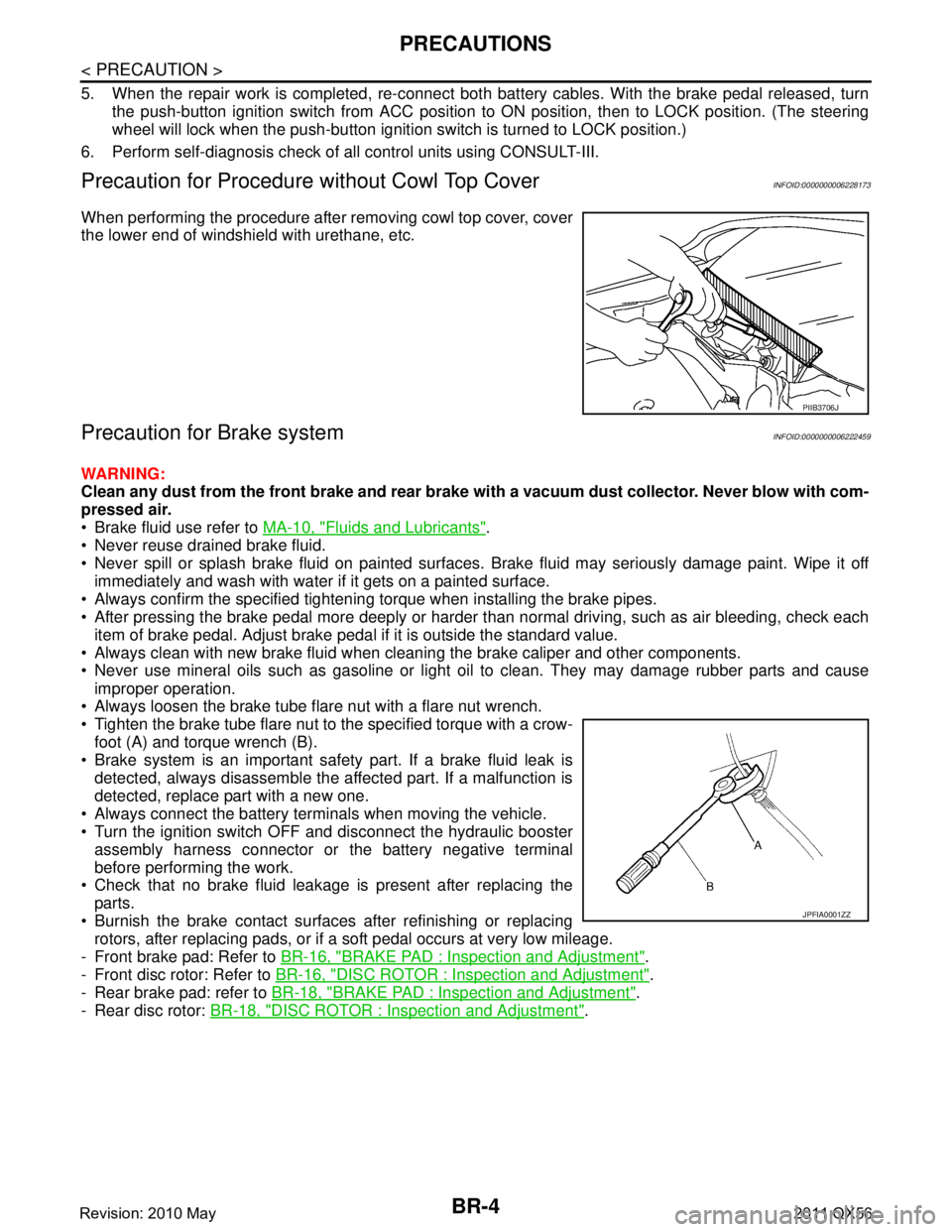
When performing the procedure after removing cowl top cover, cover
the lower end of windshield with urethane, etc.
Precaution for Brake systemINFOID:0000000006222459
WARNING:
Clean any dust from the front brake and rear brake wi th a vacuum dust collector. Never blow with com-
pressed air.
Brake fluid use refer to MA-10, "
Fluids and Lubricants".
Never reuse drained brake fluid.
Never spill or splash brake fluid on painted surfaces. Brake fluid may seriously damage paint. Wipe it off
immediately and wash with water if it gets on a painted surface.
Always confirm the specified tightening torque when installing the brake pipes.
After pressing the brake pedal more deeply or harder t han normal driving, such as air bleeding, check each
item of brake pedal. Adjust brake pedal if it is outside the standard value.
Always clean with new brake fluid when cleaning the brake caliper and other components.
Never use mineral oils such as gasoline or light oil to clean. They may damage rubber parts and cause
improper operation.
Always loosen the brake tube flar e nut with a flare nut wrench.
Tighten the brake tube flare nut to the specified torque with a crow-
foot (A) and torque wrench (B).
Brake system is an important safety part. If a brake fluid leak is detected, always disassemble the affected part. If a malfunction is
detected, replace part with a new one.
Always connect the battery terminals when moving the vehicle.
Turn the ignition switch OFF and disconnect the hydraulic booster assembly harness connector or the battery negative terminal
before performing the work.
Check that no brake fluid leakage is present after replacing the
parts.
Burnish the brake contact surfaces after refinishing or replacing rotors, after replacing pads, or if a soft pedal occurs at very low mileage.
- Front brake pad: Refer to BR-16, "
BRAKE PAD : Inspection and Adjustment".
- Front disc rotor: Refer to BR-16, "
DISC ROTOR : Inspection and Adjustment".
- Rear brake pad: refer to BR-18, "
BRAKE PAD : Inspection and Adjustment".
- Rear disc rotor: BR-18, "
DISC ROTOR : Inspection and Adjustment".
PIIB3706J
JPFIA0001ZZ
Revision: 2010 May2011 QX56
Page 486 of 5598
BR-16
< PERIODIC MAINTENANCE >
FRONT DISC BRAKE
FRONT DISC BRAKE
BRAKE PAD
BRAKE PAD : Inspection and AdjustmentINFOID:0000000006222468
INSPECTION
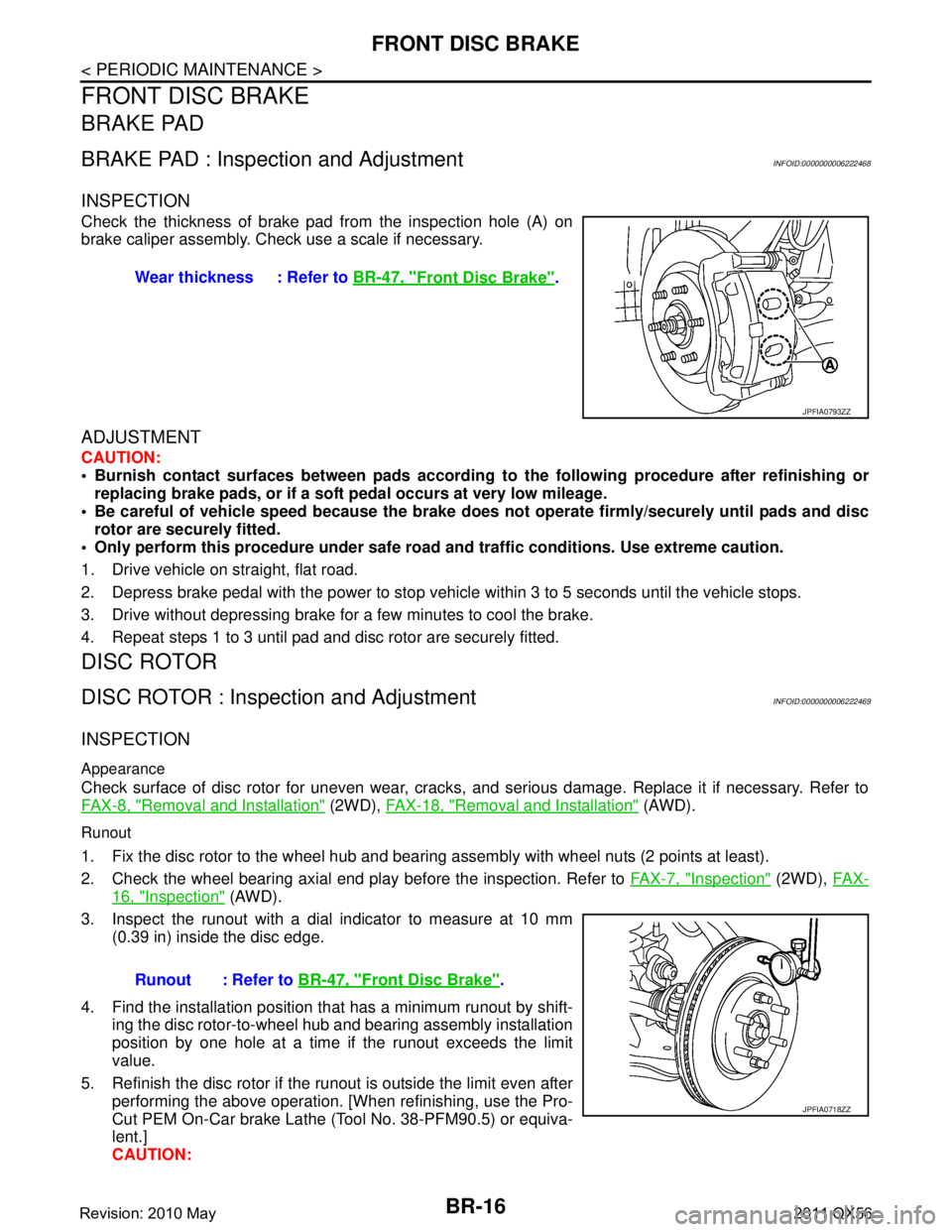
Check the thickness of brake pad from the inspection hole (A) on
brake caliper assembly. Check use a scale if necessary.
ADJUSTMENT
CAUTION:
Burnish contact surfaces between pads according to the following procedure after refinishing or
replacing brake pads, or if a soft pedal occurs at very low mileage.
Be careful of vehicle speed because the brake does not operate firmly/securely until pads and disc
rotor are securely fitted.
Only perform this procedure under safe road and traffic conditions. Use extreme caution.
1. Drive vehicle on straight, flat road.
2. Depress brake pedal with the power to stop vehicl e within 3 to 5 seconds until the vehicle stops.
3. Drive without depressing brake for a few minutes to cool the brake.
4. Repeat steps 1 to 3 until pad and disc rotor are securely fitted.
DISC ROTOR
DISC ROTOR : Inspec tion and AdjustmentINFOID:0000000006222469
INSPECTION
Appearance
Check surface of disc rotor for uneven wear, cracks, and serious damage. Replace it if necessary. Refer to
FA X - 8 , "
Removal and Installation" (2WD), FAX-18, "Removal and Installation" (AWD).
Runout
1. Fix the disc rotor to the wheel hub and bearing assembly with wheel nuts (2 points at least).
2. Check the wheel bearing axial end play before the inspection. Refer to FA X - 7 , "
Inspection" (2WD), FAX-
16, "Inspection" (AWD).
3. Inspect the runout with a dial indicator to measure at 10 mm (0.39 in) inside the disc edge.
4. Find the installation position that has a minimum runout by shift-
ing the disc rotor-to-wheel hub and bearing assembly installation
position by one hole at a time if the runout exceeds the limit
value.
5. Refinish the disc rotor if the runout is outside the limit even after performing the above operation. [When refinishing, use the Pro-
Cut PEM On-Car brake Lathe (Tool No. 38-PFM90.5) or equiva-
lent.]
CAUTION:Wear thickness : Refer to
BR-47, "
Front Disc Brake".
JPFIA0793ZZ
Runout : Refer to BR-47, "Front Disc Brake".
JPFIA0718ZZ
Revision: 2010 May2011 QX56
Page 487 of 5598

FRONT DISC BRAKEBR-17
< PERIODIC MAINTENANCE >
C
DE
G H
I
J
K L
M A
B
BR
N
O P
Check in advance that the thickness of the disc rotor is wear thickness + 0.3 mm (0.012 in) or
more.
If the thickness is less than wear thickness + 0. 3 mm (0.012 in), replace the disc rotor. Refer to
FA X - 8 , "
Removal and Installation" (2WD), FAX-18, "Removal and Installation".
Thickness
Check the thickness of the disc rotor using a micrometer. Replace
the disc rotor if the thickness is below the wear limit. Refer to FAX-8,
"Removal and Installation" (2WD), FAX-18, "Removal and Installa-
tion" (4WD).
ADJUSTMENT
CAUTION:
Burnish contact surfaces between pads according to the following procedure after refinishing or
replacing brake pads, or if a soft pedal occurs at very low mileage.
Be careful of vehicle speed because the brake does not operate firmly/securely until pads and disc
rotor are securely fitted.
Only perform this procedure under safe road and traffic conditions. Use extreme caution.
1. Drive vehicle on straight, flat road.
2. Depress brake pedal with the power to stop vehicl e within 3 to 5 seconds until the vehicle stops.
3. Drive without depressing brake for a few minutes to cool the brake.
4. Repeat steps 1 to 3 until pad and disc rotor are securely fitted. Wear thickness : Refer to
BR-47, "
Front Disc Brake".
Wear thickness : Refer to BR-47, "
Front Disc Brake".
JPFIA0719ZZ
Revision: 2010 May2011 QX56
Page 488 of 5598

BR-18
< PERIODIC MAINTENANCE >
REAR DISC BRAKE
REAR DISC BRAKE
BRAKE PAD
BRAKE PAD : Inspection and AdjustmentINFOID:0000000006222470
INSPECTION
Check the thickness of brake pad from the inspection hole (A) on
brake caliper assembly. Check use a scale if necessary.
ADJUSTMENT
CAUTION:
Burnish contact surfaces between pads according to the following procedure after refinishing or
replacing brake pads, or if a soft pedal occurs at very low mileage.
Be careful of vehicle speed because the brake does not operate firmly/securely until pads and disc
rotor are securely fitted.
Only perform this procedure under safe road and traffic conditions. Use extreme caution.
1. Drive vehicle on straight, flat road.
2. Depress brake pedal with the power to stop vehicl e within 3 to 5 seconds until the vehicle stops.
3. Drive without depressing brake for a few minutes to cool the brake.
4. Repeat steps 1 to 3 until pad and disc rotor are securely fitted.
DISC ROTOR
DISC ROTOR : Inspec tion and AdjustmentINFOID:0000000006222471
INSPECTION
Appearance
Check surface of disc rotor for uneven wear, cracks, and serious damage. Replace it if necessary. Refer to
RAX-7, "
Removal and Installation".
Runout
1. Fix the disc rotor to the wheel hub and bearing assembly with wheel nuts (2 points at least).
2. Check the wheel bearing axial end play before the inspection. Refer to RAX-5, "
Inspection".
3. Inspect the runout with a dial indicator to measure at 10 mm (0.39 in) inside the disc edge.
4. Find the installation position that has a minimum runout by shift-
ing the disc rotor-to-wheel hub and bearing assembly installation
position by one hole at a time if the runout exceeds the limit
value.
5. Refinish the disc rotor if the runout is outside the limit even after performing the above operation. [When refinishing, use the Pro-
Cut PEM On-Car brake Lathe (Tool No. 38-PFM90.5) or equiva-
lent.]
CAUTION:
Check in advance that the thickn ess of the disc rotor is wear thickness + 0.3 mm (0.012 in) or
more. Wear thickness : Refer to
BR-47, "
Rear Disc Brake".
JPFIA0720ZZ
Runout : Refer to BR-47, "Rear Disc Brake".
JPFIA0721ZZ
Revision: 2010 May2011 QX56
Page 489 of 5598

REAR DISC BRAKEBR-19
< PERIODIC MAINTENANCE >
C
DE
G H
I
J
K L
M A
B
BR
N
O P
If the thickness is less than wear thickness + 0. 3 mm (0.012 in), replace the disc rotor. Refer to
RAX-7, "
Removal and Installation".
Thickness
Check the thickness of the disc rotor using a micrometer. Replace
the disc rotor if the thickness is below the wear limit. Refer to RAX-7,
"Removal and Installation".
ADJUSTMENT
CAUTION:
Burnish contact surfaces between pads according to the following procedure after refinishing or
replacing brake pads, or if a soft pedal occurs at very low mileage.
Be careful of vehicle speed because the brake does not operate firmly/securely until pads and disc
rotor are securely fitted.
Only perform this procedure under safe road and traffic conditions. Use extreme caution.
1. Drive vehicle on straight, flat road.
2. Depress brake pedal with the power to stop vehicl e within 3 to 5 seconds until the vehicle stops.
3. Drive without depressing brake for a few minutes to cool the brake.
4. Repeat steps 1 to 3 until pad and disc rotor are securely fitted. Wear thickness : Refer to
BR-47, "
Rear Disc Brake".
Wear thickness : Refer to BR-47, "
Rear Disc Brake".
JPFIA0722ZZ
Revision: 2010 May2011 QX56
Page 506 of 5598
BR-36
< REMOVAL AND INSTALLATION >
FRONT DISC BRAKE
7. Depress the brake pedal several times to check that no drag feel is present for the front disc brake. Refer
to BR-36, "
BRAKE PAD : Inspection".
8. Install tires with power tool. Refer to WT-64, "
Exploded View".
BRAKE PAD : InspectionINFOID:0000000006222490
INSPECTION AFTER REMOVAL
Replace the shims and shim covers if rust is excessively attached.
Eliminate rust on the pad retainers and the torque mem ber. Replace them if rust is excessively attached.
INSPECTION AFTER INSTALLATION
1. Check a drag of front disc brake. If any drag is found, follow the procedure described below.
2. Remove brake pads. Refer to BR-34, "
BRAKE PAD : Removal and Installation".
3. Press the pistons. Refer to BR-34, "
BRAKE PAD : Removal and Installation".
4. Install brake pads. Refer to BR-34, "
BRAKE PAD : Removal and Installation".
5. Depress the brake pedal several times.
6. Check a drag of front disc brake again. If any drag is found, disassemble the caliper. Refer to BR-38,
"BRAKE CALIPER ASSEMBLY : Disassembly and Assembly".
7. Burnish contact surfaces brake pads and disc rotor after refinishing or replacing brake pads, or if a soft pedal occurs at very low mileage. Refer to BR-16, "
BRAKE PAD : Inspection and Adjustment".
BRAKE CALIPER ASSEMBLY
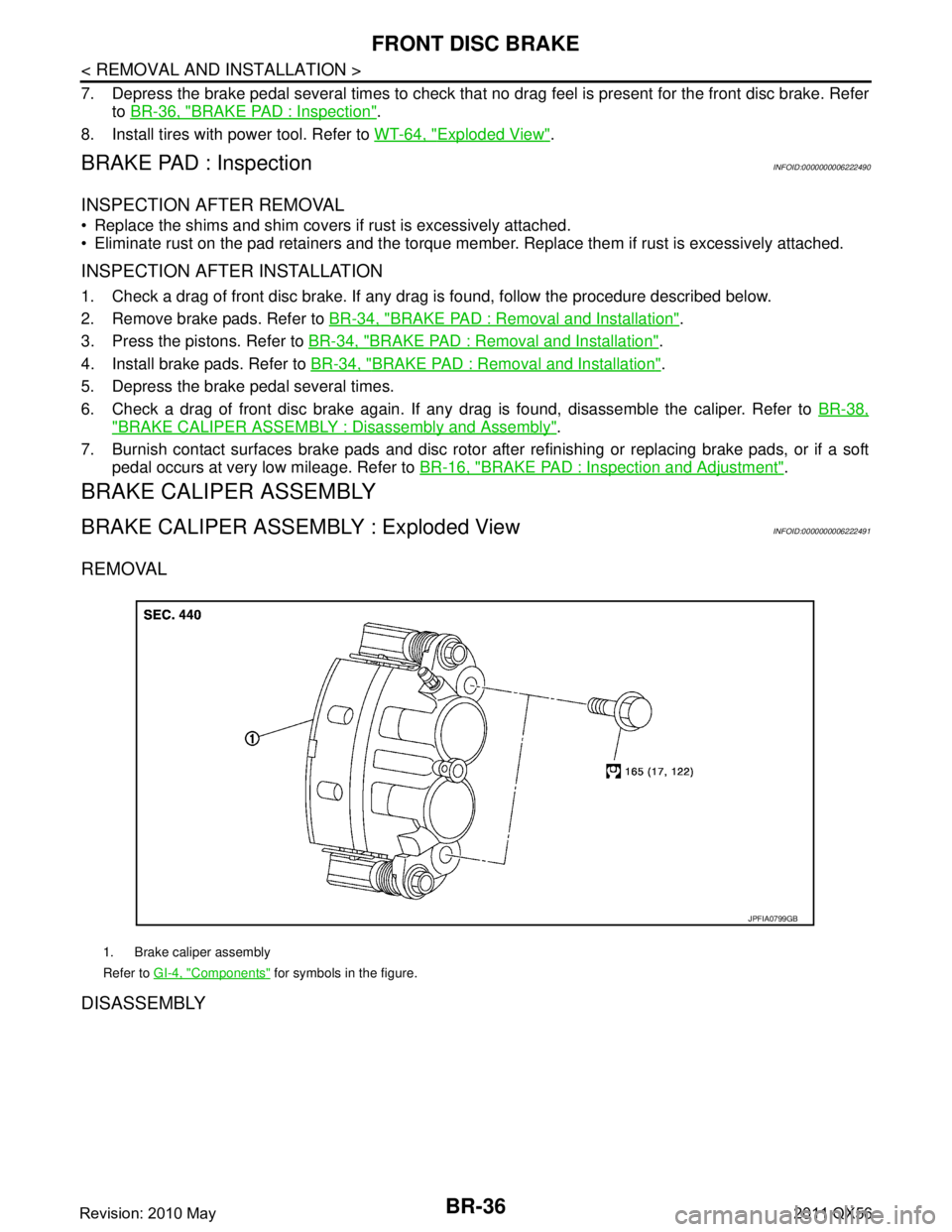
BRAKE CALIPER ASSEMBLY : Exploded ViewINFOID:0000000006222491
REMOVAL
DISASSEMBLY
1. Brake caliper assembly
Refer to GI-4, "
Components" for symbols in the figure.
JPFIA0799GB
Revision: 2010 May2011 QX56
Page 510 of 5598

BR-40
< REMOVAL AND INSTALLATION >
FRONT DISC BRAKE
3. Press the pistons. Refer to BR-34, "BRAKE PAD : Removal and Installation".
4. Install brake pads. Refer to BR-34, "
BRAKE PAD : Removal and Installation".
5. Depress the brake pedal several times.
6. Check a drag of front disc brake again. If any drag is found, disassemble the caliper. Refer to BR-38,
"BRAKE CALIPER ASSEMBLY : Disassembly and Assembly".
7. Burnish contact surfaces brake pads and disc rotor after refinishing or replacing disc rotor, or if a soft pedal occurs at very low mileage. Refer to BR-16, "
DISC ROTOR : Inspection and Adjustment".
Revision: 2010 May2011 QX56
Page 512 of 5598

BR-42
< REMOVAL AND INSTALLATION >
REAR DISC BRAKE
1. Install the torque member if the pad retainers has been removed.CAUTION:
Securely assemble the pad retainers so that it wi ll not be lifted up from the torque member.
Never deform the pad retainers.
2. Apply PCB (Poly Butyl Cuprysil) grease or silicone-based grease to the matching faces (A) between the brake pad and
shim, and install the shims to brake pads.
CAUTION:
Always replace the shims when replacing the brake pad.
3. Apply PCB (Poly Butyl Cuprysil) grease or silicone-based grease to the matching faces (B) between the brake pad and
torque member.
4. Install cylinder body to the torque member. CAUTION:
Never damage the piston boot.
When replacing brake pad with new one, check a brakefluid level in the reservoir tank because brake flui d returns to reservoir tank when pressing pis-
ton in.
NOTE:
Use a disc brake piston tool to easily press piston.
5. Install the upper sliding pin bolt and tighten it to the specified torque.
6. Depress the brake pedal several times to check that no drag feel is present for the front disc brake. Refer
to BR-42, "
BRAKE PAD : Inspection".
7. Install tires with power tool. Refer to WT-64, "
Exploded View".
BRAKE PAD : InspectionINFOID:0000000006222497
INSPECTION AFTER REMOVAL
Replace the shims if rust is excessively attached.
Eliminate rust on the pad retainers and the torque mem ber. Replace them if rust is excessively attached.
INSPECTION AFTER INSTALLATION
1. Check a drag of rear disc brake. If any drag is found, follow the procedure described below.
2. Remove brake pads. Refer to BR-41, "
BRAKE PAD : Removal and Installation".
3. Press the piston. Refer to BR-41, "
BRAKE PAD : Removal and Installation".
4. Install brake pads. Refer to BR-41, "
BRAKE PAD : Removal and Installation".
5. Depress the brake pedal several times.
6. Check a drag of rear disc brake again. If any drag is found, disassemble the caliper. Refer to BR-44,
"BRAKE CALIPER ASSEMBLY : Disassembly and Assembly".
7. Burnish contact surfaces brake pads and disc rotor after refinishing or replacing brake pads, or if a soft pedal occurs at very low mileage. Refer to BR-18, "
BRAKE PAD : Inspection and Adjustment".
BRAKE CALIPER ASSEMBLY
BRAKE CALIPER ASSEMBLY : Exploded ViewINFOID:0000000006222498
REMOVAL
JPFIA0741ZZ
Revision: 2010 May2011 QX56
Page 516 of 5598

BR-46
< REMOVAL AND INSTALLATION >
REAR DISC BRAKE
CAUTION:
Always clean with new brake fluid. Never clean with mineral oil such as gasoline and light oil.
Torque Member
Check the torque member for rust, wear, cracks or damage.
Piston
Check the surface of the piston for rust, wear, cracks or damage.
CAUTION:
A piston sliding surface is plat ed. Never polish with sandpaper.
Sliding Pin, Sliding Pin Boot and Bushing
Check the sliding pins, sliding pin boots and bushing for rust, wear, cracks or damage.
INSPECTION AFTER INSTALLATION
1. Check a drag of rear disc brake. If any dr ag is found, follow the procedure described below.
2. Remove brake pads. Refer to BR-41, "
BRAKE PAD : Removal and Installation".
3. Press the piston. Refer to BR-41, "
BRAKE PAD : Removal and Installation".
4. Install brake pads. Refer to BR-41, "
BRAKE PAD : Removal and Installation".
5. Depress the brake pedal several times.
6. Check a drag of rear disc brake again. If any drag is found, disassemble the caliper. Refer to BR-44,
"BRAKE CALIPER ASSEMBLY : Disassembly and Assembly".
7. Burnish contact surfaces brake pads and disc rotor after refinishing or replacing disc rotor, or if a soft pedal occurs at very low mileage. Refer to BR-18, "
DISC ROTOR : Inspection and Adjustment".
Revision: 2010 May2011 QX56