transfer control system ISUZU KB P190 2007 Workshop Owner's Guide
[x] Cancel search | Manufacturer: ISUZU, Model Year: 2007, Model line: KB P190, Model: ISUZU KB P190 2007Pages: 6020, PDF Size: 70.23 MB
Page 3956 of 6020
Automatic Transmission – 4L60E – On-vehicle Servicing Page 7C4–43
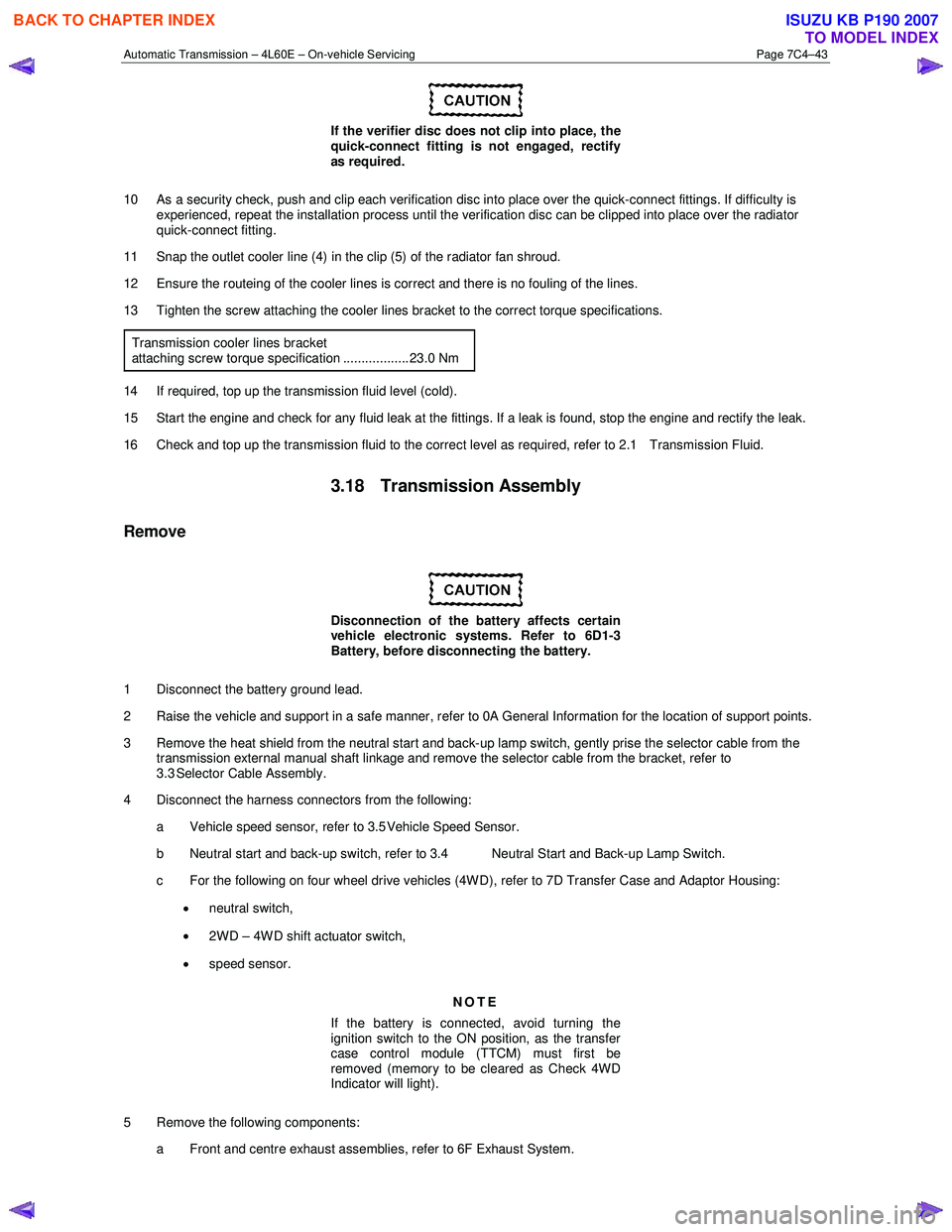
If the verifier disc does not clip into place, the
quick-connect fitting is not engaged, rectify
as required.
10 As a security check, push and clip each verification disc into place over the quick-connect fittings. If difficulty is experienced, repeat the installation process until the verification disc can be clipped into place over the radiator
quick-connect fitting.
11 Snap the outlet cooler line (4) in the clip (5) of the radiator fan shroud.
12 Ensure the routeing of the cooler lines is correct and there is no fouling of the lines.
13 Tighten the screw attaching the cooler lines bracket to the correct torque specifications.
Transmission cooler lines bracket
attaching screw torque specification .................. 23.0 Nm
14 If required, top up the transmission fluid level (cold).
15 Start the engine and check for any fluid leak at the fittings. If a leak is found, stop the engine and rectify the leak.
16 Check and top up the transmission fluid to the correct level as required, refer to 2.1 Transmission Fluid.
3.18 Transmission Assembly
Remove
Disconnection of the battery affects certain
vehicle electronic systems. Refer to 6D1-3
Battery, before disconnecting the battery.
1 Disconnect the battery ground lead.
2 Raise the vehicle and support in a safe manner, refer to 0A General Information for the location of support points.
3 Remove the heat shield from the neutral start and back-up lamp switch, gently prise the selector cable from the transmission external manual shaft linkage and remove the selector cable from the bracket, refer to
3.3 Selector Cable Assembly.
4 Disconnect the harness connectors from the following:
a Vehicle speed sensor, refer to 3.5 Vehicle Speed Sensor.
b Neutral start and back-up switch, refer to 3.4 Neutral Start and Back-up Lamp Switch.
c For the following on four wheel drive vehicles (4W D), refer to 7D Transfer Case and Adaptor Housing:
• neutral switch,
• 2WD – 4WD shift actuator switch,
• speed sensor.
NOTE
If the battery is connected, avoid turning the
ignition switch to the ON position, as the transfer
case control module (TTCM) must first be
removed (memory to be cleared as Check 4W D
Indicator will light).
5 Remove the following components: a Front and centre exhaust assemblies, refer to 6F Exhaust System.
BACK TO CHAPTER INDEX
TO MODEL INDEX
ISUZU KB P190 2007
Page 3960 of 6020
Automatic Transmission – 4L60E – On-vehicle Servicing Page 7C4–47
14 Reconnect the fuel and EVAP pipes three brackets and clips, refer to 6C Fuel System – V6.
15 Reinstall the following components:
a Starter motor, refer to 6D1-2 Starting System.
b Transmission support, refer to 3.7 Transmission Support and Mount.
c Front and centre exhaust assemblies, refer to 6F Exhaust System.
d Rear propeller shaft and for 4WD front propeller shaft, refer to 4A Propeller Shaft.
16 Reconnect the harness connectors to the following: a Vehicle speed sensor, refer to 3.5 Vehicle Speed Sensor.
b Neutral start and back-up switch, refer to 3.4 Neutral Start and Back-up Lamp Switch.
c For the following on 4W D vehicles, refer to 7D Transfer Case and Adaptor Housing:
• neutral switch,
• 2WD – 4WD shift actuator switch,
• speed sensor.
17 Reinstall the selector cable to the transmission external manual shaft linkage, secure the selector cable to the bracket and attach the heat shield to the neutral start and back-up lamp switch, refer to 3.3 Selector Cable
Assembly.
18 Perform a reverse flush of the cooler lines and a flow rate test, refer to 2.2 Reverse Flush and Flow Rate, if either of the following applies:
• the transmission fluid is contaminated,
• the transmission has been replaced,
• the torque converter has been replaced, or
• the transmission oil pump has been replaced.
19 Lower the vehicle to the ground.
20 If required, top up the transmission fluid level (cold).
21 Reconnect the battery ground lead.
22 Start the engine and check for any fluid leaking at the fittings. If a leak is found, stop the engine and rectify the leak.
23 Road test until the transmission has reached operating temperature. Re-check the fluid level and for any fluid leaks, refer to 2.1 Transmission Fluid.
3.19 Transmission Control Module
Remove
1 Ensure the ignition switch is in the OFF position.
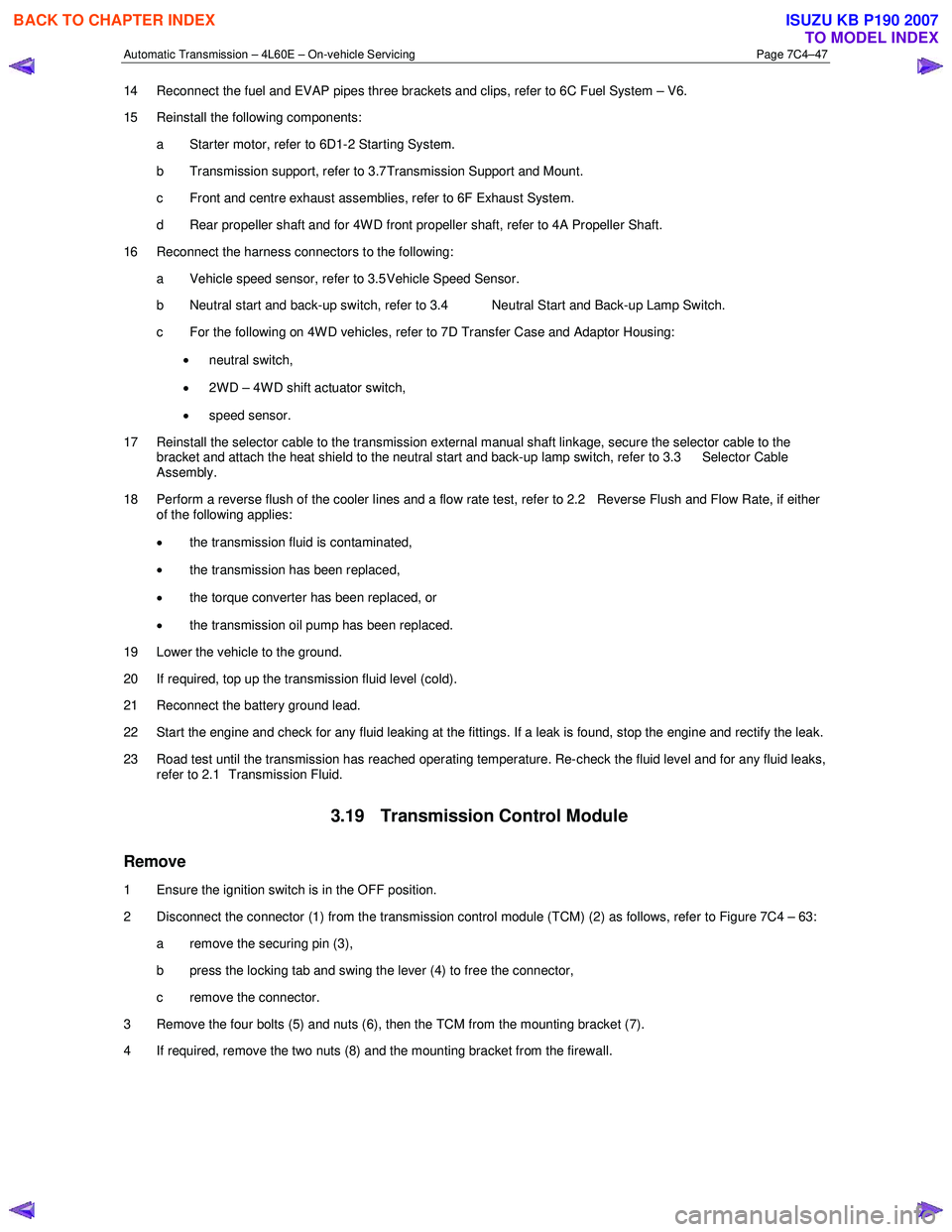
2 Disconnect the connector (1) from the transmission control module (TCM) (2) as follows, refer to Figure 7C4 – 63: a remove the securing pin (3),
b press the locking tab and swing the lever (4) to free the connector,
c remove the connector.
3 Remove the four bolts (5) and nuts (6), then the TCM from the mounting bracket (7).
4 If required, remove the two nuts (8) and the mounting bracket from the firewall.
BACK TO CHAPTER INDEX
TO MODEL INDEX
ISUZU KB P190 2007
Page 3978 of 6020
7A2-12 TRANSMISSION CONTROL SYSTEM (AW30–40LE)
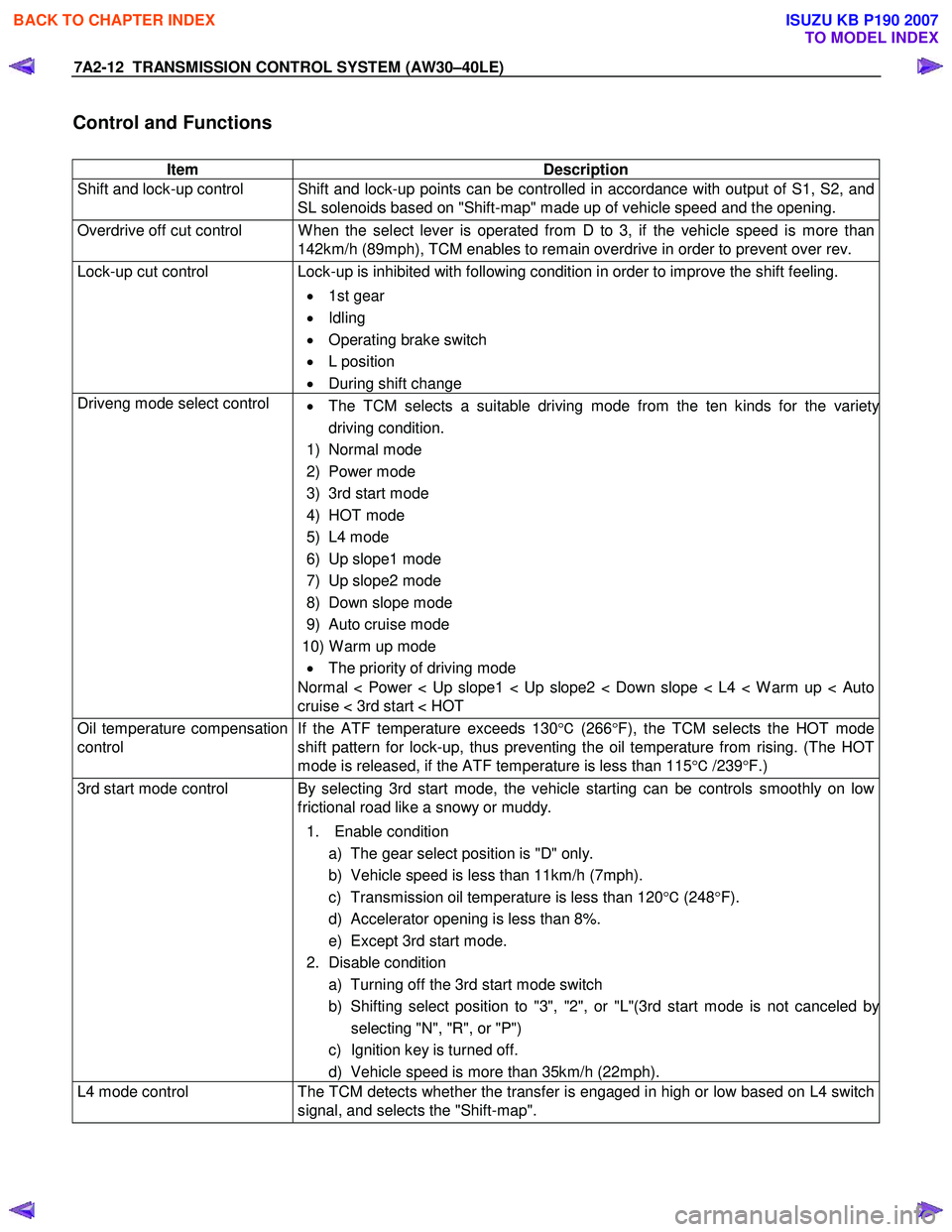
Control and Functions
Item Description
Shift and lock-up control Shift and lock-up points can be controlled in accordance with output of S1, S2, and SL solenoids based on "Shift-map" made up of vehicle speed and the opening.
Overdrive off cut control W hen the select lever is operated from D to 3, if the vehicle speed is more than 142km/h (89mph), TCM enables to remain overdrive in order to prevent over rev.
Lock-up cut control Lock-up is inhibited with following condition in order to improve the shift feeling.
• 1st gear
• Idling
• Operating brake switch
• L position
• During shift change
Driveng mode select control
• The TCM selects a suitable driving mode from the ten kinds for the variety
driving condition.
1) Normal mode
2) Power mode
3) 3rd start mode
4) HOT mode
5) L4 mode
6) Up slope1 mode
7) Up slope2 mode
8) Down slope mode
9) Auto cruise mode
10) W arm up mode • The priority of driving mode
Normal < Power < Up slope1 < Up slope2 < Down slope < L4 < W arm up < Auto
cruise < 3rd start < HOT
Oil temperature compensation
control If the ATF temperature exceeds 130
°C (266 °F), the TCM selects the HOT mode
shift pattern for lock-up, thus preventing the oil temperature from rising. (The HOT
mode is released, if the ATF temperature is less than 115 °C /239 °F.)
3rd start mode control By selecting 3rd start mode, the vehicle starting can be controls smoothly on low
frictional road like a snowy or muddy.
1. Enable condition a) The gear select position is "D" only.
b) Vehicle speed is less than 11km/h (7mph).
c) Transmission oil temperature is less than 120 °C (248 °F).
d) Accelerator opening is less than 8%.
e) Except 3rd start mode.
2. Disable condition a) Turning off the 3rd start mode switch
b) Shifting select position to "3", "2", or "L"(3rd start mode is not canceled b
y
selecting "N", "R", or "P")
c) Ignition key is turned off.
d) Vehicle speed is more than 35km/h (22mph).
L4 mode control The TCM detects whether the transfer is engaged in high or low based on L4 switch
signal, and selects the "Shift-map".
BACK TO CHAPTER INDEX
TO MODEL INDEX
ISUZU KB P190 2007
Page 3982 of 6020

7A2-16 TRANSMISSION CONTROL SYSTEM (AW30–40LE)
CAN bus systems in automatic
transmission control (AW30-40LE)
The automatic transmission control system in AW 30-
40LE uses high speed CAN bus system .The individual
CAN bus systems are connected via two interfaces and
can exchange information and data. This allows control
modules that are connected to different CAN bus
systems to communicate.
High speed CAN bus
Transmission control module in the vehicle that require
continuous, rapid communication are connected to the
high speed CAN bus. For example, the automatic
transmission is continuously notified of the current
engine load status. Since the automatic transmission
control module has to react immediately to load status
changes, rapid communication is required between the
engine control module and the automatic transmission
control module. The high speed CAN bus in the AW 30-
40LE is designed as a two-wire CAN bus (twisted pair).
The wires are shielded and twisted. The transfer rate is
500 K baud.
RUW 37ASF000401
Diagnosis
Electronic Diagnosis
How To Diagnose The Problem
1. To avoid incorrect diagnostics, this book needs to
be followed accurately. Unless stated, do not jump
directly to a section that could contain the
solution. Some important information may be
missed.
2. The sections in CAPITALS and bold are the main
sections that can be found in the contents.
3. The go to “SECTION” means to continue to check
going to the “section”.
4. The go through “SECTION” means to go through
the “section” and then to go back to the place the go
through was written.
5. BASIC ELECTRIC CIRCUITS:
You should understand the basic theory o
f
electricity. This includes the meaning of voltage,
amps, ohms, and what happens in a circuit with an
open or shorted wire. You should also be able to
read and understand wiring diagrams.
Check Trans Indicator
Find CHECK TRANS indicator and verify if it is
A. Flashing: Go to On-Board Diagnostic (OBD)
System Check.
B. Staying on: Go through “Check Trans” Check.
C. Is never “ON” when the ignition key is turned on: Go through “Check Trans” Check
D. Is “ON” during 3 seconds at ignition but “OFF” after: Normal operation. No DTC or malfunction.
RTW 77ASH000101
BACK TO CHAPTER INDEX
TO MODEL INDEX
ISUZU KB P190 2007
Page 3990 of 6020

7A2-24 TRANSMISSION CONTROL SYSTEM (AW30–40LE)
TRANSMISSION DATA
Scan Tool Parameter Units Displayed Typical Data Value at Engine Idle
Operating Conditions: Engine idling/ Engine coolant temperature is between 75 to 85 °C(167 to 185 °F)/
Accelerator pedal is constant/ Neutral or Park/ Accessories OFF/ Vehicle located at sea level
Engine Coolant temperature °C/ °F 75 to 85°C (167 to 185 °F)
Engine Speed RPM 700
Vehicle Speed Km/h / MPH 0
Ignition Voltage V 13.6
Accelerator Pedal Position Signal % 0
Throttle Position % 0
Accelerator Pedal Position Signal
During Cruise Control % 0
Cruise Control
Inactive / Active Inactive
Cruise Control OD Cancel Request ON / OFF OFF
Engine W arm Up Cycle Achieved FALSE / TRUE FALSE
Transmission Shift in Progress Inactive / Active Inactive
Garage Shift Control Inactive / Active Inactive
MIL Request Command ON / OFF OFF
Transmission Check Light ON / OFF OFF
Transmission Oil Temperature Lamp ON / OFF OFF
Power Drive Lamp ON / OFF OFF
3rd Start Lamp ON / OFF OFF
Transmission Fluid Temperature
°C/ °F 70 to 80°C (158 to 176 °F)
AT Input Speed RPM 625
AT Output Speed RPM 0
Transmission Range Park / Reverse /
Neutral / Drive 4 / Drive 3 / Drive 2 / Drive 1 Park
TR Switch P
ON / OFF ON
TR Switch R ON / OFF OFF
TR Switch N ON / OFF OFF
TR Switch D ON / OFF OFF
TR Switch 3 ON / OFF OFF
TR Switch 2 ON / OFF OFF
TR Switch L ON / OFF OFF
Diagnostic Switch Open / Close Open
Brake Pedal Switch ON / OFF OFF
Power Drive Switch ON / OFF OFF
3rd Start Switch ON / OFF OFF
4 W heel Drive Low ON / OFF OFF
Shift Solenoid 1 Command ON / OFF ON
Shift Solenoid 2 Command ON / OFF OFF
TCC Solenoid Engaged / Disengaged Disengaged
Downhill Mode Inactive / Active Inactive
Active Shift Mode Normal Mode /
Power Mode /
3rd Gear Start /
Transfer 4L MODE Hot 1 / Hot 2 /
UPHILL MODE 1 /
UPHILL MODE 2 / Cruise MODE /
W arm Up MODE Normal Mode
Estimated Gear Ratio
:1 7.97 : 1
BACK TO CHAPTER INDEX
TO MODEL INDEX
ISUZU KB P190 2007
Page 3992 of 6020
![ISUZU KB P190 2007 Workshop Owners Guide 7A2-26 TRANSMISSION CONTROL SYSTEM (AW30–40LE)
Snapshot Display With TIS2000
Procedures for transferring and displaying Tech2
snapshot data by using TIS2000 [Snapshot Upload]
function](/img/61/57177/w960_57177-3991.png "ISUZU KB P190 2007 Workshop Owners Guide 7A2-26 TRANSMISSION CONTROL SYSTEM (AW30–40LE)
Snapshot Display With TIS2000
Procedures for transferring and displaying Tech2
snapshot data by using TIS2000 [Snapshot Upload]
function")
7A2-26 TRANSMISSION CONTROL SYSTEM (AW30–40LE)
Snapshot Display With TIS2000
Procedures for transferring and displaying Tech2
snapshot data by using TIS2000 [Snapshot Upload]
function is described below.
Snapshot data can be displayed with [Snapshot Upload]
function included in TIS2000.
By analyzing these data in various methods, trouble
conditions can be checked.
Snapshot data is displayed by executing the three steps
below shown:
1. Record the snapshot data, in Tech2.
2. Transfer the snapshot data to PC.
BACK TO CHAPTER INDEX
TO MODEL INDEX
ISUZU KB P190 2007
Page 3993 of 6020
![ISUZU KB P190 2007 Workshop Owners Guide TRANSMISSION CONTROL SYSTEM (AW30–40LE) 7A2-27
After recording the snapshot in Tech2, transfer the data
from Tech2 to PC by the below procedures.
1. Start TIS2000.
2. Select [Snapshot Upload]](/img/61/57177/w960_57177-3992.png "ISUZU KB P190 2007 Workshop Owners Guide TRANSMISSION CONTROL SYSTEM (AW30–40LE) 7A2-27
After recording the snapshot in Tech2, transfer the data
from Tech2 to PC by the below procedures.
1. Start TIS2000.
2. Select [Snapshot Upload]")
TRANSMISSION CONTROL SYSTEM (AW30–40LE) 7A2-27
After recording the snapshot in Tech2, transfer the data
from Tech2 to PC by the below procedures.
1. Start TIS2000.
2. Select [Snapshot Upload] on the TIS2000 start
screen.
3. Select [Upload from trouble diagnosis tool (transfe
r
from diagnosis tester)] or click the corresponding
icon of the tool bar.
4. Select Tech2, and transfer the recorded snapshot
information.
5. Select the transferred snapshot.
6.
After ending transfer of the snapshot, data
parameter list is displayed on the screen.
3. Snapshot data is displayed with TIS2000
[Snapshot Upload] function.
Snapshot is stored in the PC hard disk or floppy disk,
and can be displayed any time.
Stored snapshot can be displayed by the following
procedures.
1. Start TIS2000.
2. Select [Snapshot Upload] on the TIS2000 start
screen.
3. Select [Open the existing files] or click the
corresponding icon of the tool bar.
4. Select the transferred snapshot.
5. Open the snapshot, to display the data paramete
r
list on the screen.
BACK TO CHAPTER INDEX
TO MODEL INDEX
ISUZU KB P190 2007
Page 3998 of 6020

7A2-32 TRANSMISSION CONTROL SYSTEM (AW30–40LE)
4. After choosing the data, click the “Next” button.
5. W hen all the necessary information is entered, the
“details” of software within the database that match
the entered data will appear for confirmation. Click
the “Program” switch and then download the ne
w
software onto Tech 2.
6. “Data Transfer” comes on display. The progress o
f
downloading will be displayed on the screen in the
form of bar graph.
7. Upon finishing the data transfer, turn off the powe
r
of Tech-2, removing from P/C.
4. Programming of TCM 1. Check to see if batteries are fully charged.
2. Connect Tech 2 to Vehicle Diagnostic Connectors.
3. Turn on the power of Tech 2 and the title screen
comes on display.
4. Turn on the ignition (without allowing the engine to
start)
5. On the title screen of Tech 2, push the "Enter"
button.
6. Choose “F: Service Programming System” on the
main screen and then choose “F1: Programming”.
7. W hile data is being transferred, “Downloading” will
be displayed on the Tech 2 screen.
8. Upon finishing the data transfer, Tech 2 will displa
y
“Reprogramming Successful”. Push the “Exit”
button to bring program to completion.
9. Following “Procedure 2: Demand of Data”, try ove
r
again "Information Obtaining" and check to confirm
if the data has been correctly re-loaded.
10. Upon finishing confirmation, turn off the ignition o
f
the vehicle and then turn off the power of Tech 2,
removing from the vehicle.
BACK TO CHAPTER INDEX
TO MODEL INDEX
ISUZU KB P190 2007
Page 4004 of 6020

7A2-38 TRANSMISSION CONTROL SYSTEM (AW30–40LE)
TCM Diagnostic Trouble Codes
The following table lists the diagnostic trouble codes supported by this vehicle application. If any DTCs not listed here
are displayed by a scan tool, the scan tool data may be faulty; notify the scan tool manufacture of any DTCs displayed
that are not included in the following table.
DTC Type
DTC No. Flash
Code DTC NAME
EURO 4Except
EURO 4
P0562 72 System Voltage Error (Low) E E
P0563 73 System Voltage Error (High) E E
P0602 63 Transmission Control Module (TCM) Programming Error E E
P0707 17 Transmission Range Sensor Circuit Open B D
P0708 17 Transmission Range Sensor Circuit Short B D
P0712 15 Transmission Oil Temperature Circuit Short
B D
P0713 16 Transmission Oil Temperature Circuit Open
B D
P0717 14 Input Speed Sensor Signal Error
B D
P0722 11 Output Speed Sensor Signal Error
B D
P0741 43 Torque Converter Clutch Stuck “OFF”
B F
P0742 53 Torque Converter Clutch Stuck “ON”
B F
P0746 45 Pressure Control Solenoid F/B Stuck
B D
P0751 41 Shift Solenoid S1 Stuck “OFF” B D
P0752 51 Shift Solenoid S1 Stuck “ON” B F
P0756 42 Shift Solenoid S2 Stuck “OFF” B F
P0757 52 Shift Solenoid S2 Stuck “ON” B F
P0962 35 Pressure Control Solenoid Circuit Open or GND Short B F
P0963 35 Pressure Control Solenoid Circuit Ignition Short B D
P0973 31 Shift Solenoid S1 Circuit GND Short B D
P0974 31 Shift Solenoid S1 Circuit Open or Ignition Short B D
P0976 32 Shift Solenoid S2 Circuit GND Short B D
P0977 32 Shift Solenoid S2 Circuit Open or Ignition Short B D
P1790 61 Transmission Control Module (TCM) ROM Checksum Error B D
P1791 62 Transmission Control Module (TCM) RAM Error B D
P2769 33 Torque Converter Clutch Circuit GND Short B D
P2770 33 Torque Converter Clutch Circuit Open or Ignition Short B D
P2773 75 Transfer 4L Switch Circuit GND Short B D
P2774 75 Transfer 4L Switch Circuit Open or Ignition Short B D
U2104 65 CAN BUS OFF
A C
U2105 67 Lost of Communication with ECM A C
BACK TO CHAPTER INDEX
TO MODEL INDEX
ISUZU KB P190 2007
Page 4075 of 6020

TRANSMISSION CONTROL SYSTEM (AW30–40LE) 7A2-109
DTC P2773 or 2774 (Flash Code 75)
RTW 77AMF000901
Condition For Running The DTC
All of the following conditions are met.
(1)
All of the following conditions are met for 2
seconds or more continuously.
• The supply voltage is more than 10.2 volts and less than 15.5 volts.
• DTC U2104 is not detecting failure or not deciding failure.
• DTC U2105 is not detecting failure or not deciding failure.
• Engine revolution signal is not detecting failure or not deciding.
• The engine revolution is more than 550 rpm.
(2) Not emergency mode.
(3) D, 3, 2, L position point is “ON”.
(4) Shift position signal is not detecting failure or not deciding failure.
(5) The vehicle speed is more than 29 km/h (18 mph) and less than 160 km/h (100 mph).
(6) Speed meter signal is detecting failure or not deciding failure.
(7) Output revolution rpm is more than 1500 rpm.
(8) Output revolution sensor is not detecting failure o
r
not deciding failure.
(9) Throttle opening more than 2%.
(10) Throttle opening signal is not detecting failure o
r
note deciding failure.
(11) All of the following conditions are met.
• Device Control is not operating.
• Disable Normal Communication is receiving enable.
• DTC Clear is not operating.
Condition For Setting The DTC
All of the following conditions are met for 10 seconds
continuously. (DTC P2773)
• Transfer 4L switch is “ON”.
• Transfer High judgment by transfer real gear ratio 0.9 < T/F Hi gear ratio < 1.1
All of the following conditions are met for 10 seconds
continuously. (DTC P2774)
• Transfer 4L switch is “OFF”.
• Transfer Low judgment by transfer real gear ratio 2.23 < T/F Low gear ratio < 2.73
Action Taken When The DTC Sets
• No shift solenoid functional failure detection.
• No L-up solenoid functional failure detection.
• MIL request “ON”.
• Check Trans “ON”.
• DTC stored.
• MIL request “ON”. (EURO 4 only)
BACK TO CHAPTER INDEX
TO MODEL INDEX
ISUZU KB P190 2007