DTC CHECK ISUZU KB P190 2007 Workshop Repair Manual
[x] Cancel search | Manufacturer: ISUZU, Model Year: 2007, Model line: KB P190, Model: ISUZU KB P190 2007Pages: 6020, PDF Size: 70.23 MB
Page 3728 of 6020
Powertrain Interface Module – V6 Page 6E1–67
10.3 Tachometer Diagnostics
Circuit Description
The powertrain interface module (PIM) receives the tachomer signal from the engine control module (ECM), it is then
sent to the instrument cluster by the PIM via a hard wired connection to drive the tachometer which displays the engine
RPM. Some of these components do not set a DTC, in the event of a component failure. The following diagnostic
procedures are devised to assist in these cases.
Additional Information
• Refer to 7.2 Diagnostic System Check to monitor DTC’s.
• Refer to 8A Electrical Body and Chassis for the following information:
• ECM wiring diagram.
• Refer to 6 W iring Diagram and Connector Chart for the following information:
• PIM connector illustration and terminal assignment, and
• PIM wiring diagram.
• For intermittent faults, refer to Intermittent Fault Conditions.
• Check for an intermittent fault in the wiring harness or connectors, if a fault cannot be found the system is
serviceable.
Since fault conditions in a wiring connector may trigger DTCs, always test the connectors related to this diagnostic
procedure for shorted terminals or poor wiring connection before replacing any component. Refer to 8A Electrical - Body
and Chassis for information on electrical fault diagnosis.
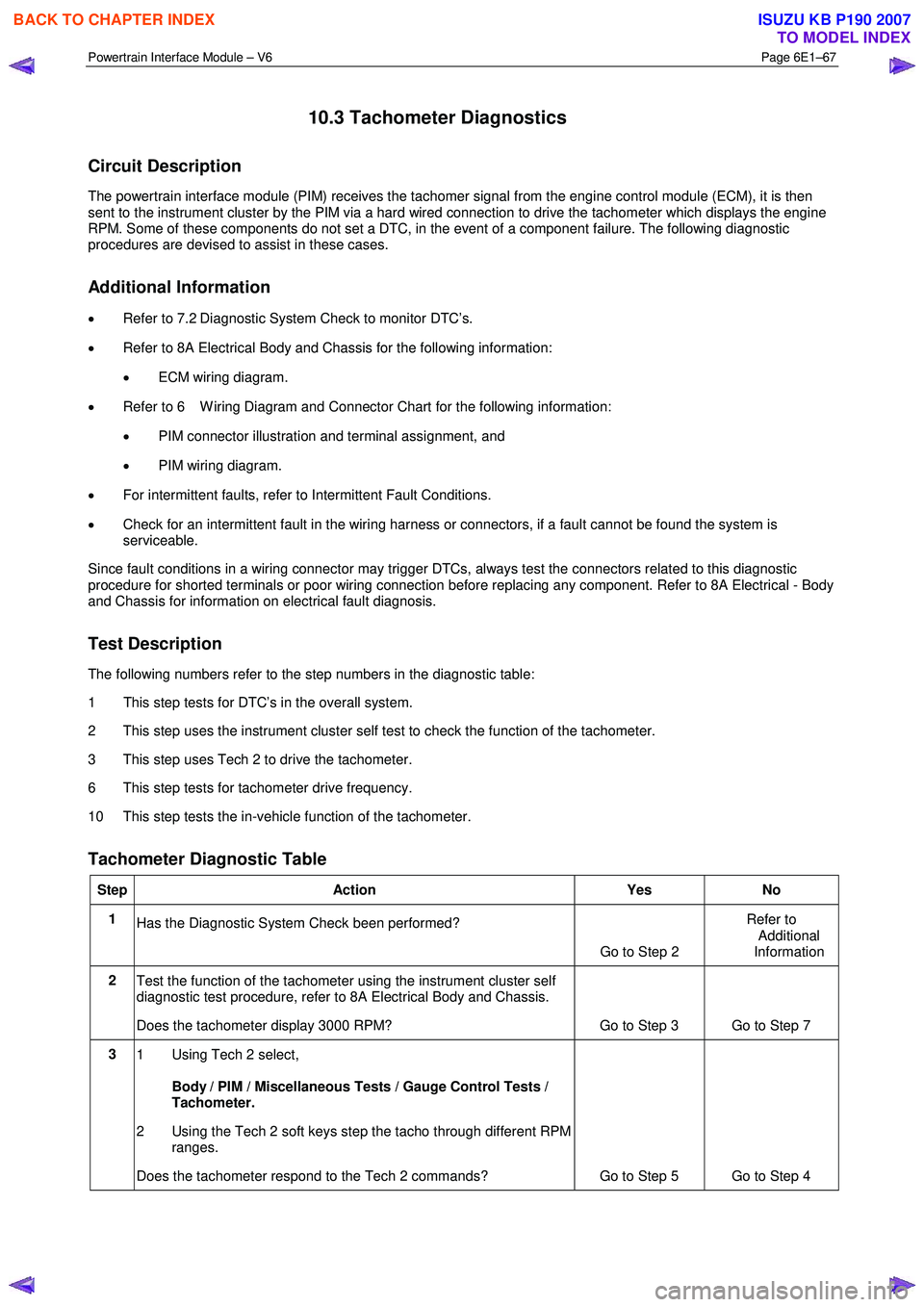
Test Description
The following numbers refer to the step numbers in the diagnostic table:
1 This step tests for DTC’s in the overall system.
2 This step uses the instrument cluster self test to check the function of the tachometer.
3 This step uses Tech 2 to drive the tachometer.
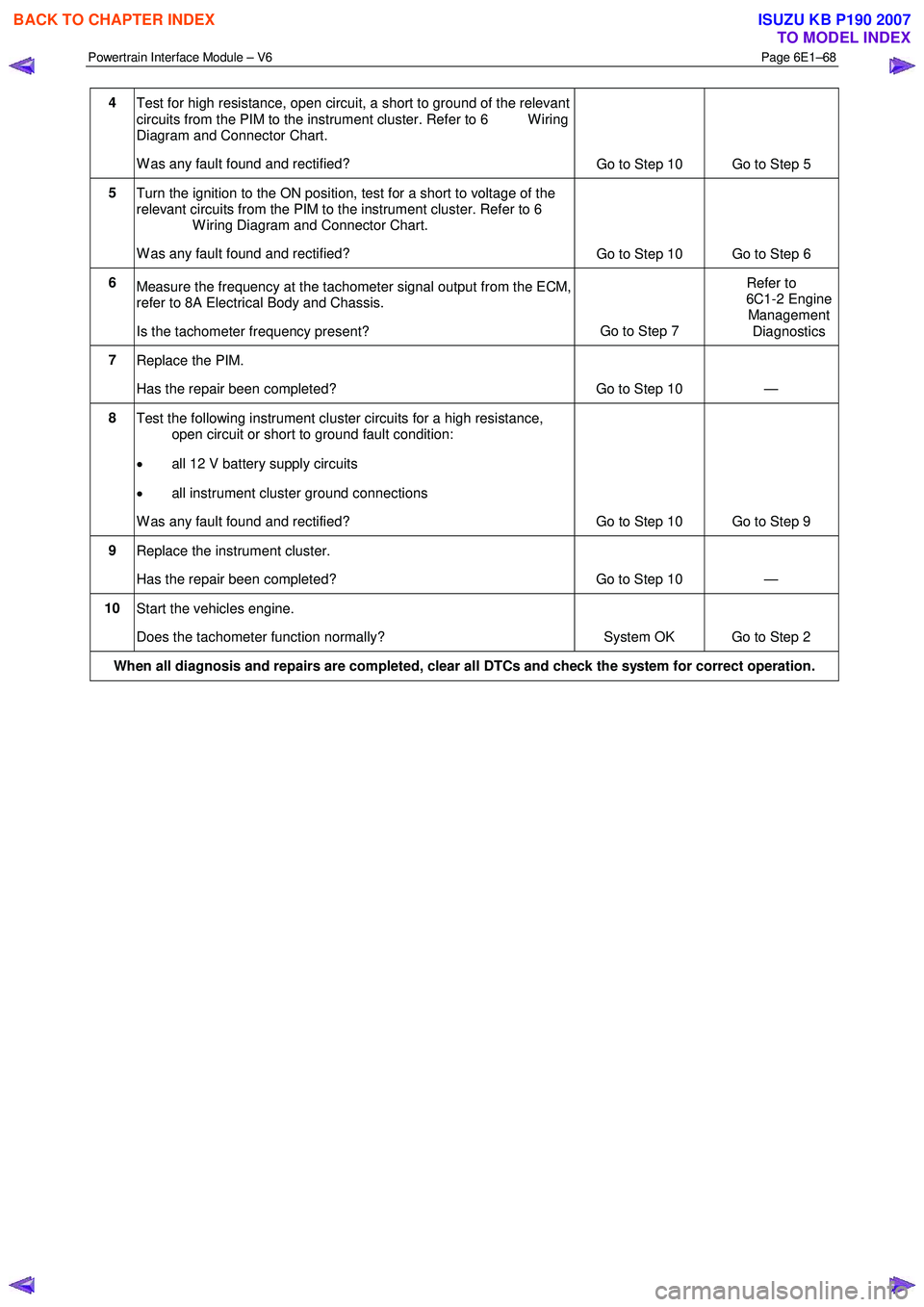
6 This step tests for tachometer drive frequency.
10 This step tests the in-vehicle function of the tachometer.
Tachometer Diagnostic Table
Step Action Yes No
1
Has the Diagnostic System Check been performed?
Go to Step 2 Refer to
Additional
Information
2 Test the function of the tachometer using the instrument cluster self
diagnostic test procedure, refer to 8A Electrical Body and Chassis.
Does the tachometer display 3000 RPM? Go to Step 3 Go to Step 7
3 1 Using Tech 2 select,
Body / PIM / Miscellaneous Tests / Gauge Control Tests /
Tachometer.
2 Using the Tech 2 soft keys step the tacho through different RPM ranges.
Does the tachometer respond to the Tech 2 commands? Go to Step 5 Go to Step 4
BACK TO CHAPTER INDEX
TO MODEL INDEX
ISUZU KB P190 2007
Page 3729 of 6020
Powertrain Interface Module – V6 Page 6E1–68
4
Test for high resistance, open circuit, a short to ground of the relevant
circuits from the PIM to the instrument cluster. Refer to 6 W iring
Diagram and Connector Chart.
W as any fault found and rectified? Go to Step 10 Go to Step 5
5
Turn the ignition to the ON position, test for a short to voltage of the
relevant circuits from the PIM to the instrument cluster. Refer to 6
W iring Diagram and Connector Chart.
W as any fault found and rectified? Go to Step 10 Go to Step 6
6
Measure the frequency at the tachometer signal output from the ECM,
refer to 8A Electrical Body and Chassis.
Is the tachometer frequency present? Go to Step 7 Refer to
6C1-2 Engine Management
Diagnostics
7 Replace the PIM.
Has the repair been completed? Go to Step 10 —
8 Test the following instrument cluster circuits for a high resistance,
open circuit or short to ground fault condition:
• all 12 V battery supply circuits
• all instrument cluster ground connections
W as any fault found and rectified? Go to Step 10 Go to Step 9
9 Replace the instrument cluster.
Has the repair been completed? Go to Step 10 —
10 Start the vehicles engine.
Does the tachometer function normally? System OK Go to Step 2
When all diagnosis and repairs are completed, clear all DTCs and check the system for correct operation.
BACK TO CHAPTER INDEX
TO MODEL INDEX
ISUZU KB P190 2007
Page 3730 of 6020
Powertrain Interface Module – V6 Page 6E1–69
10.4 Temperature Gauge Diagnostics
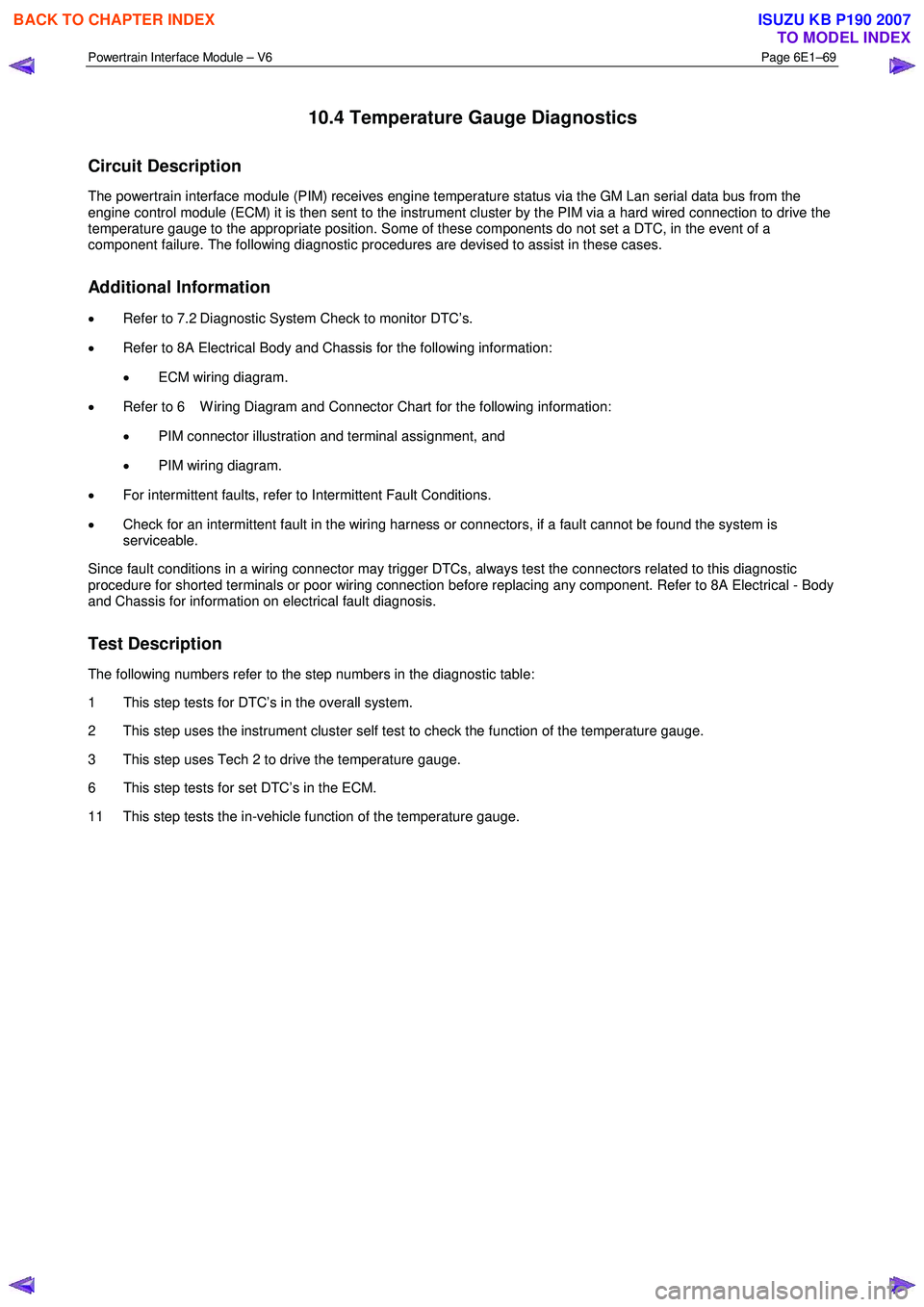
Circuit Description
The powertrain interface module (PIM) receives engine temperature status via the GM Lan serial data bus from the
engine control module (ECM) it is then sent to the instrument cluster by the PIM via a hard wired connection to drive the
temperature gauge to the appropriate position. Some of these components do not set a DTC, in the event of a
component failure. The following diagnostic procedures are devised to assist in these cases.
Additional Information
• Refer to 7.2 Diagnostic System Check to monitor DTC’s.
• Refer to 8A Electrical Body and Chassis for the following information:
• ECM wiring diagram.
• Refer to 6 W iring Diagram and Connector Chart for the following information:
• PIM connector illustration and terminal assignment, and
• PIM wiring diagram.
• For intermittent faults, refer to Intermittent Fault Conditions.
• Check for an intermittent fault in the wiring harness or connectors, if a fault cannot be found the system is
serviceable.
Since fault conditions in a wiring connector may trigger DTCs, always test the connectors related to this diagnostic
procedure for shorted terminals or poor wiring connection before replacing any component. Refer to 8A Electrical - Body
and Chassis for information on electrical fault diagnosis.
Test Description
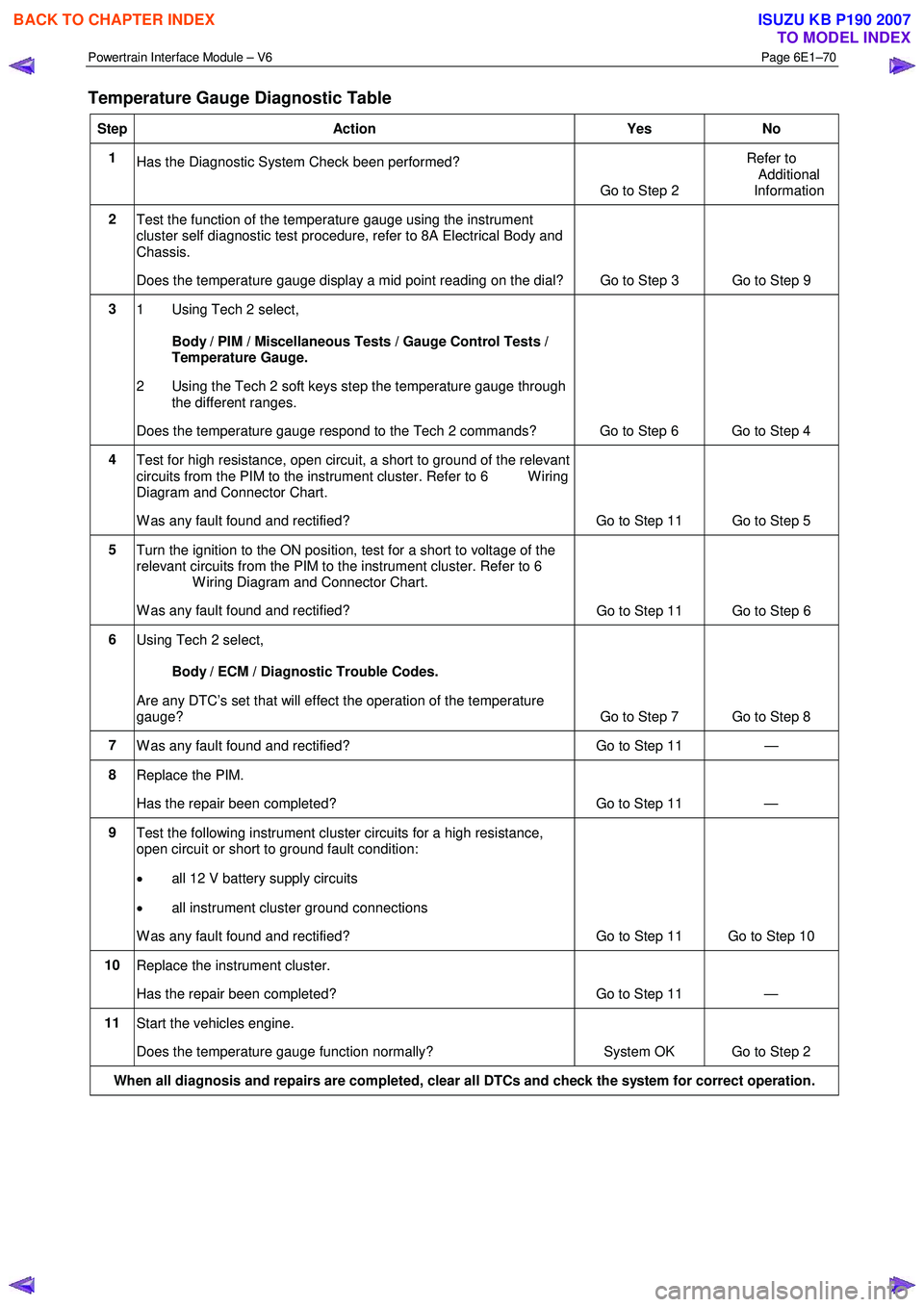
The following numbers refer to the step numbers in the diagnostic table:
1 This step tests for DTC’s in the overall system.
2 This step uses the instrument cluster self test to check the function of the temperature gauge.
3 This step uses Tech 2 to drive the temperature gauge.
6 This step tests for set DTC’s in the ECM.
11 This step tests the in-vehicle function of the temperature gauge.
BACK TO CHAPTER INDEX
TO MODEL INDEX
ISUZU KB P190 2007
Page 3731 of 6020
Powertrain Interface Module – V6 Page 6E1–70
Temperature Gauge Diagnostic Table
Step Action Yes No
1
Has the Diagnostic System Check been performed?
Go to Step 2 Refer to
Additional
Information
2 Test the function of the temperature gauge using the instrument
cluster self diagnostic test procedure, refer to 8A Electrical Body and
Chassis.
Does the temperature gauge display a mid point reading on the dial? Go to Step 3 Go to Step 9
3
1 Using Tech 2 select,
Body / PIM / Miscellaneous Tests / Gauge Control Tests /
Temperature Gauge.
2 Using the Tech 2 soft keys step the temperature gauge through the different ranges.
Does the temperature gauge respond to the Tech 2 commands? Go to Step 6 Go to Step 4
4 Test for high resistance, open circuit, a short to ground of the relevant
circuits from the PIM to the instrument cluster. Refer to 6 W iring
Diagram and Connector Chart.
W as any fault found and rectified? Go to Step 11 Go to Step 5
5 Turn the ignition to the ON position, test for a short to voltage of the
relevant circuits from the PIM to the instrument cluster. Refer to 6
W iring Diagram and Connector Chart.
W as any fault found and rectified? Go to Step 11 Go to Step 6
6
Using Tech 2 select,
Body / ECM / Diagnostic Trouble Codes.
Are any DTC’s set that will effect the operation of the temperature
gauge? Go to Step 7 Go to Step 8
7 W as any fault found and rectified? Go to Step 11 —
8 Replace the PIM.
Has the repair been completed? Go to Step 11 —
9 Test the following instrument cluster circuits for a high resistance,
open circuit or short to ground fault condition:
• all 12 V battery supply circuits
• all instrument cluster ground connections
W as any fault found and rectified? Go to Step 11 Go to Step 10
10 Replace the instrument cluster.
Has the repair been completed? Go to Step 11 —
11 Start the vehicles engine.
Does the temperature gauge function normally? System OK Go to Step 2
When all diagnosis and repairs are completed, clear all DTCs and check the system for correct operation.
BACK TO CHAPTER INDEX
TO MODEL INDEX
ISUZU KB P190 2007
Page 3740 of 6020

Powertrain Interface Module – V6 Page 6E1–79
13 Powertrain Interface Module –
Tech 2 Functions
13.1 Introduction
Do not use a Tech 2 that displays faulty data;
have the Tech 2 repaired. The use of a faulty
Tech 2 can result in misdiagnosis and the
unnecessary replacement of parts.
From the Main Menu, having selected Diagnostics / 2006 / RA Rodeo / Body , the Tech 2 functions for the Powertrain
Interface, include:
F0: Diagnostic Trouble Codes
F1: Diagnostic Data Display
F2: Snapshot
F3: Miscellaneous Tests
F4: Additional Functions
F5: Program
F6: Security
13.2 Tech 2 Functions
F0: Diagnostic Trouble Codes
W hen this test mode is initiated, DTCs stored by the ECM can be displayed or cleared. W hen entered, there are two
additional modes for selection:
F0: Read DTC Info Ordered By Priority : All DTCs stored in the ECM will be displayed.
F1: Clear DTC Information : Clears all current DTCs in the ECM and TCM memories.
F1: Diagnostic Data Display
• Use the Tech 2 Data List under the following conditions:
• The Diagnostic System Check – V6 Engine has been completed.
• The On-Board Diagnostics are functioning correctly.
• No DTCs are present.
NOTE
The values quoted in the following data list are
only intended to provide the Technician with an
indication of the values to be expected.
BACK TO CHAPTER INDEX
TO MODEL INDEX
ISUZU KB P190 2007
Page 3788 of 6020

Automatic Transmission – 4L60E – Electrical Diagnosis Page 7C2–2
4 Diagnostics ...........................................................................................................................................27
4.1 Introduction ................................................................................................................... ....................................... 27
4.2 Basic Knowledge Required ....................................................................................................... .......................... 27
4.3 Diagnostic Precautions ....................................................................................................................................... 27
4.4 Preliminary Checks.............................................................................................................................................. 28
4.5 Diagnostic Trouble Code Tables ................................................................................................. ....................... 29
Multiple DTCs Fault Condition ............................................................................................................................ 29
4.6 Diagnostic Trouble Code Definitions ............................................................................................ ..................... 29
Type A – Emission Related DTCs ....................................................................................................................... 29
Type B – Emission Related DTCs ....................................................................................................................... 30
Conditions for Clearing Type A or Type B DTCs .................................................................................. ............ 30
Type C – Non-emission Related DTCs ............................................................................................................... 30
Conditions for Clearing Type C DTCs .............................................................................................................. 30
Current DTCs........................................................................................................................................................ 30
History DTCs ........................................................................................................................................................ 30
4.7 Diagnostic System Check ........................................................................................................ ........................... 30
Description ........................................................................................................................................................... 30
Test Description ................................................................................................................................................... 31
4.8 Diagnostic Trouble Code List ................................................................................................... .......................... 31
4.9 DTC P0218 – Transmission Fluid Overtemperature................................................................................. ......... 33
DTC Description ................................................................................................................................................... 33
Circuit Description ............................................................................................................................................... 33
Conditions for Running the DTC ................................................................................................. ....................... 33
Conditions for Setting the DTC........................................................................................................................... 33
Action Taken When the DTC Sets ................................................................................................. ..................... 33
Conditions for Clearing the DTC ........................................................................................................................ 34
Diagnostic Aids .................................................................................................................................................... 34
Test Description ................................................................................................................................................... 34
DTC P0218 Diagnostic Table..................................................................................................... .......................... 34
4.10 DTC P0562 – System Voltage Low ................................................................................................. .................... 35
DTC Description ................................................................................................................................................... 35
Circuit Description ............................................................................................................................................... 35
Conditions for Running the DTC ................................................................................................. ....................... 36
Conditions for Setting the DTC........................................................................................................................... 36
Action Taken When the DTC Sets ................................................................................................. ..................... 36
Conditions for Clearing the DTC ........................................................................................................................ 36
Diagnostic Aids .................................................................................................................................................... 36
Test Description ................................................................................................................................................... 36
DTC P0562 Diagnostic Table..................................................................................................... .......................... 36
4.11 DTC P0563 – System Voltage High................................................................................................ ..................... 38
DTC Description ................................................................................................................................................... 38
Circuit Description ............................................................................................................................................... 38
Conditions for Running the DTC ................................................................................................. ....................... 38
Conditions for Setting the DTC........................................................................................................................... 39
Action Taken When the DTC Sets ................................................................................................. ..................... 39
Conditions for Clearing the DTC ........................................................................................................................ 39
Diagnostic Aids .................................................................................................................................................... 39
Test Description ................................................................................................................................................... 39
DTC P0563 Diagnostic Table..................................................................................................... .......................... 39
4.12 DTC P0601 to P0604 or P1621 – TCM Malfunction .................................................................................. .......... 41
DTC Description ................................................................................................................................................... 41
Circuit Description ............................................................................................................................................... 41
Conditions for Running the DTC ................................................................................................. ....................... 41
Conditions for Setting the DTC........................................................................................................................... 41
Action Taken When the DTC Sets ................................................................................................. ..................... 42
Conditions for Clearing the DTC ........................................................................................................................ 42
Test Description ................................................................................................................................................... 42
DTC P0601 to P0604 or P1621 Diagnostic Table ................................................................................... ............ 42
4.13 DTC P0711 to P0713 – Transmission Fluid Temperature Sensor .................................................................... 4 3
DTC Description ................................................................................................................................................... 43
BACK TO CHAPTER INDEX
TO MODEL INDEX
ISUZU KB P190 2007
Page 3814 of 6020
Automatic Transmission – 4L60E – Electrical Diagnosis Page 7C2–28
7 Ensure that all wiring harness connectors are fitted correctly and secure.
8 W hen steam or pressure cleaning vehicle components, such as engines, transmissions, etc., do not direct the cleaning nozzle at any system electrical wiring harness connectors or components.
9 Do not clear any DTCs unless instructed.
10 The fault must be present when using the Diagnostic Trouble Code (DTC) Diagnostic Tables. Otherwise, misdiagnosis or replacement of good parts may occur.
11 Do not touch any electronic control module connector pins or soldered components on the circuit board. This is required to avoid the possibility of electrostatic discharge damage.
12 Use only the test equipment specified in the diagnostic tables, as other test equipment may give incorrect results or damage good components.
13 Electronic control modules are designed to withstand normal current draws associated with vehicle operation. However, the following fault conditions or incorrect test procedure may overload internal control module circuits and
irreparably damage the control module:
• A short to voltage fault condition in any of the control module low reference circuits may cause internal and/or
sensor damage. Therefore, any short to voltage fault condition in the control module low reference circuits
must be rectified before replacing a faulty component.
• A short to ground fault condition in any of the control module 5 volts reference circuits may cause internal
control module and/or sensor damage. Therefore, any short to ground fault condition in the control module 5
volt reference circuits must be rectified before replacing a faulty component.
• W hen using a test light to test an electrical circuit, do not use any of the control module low reference circuits
or 5 volts reference circuits as a reference point. Otherwise, excessive current draw from the test light may
damage the control module.
14 Disregard DTCs that set while performing the following diagnostic Steps:
• Using the Tech 2 output control function, or
• Disconnecting a control module system sensor connector then switching the ignition ON.
15 After completing the required diagnostics and service operations, road test the vehicle to ensure correct system operation.
4.4 Preliminary Checks
The Preliminary Checks is a set of visual and physical checks or inspections that may quickly identify a control module
system fault condition:
1 Refer to relevant Service Techlines for information regarding the fault condition.
2 Ensure that the battery is fully charged.
3 Inspect the battery connections for corrosion or a loose terminal.
4 Ensure that all relevant control module system related fuses are serviceable.
5 Inspect for incorrect aftermarket theft deterrent devices, lights or mobile phone installation.
6 Ensure that there is no speaker magnet positioned too close to any electronic module that contains relays.
7 Inspect the system wiring harness for proper connections, pinches or cuts.
8 Ensure that all control module related electrical wiring connectors are fitted correctly.
9 Inspect the control module ground connections for corrosion, loose terminal or incorrect position.
10 Ensure that the resistance between the control module housing and the battery ground cable is less than 0.5 ohms.
11 Check that the control module and its mounting bracket is secure.
12 Check all control module related components for correct installation.
13 Check the control module and related wiring harness routing to ensure that no rubbing or cutting of the wiring harness by sharp body components can occur.
BACK TO CHAPTER INDEX
TO MODEL INDEX
ISUZU KB P190 2007
Page 3815 of 6020
Automatic Transmission – 4L60E – Electrical Diagnosis Page 7C2–29
4.5 Diagnostic Trouble Code Tables
The diagnostic system check and the DTC list, directs the technician to the appropriate diagnostic trouble code (DTC)
tables if there is a DTC currently stored in the TCM.
The diagnostic tables locate a faulty circuit or component through a logic based on the process of elimination. These
diagnostic tables are developed with the following assumptions:
• the vehicle functioned correctly at the time of assembly,
• there are no multiple faults, and
• the problem currently exists.
Understanding and the correct use of the diagnostic tables are essential to reduce diagnostic time and to prevent
misdiagnosis.
Multiple DTCs Fault Condition
Some fault conditions trigger multiple component DTCs even if the fault condition exists only on a single component. If
there are multiple DTCs stored in the TCM, the service technician must view and record all DTCs logged.
Relationship between the logged DTCs can then be analysed to determine the source of the fault condition. Always
begin the diagnostic process with the DTC table of the fault condition that may trigger other DTCs to set.
The following fault conditions may trigger multiple DTCs:
• a fault in the serial data communication circuit,
• a system voltage that is too low may cause incorrect transmission tem operation or transmission component
malfunction,
• a system voltage that is too high may damage the TCM and/or other components,
• fault condition in the TCM Read Only Memory (ROM) or Random Access Memory (RAM),
• fault condition in the TCM internal circuitry or programming, or
• improperly connected sensor or component wiring connector.
If there are no obvious faults to begin a multiple DTC fault condition diagnostic procedure, refer to the Conditions for
Running the DTC in each diagnostic.
4.6 Diagnostic Trouble Code Definitions
The TCM constantly performs self-diagnostic tests on the transmission and it components. W hen the TCM detects a fault
condition in the transmission operating parameters, the TCM sets a DTC to represents that fault condition. The following
are the types of DTCs programmed in the TCM. In addition, DTCs are classified as either Current or History DTC.
• Type A – Emission Related DTCs,
• Type B – Emission Related DTCs, and
• Type C – Non-emission Related DTCs.
NOTE
Depending on the type of DTC set, the TCM may
command the malfunction indiciator lamp (MIL) to
display on the instrument cluster and warn the
driver there is a fault in the transmission. Refer to
the RA Rodeo Owner Manual for further
information on the MIL.
Type A – Emission Related DTCs
The TCM takes the following action when a Type A DTC runs and fails:
• sets a current Type A DTC that represents the fault condition,
• illuminates the MIL, and
BACK TO CHAPTER INDEX
TO MODEL INDEX
ISUZU KB P190 2007
Page 3816 of 6020
Automatic Transmission – 4L60E – Electrical Diagnosis Page 7C2–30
• records the operating condition at the time the diagnostic fails and stores this information in the Freeze Frame/
Failure Record.
Type B – Emission Related DTCs
The TCM takes the following actions when a Type B DTC runs and fails.
• On the first time a Type B DTC fails:
• sets a current Type B DTC that represents the fault condition, and
• records the operating conditions at the time the fault sets and stores this information in the Failure Records.
• On the second consecutive ignition cycle that a Type B DTC fails:
• illuminates the MIL, and
• records the operating condition at the time the diagnostic fails and stores this information in the Freeze
Frame/ Failure Record.
Conditions for Clearing Type A or Type B DTCs
• The current DTC clears when there is no fault condition in the current TCM self-diagnostics.
• If there are no DTCs logged after six consecutive ignition cycles, the TCM deactivates the MIL.
• Type A or Type B History DTC clears when there is no fault condition after 40 consecutive warm-up cycles.
• Use of Tech 2 to clear DTCs.
Type C – Non-emission Related DTCs
The TCM takes the following action when a Type C DTC runs and fails:
• sets a current Type C DTC that represents the fault condition,
• records the operating conditions at the time the DTC is logged and stores this information in the Failure Record,
and
NOTE
The MIL does not illuminate when a Type C DTC
sets.
Conditions for Clearing Type C DTCs
• The current DTC clears when there is no fault condition in the current TCM self-diagnostics.
• Type C History DTC clears when there is no fault condition after 40 consecutive warm-up cycles.
• Use of Tech 2 to clear DTCs.
Current DTCs
A DTC is a Current DTC if the fault condition that triggers the DTC is present during the last TCM self-diagnostics.
History DTCs
A DTC is a History DTC if the fault condition that triggers the DTC is not present during the last TCM self-diagnostics.
4.7 Diagnostic System Check
Description
This section procedure is organised in a logical structure that begins with the diagnostic system check. The diagnostic
system check directs you in a logical direction to the appropriate Section or diagnostic procedure.
BACK TO CHAPTER INDEX
TO MODEL INDEX
ISUZU KB P190 2007
Page 3817 of 6020
Automatic Transmission – 4L60E – Electrical Diagnosis Page 7C2–31
Test Description
The following numbers refer to the step numbers in the diagnostic table:
1 Within this document there are a number of requirements that must be met before you can start diagnosis. Refer to 4.2 Basic Knowledge Required, 4.3 Diagnostic Precautions and 4.4 Preliminary Checks.
2 Checks if there is data communication between Tech 2 and the TCM.
3 Checks if the TCM has set any DTCs. If no DTCs have set, the functional test must be performed, which diagnoses the hydro-mechanical functions of the transmission.
Step Action Yes No
1 Have you read the Basic Diagnostic Requirements, Diagnostic
Precautions and Preliminary Checks? Go to Step 3 Refer to Note 1
2
1 Connect Tech 2 to the DLC.
2 On Tech 2 select: Transmission / Automatic Transmission
and follow the instruction on Tech 2.
Does Tech 2 display the TCM specifications? Go to Step 4 Refer to 6E1
Powertrain Interface
Module
3 On Tech 2 select:
Diagnostic Trouble Codes / Read DTC Information
Does Tech 2 display any DTCs?
Go to
4.8 Diagnostic Trouble Code List Perform the
Functional Test, refer to 7C3 Automatic
Transmission –
4L60E – Hydraulic and Mechanical Diagnosis
4.8 Diagnostic Trouble Code List
NOTE
If the DTC listed on Tech 2 is not contained in
this list, refer to OD Vehicle Diagnostics.
DTC Type Description Diagnostic Table
P0218 C Transmission Fluid Overtemperature 4.9 DTC P0218 – Transmission
Fluid Overtemperature
P0562 C System Voltage Low 4.10 DTC P0562 – System
Voltage Low
P0563 C System Voltage High 4.11 DTC P0563 – System
Voltage High
P0601 A Transmission Control Module (TCM) Read Only Memory
(ROM) 4.12 DTC P0601 to P0604 or
P1621 – TCM Malfunction
P0602 A Transmission Control Module (TCM) Not Programmed 4.12 DTC P0601 to P0604 or
P1621 – TCM Malfunction
P0603 A Transmission Control Module (TCM) Random Access
Memory (RAM) 4.12 DTC P0601 to P0604 or
P1621 – TCM Malfunction
P0604 A Transmission Control Module (TCM) Long Term Memory
Performance 4.12 DTC P0601 to P0604 or
P1621 – TCM Malfunction
P0711 C Transmission Fluid Temperature (TFT) Sensor
Performance 4.13 DTC P0711 to P0713 –
Transmission Fluid Temperature
Sensor
P0712 C Transmission Fluid Temperature (TFT) Sensor Circuit Low
Voltage 4.13 DTC P0711 to P0713 –
Transmission Fluid Temperature
Sensor
BACK TO CHAPTER INDEX
TO MODEL INDEX
ISUZU KB P190 2007