ad blue ISUZU TROOPER 1995 Owner's Manual
[x] Cancel search | Manufacturer: ISUZU, Model Year: 1995, Model line: TROOPER, Model: ISUZU TROOPER 1995Pages: 1928
Page 810 of 1928
6E2-114 DRIVEABILITY AND EMISSIONS
CHART C-1F
HEATED OXYGEN SENSOR (H02S} HEATER CHECK
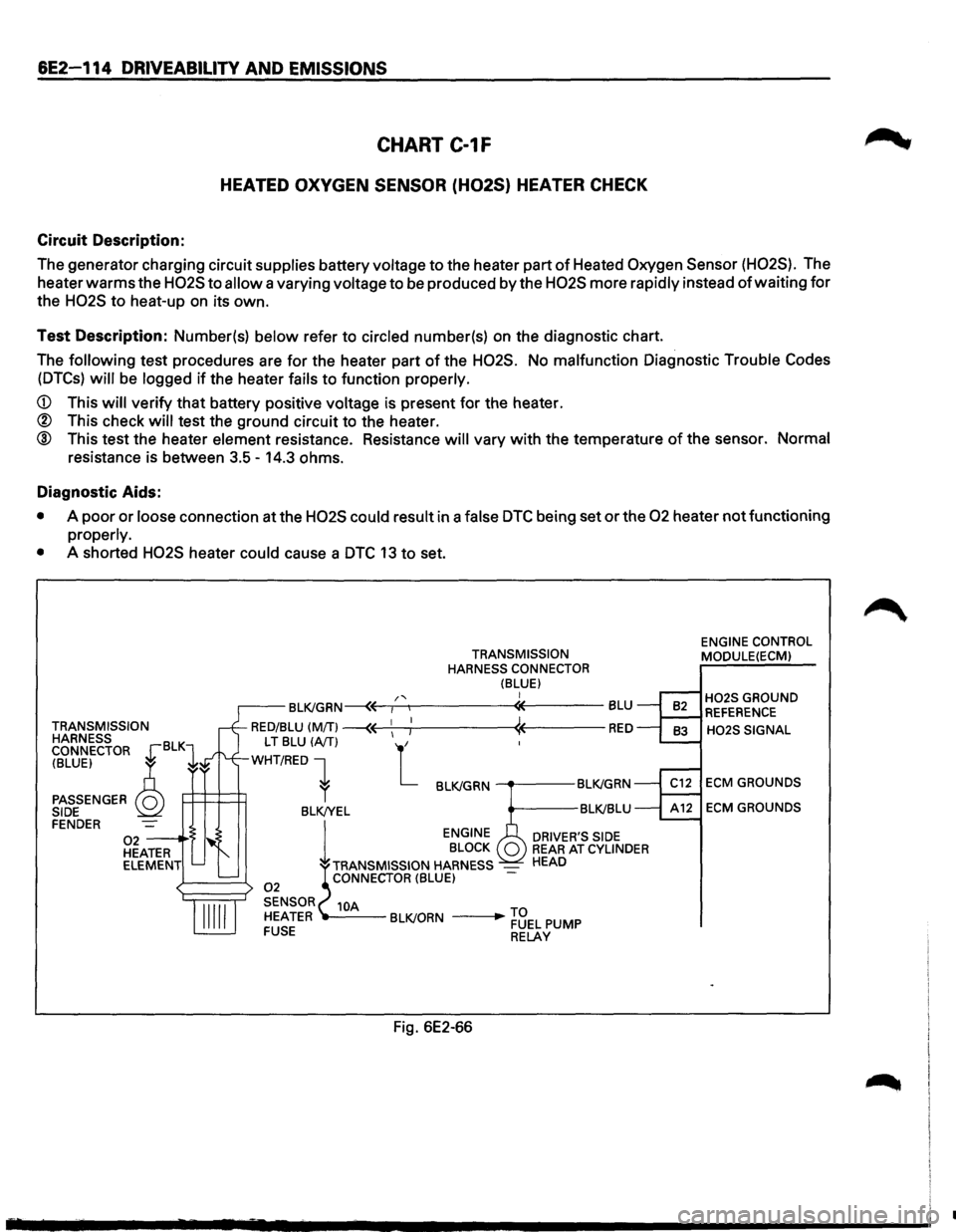
Circuit Description:
The generator charging circuit supplies battery voltage to the heater part of Heated Oxygen Sensor (H02S). The
heater
warms the H02S to allow a varying voltage to be produced by the H02S more rapidly instead of waiting for
the H02S to heat-up on its own.
Test Description: Number(s) below refer to circled number(s) on the diagnostic chart.
The
following test procedures are for the heater part of the H02S. No malfunction Diagnostic Trouble Codes
(DTCs) will be logged if the heater fails to function properly.
CD This will verify that battery positive voltage is present for the heater.
® This check will test the ground circuit to the heater.
® This test the heater element resistance. Resistance will vary with the temperature of the sensor. Normal
resistance is between 3.5-14.3 ohms.
Diagnostic Aids:
• A poor or loose connection at the H02S could result in a false DTC being set or the 02 heater not functioning
properly.
•
A shorted H02S heater could cause a DTC 13 to set.
TRANSMISSION
HARNESS
CONNECTOR
~BLKl
(BLUE) ~ ~
PASSENGER Q SIDE FENDER 02--·'> HEATER
ELEMENT
TRANSMISSION
HARNESS CONNECTOR
(BLUE) I
Fig. 6E2-66
ENGINE CONTROL
MODULE(ECM)
H02S GROUND REFERENCE
H02S SIGNAL
ECM GROUNDS
ECM GROUNDS
•
Page 1052 of 1928
7A-180 AUTOMATIC TRANSMISSION (4L30-E)
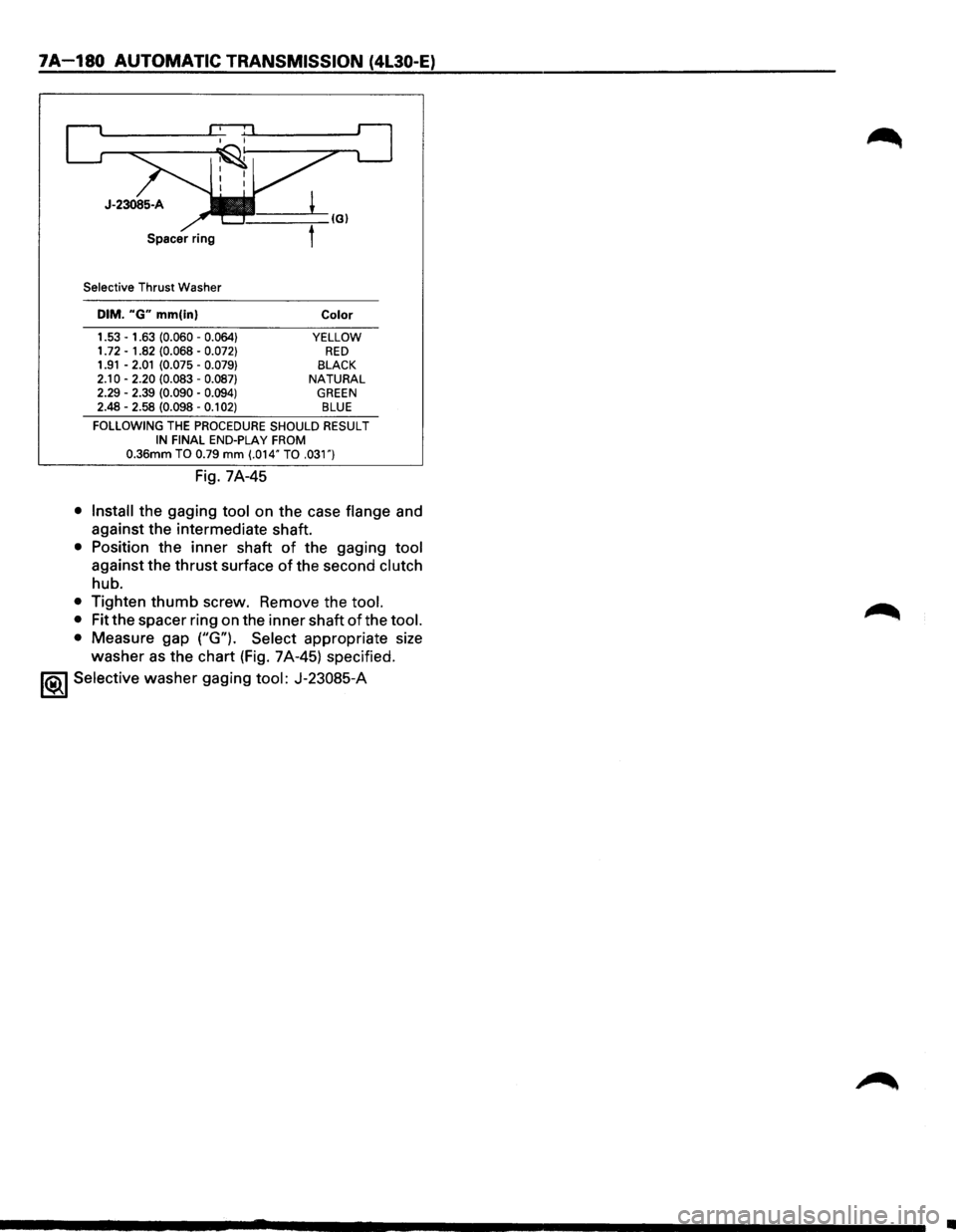
Selective Thrust Washer
DIM. "G" mm(in)
1.53 -1.63 (0.060 -0.064} 1. 72 -1.82 (0.068 -0.072} 1.91 -2.01 (0.075 -0.079}
2.10 -2.20 (0.083 -0.087} 2.29 -2.39 (0.090 -0.094} 2.48 -2.58 (0.098 -0.1 02)
Color
YELLOW RED BLACK NATURAL GREEN BLUE
FOLLOWING THE PROCEDURE SHOULD RESULT IN FINAL END-PLAY FROM 0.36mm TO 0.79 mm (.014" TO .031")
Fig. 7A-45
• Install the gaging tool on the case flange and
against the intermediate shaft.
• Position the inner shaft of the gaging tool
against the thrust surface of the second clutch
hub.
• Tighten thumb screw. Remove the tool.
•
Fit the spacer ring on the inner shaft of the tool.
•
Measure gap ("G"). Select appropriate size
washer as the chart (Fig. 7A-45) specified.
1<&1 Selective washer gaging tool: J-23085-A
•
Page 1055 of 1928
~~11. Fourth •
~ clutch
___,,.,.,.,.
retainer
Turbine shaft
& overrun clutch
housing assembly
Fourth clutch
plates
®• I 19. Thrust bearing
18
~Overdrive L' ,
~ernal gear _ ------_j
~ 2l. Thr~st washer
Fig. 7A-50
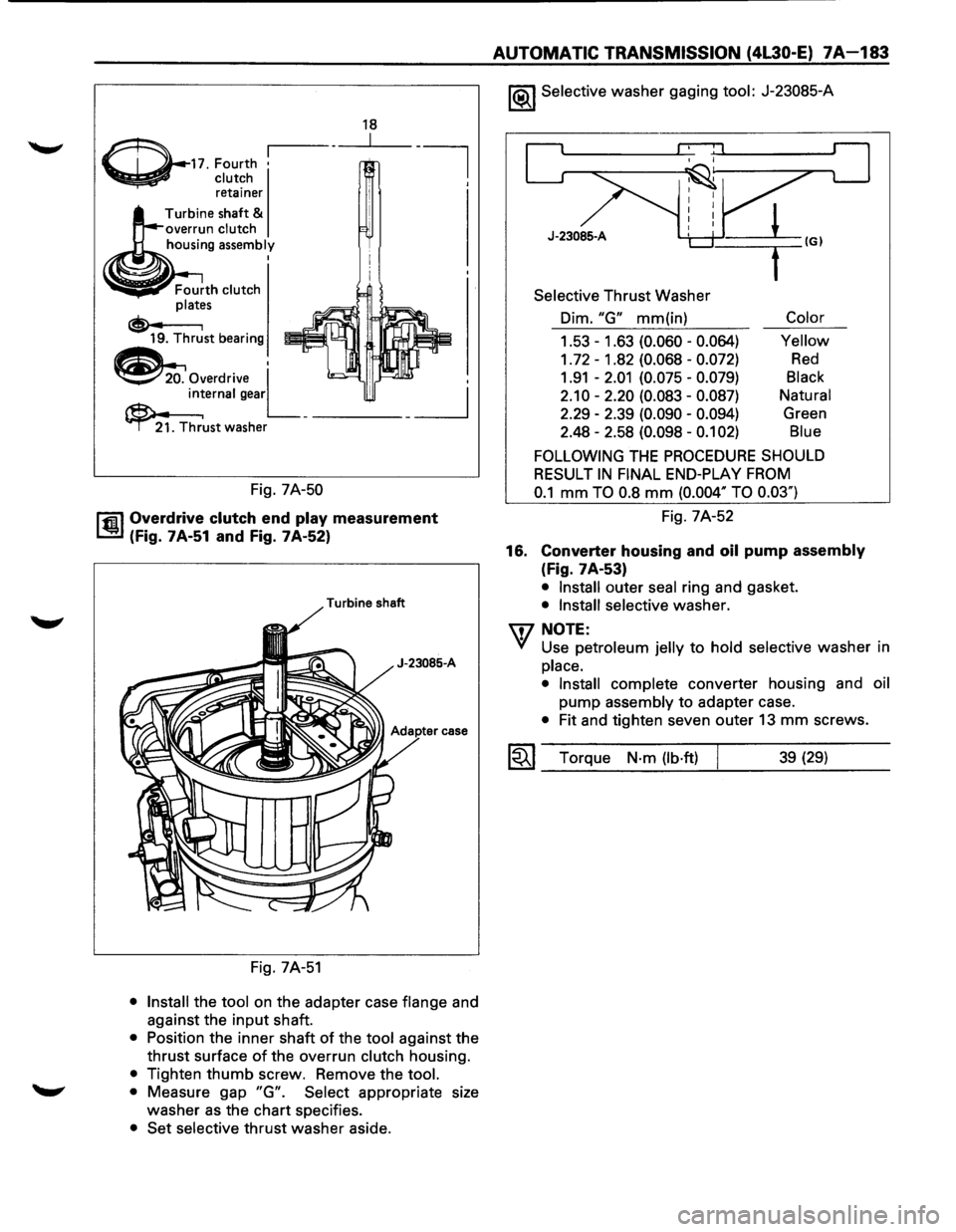
rfi:il Overdrive clutch end play measurement
~ (Fig. 7A-51 and Fig. 7A-52)
Turbine shaft
J-23085-A
case
Fig. 7A-51
• Install the tool on the adapter case flange and
against the
input shaft.
• Position the inner shaft of the tool against the
thrust surface
of the overrun clutch housing.
• Tighten thumb screw. Remove the tool.
• Measure gap "G". Select appropriate size
washer
as the chart specifies.
• Set selective thrust washer aside.
AUTOMATIC TRANSMISSION (4L30-E) 7A-183
1®.1 Selective washer gaging tool: J-23085-A
J-23085-A
Selective Thrust Washer
Dim.
"G" mm(in) Color
1.53-1.63 (0.060- 0.064) Yellow
1. 72 - 1 .82 (0.068 -0.072) Red
1.91 -2.01 (0.075 -0.079) Black
2.10-2.20 (0.083-0.087) Natural
2.29 -2.39
(0.090 -0.094) Green
2.48 -2.58
(0.098 -0.1 02) Blue
FOLLOWING THE PROCEDURE SHOULD
RESULT
IN FINAL END-PLAY FROM
0.1 mm TO 0.8 mm (0.004" TO 0.03")
Fig. 7A-52
16.
Converter housing and oil pump assembly
(Fig. 7A-53)
• Install outer seal ring and gasket.
• Install selective washer.
W NOTE:
VI Use petroleum jelly to hold selective washer in
place.
• Install
complete converter housing and oil
pump
assembly to adapter case.
• Fit and tighten seven outer 13 mm screws.
~~~ Torque N·m (lb·ft) j 39 (29)
Page 1117 of 1928
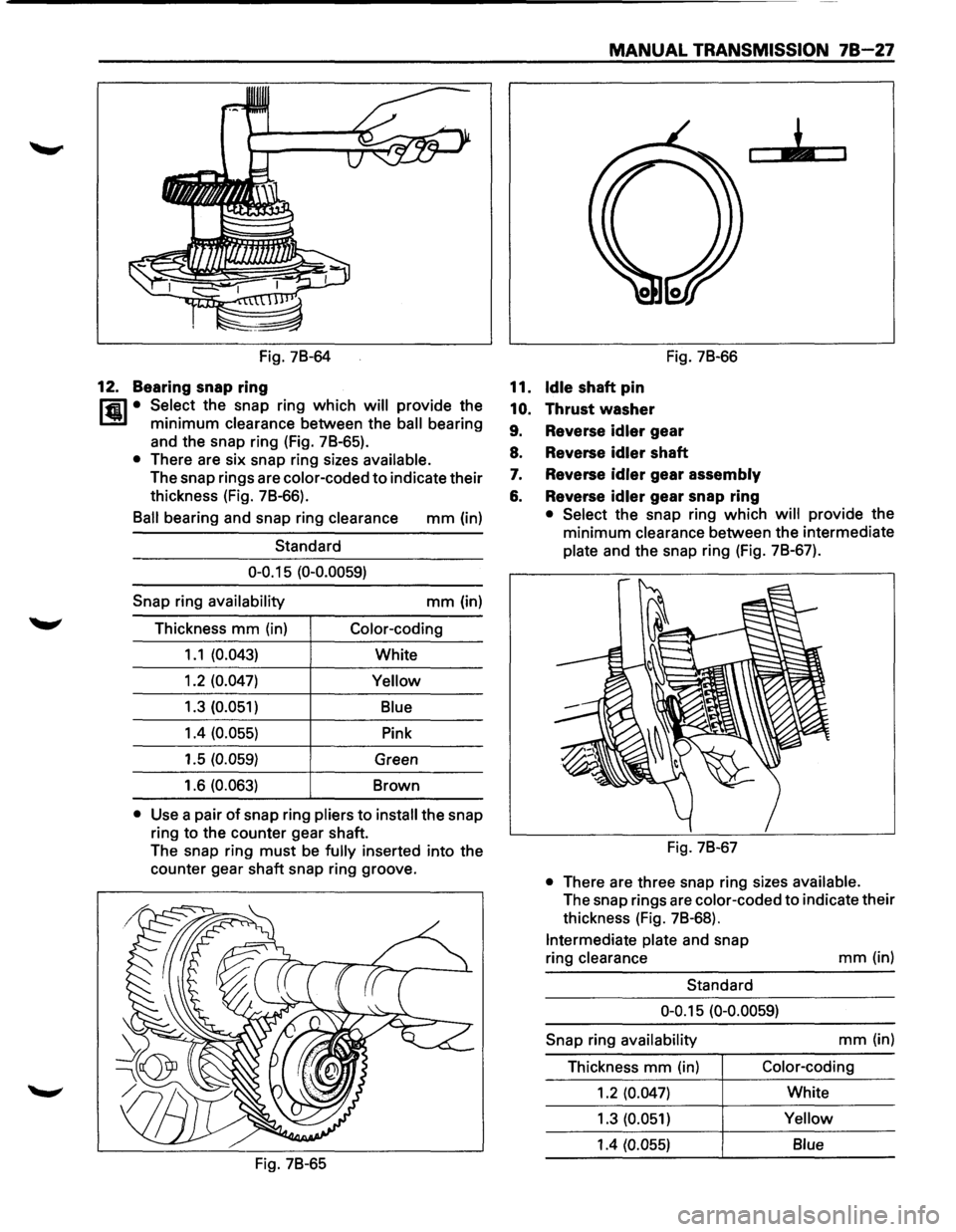
Fig. 7B-64
12. Bearing snap ring
Hi1 • Select the snap ring which will provide the
1..!!1 minimum clearance between the ball bearing
and the snap ring (Fig. 7B-65).
• There are six snap ring sizes available.
The snap rings are color-coded to indicate their
thickness (Fig. 7B-66).
Ball bearing and snap ring clearance mm (in)
Standard
0-0.15 (0-0.0059)
Snap ring availability mm (in)
Thickness
mm (in) Color-coding
1.1 (0.043) White
1.2
(0.047) Yellow
1.3 (0.051)
Blue
1.4 (0.055) Pink
1.5
(0.059) Green
1.6
(0.063) Brown
• Use a pair of snap ring pliers to install the snap
ring to the counter gear shaft.
The snap ring
must be fully inserted into the
counter gear shaft snap ring groove.
Fig. 7B-65
MANUAL TRANSMISSION 78-27
11. Idle shaft pin
10. Thrust washer
Fig. 7B-66
9. Reverse idler gear
8. Reverse
idler shaft
7. Reverse idler gear assembly
6. Reverse idler gear snap ring
• Select the snap ring which will provide the
minimum
clearance between the intermediate
plate and the snap ring (Fig. 7B-67).
Fig. 7B-67
• There are three snap ring sizes available.
The snap rings are color-coded to indicate their
thickness (Fig. 7B-68).
Intermediate plate and snap
ring
clearance
Standard
mm(in)
0-0.15 (0-0.0059)
Snap ring availability mm (in)
Thickness
mm (in) Color-coding
1.2 (0.047) White
1.3
(0.051) Yellow
1.4 (0.055)
Blue
Page 1118 of 1928
78-28 MANUAL TRANSMISSION
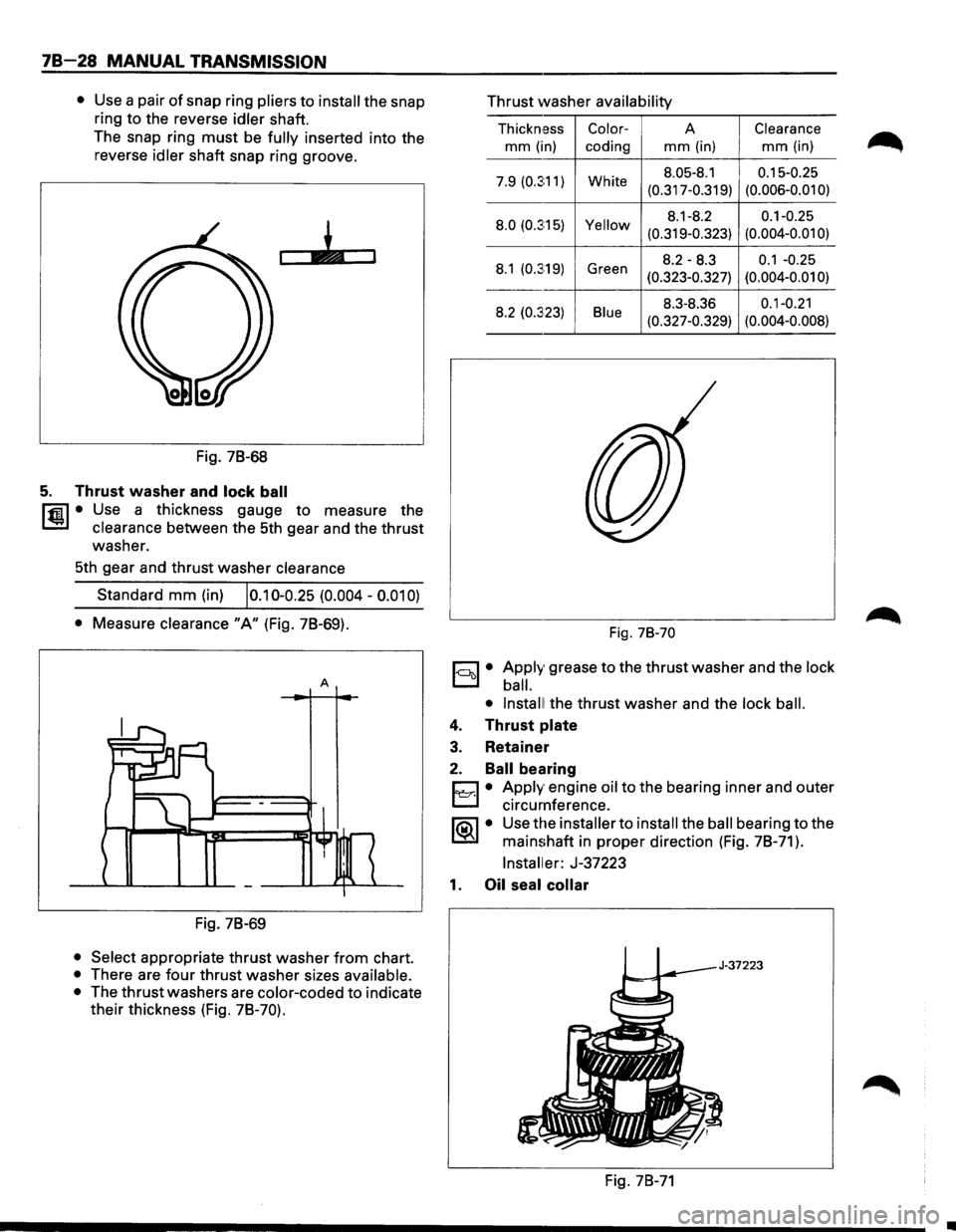
• Use a pair of snap ring pliers to install the snap
ring to the reverse
idler shaft.
The snap ring
must be fully inserted into the
reverse
idler shaft snap ring groove.
Fig. 78-68
5. Thrust washer and lock ball
l'fil • Use a thickness gauge to measure the
1.!::.1 clearance between the 5th gear and the thrust
washer.
5th gear and thrust washer
clearance
Standard mm (in) 10.10-0.25 (0.004 -0.01 0)
• Measure clearance "A" (Fig. 78-69).
A
Fig. 78-69
• Select appropriate thrust washer from chart.
• There are four thrust washer sizes available.
•
The thrust washers are color-coded to indicate
their thickness (Fig.
78-70).
Thrust washer availability
Thickn,ess Color-A Clearance
mm (in)
coding mm (in) mm (in)
7.9 (0.3:11) White 8.05-8.1 0.15-0.25
(0.317-0.319) (0.006-0.01
0)
8.0
(0.3:15) Yellow 8.1-8.2 0.1-0.25
(0.319-0.323) (0.004-0.01
0)
8.1 (0.3:19) Green 8.2-8.3 0.1 -0.25
(0.323-0.327) (0.004-0.01 0)
8.2 (0.323) Blue 8.3-8.36 0.1-0.21
(0.327-0.329) (0.004-0.008)
Fig. 78-70
1-ool • Apply grease to the thrust washer and the lock
ball.
• Install!
the thrust washer and the lock ball.
4. Thrust plate
3. Retainer
2. Ball bearing
D • Apply engine oil to the bearing inner and outer
~ circumference.
lia\1 • Use the installer to install the ball bearing to the
~ mainshaft in proper direction (Fig. 78-71 ).
Installer: J-37223
1. Oil seal collar
Fig. 78-71
•
Page 1126 of 1928
78-36 MANUAL TRANSMISSION
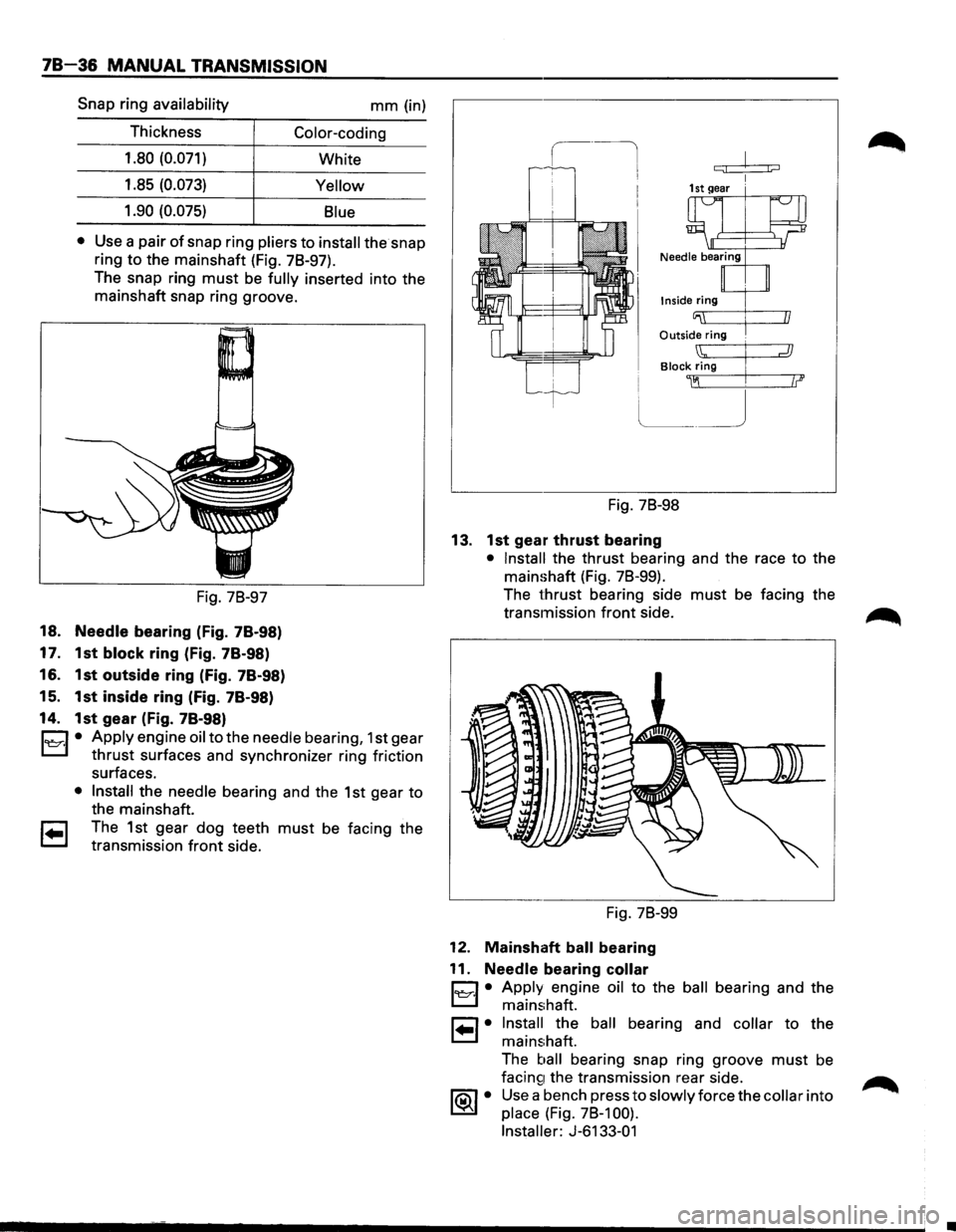
Snap ring availability mm (in)
Thickness
Color-coding
1.80 (0.071)
White
1.85
(0.073) Yellow
1.90 (0.075)
Blue
•
Use a pair of snap ring pliers to install the snap
ring
to the mainshaft (Fig. 78-97).
The snap ring
must be fully inserted into the
mainshaft snap ring groove.
Fig. 78-97
18. Needle bearing (Fig. 78-98)
17. 1st
block ring (Fig. 78-98)
16. 1st outside ring (Fig. 78-98)
15. 1st inside ring (Fig. 78-98)
14. 1st gear (Fig. 78-98)
C1 • Apply engine oil to the needle bearing, 1st gear
L::l thrust surfaces and synchronizer ring friction
surfaces.
• Install the needle bearing and the 1st gear to
the mainshaft.
1 .. 1 The 1st gear dog teeth must be facing the
transmission
front side.
c:;! j;::::J
Inside ring
Outside ring .
Block Zig I
~~ .
Fig. 78-98
13. 1st gear thrust bearing
• Install the thrust bearing and the race to the
mainshaft (Fig. 78-99).
The
thrust bearing side must be facing the
transmission
front side.
Fig. 78-99
12. Mainshaft ball bearing
11.
Needle bearing collar
1~·1 • Apply engine oil to the ball bearing and the
mainshaft.
1 .. 1• Install the ball bearing and collar to the
mainshaft.
The
ball bearing snap ring groove must be
facin~1 the transmission rear side.
1®..1 • Use a bench press to slowly force the collar into
place (Fig. 78-1 00).
Installer:
J-6133-01
Page 1127 of 1928
MANUAL TRANSMISSION 78-37
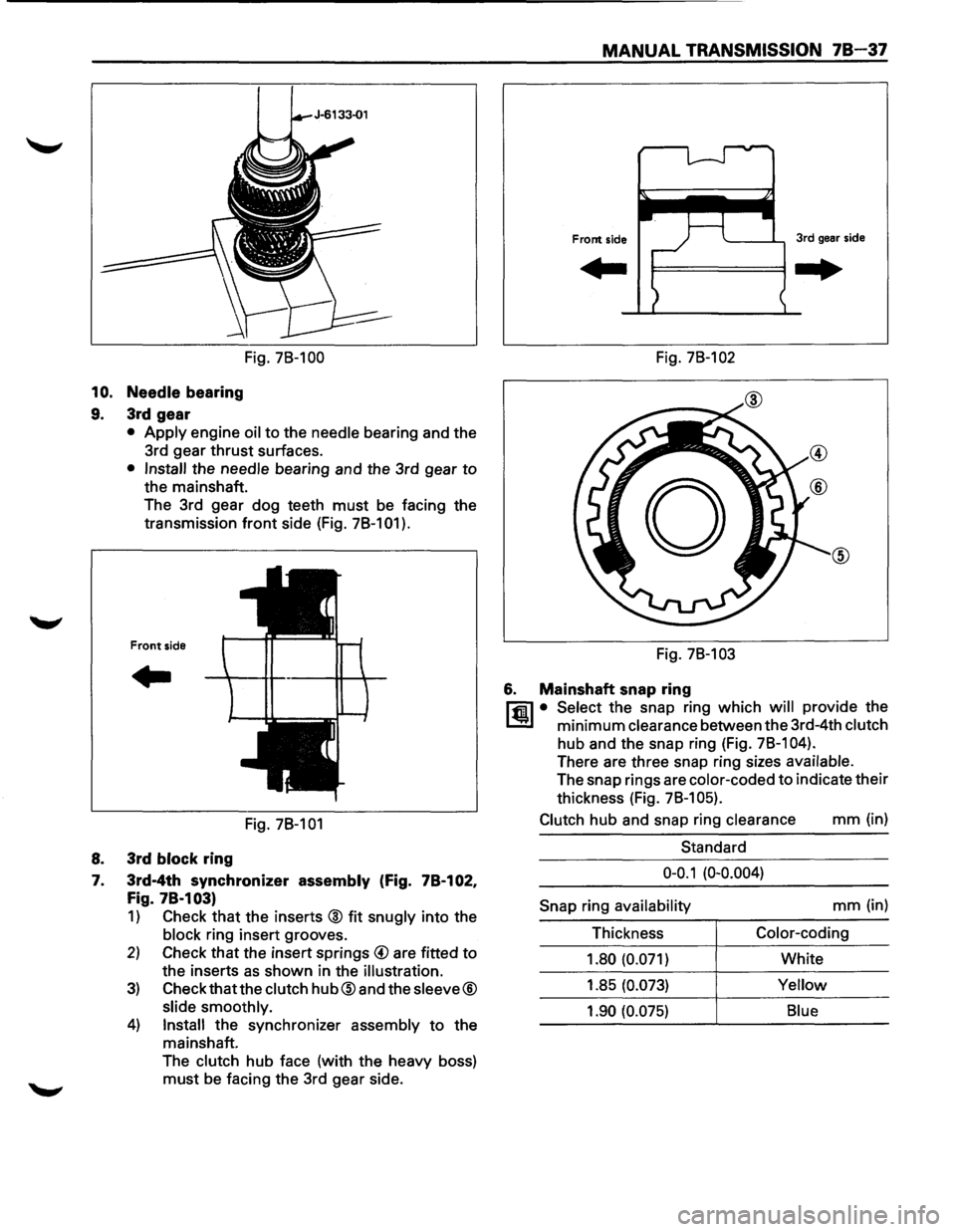
Fig. 78-100 Fig. 78-102
10. Needle bearing
9. 3rd gear
• Apply engine oil to the needle bearing and the
3rd gear
thrust surfaces.
• Install the needle bearing and the 3rd gear to
the mainshaft.
The 3rd gear dog teeth
must be facing the
transmission
front side (Fig. 78-101 ).
Front side
..
Fig. 78-101
8. 3rd block ring
7. 3rd-4th synchronizer assembly (Fig. 78-102,
Fig. 78·103)
1) Check that the inserts @ fit snugly into the
block ring insert grooves.
2) Check that the insert springs @ are fitted to
the inserts as shown in the illustration.
3) Check that the clutch hub@and the sleeve®
slide smoothly.
4) Install the synchronizer assembly to the
mainshaft.
The
clutch hub face (with the heavy boss)
must be facing the 3rd gear side. Fig.
78-103
6. Mainshaft snap ring
l"fil • Select the snap ring which will provide the
l..!l!l minimum clearance between the 3rd-4th clutch
hub and the snap ring (Fig. 78-1 04).
There are three snap ring sizes available.
The snap rings are color-coded to indicate their
thickness (Fig.
78-1 05).
Clutch
hub and snap ring clearance mm (in)
Standard
0-0.1 (0-0.004)
Snap
ring availability mm (in)
Thickness
Color-coding
1.80 (0.071)
White
1.85
(0.073) Yellow
1.90 (0.075) Blue
Page 1183 of 1928
IMITI
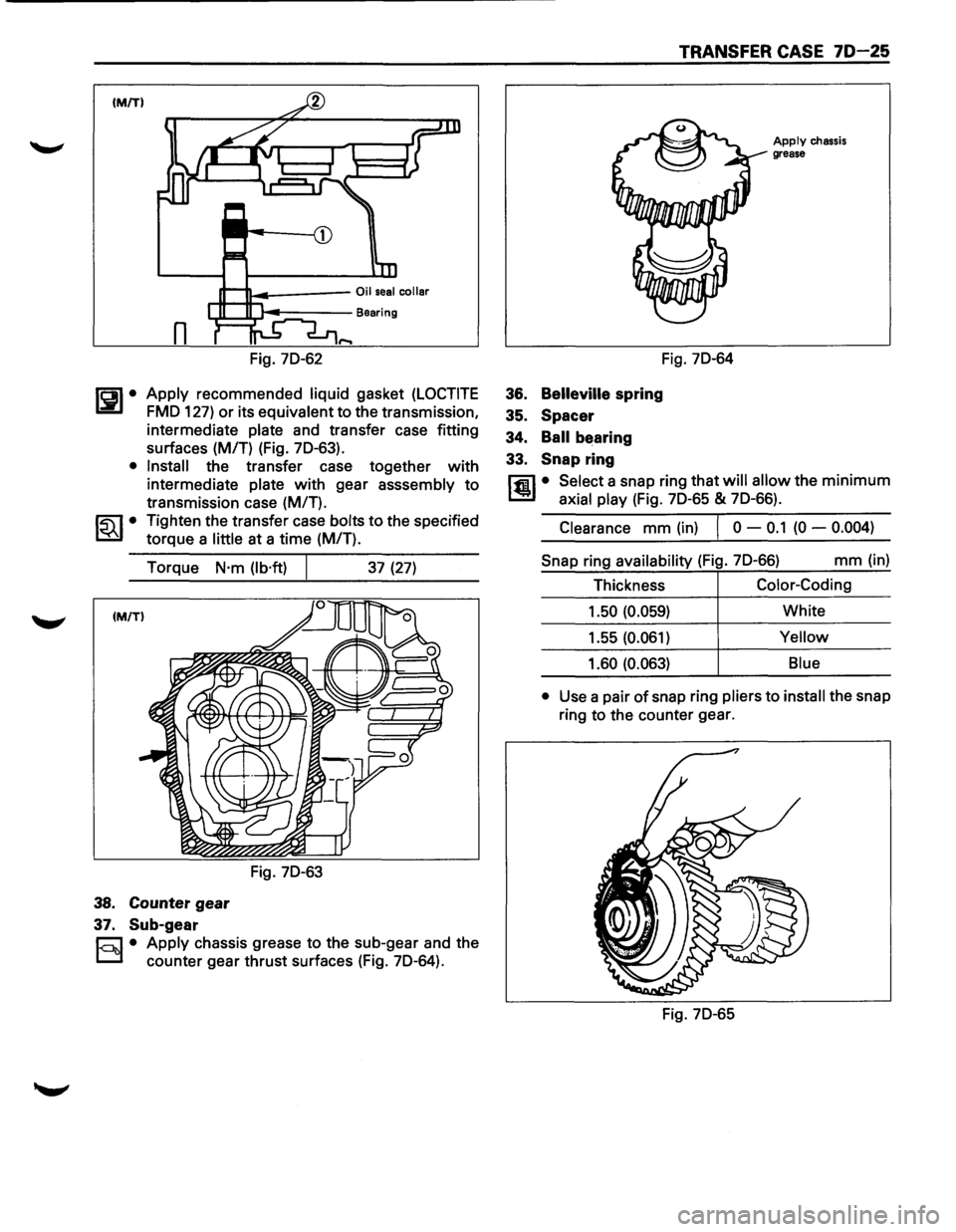
Fig. 70-62
~~~· Apply recommended liquid gasket (LOCTITE
FMO 127) or its equivalent to the transmission,
intermediate
plate and transfer case fitting
surfaces (M/T) (Fig. 70-63).
• Install the transfer case together with
intermediate plate with gear asssembly to
transmission case (M/T).
~~~· Tighten the transfer case bolts to the specified
torque a
little at a time (M/T).
Torque
N·m (lb·ft)
38. Counter gear
37. Sub-gear
Fig. 70-63
37 (27)
§!• Apply chassis grease to the sub-gear and the
counter gear thrust surfaces (Fig. 70-64).
TRANSFER CASE 70-25
36. Belleville spring
35. Spacer
34.
Ball bearing
33.
Snap ring
Fig. 70-64
Apply chassis
grease
rfil • Select a snap ring that will allow the minimum
l!l:.l axial play (Fig. 70-65 & 70-66).
Clearance mm (in) I 0 -0.1 (0 -0.004)
Snap ring availability (Fig. 70-66) mm (in)
Thickness
Color-Coding
1.50 (0.059) White
1.55 (0.061)
Yellow
1.60 (0.063) Blue
•
Use a pair of snap ring pliers to install the snap
ring to the counter gear.
Fig. 70-65
Page 1185 of 1928
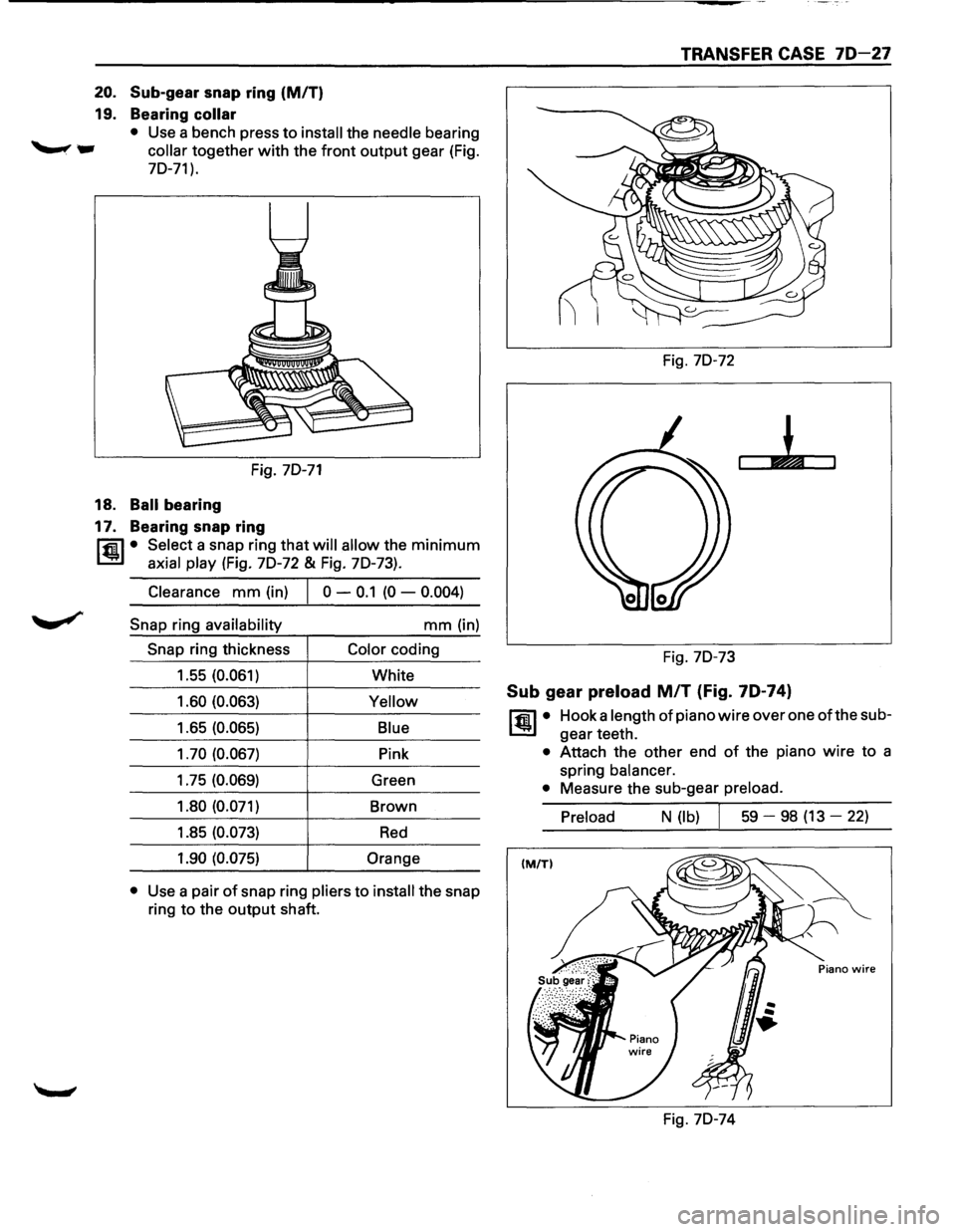
20. Sub-gear snap ring (MIT)
19. Bearing collar
• Use a bench press to install the needle bearing
collar together with the front output gear (Fig.
70-71).
Fig. 70-71
18. Ball bearing
17. Bearing snap ring
rfil • Select a snap ring that will allow the minimum
~ axial play (Fig. 70-72 & Fig. 70-73).
Clearance mm (in) 0 -0.1 (0 -0.004)
Snap ring availability mm (in)
Snap ring thickness Color coding
1.55 (0.061)
White
1.60 (0.063)
Yellow
1.65 (0.065) Blue
1. 70 (0.067)
Pink
1.75 (0.069)
Green
1.80 (0.071)
Brown
1.85 (0.073)
Red
1.90 (0.075) Orange
•
Use a pair of snap ring pliers to install the snap
ring
to the output shaft.
TRANSFER CASE 70-27
Fig. 70-72
Fig. 70-73
Sub gear preload MIT (Fig. 70-74)
~·
Hook a length of piano wire over one ofthe sub
gear teeth.
• Attach the other end of the piano wire to a
spring
balancer.
•
Measure the sub-gear preload.
Preload
N (lb) I 59 -98 (13 -22)
Fig. 70-74
Page 1200 of 1928
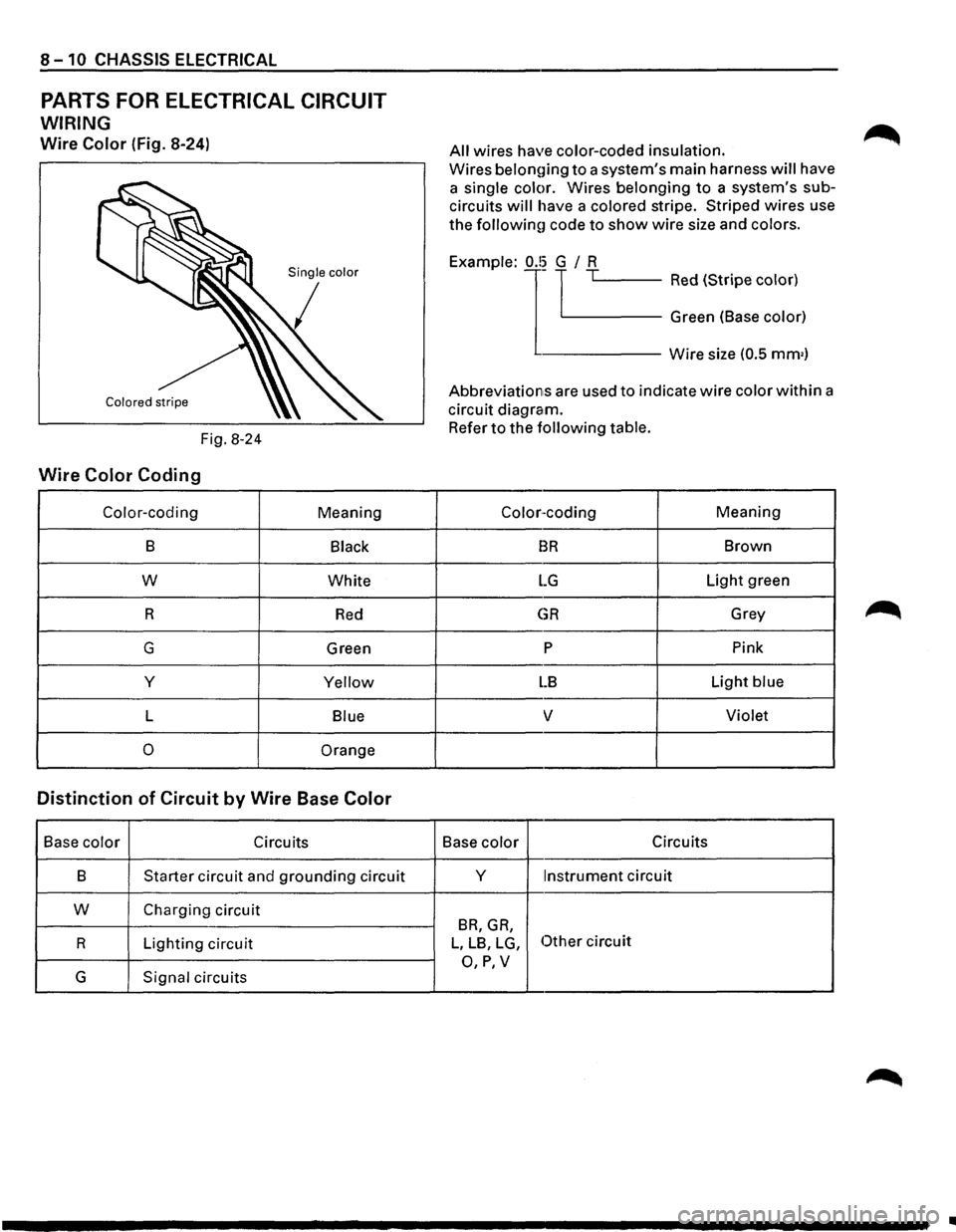
8-10 CHASSIS ELECTRICAL
PARTS FOR ELECTRICAL CIRCUIT
WIRING
Wire Color (Fig. 8-24)
Fig. 8-24
Wire Color Coding
Color-coding Meaning
B Black
w White
R
Red
G Green
y
Yellow
L Blue
0 Orange
Distinction of Circuit by Wire Base Color
Base color Circuits
B
Starter circuit and grounding circuit
w Charging circuit
R Lighting circuit
G Signal circuits
All wires have color-coded insulation.
Wires belon{)ing to a system's main harness will have
a
single color. Wires belonging to a system's sub
circuits will have a colored stripe. Striped wires use
the followinu code to show wire size and colors.
j '-----Red (Stripe color) Example:
1
0.!~ TL.-~-~---
Green (Base color)
------Wire size (0.5 mm•)
Abbreviations are used to indicate wire color within a
circuit diagram.
Refer to the following table.
Color-coding Meaning
BR Brown
LG Light green
GR Grey
p Pink
LB Light blue
v Violet
Base color Circuits
y
Instrument circuit
BR, GR,
L, LB, LG, Other circuit
O,P,V