wheel bolt torque ISUZU TROOPER 1995 Owner's Manual
[x] Cancel search | Manufacturer: ISUZU, Model Year: 1995, Model line: TROOPER, Model: ISUZU TROOPER 1995Pages: 1928
Page 354 of 1928
5A2-4 DISC BRAKES
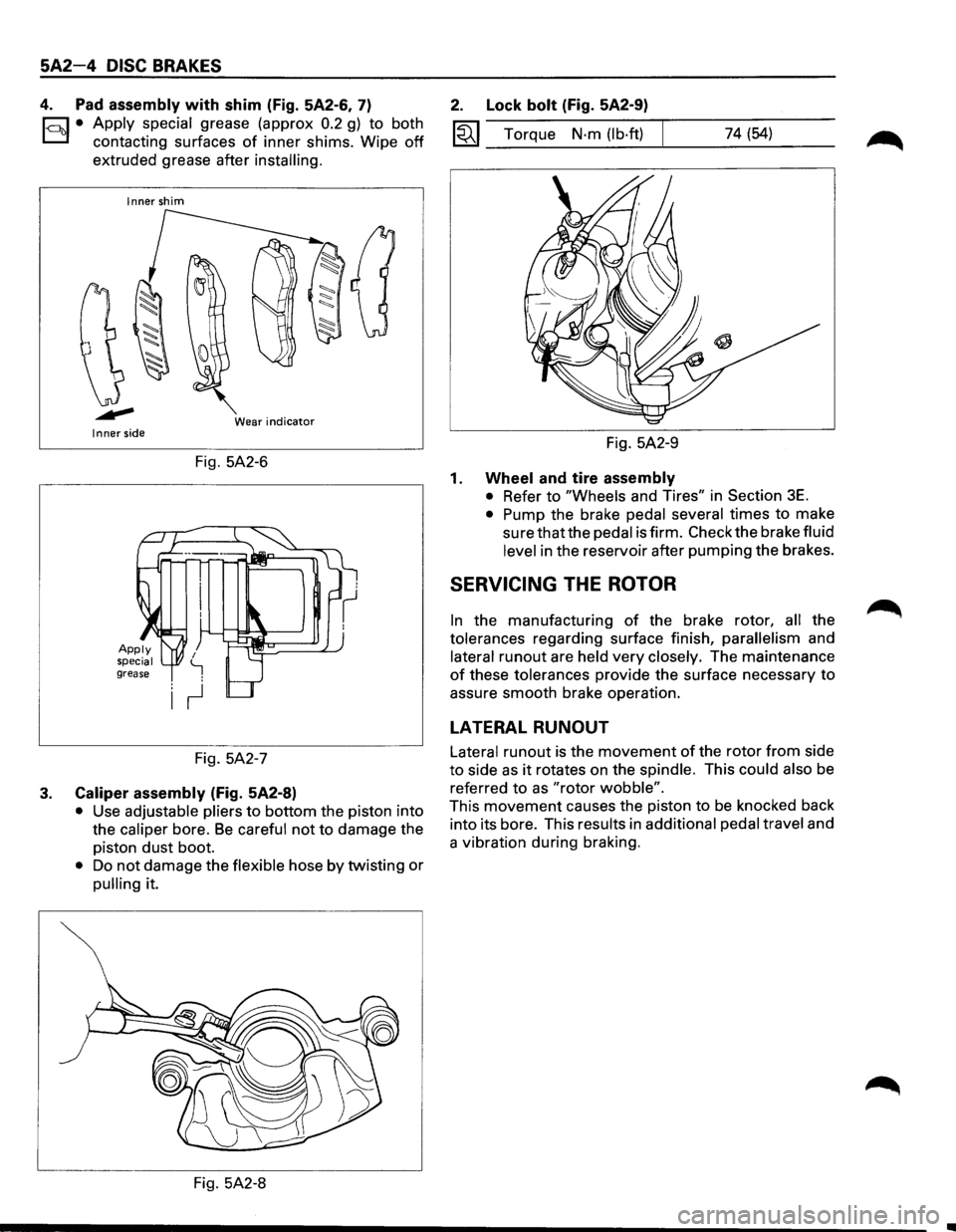
4. Pad assembly with shim (Fig. 5A2-6, 7)
1-c::~t:.l• Apply ~pecial grease (approx 0.2 g) to both
contactmg surfaces
of inner shims. Wipe off
extruded grease after installing.
Inner shim
Wear
indicator Inner side
Fig. 5A2-6
Fig. 5A2-7
3. Caliper assembly (Fig. 5A2-8)
• Use adjustable pliers to bottom the piston into
the
caliper bore. Be careful not to damage the
piston
dust boot.
• Do not damage the flexible hose by twisting or
pulling it.
Fig. 5A2-8
2. Lock bolt (Fig. 5A2-9)
1«1 Torque N·m (lb·ft) 74 (54)
Fig. 5A2-9
1. Wheel and tire assembly
• Refer to "Wheels and Tires" in Section 3E.
• Pump the brake pedal several times to make
sure that the pedal is firm. Check the brake fluid
level in the reservoir after pumping the brakes.
SERVICING THE ROTOR
In the manufacturing of the brake rotor, all the
tolerances regarding surface finish,
parallelism and
lateral
runout are held very closely. The maintenance
of these tolerances provide the surface necessary to
assure smooth brake operation.
LATERAL RUNOUT
Lateral runout is the movement of the rotor from side
to side as it rotates on the spindle. This could also be
referred
to as "rotor wobble".
This movement causes the piston to be knocked back
into its bore. This results in
additional pedal travel and
a vibration during braking.
Page 406 of 1928
5A3-38 REAR WHEEL ANTILOCK BRAKE SYSTEM
ON-VEHICLE SERVICE ·
REAR WHEEL ANTILOCK ELECTRONIC BRAKE CONTROL MODULE (EBCM)
REPLACEMENT
3
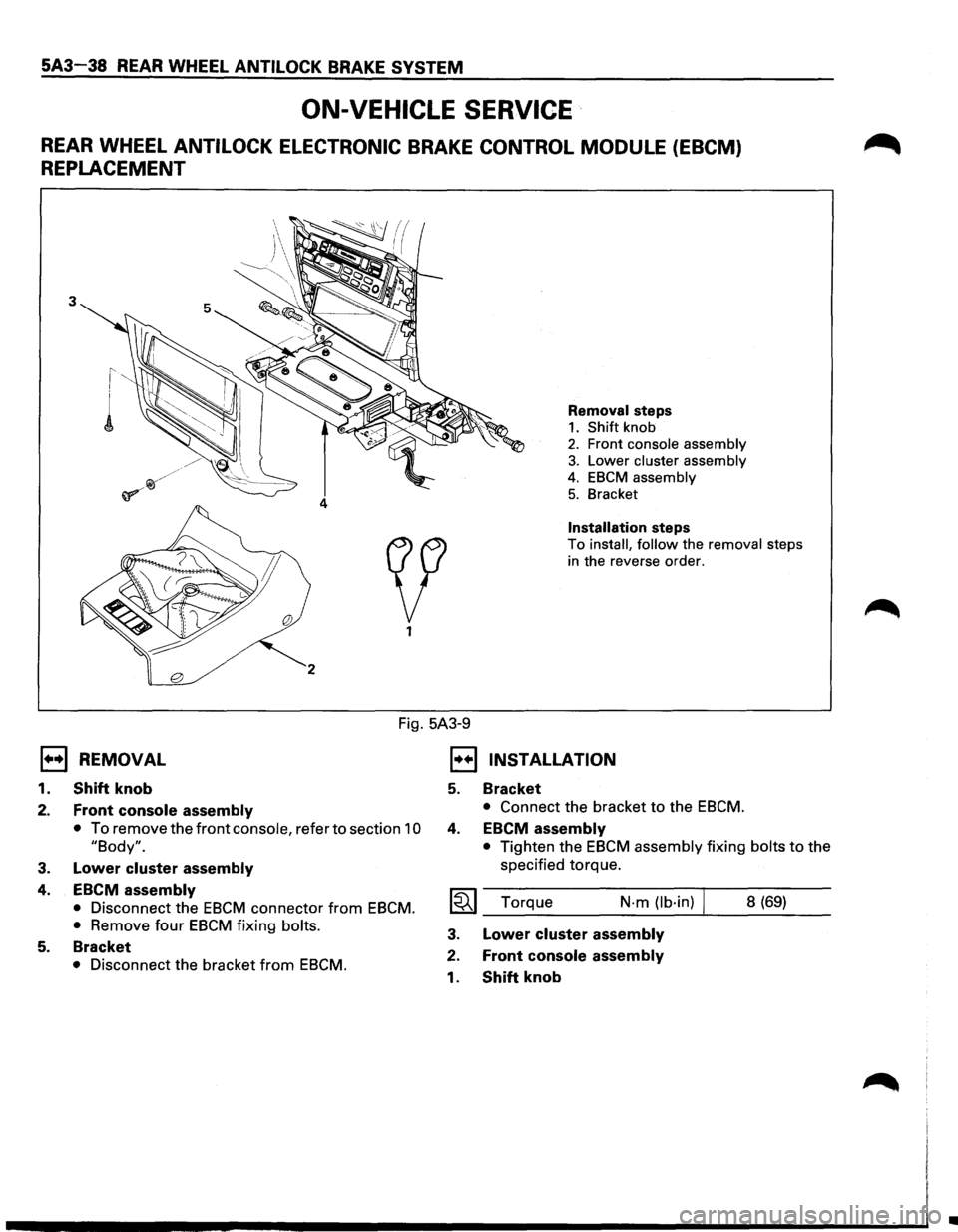
Removal steps
1. Shift knob
2. Front console assembly
3. Lower cluster assembly
4. EBCM assembly
5. Bracket
Installation steps
To install, follow the removal steps
in the reverse order.
Fig. 5A3-9
E) REMOVAL
1.
2.
3.
4.
5.
Shift knob
Front console assembly
• To remove the front console, refer to section 10
"Body".
Lower cluster assembly
EBCM assembly
• Disconnect the EBCM connector from EBCM.
•
Remove four EBCM fixing bolts.
Bracket
• Disconnect the bracket from EBCM.
1•+1 INSTALLATION
5.
4.
Bracket
• Connect the bracket to the EBCM.
EBCM assembly
• Tighten the EBCM assembly fixing bolts to the
specified torque.
I~I_T_o_rq_u_e ____ N·_m_(lb_·i_n_) ...... 1 __ 8_(6_9_) __
3.
2.
1.
Lower cluster assembly
Front console assembly
Shift knob
•
Page 407 of 1928
REAR WHEEL ANTILOCK BRAKE SYSTEM 5A3-39
ANTILOCK (ISOLATION/DUMP) VALVE REPLACEMENT
3
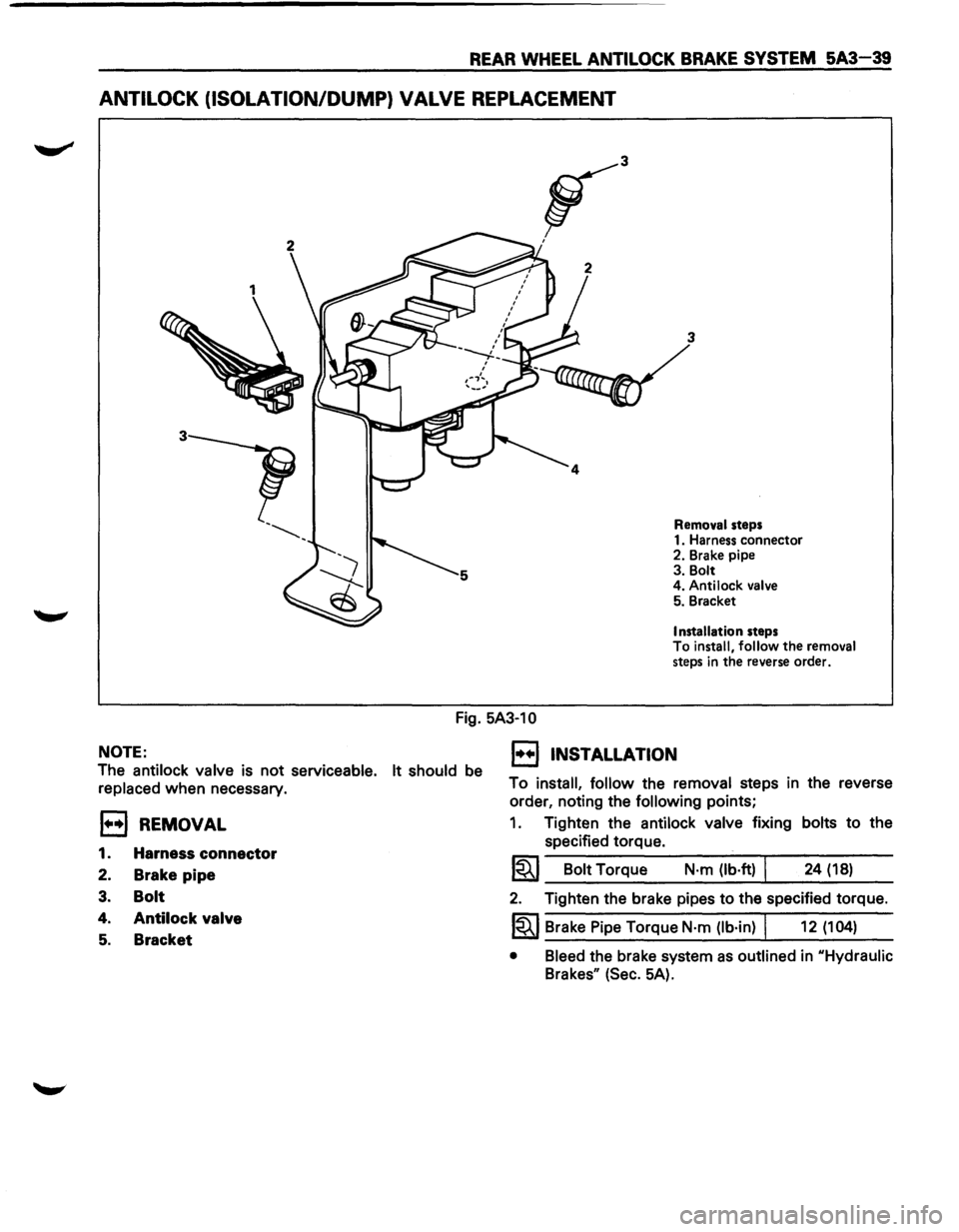
Removal steps
1. Harness connector
2. Brake pipe
3. Bolt
4. Antilock
valve 5. Bracket
Installation steps
To install, follow the removal
steps in the reverse order.
Fig. 5A3-10
NOTE:
The antilock valve is not serviceable. It should be
replaced when necessary.
EJ REMOVAL
1. Harness connector
2. Brake pipe
3. Bolt
4. Antilock valve
5. Bracket
1••1 INSTALLATION
To install, follow the removal steps in the reverse
order, noting the
following points;
1. Tighten the antilock valve fixing bolts to the
specified torque.
1~1 Bolt Torque N·m (lb·ft) I 24 (18)
2. Tighten the brake pipes to the specified torque.
1~1 Brake Pipe Torque N·m (lb·in) I 12 (104)
• Bleed the brake system as outlined in uHydraulic
Brakesu (Sec. 5A).
Page 408 of 1928
5A3-40 REAR WHEEL ANTILOCK BRAKE SYSTEM
SPEED SENSOR REPLACEMENT
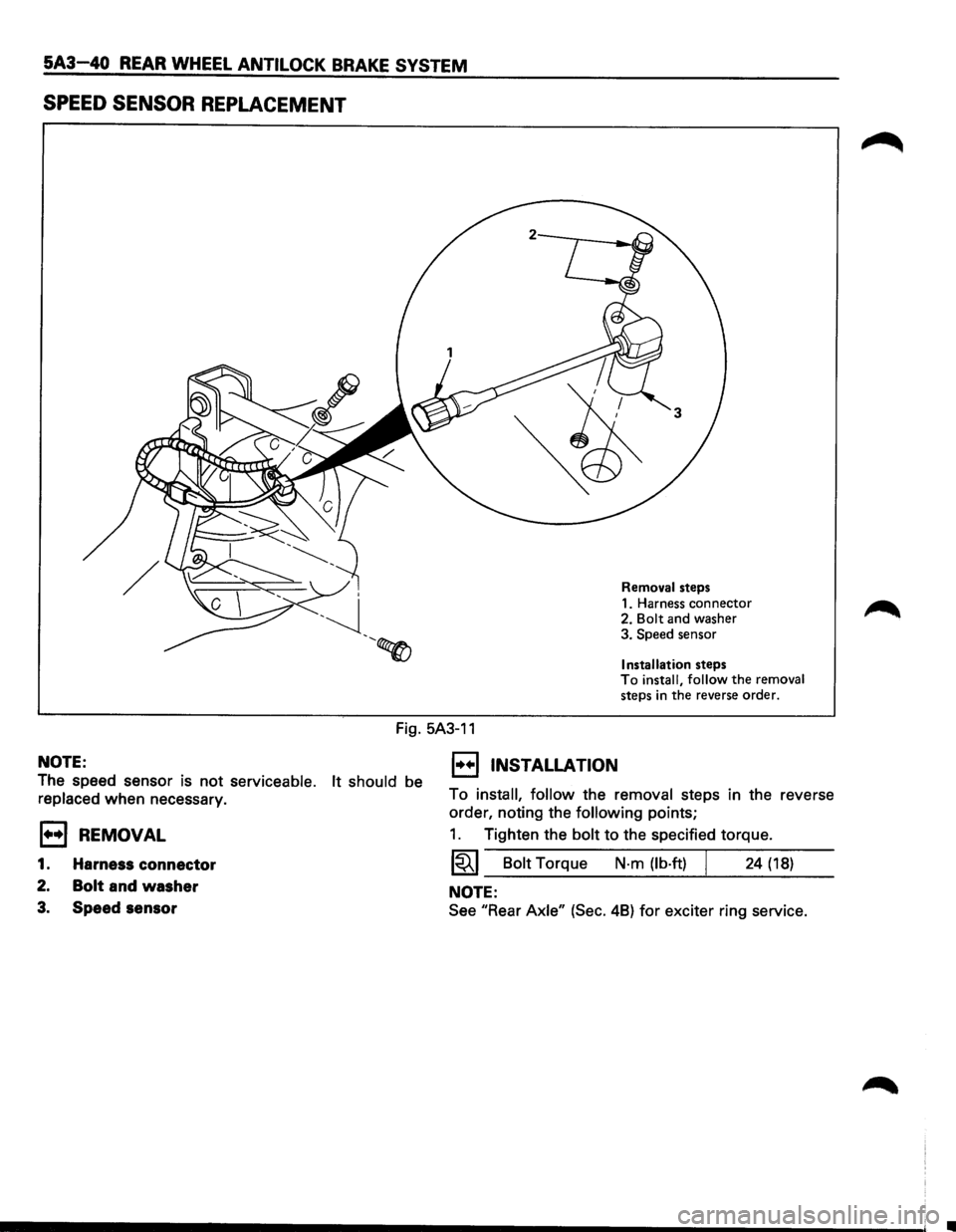
Removal steps
1. Harness connector
2.
Bolt and washer
3. Speed sensor
Installation steps To install, follow the removal
steps in the reverse order.
Fig. 5A3-11
NOTE:
The speed sensor is not serviceable. It should be
replaced when necessary.
E3 REMOVAL
1. Harness connector
2. Bolt and washer
3. Speed sensor
1••1 INSTALLATION
To install, follow the removal steps in the reverse
order, noting the
following points;
1. Tighten the bolt to the specified torque.
1~1 Bolt Torque N-m {lb·ft) I 24 {18)
NOTE:
See "Rear Axle" {Sec. 48) for exciter ring service.
Page 483 of 1928
4-WHEEL ANTILOCK BRAKE SYSTEM (ABS) 5A4-73
ON-VEHICLE SERVICE
W CAUTION:
~ Replace all components included in repair kits used to service this system. Lubricate rubber parts with
clean, fresh brake fluid to ease assembly. Do not use shop air with in-line lubricators on brake parts,
as
damage to rubber components may result. If any hydraulic component is removed or brake line
disconnected,
it may be necessary to bleed part or all of the brake system.
NOTE:
The use of rubber hoses or parts other than those furnished specifically for the Anti lock Brake System may
lead to functional problems requiring major overhaul.
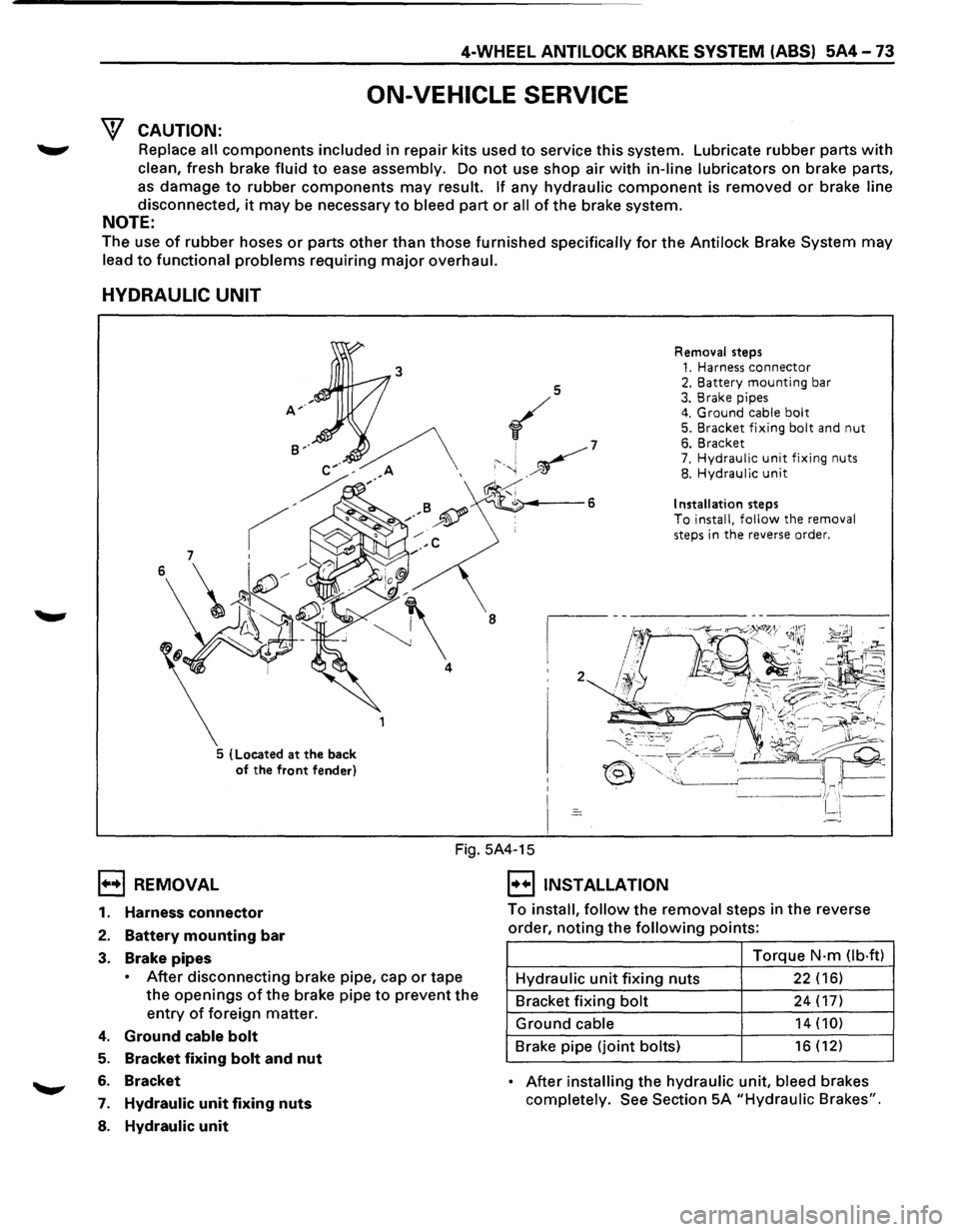
HYDRAULIC UNIT
5 (Located at the back
of the front fender) Removal
steps
1. Harness connector 2. Battery mounting bar 3. Brake pipes 4. Ground cable bolt 5. Bracket fixing bolt and nut 6. Bracket 7. Hydraulic unit fixing nuts 8. Hydraulic unit
Installation steps To install, follow the removal
steps in the reverse order.
1••1 REMOVAL
Fig. 5A4-15
I••IINSTALLATION
1. Harness connector
2. Battery mounting bar
3. Brake pipes
• After disconnecting brake pipe, cap or tape
the
openings of the brake pipe to prevent the
entry of foreign matter.
4. Ground cable bolt
5. Bracket fixing bolt and nut
6. Bracket
7. Hydraulic unit fixing nuts
8. Hydraulic unit
To install, follow the removal steps in the reverse
order,
noting the following points:
Torque
N·m Ob·ftl
Hydraulic unit fixing nuts 22 (16)
Bracket fixing bolt 24 (17)
Ground cable 14 (10)
Brake pipe (joint bolts) 16 (12)
• After installing the hydraulic unit, bleed brakes
completely.
See Section 5A "Hydraulic Brakes".
Page 484 of 1928
5A4-74 4-WHEEL ANTILOCK BRAKE SYSTEM (ABS)
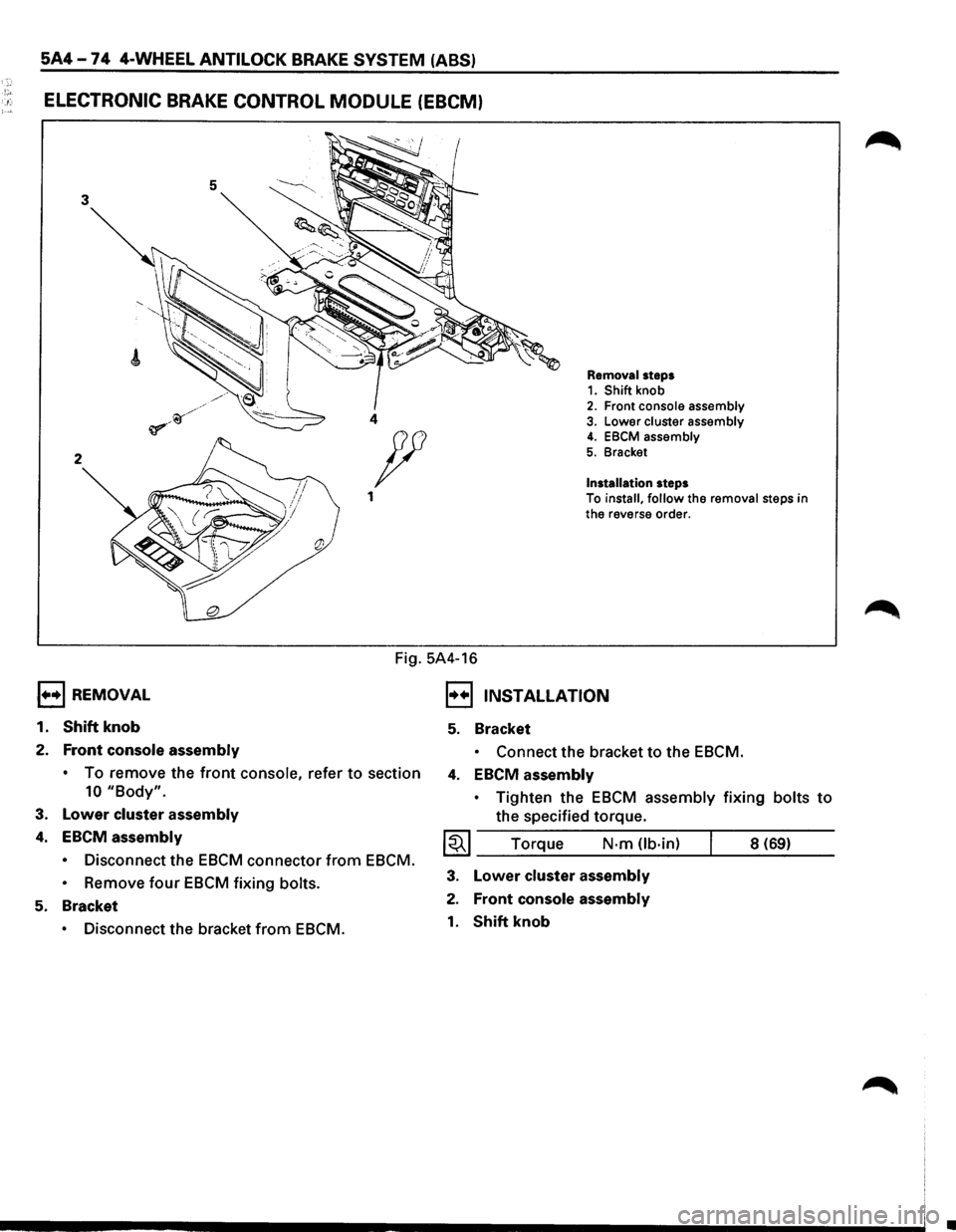
!"' . .: ELECTRONIC BRAKE CONTROL MODULE (EBCM)
5 3
2
1••1 REMOVAL
1.
Shift knob
2. Front console assembly
Removal steps 1. Shift knob 2. Front console assembly 4 3. Lower cluster assembly
Installation steps
4. EBCM assembly
5. Bracket p
1 To install, follow the removal steps in
the reverse order.
Fig. 5A4-16
I••IJNSTALLATION
5. Bracket
• Connect the bracket to the EBCM.
•
To remove the front console, refer to section 4. EBCM assembly
10 "Body".
3. Lower cluster assembly
4. EBCM assembly
• Disconnect the EBCM connector from EBCM.
•
Remove four EBCM fixing bolts.
5. Bracket
• Disconnect the bracket from EBCM. •
Tighten
the EBCM assembly fixing bolts to
the specified torque.
~~~ Torque N·m Ub·in) 8 (69)
3. Lower cluster assembly
2. Front console assembly
1. Shift knob
•
Page 485 of 1928
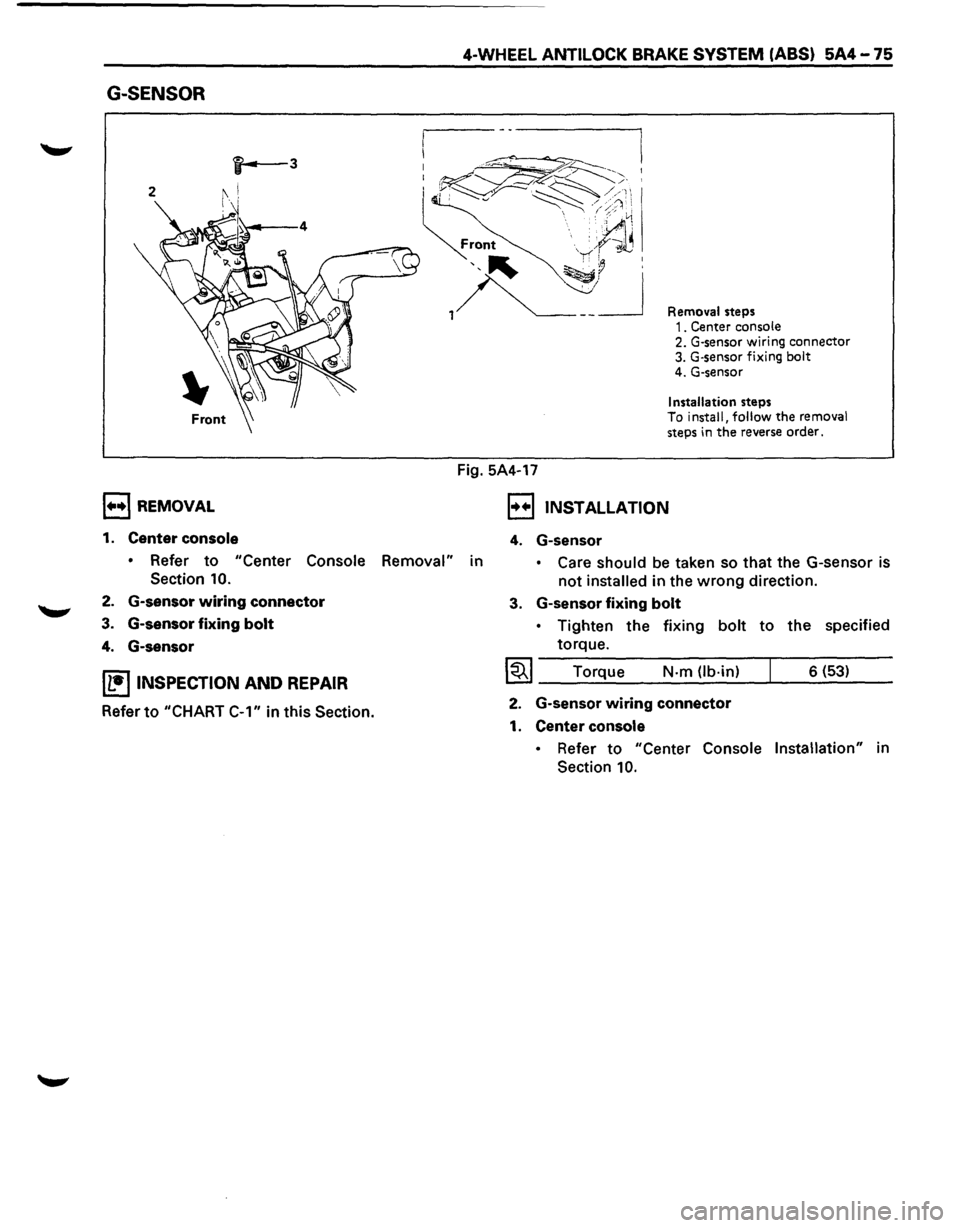
G-SENSOR
, .... ,REMOVAL
1. Center console
4-WHEEL ANTILOCK BRAKE SYSTEM (ABS) 5A4-75
Fig. 5A4-17
Removal steps 1. Center console 2. G-sensor wiring connector 3. G·sensor fixing bolt 4. G-sensor
Installation steps To install, follow the removal steps in the reverse order.
, .. .,, INSTALLATION
4. G-sensor
• Refer to "Center Console Removal" in • Care should be taken so that the G-sensor is
not installed in the wrong direction.
Section 10.
2. G-sensor wiring connector
3. G-sensor fixing bolt
4. G-sensor
IL•ItNSPECTION AND REPAIR
Refer to "CHART
C-1" in this Section.
3. G-sensor fixing bolt
• Tighten the fixing bolt to the specified
torque.
I~I ____ T_o_rq~u~e ____ N~·-m~(lb_·_in~)--~ ___ 6_(_53~) __ __
2. G-sensor wiring connector
1. Center console
• Refer to "Center Console Installation" in
Section
10.
Page 487 of 1928
I••! INSTALLATION
5. Speed sensor
4-WHEEL ANTILOCK BRAKE SYSTEM (ABS) 5A4-77
,.....,. • Take care not to hit the speed sensor pole
piece during installation.
4. Speed sensor fixing bolt
• Tighten the fixing bolt to the specified
torque.
1~1 Torque N·m (lb·in) 8 (69)
3. Speed sensor cable fixing bolt (lower side)
• Tighten the fixing bolt to the specified
torque.
~~~ Torque N·m (lb-ft) 24 (18)
2. Speed sensor cable fixing bolt (Upper side)
• Tighten
torque.
1~1 Torque the
fixing
bolt to the specified
N-m (lb·in) 6 (52)
• Confirm that a white line marked on the
cable is not twisted when connecting the
speed sensor
cable.
1. Speed sensor connector
Page 488 of 1928
5A4-78 4-WHEEL ANTILOCK BRAKE SYSTEM (ABS)
REAR WHEEL SPEED SENSOR
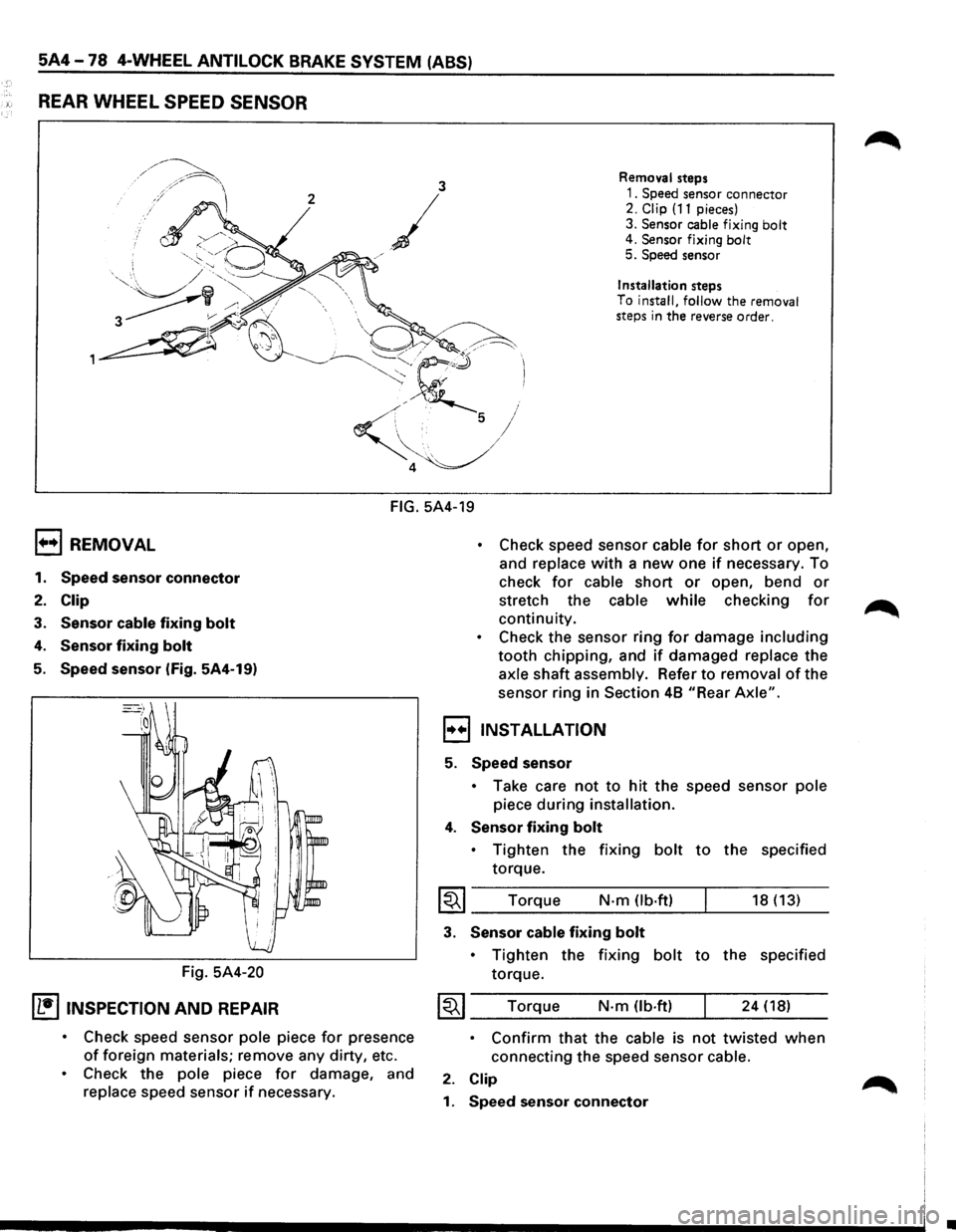
3 Removal steps
2
/
1. Speed sensor connector 2. Clip (11 pieces)
3.
Sensor cable fixing bolt 4. Sensor fixing bolt 5. Speed sensor
j
/
Installation steps
To
install, follow the removal
steps in the reverse order.
FIG. 5A4-19
1+•1 REMOVAL
1. Speed sensor connector
2. Clip
3. Sensor cable fixing bolt
4. Sensor fixing bolt
5. Speed sensor (Fig. 5A4-19)
Fig.
5A4-20
IL•ItNSPECTION AND REPAIR
• Check speed sensor pole piece for presence
of foreign materials; remove any dirty, etc.
• Check the pole piece for damage, and
replace speed sensor if necessary.
• Check speed sensor cable for short or open,
and
replace with a new one if necessary. To
check
for cable short or open, bend or
stretch the cable while checking for
continuity.
• Check the sensor ring for damage including
tooth chipping, and if damaged replace the
axle shaft assembly. Refer to removal of the
sensor ring in
Section 48 "Rear Axle".
,,..,,INSTALLATION
5. Speed sensor
• Take care not to hit the speed sensor pole
piece during installation.
4. Sensor fixing bolt
• Tighten the fixing bolt to the specified
torque.
I~I ____ T_o_rq~u_e ____ N __ ·m __ O_b·_ft_) __ ~ ____ 18_(_1_3_) __
3. Sensor cable fixing bolt
• Tighten the fixing bolt to the specified
torque.
~~~ Torque N·m (lb.ft) 24 (18)
• Confirm that the cable is not twisted when
connecting the speed sensor cable.
2. Clip
1. Speed sensor connector
•
Page 496 of 1928
5C-6 PARKING BRAKES
1••1 INSTALLATION
15. Rear cable
hl • Apply grease (BESCO L-2 or equivalent) to the
D connecting portion of the rear cable and
equalizer.
14. Equalizer
13. Back plate
12. Adjust nut
• Tighten the adjust nut to the specified torque.
1~1 Torque N-m (lb-in) I 6 (52)
• To adjust the parking brake, refer to "Parking
Brake Adjustment" in this Section.
11,10, 9. Clip
~~~ Torque N·m (lb·in) I 6 (52)
8. Cable fixing bolt
• Tighten the cable fixing bolt to the specified
torque.
~~~ Torque N·m (lb·in) 6 (52)
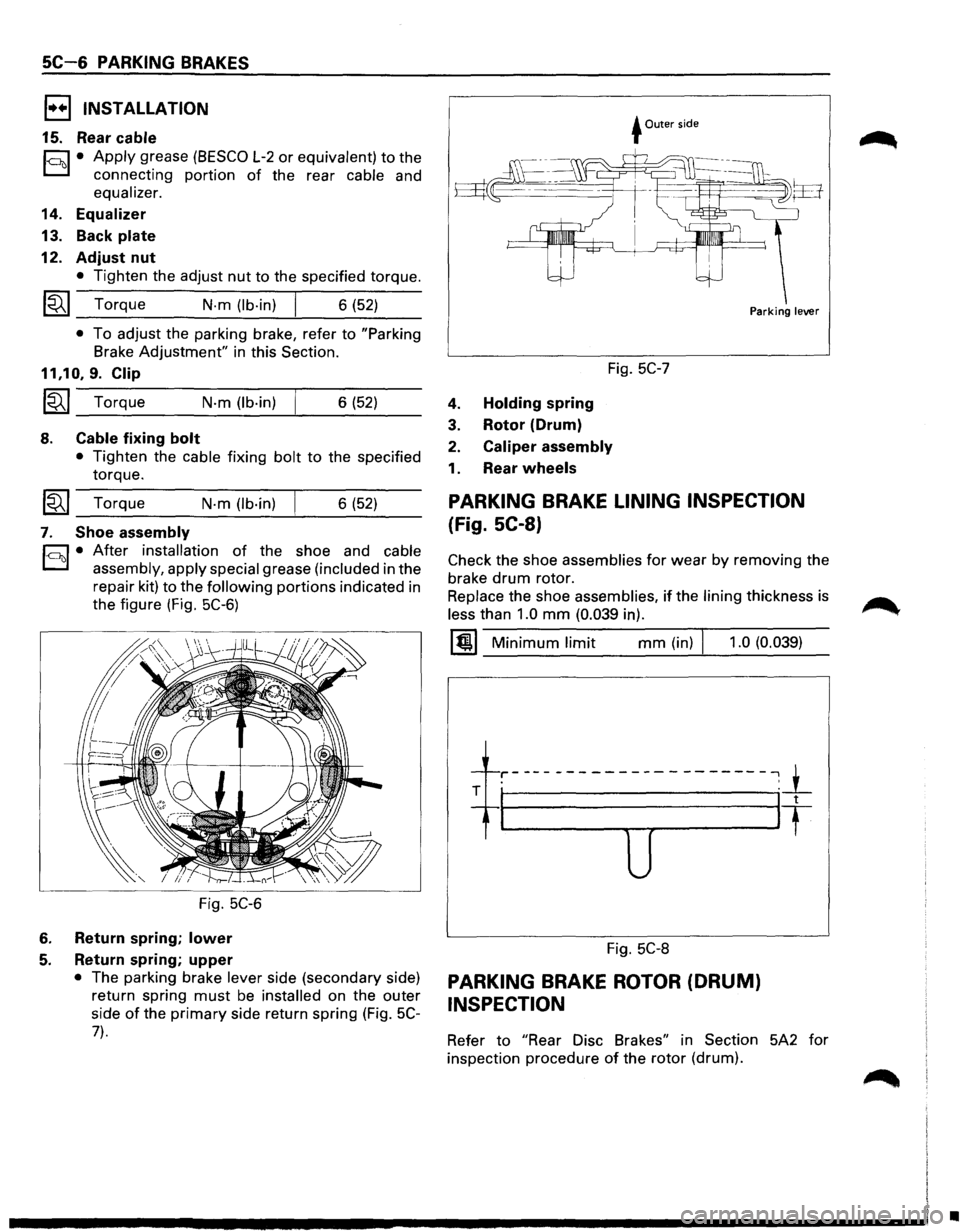
7. Shoe assembly
h1 • After installation of the shoe and cable
D assembly, apply special grease (included in the
repair kit)
to the following portions indicated in
the figure (Fig.
5C-6)
Fig. 5C-6
6. Return spring; lower
5. Return spring; upper
• The parking brake lever side (secondary side)
return spring
must be installed on the outer
side
of the primary side return spring (Fig. 5C-
7).
+Outer side
Fig. 5C-7
4. Holding spring
3. Rotor (Drum)
2. Caliper assembly
1. Rear wheels
Parking lever
PARKING BRAKE LINING INSPECTION
(Fig. SC-8)
Check the shoe assemblies for wear by removing the
brake
drum rotor.
Replace the shoe assemblies, if the lining thickness is
less than 1.0 mm (0.039 in).
1@1 Minimum limit mm (in) J 1.0 (0.039)
-1---r-----------------------,_1_ . '
T I It
u
Fig. 5C-8
PARKING BRAKE ROTOR (DRUM)
INSPECTION
Refer to "Rear Disc Brakes" in Section 5A2 for
inspection procedure
of the rotor (drum).
•