Drive shaft JAGUAR X308 1998 2.G Workshop Manual
[x] Cancel search | Manufacturer: JAGUAR, Model Year: 1998, Model line: X308, Model: JAGUAR X308 1998 2.GPages: 2490, PDF Size: 69.81 MB
Page 1468 of 2490
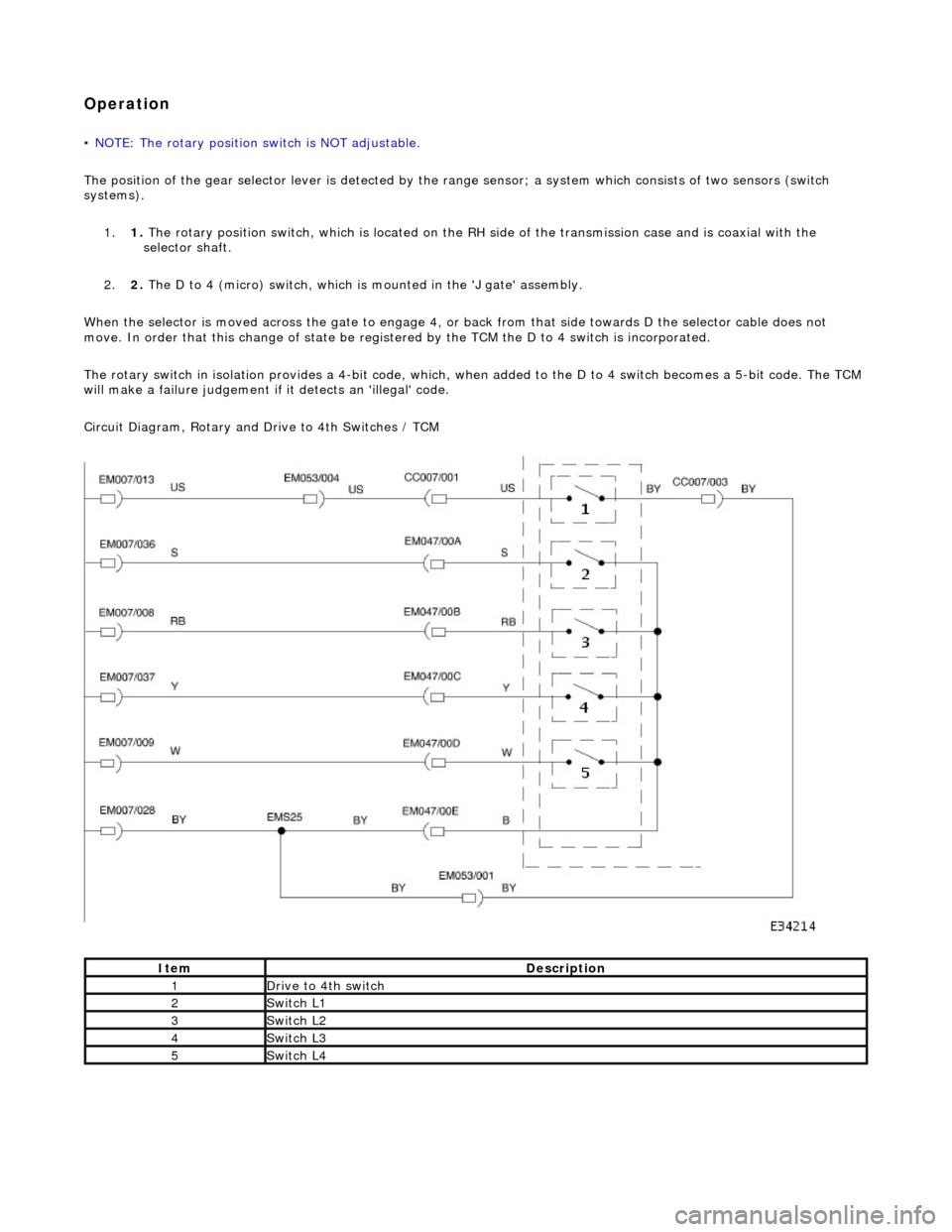
Operation
• NOTE: The rotary position switch is NOT adjustable.
The position of the gear selector lever is detected by the range sensor; a system which consists of two sensors (switch
systems). 1. 1. The rotary position switch, which is located on the RH side of the transmission case and is coaxial with the
selector shaft.
2. 2. The D to 4 (micro) switch, which is mounted in the 'J gate' assembly.
When the selector is moved across the ga te to engage 4, or back from that side towards D the selector cable does not
move. In order that this change of state be registered by the TCM the D to 4 switch is incorporated.
The rotary switch in isolation provides a 4-bit code, which, when added to the D to 4 switch becomes a 5-bit code. The TCM
will make a failure judgement if it detects an 'illegal' code.
Circuit Diagram, Rotary and Drive to 4th Switches / TCM
ItemDescription
1Drive to 4th switch
2Switch L1
3Switch L2
4Switch L3
5Switch L4
Page 1501 of 2490

Selector lever:
Gear selector positions are:
P Transmission mechanically locked, starting available * R Reverse gear N Neutral gear, no power to the rear wheels (starting available) D Drive gear, all 5 forward gears available (see Performance Mode Pushbutton) 4 Upshift to 4th gear only 3 Upshift to 3rd gear only 2 Upshift to 2nd gear only
Gearshift Interlock Manual Override*
The interlock system which locks the sele ctor in P and prevents the ignition key from being removed except when P is
selected, may be manually overridden in the event of an emergency.
1. 1. With the parking brake applied
2. 2. Remove the access blank using a suitable Torx bit
3. 3. Insert a small screwdriver into the vacated hole
4. 4. Push the screwdriver downwards, gently, and hold whilst simultaneously moving the selector from P towards R ,
but do not engage R until the tool has been removed
5. 5. An audible warning may be heard when operation 4 is carried out
6. 6. With the selector in N and the access bl ank replaced, the vehicle may be started
Range Selection
The selector lever transmits operator demand to the transmission and TCM by means of a cable and Dual-Linear
Switch (DLS).
The lever operates the transmission assemb ly selector shaft, only for P R N D , by means of a cable. Movement of the
lever across the gate to 4, 3 and 2 positions disengages th e cable from the selector lever and engages the DLS which
controls gear selection electronically.
Gear selector module:
Provides illumination of the decal relevant to the gear sele cted. This information is provided by CAN from the TCM. Illuminates the security system Active LED on the gear selector surround, in response to an output from the BPM.
Transmission Switches
Performance Mode Pushbutton
7—Connector - Climate control
8—Solenoid - Gear selector
9—Security system Active LED
Page 2026 of 2490
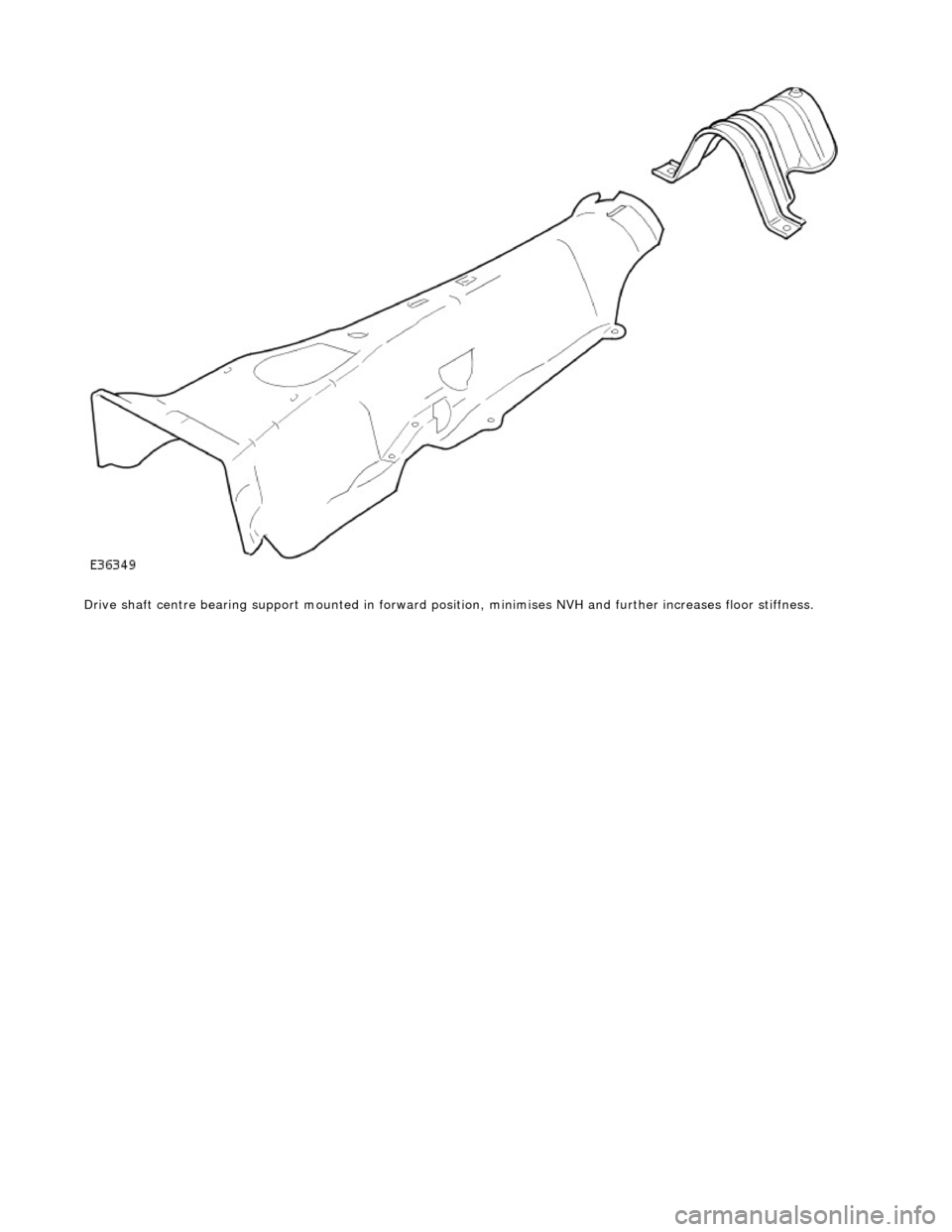
Drive shaft centre bearing support mounted in forward position, minimises NVH an d further increases floor stiffness.
Page 2144 of 2490

Seating - Front Seat Recliner Motor
Removal and Installation
Removal
1. WARNING: FOLLOWING DISCONNECTION OF THE
BATTERY A PERIOD OF AT LEAST ONE MINUTE MUST BE
ALLOWED TO ELAPSE BEFORE WORKING ON A FRONT SEAT WITH
A SIDE AIRBAG FITTED.
Remove battery cover and disc onnect ground cable from
battery terminal. Refer to 86,.15.19.
2. Remove front seat and position for access. Refer to 76.70.01.
3. Remove front seat back finisher. Refer to 76.70.09.
4. Release seat squab cover securing clips from frame.
5. Release seat squab cover lower edge retaining strip from
frame.
6. Disconnect recline motor/potentiometer harness multiplug
(white).
7. Remove and discard gearbox RH drive shaft end securing clip.
Page 2145 of 2490

Installation
8. Using a suitable soft drift, release drive shaft from gearbox and potentiometer.
9. Slacken and remove bolts securi ng potentiometer/gearbox to
seat frame
10. Rotate potentiometer to release it from retaining plate tang.
11. Slacken and remove bolts securing recline motor to seat
frame.
12. Remove recline motor/potentio meter/gearbox assembly from
seat.
1. Position recline motor on seat frame mounting and fit and
Page 2146 of 2490

tighten securing bolts.
2.
Position potentiometer on gearbox.
3. Engage drive shaft in po tentiometer and gearbox.
4. Install potentiometer retaining plate.
5. Rotate potentiometer to en gage retaining plate tang.
6. Fit and tighten retaining plate/gearbox securing bolts.
7. Fit and fully seat new gearbo x drive shaft securing clip
8. Fit seat cover RH side to seat frame and fully seat securing
clips.
9. Fit seat cover LH side to seat frame and fully seat securing
clips.
10. Fit seat cover to lower frame retaining strip.
11. Position seat for acces and fit seat back finisher. Refer to
76.70.09.
12. Install seat in vehicle. Refer to 76.70.01.
13. Connect ground cable to batt ery terminal and fit battery
cover. Refer to 86.15.15.
14. Motor seat fully forward and fully rearward, checking for
satisfactory operation.
15. Return seat to original position.
Page 2150 of 2490
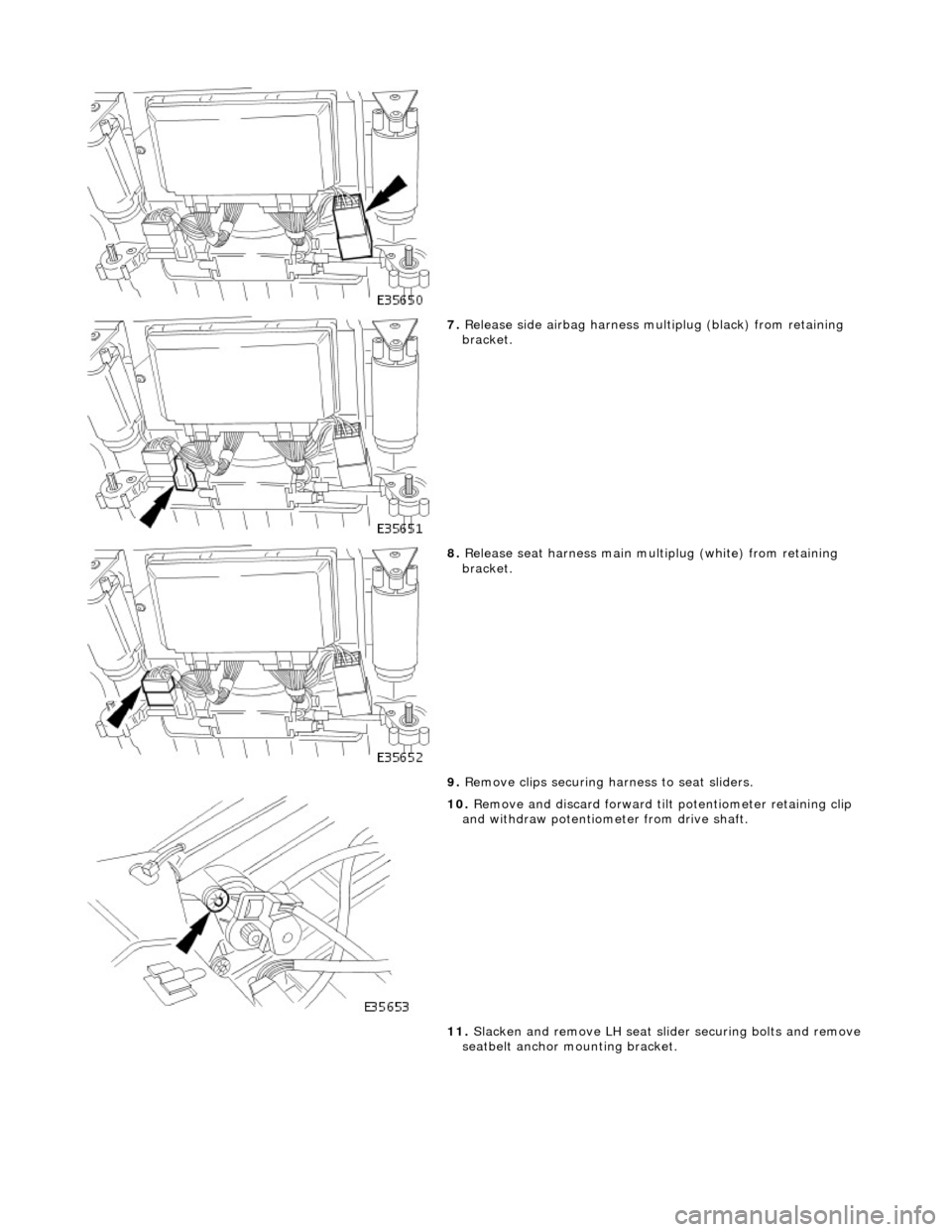
7. Release side airbag harness multiplug (black) from retaining
bracket.
8. Release seat harness main mu ltiplug (white) from retaining
bracket.
9. Remove clips securing harness to seat sliders.
10. Remove and discard forward tilt potentiometer retaining clip
and withdraw potentiometer from drive shaft.
11. Slacken and remove LH seat slid er securing bolts and remove
seatbelt anchor mounting bracket.
Page 2153 of 2490
I
nstallation
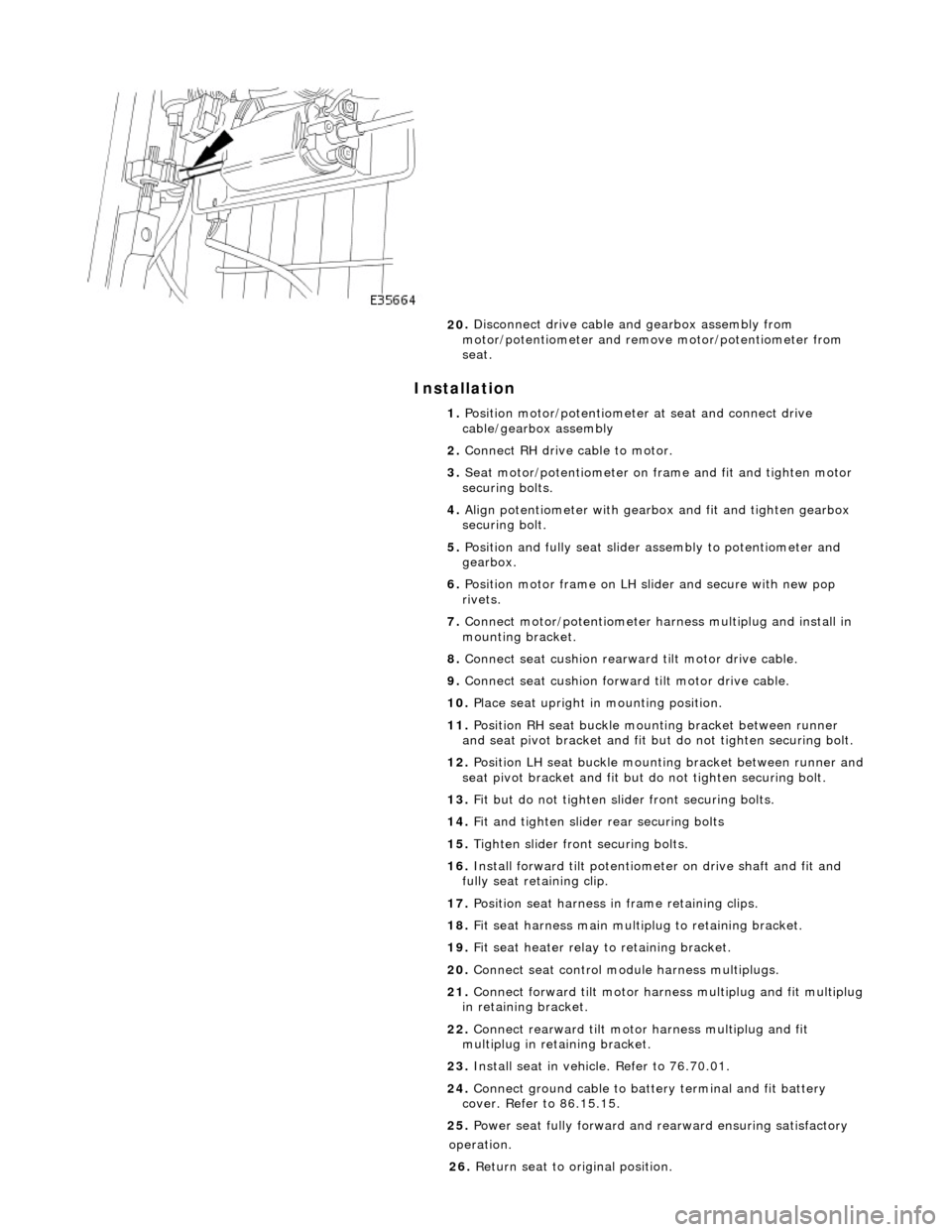
20
.
Disconnect drive cable and gearbox assembly from
motor/potentiometer and remo ve motor/potentiometer from
seat.
1. Position motor/potentiometer at seat and connect drive
cable/gearbox assembly
2. Connect RH drive cable to motor.
3. Seat motor/potentiometer on fra me and fit and tighten motor
securing bolts.
4. Align potentiometer with gearbo x and fit and tighten gearbox
securing bolt.
5. Position and fully seat slider assembly to potentiometer and
gearbox.
6. Position motor frame on LH sl ider and secure with new pop
rivets.
7. Connect motor/potentiometer harness multiplug and install in
mounting bracket.
8. Connect seat cushion rearward tilt motor drive cable.
9. Connect seat cushion forwar d tilt motor drive cable.
10. Place seat upright in mounting position.
11. Position RH seat buckle mounting bracket between runner
and seat pivot bracket and fit but do not tighten securing bolt.
12. Position LH seat buckle mounting bracket between runner and
seat pivot bracket an d fit but do not tighten securing bolt.
13. Fit but do not tighten slider front securing bolts.
14. Fit and tighten slider rear securing bolts
15. Tighten slider front securing bolts.
16. Install forward tilt potentiome ter on drive shaft and fit and
fully seat retaining clip.
17. Position seat harness in frame retaining clips.
18. Fit seat harness main multiplug to retaining bracket.
19. Fit seat heater relay to retaining bracket.
20. Connect seat control module harness multiplugs.
21. Connect forward tilt motor harn ess multiplug and fit multiplug
in retaining bracket.
22. Connect rearward tilt motor harness multiplug and fit
multiplug in retaining bracket.
23. Install seat in vehicle. Refer to 76.70.01.
24. Connect ground cable to batt ery terminal and fit battery
cover. Refer to 86.15.15.
25. Power seat fully forward and rearward ensuring satisfactory
op
eration.
26. Return seat to original position.
Page 2387 of 2490
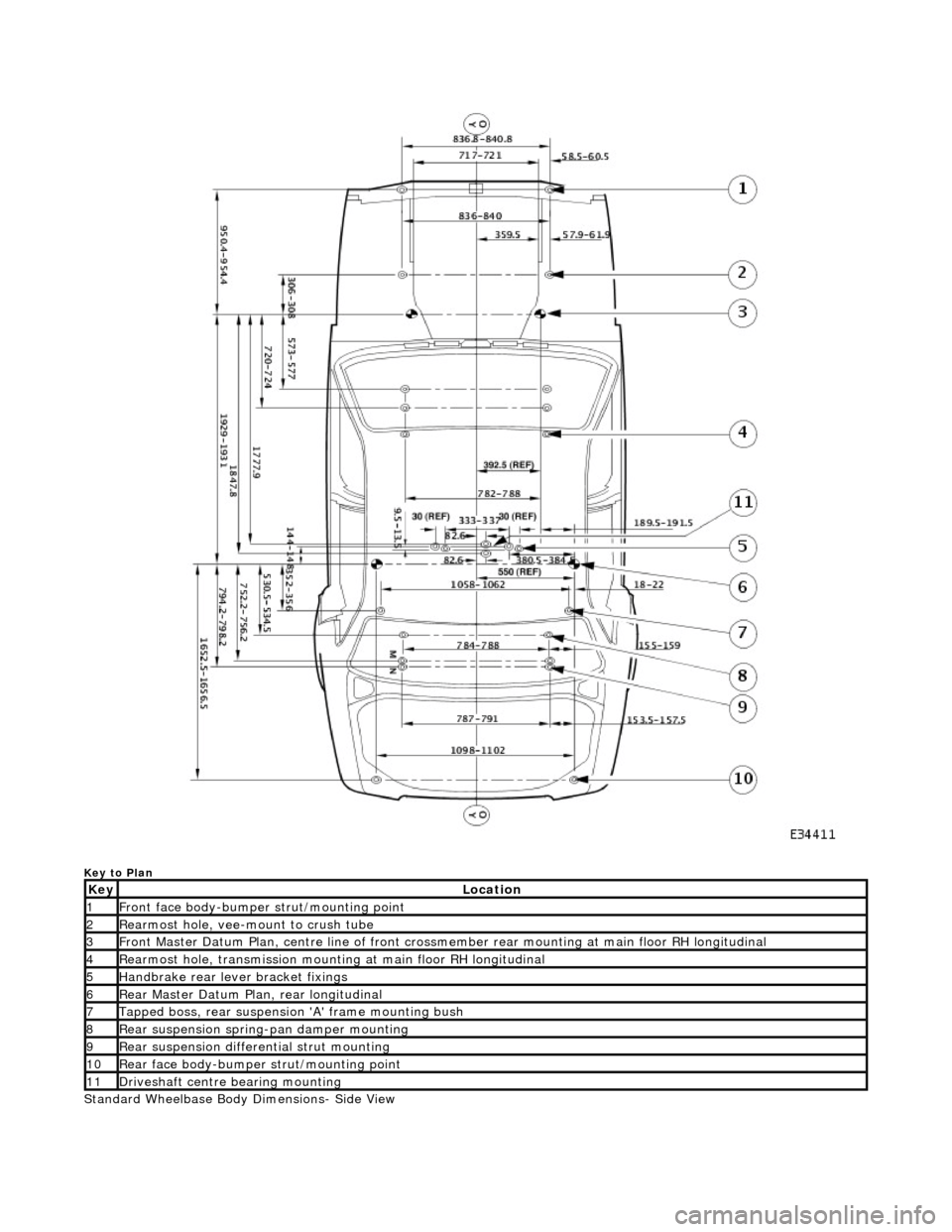
Key to Plan
Standard Wheelbase Body Dimensions- Side View
KeyLocation
1Front face body-bumper strut/mounting point
2Rearmost hole, vee-mount to crush tube
3Front Master Datum Plan, centre li ne of front crossmember rear mount ing at main floor RH longitudinal
4Rearmost hole, transmission mounting at main floor RH longitudinal
5Handbrake rear lever bracket fixings
6Rear Master Datum Plan, rear longitudinal
7Tapped boss, rear suspension 'A' frame mounting bush
8Rear suspension spring-pan damper mounting
9Rear suspension differential strut mounting
10Rear face body-bumper strut/mounting point
11Driveshaft centre bearing mounting
Page 2388 of 2490
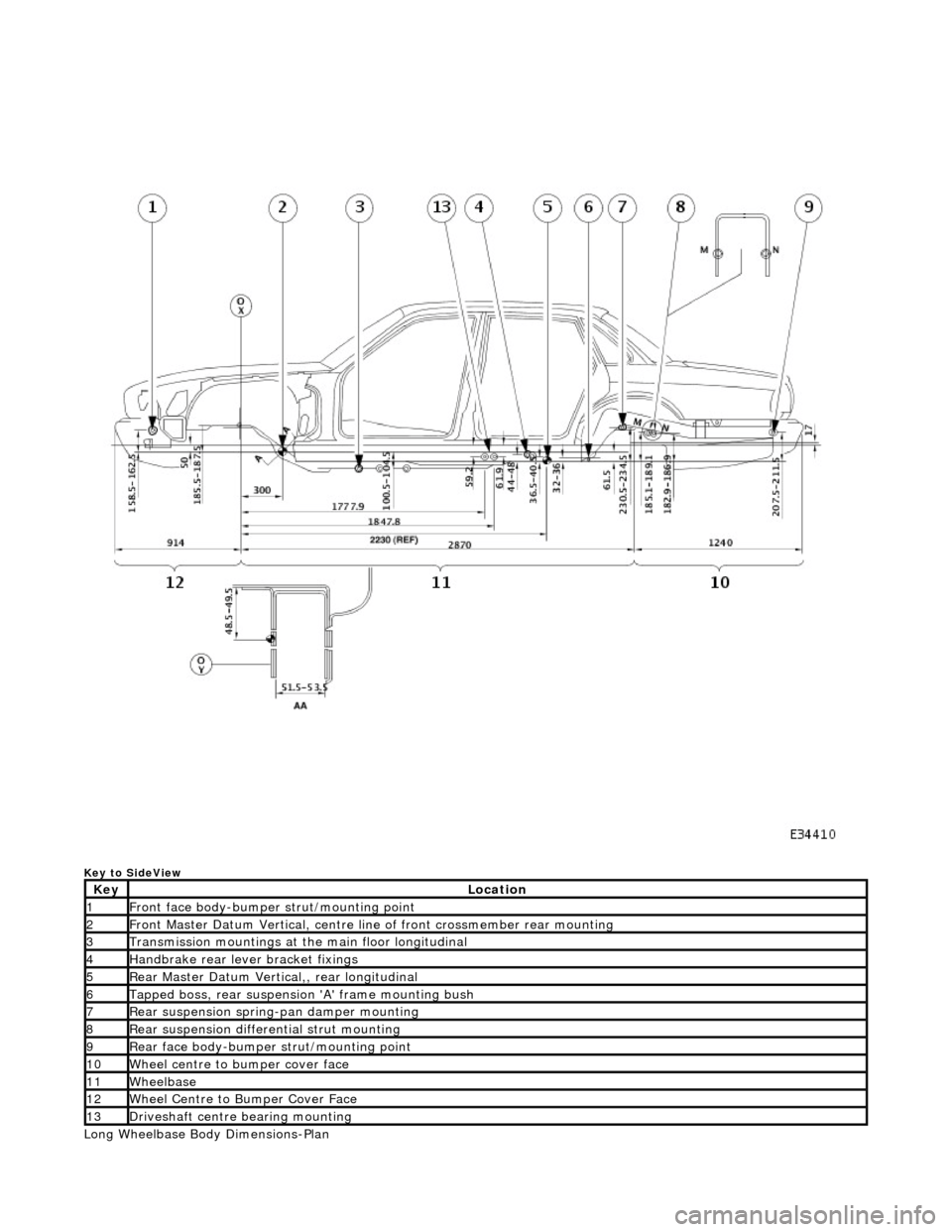
Key to SideView
Long Wheelbase Body Dimensions-Plan
KeyLocation
1Front face body-bumper strut/mounting point
2Front Master Datum Vertical, centre line of front crossmember rear mounting
3Transmission mountings at the main floor longitudinal
4Handbrake rear lever bracket fixings
5Rear Master Datum Vertical,, rear longitudinal
6Tapped boss, rear suspensi on 'A' frame mounting bush
7Rear suspension spring-pan damper mounting
8Rear suspension differential strut mounting
9Rear face body-bumper strut/mounting point
10Wheel centre to bumper cover face
11Wheelbase
12Wheel Centre to Bumper Cover Face
13Driveshaft centre bearing mounting