106 JAGUAR XF 2009 1.G User Guide
[x] Cancel search | Manufacturer: JAGUAR, Model Year: 2009, Model line: XF, Model: JAGUAR XF 2009 1.GPages: 391, PDF Size: 19.32 MB
Page 272 of 391
Audio unit operation
272
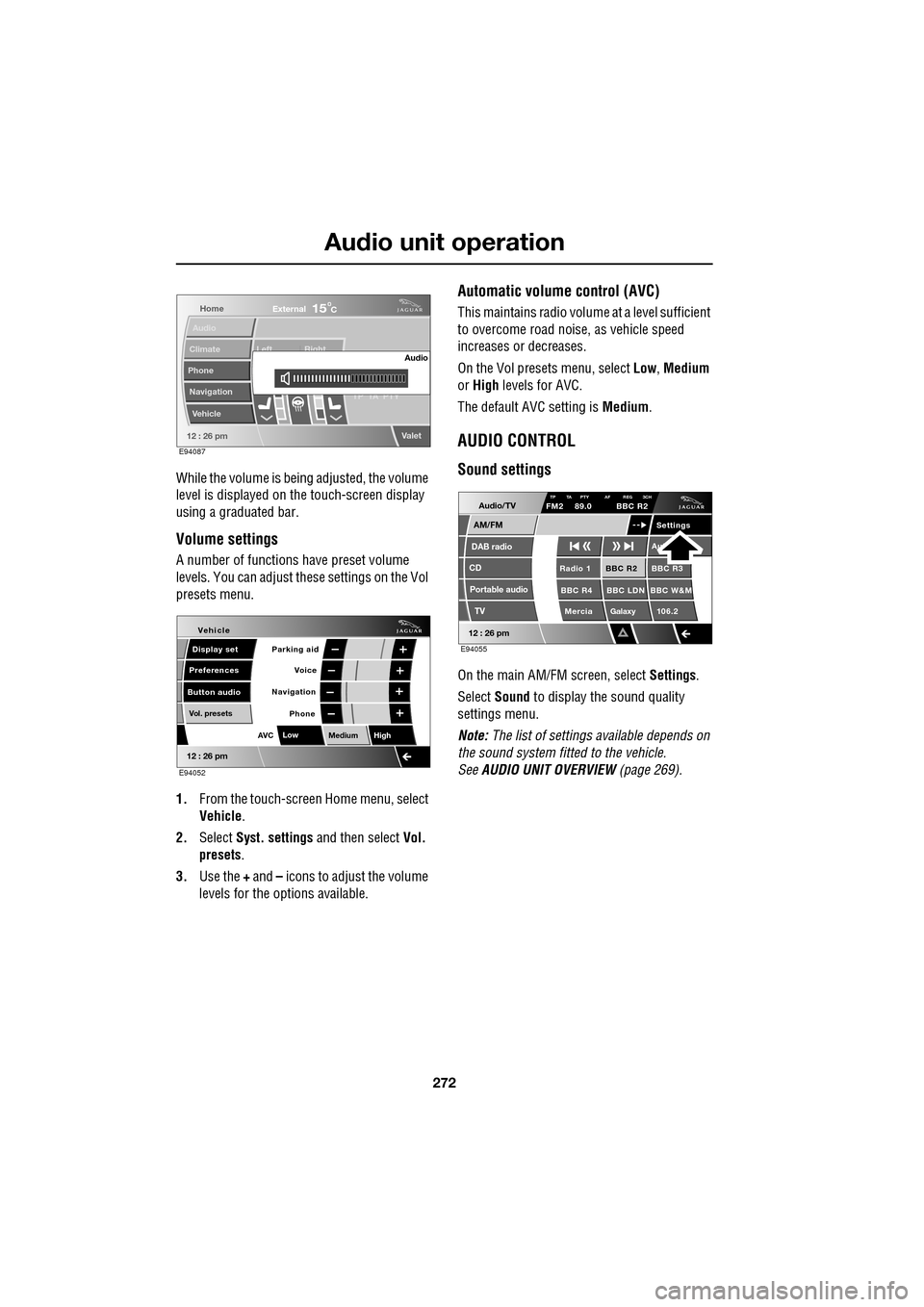
While the volume is being adjusted, the volume
level is displayed on the touch-screen display
using a graduated bar.
Volume settings
A number of functions have preset volume
levels. You can adjust these settings on the Vol
presets menu.
1. From the touch-screen Home menu, select
Vehicle .
2. Select Syst. settings and then select Vol.
presets .
3. Use the + and – icons to adjust the volume
levels for the options available.
Automatic volume control (AVC)
This maintains radio volume at a level sufficient
to overcome road noise, as vehicle speed
increases or decreases.
On the Vol presets menu, select Low, Medium
or High levels for AVC.
The default AVC setting is Medium.
AUDIO CONTROL
Sound settings
On the main AM/FM screen, select Settings.
Select Sound to display the sound quality
settings menu.
Note: The list of settings available depends on
the sound system fitted to the vehicle.
See AUDIO UNIT OVERVIEW (page 269).
Home
Audio
Climate
Phone
Navigation
Vehicle Left Right
TP T
A PTY
Valet12 : 26 pm
Audio
External15C
E94087
Voice
Vehicle
Display set
Preferences
Button audioParking aid
Vol. presets
AVC Low
MediumHigh
12 : 26 pm
Navigation
Phone
E94052
Audio/TV
DAB radio
CD
AM/FM
12 : 26 pm
BBC R2 BBC R3
BBC R4 BBC LDN BBC W&M Mercia Galaxy 106.2Radio 1
Settings
Aut
TP TA PTY AF REG 3CHFM2 89.0 BBC R2
Portable audio TV
E94055
Page 274 of 391
Audio unit operation
274
WAVEBAND BUTTON
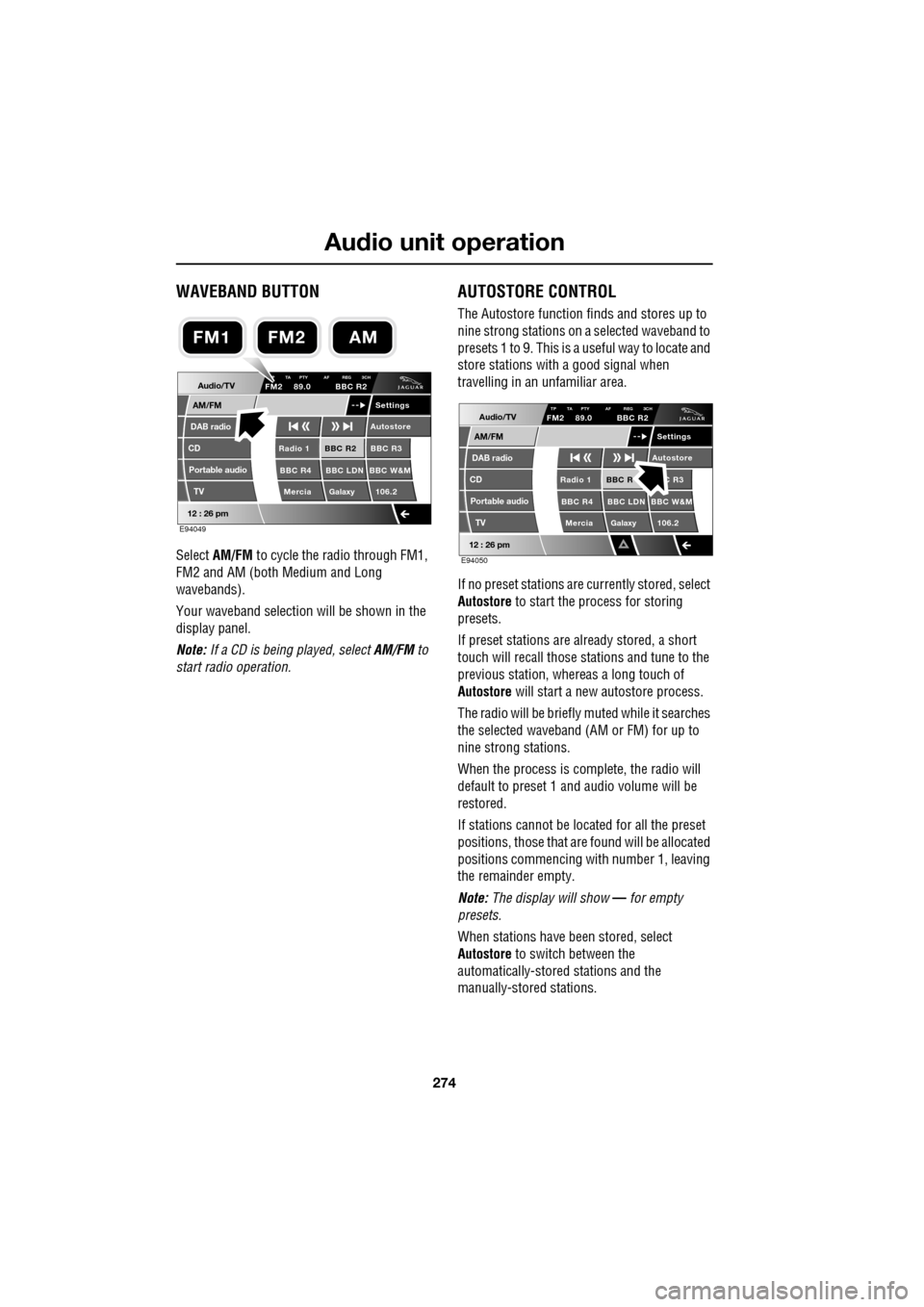
Select AM/FM to cycle the radio through FM1,
FM2 and AM (both Medium and Long
wavebands).
Your waveband selection will be shown in the
display panel.
Note: If a CD is being played, select AM/FM to
start radio operation.
AUTOSTORE CONTROL
The Autostore function fi nds and stores up to
nine strong stations on a selected waveband to
presets 1 to 9. This is a useful way to locate and
store stations with a good signal when
travelling in an unfamiliar area.
If no preset stations are currently stored, select
Autostore to start the process for storing
presets.
If preset stations are already stored, a short
touch will recall those stations and tune to the
previous station, whereas a long touch of
Autostore will start a new autostore process.
The radio will be briefly muted while it searches
the selected waveband (AM or FM) for up to
nine strong stations.
When the process is co mplete, the radio will
default to preset 1 and audio volume will be
restored.
If stations cannot be located for all the preset
positions, those that are found will be allocated
positions commencing with number 1, leaving
the remainder empty.
Note: The display will show — for empty
presets.
When stations have been stored, select
Autostore to switch between the
automatically-stored stations and the
manually-stored stations.
Audio/TV
DAB radio
CD
AM/FM
12 : 26 pm
BBC R2 BBC R3
BBC R4 BBC LDN BBC W&M Mercia Galaxy 106.2Radio 1
Settings
Autostore
P TA PTY AF REG 3CHFM2 89.0 BBC R2
Portable audio TV
E94049
FM2AMFM1
Audio/TV
DAB radio
CD
AM/FM
12 : 26 pm
BBC R C R3
BBC R4 BBC LDN BBC W&M Mercia Galaxy 106.2Radio 1
Settings
Autostore
TP TA PTY AF REG 3CHFM2 89.0 BBC R2
Portable audio TV
E94050
Page 275 of 391
275
Audio unit operation
STATION PRESET BUTTONS
Tuning stations
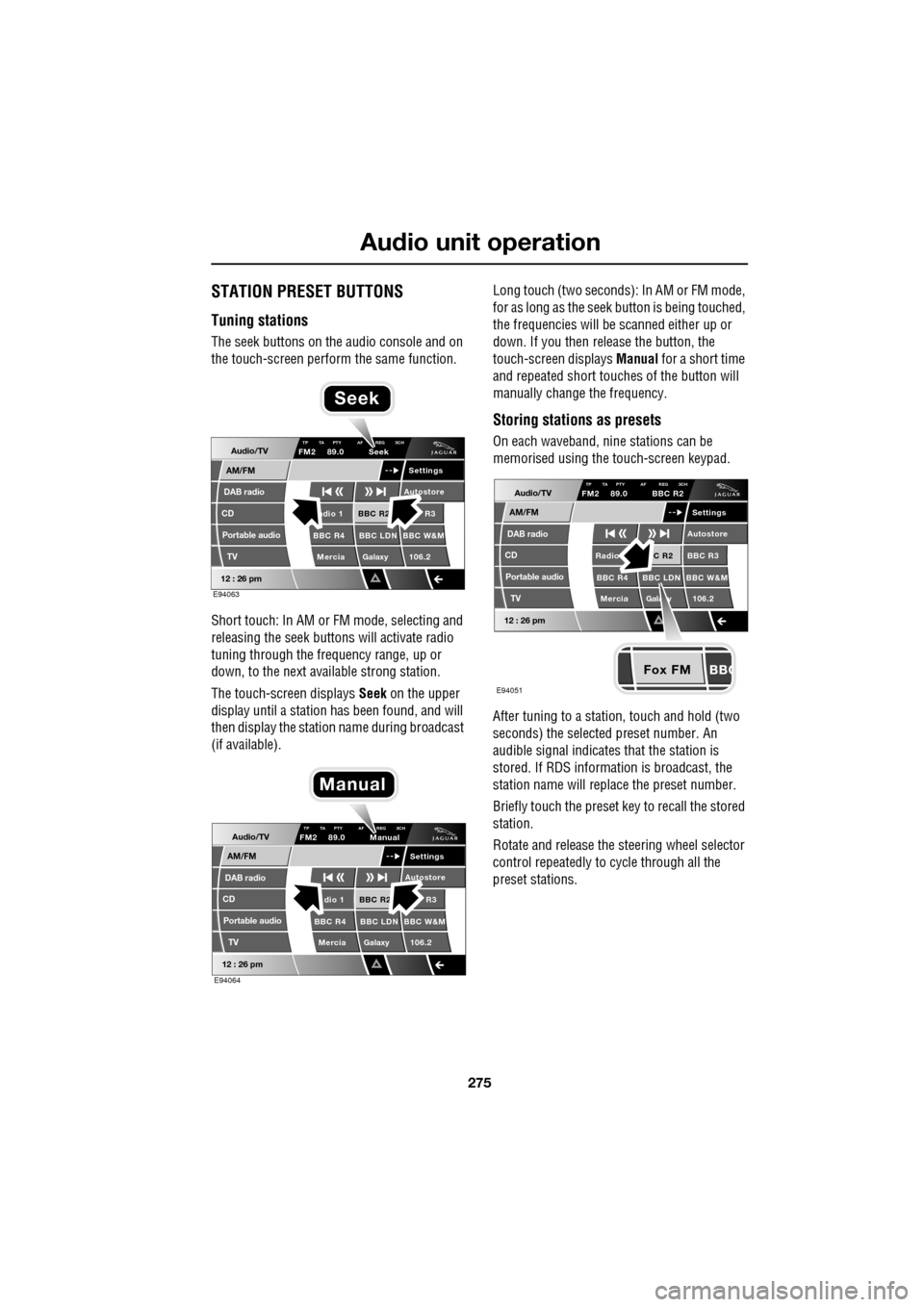
The seek buttons on the audio console and on
the touch-screen perform the same function.
Short touch: In AM or FM mode, selecting and
releasing the seek buttons will activate radio
tuning through the frequency range, up or
down, to the next available strong station.
The touch-screen displays Seek on the upper
display until a station has been found, and will
then display the station name during broadcast
(if available). Long touch (two seconds): In AM or FM mode,
for as long as the seek
button is being touched,
the frequencies will be scanned either up or
down. If you then release the button, the
touch-screen displays Manual for a short time
and repeated short touc hes of the button will
manually change the frequency.
Storing stations as presets
On each waveband, ni ne stations can be
memorised using the touch-screen keypad.
After tuning to a stati on, touch and hold (two
seconds) the selected preset number. An
audible signal indicates that the station is
stored. If RDS informat ion is broadcast, the
station name will replace the preset number.
Briefly touch the preset key to recall the stored
station.
Rotate and release the steering wheel selector
control repeatedly to cycle through all the
preset stations.Audio/TV
DAB radio
CD
AM/FM
12 : 26 pm
BBC R2 R3
BBC R4 BBC LDN BBC W&M Mercia Galaxy 106.2adio 1
Settings
Autostore
TP TA PTY AF REG 3CHFM2 89.0 Seek
Portable audio TV
E94063
Seek
Audio/TV
DAB radio
CD
AM/FM
12 : 26 pm
BBC R2 R3
BBC R4 BBC LDN BBC W&M Mercia Galaxy 106.2dio 1
Settings
Autostore
TP TA PTY AF REG 3CHFM2 89.0 Manual
Portable audio TV
E94064
Manual
Fox FM
Audio/TV
DAB radio
CD
AM/FM
12 : 26 pm
C R2 BBC R3
BBC R4 BBC LDN BBC W&M
Mercia Gala y 106.2Radio
Settings
Autostore
TP TA PTY AF REG 3CHFM2 89.0 BBC R2
Portable audio TV
E94051
Page 276 of 391
Audio unit operation
276
TRAFFIC INFORMATION CONTROL
With the Traffic Announcements (TA) option
on, local traffic announcements will interrupt
normal broadcasts or playback.
If audio volume is set at a minimum, then the
volume will increase for the announcement,
returning to the previous volume setting
afterwards.
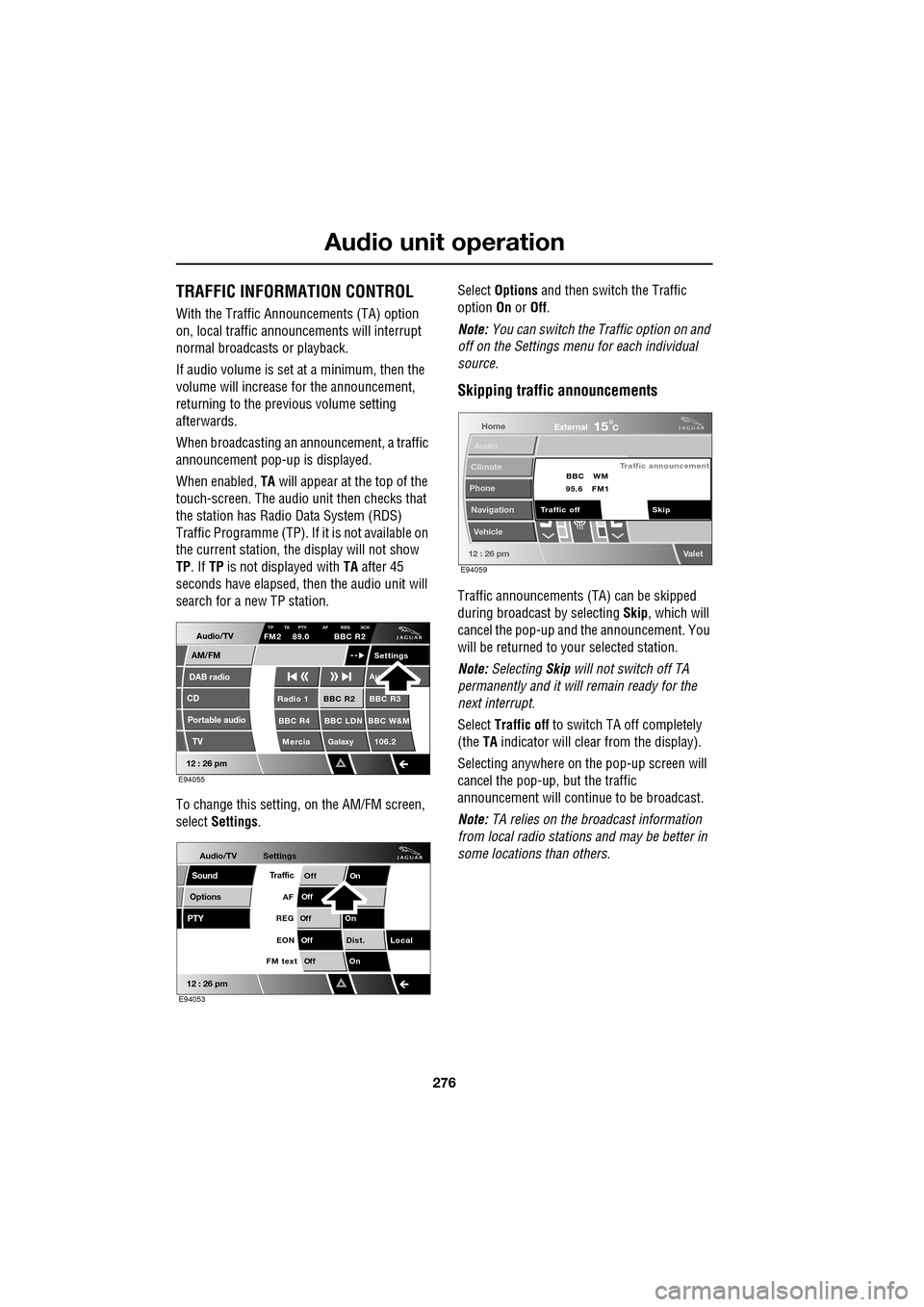
When broadcasting an announcement, a traffic
announcement pop-up is displayed.
When enabled, TA will appear at the top of the
touch-screen. The audio un it then checks that
the station has Radio Data System (RDS)
Traffic Programme (TP). If it is not available on
the current station, th e display will not show
TP . If TP is not displayed with TA after 45
seconds have elapsed, th en the audio unit will
search for a new TP station.
To change this setting, on the AM/FM screen,
select Settings . Select
Options and then switch the Traffic
option On or Off.
Note: You can switch the Traffic option on and
off on the Settings menu for each individual
source.
Skipping traffic announcements
Traffic announcements (TA) can be skipped
during broadcast by selecting Skip, which will
cancel the pop-up and the announcement. You
will be returned to your selected station.
Note: Selecting Skip will not switch off TA
permanently and it will remain ready for the
next interrupt.
Select Traffic off to switch TA off completely
(the TA indicator will clear from the display).
Selecting anywhere on the pop-up screen will
cancel the pop-up, but the traffic
announcement will continue to be broadcast.
Note: TA relies on the broadcast information
from local radio stations and may be better in
some locations than others.
Audio/TV
DAB radio
CD
AM/FM
12 : 26 pm
BBC R2 BBC R3
BBC R4 BBC LDN BBC W&M Mercia Galaxy 106.2Radio 1
Settings
Au
TP TA PTY AF REG 3CHFM2 89.0 BBC R2
Portable audio TV
E94055
Audio/TV
Options
PTY
Sound
12 : 26 pm
Settings
TrafficOnOff
Of f
On
Of
f
Dist. Local
Of f
On
Of f
FM text EON
REG
AF
E94053
Home
Audio
Climate
Phone
Navigation
Vehicle
Valet12 : 26 pm
External15C
Traffic announcement
Skip
Traffic off BBC
95.6 WM
FM1
E94059
Page 278 of 391
Audio unit menus
278
FM text
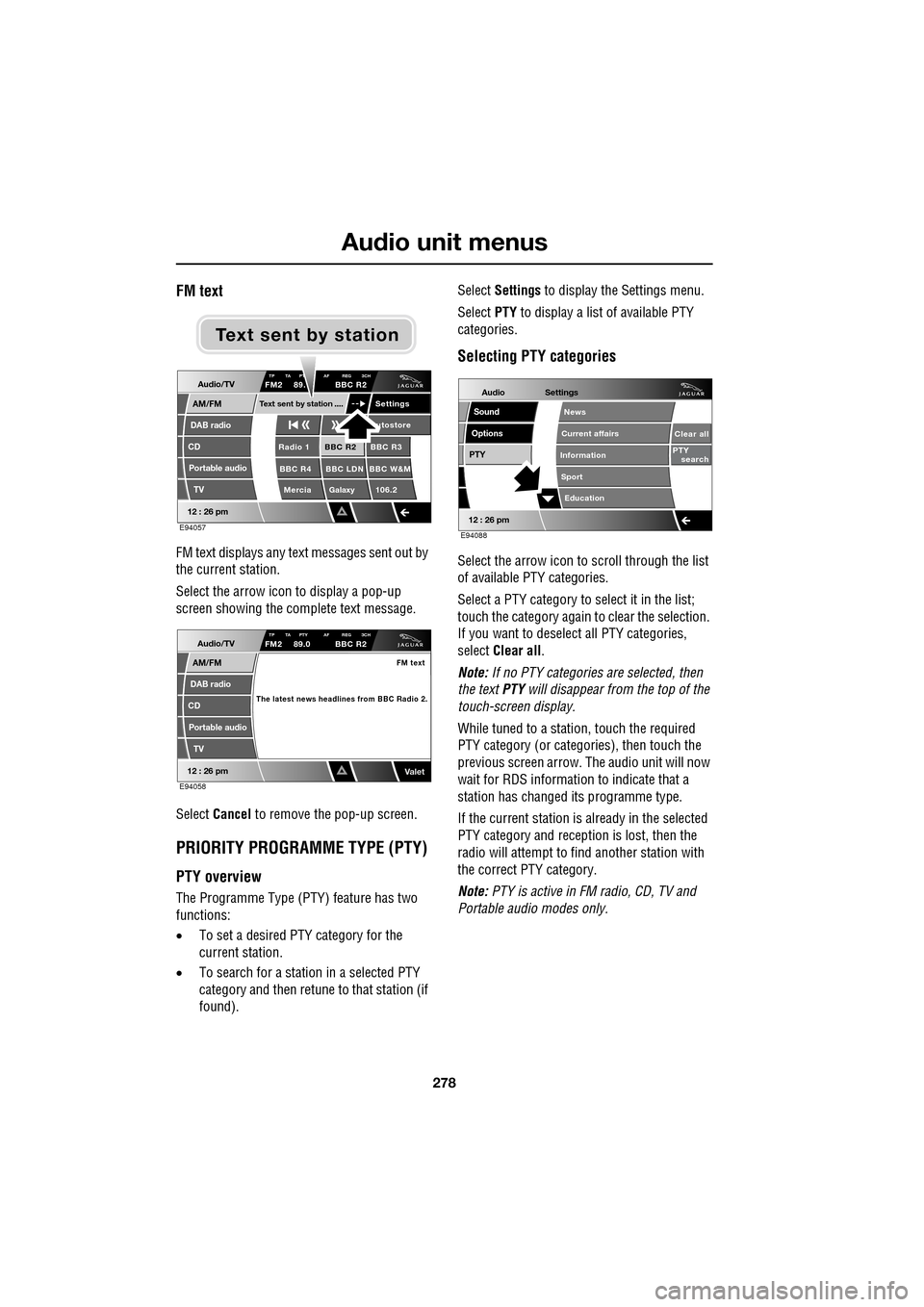
FM text displays any text messages sent out by
the current station.
Select the arrow icon to display a pop-up
screen showing the complete text message.
Select Cancel to remove the pop-up screen.
PRIORITY PROGRAMME TYPE (PTY)
PTY overview
The Programme Type (PTY) feature has two
functions:
•To set a desired PTY category for the
current station.
• To search for a station in a selected PTY
category and then retune to that station (if
found). Select
Settings to display the Settings menu.
Select PTY to display a list of available PTY
categories.
Selecting PTY categories
Select the arrow icon to scroll through the list
of available PTY categories.
Select a PTY category to select it in the list;
touch the category again to clear the selection.
If you want to deselect all PTY categories,
select Clear all .
Note: If no PTY categories are selected, then
the text PTY will disappear from the top of the
touch-screen display.
While tuned to a stati on, touch the required
PTY category (or categories), then touch the
previous screen arrow. The audio unit will now
wait for RDS informati on to indicate that a
station has changed its programme type.
If the current station is already in the selected
PTY category and reception is lost, then the
radio will attempt to fi nd another station with
the correct PTY category.
Note: PTY is active in FM radio, CD, TV and
Portable audi o modes only.
Audio/TV
DAB radio
CD
AM/FM
12 : 26 pm
BBC R2 BBC R3
BBC R4 BBC LDN BBC W&M Mercia Galaxy 106.2Radio 1
Settings
utostore
TP TA PT AF REG 3CHFM2 89. BBC R2
Portable audio TV
Text sent by station
E94057
Text sent by station
Audio/TV
DAB radio
CD
AM/FM
12 : 26 pm
TP TA PTY AF REG 3CHFM2 89.0 BBC R2
Portable audio
TV
FM text
The latest news headlines from BBC Radio 2.
ValetE94058
Audio
Options
PTY
Sound
12 : 26 pm
Settings
Clear all
PTY search
Education
News
Current affairs
Information
Sport
E94088
Page 293 of 391
293
Compact disc player
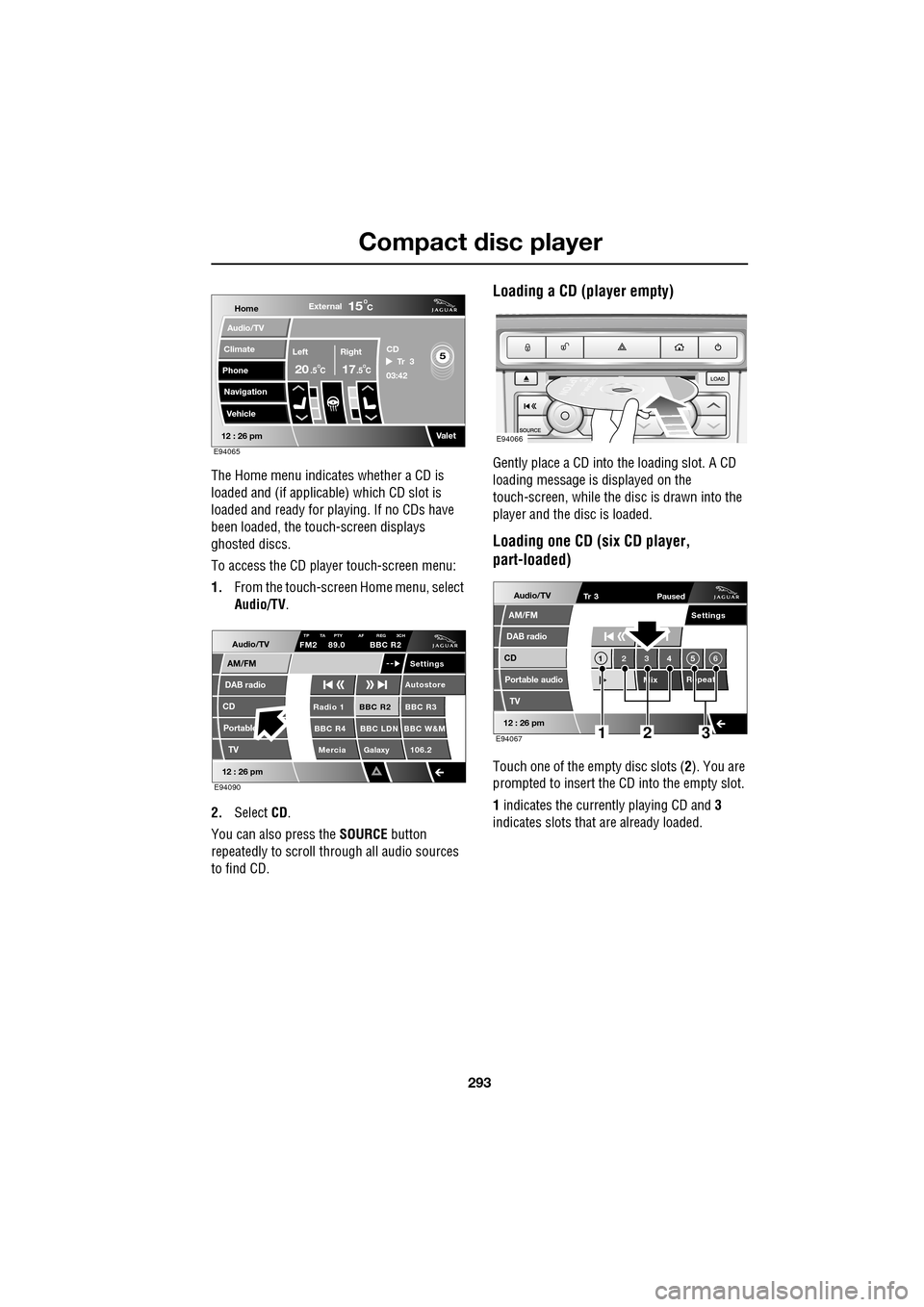
The Home menu indicates whether a CD is
loaded and (if applicable) which CD slot is
loaded and ready for playing. If no CDs have
been loaded, the touch-screen displays
ghosted discs.
To access the CD player touch-screen menu:
1. From the touch-screen Home menu, select
Audio/TV .
2. Select CD.
You can also press the SOURCE button
repeatedly to scroll through all audio sources
to find CD.
Loading a CD (player empty)
Gently place a CD into the loading slot. A CD
loading message is displayed on the
touch-screen, while the di sc is drawn into the
player and the disc is loaded.
Loading one CD (six CD player,
part-loaded)
Touch one of the empty disc slots ( 2). You are
prompted to insert the CD into the empty slot.
1 indicates the currently playing CD and 3
indicates slots that are already loaded.
Home
Audio/TV
Climate
Phone
Navigation
VehicleExternal
Left Right
20 17CC
15C
.5 .5
Valet12 : 26 pm
5Tr 3
CD
03:42
E94065
Audio/TV
DAB radio
CD
AM/FM
12 : 26 pm
BBC R2 BBC R3
BBC R4 BBC LDN BBC W&M Mercia Galaxy 106.2Radio 1
Settings
Autostore
TP TA PTY AF REG 3CHFM2 89.0 BBC R2
Portable TV
E94090
E94066
Audio/TV
DAB radio
CD
AM/FM
12 : 26 pm
Portable audio
TV
Settings
1 23 45 6
MixRepeat
Tr 3
Paused
E94067123
Page 353 of 391
353
Navigation system
LANGUAGE SELECTION
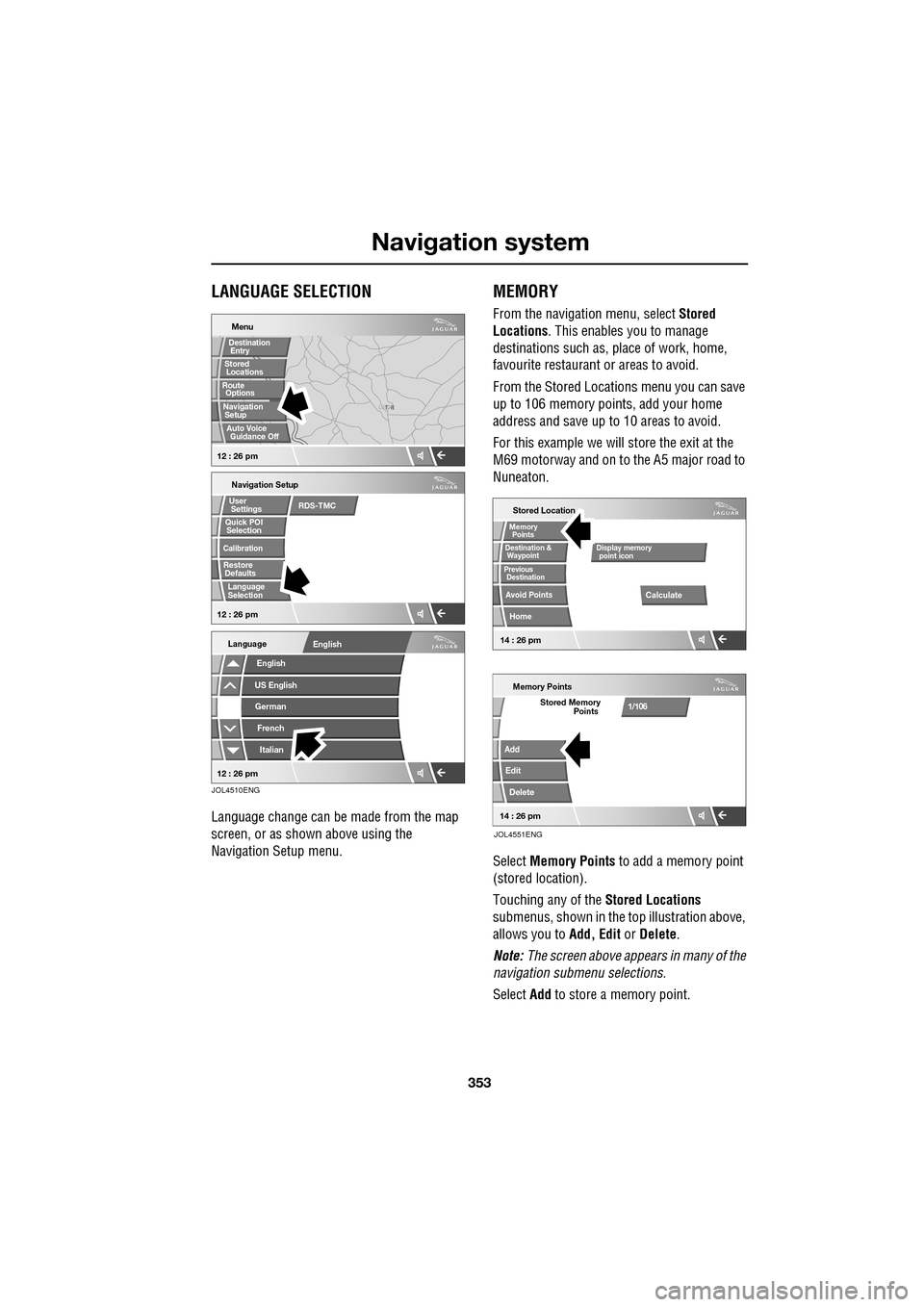
Language change can be made from the map
screen, or as shown above using the
Navigation Setup menu.
MEMORY
From the navigation menu, select Stored
Locations . This enables you to manage
destinations such as, place of work, home,
favourite restaurant or areas to avoid.
From the Stored Locations menu you can save
up to 106 memory points, add your home
address and save up to 10 areas to avoid.
For this example we will store the exit at the
M69 motorway and on to the A5 major road to
Nuneaton.
Select Memory Points to add a memory point
(stored location).
Touching any of the Stored Locations
submenus, shown in the top illustration above,
allows you to Add, Edit or Delete .
Note: The screen above appears in many of the
navigation submenu selections.
Select Add to store a memory point.
T N
LUTON
Menu
Navigation Setup
Selection
Calibration
Restore User
Settings
Defaults Quick POI
12 : 26 pm 12 : 26 pm
Stored
Destination
Auto Voice
Entry
Guidance Off
Locations
Navigation SetupRoute Options
RDS-TMC
Language
Selection
English
Language
US EnglishGerman
French
Italian
English
12 : 26 pm
JOL4510ENG
Stored Location
Destination &
Waypoint
Previous
Avoid Points
Home
Memory
Calculate
Display memory
Memory Points
Add
Edit
Delete
Stored Memory1/106
point icon
Points
Destination
Points
JOL4551ENG
14 : 26 pm14 : 26 pm
Page 384 of 391
Index
384
Essential towing checks . . . . . . . . . . . . . 185
Event data recording . . . . . . . . . . . . . . . . . 11
Exterior mirrors . . . . . . . . . . . . . . . . . . . . . 95adjusting and folding . . . . . . . . . . . . . . 95
mirror dip when reversing. . . . . . . . . . . 96
F
Fascia - controls overview . . . . . . . . . . . . . 12
Fastening the seat belts . . . . . . . . . . . . . . . 51releasing the seat belts . . . . . . . . . . . . . 51
Ferry disarming the tilt alarm sensor . . . . . . . 22
Fire extinguisher . . . . . . . . . . . . . . . . . . . 250
First aid kit . . . . . . . . . . . . . . . . . . . . . . . . 250
Forward alert function . . . . . . . . . . . . . . . 164
Fuel
octane rating . . . . . . . . . . . . . . . . . . . . 175
petrol fuel guard . . . . . . . . . . . . . . . . . 180
refuelling . . . . . . . . . . . . . . . . . . . . . . . 179
Fuel cut-off . . . . . . . . . . . . . . . . . . . . . . . 177 resetting the fuel cut-off . . . . . . . . . . . 178
Fuel filler flap . . . . . . . . . . . . . . . . . . . . . . 178
Fuel guard . . . . . . . . . . . . . . . . . . . . . . . . 180
Fuel quality . . . . . . . . . . . . . . . . . . . . . . . 174 alternative fuels for pe trol engines . . . 175
diesel engined vehicles . . . . . . . . . . . . 176
petrol engined vehicles . . . . . . . . . . . . 174
unleaded fuel. . . . . . . . . . . . . . . . . . . . 175
Fuse box locations . . . . . . . . . . . . . . . . . . 242 engine compartment fuse box. . . . . . . 242
fuse and relay positions . . . . . . . . . . . 244
luggage compartment fuse box. . . . . . 243
passenger compartment fuse box . . . . 243
Fuse specification chart . . . . . . . . . . . . . . 245
G
Garage door transceiver . . . . . . . . . . . . . 128 before programming . . . . . . . . . . . . . . 128
entry gate programming . . . . . . . . . . . 130
information and assistance . . . . . . . . . 130
programming . . . . . . . . . . . . . . . . . . . 129
reprogramming a single garage door opener
button . . . . . . . . . . . . . . . . . . . . . . . 130
rolling code device equipment
programming . . . . . . . . . . . . . . . . . 130
to erase all programming . . . . . . . . . . 129 General information on
radio frequencies . . 16
Global opening and closing. . . . . . . . . . . . . 35 cancelling global opening/closing . . . . . 36
window global closing (not Japan). . . . . 36
window global opening . . . . . . . . . . . . . 35
Glove box . . . . . . . . . . . . . . . . . . . . . . . . . 125
H
Hazard warning flashers . . . . . . . . . . . 77, 250
Head restraints . . . . . . . . . . . . . . . . . . . . . . 44
head restraint removal . . . . . . . . . . . . . . 45
manual head restraints . . . . . . . . . . . . . . 45
tilt adjustment . . . . . . . . . . . . . . . . . . . . 44
whiplash protection . . . . . . . . . . . . . . . . 44
Headlamp adjustment . . . . . . . . . . . . . . . . . 78
Headlamp levelling . . . . . . . . . . . . . . . . . . . 79
halogen headlamps . . . . . . . . . . . . . . . . 79
xenon headlamps . . . . . . . . . . . . . . . . . . 79
Headlamp removal . . . . . . . . . . . . . . . . . . . 81
Headlamp washers . . . . . . . . . . . . . . . . . . . 90
Heated seats . . . . . . . . . . . . . . . . . . . . . . . . 47
Heated steering wheel. . . . . . . . . . . . . . . . . 68
Hints on driving with ABS . . . . . . . . . . . . . 144 ABS braking techniques . . . . . . . . . . . . 145
ABS warning indicator . . . . . . . . . . . . . 144
brake vacuum assist (V6 petrol models
only) . . . . . . . . . . . . . . . . . . . . . . . . 146
Electronic Brakeforce Distribution (EBD) . .
145
Emergency Brake Assist (EBA) . . . . . . . 146
Horn . . . . . . . . . . . . . . . . . . . . . . . . . . . . . . 68
I
Information displays general information . . . . . . . . . . . . . . . 105
Information messages . . . . . . . . . . . . . . . 106
Inspecting safety syst em components . . . 252
Instrument lighting dimmer . . . . . . . . . . . 123
Instrument panel overview . . . . . . . . . . . . . 99 instrument panel . . . . . . . . . . . . . . . . . . 99
Interior lamps . . . . . . . . . . . . . . . . . . . . . . . 80
rear interior lighting . . . . . . . . . . . . . . . . 80
Interior mirror . . . . . . . . . . . . . . . . . . . . . . . 94 auto dimming . . . . . . . . . . . . . . . . . . . . . 94
manual dimming . . . . . . . . . . . . . . . . . . 94
Isofix child restraints . . . . . . . . . . . . . . . . . 62