change time JAGUAR XF 2009 1.G User Guide
[x] Cancel search | Manufacturer: JAGUAR, Model Year: 2009, Model line: XF, Model: JAGUAR XF 2009 1.GPages: 391, PDF Size: 19.32 MB
Page 129 of 391
129
Convenience features
To erase all programming
For first time programming, ensure that the
engine is switched off:
1.Ensure that the ignition system is in
convenience mode.
2. Press and hold the two outer buttons on
the transceiver in th e rear-view mirror.
Keep the buttons pressed until the
indicator lamp begins to flash (this will
take approximately 20 seconds), then
release the buttons.
All memories in the gara ge door opener have
now been cleared.
Note: Do not perform this procedure when
programming the addi tional garage door
opener buttons.
Programming
Ensuring that the engine is switched off:
1. Ensure that the ignition system is on.
2. Hold the end of the original garage door
opener hand-held transmitter
approximately 50 to 150 mm (2 to 6
inches) away from the transceiver in the
rear-view mirror, keeping the indicator
lamp in view. 3.
Using both hands , simultaneously press
and hold both the chosen transceiver
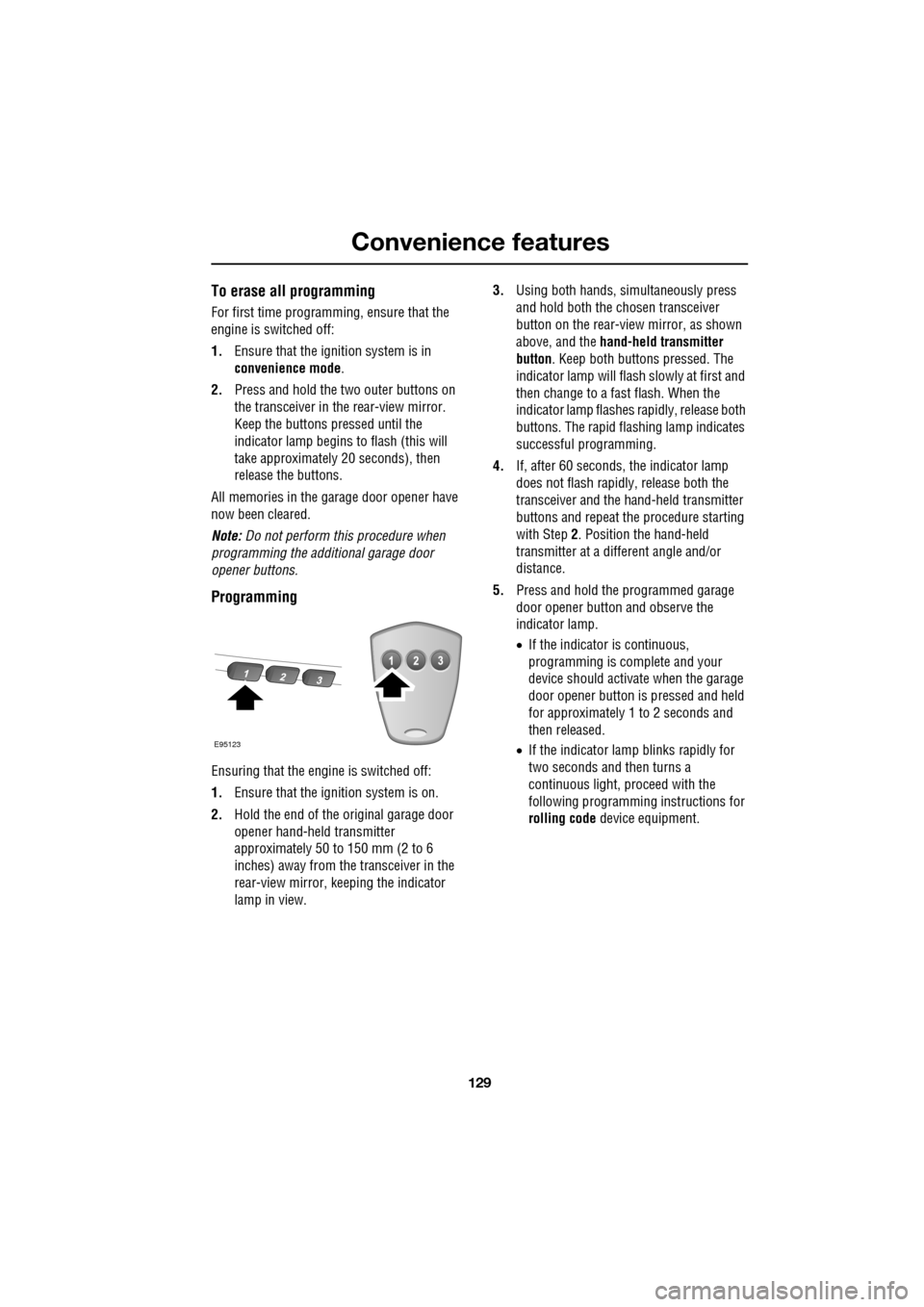
button on the rear-view mirror, as shown
above, and the hand-held transmitter
button. Keep both buttons pressed. The
indicator lamp will flash slowly at first and
then change to a fast flash. When the
indicator lamp flashes rapidly, release both
buttons. The rapid flas hing lamp indicates
successful programming.
4. If, after 60 seconds, the indicator lamp
does not flash rapidl y, release both the
transceiver and the hand-held transmitter
buttons and repeat the procedure starting
with Step 2. Position the hand-held
transmitter at a diffe rent angle and/or
distance.
5. Press and hold the programmed garage
door opener button and observe the
indicator lamp.
•If the indicator is continuous,
programming is complete and your
device should activate when the garage
door opener button is pressed and held
for approximately 1 to 2 seconds and
then released.
• If the indicator lamp blinks rapidly for
two seconds and then turns a
continuous light, pr oceed with the
following programming instructions for
rolling code device equipment.
E95123
Page 133 of 391
133
Starting the engine
KEYLESS STARTING
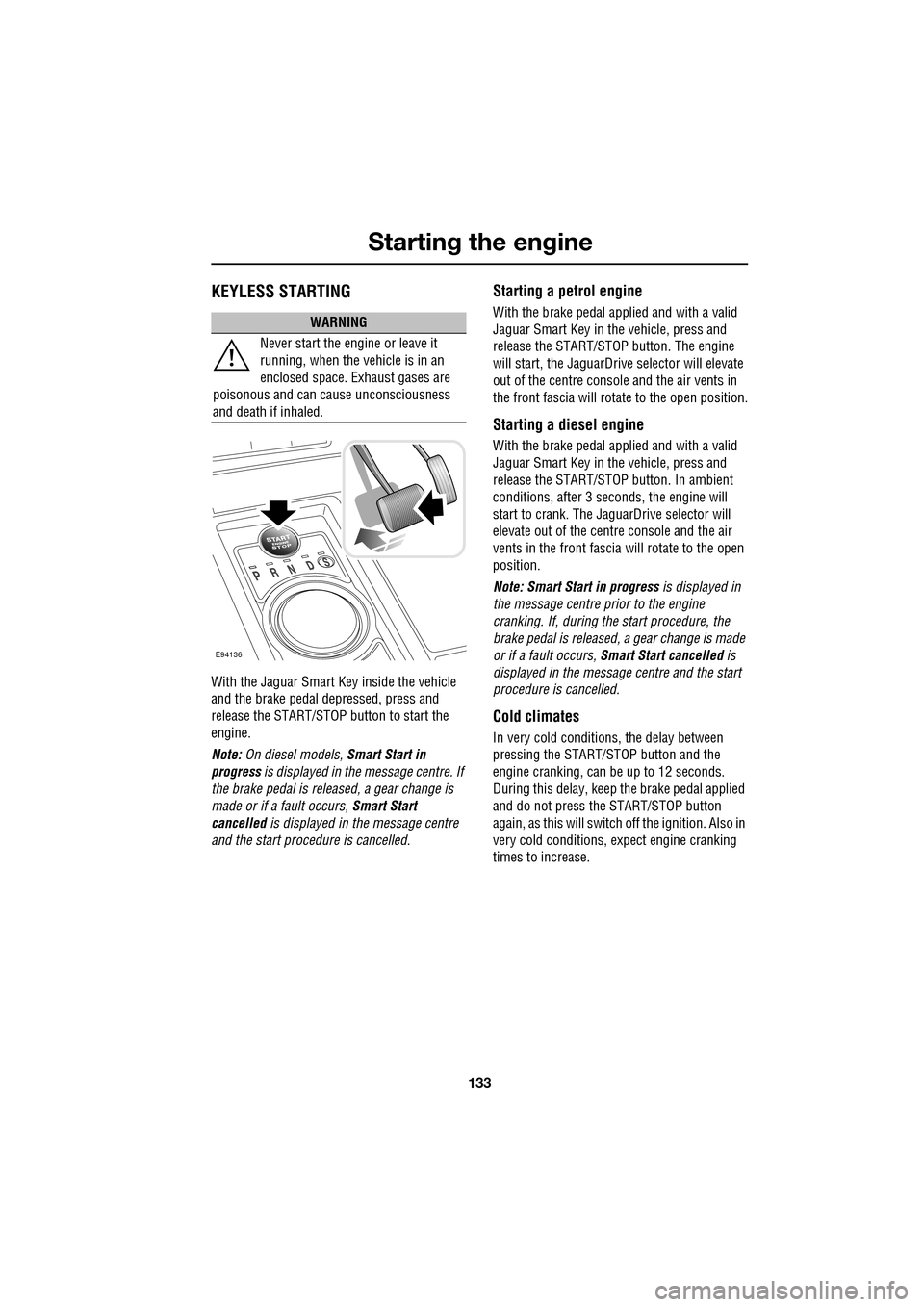
With the Jaguar Smart Key inside the vehicle
and the brake pedal depressed, press and
release the START/STOP button to start the
engine.
Note: On diesel models, Smart Start in
progress is displayed in the message centre. If
the brake pedal is released, a gear change is
made or if a fault occurs, Smart Start
cancelled is displayed in the message centre
and the start procedure is cancelled.
Starting a petrol engine
With the brake pedal applied and with a valid
Jaguar Smart Key in the vehicle, press and
release the START/STOP button. The engine
will start, the JaguarDrive selector will elevate
out of the centre console and the air vents in
the front fascia will ro tate to the open position.
Starting a diesel engine
With the brake pedal applied and with a valid
Jaguar Smart Key in the vehicle, press and
release the START/STOP button. In ambient
conditions, after 3 seconds, the engine will
start to crank. The JaguarDrive selector will
elevate out of the centre console and the air
vents in the front fascia will rotate to the open
position.
Note: Smart Start in progress is displayed in
the message centre prior to the engine
cranking. If, during the start procedure, the
brake pedal is released, a gear change is made
or if a fault occurs, Smart Start cancelled is
displayed in the message centre and the start
procedure is cancelled.
Cold climates
In very cold conditions, the delay between
pressing the START/STOP button and the
engine cranking, can be up to 12 seconds.
During this delay, keep the brake pedal applied
and do not press the START/STOP button
again, as this will switch off the ignition. Also in
very cold conditions, expect engine cranking
times to increase.
WARNING
Never start the engine or leave it
running, when the vehicle is in an
enclosed space. Exhaust gases are
poisonous and can cause unconsciousness
and death if inhaled.
E94136
Page 161 of 391
161
Adaptive cruise control (ACC)
The vehicle will then maintain the constant time
gap to the vehicle ahead until:
•The vehicle ahead accelerates to a speed
above the set speed.
• The vehicle ahead moves out of lane or out
of view.
• A new gap distance is set.
If necessary, the vehicle brakes will be
automatically applied to slow the vehicle to
maintain the gap to the vehicle in front.
The maximum braking which is applied by the
ACC system is limited and can be overridden by
the driver applying the brakes, if required.
Note: Driver braking will cancel ACC.
If the ACC system predicts that its maximum
braking level will not be sufficient, then an
audible warning will sound while the ACC
continues to brake. DRIVER INTERVENE will be
displayed on the message centre. The driver
should take immediate action.
When in follow mode, the vehicle will
automatically return to the set speed when the
road ahead is clear, for instance when:
• The vehicle in front accelerates or changes
lane.
• The driver changes lane to either side or
enters an exit lane.
The driver should intervene if appropriate.
Changing the follow mode set gap
The gap from the vehicle ahead can be
decreased or increased by rolling the
thumbwheel on the stee ring wheel. Four gap
settings are available and the selected gap
setting will be displaye d on the message centre
when either ACC button is pressed. Each gap level is indicated by an
additional
chevron in front of th e vehicle icon in the
message centre (one chevron (gap level 1)
being the shortest, four chevrons (gap level 4)
being the longest). A fter the ignition is
switched on, the default gap (gap level 3) will
be automatically selected ready for ACC
operation.
Note: When the ignition is switched off, the
gap setting will revert to the default setting
(gap level 3) when switched on again.
Note: It is the driver’s responsibility to select a
gap appropriate to the driving conditions.
Overriding the speed and follow mode
The set speed and gap ca n be overridden by
pressing the accelerator pedal when cruising at
constant speed or in follow mode. If the vehicle
is in follow mode, the instrument warning
indicator will go out when the ACC is
overridden by the driver using the accelerator
and CRUISE OVERRIDE will be displayed on
the message centre. When the accelerator is
released the ACC functi on will operate again
and vehicle speed will decrease to the set
speed, or a lower spee d if follow mode is
active.
WARNING
Whenever the driver is overriding the
ACC by depressing the accelerator
pedal, the ACC will not automatically
apply the brakes to ma intain separation from
any vehicle ahead.
Page 166 of 391
Adaptive cruise control (ACC)
166
MESSAGE CENTRE INFORMATION MESSAGES
MessageMeaning
CRUISE OVERRIDE Driver is pressing the accelerator pedal overriding cruise control function. Message will disappear when accelerator pedal is released
and cruise control speed is resumed.
CRUISE CANCELLED Driver has cancelle d cruise control or is braking.
CRUISE NOT AVAILABLE Cruise control or Adaptive
Cruise Control malfunction.
DRIVER INTERVENE Action by the driver to apply the brakes is required.
SETSPEED XXX KM/H Speed set fo r Adaptive Cruise Control.
GAP Set the distance (time gap).
RADAR SENSOR BLOCKED Clean the front of the vehicle in the area of the sensor unit (the sensor
is mounted centrally behind the
bumper cover above the cooling
aperture).
This message may also appear under the following conditions:
If stone chip protect ion has been applied.
On rural roads with few roadside objects.
In heavy rain.
FORWARD ALERT OFF Forward alert feature has been switched off.
WARNING: A warning will not be given for objects detected in
the vehicle’s path of travel.
FORWARD ALERT Forward Alert feature has been switched on or the setting changed. A
warning will be given for objects detected in the vehicle path of travel.
A longer gap indicates that the system will warn when detected objects
are further away than the previous setting.
Action by the driver to ap ply the brakes is required.
FORWARD ALERT UNAVAILABLE Advanced emergency brake assist
and Forward Alert functions are
unavailable.
Page 170 of 391
Driving dynamics
170
DYNAMIC MODE
(V8 petrol and diesel vehicles only)
Press to operate. Dynamic mode
co-ordinates the vehicle's control
systems to deliver a high
performance driving experience. This setting
enhances key vehicle systems so that the
vehicle's full potential can be exploited. The
vehicle's responses are aimed at involving the
driver more in focused and purposeful driving,
helping swift progress.
Note: When the transmission is set to
permanent manual mode (i.e. using the
paddles to change gear while in Sport mode)
and Dynamic mode is selected, transmission
upshifts are fully controlled by the driver. This
means that the transmissi on will not change up
a gear automatically, even when the vehicle's
rev limit is reached. When the rev limit is
reached, the gear position indicator in the
message centre will glow amber, to indicate
that the next gear should be selected.
Note: Dynamic mode cannot be active at the
same time as Winter m ode. Dynamic mode will
remain selected for approximately six hours
after the ignition is swit ched off, after which
point it will need to be reselected if required.
STABILITY CONTROL
Dynamic Stability Control (DSC)
Dynamic Stability Contro l (DSC) is operational
whenever the engine is running, unless it has
been manually switched off. When the system
is operating, the warn ing indicator in the
instrument panel will flash.
The DSC system controls the Anti-lock Braking
System (ABS), traction control and yaw control
of the vehicle.
The DSC system assists the driver in retaining
directional control of th e vehicle in situations
where the vehicle is sliding (understeer or
oversteer). It must not encourage the driver to
drive beyond the limit of adhesion or at speeds
higher than those suitable for the prevailing
road and traffic conditions.
DSC applies braking pres sure to individual
wheels if excessive variation is detected. This
ensures that the vehicle follows the driver’s
intended direction of travel as closely as
possible.
Traction control will intervene to control wheel
spin by automatically reducing the power
output from the engine and applying braking to
individual wheels. This improves acceleration,
particularly on surfaces with uneven friction
(e.g. one wheel on ice with another on tarmac).
Note: For recommended DSC mode selection,
refer to the JaguarDri ve Control scenarios
section in this handbook.
WARNING
The fact that the vehicle is fitted with
DSC, must never allow the driver to
be tempted into taking risks which
could affect his or her sa fety or that of other
road users. In all cases, it remains the driver’s
responsibility to drive sa fely according to the
prevailing conditions.
Page 188 of 391
Vehicle care
188
Do not use household soaps or detergents. The
use of Jaguar Vehicle Shampoo is
recommended.
Note: The vehicle's brightwork should be
cleaned using a sponge and generous
quantities of cold or lukewarm water only.
Rinse thoroughly and dry with a chamois
leather or synthetic substitute.
Using an automatic wash
Note: Regular use of automatic car washes
tends to dull the lustre of the paintwork.
1. Drive up to the entry of the car wash and
onto the conveyor.
2. Select N (Neutral) using the JaguarDrive
selector.
3. Press and release the engine START/STOP
button to stop the engine. The JaguarDrive
selector should remain raised and the
selector and message centre should
indicate that N is selected. 4.
The vehicle should rema in in this condition
while it is conveyed through the car wash.
5. At the end of the wash cycle, when directed
to start the engine by the car wash
instructions, press the brake pedal and
press and release the engine START/STOP
button to start the engine.
6. Select D (Drive) using the JaguarDrive
selector and drive away.
Do not start the engine or change the
JaguarDrive selector position during the car
wash.
After leaving the car wash, switch on the
windscreen wiper immediately to remove water
and prevent a build up of wax.
Underbonnet cleaning
CAUTIONS
Commercially operated automatic car
washes, jet washes and power-operated
mops, are not recommen ded. The detergents
used can contain certain chemicals which
may, over time, be detrimental to some
exterior parts of the vehicle. Prolonged usage
of automatic car wash es and power-operated
mops will also cause fine scratches in the paint
surface.
Ensure that Auto wipe is not selected
when entering a car wash, or damage to
the wiper blades and arms can occur if they
operate during the wash cycle.
Ensure that when using an automatic
drive through car wash, N (Neutral) is
selected and that the ignition is left in
convenience mode for the duration of the
wash.
CAUTIONS
Do not use a high pr essure washer or
steam cleaner in the engine
compartment. Damage to components could
occur.
Ensure that the brake fluid reservoir is
kept dry at all times. Only use a clean,
dry cloth to clean the brake fluid cap and
reservoir.
Page 190 of 391
Vehicle care
190
Leather
Leather is an easy to maintain natural product.
However, dust and subs tances can penetrate
the pores and crease the leather, causing
surface wear and brittleness.
To prevent ingrained dirt and staining, inspect
the seat upholstery regularly and clean every
one to two months, as follows:
• Wipe off fine dust from the seat surfaces
using a clean, damp, non-coloured cloth.
Change frequently to a clean area of cloth,
to avoid abrasive action on the leather
surface. Avoid over-wetting.
• If this is not suffic ient, use a cloth which
has been dampened with warm soapy
water and then wrung out. Use only mild
non-caustic soap.
• Use Jaguar Leather Cleaner for heavily
soiled areas. Dry off and rub with a clean
soft cloth, changing surfaces regularly.
When staining (e.g. from clothing) or spillage
occurs, clean the affected area immediately as
described above.
Use Jaguar Leather Cleaner several times a
year to maintain its appearance and
suppleness. The clea ner will nourish and
moisturise and help to improve the surface
protective film agains t dust and substances.
• Do not use solvents. Do not use
detergents, furniture polish or household
cleaners. While these products may
initially give impressi ve results, their use
will lead to rapid deterioration of the
leather and will inva lidate the warranty.
Jaguar recommend a basic set of products
that have been specially selected for the
type of leather in your vehicle.
• Dark clothing may stain leather seats just
like other upholstery products. •
Sharp objects such as belts, zip fasteners,
rivets, etc., can leave permanent scratches
and scratch marks on the leather surface.
• Unless spillages such as tea, coffee or ink
are washed away immediately, permanent
staining may have to be accepted.
If a valet service is used, ensure that the
specialist concerned is aware of, and follows,
these instructions precisely.
Cloth and fabric
Use Jaguar Upholstery Cleaner, following the
instructions. Avoid over-wetting.
Removing stains
Most stains on woollen fabric can be removed
if treatment is carried out immediately, before
the stain has a chance to dry-in.
Most stains can be treated with one of three
cleaning fluids: Jaguar U pholstery Cleaner, dry
cleaning fluid or clean water. Follow the
instructions on the package.
Instrument pack, clock, and audio
equipment
Only use a soft dry cloth to clean the
instrument pack, clock and audio equipment.
Do not use cleaning fluids or sprays.
CAUTIONS
Never use soap, ammonia, bleach or
other cleaners intended for use on hard
surfaces.
Do not use upholst ery cleaner on
electrical equipment such as fascia
switches.
When cleaning around electrical
equipment such as switches, ensure
that fluids do not leak into any gaps around the
components or between panels or trim.
Page 221 of 391
221
Wheels and tyres
Wear indicators
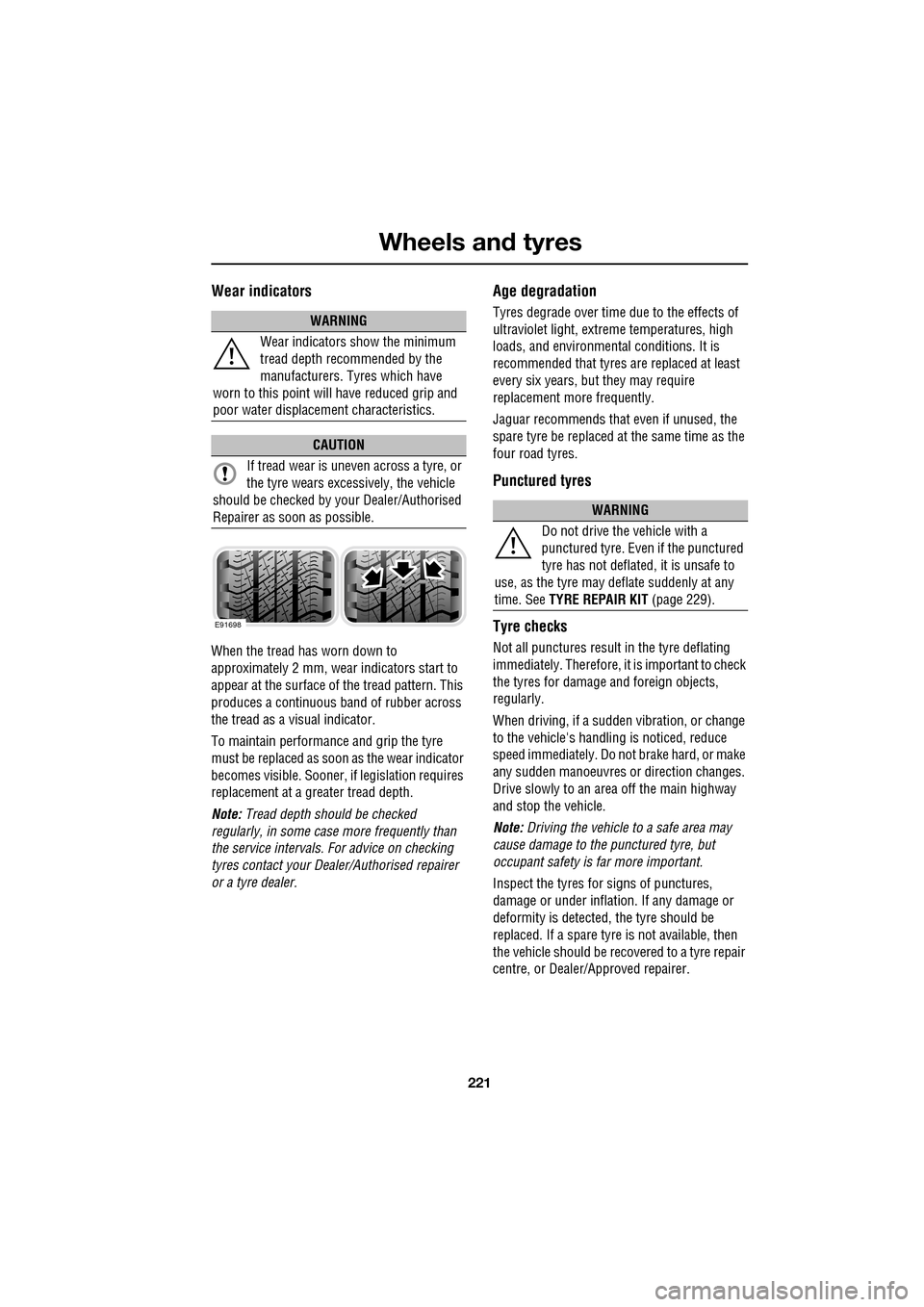
When the tread has worn down to
approximately 2 mm, wear indicators start to
appear at the surface of the tread pattern. This
produces a continuous band of rubber across
the tread as a visual indicator.
To maintain performance and grip the tyre
must be replaced as soon as the wear indicator
becomes visible. Sooner, if legislation requires
replacement at a greater tread depth.
Note: Tread depth should be checked
regularly, in some case more frequently than
the service intervals. For advice on checking
tyres contact your Dealer/Authorised repairer
or a tyre dealer.
Age degradation
Tyres degrade over time due to the effects of
ultraviolet light, extreme temperatures, high
loads, and environmen tal conditions. It is
recommended that tyres are replaced at least
every six years, but they may require
replacement more frequently.
Jaguar recommends that even if unused, the
spare tyre be replaced at the same time as the
four road tyres.
Punctured tyres
Tyre checks
Not all punctures result in the tyre deflating
immediately. Therefore, it is important to check
the tyres for damage and foreign objects,
regularly.
When driving, if a sudden vibration, or change
to the vehicle's hand ling is noticed, reduce
speed immediately. Do not brake hard, or make
any sudden manoeuvres or direction changes.
Drive slowly to an area off the main highway
and stop the vehicle.
Note: Driving the vehicle to a safe area may
cause damage to th e punctured tyre, but
occupant safety is far more important.
Inspect the tyres for signs of punctures,
damage or under inflati on. If any damage or
deformity is detected, the tyre should be
replaced. If a spare tyre is not available, then
the vehicle should be reco vered to a tyre repair
centre, or Dealer/Approved repairer.
WARNING
Wear indicators show the minimum
tread depth recommended by the
manufacturers. Tyres which have
worn to this point will have reduced grip and
poor water displacement characteristics.
CAUTION
If tread wear is uneve n across a tyre, or
the tyre wears excessively, the vehicle
should be checked by your Dealer/Authorised
Repairer as soon as possible.
E91698
WARNING
Do not drive the vehicle with a
punctured tyre. Even if the punctured
tyre has not deflated, it is unsafe to
use, as the tyre may deflate suddenly at any
time. See TYRE REPAIR KIT (page 229).
Page 225 of 391
225
Wheels and tyres
CHANGING A ROAD WHEEL
If a wheel change is required, pull off the road
completely. Park on ground which is as level
and solid as possible. Ensure that the vehicle is
clear of any objects that will obstruct the safe
removal of the wheel. Switch on hazard
warning lamps and, where legally required,
display the warning triangle.
Regular maintenance of tyres contributes not
only to safety, but to the designed function of
the vehicle. Road-holdi ng, steering and braking
are especially vulnerable to incorrectly
pressurised, badly fitted or worn tyres.
Tyres of the correct size and type, but of
different make can have widely varying
characteristics. It is therefore recommended
that Jaguar approved tyres are fitted to all
wheels.
Temporary use spare wheel
Observe the following wa rnings before using
the wheel:
WARNINGS
Always ensure replacement tyres
have the correct rating and
specifications (e.g. load index, size,
speed rating) for your vehicle.
When using tyres other than those
recommended by Jaguar, do not
exceed the speed capacity
recommended by the manufacturer.
Wheels are extremely heavy. Take
care when lifting and particularly
when removing and replacing a wheel
in its storage position in the luggage
compartment.
CAUTION
Ultra high performance tyres. This
vehicle is equipped with an Ultra High
Performance (UHP) tyre and wheel
combination designed to give maximum dry
road performance with consideration for
aquaplaning resistan ce. UHP tyres have
performance enhancing soft rubber tread
compound. If driven aggressively they may
suffer rapid tread wear and a shorter life than
can be expected from other tyre types. This
wheel and tyre comb ination is more
susceptible to damage from road hazards.
Do not use this combination for driving on
snow or ice. High perf ormance tyres must be
replaced with winter tyres when weather
conditions dictate.
WARNINGS
Note the temporary use spare wheel
warning label. Adhere to instructions
on the label. Failure to comply can be
dangerous.
When a temporary use spare wheel is
fitted, drive with caution and replace
with the specified wheel and tyre as
soon as possible.
Do not fit more than one temporary
use spare wheel and tyre assembly at
one time.
The temporary use spare wheel must
be inflated to 4.2 bar (60 lbf/in²,
420 kPa) and cannot be repaired.
Temporary use spare wheel,
maximum speed is 80 km/h
(50 mph).
Page 268 of 391
Audio introduction
268
RADIO RECEPTION
Some interference is to be expected from time
to time during a journey. Occasionally, it may
be necessary to retune the audio unit, to offset
the effects of moving from one transmitter area
to another.
While Radio Data System (RDS) automatic
retuning helps to reduce the effects of signal
changes, some manual retuning may still be
required (especially for lo cal stations) in areas
of weak reception.
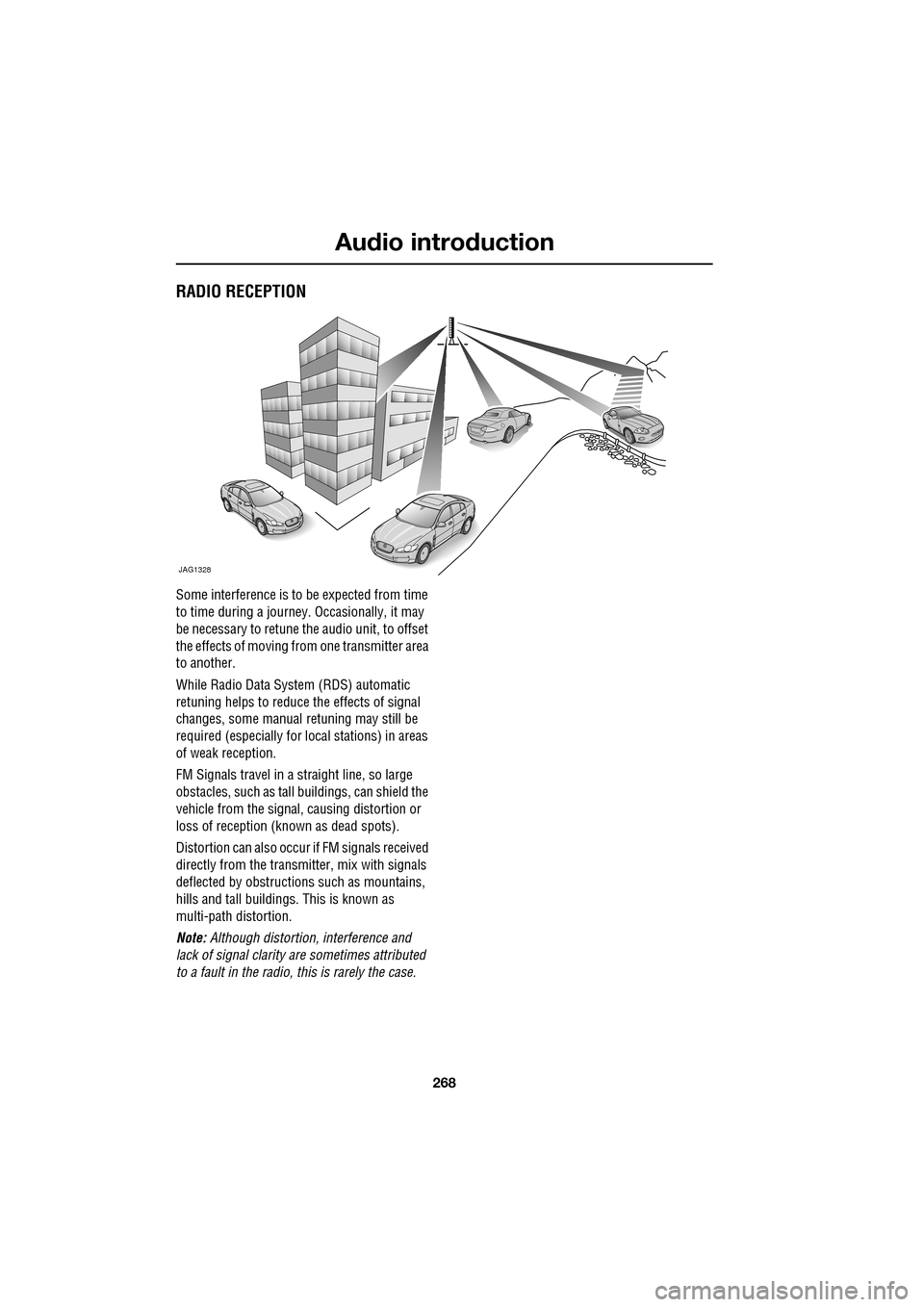
FM Signals travel in a straight line, so large
obstacles, such as tall buildings, can shield the
vehicle from the signal, causing distortion or
loss of reception (known as dead spots).
Distortion can also occur if FM signals received
directly from the transmitter, mix with signals
deflected by obstructions such as mountains,
hills and tall buildin gs. This is known as
multi-path distortion.
Note: Although distortion, interference and
lack of signal clarity are sometimes attributed
to a fault in the radio, this is rarely the case.
JAG1328