instrument panel JAGUAR XF 2009 1.G User Guide
[x] Cancel search | Manufacturer: JAGUAR, Model Year: 2009, Model line: XF, Model: JAGUAR XF 2009 1.GPages: 391, PDF Size: 19.32 MB
Page 134 of 391
Starting the engine
134
Engine block heaters
Engines are more difficult to start when the
ambient temperature is very low. In
geographical areas where temperatures below
-10°C (14°F) are experienced frequently, it is
advisable to fit an engine block heater. The
block heater will have an insulated connector at
the front of the vehicle, which is connected to a
mains supply using a suitable extension cable.
The heater can remain in use overnight if
required. Typically, an e ngine block heater will
use between 400W and 1000W per hour.
For further information consult your Jaguar
Dealer/Authorised Repairer.
If the engine fails to start
When pressing the engine START/STOP button
to start the engine, if the security status
indicator lamp on the top surface of the
instrument panel rema ins flashing, a fault
condition is indicate d. Seek qualified
assistance as soon as possible.
Note: If the Jaguar Smart Key is placed in the
door pocket, it may be outside the range of the
sensors when the door is opened.
Note: If the fuel system inertia switch has
tripped, the ignition circuit will be isolated.
See FUEL CUT-OFF (page 177).
Petrol engines
If the engine persistently fails to start, press the
START/STOP button (without applying the
brake pedal) to return the ignition to
convenience mode. Slowly depress the
accelerator pedal fully, hold it in this position
and press the START/STOP button with the
brake pedal applied, the engine will start to
crank. Release the accelerator pedal when the
engine starts.
If the engine still fails to start, consult your
Dealer/Authorised Repairer.
Diesel engines
If the engine persistently fails to start, press
and hold the START/STOP button (with the
brake pedal applied). Keep the START/STOP
button and the brake pedal pressed until the
engine starts, then release.
If the engine still fails to start, consult your
Dealer/Authorised Repairer.
SWITCHING OFF THE ENGINE
With the gear selector in position P, press the
engine START/STOP button. The engine will
stop and the ignition syst em will return to
convenience mode. The audio, telephone and
touch-screen systems will revert to stand-by
mode and the JaguarDrive selector will retract
into the centre console. Pressing the
START/STOP button ag ain (without pressing
the brake pedal) will activate the systems.
CAUTION
The fitting of an engine block heater
does not eliminate the need for
antifreeze.
WARNING
Never switch off the engine when the
vehicle is in motion.
Page 146 of 391
Brakes
146
Emergency Brake Assist (EBA)
The EBA system measures the rate at which the
brake pressure increases. If the system detects
an emergency braking situation, EBA
automatically init iates full braking effect. This
can reduce stopping dist ances in critical
situations.
EBA stops operating as soon as the brake pedal
is released.
EBA is part of the Dynamic Stability
Control (DSC) system and a fault
with the EBA system is indicated by
the amber DSC warning indicator illuminating
and DSC NOT AVAILABLE (with amber
backlight) displaying in the message centre.
Seek qualified assistan ce as soon as possible.
Brake vacuum assist
(V6 petrol models only)
When the engine is cold and/or engine vacuum
is low, Brake vacuum assist provides additional
brake pedal assistance. When the function is
operating, a pulsation ma y be felt through the
brake pedal - this is not a cause for concern.
A fault is indicate d by the message BRAKE
ASSIST FAULT (with amber backlight)
appearing in the message centre. Increased
brake pedal effort may be required to slow the
vehicle when the engine is cold and/or engine
vacuum is low. Seek qualified assistance.
ELECTRIC PARKING BRAKE (EPB)
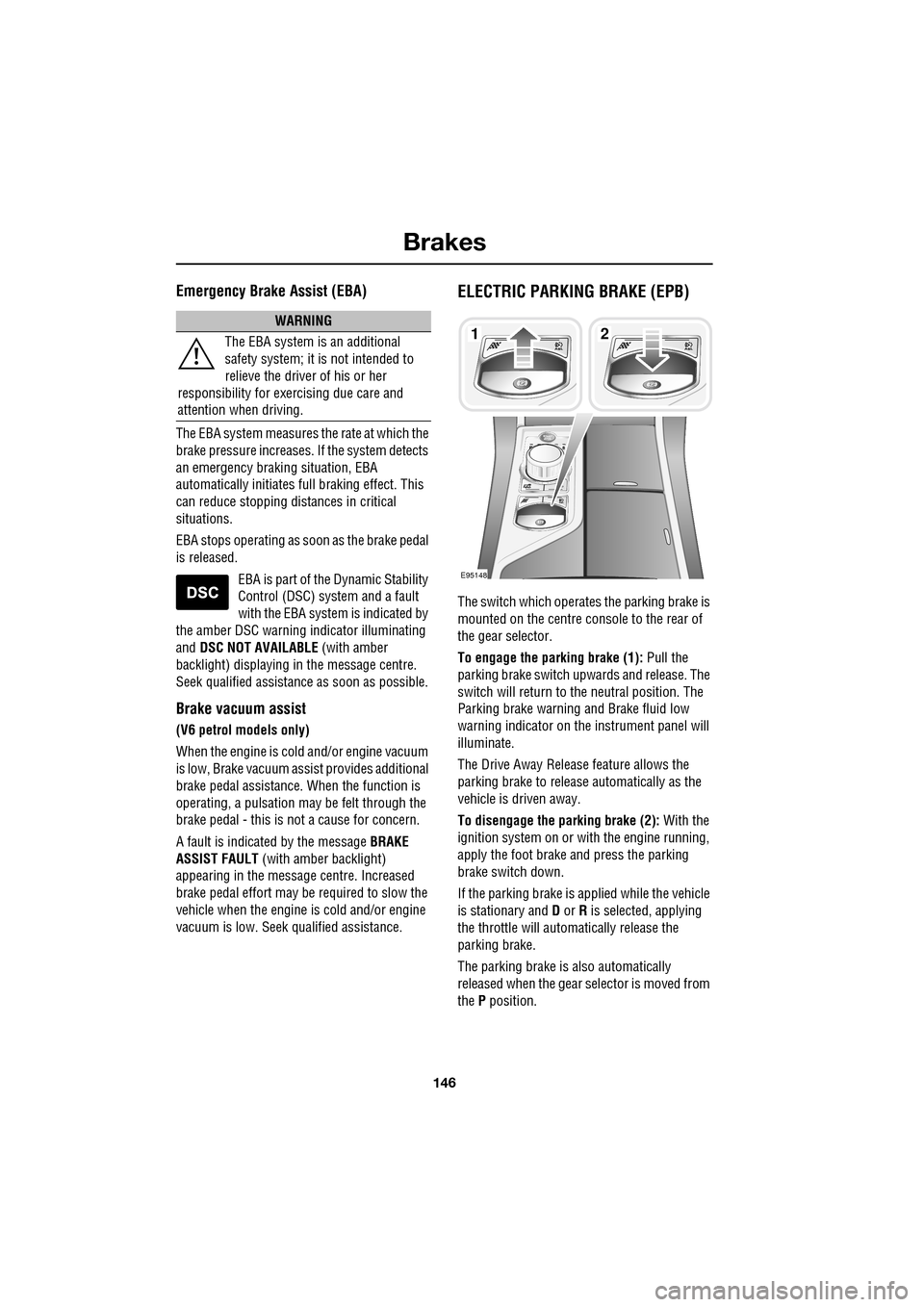
The switch which operate s the parking brake is
mounted on the centre c onsole to the rear of
the gear selector.
To engage the parking brake (1): Pull the
parking brake switch up wards and release. The
switch will return to the neutral position. The
Parking brake warning and Brake fluid low
warning indicator on the instrument panel will
illuminate.
The Drive Away Release feature allows the
parking brake to release automatically as the
vehicle is driven away.
To disengage the parking brake (2): With the
ignition system on or with the engine running,
apply the foot brake and press the parking
brake switch down.
If the parking brake is a pplied while the vehicle
is stationary and D or R is selected, applying
the throttle will auto matically release the
parking brake.
The parking brake is also automatically
released when the gear selector is moved from
the P position.
WARNING
The EBA system is an additional
safety system; it is not intended to
relieve the driver of his or her
responsibility for exercising due care and
attention when driving.12
E95148
Page 147 of 391
147
Brakes
If the parking brake is inadvertently applied
when the vehicle is moving at above 3 km/h
(1.8 mph), PARK BRAKE APPLIED is displayed
in the message centre, the warning indicator in
the instrument panel will illuminate and a
warning chime will sound.
If the parking brake is a pplied whilst the vehicle
is moving, releasing the switch will disengage
the parking brake. The parking brake cannot be
applied when the vehicle is moving, if the
accelerator pedal is pressed.
Note: If the vehicle is in motion, the parking
brake should only be used as an emergency
brake.
The warning indicator in the instrument panel
will remain on for a short time, if the parking
brake is applied when the ignition system is
reverted to the convenience mode.
If a fault in the system is detected,
the amber brake warning indicator
will illuminate and PARK BRAKE
FAULT or CANNOT APPLY PARK BRAKE will
be displayed in the message centre. Seek
qualified assistance as soon as possible.
If the battery has been discharged or
disconnected, APPLY FOOT AND PARK BRAKE
will be displayed in the message centre when
the ignition is next switched on. Depress the
foot brake and pull the parking brake switch up
to apply the parking brake. This is required to
reset the parking brake system. The parking
brake will now function correctly.
CAUTION
Always apply the parking brake when
the vehicle is parked.
Page 160 of 391
Adaptive cruise control (ACC)
160
Setting the speed
Accelerate as normal until the required speed is
reached.
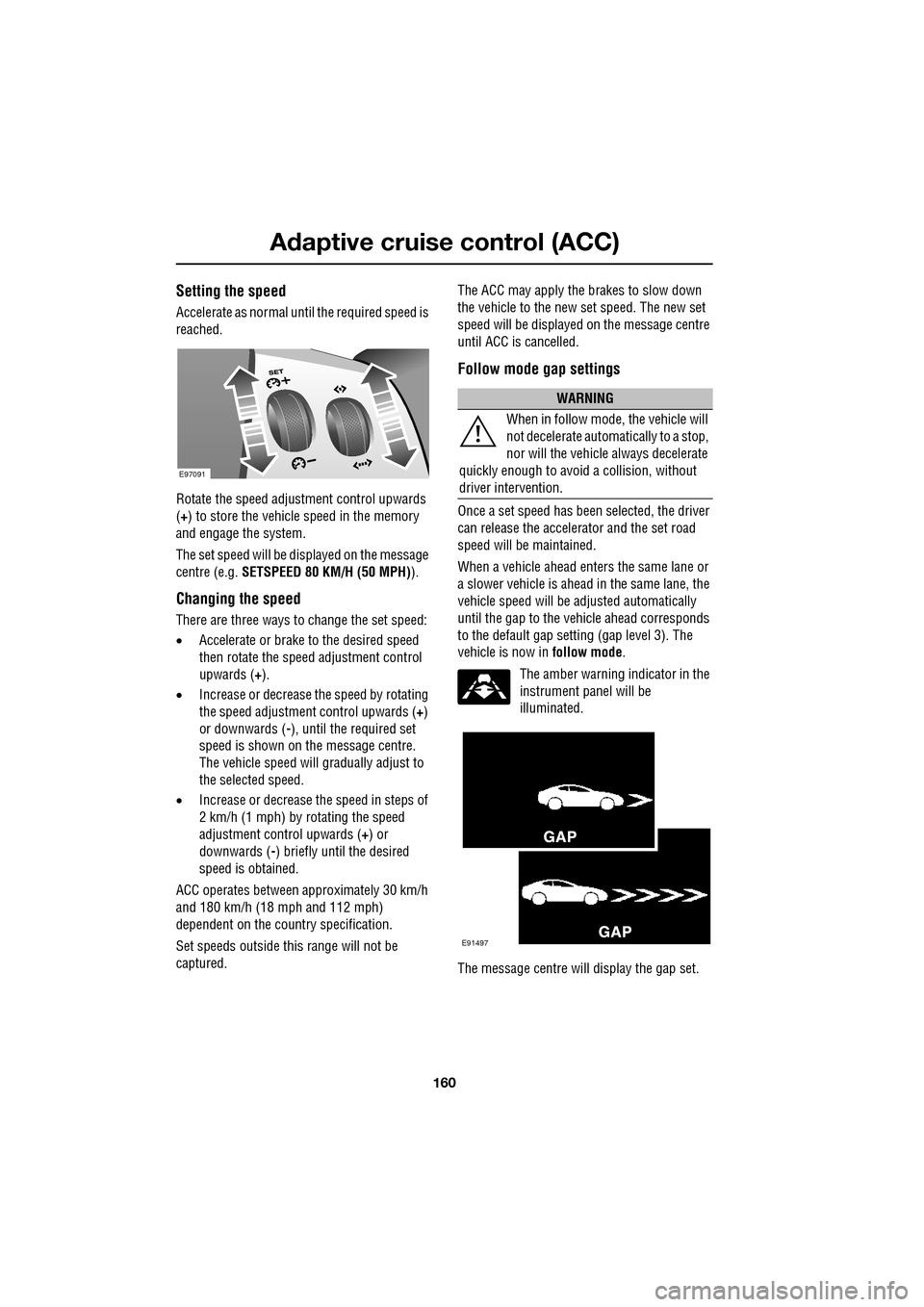
Rotate the speed adjustment control upwards
(+) to store the vehicle speed in the memory
and engage the system.
The set speed will be displayed on the message
centre (e.g. SETSPEED 80 KM/H (50 MPH) ).
Changing the speed
There are three ways to change the set speed:
•Accelerate or brake to the desired speed
then rotate the speed adjustment control
upwards ( +).
• Increase or decrease the speed by rotating
the speed adjustment control upwards ( +)
or downwards ( -), until the required set
speed is shown on the message centre.
The vehicle speed will gradually adjust to
the selected speed.
• Increase or decrease the speed in steps of
2 km/h (1 mph) by rotating the speed
adjustment control upwards (+) or
downwards ( -) briefly until the desired
speed is obtained.
ACC operates between approximately 30 km/h
and 180 km/h (18 mph and 112 mph)
dependent on the c ountry specification.
Set speeds outside th is range will not be
captured. The ACC may apply the brakes to slow down
the vehicle to the new set speed. The new set
speed will be displayed on the message centre
until ACC is cancelled.
Follow mode gap settings
Once a set speed has been selected, the driver
can release the accelerator and the set road
speed will be maintained.
When a vehicle ahead enters the same lane or
a slower vehicle is ahead in the same lane, the
vehicle speed will be adjusted automatically
until the gap to the vehicle ahead corresponds
to the default gap setting (gap level 3). The
vehicle is now in
follow mode.
The amber warning indicator in the
instrument panel will be
illuminated.
The message centre will display the gap set.
E97091
WARNING
When in follow mode, the vehicle will
not decelerate automatically to a stop,
nor will the vehicle always decelerate
quickly enough to avoid a collision, without
driver intervention.
E91497
Page 164 of 391
Adaptive cruise control (ACC)
164
Adverse weather conditions
During adverse weather conditions such as
heavy rain or snowfall, the sensitivity of radar
blockage detection is incr eased, so that it can
correctly detect any reduced performance
caused by a blocked sensor.
During these conditions, the warning message
ACC SENSOR BLOCKED may be displayed
more frequently, especially in areas where
there are few roadside objects for the radar to
detect.
FORWARD ALERT FUNCTION
Limited detection and warning of objects
ahead, is provided during ACC operation by the
ACC FORWARD ALERT warning. The enhanced
forward alert feature additionally provides
warnings when ACC is not engaged; if an object
is detected close ahead, then the warning tone
and message will be issued. The brakes will not
be applied. The forward alert system does not initiate any
action. The driver must
take appropriate action
when the FORWARD ALERT message is
displayed. However, the system monitors
driver actions (e.g. braking, steering or
indicating) and may not initiate the warning
display if the appropriate action has been taken
early enough.
The Forward alert function may be switched on
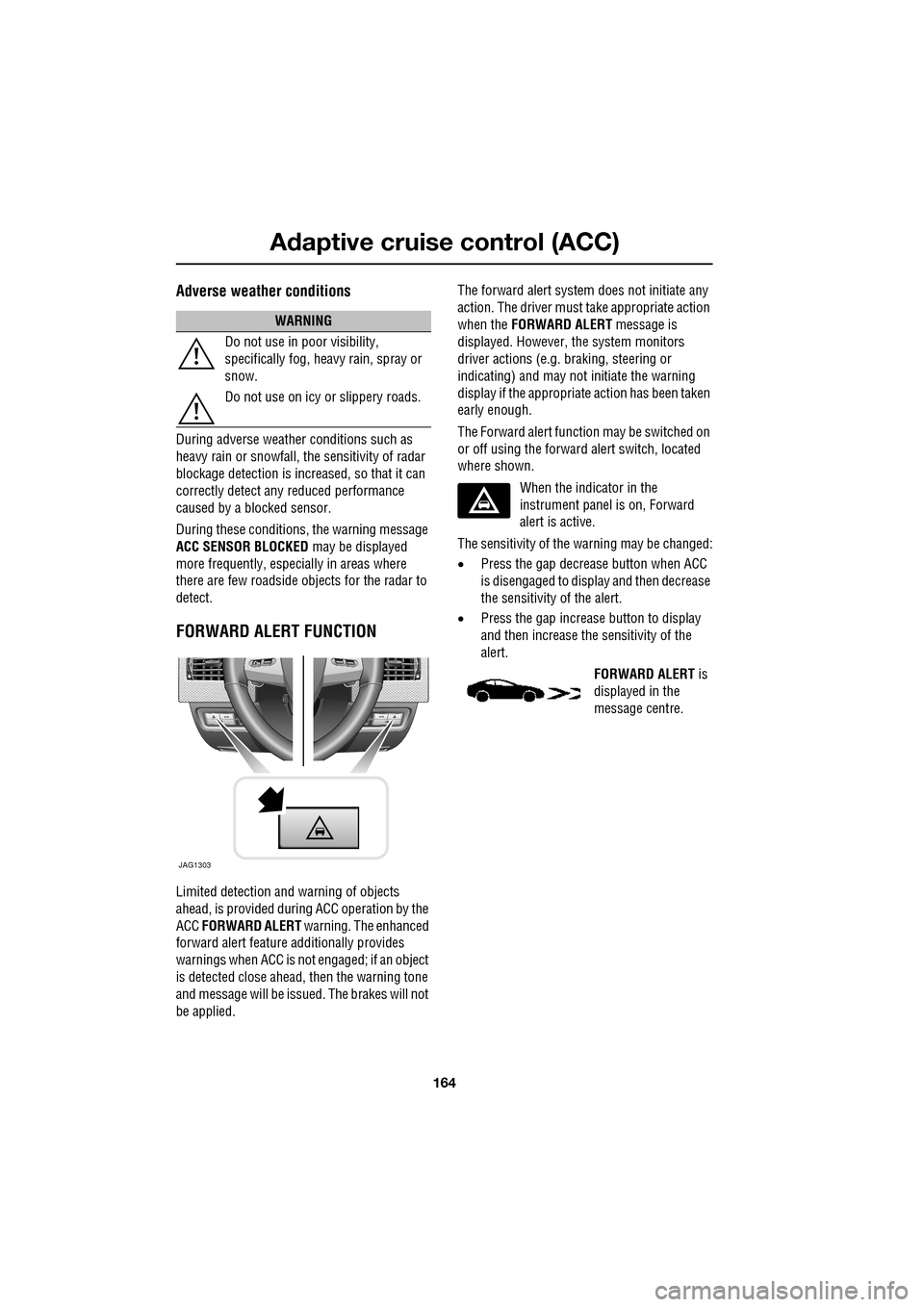
or off using the forward alert switch, located
where shown.
When the indicator in the
instrument panel is on, Forward
alert is active.
The sensitivity of the warning may be changed:
• Press the gap decrease button when ACC
is disengaged to displa y and then decrease
the sensitivity of the alert.
• Press the gap increase button to display
and then increase the sensitivity of the
alert.
FORWARD ALERT is
displayed in the
message centre.
WARNING
Do not use in poor visibility,
specifically fog, heavy rain, spray or
snow.
Do not use on icy or slippery roads.
JAG1303
Page 167 of 391
167
Automatic speed limiter (ASL)
PRINCIPLE OF OPERATION
ASL can be used in a situation where varying
vehicle speed is likely but a maximum speed
must not be exceeded. For example, where a
local speed limit is 80 km/h (50 mph), the set
speed could be at that limit or just under.
If ASL is not selected, cr uise control is always
available by simply rotating the thumb wheel
on the right-hand side of the steering wheel to
set a cruising speed. The ASL button allows the
driver to select betwee n cruise control and the
automatic speed limiter. The ASL can be set to
any speed between 30 km/h (18 mph) and 240
km/h (150 mph).
Note: Although ASL only operates at speeds
between 30 km/h (18 mph) and 240 km/h (150
mph), the maximum speed can be set when the
vehicle is stationary.
When ASL is selected, the warning indicator in
the instrument panel will illuminate. When the
ASL button is pressed ag ain, the light will
extinguish, ASL will be cancelled and cruise
control will be available again.
USING THE ASL
Setting a speed limit
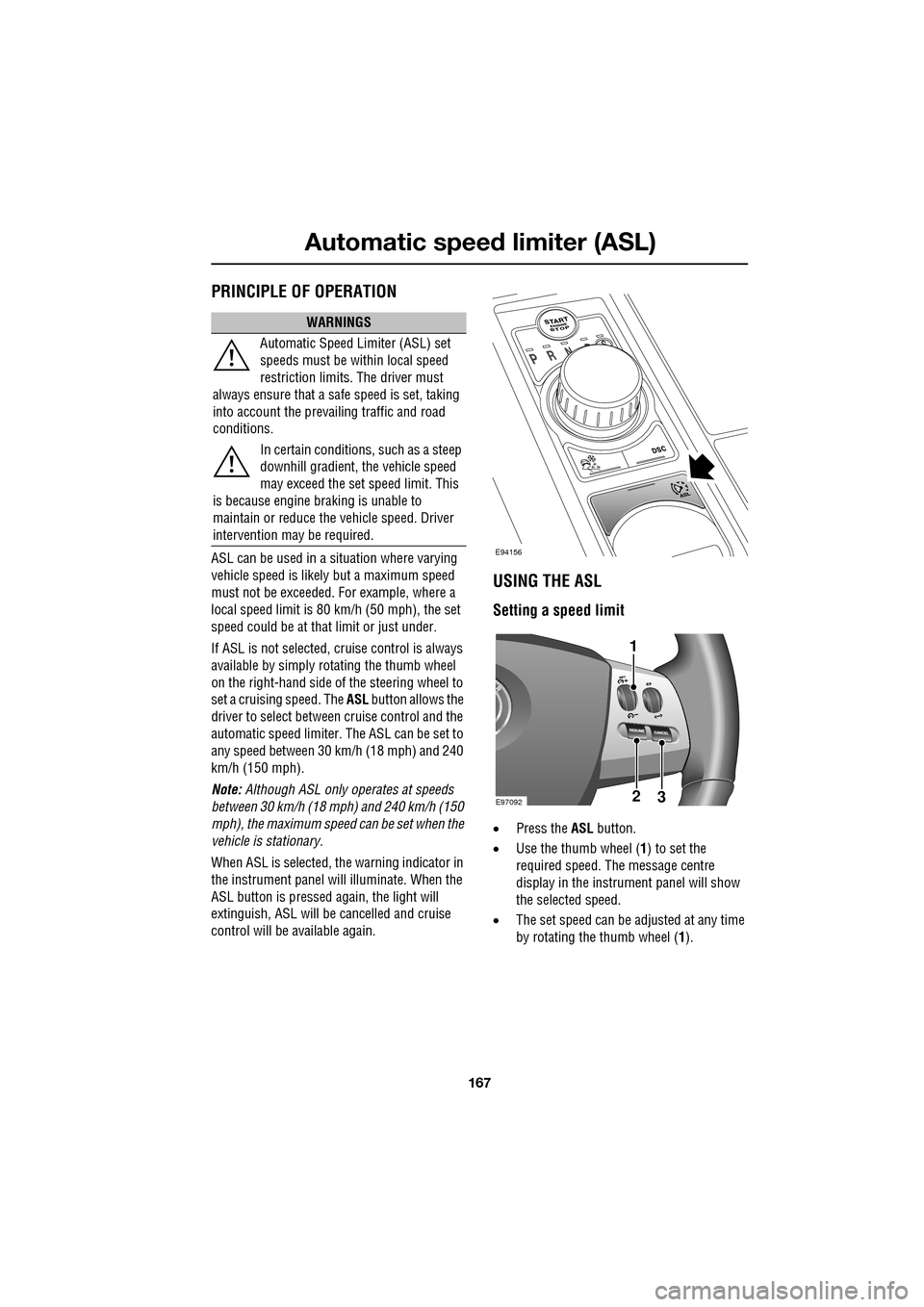
• Press the ASL button.
• Use the thumb wheel ( 1) to set the
required speed. The message centre
display in the instru ment panel will show
the selected speed.
• The set speed can be adjusted at any time
by rotating the thumb wheel (1).
WARNINGS
Automatic Speed Limiter (ASL) set
speeds must be within local speed
restriction limits. The driver must
always ensure that a safe speed is set, taking
into account the prevailing traffic and road
conditions.
In certain conditions, such as a steep
downhill gradient, the vehicle speed
may exceed the set speed limit. This
is because engine br aking is unable to
maintain or reduce the vehicle speed. Driver
intervention may be required.
E94156
E9709223
1
Page 170 of 391
Driving dynamics
170
DYNAMIC MODE
(V8 petrol and diesel vehicles only)
Press to operate. Dynamic mode
co-ordinates the vehicle's control
systems to deliver a high
performance driving experience. This setting
enhances key vehicle systems so that the
vehicle's full potential can be exploited. The
vehicle's responses are aimed at involving the
driver more in focused and purposeful driving,
helping swift progress.
Note: When the transmission is set to
permanent manual mode (i.e. using the
paddles to change gear while in Sport mode)
and Dynamic mode is selected, transmission
upshifts are fully controlled by the driver. This
means that the transmissi on will not change up
a gear automatically, even when the vehicle's
rev limit is reached. When the rev limit is
reached, the gear position indicator in the
message centre will glow amber, to indicate
that the next gear should be selected.
Note: Dynamic mode cannot be active at the
same time as Winter m ode. Dynamic mode will
remain selected for approximately six hours
after the ignition is swit ched off, after which
point it will need to be reselected if required.
STABILITY CONTROL
Dynamic Stability Control (DSC)
Dynamic Stability Contro l (DSC) is operational
whenever the engine is running, unless it has
been manually switched off. When the system
is operating, the warn ing indicator in the
instrument panel will flash.
The DSC system controls the Anti-lock Braking
System (ABS), traction control and yaw control
of the vehicle.
The DSC system assists the driver in retaining
directional control of th e vehicle in situations
where the vehicle is sliding (understeer or
oversteer). It must not encourage the driver to
drive beyond the limit of adhesion or at speeds
higher than those suitable for the prevailing
road and traffic conditions.
DSC applies braking pres sure to individual
wheels if excessive variation is detected. This
ensures that the vehicle follows the driver’s
intended direction of travel as closely as
possible.
Traction control will intervene to control wheel
spin by automatically reducing the power
output from the engine and applying braking to
individual wheels. This improves acceleration,
particularly on surfaces with uneven friction
(e.g. one wheel on ice with another on tarmac).
Note: For recommended DSC mode selection,
refer to the JaguarDri ve Control scenarios
section in this handbook.
WARNING
The fact that the vehicle is fitted with
DSC, must never allow the driver to
be tempted into taking risks which
could affect his or her sa fety or that of other
road users. In all cases, it remains the driver’s
responsibility to drive sa fely according to the
prevailing conditions.
Page 171 of 391
171
Driving dynamics
TracDSC
TracDSC is an alternative setting of DSC with
reduced system interventions. With TracDSC
engaged, traction may be somewhat increased,
although stability may be reduced compared to
normal DSC. TracDSC is intended for use only
on dry tarmac, by suitably experienced drivers
and should not be select ed for other surfaces
or by drivers with insufficient skill and training
to operate the vehicle safely with the TracDSC
function engaged.
The less restrictive TracDSC setting may be
preferred, for example, by expert drivers
engaged in high performance driving on dry
Tarmac surfaces such as tracks and circuits.
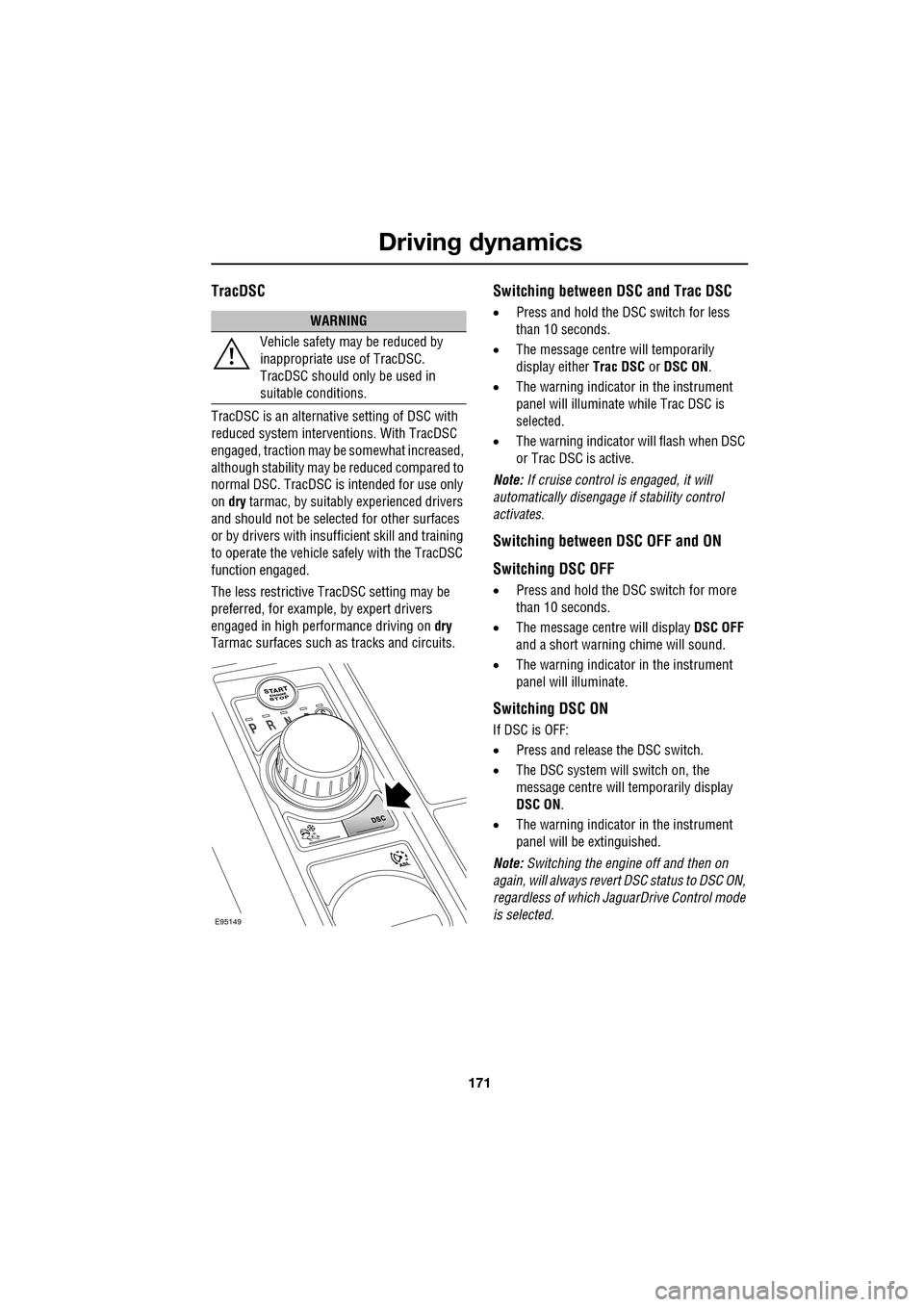
Switching between DSC and Trac DSC
• Press and hold the DSC switch for less
than 10 seconds.
• The message centre will temporarily
display either Trac DSC or DSC ON.
• The warning indicator in the instrument
panel will illuminate while Trac DSC is
selected.
• The warning indicator will flash when DSC
or Trac DSC is active.
Note: If cruise control is engaged, it will
automatically disengage if stability control
activates.
Switching between DSC OFF and ON
Switching DSC OFF
• Press and hold the DSC switch for more
than 10 seconds.
• The message centre will display DSC OFF
and a short warning chime will sound.
• The warning indicator in the instrument
panel will illuminate.
Switching DSC ON
If DSC is OFF:
• Press and release the DSC switch.
• The DSC system will switch on, the
message centre will temporarily display
DSC ON .
• The warning indicator in the instrument
panel will be extinguished.
Note: Switching the engine off and then on
again, will always revert DSC status to DSC ON,
regardless of which Ja guarDrive Control mode
is selected.
WARNING
Vehicle safety may be reduced by
inappropriate use of TracDSC.
TracDSC should only be used in
suitable conditions.
E95149
Page 172 of 391
Driving dynamics
172
Note: In rare circumstances, when TracDSC is
selected or DSC is o ff, high acceleration on
rough roads may cause DSC to switch back on.
This prevents high loads on the vehicle
driveline. DSC will su bsequently remain on,
unless TracDSC is selected or DSC is switched
off manually.
Stability control indicator
If there is a fault, the warning
indicator will ill uminate in the
instrument panel and the message
centre will display DSC NOT AVAILABLE with
an amber backlight.
It is safe to drive the vehicle, but the DSC
system will not activa te under wheel spin or
slide conditions. You should seek qualified
assistance as soon as possible.
Adaptive dynamics
(Supercharged vehicles only)
Jaguar Adaptive dy namics continuously
monitors the road a nd driver inputs and
optimises the vehicle suspension settings for
ride comfort and control.
The adaptive dynamics system is linked to
Dynamic mode, modifying the suspension
settings for a more sporting character.
If the message centre displays the message
ADAPTIVE DYNAMICS FAULT , a fault has been
detected in the adaptive dynamics system.
Seek qualified assistan ce as soon as possible.
Active Differential Control (E-diff)
(Supercharged vehicles only)
The E-diff improves trac tion when one driven
wheel has more grip than the other. This
improves progress out of corners and on
patchy or uneven surfaces. The E-diff can also
increase stability in oversteer situations,
depending on road c onditions and driver
inputs. Settings for the E-diff are made automatically,
without the need for driver selection.
If there is a fault with the E-diff system, the
message centre will display
EDIFF SYSTEM
FAULT . If DSC is off, then TracDSC will be
selected automatically. The driver can still
switch between DSC mode s, as normal and the
vehicle is safe to dr ive, but seek qualified
assistance as soon as possible.
Note: If the E-diff is active continuously for an
extended period (e.g. on a patchy surface with
DSC off) then the E-diff may be temporarily
deactivated to prevent ov erheating. If DSC is
off, then TracDSC will be selected
automatically. The mess age centre will display
EDIFF NOT AVAILABLE . The driver can still
switch between DSC modes as normal and the
E-diff will become availa ble again automatically
when it has cool ed sufficiently.
Page 190 of 391
Vehicle care
190
Leather
Leather is an easy to maintain natural product.
However, dust and subs tances can penetrate
the pores and crease the leather, causing
surface wear and brittleness.
To prevent ingrained dirt and staining, inspect
the seat upholstery regularly and clean every
one to two months, as follows:
• Wipe off fine dust from the seat surfaces
using a clean, damp, non-coloured cloth.
Change frequently to a clean area of cloth,
to avoid abrasive action on the leather
surface. Avoid over-wetting.
• If this is not suffic ient, use a cloth which
has been dampened with warm soapy
water and then wrung out. Use only mild
non-caustic soap.
• Use Jaguar Leather Cleaner for heavily
soiled areas. Dry off and rub with a clean
soft cloth, changing surfaces regularly.
When staining (e.g. from clothing) or spillage
occurs, clean the affected area immediately as
described above.
Use Jaguar Leather Cleaner several times a
year to maintain its appearance and
suppleness. The clea ner will nourish and
moisturise and help to improve the surface
protective film agains t dust and substances.
• Do not use solvents. Do not use
detergents, furniture polish or household
cleaners. While these products may
initially give impressi ve results, their use
will lead to rapid deterioration of the
leather and will inva lidate the warranty.
Jaguar recommend a basic set of products
that have been specially selected for the
type of leather in your vehicle.
• Dark clothing may stain leather seats just
like other upholstery products. •
Sharp objects such as belts, zip fasteners,
rivets, etc., can leave permanent scratches
and scratch marks on the leather surface.
• Unless spillages such as tea, coffee or ink
are washed away immediately, permanent
staining may have to be accepted.
If a valet service is used, ensure that the
specialist concerned is aware of, and follows,
these instructions precisely.
Cloth and fabric
Use Jaguar Upholstery Cleaner, following the
instructions. Avoid over-wetting.
Removing stains
Most stains on woollen fabric can be removed
if treatment is carried out immediately, before
the stain has a chance to dry-in.
Most stains can be treated with one of three
cleaning fluids: Jaguar U pholstery Cleaner, dry
cleaning fluid or clean water. Follow the
instructions on the package.
Instrument pack, clock, and audio
equipment
Only use a soft dry cloth to clean the
instrument pack, clock and audio equipment.
Do not use cleaning fluids or sprays.
CAUTIONS
Never use soap, ammonia, bleach or
other cleaners intended for use on hard
surfaces.
Do not use upholst ery cleaner on
electrical equipment such as fascia
switches.
When cleaning around electrical
equipment such as switches, ensure
that fluids do not leak into any gaps around the
components or between panels or trim.