keyless JAGUAR XF 2009 1.G User Guide
[x] Cancel search | Manufacturer: JAGUAR, Model Year: 2009, Model line: XF, Model: JAGUAR XF 2009 1.GPages: 391, PDF Size: 19.32 MB
Page 38 of 391
Alarm
38
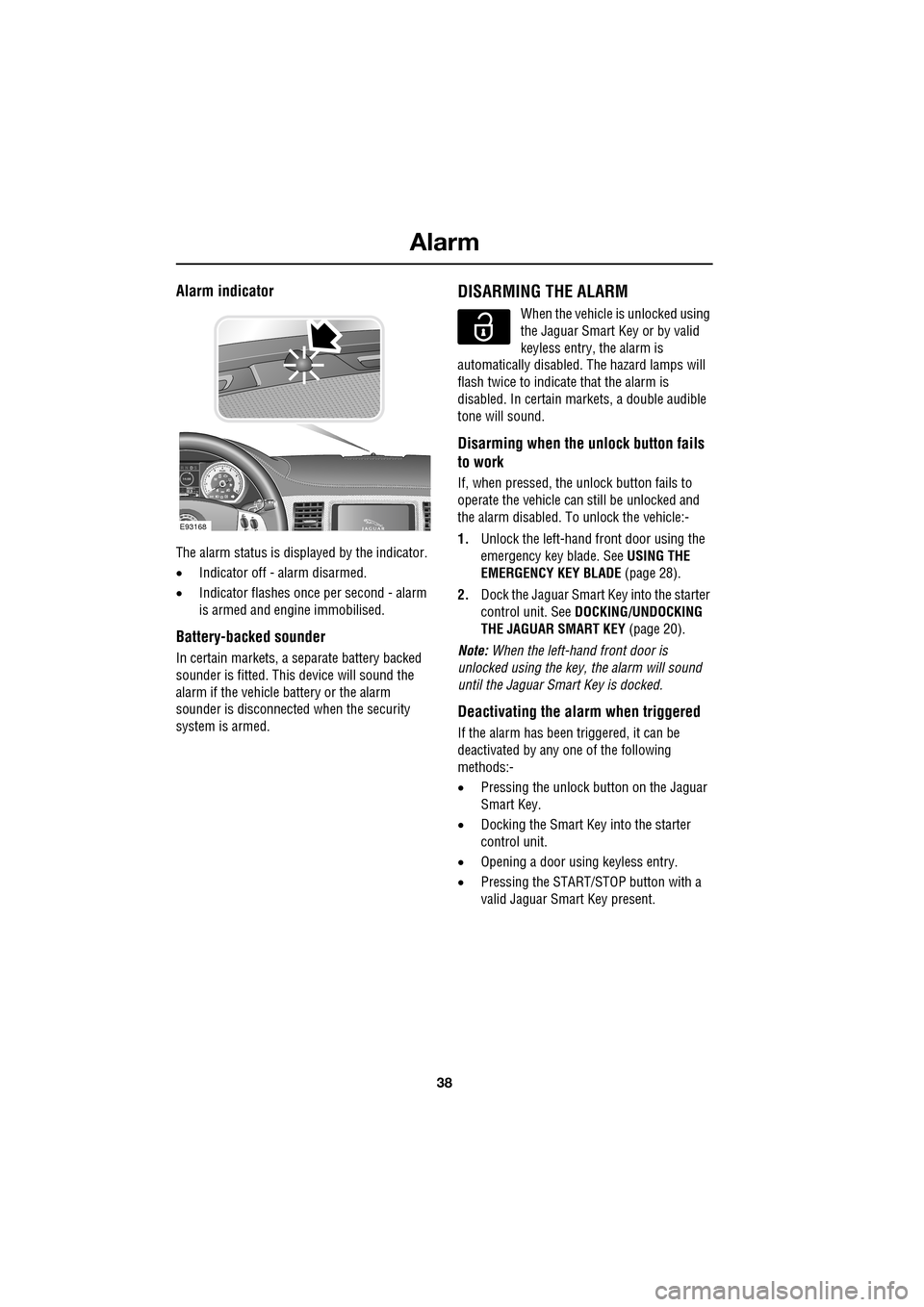
Alarm indicator
The alarm status is displayed by the indicator.
•Indicator off - alarm disarmed.
• Indicator flashes onc e per second - alarm
is armed and engine immobilised.
Battery-backed sounder
In certain markets, a separate battery backed
sounder is fitted. This device will sound the
alarm if the vehicle battery or the alarm
sounder is disconnected when the security
system is armed.
DISARMING THE ALARM
When the vehicle is unlocked using
the Jaguar Smart Key or by valid
keyless entry, the alarm is
automatically disabled. The hazard lamps will
flash twice to indicate that the alarm is
disabled. In certain ma rkets, a double audible
tone will sound.
Disarming when the unlock button fails
to work
If, when pressed, the unlock button fails to
operate the vehicle can still be unlocked and
the alarm disabled. To unlock the vehicle:-
1. Unlock the left-hand front door using the
emergency key blade. See USING THE
EMERGENCY KEY BLADE (page 28).
2. Dock the Jaguar Smart Key into the starter
control unit. See DOCKING/UNDOCKING
THE JAGUAR SMART KEY (page 20).
Note: When the left-hand front door is
unlocked using the key, the alarm will sound
until the Jaguar Smart Key is docked.
Deactivating the alarm when triggered
If the alarm has been triggered, it can be
deactivated by any one of the following
methods:-
• Pressing the unlock button on the Jaguar
Smart Key.
• Docking the Smart Key into the starter
control unit.
• Opening a door using keyless entry.
• Pressing the START/ST OP button with a
valid Jaguar Smart Key present.
km/ 0 km
E93168
Page 133 of 391
133
Starting the engine
KEYLESS STARTING
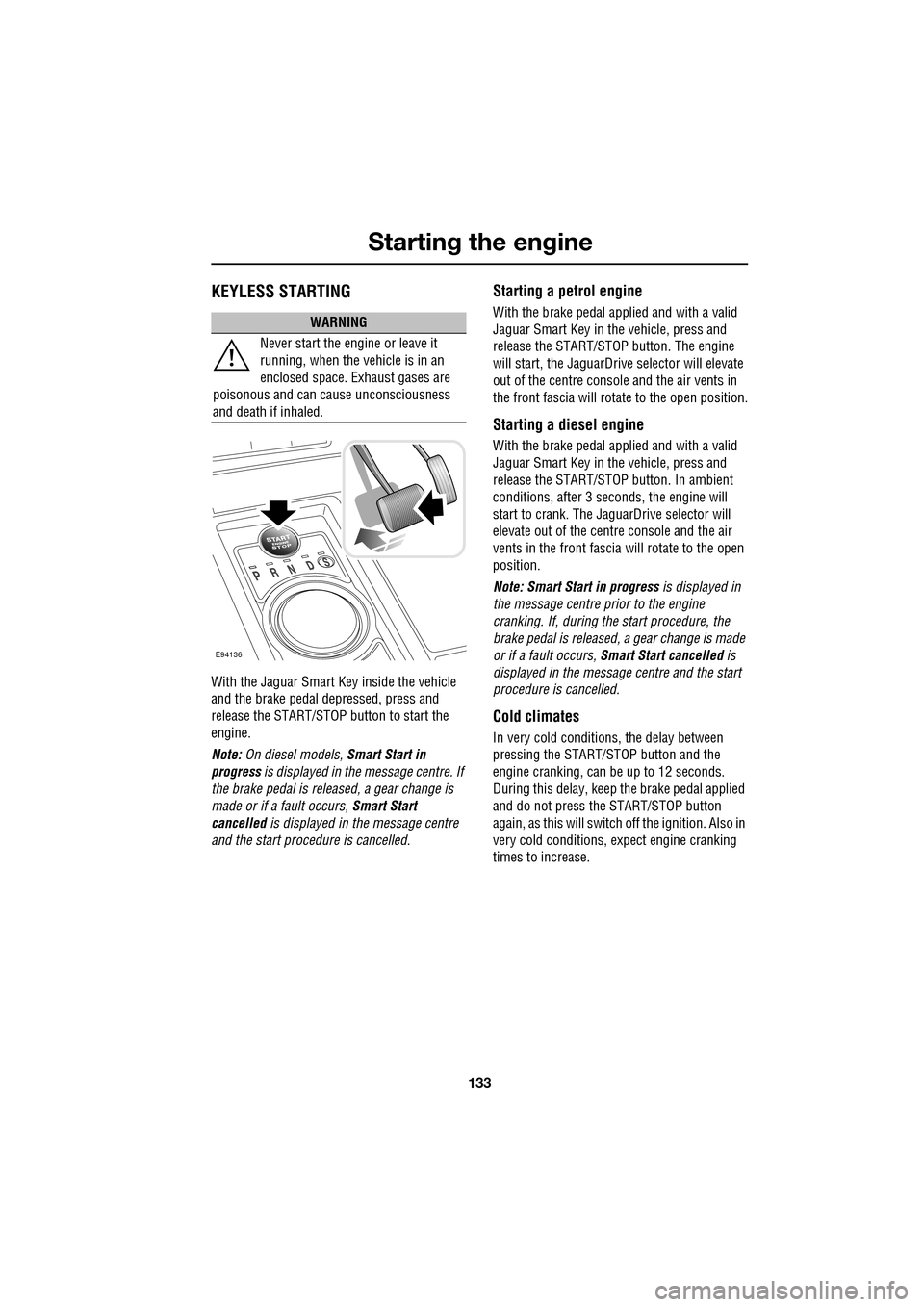
With the Jaguar Smart Key inside the vehicle
and the brake pedal depressed, press and
release the START/STOP button to start the
engine.
Note: On diesel models, Smart Start in
progress is displayed in the message centre. If
the brake pedal is released, a gear change is
made or if a fault occurs, Smart Start
cancelled is displayed in the message centre
and the start procedure is cancelled.
Starting a petrol engine
With the brake pedal applied and with a valid
Jaguar Smart Key in the vehicle, press and
release the START/STOP button. The engine
will start, the JaguarDrive selector will elevate
out of the centre console and the air vents in
the front fascia will ro tate to the open position.
Starting a diesel engine
With the brake pedal applied and with a valid
Jaguar Smart Key in the vehicle, press and
release the START/STOP button. In ambient
conditions, after 3 seconds, the engine will
start to crank. The JaguarDrive selector will
elevate out of the centre console and the air
vents in the front fascia will rotate to the open
position.
Note: Smart Start in progress is displayed in
the message centre prior to the engine
cranking. If, during the start procedure, the
brake pedal is released, a gear change is made
or if a fault occurs, Smart Start cancelled is
displayed in the message centre and the start
procedure is cancelled.
Cold climates
In very cold conditions, the delay between
pressing the START/STOP button and the
engine cranking, can be up to 12 seconds.
During this delay, keep the brake pedal applied
and do not press the START/STOP button
again, as this will switch off the ignition. Also in
very cold conditions, expect engine cranking
times to increase.
WARNING
Never start the engine or leave it
running, when the vehicle is in an
enclosed space. Exhaust gases are
poisonous and can cause unconsciousness
and death if inhaled.
E94136
Page 247 of 391
247
Fuses
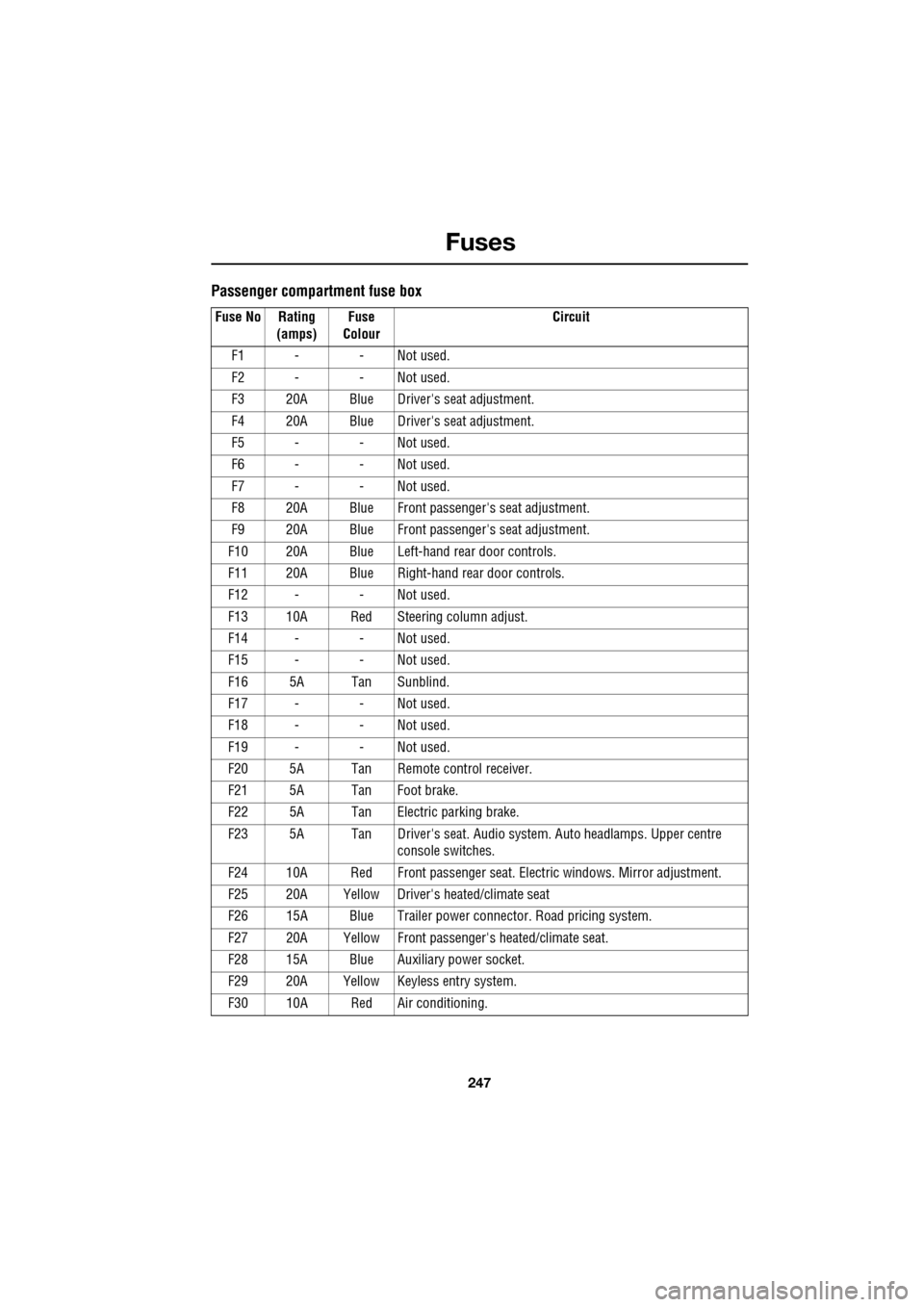
Passenger compartment fuse box
Fuse No Rating (amps) Fuse
Colour Circuit
F1 - - Not used.
F2 - - Not used.
F3 20A Blue Driver's seat adjustment.
F4 20A Blue Driver's seat adjustment.
F5 - - Not used.
F6 - - Not used.
F7 - - Not used.
F8 20A Blue Front passenger's seat adjustment.
F9 20A Blue Front passenger's seat adjustment.
F10 20A Blue Left-hand rear door controls.
F11 20A Blue Right-hand rear door controls.
F12 - - Not used.
F13 10A Red Steering column adjust.
F14 - - Not used.
F15 - - Not used.
F16 5A Tan Sunblind.
F17 - - Not used.
F18 - - Not used.
F19 - - Not used.
F20 5A Tan Remote control receiver.
F21 5A Tan Foot brake.
F22 5A Tan Electric parking brake.
F23 5A Tan Driver's seat. Audio system. Auto headlamps. Upper centre console switches.
F24 10A Red Front passen ger seat. Electric windows. Mirror adjustment.
F25 20A Yellow Driver's heated/climate seat
F26 15A Blue Trailer power connector. Road pricing system.
F27 20A Yellow Front passenger's heated/climate seat.
F28 15A Blue Auxiliary power socket.
F29 20A Yellow Keyless entry system.
F30 10A Red Air conditioning.
Page 385 of 391
Index
385
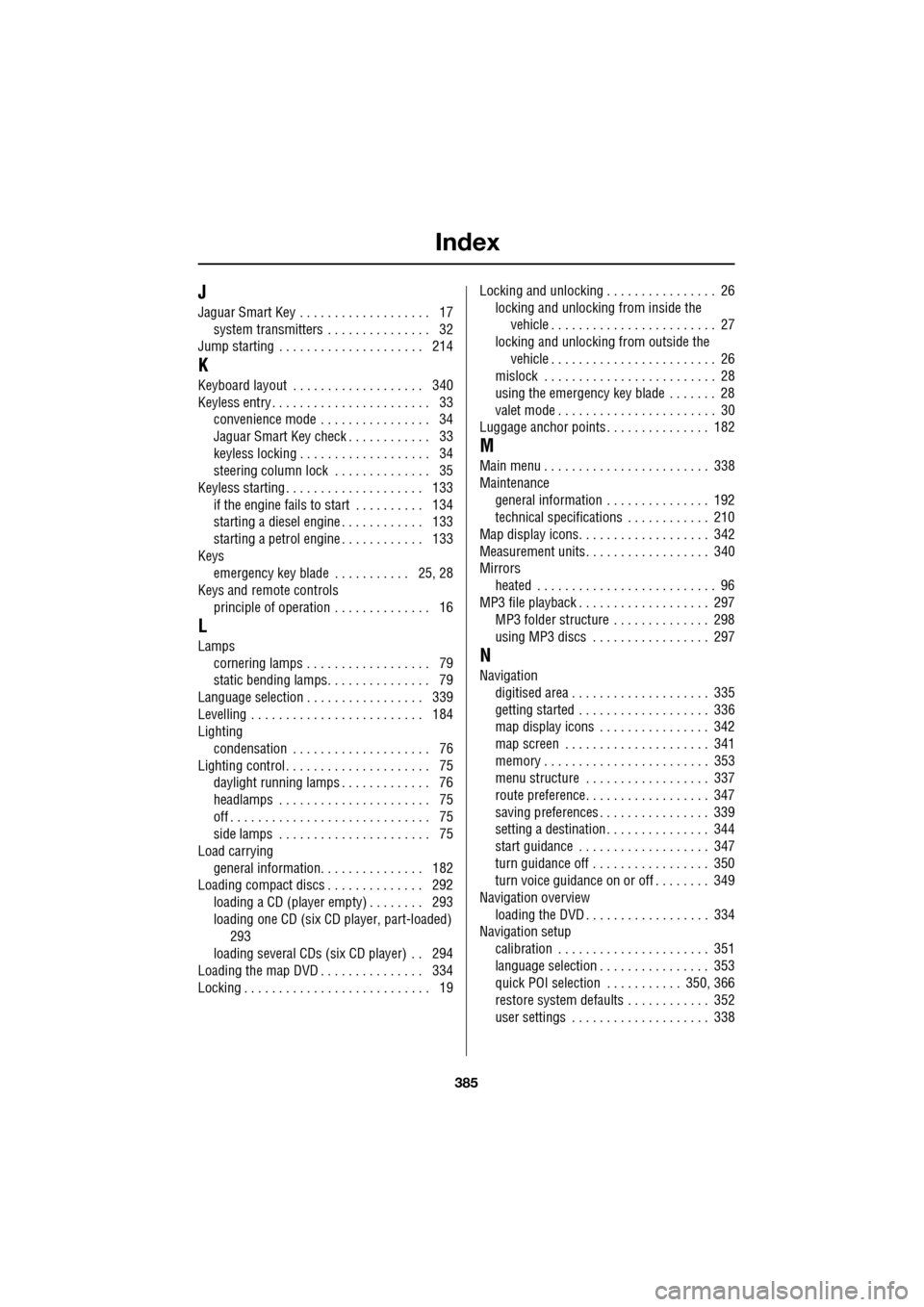
J
Jaguar Smart Key . . . . . . . . . . . . . . . . . . . 17system transmitters . . . . . . . . . . . . . . . 32
Jump starting . . . . . . . . . . . . . . . . . . . . . 214
K
Keyboard layout . . . . . . . . . . . . . . . . . . . 340
Keyless entry . . . . . . . . . . . . . . . . . . . . . . . 33 convenience mode . . . . . . . . . . . . . . . . 34
Jaguar Smart Key check . . . . . . . . . . . . 33
keyless locking . . . . . . . . . . . . . . . . . . . 34
steering column lock . . . . . . . . . . . . . . 35
Keyless starting . . . . . . . . . . . . . . . . . . . . 133
if the engine fails to start . . . . . . . . . . 134
starting a diesel engine . . . . . . . . . . . . 133
starting a petrol engine . . . . . . . . . . . . 133
Keys emergency key blade . . . . . . . . . . . 25, 28
Keys and remote controls
principle of operation . . . . . . . . . . . . . . 16
L
Lampscornering lamps . . . . . . . . . . . . . . . . . . 79
static bending lamps. . . . . . . . . . . . . . . 79
Language selection . . . . . . . . . . . . . . . . . 339
Levelling . . . . . . . . . . . . . . . . . . . . . . . . . 184
Lighting condensation . . . . . . . . . . . . . . . . . . . . 76
Lighting control . . . . . . . . . . . . . . . . . . . . . 75 daylight running lamps . . . . . . . . . . . . . 76
headlamps . . . . . . . . . . . . . . . . . . . . . . 75
off . . . . . . . . . . . . . . . . . . . . . . . . . . . . . 75
side lamps . . . . . . . . . . . . . . . . . . . . . . 75
Load carrying
general information. . . . . . . . . . . . . . . 182
Loading compact discs . . . . . . . . . . . . . . 292 loading a CD (player empty) . . . . . . . . 293
loading one CD (six CD player, part-loaded)
293
loading several CDs (six CD player) . . 294
Loading the map DVD . . . . . . . . . . . . . . . 334
Locking . . . . . . . . . . . . . . . . . . . . . . . . . . . 19 Locking and unlocking . . . . . . . . . . . . . . . . 26
locking and unlocking from inside the vehicle . . . . . . . . . . . . . . . . . . . . . . . . 27
locking and unlocking from outside the
vehicle . . . . . . . . . . . . . . . . . . . . . . . . 26
mislock . . . . . . . . . . . . . . . . . . . . . . . . . 28
using the emergency key blade . . . . . . . 28
valet mode . . . . . . . . . . . . . . . . . . . . . . . 30
Luggage anchor points . . . . . . . . . . . . . . . 182
M
Main menu . . . . . . . . . . . . . . . . . . . . . . . . 338
Maintenance
general information . . . . . . . . . . . . . . . 192
technical specifications . . . . . . . . . . . . 210
Map display icons. . . . . . . . . . . . . . . . . . . 342
Measurement units. . . . . . . . . . . . . . . . . . 340
Mirrors heated . . . . . . . . . . . . . . . . . . . . . . . . . . 96
MP3 file playback . . . . . . . . . . . . . . . . . . . 297 MP3 folder structure . . . . . . . . . . . . . . 298
using MP3 discs . . . . . . . . . . . . . . . . . 297
N
Navigationdigitised area . . . . . . . . . . . . . . . . . . . . 335
getting started . . . . . . . . . . . . . . . . . . . 336
map display icons . . . . . . . . . . . . . . . . 342
map screen . . . . . . . . . . . . . . . . . . . . . 341
memory . . . . . . . . . . . . . . . . . . . . . . . . 353
menu structure . . . . . . . . . . . . . . . . . . 337
route preference. . . . . . . . . . . . . . . . . . 347
saving preferences . . . . . . . . . . . . . . . . 339
setting a destination . . . . . . . . . . . . . . . 344
start guidance . . . . . . . . . . . . . . . . . . . 347
turn guidance off . . . . . . . . . . . . . . . . . 350
turn voice guidance on or off . . . . . . . . 349
Navigation overview
loading the DVD . . . . . . . . . . . . . . . . . . 334
Navigation setup calibration . . . . . . . . . . . . . . . . . . . . . . 351
language selection . . . . . . . . . . . . . . . . 353
quick POI selection . . . . . . . . . . . 350, 366
restore system defaults . . . . . . . . . . . . 352
user settings . . . . . . . . . . . . . . . . . . . . 338