warning light JAGUAR XF 2009 1.G User Guide
[x] Cancel search | Manufacturer: JAGUAR, Model Year: 2009, Model line: XF, Model: JAGUAR XF 2009 1.GPages: 391, PDF Size: 19.32 MB
Page 77 of 391
77
Lighting
Exit delay
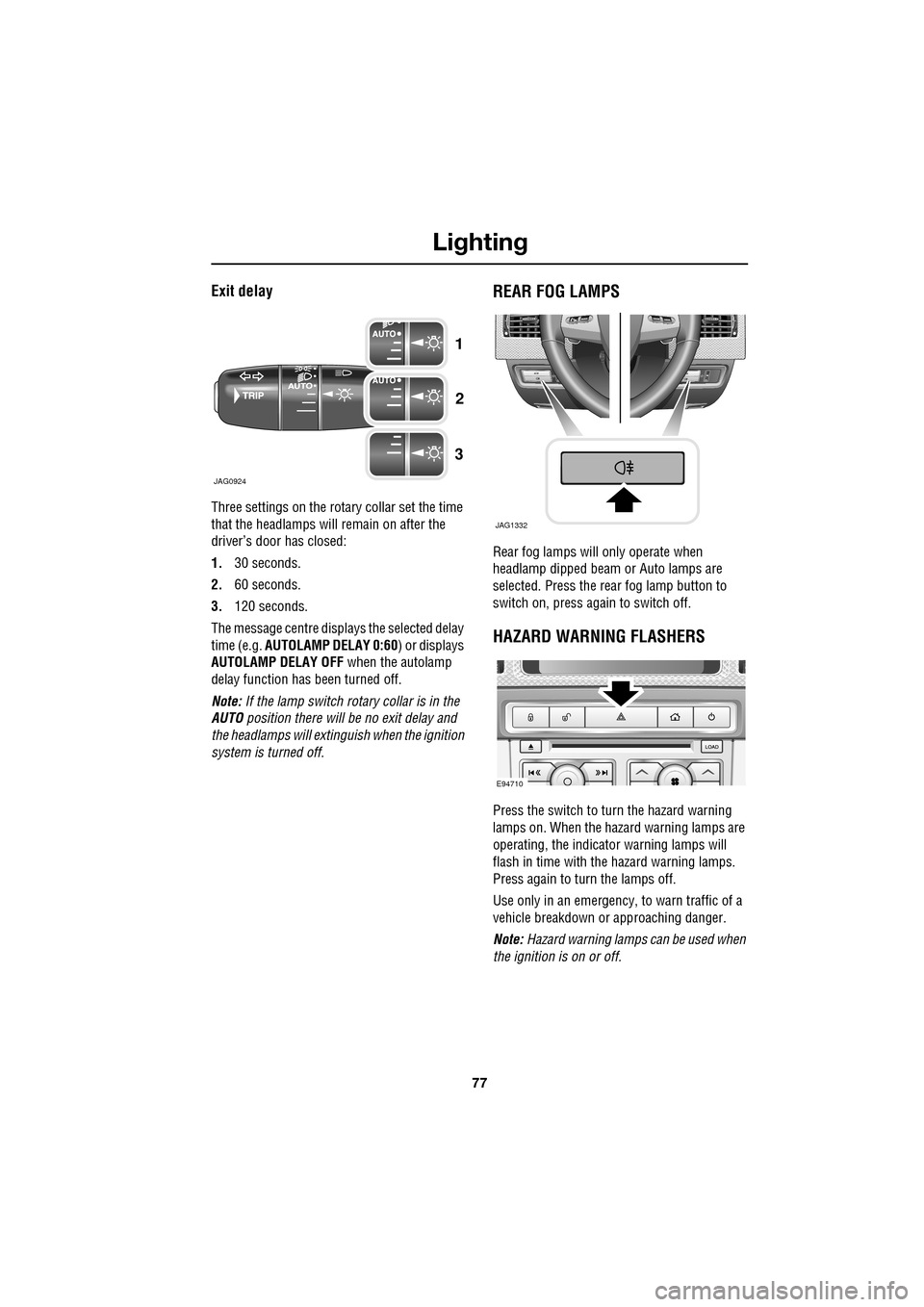
Three settings on the rotary collar set the time
that the headlamps will remain on after the
driver’s door has closed:
1.30 seconds.
2. 60 seconds.
3. 120 seconds.
The message centre displays the selected delay
time (e.g. AUTOLAMP DELAY 0:60 ) or displays
AUTOLAMP DELAY OFF when the autolamp
delay function has been turned off.
Note: If the lamp switch ro tary collar is in the
AUTO position there will be no exit delay and
the headlamps will extinguish when the ignition
system is turned off.
REAR FOG LAMPS
Rear fog lamps will only operate when
headlamp dipped beam or Auto lamps are
selected. Press the rear fog lamp button to
switch on, press again to switch off.
HAZARD WARNING FLASHERS
Press the switch to turn the hazard warning
lamps on. When the hazard warning lamps are
operating, the indicator warning lamps will
flash in time with the hazard warning lamps.
Press again to turn the lamps off.
Use only in an emergency, to warn traffic of a
vehicle breakdown or approaching danger.
Note: Hazard warning lamps can be used when
the ignition is on or off.
JAG0924
1
2
3
JAG1332
E94710
Page 78 of 391
Lighting
78
DIRECTION INDICATORS
The direction indicators are operated using the
indicator stalk. Move the stalk up or down, to
indicate a right or left turn. A green warning
indicator will flash in the instrument panel.
The indicators will operate three times (e.g. to
indicate a lane change) if the stalk is briefly
pushed up or down. Lane change flash can be
disabled or enabled by a Dealer/Authorised
Repairer.
Note: Should a direction indicator bulb fail, the
corresponding green warning indicator will
flash at twice the normal rate and the audible
ticking will sound at twice the normal rate.
HEADLAMPS - DRIVING ABROAD
Note: The headlamps must be removed in
order to change the beam pattern.
See REMOVING A HEADLAMP (page 81).
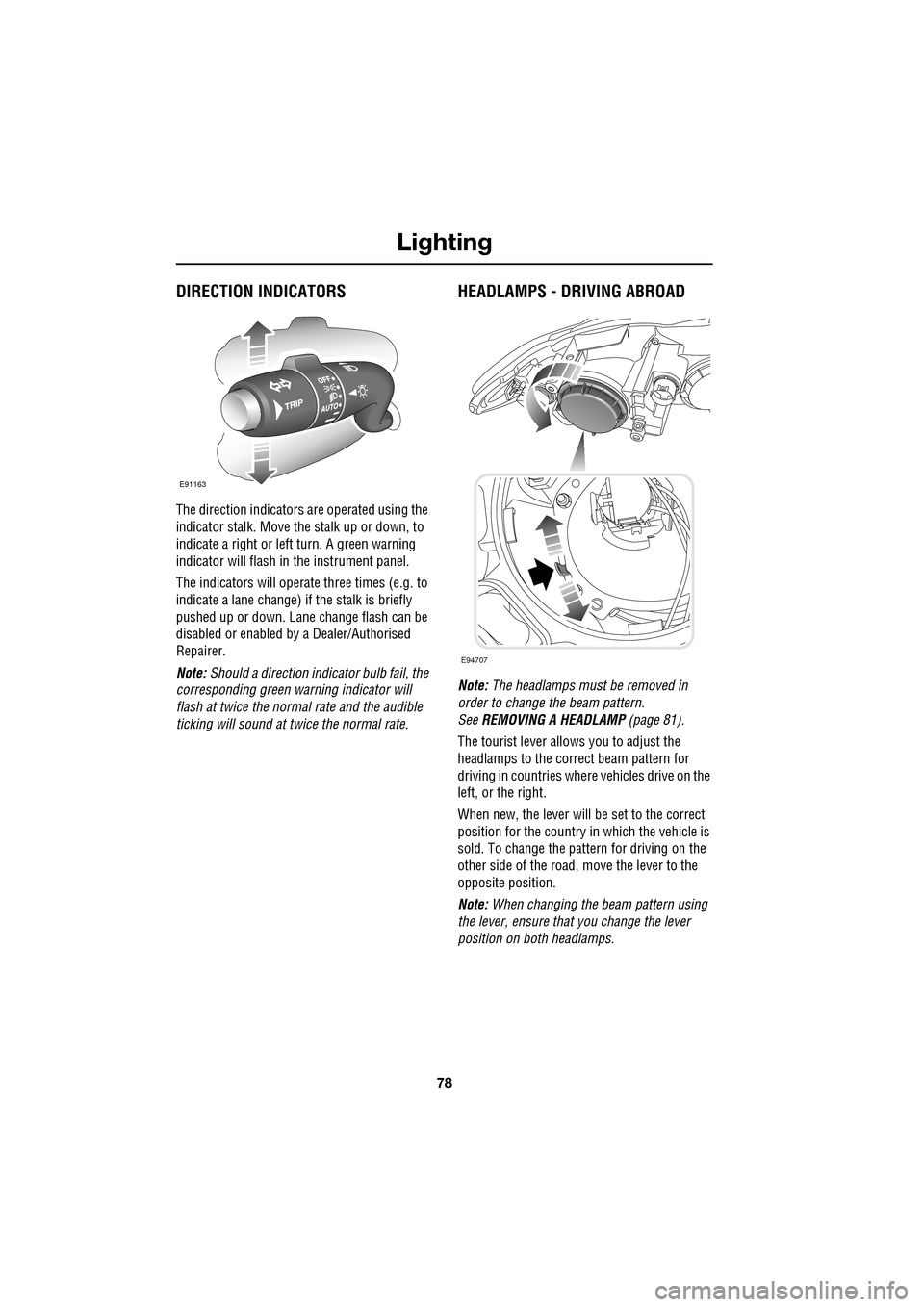
The tourist lever allows you to adjust the
headlamps to the correct beam pattern for
driving in countries wher e vehicles drive on the
left, or the right.
When new, the lever will be set to the correct
position for the country in which the vehicle is
sold. To change the pattern for driving on the
other side of the road, move the lever to the
opposite position.
Note: When changing the beam pattern using
the lever, ensure that you change the lever
position on both headlamps.
E91163
E94707
Page 83 of 391
83
Lighting
CHANGING A BULB
General information
Note: In certain markets its a legal requirement
to carry spare bulbs. A replacement bulb kit is
available as an approved accessory from your
Dealer/Authorised Repairer.
Halogen bulbs
Halogen bulbs are used for main beam and
dipped beam headlamps. Take care not to
touch the glass part of the bulb with your
fingers; always use a cl oth to handle the bulb.
If necessary use methylated spirits to remove
finger prints.
Xenon lamps
Seek advice about the correct
disposal of Xenon lamp units from
your Dealer/Authorised Repairer, or
your local authority.
HEADLAMP UNIT BULBS
Halogen dipped beam
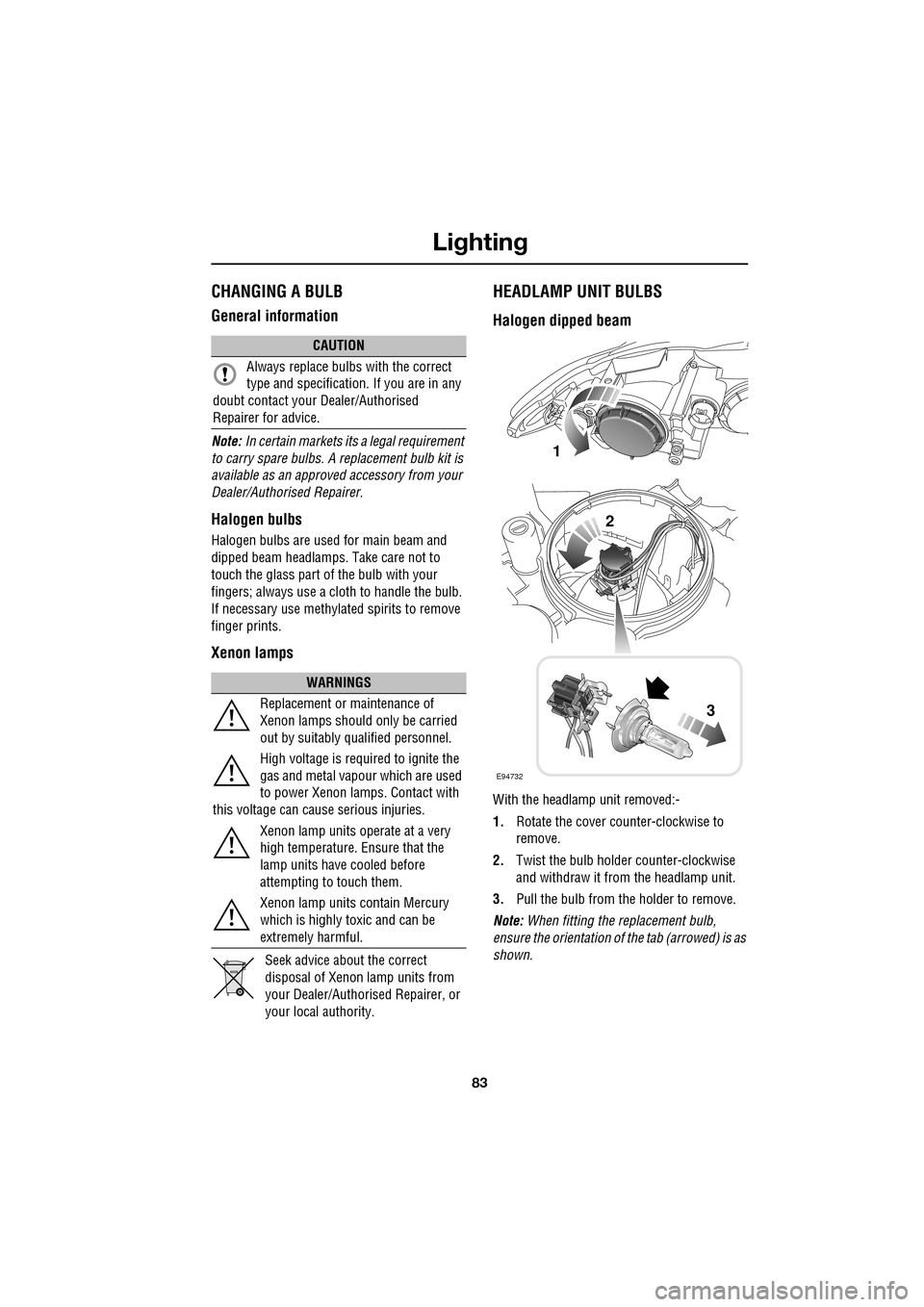
With the headlamp unit removed:-
1. Rotate the cover counter-clockwise to
remove.
2. Twist the bulb holder counter-clockwise
and withdraw it from the headlamp unit.
3. Pull the bulb from the holder to remove.
Note: When fitting the replacement bulb,
ensure the orientation of the tab (arrowed) is as
shown.
CAUTION
Always replace bulbs with the correct
type and specification. If you are in any
doubt contact your Dealer/Authorised
Repairer for advice.
WARNINGS
Replacement or maintenance of
Xenon lamps should only be carried
out by suitably qualified personnel.
High voltage is required to ignite the
gas and metal vapour which are used
to power Xenon lamps. Contact with
this voltage can cause serious injuries.
Xenon lamp units operate at a very
high temperature. Ensure that the
lamp units have cooled before
attempting to touch them.
Xenon lamp units contain Mercury
which is highly toxic and can be
extremely harmful.
E94732
1
2
3
Page 94 of 391
Windows and mirrors
94
Window isolator
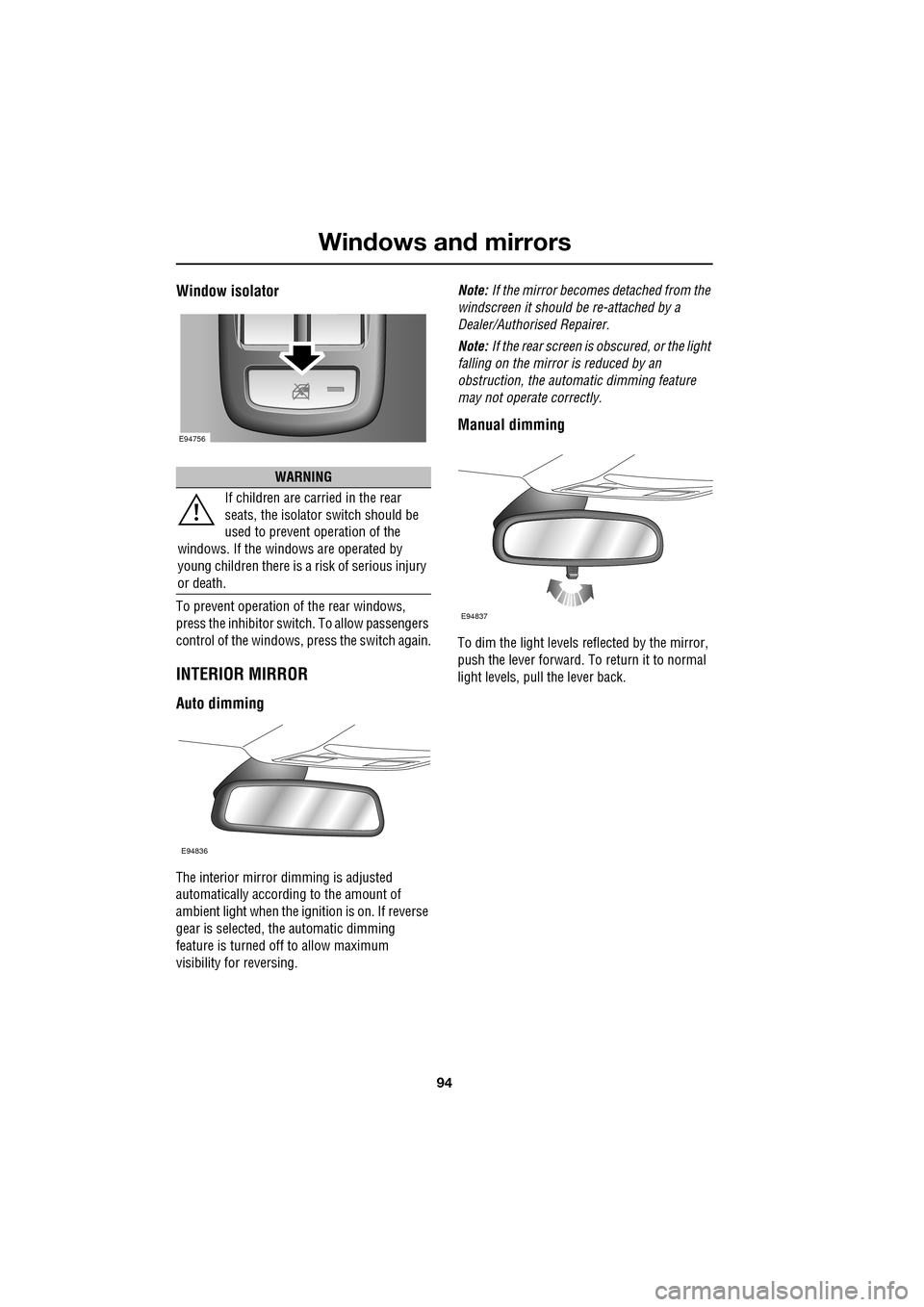
To prevent operation of the rear windows,
press the inhibitor switch. To allow passengers
control of the windows, press the switch again.
INTERIOR MIRROR
Auto dimming
The interior mirror dimming is adjusted
automatically according to the amount of
ambient light when the i gnition is on. If reverse
gear is selected, the automatic dimming
feature is turned off to allow maximum
visibility for reversing. Note:
If the mirror becomes detached from the
windscreen it should be re-attached by a
Dealer/Authorised Repairer.
Note: If the rear screen is obscured, or the light
falling on the mirror is reduced by an
obstruction, the automa tic dimming feature
may not operate correctly.
Manual dimming
To dim the light levels re flected by the mirror,
push the lever forward. To return it to normal
light levels, pull the lever back.
WARNING
If children are carried in the rear
seats, the is olator switch should be
used to prevent operation of the
windows. If the windows are operated by
young children there is a risk of serious injury
or death.
E94756
E94836
E94837
Page 100 of 391
Instruments
100
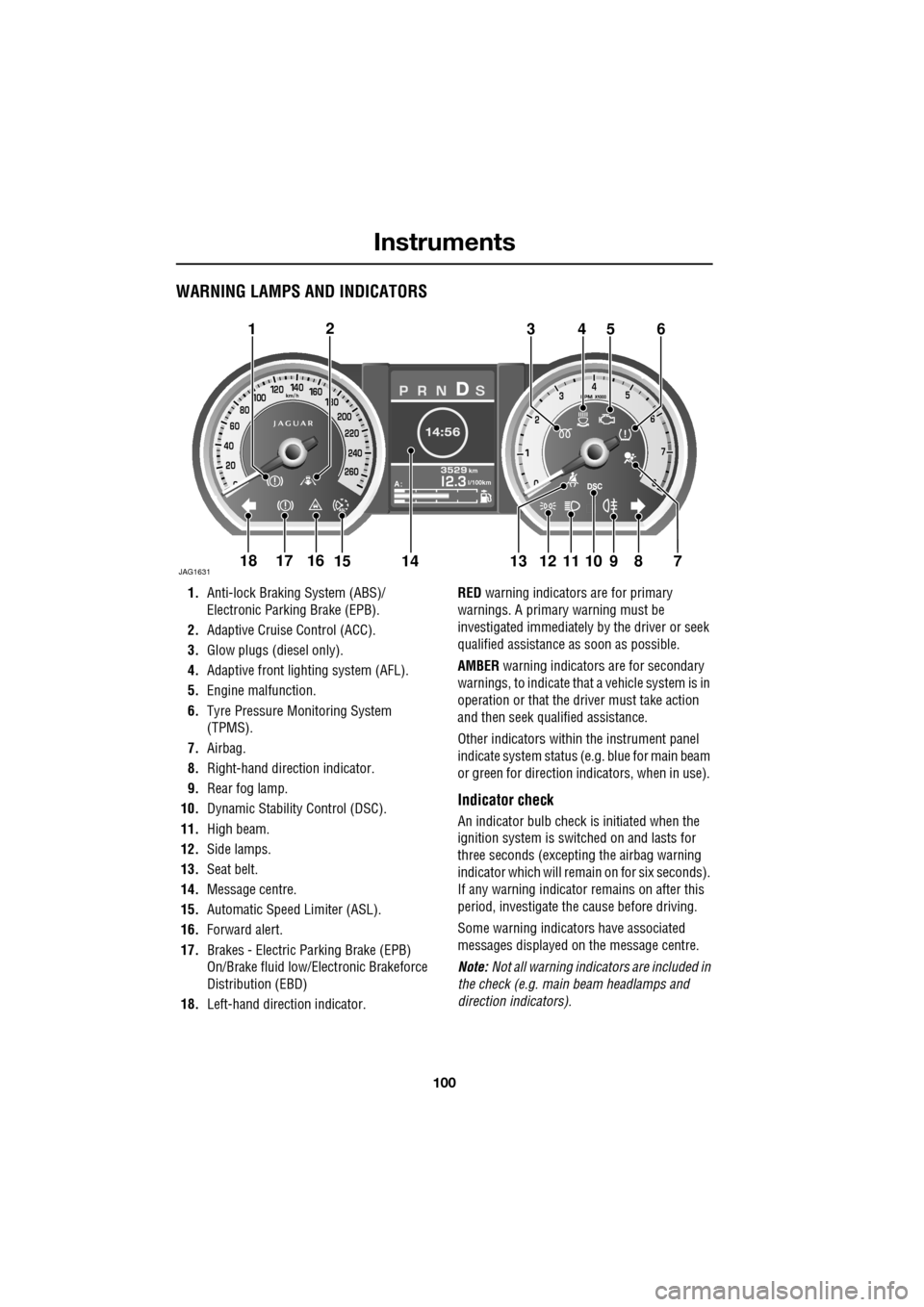
WARNING LAMPS AND INDICATORS
1.Anti-lock Braking System (ABS)/
Electronic Parking Brake (EPB).
2. Adaptive Cruise Control (ACC).
3. Glow plugs (diesel only).
4. Adaptive front lighting system (AFL).
5. Engine malfunction.
6. Tyre Pressure M onitoring System
(TPMS).
7. Airbag.
8. Right-hand direct ion indicator.
9. Rear fog lamp.
10. Dynamic Stability Control (DSC).
11. High beam.
12. Side lamps.
13. Seat belt.
14. Message centre.
15. Automatic Speed Limiter (ASL).
16. Forward alert.
17. Brakes - Electric Parking Brake (EPB)
On/Brake fluid low/El ectronic Brakeforce
Distribution (EBD)
18. Left-hand direction indicator. RED
warning indicators are for primary
warnings. A primary warning must be
investigated immediately by the driver or seek
qualified assistance as soon as possible.
AMBER warning indicators are for secondary
warnings, to indicate that a vehicle system is in
operation or that the driver must take action
and then seek qualified assistance.
Other indicators within the instrument panel
indicate system status (e .g. blue for main beam
or green for direction indicators, when in use).
Indicator check
An indicator bulb check is initiated when the
ignition system is switched on and lasts for
three seconds (excepting the airbag warning
indicator which will remain on for six seconds).
If any warning indicator remains on after this
period, investigate the cause before driving.
Some warning indicators have associated
messages displayed on the message centre.
Note: Not all warning indicators are included in
the check (e.g. main beam headlamps and
direction indicators).
Akm
l/100km
JAG1631
123456
789101817161514131211
Page 101 of 391
101
Instruments
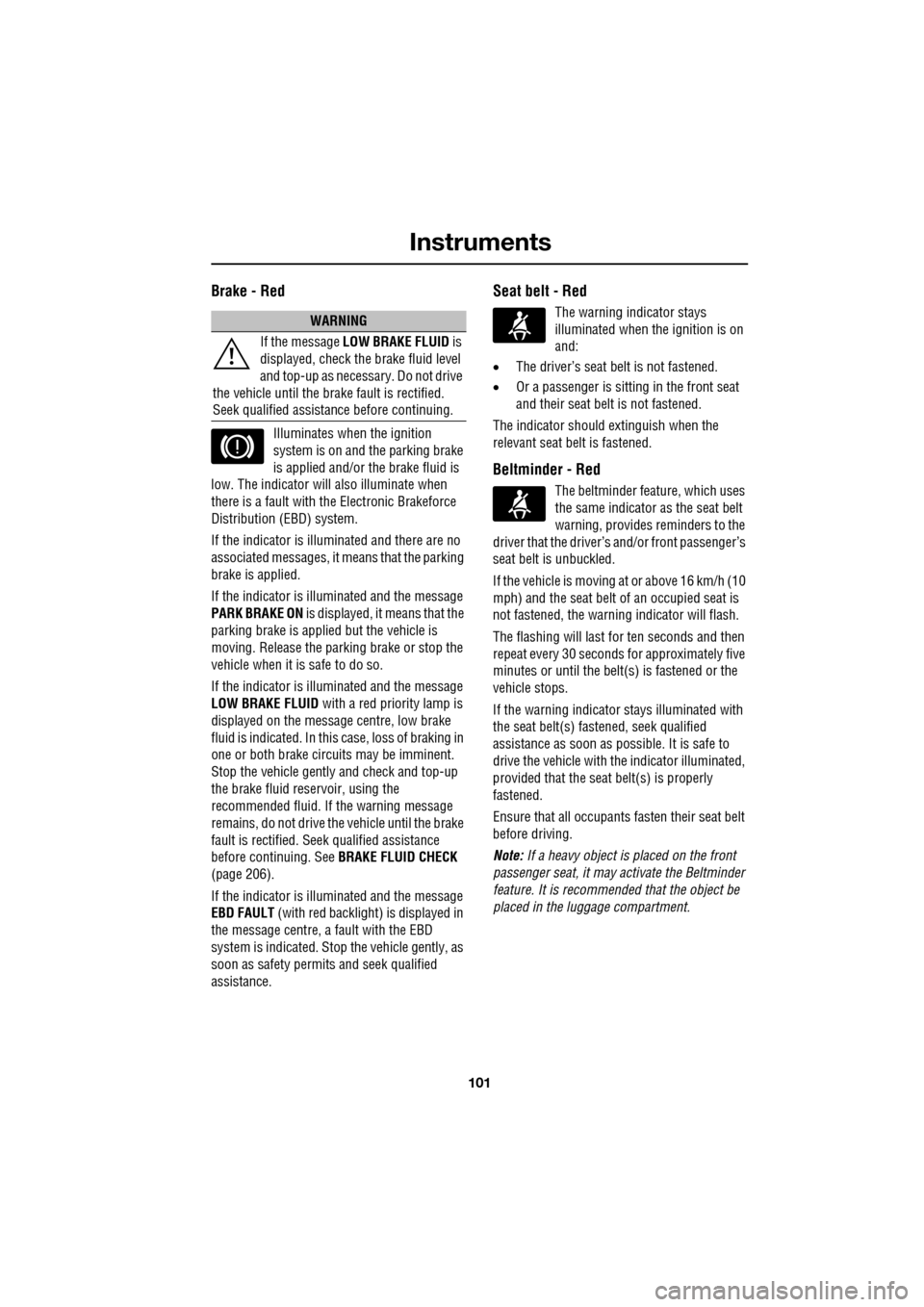
Brake - Red
Illuminates when the ignition
system is on and the parking brake
is applied and/or the brake fluid is
low. The indicator will also illuminate when
there is a fault with the Electronic Brakeforce
Distribution (EBD) system.
If the indicator is illu minated and there are no
associated messages, it means that the parking
brake is applied.
If the indicator is illuminated and the message
PARK BRAKE ON is displayed, it means that the
parking brake is applied but the vehicle is
moving. Release the parking brake or stop the
vehicle when it is safe to do so.
If the indicator is illuminated and the message
LOW BRAKE FLUID with a red priority lamp is
displayed on the message centre, low brake
fluid is indicated. In this case, loss of braking in
one or both brake circ uits may be imminent.
Stop the vehicle gently and check and top-up
the brake fluid reservoir, using the
recommended fluid. If the warning message
remains, do not drive the vehicle until the brake
fault is rectified. Se ek qualified assistance
before continuing. See BRAKE FLUID CHECK
(page 206).
If the indicator is illuminated and the message
EBD FAULT (with red backlight) is displayed in
the message centre, a fault with the EBD
system is indicated. Stop the vehicle gently, as
soon as safety permit s and seek qualified
assistance.
Seat belt - Red
The warning indicator stays
illuminated when the ignition is on
and:
• The driver’s seat be lt is not fastened.
• Or a passenger is sitting in the front seat
and their seat belt is not fastened.
The indicator should extinguish when the
relevant seat belt is fastened.
Beltminder - Red
The beltminder feat ure, which uses
the same indicator as the seat belt
warning, provides reminders to the
driver that the driver’s and/or front passenger’s
seat belt is unbuckled.
If the vehicle is moving at or above 16 km/h (10
mph) and the seat belt of an occupied seat is
not fastened, the warning indicator will flash.
The flashing will last for ten seconds and then
repeat every 30 seconds for approximately five
minutes or until the belt(s ) is fastened or the
vehicle stops.
If the warning indicator stays illuminated with
the seat belt(s) fastened, seek qualified
assistance as s oon as possible. It is safe to
drive the vehicle with th e indicator illuminated,
provided that the seat belt(s) is properly
fastened.
Ensure that all occupants fasten their seat belt
before driving.
Note: If a heavy object is placed on the front
passenger seat, it may activate the Beltminder
feature. It is recommended that the object be
placed in the luggage compartment.
WARNING
If the message LOW BRAKE FLUID is
displayed, check the brake fluid level
and top-up as necessary. Do not drive
the vehicle until the brake fault is rectified.
Seek qualified assistan ce before continuing.
Page 102 of 391
Instruments
102
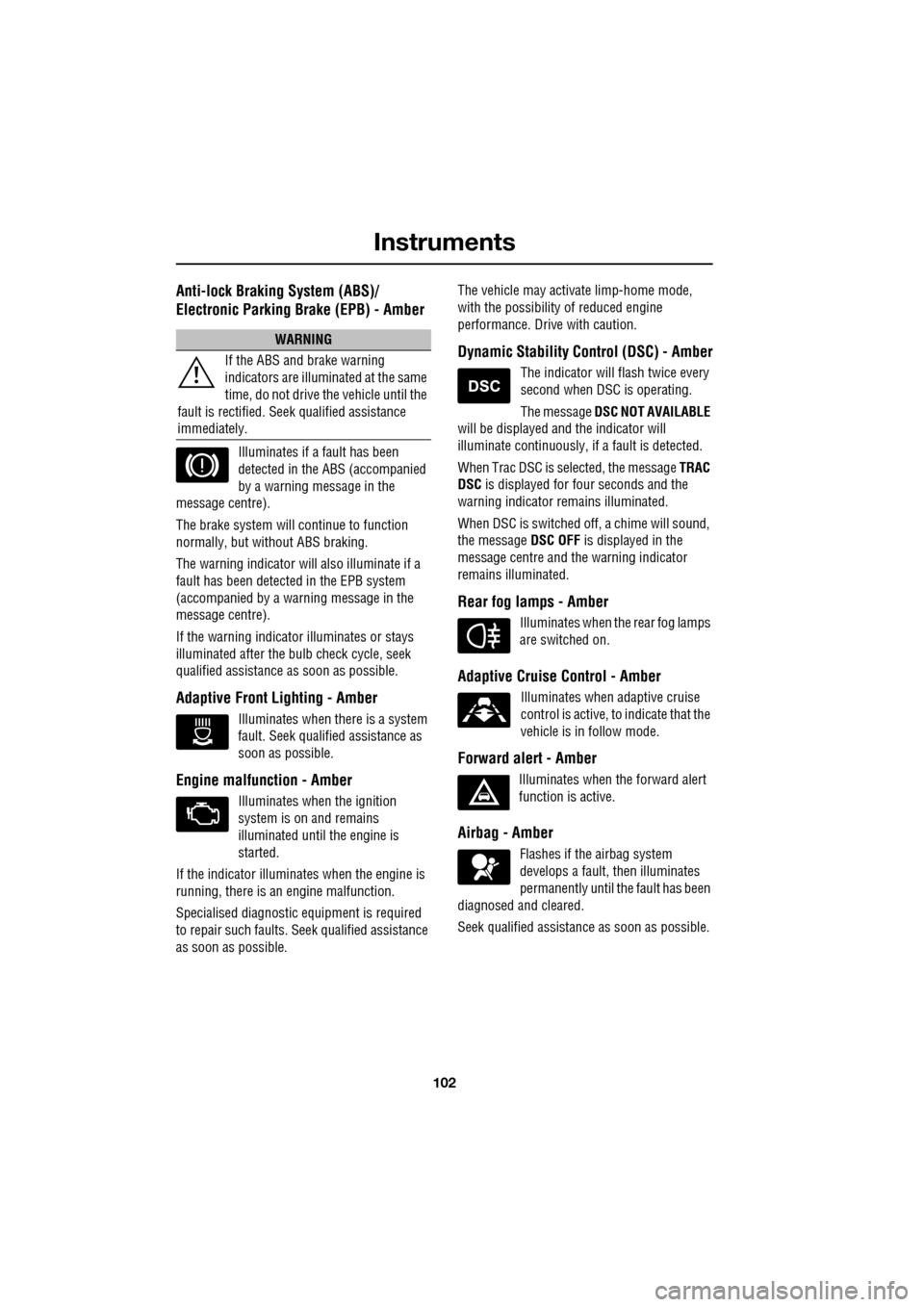
Anti-lock Braking System (ABS)/
Electronic Parking Brake (EPB) - Amber
Illuminates if a fault has been
detected in the ABS (accompanied
by a warning message in the
message centre).
The brake system will c ontinue to function
normally, but without ABS braking.
The warning indicator will also illuminate if a
fault has been detected in the EPB system
(accompanied by a warning message in the
message centre).
If the warning indicato r illuminates or stays
illuminated after the bulb check cycle, seek
qualified assistance as soon as possible.
Adaptive Front Lighting - Amber
Illuminates when there is a system
fault. Seek qualified assistance as
soon as possible.
Engine malfunction - Amber
Illuminates when the ignition
system is on and remains
illuminated until the engine is
started.
If the indicator illuminates when the engine is
running, there is an engine malfunction.
Specialised diagnostic equipment is required
to repair such faults. Seek qualified assistance
as soon as possible. The vehicle may acti
vate limp-home mode,
with the possibility of reduced engine
performance. Driv e with caution.
Dynamic Stability Control (DSC) - Amber
The indicator will flash twice every
second when DSC is operating.
The message DSC NOT AVAILABLE
will be displayed and the indicator will
illuminate continuously, if a fault is detected.
When Trac DSC is selected, the message TRAC
DSC is displayed for f our seconds and the
warning indicator remains illuminated.
When DSC is switched off, a chime will sound,
the message DSC OFF is displayed in the
message centre and the warning indicator
remains illuminated.
Rear fog lamps - Amber
Illuminates when the rear fog lamps
are switched on.
Adaptive Cruise Control - Amber
Illuminates when adaptive cruise
control is active, to indicate that the
vehicle is in follow mode.
Forward alert - Amber
Illuminates when the forward alert
function is active.
Airbag - Amber
Flashes if the airbag system
develops a fault, then illuminates
permanently until the fault has been
diagnosed and cleared.
Seek qualified assistance as soon as possible.
WARNING
If the ABS and brake warning
indicators are illuminated at the same
time, do not drive the vehicle until the
fault is rectified. Seek qualified assistance
immediately.
Page 104 of 391
Instruments
104
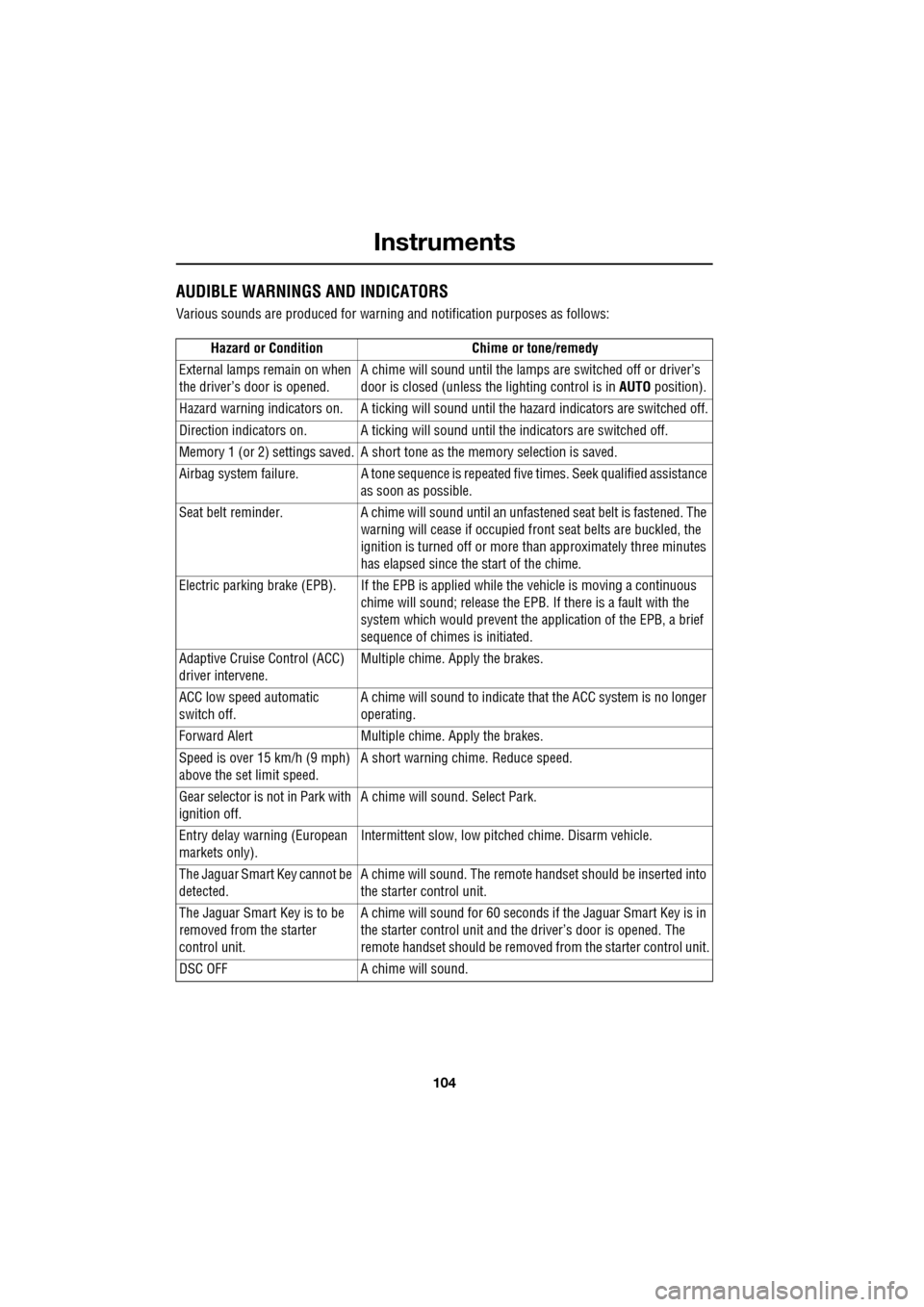
AUDIBLE WARNINGS AND INDICATORS
Various sounds are produced for warning and notification purposes as follows:Hazard or Condition Chime or tone/remedy
External lamps remain on when
the driver’s door is opened. A chime will sound until the lamps are switched off or driver’s
door is closed (unless the lighting control is in
AUTO position).
Hazard warning indicators on. A ti cking will sound until the hazard indicators are switched off.
Direction indicators on. A tick ing will sound until the indicators are switched off.
Memory 1 (or 2) settings saved. A short tone as the memory selection is saved.
Airbag system failure. A tone sequence is repeated five times. Seek qualified assistance as soon as possible.
Seat belt reminder. A chime will sound until an unfastened se at belt is fastened. The
warning will cease if occupied fr ont seat belts are buckled, the
ignition is turned off or more than approximately three minutes
has elapsed since the start of the chime.
Electric parking brake (EPB). If the EPB is a pplied while the vehicle is moving a continuous
chime will sound; release the EPB. If there is a fault with the
system which would prevent the a pplication of the EPB, a brief
sequence of chimes is initiated.
Adaptive Cruise Control (ACC)
driver intervene. Multiple chime. Apply the brakes.
ACC low speed automatic
switch off. A chime will sound to indicate that the ACC system is no longer
operating.
Forward Alert Multiple chime. Apply the brakes.
Speed is over 15 km/h (9 mph)
above the set limit speed. A short warning chime. Reduce speed.
Gear selector is not in Park with
ignition off. A chime will sound.
Select Park.
Entry delay warning (European
markets only). Intermittent slow, low pitc
hed chime. Disarm vehicle.
The Jaguar Smart Key cannot be
detected. A chime will sound. The remote ha
ndset should be inserted into
the starter control unit.
The Jaguar Smart Key is to be
removed from the starter
control unit. A chime will sound for 60 seconds if
the Jaguar Smart Key is in
the starter control unit and the driver’s door is opened. The
remote handset should be remove d from the starter control unit.
DSC OFF A chime will sound.
Page 105 of 391
105
Information displays
GENERAL INFORMATION
The driver message centre display is situated
within the instrument panel between the
tachometer and speedometer gauges. The
message centre is active as soon as a door is
opened for access.
The primary function of the message centre is
to inform the driver of the following:
• Warning messages.
• Temporary alert messages.
• Information messages.
• Turn-by-turn navigation.
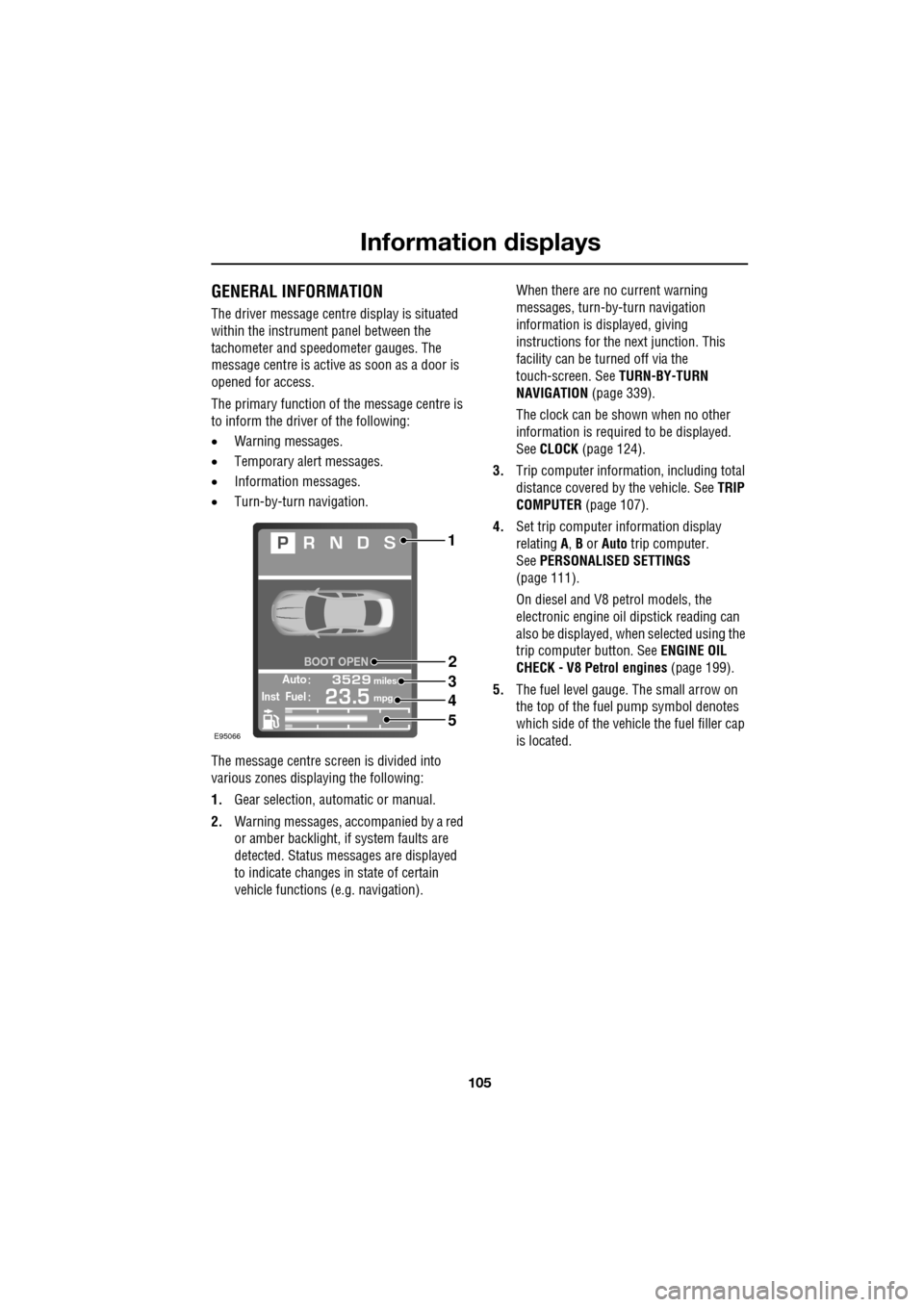
The message centre screen is divided into
various zones displaying the following:
1. Gear selection, automatic or manual.
2. Warning messages, accompanied by a red
or amber backlight, if system faults are
detected. Status messages are displayed
to indicate changes in state of certain
vehicle functions (e.g. navigation). When there are no current warning
messages, turn-by-turn navigation
information is displayed, giving
instructions for the next junction. This
facility can be turned off via the
touch-screen. See
TURN-BY-TURN
NAVIGATION (page 339).
The clock can be shown when no other
information is required to be displayed.
See CLOCK (page 124).
3. Trip computer information, including total
distance covered by the vehicle. See TRIP
COMPUTER (page 107).
4. Set trip computer information display
relating A, B or Auto trip computer.
See PERSONALISED SETTINGS
(page 111).
On diesel and V8 petrol models, the
electronic engine oil dipstick reading can
also be displayed, when selected using the
trip computer button. See ENGINE OIL
CHECK - V8 Petrol engines (page 199).
5. The fuel level gauge. The small arrow on
the top of the fuel pump symbol denotes
which side of the vehi cle the fuel filler cap
is located.
Automiles
Inst Fuelmpg
BOOT OPEN
E95066
1
2
3
4
5
Page 110 of 391
Information displays
110
Touch-screen use
When the engine START/STOP button is
pressed, the touch-screen is activated by the
on/off switch on the centre console.
The buttons on the centre console, below the
touch-screen display, are referred to as hard
buttons and should be pressed firmly. The
touch-screen buttons are soft buttons and only
require short, light pressu re to function. Do not
use excessive pressure.
When operating touch-sc reen buttons, always
extend the tip of one finger, and withhold the
thumb and remaining finge rs from the screen.
Touching the screen with more than one finger
at a time may cause false inputs.
Throughout the handbook, the expression
Select an item (or similar wording) means
touch the on-screen button to select or alter
the required item.
The handbook shows the on-screen menus,
explains how to oper ate the controls and
illustrates how to select or alter settings and
requirements. After becoming familiar with the
controls, follow the on-screen menus and
prompts, to operate th e system as required.
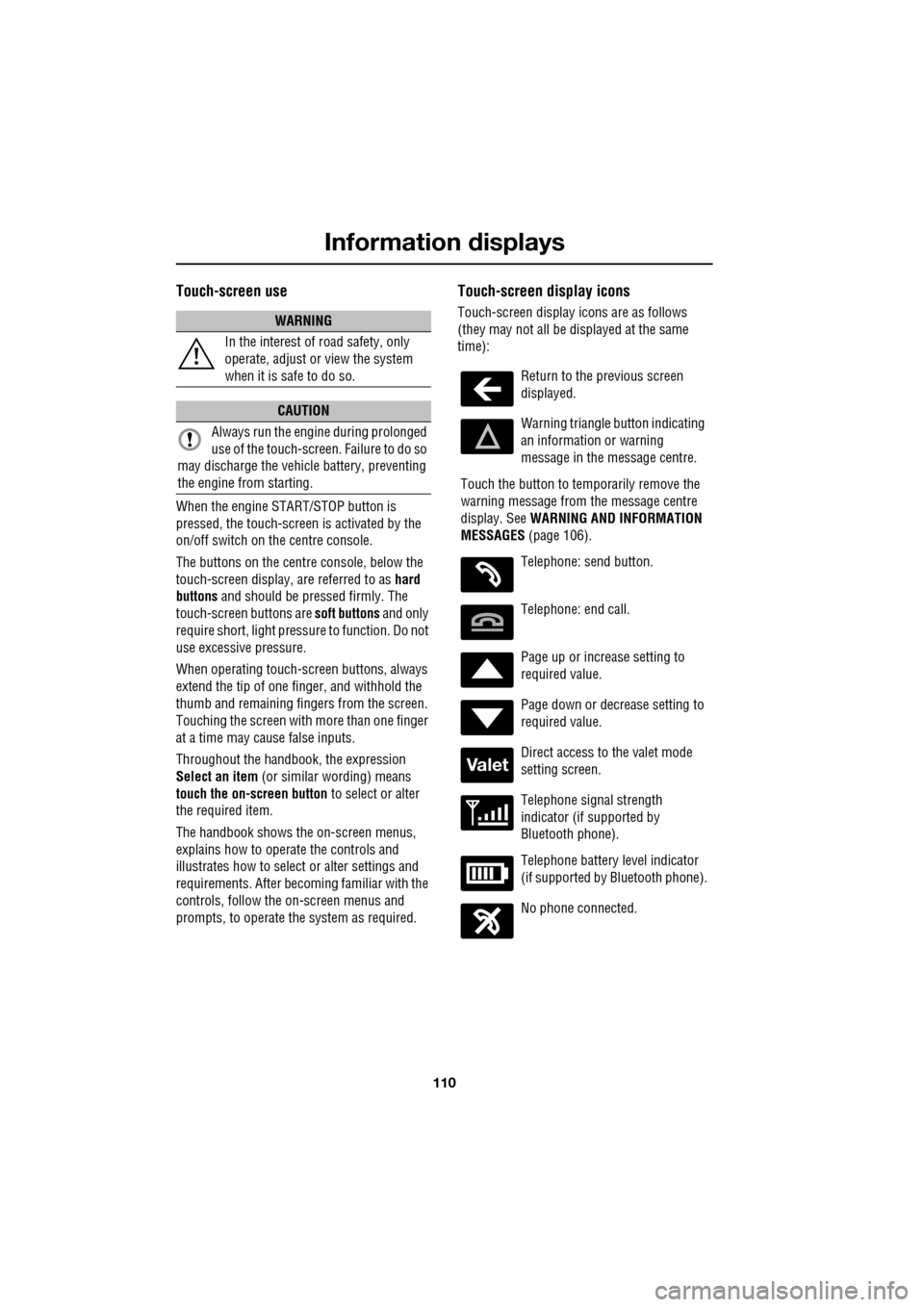
Touch-screen display icons
Touch-screen display icons are as follows
(they may not all be displayed at the same
time):WARNING
In the interest of road safety, only
operate, adjust or view the system
when it is safe to do so.
CAUTION
Always run the engine during prolonged
use of the touch-screen. Failure to do so
may discharge the vehicle battery, preventing
the engine from starting.
Return to the previous screen
displayed.
Warning triangle button indicating
an information or warning
message in the message centre.
Touch the button to temporarily remove the
warning message from the message centre
display. See WARNING AND INFORMATION
MESSAGES (page 106).
Telephone: send button.
Telephone: end call.
Page up or increase setting to
required value.
Page down or decrease setting to
required value.
Direct access to the valet mode
setting screen.
Telephone signal strength
indicator (if supported by
Bluetooth phone).
Telephone battery level indicator
(if supported by Bluetooth phone).
No phone connected.
Valet