Locking JAGUAR XF 2009 1.G Owner's Manual
[x] Cancel search | Manufacturer: JAGUAR, Model Year: 2009, Model line: XF, Model: JAGUAR XF 2009 1.GPages: 391, PDF Size: 19.32 MB
Page 47 of 391
47
Seats
Raising the rear seats
The process for raising the rear seat is the
reverse of folding.
HEATED SEATS
Note: To prevent the battery from becoming
discharged the seat heaters will only operate
when the engine is running.
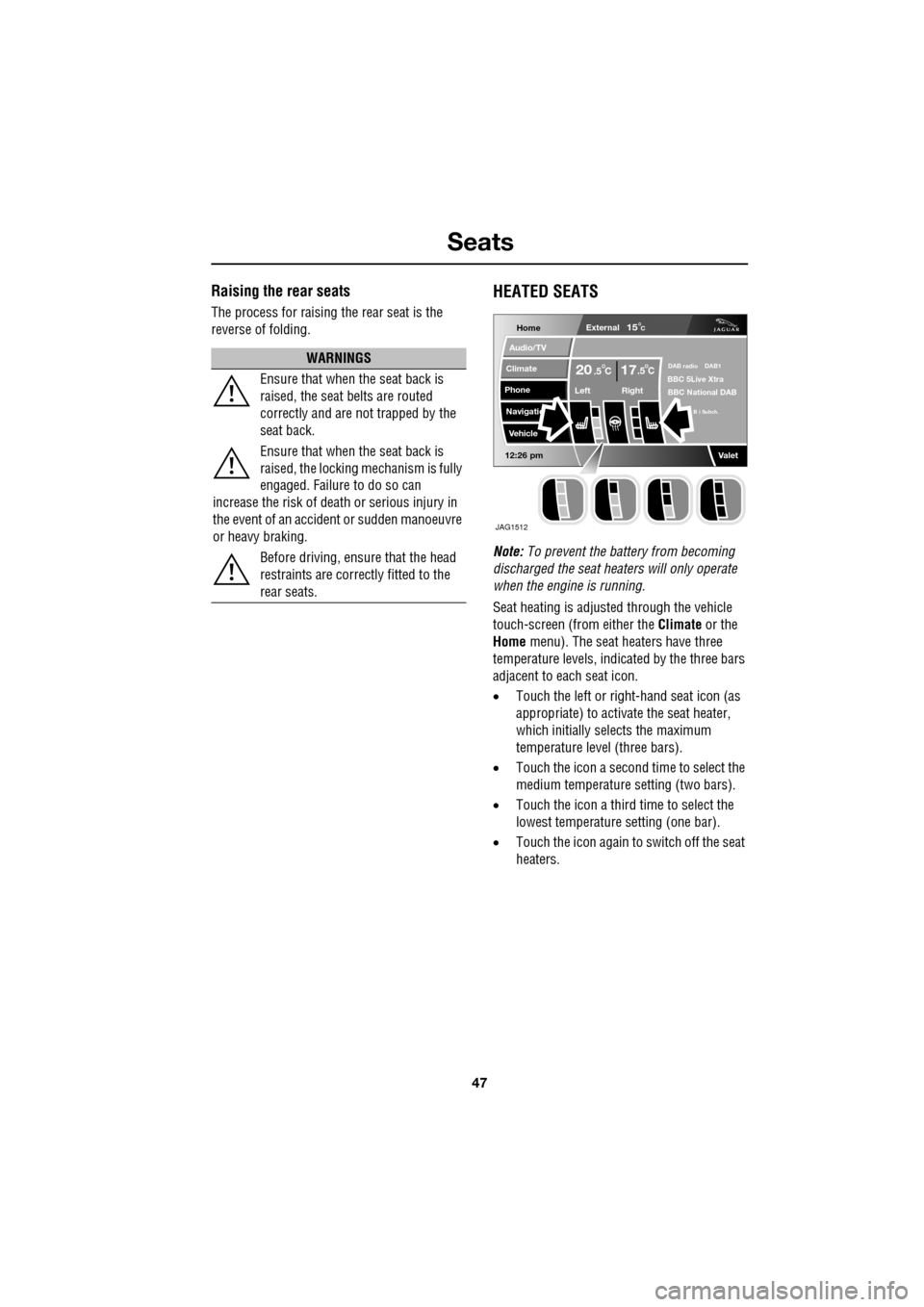
Seat heating is adjusted through the vehicle
touch-screen (from either the Climate or the
Home menu). The seat heaters have three
temperature levels, indica ted by the three bars
adjacent to each seat icon.
• Touch the left or right -hand seat icon (as
appropriate) to activate the seat heater,
which initially selects the maximum
temperature level (three bars).
• Touch the icon a second time to select the
medium temperature setting (two bars).
• Touch the icon a third time to select the
lowest temperature setting (one bar).
• Touch the icon again to switch off the seat
heaters.
WARNINGS
Ensure that when the seat back is
raised, the seat belts are routed
correctly and are not trapped by the
seat back.
Ensure that when the seat back is
raised, the locking mechanism is fully
engaged. Failure to do so can
increase the risk of death or serious injury in
the event of an accident or sudden manoeuvre
or heavy braking.
Before driving, ensure that the head
restraints are correctly fitted to the
rear seats.
Home
Audio/TV
Climate
Phone
Navigatio
Vehicle
Left Right
20 17CC.5 .5
Valet12:26 pm
External15C
DAB radio DAB1BBC 5Live Xtra
BBC National DAB
B i Subch.
JAG1512
Page 52 of 391
Seat belts
52
SEAT BELT HEIGHT ADJUSTMENT
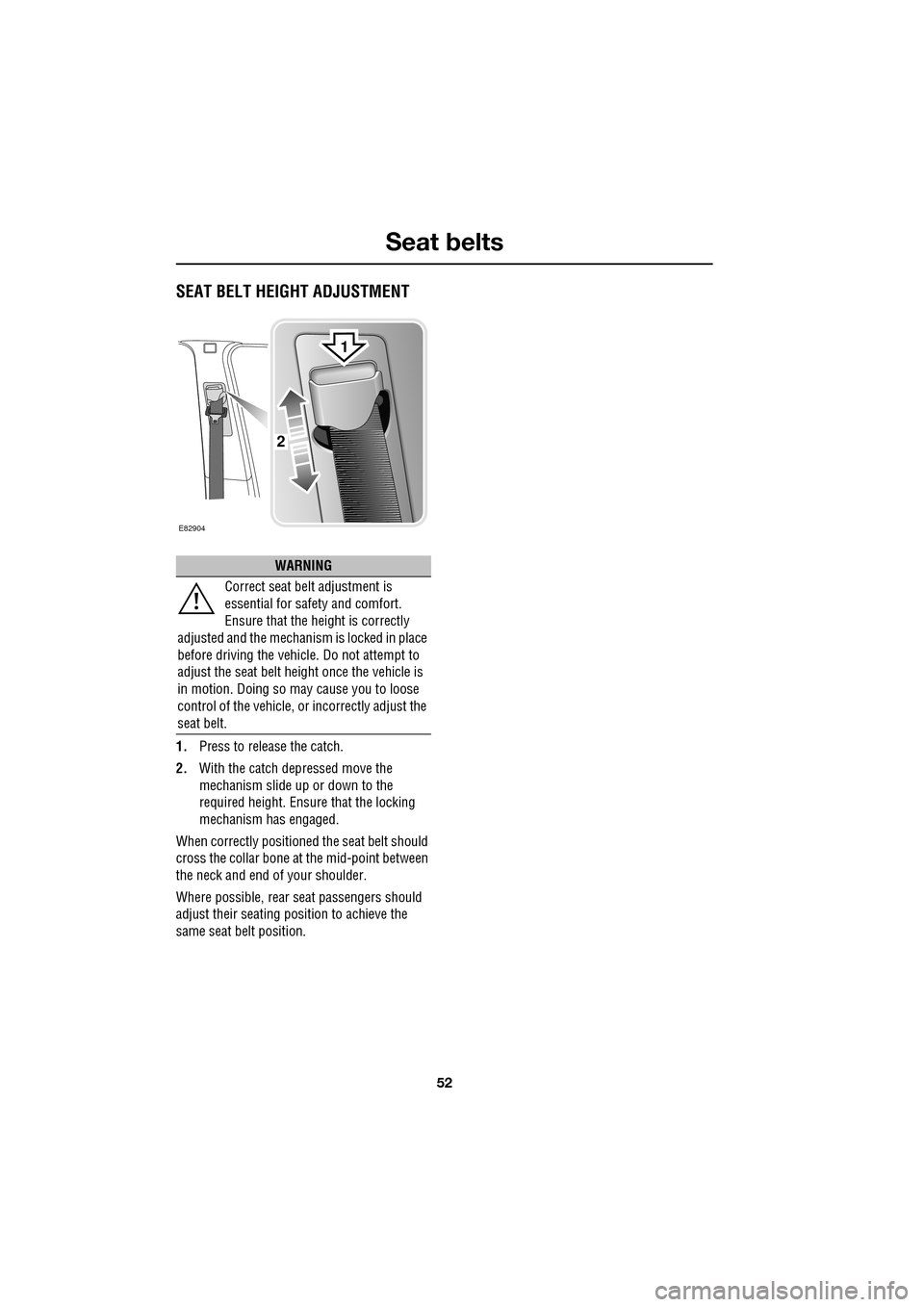
1.Press to release the catch.
2. With the catch depressed move the
mechanism slide up or down to the
required height. Ensure that the locking
mechanism has engaged.
When correctly positione d the seat belt should
cross the collar bone at the mid-point between
the neck and end of your shoulder.
Where possible, rear seat passengers should
adjust their seating pos ition to achieve the
same seat belt position.
WARNING
Correct seat belt adjustment is
essential for safety and comfort.
Ensure that the height is correctly
adjusted and the mechanism is locked in place
before driving the vehicl e. Do not attempt to
adjust the seat belt height once the vehicle is
in motion. Doing so may cause you to loose
control of the vehicle, or incorrectly adjust the
seat belt.
E82904
2
1
Page 63 of 391
63
Child safety
ISOFIX child seats
•IUF = Suitable for ISOFIX forward child
restraint systems of universal category
approved for use in the mass group.
• IL = These ISOFIX child restraint systems
are of the specific vehicle, restricted or
semi-universal categories.
• * = Child seats suitable for use in these
locations are Britax Cosy-Tot Premium
Infant carrier and Br itax Duo Plus child
seat.
Note: Ages given are approximate. In case of
doubt, the child’s weight, not age, should be
used when considering an appropriate child
seat.
Installing an ISOFIX child seat
To install an ISOFIX child seat:-
1. Raise or remove the head restraint from
the relevant seat.
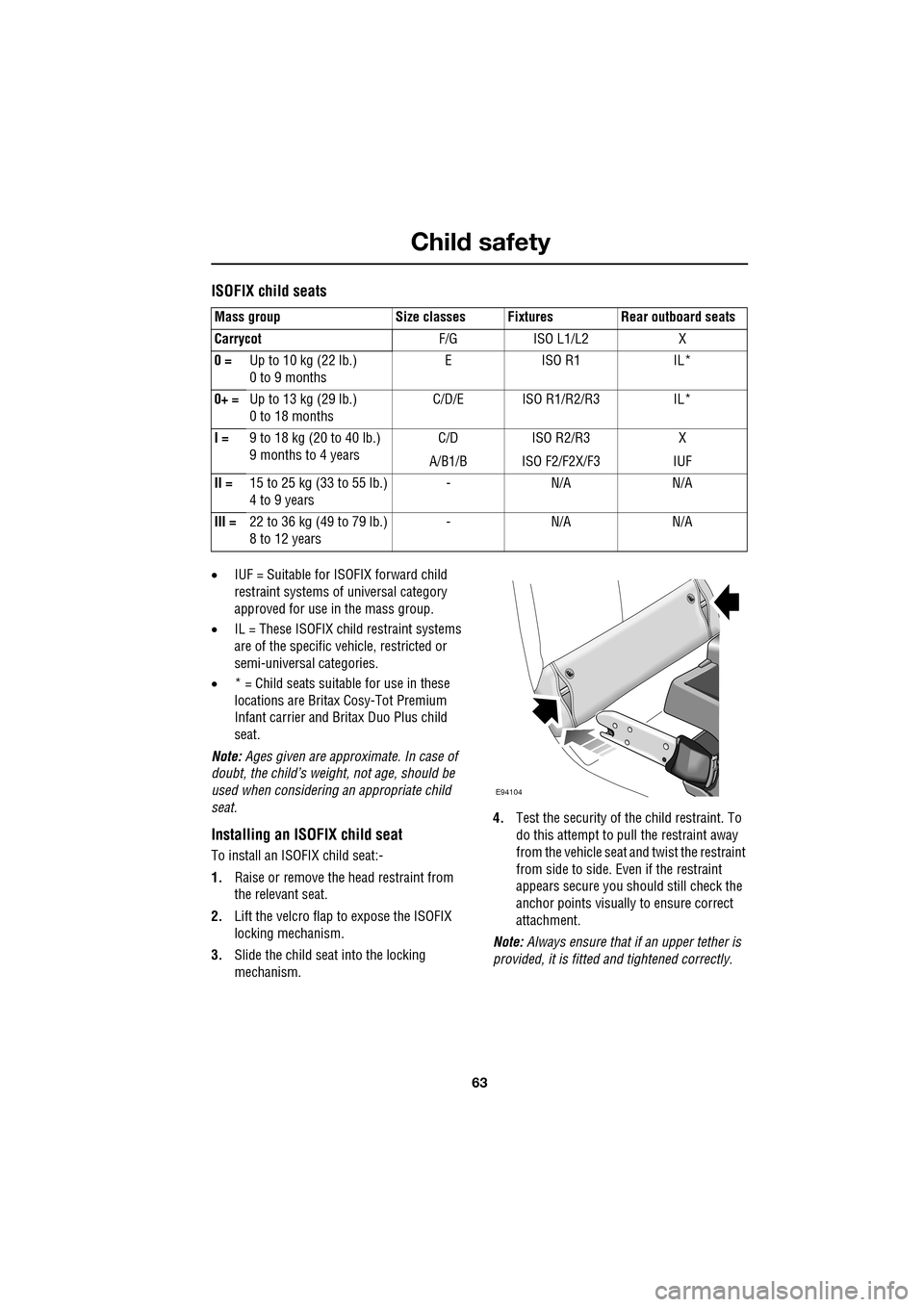
2. Lift the velcro flap to expose the ISOFIX
locking mechanism.
3. Slide the child seat into the locking
mechanism. 4.
Test the security of the child restraint. To
do this attempt to pull the restraint away
from the vehicle seat and twist the restraint
from side to side. Even if the restraint
appears secure you s hould still check the
anchor points visually to ensure correct
attachment.
Note: Always ensure that if an upper tether is
provided, it is fitted and tightened correctly.
Mass group Size classes Fixtures Rear outboard seats
Carrycot
F/G ISO L1/L2 X
0 = Up to 10 kg (22 lb.)
0 to 9 months EISO R1 IL*
0+ = Up to 13 kg (29 lb.)
0 to 18 months C/D/E ISO R1/R2/R3 IL*
I = 9 to 18 kg (20 to 40 lb.)
9 months to 4 years C/D
A/B1/B ISO R2/R3
ISO F2/F2X/F3 X
IUF
II = 15 to 25 kg (33 to 55 lb.)
4 to 9 years -N/A N/A
III = 22 to 36 kg (49 to 79 lb.)
8 to 12 years -N/A N/A
E94104
Page 90 of 391
Wipers and washers
90
Low screen wash
If the low washer fluid warning is on, the
windscreen wipers will not operate when the
wash/wipe is activated, even though there may
be washer fluid remaining in the reservoir
which is sprayed onto the screen. This is to
prevent damage to the wiper blades, scratching
of the glass or smearing dirt across the screen.
Normal, fast or single wipe can be selected
manually, to clear any spray from the
windscreen.
Timed jet function
If the timed jet func tion is configured,
the washer jets will only operate on the
up stroke of the wipers.
This function can be enabled/disabled by your
Dealer/Authorised Repairer.
Drip wipe
If the drip wipe function is configured,
the wipers will operate four seconds
after a wash wipe cycle has finished, to
clear any remaining drips from the windscreen.
This function can be enabled/disabled by your
Dealer/Authorised Repairer.
Blocked jets
If a washer jet becomes blocked, use a thin
strand of wire to unblock the jet by inserting
the wire into the jet. Ensure that the wire is
completely remove d after unblocking.
HEADLAMP WASHERS
Headlamp power wash operates automatically
with the windscreen wash, and will only
operate if the headlamps are switched on and
there is sufficient washer fluid in the reservoir.
Headlamp wash operates with every fourth
operation of the screen wa shers, provided that
ten minutes have elapsed since the last
operation of the headlamp washers.
Note: The power wash sequence is reset when
the headlamps or the ignition are turned off.
Note: Headlamp power wash is inhibited when
the low washer fluid warning is on.
CHECKING THE WIPER BLADES
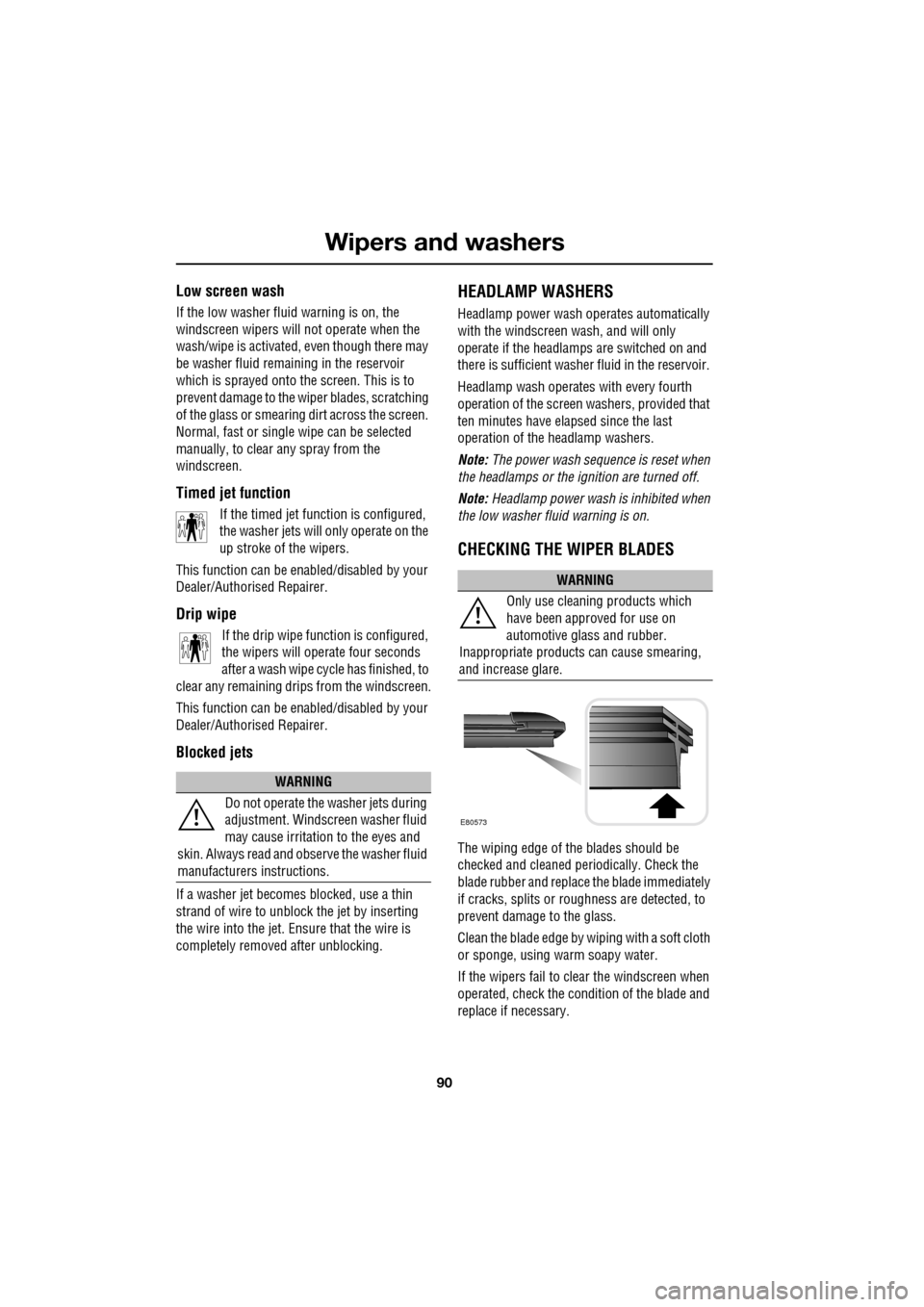
The wiping edge of the blades should be
checked and cleaned periodically. Check the
blade rubber and replace the blade immediately
if cracks, splits or roughness are detected, to
prevent damage to the glass.
Clean the blade edge by wiping with a soft cloth
or sponge, using wa rm soapy water.
If the wipers fail to clear the windscreen when
operated, check the cond ition of the blade and
replace if necessary.
WARNING
Do not operate the washer jets during
adjustment. Windscreen washer fluid
may cause irritation to the eyes and
skin. Always read and observe the washer fluid
manufacturers instructions.
WARNING
Only use cleani ng products which
have been approved for use on
automotive glass and rubber.
Inappropriate products can cause smearing,
and increase glare.
E80573
Page 144 of 391
Brakes
144
PRINCIPLE OF OPERATION
Brake pads
Brake pads require a period of bedding in when
new. Drive with extra caution for the first
500 km (300 miles) to avoid the need for heavy
braking.
Brake pad wear warning
When the brake pads are wearing low, the
warning message BRAKE PADS LOW is
displayed in the message centre. Arrange for
your vehicle to be se en by your Dealer/
Authorised Repairer at the earliest opportunity.
Wet conditions
Driving through heavy ra in or water can have
an adverse effect on braking efficiency. Under
such circumstances, it is recommended that
you lightly a pply the brakes intermittently to
dry the brakes.
ABS warning indicator
If this amber warning indicator
illuminates while driving and/or
ABS FAULT is displayed in the
message centre, drive with extra caution, avoid
heavy braking where possible, and seek
qualified assistance as soon as possible.
If this red warning indicator
illuminates while driving and/or the
message LOW BRAKE FLUID is
displayed in the message centre, check the
brake fluid level at the earliest opportunity and
top-up as required. See BRAKE FLUID CHECK
(page 206).
HINTS ON DRIVING WITH ABS
ABS (Anti-Lock Braking System) allows
maximum brake pressure, and thus maximum
braking efficiency, to be applied, and prevents
the road wheels locking. This allows the driver
to retain steering control during heavy braking
under most road conditions.
ABS optimises tyre to road adhesion under
maximum braking conditions, though it cannot
provide increased cornering ability.
WARNINGS
Do not rest your foot on the brake
pedal whilst the vehicle is in motion.
This may cause a light application of
the brakes, which can result in overheating,
reduced brake performance, and excessive
brake wear.
Never allow the vehicle to coast
(freewheel) with the engine turned
off. The engine must be running to
provide full braking assistance. The brakes will
still function with the e ngine off, but far more
pressure will be required to operate them.
If the red brake warning indicator
illuminates, safely bring the vehicle to
a stop, as quickly as possible. Seek
qualified assistance before proceeding.
Never place non-approved floor
matting or any ot her obstructions
under the brake pedal. This restricts
pedal travel and braking efficiency.
WARNINGS
ABS cannot overcome the physical
limitations of braking distance. Nor
can it overcome the lack of grip on a
road surface (e.g. aquaplaning on water).
Braking distance is increased on a
slippery surface. This applies to all
vehicles, even those fitted with ABS.
The driver should not be tempted to
take risks when driving, in the hope
that ABS will correct errors of
judgement. In all cases it remains the driver's
responsibility to driv e with due care and
attention, payi ng particular attention to the
effects of speed, weather, road conditions etc.
Page 224 of 391
Wheels and tyres
224
RUN FLAT TYRES
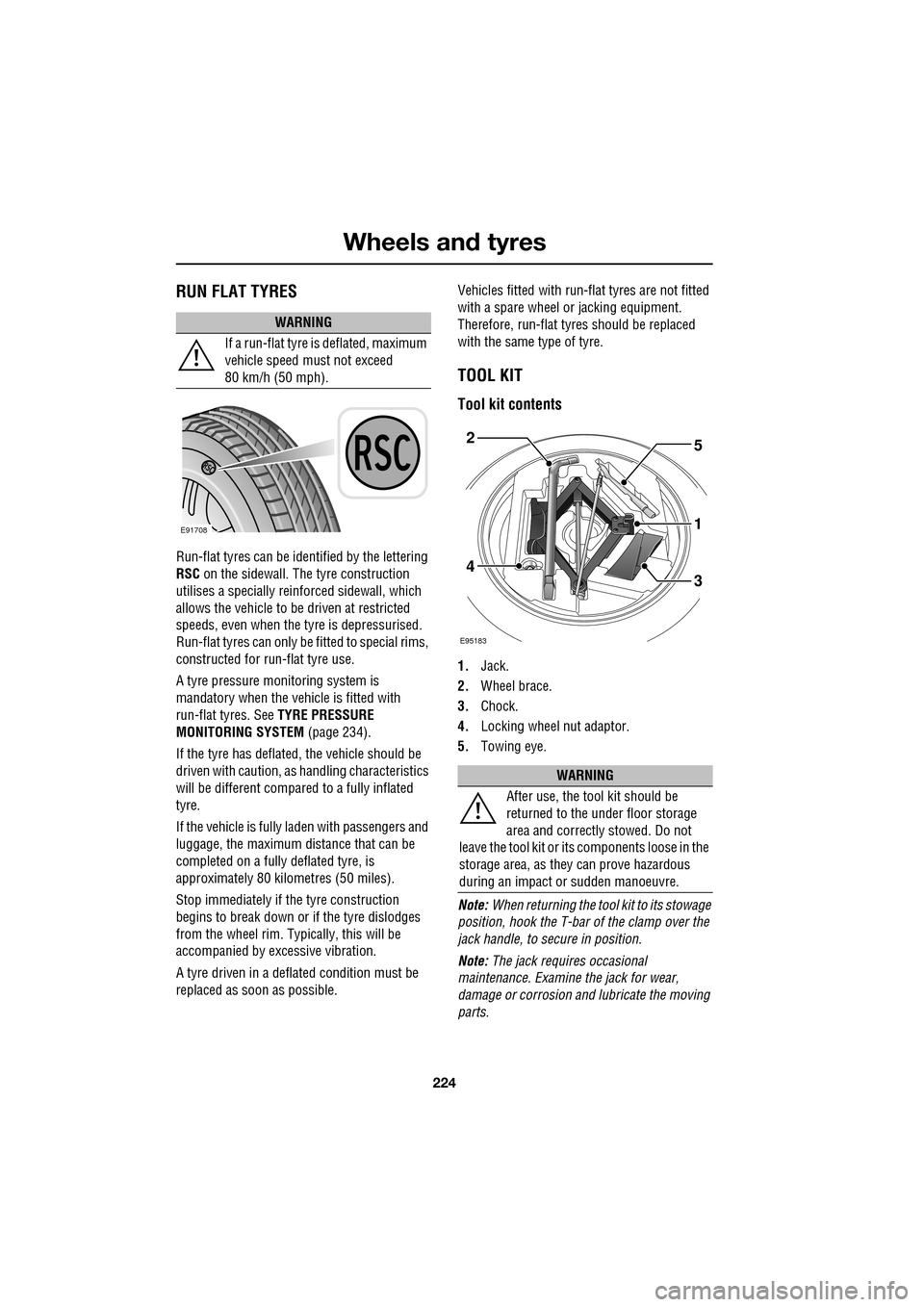
Run-flat tyres can be identified by the lettering
RSC on the sidewall. The tyre construction
utilises a specially reinforced sidewall, which
allows the vehicle to be driven at restricted
speeds, even when the tyre is depressurised.
Run-flat tyres can only be fitted to special rims,
constructed for ru n-flat tyre use.
A tyre pressure monitoring system is
mandatory when the vehicle is fitted with
run-flat tyres. See TYRE PRESSURE
MONITORING SYSTEM (page 234).
If the tyre has deflated, the vehicle should be
driven with caution, as handling characteristics
will be different compared to a fully inflated
tyre.
If the vehicle is fully la den with passengers and
luggage, the maximum di stance that can be
completed on a fully deflated tyre, is
approximately 80 kilo metres (50 miles).
Stop immediately if the tyre construction
begins to break down or if the tyre dislodges
from the wheel rim. Typi cally, this will be
accompanied by excessive vibration.
A tyre driven in a defl ated condition must be
replaced as s oon as possible. Vehicles fitted with run-flat tyres are not fitted
with a spare wheel or jacking equipment.
Therefore, run-flat tyre
s should be replaced
with the same type of tyre.
TOOL KIT
Tool kit contents
1. Jack.
2. Wheel brace.
3. Chock.
4. Locking wheel nut adaptor.
5. Towing eye.
Note: When returning the tool kit to its stowage
position, hook the T-bar of the clamp over the
jack handle, to se cure in position.
Note: The jack requi res occasional
maintenance. Examine the jack for wear,
damage or corrosion and lubricate the moving
parts.
WARNING
If a run-flat tyre is deflated, maximum
vehicle speed must not exceed
80 km/h (50 mph).
E91708
WARNING
After use, the tool kit should be
returned to the under floor storage
area and correctly stowed. Do not
leave the tool kit or it s components loose in the
storage area, as they can prove hazardous
during an impact or sudden manoeuvre.
E95183
5
1
34
2
Page 226 of 391
Wheels and tyres
226
Locking wheel nuts
Vehicles may be equipped with a locking wheel
nut on each wheel. These are similar to
standard wheel nuts, and can only be removed
using the special adaptor provided with the
jacking equipment.
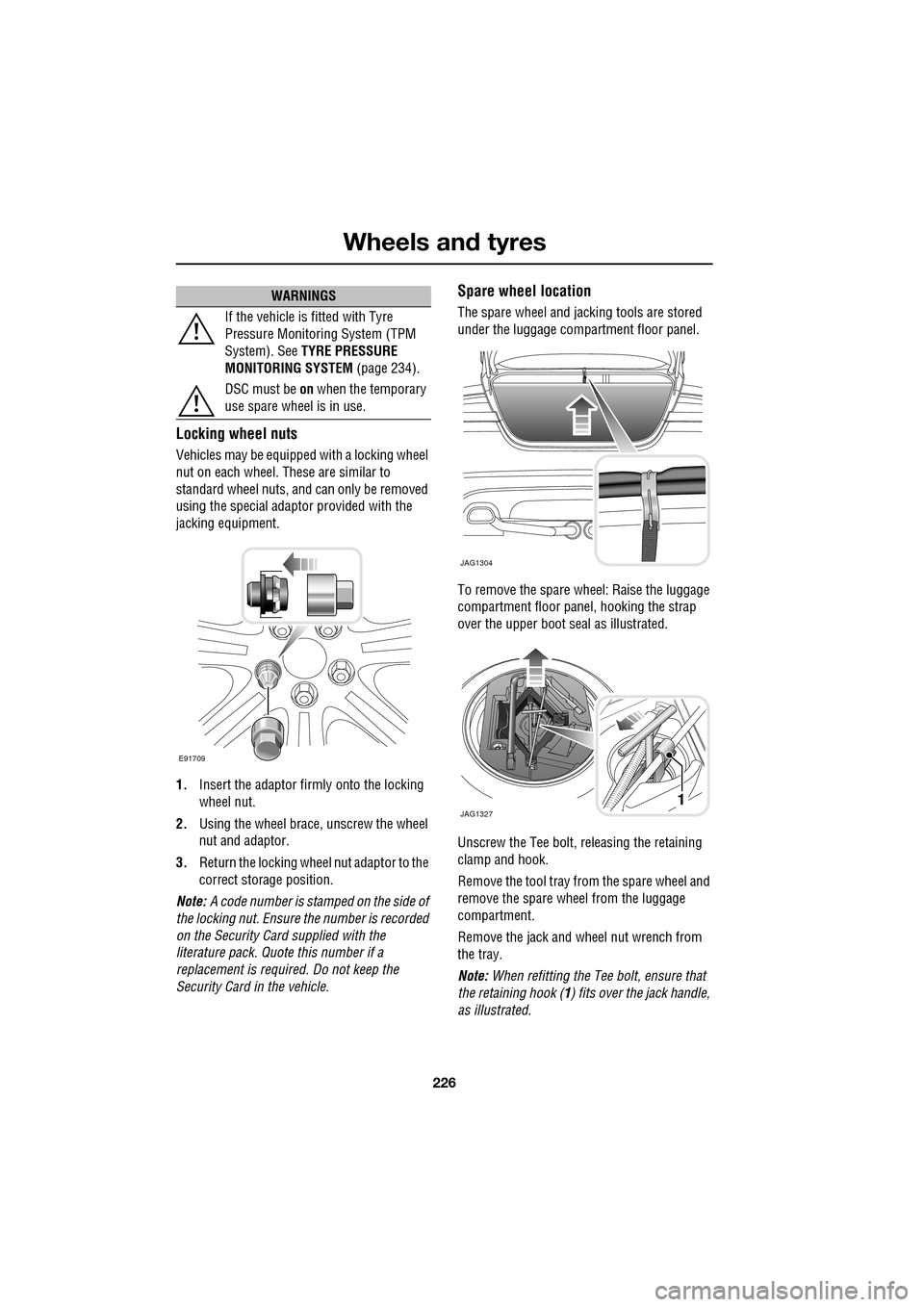
1. Insert the adaptor firmly onto the locking
wheel nut.
2. Using the wheel brace, unscrew the wheel
nut and adaptor.
3. Return the locking wheel nut adaptor to the
correct storage position.
Note: A code number is stam ped on the side of
the locking nut. Ensure the number is recorded
on the Security Card supplied with the
literature pack. Quot e this number if a
replacement is require d. Do not keep the
Security Card in the vehicle.
Spare wheel location
The spare wheel and jacking tools are stored
under the luggage compartment floor panel.
To remove the spare wheel: Raise the luggage
compartment floor panel, hooking the strap
over the upper boot seal as illustrated.
Unscrew the Tee bolt, re leasing the retaining
clamp and hook.
Remove the tool tray from the spare wheel and
remove the spare wheel from the luggage
compartment.
Remove the jack and wheel nut wrench from
the tray.
Note: When refitting the Tee bolt, ensure that
the retaining hook ( 1) fits over the jack handle,
as illustrated.
If the vehicle is fitted with Tyre
Pressure Monitoring System (TPM
System). See
TYRE PRESSURE
MONITORING SYSTEM (page 234).
DSC must be on when the temporary
use spare wheel is in use.
WARNINGS
E91709
JAG1304
JAG13271
Page 255 of 391
255
Vehicle recovery
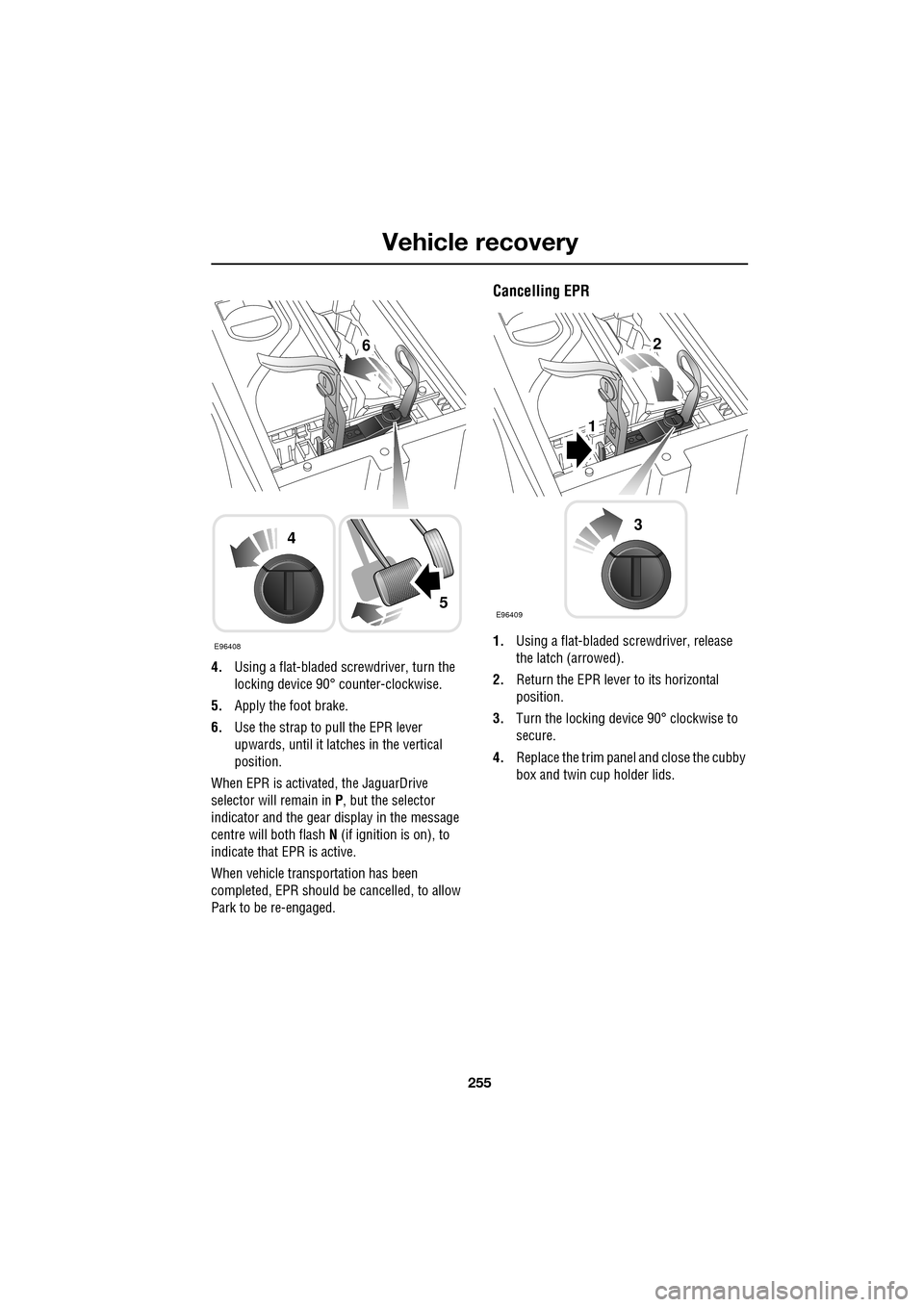
4.Using a flat-bladed screwdriver, turn the
locking device 90° counter-clockwise.
5. Apply the foot brake.
6. Use the strap to pull the EPR lever
upwards, until it latches in the vertical
position.
When EPR is activated, the JaguarDrive
selector will remain in P , but the selector
indicator and the gear display in the message
centre will both flash N (if ignition is on), to
indicate that EPR is active.
When vehicle transportation has been
completed, EPR should be cancelled, to allow
Park to be re-engaged.
Cancelling EPR
1. Using a flat-bladed sc rewdriver, release
the latch (arrowed).
2. Return the EPR lever to its horizontal
position.
3. Turn the locking device 90° clockwise to
secure.
4. Replace the trim pane l and close the cubby
box and twin cup holder lids.E96408
4
5
62
1
E96409
3
Page 285 of 391
285
Digital audio broadcasting
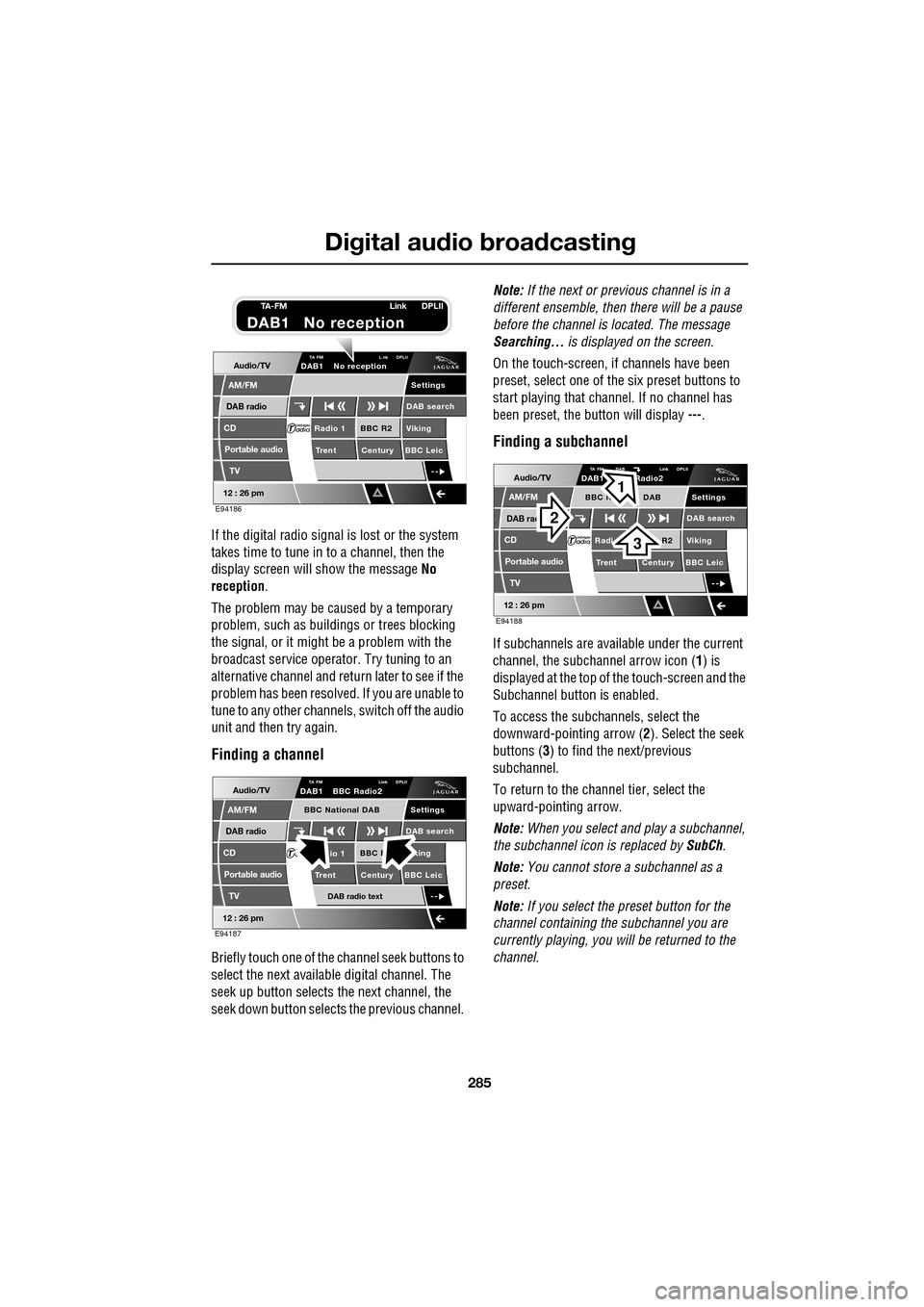
If the digital radio signal is lost or the system
takes time to tune in to a channel, then the
display screen will show the message No
reception.
The problem may be caused by a temporary
problem, such as buildings or trees blocking
the signal, or it might be a problem with the
broadcast servic e operator. Try tuning to an
alternative channel and return later to see if the
problem has been resolved. If you are unable to
tune to any other channe ls, switch off the audio
unit and then try again.
Finding a channel
Briefly touch one of the channel seek buttons to
select the next availabl e digital channel. The
seek up button selects th e next channel, the
seek down button selects the previous channel. Note:
If the next or previous channel is in a
different ensemble, then there will be a pause
before the channel is located. The message
Searching... is displayed on the screen.
On the touch-screen, if channels have been
preset, select one of the six preset buttons to
start playing that channel. If no channel has
been preset, the button will display ---.
Finding a subchannel
If subchannels are available under the current
channel, the subchannel arrow icon ( 1) is
displayed at the top of the touch-screen and the
Subchannel button is enabled.
To access the subchannels, select the
downward-pointing arrow ( 2). Select the seek
buttons ( 3) to find the next/previous
subchannel.
To return to the channel tier, select the
upward-pointing arrow.
Note: When you select and play a subchannel,
the subchannel icon is replaced by SubCh.
Note: You cannot store a subchannel as a
preset.
Note: If you select the preset button for the
channel containing the subchannel you are
currently playing, you will be returned to the
channel.
Audio/TV
DAB radio
CD
AM/FM
12 : 26 pm
BBC R2 Viking
Trent Century BBC LeicRadio 1
Settings
DAB search
TA FM L nk DPLIIDAB1 No reception
Portable audio
TV
E94186
TA-FM Link DPLII
DAB1 No reception
Audio/TV
DAB radio
CD
AM/FM
12 : 26 pm
BBC R king
Trent Century BBC Leicio 1
Settings
DAB search
TA FM Link DPLIIDAB1 BBC Radio2
Portable audio
TV
DAB radio text
BBC National DAB
E94187
Audio/TV
DAB rad
CD
AM/FM
12 : 26 pm
R2 Viking
T
rent Century BBC LeicRadi
Settings
DAB search
TA FM DAB Link DPLIIDAB1 Radio2
Portable audio
TV
BBC N DAB
E94188
2
3
1
Page 382 of 391
Index
382
Bulb changing . . . . . . . . . . . . . . . . . . . . . . 83direction indicator bulb (front) . . . . . . . 84
headlamp unit bulbs . . . . . . . . . . . . . . . 83
high level brake lamp . . . . . . . . . . . . . . 86
number plate lamp bulb . . . . . . . . . . . . 86
rear lamp bulbs . . . . . . . . . . . . . . . . . . . 85
side lamp bulb . . . . . . . . . . . . . . . . . . . 85
side repeater lamp . . . . . . . . . . . . . . . . 85
Bulb specification chart . . . . . . . . . . . . . . . 87
C
Cancel guidance . . . . . . . . . . . . . . . . . . . 350
Car wash . . . . . . . . . . . . . . . . . . . . . . . . . 187
Cautions . . . . . . . . . . . . . . . . . . . . . . . . . . . 9
Changing a bulb . . . . . . . . . . . . . . . . . . . . 83 general information . . . . . . . . . . . . . . . . 83
Changing a fuse. . . . . . . . . . . . . . . . . . . . 241 checking or renewing a blown fuse . . . 241
Changing a road wheel . . . . . . . . . . . . . . 225
locking wheel nuts . . . . . . . . . . . . . . . 226
spare wheel location . . . . . . . . . . . . . . 226
temporary use spare wheel . . . . . . . . . 225
tightening the wheel nuts . . . . . . . . . . 229
wheel changing procedure . . . . . . . . . 228
wheel changing safety. . . . . . . . . . . . . 227
Changing the remote cont rol battery . . . . . 24
Changing the vehicle battery . . . . . . . . . . 215
battery disposal. . . . . . . . . . . . . . . . . . 215
Changing the wiper blades . . . . . . . . . . . . 91 changing the wiper blades . . . . . . . . . . 92
service position . . . . . . . . . . . . . . . . . . . 91
Channel automatic tuning . . . . . . . . . . . . 284
Channel options. . . . . . . . . . . . . . . . . . . . 284 DAB search . . . . . . . . . . . . . . . . . . . . . 286
finding a channel. . . . . . . . . . . . . . . . . 285
finding a subchannel . . . . . . . . . . . . . . 285
finding an ensemble . . . . . . . . . . . . . . 286
Charging the vehicle battery . . . . . . . . . . 215
Checking the wiper blades . . . . . . . . . . . . . 90
Child safety locks . . . . . . . . . . . . . . . . . . . 65
Child seat anchor points . . . . . . . . . . . . . . 62 installing an ISOFIX child seat. . . . . . . . 63
ISOFIX anchor points . . . . . . . . . . . . . . 62
tether anchorage points . . . . . . . . . . . . 64
Child seat positioning . . . . . . . . . . . . . . . . 60 Child seats . . . . . . . . . . . . . . . . . . . . . . . . . 59
child restraint check list . . . . . . . . . . . . . 60
Cleaning the alloy wheels . . . . . . . . . . . . . 187
Cleaning the exterior . . . . . . . . . . . . . . . . . 187
bird droppings . . . . . . . . . . . . . . . . . . . 189
cleaning the rear screen . . . . . . . . . . . . 189
glass surfaces . . . . . . . . . . . . . . . . . . . 189
polishing . . . . . . . . . . . . . . . . . . . . . . . 189
removing grease and tar. . . . . . . . . . . . 189
underbonnet cleaning . . . . . . . . . . . . . . 188
using an automatic wash . . . . . . . . . . . 188
washing the vehicle paintwork . . . . . . . 187
Cleaning the interior . . . . . . . . . . . . . . . . . 189 airbag module covers . . . . . . . . . . . . . . 191
carpet and mats . . . . . . . . . . . . . . . . . . 191
cloth and fabric . . . . . . . . . . . . . . . . . . 190
instrument pack, clock, and audio equipment . . . . . . . . . . . . . . . . . . . . 190
leather . . . . . . . . . . . . . . . . . . . . . . . . . 190
removing stains . . . . . . . . . . . . . . . . . . 190
seat belts . . . . . . . . . . . . . . . . . . . . . . . 191
Climate seats . . . . . . . . . . . . . . . . . . . . . . . 48 backrest ventilation only. . . . . . . . . . . . . 48
cooled ventilation . . . . . . . . . . . . . . . . . . 48
heated ventilation . . . . . . . . . . . . . . . . . . 48
Clock. . . . . . . . . . . . . . . . . . . . . . . . . . . . . 124 setting the clock as the screensaver . . . 124
Compact disc display options . . . . . . . . . . 296
Compact disc pause . . . . . . . . . . . . . . . . . 295
Compact disc player CD compatibility . . . . . . . . . . . . . . . . . . 292
loading CDs . . . . . . . . . . . . . . . . . . . . . 292
Compact disc selection . . . . . . . . . . . . . . . 294
Compass view. . . . . . . . . . . . . . . . . . . . . . 360
Condensation - lamps . . . . . . . . . . . . . . . . . 76
Controls overview . . . . . . . . . . . . . . . . . . . . 12
Coolant check . . . . . . . . . . . . . . . . . . . . . . 204
Cornering lamps . . . . . . . . . . . . . . . . . . . . . 79
Cruise control . . . . . . . . . . . . . . . . . . . 74, 156
principle of operation . . . . . . . . . . . . . . 156
Cup holders . . . . . . . . . . . . . . . . . . . . . . . 126 twin cup holder . . . . . . . . . . . . . . . . . . 127