Navigation JAGUAR XF 2009 1.G Owner's Manual
[x] Cancel search | Manufacturer: JAGUAR, Model Year: 2009, Model line: XF, Model: JAGUAR XF 2009 1.GPages: 391, PDF Size: 19.32 MB
Page 249 of 391
249
Fuses
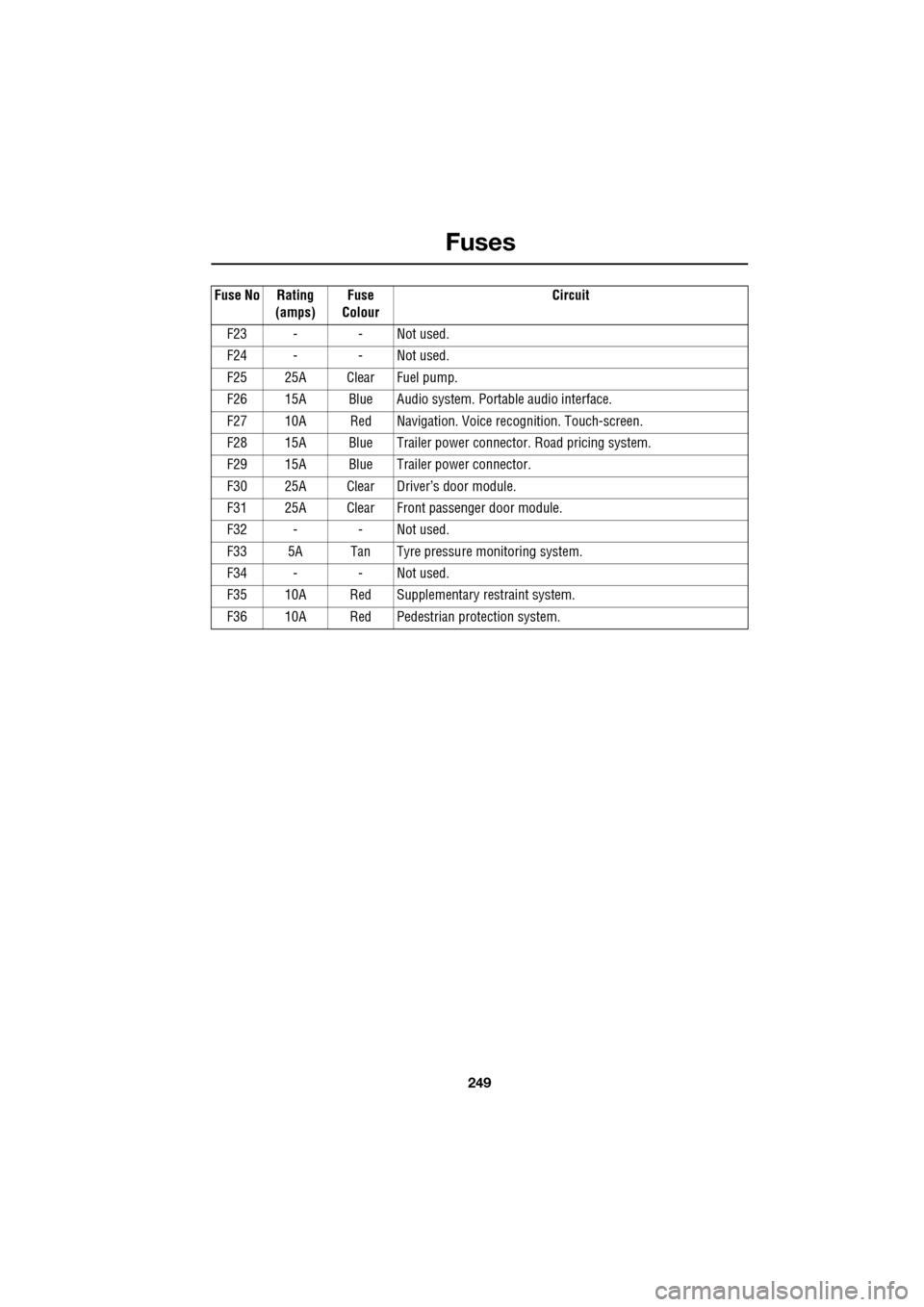
F23 - - Not used.
F24 - - Not used.
F25 25A Clear Fuel pump.
F26 15A Blue Audio system. Portable audio interface.
F27 10A Red Navigation. Voic e recognition. Touch-screen.
F28 15A Blue Trailer power conne ctor. Road pricing system.
F29 15A Blue Trailer power connector.
F30 25A Clear Driver’s door module.
F31 25A Clear Front passenger door module.
F32 - - Not used.
F33 5A Tan Tyre pressure monitoring system.
F34 - - Not used.
F35 10A Red Supplementary restraint system.
F36 10A Red Pedestrian protection system.
Fuse No Rating
(amps) Fuse
Colour Circuit
Page 271 of 391
271
Audio unit operation
ON/OFF CONTROL
The audio system can be used with the vehicle
ignition on or off, but will switch off
automatically when the ignition is switched off.
To operate the audio system when the ignition
has been switched off, press the On/off volume
control.
The audio system can be switched on in one of
two ways:
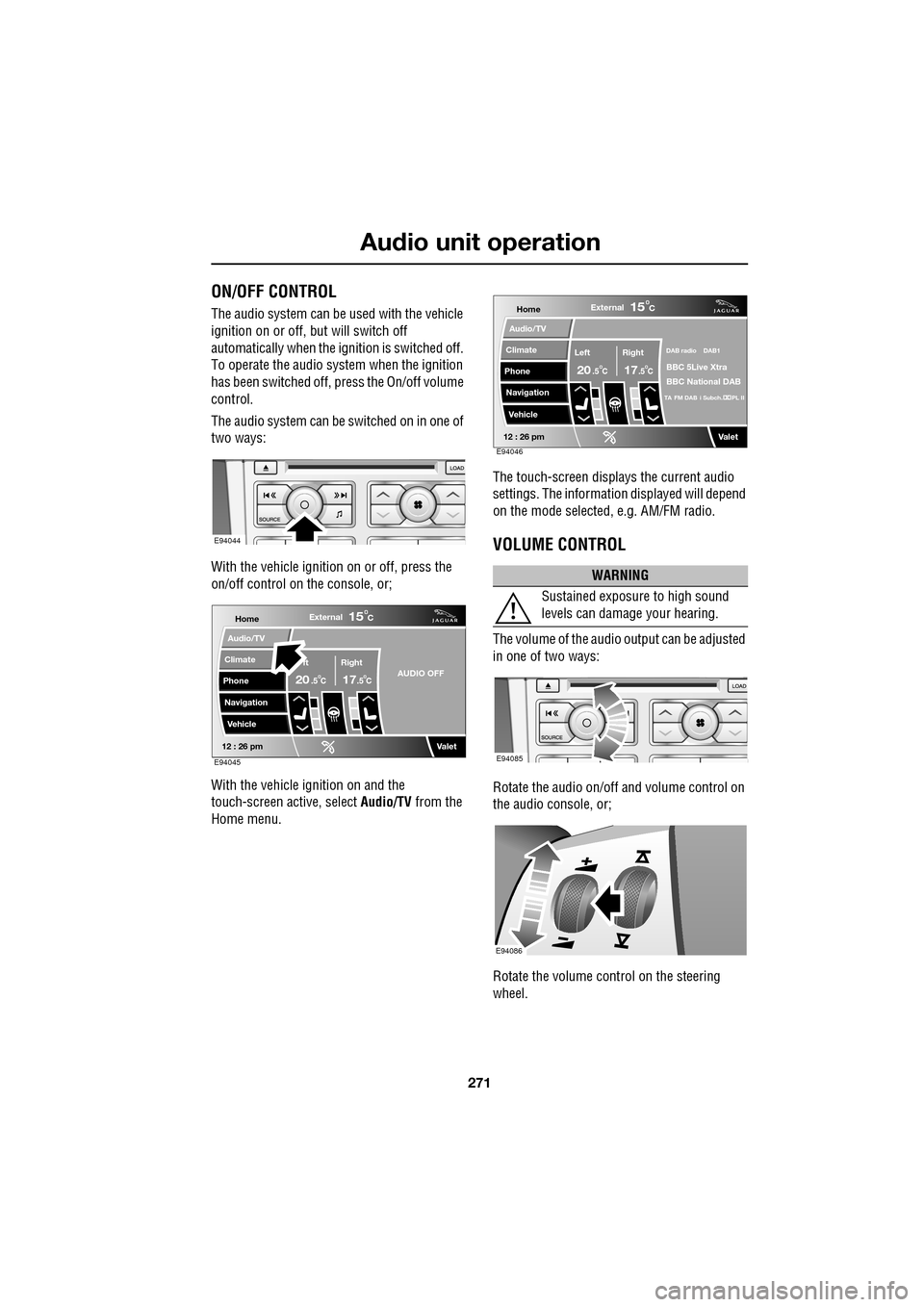
With the vehicle ignition on or off, press the
on/off control on the console, or;
With the vehicle ignition on and the
touch-screen active, select Audio/TV from the
Home menu. The touch-screen displays the current audio
settings. The informati
on displayed will depend
on the mode selected , e.g. AM/FM radio.
VOLUME CONTROL
The volume of the audio output can be adjusted
in one of two ways:
Rotate the audio on/off and volume control on
the audio console, or;
Rotate the volume control on the steering
wheel.
E94044
Home
Audio/TV
Climate
Phone
Navigation
VehicleExternal
ft Right
20 17CC
15C
.5 .5AUDIO OFF
Valet12 : 26 pmE94045
WARNING
Sustained exposure to high sound
levels can damage your hearing.
Home
Audio/TV
Climate
Phone
Navigation
VehicleExternal
Left Right
20 17CC
15C
.5 .5
DAB radio DAB1
BBC 5Live Xtra
BBC National DAB
TA FM DAB i Subch. PL II
Valet12 : 26 pmE94046
E94085
E94086
Page 272 of 391
Audio unit operation
272
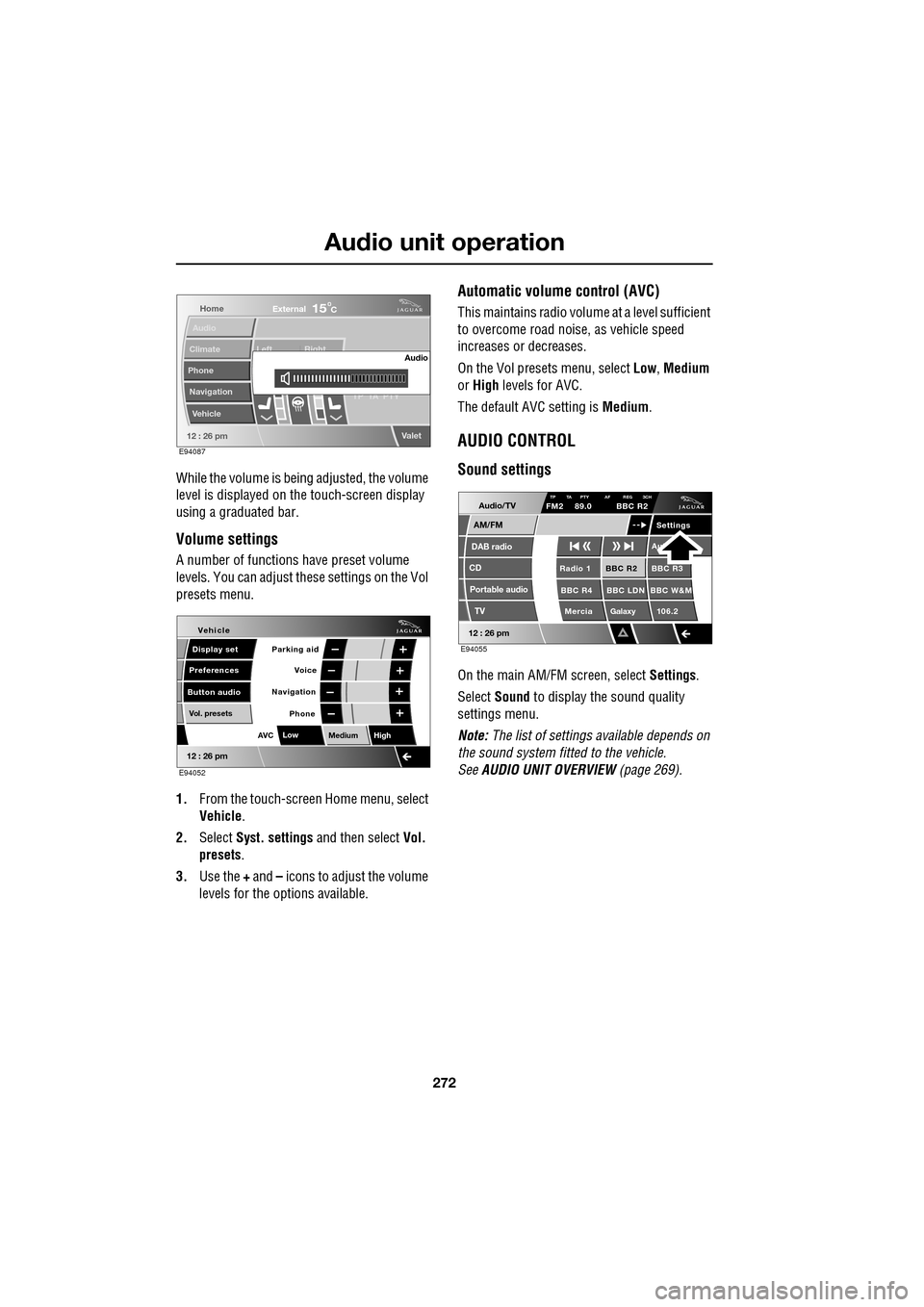
While the volume is being adjusted, the volume
level is displayed on the touch-screen display
using a graduated bar.
Volume settings
A number of functions have preset volume
levels. You can adjust these settings on the Vol
presets menu.
1. From the touch-screen Home menu, select
Vehicle .
2. Select Syst. settings and then select Vol.
presets .
3. Use the + and – icons to adjust the volume
levels for the options available.
Automatic volume control (AVC)
This maintains radio volume at a level sufficient
to overcome road noise, as vehicle speed
increases or decreases.
On the Vol presets menu, select Low, Medium
or High levels for AVC.
The default AVC setting is Medium.
AUDIO CONTROL
Sound settings
On the main AM/FM screen, select Settings.
Select Sound to display the sound quality
settings menu.
Note: The list of settings available depends on
the sound system fitted to the vehicle.
See AUDIO UNIT OVERVIEW (page 269).
Home
Audio
Climate
Phone
Navigation
Vehicle Left Right
TP T
A PTY
Valet12 : 26 pm
Audio
External15C
E94087
Voice
Vehicle
Display set
Preferences
Button audioParking aid
Vol. presets
AVC Low
MediumHigh
12 : 26 pm
Navigation
Phone
E94052
Audio/TV
DAB radio
CD
AM/FM
12 : 26 pm
BBC R2 BBC R3
BBC R4 BBC LDN BBC W&M Mercia Galaxy 106.2Radio 1
Settings
Aut
TP TA PTY AF REG 3CHFM2 89.0 BBC R2
Portable audio TV
E94055
Page 276 of 391
Audio unit operation
276
TRAFFIC INFORMATION CONTROL
With the Traffic Announcements (TA) option
on, local traffic announcements will interrupt
normal broadcasts or playback.
If audio volume is set at a minimum, then the
volume will increase for the announcement,
returning to the previous volume setting
afterwards.
When broadcasting an announcement, a traffic
announcement pop-up is displayed.
When enabled, TA will appear at the top of the
touch-screen. The audio un it then checks that
the station has Radio Data System (RDS)
Traffic Programme (TP). If it is not available on
the current station, th e display will not show
TP . If TP is not displayed with TA after 45
seconds have elapsed, th en the audio unit will
search for a new TP station.
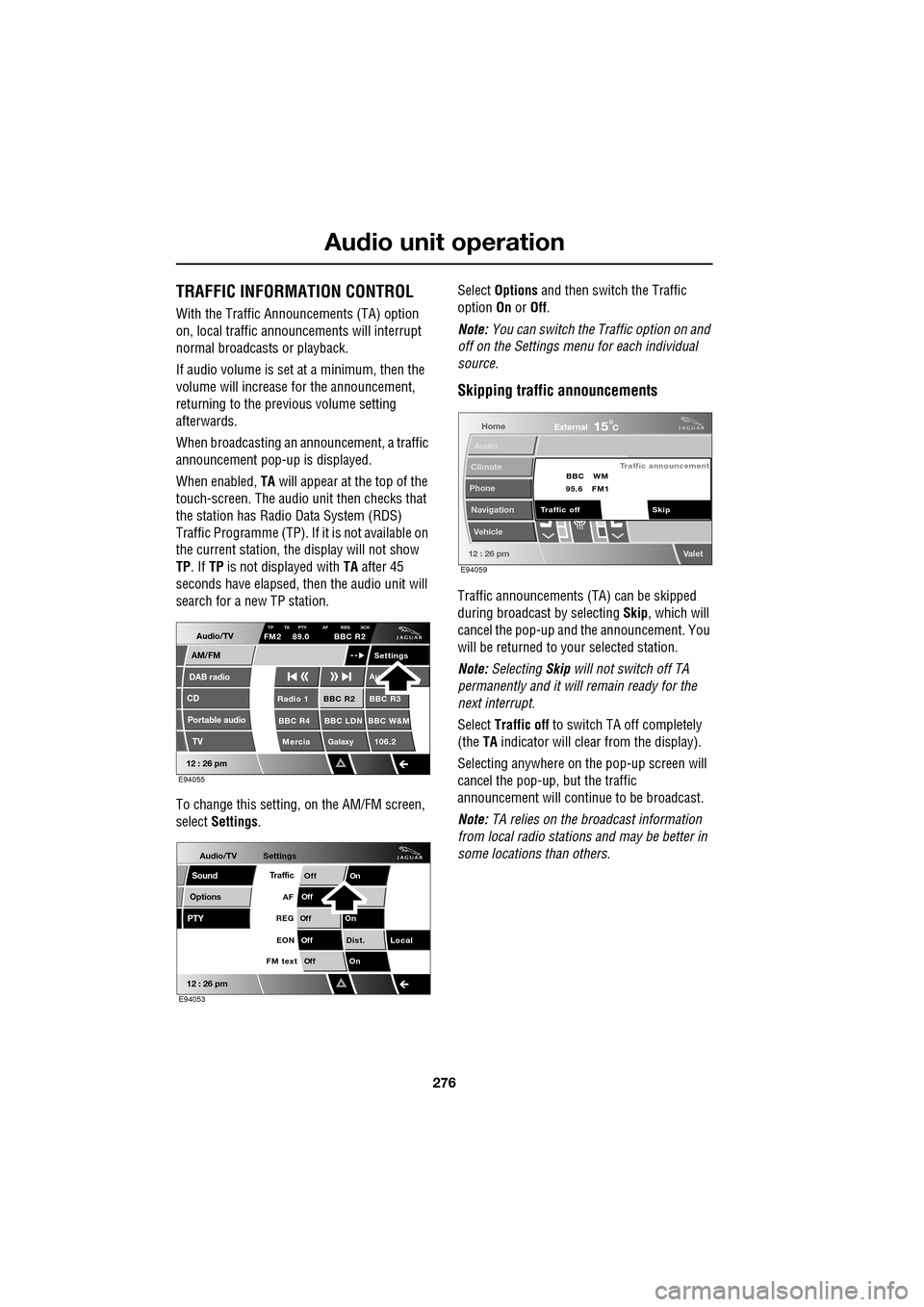
To change this setting, on the AM/FM screen,
select Settings . Select
Options and then switch the Traffic
option On or Off.
Note: You can switch the Traffic option on and
off on the Settings menu for each individual
source.
Skipping traffic announcements
Traffic announcements (TA) can be skipped
during broadcast by selecting Skip, which will
cancel the pop-up and the announcement. You
will be returned to your selected station.
Note: Selecting Skip will not switch off TA
permanently and it will remain ready for the
next interrupt.
Select Traffic off to switch TA off completely
(the TA indicator will clear from the display).
Selecting anywhere on the pop-up screen will
cancel the pop-up, but the traffic
announcement will continue to be broadcast.
Note: TA relies on the broadcast information
from local radio stations and may be better in
some locations than others.
Audio/TV
DAB radio
CD
AM/FM
12 : 26 pm
BBC R2 BBC R3
BBC R4 BBC LDN BBC W&M Mercia Galaxy 106.2Radio 1
Settings
Au
TP TA PTY AF REG 3CHFM2 89.0 BBC R2
Portable audio TV
E94055
Audio/TV
Options
PTY
Sound
12 : 26 pm
Settings
TrafficOnOff
Of f
On
Of
f
Dist. Local
Of f
On
Of f
FM text EON
REG
AF
E94053
Home
Audio
Climate
Phone
Navigation
Vehicle
Valet12 : 26 pm
External15C
Traffic announcement
Skip
Traffic off BBC
95.6 WM
FM1
E94059
Page 287 of 391
287
Digital audio broadcasting
PRESET BUTTONS
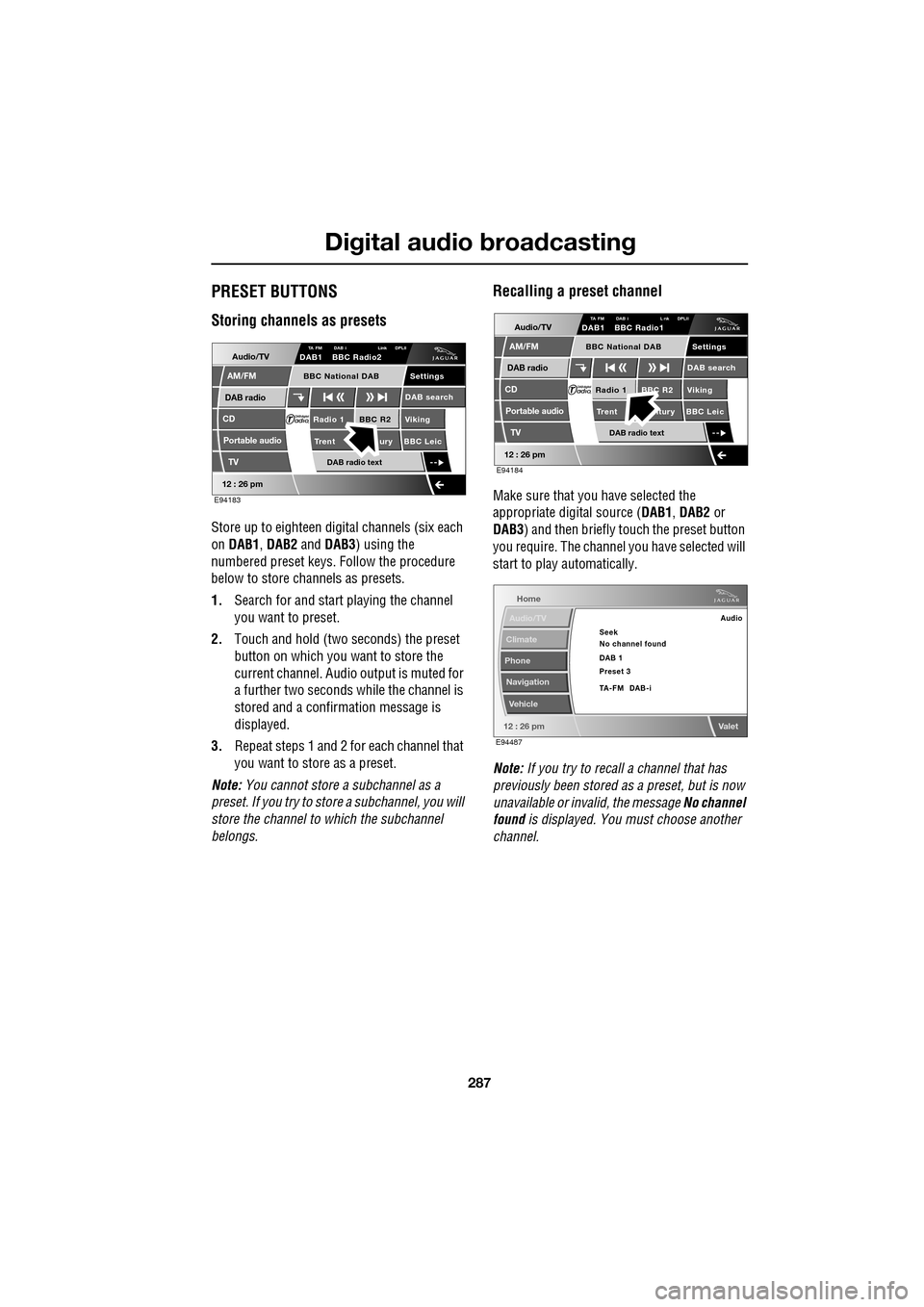
Storing channels as presets
Store up to eighteen digital channels (six each
on DAB1 , DAB2 and DAB3 ) using the
numbered preset keys. Follow the procedure
below to store channels as presets.
1. Search for and start playing the channel
you want to preset.
2. Touch and hold (two seconds) the preset
button on which you want to store the
current channel. Audi o output is muted for
a further two seconds while the channel is
stored and a confirmation message is
displayed.
3. Repeat steps 1 and 2 for each channel that
you want to store as a preset.
Note: You cannot store a subchannel as a
preset. If you try to stor e a subchannel, you will
store the channel to which the subchannel
belongs.
Recalling a preset channel
Make sure that you have selected the
appropriate digital source ( DAB1, DAB2 or
DAB3 ) and then briefly touch the preset button
you require. The channel you have selected will
start to play automatically.
Note: If you try to recall a channel that has
previously been stored as a preset, but is now
unavailable or invalid, the message No channel
found is displayed. You must choose another
channel.
Audio/TV
DAB radio
CD
AM/FM
12 : 26 pm
BBC R2 Viking
Trent ury BBC LeicRadio 1
Settings
DAB search
TA FM DAB i Link DPLIIDAB1 BBC Radio2
Portable audio
TV
DAB radio text
BBC National DAB
E94183
Audio/TV
DAB radio
CD
AM/FM
12 : 26 pm
BBC R2 Viking
Trent ntury BBC LeicRadio 1
Settings
DAB search
TA FM DAB i L nk DPLIIDAB1 BBC Radio1
Portable audio
TV
DAB radio text
BBC National DAB
E94184
Home
Audio/TV
Climate
Phone
Navigation
Vehicle
Valet12 : 26 pm
Audio
Seek
No channel found
Preset 3 DAB 1
TA-FM DAB-i
E94487
Page 293 of 391
293
Compact disc player
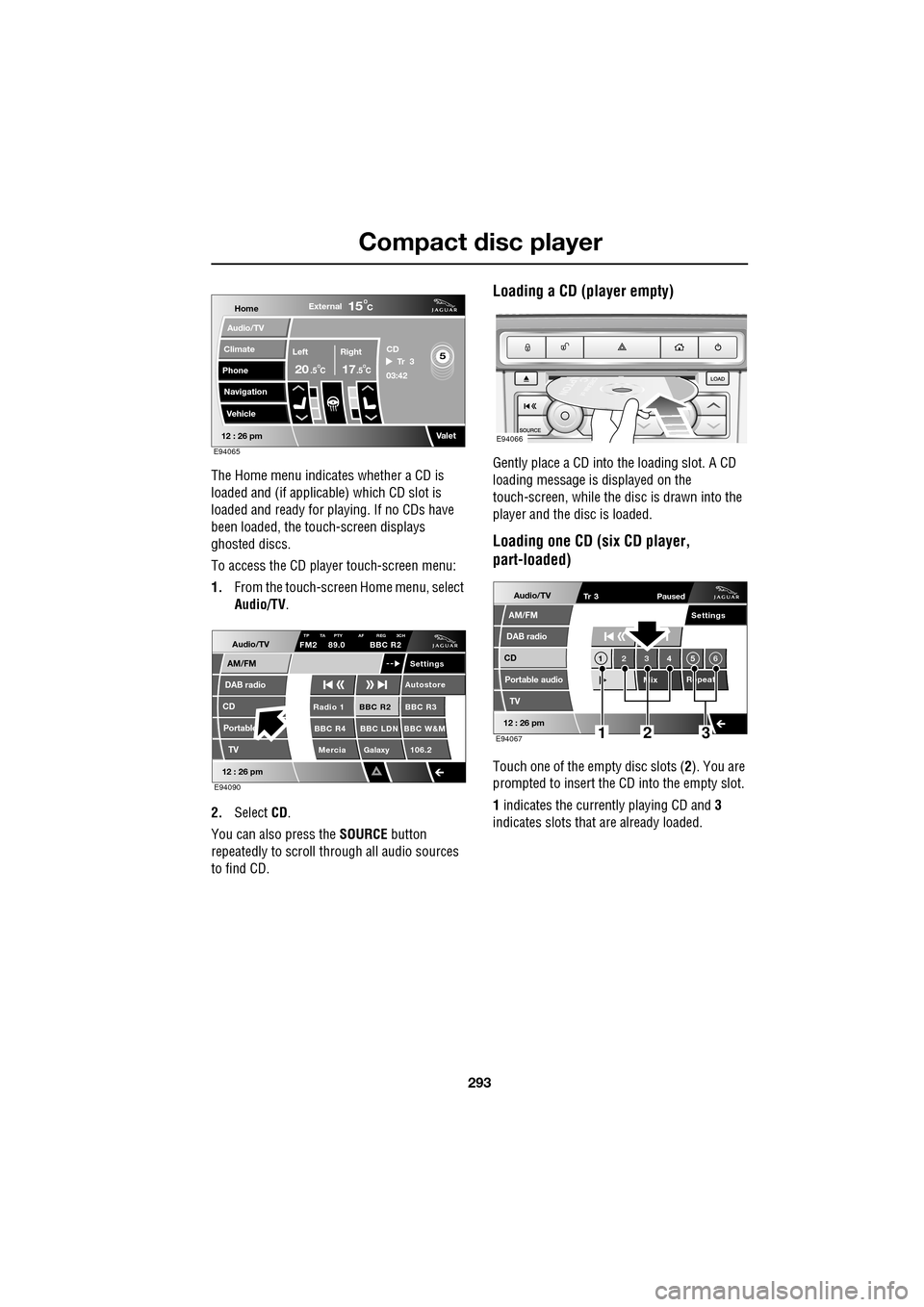
The Home menu indicates whether a CD is
loaded and (if applicable) which CD slot is
loaded and ready for playing. If no CDs have
been loaded, the touch-screen displays
ghosted discs.
To access the CD player touch-screen menu:
1. From the touch-screen Home menu, select
Audio/TV .
2. Select CD.
You can also press the SOURCE button
repeatedly to scroll through all audio sources
to find CD.
Loading a CD (player empty)
Gently place a CD into the loading slot. A CD
loading message is displayed on the
touch-screen, while the di sc is drawn into the
player and the disc is loaded.
Loading one CD (six CD player,
part-loaded)
Touch one of the empty disc slots ( 2). You are
prompted to insert the CD into the empty slot.
1 indicates the currently playing CD and 3
indicates slots that are already loaded.
Home
Audio/TV
Climate
Phone
Navigation
VehicleExternal
Left Right
20 17CC
15C
.5 .5
Valet12 : 26 pm
5Tr 3
CD
03:42
E94065
Audio/TV
DAB radio
CD
AM/FM
12 : 26 pm
BBC R2 BBC R3
BBC R4 BBC LDN BBC W&M Mercia Galaxy 106.2Radio 1
Settings
Autostore
TP TA PTY AF REG 3CHFM2 89.0 BBC R2
Portable TV
E94090
E94066
Audio/TV
DAB radio
CD
AM/FM
12 : 26 pm
Portable audio
TV
Settings
1 23 45 6
MixRepeat
Tr 3
Paused
E94067123
Page 310 of 391
Telephone
310
6.When the vehicle's Bluetooth system is
discovered, your mob ile phone will list
Jaguar as a discovered Bluetooth device.
Select this device from the list.
7. You will now be requested to enter a
Bluetooth PIN. When pairing and docking
from your mobile phone, this number is
always 1313.
Once your phone is paired to the vehicle's
Bluetooth system, it can connect automatically.
If the phone does not automatically connect,
you will have to conne ct manually with the
Jaguar Bluetooth System, via the mobile
phone. Please consul t the mobile phone's
handbook for further information.
Note: Some mobile phones require you to
authorise the connection each time you start
the system. To change this, you must set
Jaguar as ‘authorised’ in the mobile phone’s
known device list. This will enable connections
from the vehicle to the mobile phone to take
place automatically without confirmation each
time. Please consul t the mobile phone’s
handbook for further information.
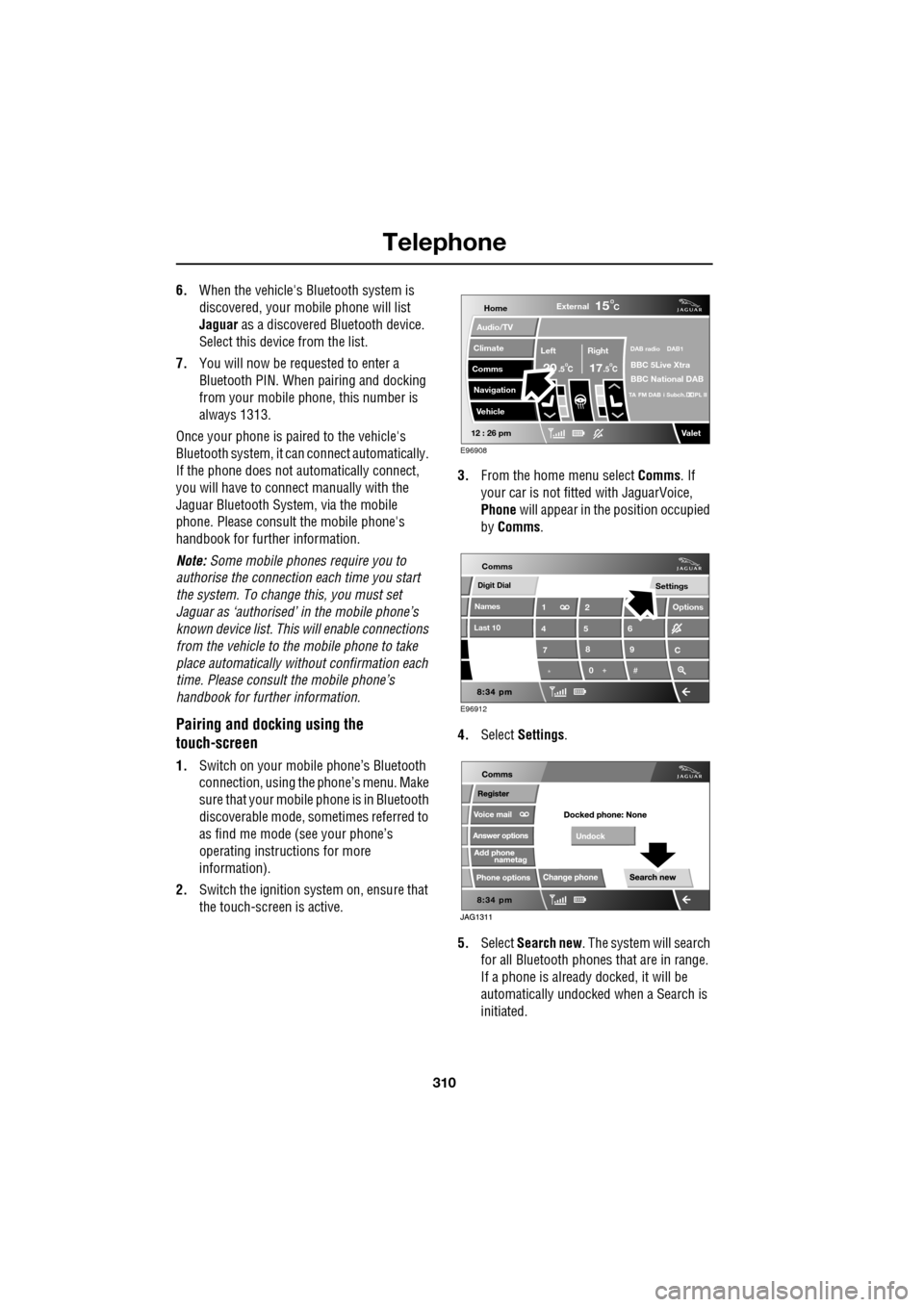
Pairing and docking using the
touch-screen
1. Switch on your mobile phone’s Bluetooth
connection, using the phone’s menu. Make
sure that your mobile phone is in Bluetooth
discoverable mode, sometimes referred to
as find me mode (s ee your phone’s
operating instructions for more
information).
2. Switch the ignition system on, ensure that
the touch-screen is active. 3.
From the home menu select Comms. If
your car is not fitted with JaguarVoice,
Phone will appear in the position occupied
by Comms .
4. Select Settings .
5. Select Search new . The system will search
for all Bluetooth phones that are in range.
If a phone is already docked, it will be
automatically undocked when a Search is
initiated.
Home
Audio/TV
Climate
Comms
Navigation
VehicleExternal
Left Right
20 17CC
15C
.5 .5
DAB radio DAB1
BBC 5Live Xtra
BBC National DAB
TA FM DAB i Subch. PL II
Valet12 : 26 pm
E96908
Digit Dial
Names
Last 10
Settings
7
1
4
*8
2
5
0 9
6
Options
C
E96912
Comms
Page 312 of 391
Telephone
312
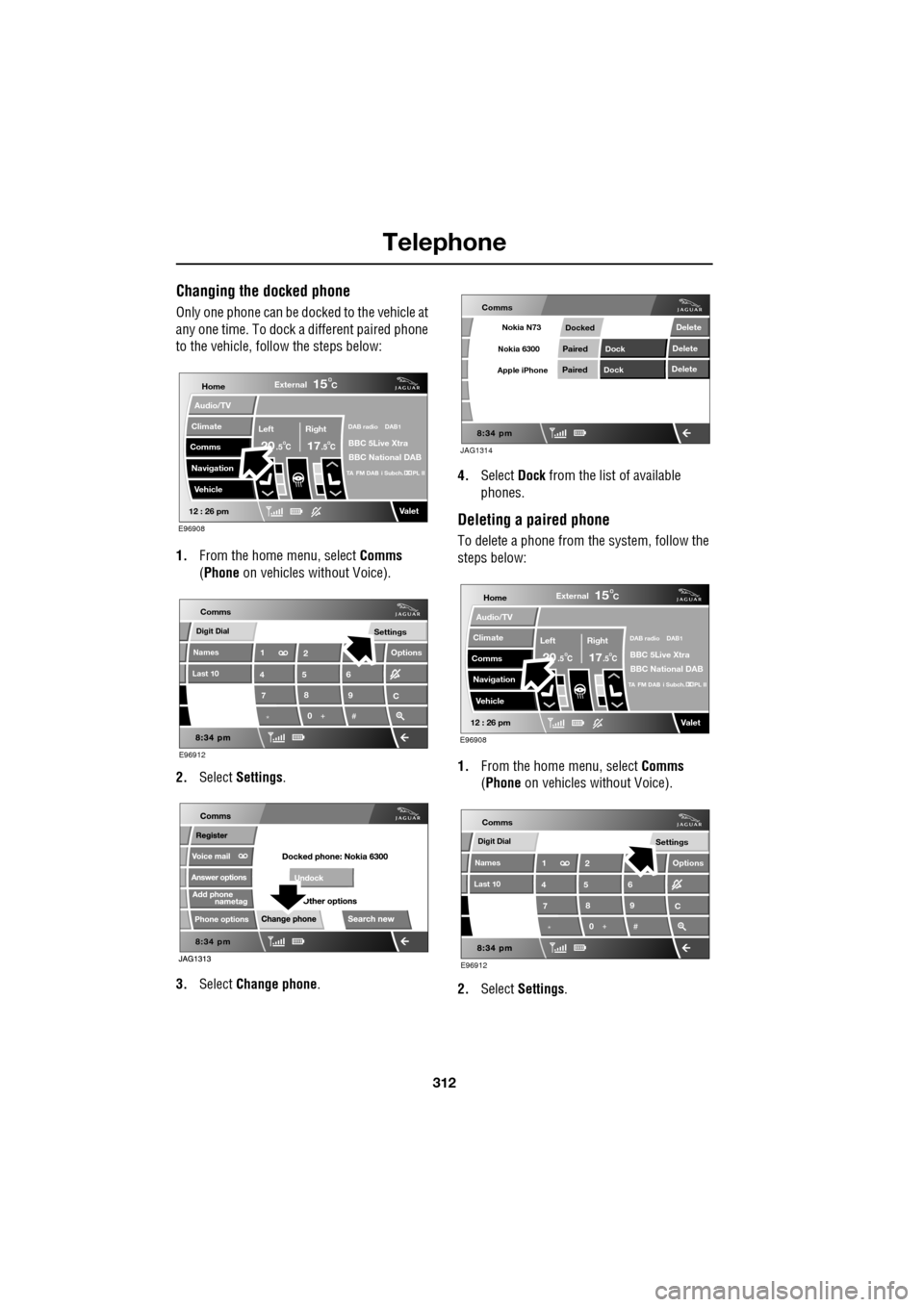
Changing the docked phone
Only one phone can be docked to the vehicle at
any one time. To dock a different paired phone
to the vehicle, follow the steps below:
1. From the home menu, select Comms
(Phone on vehicles without Voice).
2. Select Settings .
3. Select Change phone . 4.
Select Dock from the list of available
phones.
Deleting a paired phone
To delete a phone from the system, follow the
steps below:
1. From the home menu, select Comms
(Phone on vehicles without Voice).
2. Select Settings .
Home
Audio/TV
Climate
Comms
Navigation
VehicleExternal
Left Right
20 17CC
15C
.5 .5
DAB radio DAB1
BBC 5Live Xtra
BBC National DAB
TA FM DAB i Subch. PL II
Valet12 : 26 pm
E96908
Digit Dial
Names
Last 10
Settings
7
1
4
*8
2
5
0 9
6
Options
C
E96912
Comms
JAG1314
Comms
Delete
Delete
Delete
Paired
PairedDock
Dock
Docked
Nokia N73
Nokia 6300
Apple iPhone
Home
Audio/TV
Climate
Comms
Navigation
VehicleExternal
Left Right
20 17CC
15C
.5 .5
DAB radio DAB1
BBC 5Live Xtra
BBC National DAB
TA FM DAB i Subch. PL II
Valet12 : 26 pm
E96908
Digit Dial
Names
Last 10
Settings
7
1
4
*8
2
5
0 9
6
Options
C
E96912
Comms
Page 317 of 391
317
Telephone
MAKING A CALL
Before you make a call, your mobile phone
must be paired and docked with the vehicle’s
Bluetooth system.
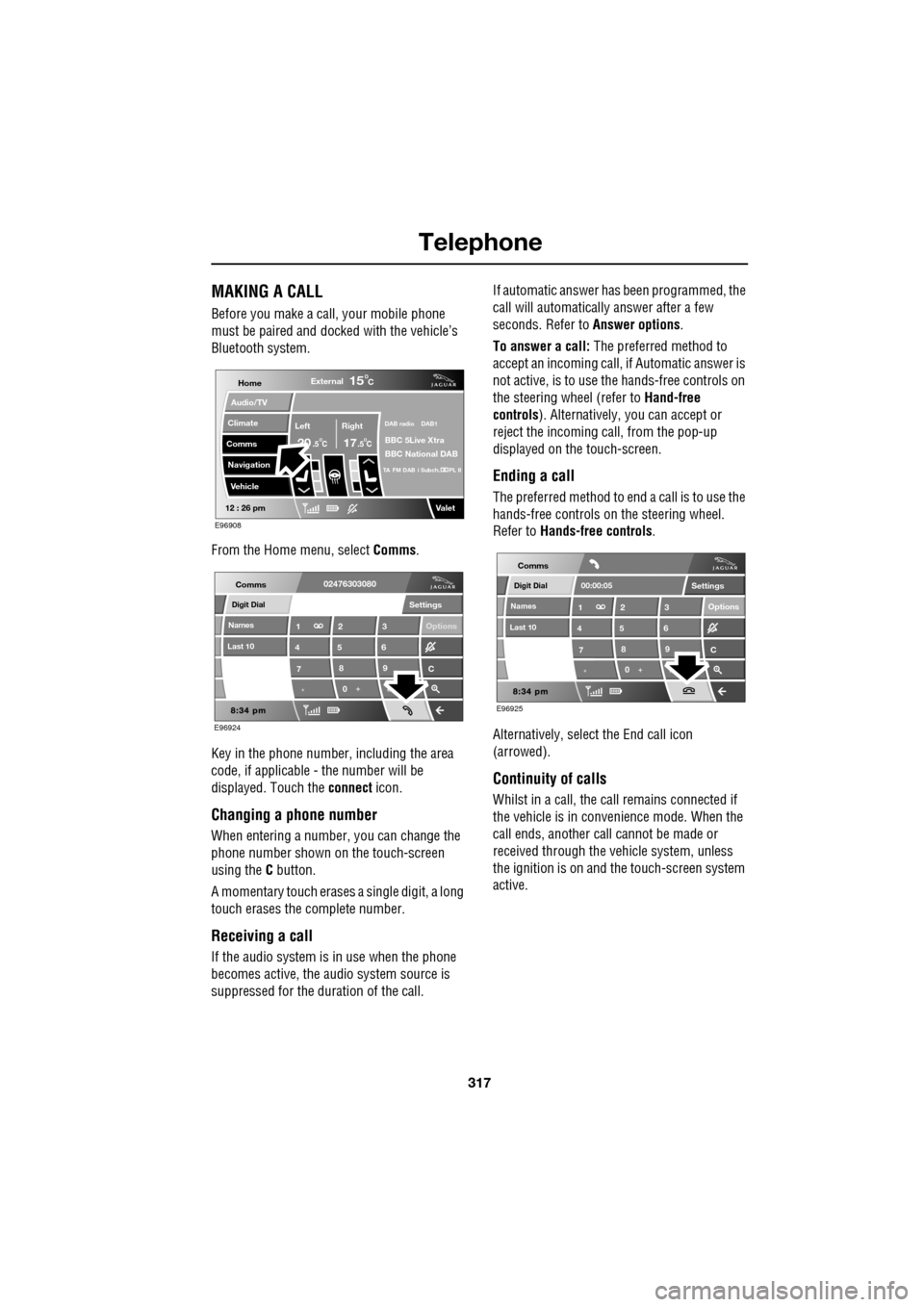
From the Home menu, select Comms.
Key in the phone number, including the area
code, if applicable - the number will be
displayed. Touch the connect icon.
Changing a phone number
When entering a number, you can change the
phone number shown on the touch-screen
using the C button.
A momentary touch erases a single digit, a long
touch erases the complete number.
Receiving a call
If the audio system is in use when the phone
becomes active, the audio system source is
suppressed for the dur ation of the call. If automatic answer has been programmed, the
call will automatically answer after a few
seconds. Refer to
Answer options.
To answer a call: The preferred method to
accept an incoming call, if Automatic answer is
not active, is to use th e hands-free controls on
the steering wheel (refer to Hand-free
controls ). Alternatively, you can accept or
reject the incoming call, from the pop-up
displayed on the touch-screen.
Ending a call
The preferred method to end a call is to use the
hands-free controls on the steering wheel.
Refer to Hands-free controls .
Alternatively, select the End call icon
(arrowed).
Continuity of calls
Whilst in a call, the ca ll remains connected if
the vehicle is in convenience mode. When the
call ends, another call cannot be made or
received through the vehicle system, unless
the ignition is on and the touch-screen system
active.
Home
Audio/TV
Climate
Comms
Navigation
VehicleExternal
Left Right
20 17CC
15C
.5 .5
DAB radio DAB1
BBC 5Live Xtra
BBC National DAB
TA FM DAB i Subch. PL II
Valet12 : 26 pm
E96908
Digit Dial
Names
Last 10
Settings
7
1
4
*8
2
5
0 9
3
6
Options
C
E96924
Comms02476303080Digit Dial
Names
Last 10
Settings
7
1
4
*8
2
5
0 9
3
6
Options
C
E96925
Comms
00:00:05
Page 318 of 391
Telephone
318
NAMES
Directory name search
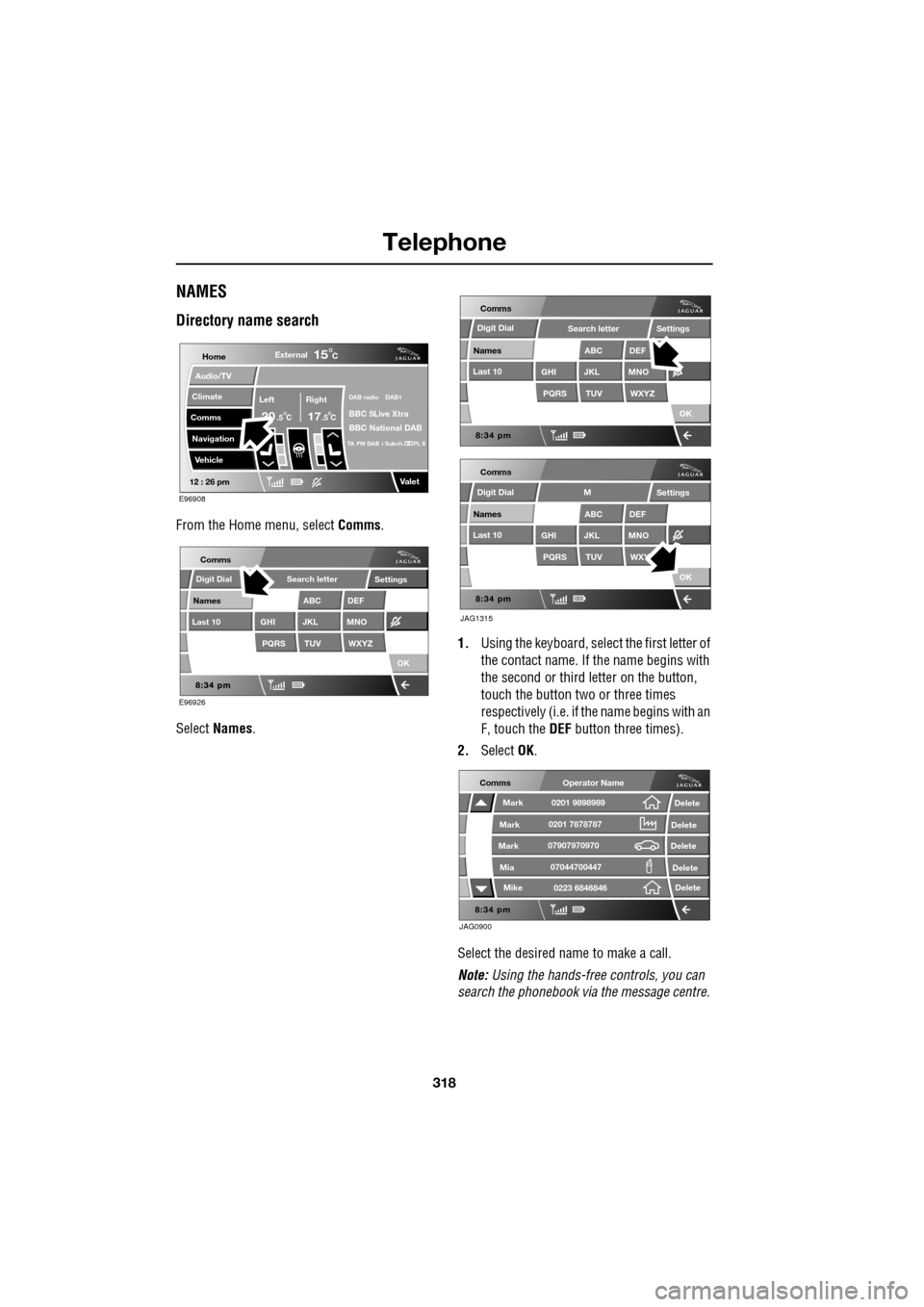
From the Home menu, select Comms.
Select Names . 1.
Using the keyboard, select the first letter of
the contact name. If th e name begins with
the second or third letter on the button,
touch the button two or three times
respectively (i.e. if th e name begins with an
F, touch the DEF button three times).
2. Select OK.
Select the desired name to make a call.
Note: Using the hands-free controls, you can
search the phonebook via the message centre.
Home
Audio/TV
Climate
Comms
Navigation
VehicleExternal
Left Right
20 17CC
15C
.5 .5
DAB radio DAB1
BBC 5Live Xtra
BBC National DAB
TA FM DAB i Subch. PL II
Valet12 : 26 pm
E96908
E96926
Comms
Digit Dial
Names
Last 10
Settings
PQRS
GHITUV
ABC
JKL
WXYZ
DEF
MNO
Search letter
OK
Comms
Comms
Names
Last 10
Settings
PQRS
GHITUV
ABC
JKL
WXYZ
DEF
MNO
Search letter
OK
Names
Last 10
Settings
PQRS
GHITUV
ABC
JKL
WXY
DEF
MNO
M
OK
JAG1315
Digit Dial
Digit Dial
JAG0900
Comms
Delete
Delete
Delete
Delete
Delete
Mark
Mark
Mark
Mike
Mia0201 9898989
0201 7878787
0223 6846846
07907970970
07044700447
Operator Name