service JAGUAR XF 2009 1.G Owner's Manual
[x] Cancel search | Manufacturer: JAGUAR, Model Year: 2009, Model line: XF, Model: JAGUAR XF 2009 1.GPages: 391, PDF Size: 19.32 MB
Page 288 of 391
Digital audio broadcasting
288
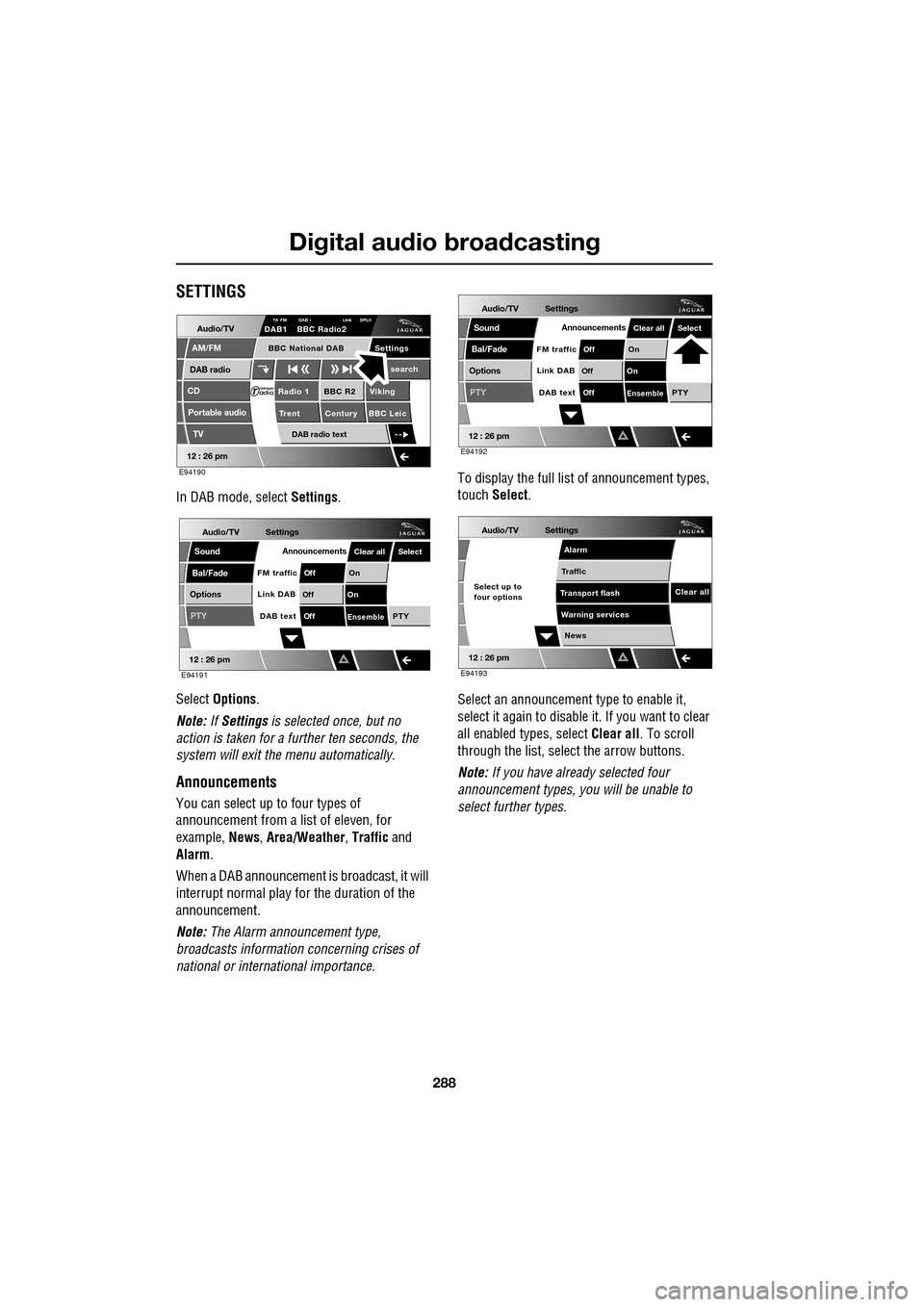
SETTINGS
In DAB mode, select Settings.
Select Options .
Note: If Settings is selected once, but no
action is taken for a further ten seconds, the
system will exit the menu automatically.
Announcements
You can select up to four types of
announcement from a list of eleven, for
example, News, Area/Weather , Traffic and
Alarm .
When a DAB announcement is broadcast, it will
interrupt normal play for the duration of the
announcement.
Note: The Alarm announcement type,
broadcasts information concerning crises of
national or international importance. To display the full list
of announcement types,
touch Select .
Select an announcement type to enable it,
select it again to disabl e it. If you want to clear
all enabled types, select Clear all. To scroll
through the list, select the arrow buttons.
Note: If you have already selected four
announcement types, y ou will be unable to
select further types.
Audio/TV
DAB radio
CD
AM/FM
12 : 26 pm
BBC R2 Viking
Trent Century BBC LeicRadio 1
Settings search
TA FM DAB i Link DPLIIDAB1 BBC Radio2
Portable audio
TV
DAB radio text
BBC National DAB
E94190
Audio/TV
Bal/Fade
Options
Sound
12 : 26 pm
Settings
Announcements
On
Of f
On
Of f
EnsemblePTY
Of f
DAB text
Link DAB
FM trafficPTY
Select
Clear all
E94191
Audio/TV
Bal/Fade
Options
Sound
12 : 26 pm
Settings
Announcements
On
Of f
On
Of f
EnsemblePTY
Of f
DAB text
Link DAB
FM trafficPTY
Select
Clear all
E94192
Audio/TV
12 : 26 pm
Settings
News
Alarm
Traffic
T ransport flash
W
arning services
Clear allSelect up to
four options
E94193
Page 290 of 391
Digital audio broadcasting
290
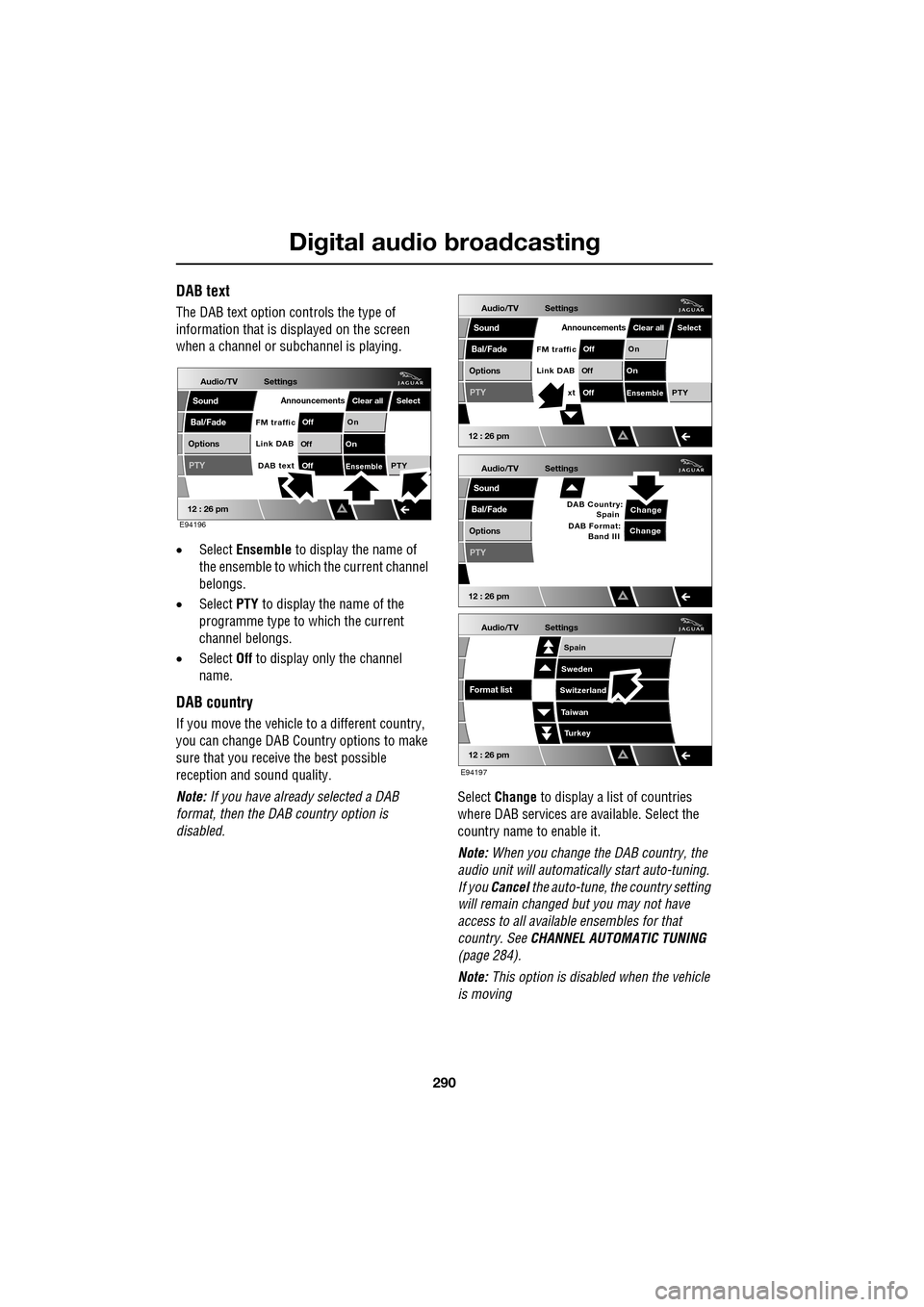
DAB text
The DAB text option controls the type of
information that is displayed on the screen
when a channel or s ubchannel is playing.
• Select Ensemble to display the name of
the ensemble to which the current channel
belongs.
• Select PTY to display the name of the
programme type to which the current
channel belongs.
• Select Off to display only the channel
name.
DAB country
If you move the vehicle to a different country,
you can change DAB Count ry options to make
sure that you receive the best possible
reception and sound quality.
Note: If you have already selected a DAB
format, then the DAB country option is
disabled. Select
Change to display a list of countries
where DAB services are available. Select the
country name to enable it.
Note: When you change the DAB country, the
audio unit will automati cally start auto-tuning.
If you Cancel the auto-tune, the country setting
will remain changed but you may not have
access to all available ensembles for that
country. See CHANNEL AUTOMATIC TUNING
(page 284).
Note: This option is disabled when the vehicle
is moving
Audio/TV
Bal/Fade
Options
Sound
12 : 26 pm
Settings
Announcements
On
Of f
On
Of f
EnsemblePTY
Of f
DAB text
Link DAB
FM trafficPTY
Select
Clear all
E94196
Audio/TV
Bal/Fade
Options
Sound
12 : 26 pm
Settings
Announcements
On
Of f
On
Of f
EnsemblePTY
Of f
xt
Link DAB
FM trafficPTY
Select
Clear all
Audio/TV
Bal/Fade
Options
Sound
12 : 26 pm
Settings
Change
PTY
Change
DAB Country:
Spain
DAB Format: Band III
Audio/TV
12 : 26 pm
Settings
Turkey
Spain
Sweden
Switzerland
T aiwan
Format list
E94197
Page 313 of 391
313
Telephone
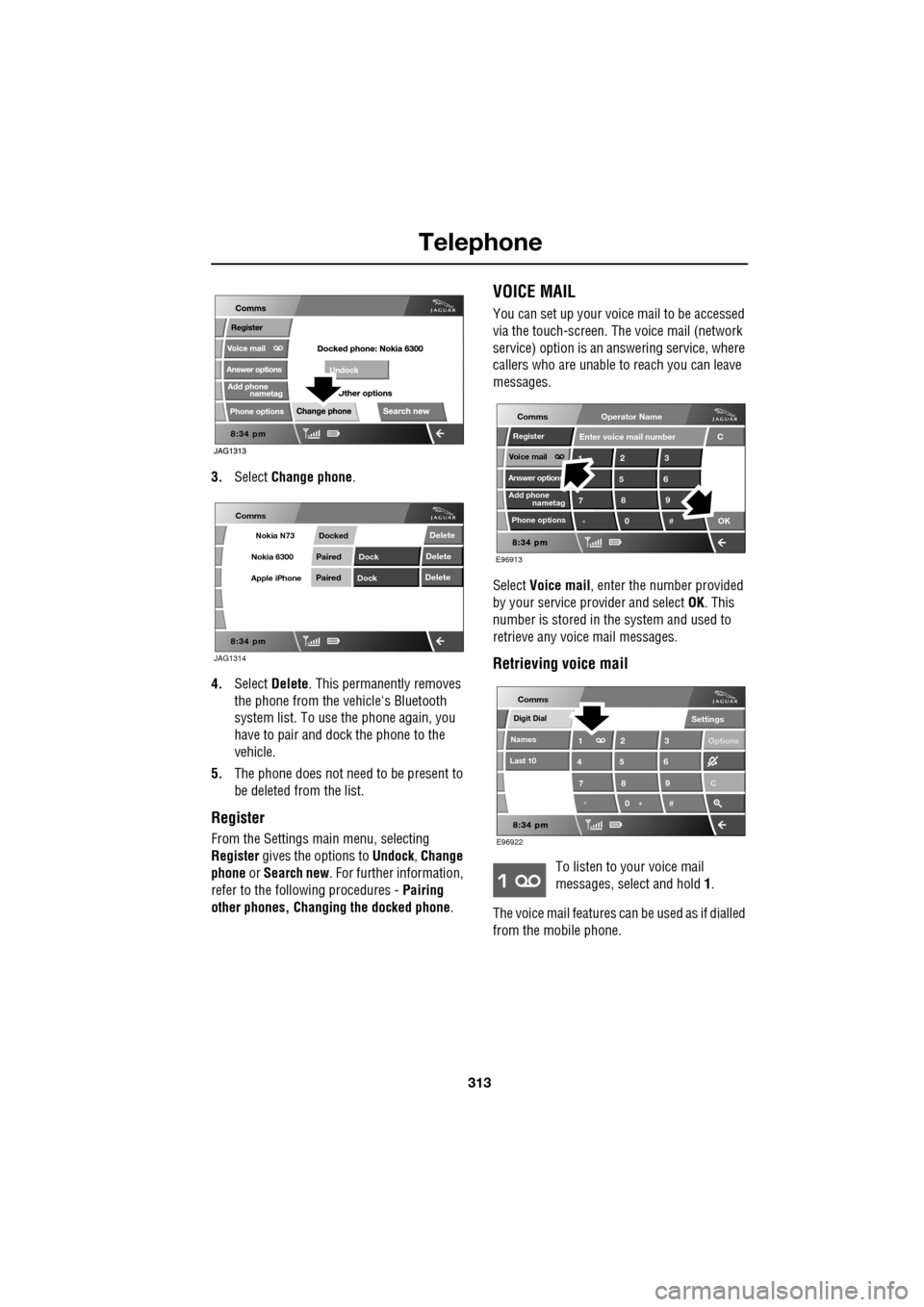
3.Select Change phone .
4. Select Delete . This permanently removes
the phone from the vehicle's Bluetooth
system list. To use the phone again, you
have to pair and dock the phone to the
vehicle.
5. The phone does not need to be present to
be deleted from the list.
Register
From the Settings ma in menu, selecting
Register gives the options to Undock, Change
phone or Search new . For further information,
refer to the following procedures - Pairing
other phones, Changing the docked phone .
VOICE MAIL
You can set up your voice mail to be accessed
via the touch-screen. The voice mail (network
service) option is an answering service, where
callers who are unable to reach you can leave
messages.
Select Voice mail , enter the number provided
by your service provider and select OK. This
number is stored in the system and used to
retrieve any voice mail messages.
Retrieving voice mail
To listen to your voice mail
messages, select and hold 1.
The voice mail features ca n be used as if dialled
from the mobile phone.
JAG1314
Comms
Delete
Delete
Delete
Paired
PairedDock
Dock
Docked
Nokia N73
Nokia 6300
Apple iPhone
C
7
1
*8
2
5
0 9
3
6
OK
Enter voice mail number
nametag
Register
Voice mail
Answer options
Phone options
E96913
Comms
Add phone
Operator Name
*
Digit Dial
Names
Last 10
Settings
7
1
4
*8
2
5
0 9
3
6
Options
E96922
Comms
C
Page 326 of 391
Telephone
326
Storing nametags using the
touch-screen
Nametags can also be added to the system by
using the Add Phone nametag feature on the
touch-screen, as described below.
1. From the Home menu, select the Comms
button.
2. From the Comms menu, select the Add
Phone Nametag button.
3. A numerical touch-screen is displayed.
Enter the phone number.
4. When the number is entered, select the
Add button in the top right-hand corner
and, once the tone ha s sounded, speak the
name that you wish the number to be
stored under.
Note: The storage of the nametag itself is
subject to the nameta g not being too short
(less than 0.4 seconds), too long (longer than
4 seconds), not sounding too much like
another stored nametag and relies on the
repetition of the nametag sounding the same
as the first utterance of it. If any of these criteria
are not met, the system will prompt you to give
a new nametag.
Note: The Add button will be greyed out if the
phone number is not valid.
Dialling a nametag
To dial a number stored under a nametag in the
directory, press and release the voice button
and say Phone dial name . The system will
repeat the command and will prompt you for a
stored nametag by saying Name please. After
the tone, speak the name tag of the required
number. The system will replay the stored
nametag and ask for confirmation that it is
correct. Answer with Yes or No, as appropriate.
Dialling voicemail
The number for your voicemail service needs
to be stored in the system, before using this
facility. To store the voicemail number:
• From the Home menu, select Comms.
• From the Comms menu, select Settings.
• The phone Settings me nu has a Voice mail
button, to allow your voicemail number to
be entered.
To dial the voicemail number, press and
release the Voice button on the steering wheel,
wait for the tone to sound, then say Phone dial
voicemail .
Play all stored nametags
To play all the nametags stored in the directory,
press and release the Voice button on the
steering wheel and after the tone, say Phone
play directory . The list can be interrupted at
any time, by pressing and releasing the button
again. Once interrupted, you can then use the
commands, REPLAY , DIAL , DELETE, EDIT or
CANCEL .
Dialling a nametag stored on the
handset
To dial a number associated with a nametag
stored on the phone hand set, press and release
the Voice button on the steering wheel and,
after the tone, say Phone dial handset name .
Page 333 of 391
333
Television
TV settings
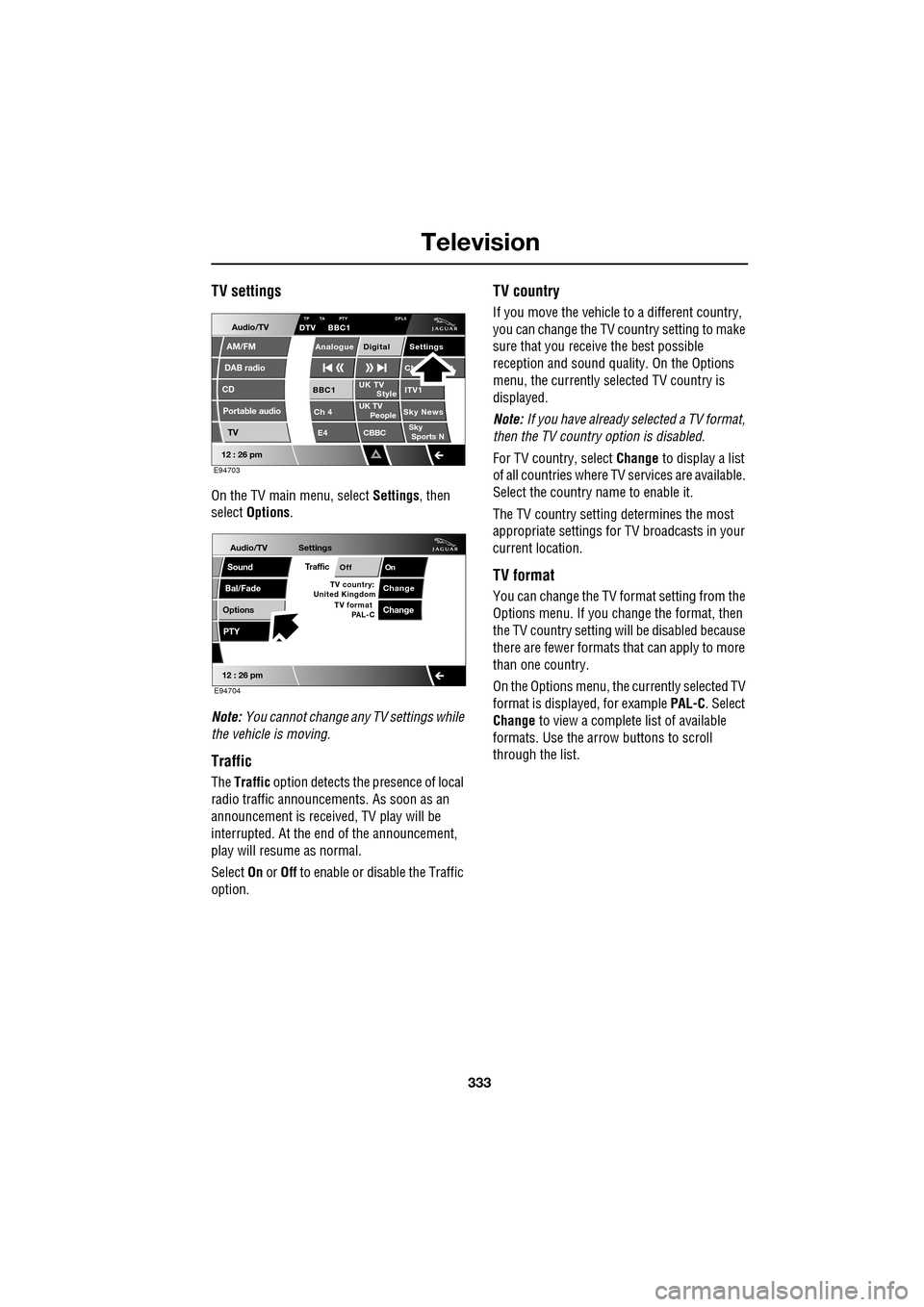
On the TV main menu, select Settings, then
select Options .
Note: You cannot change any TV settings while
the vehicle is moving.
Traffic
The Traffic option detects the presence of local
radio traffic announcements. As soon as an
announcement is received, TV play will be
interrupted. At the end of the announcement,
play will resume as normal.
Select On or Off to enable or disable the Traffic
option.
TV country
If you move the vehicle to a different country,
you can change the TV c ountry setting to make
sure that you receive the best possible
reception and sound quali ty. On the Options
menu, the currently sele cted TV country is
displayed.
Note: If you have already selected a TV format,
then the TV country option is disabled.
For TV country, select Change to display a list
of all countries where TV services are available.
Select the country na me to enable it.
The TV country setting determines the most
appropriate settings for TV broadcasts in your
current location.
TV format
You can change the TV format setting from the
Options menu. If you change the format, then
the TV country setting will be disabled because
there are fewer formats that can apply to more
than one country.
On the Options menu, the currently selected TV
format is displayed, for example PAL-C. Select
Change to view a complete list of available
formats. Use the arrow buttons to scroll
through the list.
Audio/TV
DAB radio
CD
AM/FM
12 : 26 pm
Portable audio
TV
UK TV ITV1
Ch 4 Sky News E4 CBBCBBC1
Settings
Ch t
TA PTY DPLIIDTV BBC1
Style
UK TV People
SkySports NTP
Analogue Digital
E94703
Audio/TV
Bal/Fade
Options
Sound
12 : 26 pm
Settings
TrafficOnOff
ChangeTV country:
PTY
United Kingdom TV format
PAL-CChange
E94704
Page 363 of 391
363
Navigation system
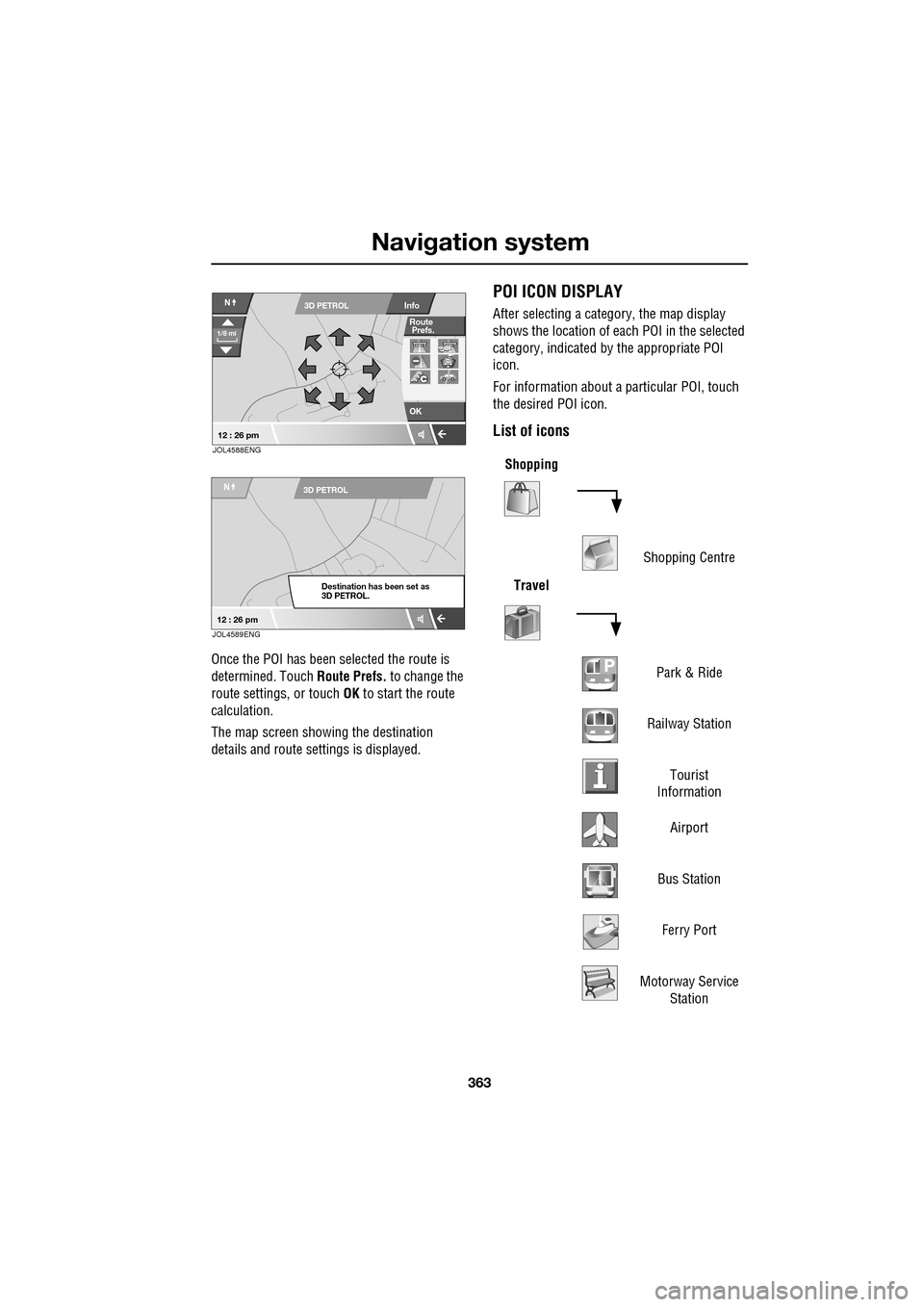
Once the POI has been selected the route is
determined. Touch Route Prefs. to change the
route settings, or touch OK to start the route
calculation.
The map screen showing the destination
details and route sett ings is displayed.
POI ICON DISPLAY
After selecting a category, the map display
shows the location of each POI in the selected
category, indicated by the appropriate POI
icon.
For information about a particular POI, touch
the desired POI icon.
List of icons
OK
Info
N
1/8 mi
3D PETROL
12 : 26 pm
Route
Prefs.
JOL4588ENG
N3D PETROL
Destination has been set as
3D PETROL.
12 : 26 pmJOL4589ENG
Shopping
Shopping Centre
Travel
Park & Ride
Railway Station Tourist
Information
Airport
Bus Station Ferry Port
Motorway Service Station
Page 377 of 391
377
Navigation system
NAVIGATION SHOW TRAFFIC INFORMATION Displays Traffic information.
NAVIGATION HIDE TRAFFIC INFORMATION Hides Traffic information.
NAVIGATION STORE NAME Allows you to store nametags for waypoints or
destinations. Each nametag must meet the following
criteria:
• Be spoken in more than 0.4 seconds, but less than four
seconds.
• Not similar to any other nametag.
• Once stored, you must always speak the name in the
same manner as during storage.
If the criteria is not met, the system will supply one of the
following feedback:
• Name too short, new name please .
• Name too long, new name please .
• (nametag) sounds too much like (another nametag) .
• The names entered are different, new name please.
NAVIGATION (POI) Provided that the map ma gnification is at 1 km (0.6 mile) or
less, this voice command allows you to select up to five
Points Of Interest (POI) from the list below.
• Petrol
• Parking
• Town centre
• Hotel
• Hospital
• Golf course
• Shopping
• Restaurant
• I’m hungry
• Tourist information
• Jaguar (Dealer) - not Australia
• Motorway services
If more then five POIs are selected, a feedback message of
Navigation POI off will be heard. Clear your current
selection to allow furthe r POIs to be displayed.
NAVIGATION POI OFF Hid es all the POI icons.
Voice command
System response
Page 381 of 391
Index
381
A
ABS driving hints . . . . . . . . . . . . . . . . . . 144
ACC . . . . . . . . . . . . . . . . . . . . . . . . . . . . . 159
Accessories . . . . . . . . . . . . . . . . . . . . . . . . 14
Adaptive cruise control . . . . . . . . . . . . . . 159
Adaptive cruise control (ACC)principle of operation . . . . . . . . . . . . . 159
Adaptive dynamics . . . . . . . . . . . . . . . . . 172
Adjusting the headlamps . . . . . . . . . . . . . . 78
Adjusting the steering wheel . . . . . . . . . . . 67 entry and exit mode . . . . . . . . . . . . . . . 67
Advanced emergency brake assist . . . . . 165
AFS . . . . . . . . . . . . . . . . . . . . . . . . . . . . . . 79
Air vents . . . . . . . . . . . . . . . . . . . . . . . . . 115 rear vents . . . . . . . . . . . . . . . . . . . . . . 115
Airbag labels . . . . . . . . . . . . . . . . . . . . . . . 58
Airbag service information . . . . . . . . . . . . 58
Airbag warning lamp . . . . . . . . . . . . . . . . . 57
Alarm trigger information . . . . . . . . . . . . . . . . 39
Alarm sensor override . . . . . . . . . . . . . . . . 22
Approach lamps . . . . . . . . . . . . . . . . . . . . 81
Arming . . . . . . . . . . . . . . . . . . . . . . . . . . . 19
Arming the alarm . . . . . . . . . . . . . . . . . . . 37
alarm indicator . . . . . . . . . . . . . . . . . . . 38
battery-backed sounder . . . . . . . . . . . . 38
full alarm. . . . . . . . . . . . . . . . . . . . . . . . 37
perimeter alarm . . . . . . . . . . . . . . . . . . 37
ASL . . . . . . . . . . . . . . . . . . . . . . . . . . . . . 167
Audible warnings and indicators . . . . . . . 104
Audio portable interface . . . . . . . . . . . . . . . . 131
Audio control. . . . . . . . . . . . . . . . . . . 69, 272
sound settings . . . . . . . . . . . . . . . . . . 272
Audio controls . . . . . . . . . . . . . . . . . . . . . 282 steering wheel controls. . . . . . . . . . . . 282
Audio unit overview. . . . . . . . . . . . . . . . . 269 audio controls . . . . . . . . . . . . . . . . . . . 269
sound system overview . . . . . . . . . . . 270
Autolamps . . . . . . . . . . . . . . . . . . . . . . . . . 76 exit delay. . . . . . . . . . . . . . . . . . . . . . . . 77
windscreen wiper detection . . . . . . . . . 76
Automatic climate control . . . . . . . . . . . . 116 controls . . . . . . . . . . . . . . . . . . . . . . . 116
touch-screen operation . . . . . . . . . . . . 119 Automatic speed limiter . . . . . . . . . . . . . . 167
Automatic speed limiter (ASL)
principle of operation . . . . . . . . . . . . . . 167
Automatic transmission . . . . . . . . . . . . . . 137
automatic mode . . . . . . . . . . . . . . . . . . 139
JaguarDrive selector . . . . . . . . . . . . . . 137
limp-home mode . . . . . . . . . . . . . . . . . 143
manual mode . . . . . . . . . . . . . . . . . . . . 141
message centre display . . . . . . . . . . . . 143
sport mode . . . . . . . . . . . . . . . . . . . . . 140
starting. . . . . . . . . . . . . . . . . . . . . . . . . 139
Autostore control . . . . . . . . . . . . . . . . . . . 274
Auxiliary connections . . . . . . . . . . . . . . . . 299 connecting a USB device . . . . . . . . . . . 300
connecting an auxiliary device . . . . . . . 301
connecting an iPod . . . . . . . . . . . . . . . 300
connecting more than one device . . . . 301
portable audio overview . . . . . . . . . . . . 299
Auxiliary input devices . . . . . . . . . . . . . . . 302 displaying track information. . . . . . . . . 303
playing a portable device . . . . . . . . . . . 302
portable device settings . . . . . . . . . . . . 306
searching a portable device . . . . . . . . . 304
Auxiliary power sockets . . . . . . . . . . . . . . 125
B
Battery charging faults . . . . . . . . . . . . . . . . . . . 213
Battery care . . . . . . . . . . . . . . . . . . . . . . . 212 Battery Monitoring System (BMS) . . . . 213
Battery charging . . . . . . . . . . . . . . . . . . . . 215
Battery warning symbols . . . . . . . . . . . . . 212
Blind spot monitor . . . . . . . . . . . . . . . . . . . 97 sensor blockage . . . . . . . . . . . . . . . . . . . 98
system fault . . . . . . . . . . . . . . . . . . . . . . 98
Block heaters . . . . . . . . . . . . . . . . . . . . . . 134
Bonnet lock . . . . . . . . . . . . . . . . . . . . . . . 195
Booster cables . . . . . . . . . . . . . . . . . . . . . 214
Booster cushions . . . . . . . . . . . . . . . . . . . . 61
Brake fluid check . . . . . . . . . . . . . . . . . . . 206
checking the fluid level. . . . . . . . . . . . . 206
topping up the fluid . . . . . . . . . . . . . . . 207
Brakes
brake pads . . . . . . . . . . . . . . . . . . . . . . 144
pad wear warning. . . . . . . . . . . . . . . . . 144
principle of operation . . . . . . . . . . . . . . 144
Page 382 of 391
Index
382
Bulb changing . . . . . . . . . . . . . . . . . . . . . . 83direction indicator bulb (front) . . . . . . . 84
headlamp unit bulbs . . . . . . . . . . . . . . . 83
high level brake lamp . . . . . . . . . . . . . . 86
number plate lamp bulb . . . . . . . . . . . . 86
rear lamp bulbs . . . . . . . . . . . . . . . . . . . 85
side lamp bulb . . . . . . . . . . . . . . . . . . . 85
side repeater lamp . . . . . . . . . . . . . . . . 85
Bulb specification chart . . . . . . . . . . . . . . . 87
C
Cancel guidance . . . . . . . . . . . . . . . . . . . 350
Car wash . . . . . . . . . . . . . . . . . . . . . . . . . 187
Cautions . . . . . . . . . . . . . . . . . . . . . . . . . . . 9
Changing a bulb . . . . . . . . . . . . . . . . . . . . 83 general information . . . . . . . . . . . . . . . . 83
Changing a fuse. . . . . . . . . . . . . . . . . . . . 241 checking or renewing a blown fuse . . . 241
Changing a road wheel . . . . . . . . . . . . . . 225
locking wheel nuts . . . . . . . . . . . . . . . 226
spare wheel location . . . . . . . . . . . . . . 226
temporary use spare wheel . . . . . . . . . 225
tightening the wheel nuts . . . . . . . . . . 229
wheel changing procedure . . . . . . . . . 228
wheel changing safety. . . . . . . . . . . . . 227
Changing the remote cont rol battery . . . . . 24
Changing the vehicle battery . . . . . . . . . . 215
battery disposal. . . . . . . . . . . . . . . . . . 215
Changing the wiper blades . . . . . . . . . . . . 91 changing the wiper blades . . . . . . . . . . 92
service position . . . . . . . . . . . . . . . . . . . 91
Channel automatic tuning . . . . . . . . . . . . 284
Channel options. . . . . . . . . . . . . . . . . . . . 284 DAB search . . . . . . . . . . . . . . . . . . . . . 286
finding a channel. . . . . . . . . . . . . . . . . 285
finding a subchannel . . . . . . . . . . . . . . 285
finding an ensemble . . . . . . . . . . . . . . 286
Charging the vehicle battery . . . . . . . . . . 215
Checking the wiper blades . . . . . . . . . . . . . 90
Child safety locks . . . . . . . . . . . . . . . . . . . 65
Child seat anchor points . . . . . . . . . . . . . . 62 installing an ISOFIX child seat. . . . . . . . 63
ISOFIX anchor points . . . . . . . . . . . . . . 62
tether anchorage points . . . . . . . . . . . . 64
Child seat positioning . . . . . . . . . . . . . . . . 60 Child seats . . . . . . . . . . . . . . . . . . . . . . . . . 59
child restraint check list . . . . . . . . . . . . . 60
Cleaning the alloy wheels . . . . . . . . . . . . . 187
Cleaning the exterior . . . . . . . . . . . . . . . . . 187
bird droppings . . . . . . . . . . . . . . . . . . . 189
cleaning the rear screen . . . . . . . . . . . . 189
glass surfaces . . . . . . . . . . . . . . . . . . . 189
polishing . . . . . . . . . . . . . . . . . . . . . . . 189
removing grease and tar. . . . . . . . . . . . 189
underbonnet cleaning . . . . . . . . . . . . . . 188
using an automatic wash . . . . . . . . . . . 188
washing the vehicle paintwork . . . . . . . 187
Cleaning the interior . . . . . . . . . . . . . . . . . 189 airbag module covers . . . . . . . . . . . . . . 191
carpet and mats . . . . . . . . . . . . . . . . . . 191
cloth and fabric . . . . . . . . . . . . . . . . . . 190
instrument pack, clock, and audio equipment . . . . . . . . . . . . . . . . . . . . 190
leather . . . . . . . . . . . . . . . . . . . . . . . . . 190
removing stains . . . . . . . . . . . . . . . . . . 190
seat belts . . . . . . . . . . . . . . . . . . . . . . . 191
Climate seats . . . . . . . . . . . . . . . . . . . . . . . 48 backrest ventilation only. . . . . . . . . . . . . 48
cooled ventilation . . . . . . . . . . . . . . . . . . 48
heated ventilation . . . . . . . . . . . . . . . . . . 48
Clock. . . . . . . . . . . . . . . . . . . . . . . . . . . . . 124 setting the clock as the screensaver . . . 124
Compact disc display options . . . . . . . . . . 296
Compact disc pause . . . . . . . . . . . . . . . . . 295
Compact disc player CD compatibility . . . . . . . . . . . . . . . . . . 292
loading CDs . . . . . . . . . . . . . . . . . . . . . 292
Compact disc selection . . . . . . . . . . . . . . . 294
Compass view. . . . . . . . . . . . . . . . . . . . . . 360
Condensation - lamps . . . . . . . . . . . . . . . . . 76
Controls overview . . . . . . . . . . . . . . . . . . . . 12
Coolant check . . . . . . . . . . . . . . . . . . . . . . 204
Cornering lamps . . . . . . . . . . . . . . . . . . . . . 79
Cruise control . . . . . . . . . . . . . . . . . . . 74, 156
principle of operation . . . . . . . . . . . . . . 156
Cup holders . . . . . . . . . . . . . . . . . . . . . . . 126 twin cup holder . . . . . . . . . . . . . . . . . . 127
Page 387 of 391
Index
387
R
Radio data system (RDS) . . . . . . . . . . . . 277alternative frequency (AF) . . . . . . . . . . 277
extended other networks (EON) . . . . . 277
FM text . . . . . . . . . . . . . . . . . . . . . . . . 278
options menu overview. . . . . . . . . . . . 277
regionalisation (REG) . . . . . . . . . . . . . 277
traffic . . . . . . . . . . . . . . . . . . . . . . . . . 277
Radio reception . . . . . . . . . . . . . . . . . . . . 268
Rain sensor . . . . . . . . . . . . . . . . . . . . . . . . 89
RDS-TMC . . . . . . . . . . . . . . . . . . . . . . . . 368 all traffic events . . . . . . . . . . . . . . . . . 371
display . . . . . . . . . . . . . . . . . . . . . . . . 368
dynamic navigation . . . . . . . . . . . . . . . 370
icons . . . . . . . . . . . . . . . . . . . . . . . . . . 368
on route events . . . . . . . . . . . . . . . . . . 371
surveillance setting . . . . . . . . . . . . . . . 372
traffic on route . . . . . . . . . . . . . . . . . . 370
using TMC . . . . . . . . . . . . . . . . . . . . . 370
voice guidance . . . . . . . . . . . . . . . . . . 370
Rear fog lamps . . . . . . . . . . . . . . . . . . . . . 77
Rear lamp removal . . . . . . . . . . . . . . . . . . 82
Rear seats . . . . . . . . . . . . . . . . . . . . . . . . . 45 folding the rear seats . . . . . . . . . . . . . . 46
raising the rear seats . . . . . . . . . . . . . . 47
Rear under floor storage . . . . . . . . . . . . . 182
Rear view camera
principle of operation . . . . . . . . . . . . . 152
Recommended towing weights . . . . . . . . 185
Refuelling . . . . . . . . . . . . . . . . . . . . . . . . 179
fuel consumption . . . . . . . . . . . . . . . . 181
fuel filler . . . . . . . . . . . . . . . . . . . . . . . 179
fuel tank capacity . . . . . . . . . . . . . . . . 179
Remote control . . . . . . . . . . . . . . . . . . . . . 17
Remote control battery . . . . . . . . . . . . . . . 24
Remote control programming . . . . . . . . . . 21
Removing a headlamp. . . . . . . . . . . . . . . . 81
Removing a rear lamp . . . . . . . . . . . . . . . . 82
Repairing minor paint damage . . . . . . . . 191
Repeat compact disc tracks . . . . . . . . . . 296
Run flat tyres. . . . . . . . . . . . . . . . . . . . . . 224
Running out of fuel . . . . . . . . . . . . . . . . . 177 diesel engines . . . . . . . . . . . . . . . . . . . 177 Running-in . . . . . . . . . . . . . . . . . . . . . . . . 154
brakes . . . . . . . . . . . . . . . . . . . . . . . . . 154
engine . . . . . . . . . . . . . . . . . . . . . . . . . 154
engine oil consumption . . . . . . . . . . . . 154
final drive unit . . . . . . . . . . . . . . . . . . . 154
S
Safety . . . . . . . . . . . . . . . . . . . . . . . . . . . . . 10
Safety precautions . . . . . . . . . . . . . . . . . . 174
Satellite signal reception. . . . . . . . . . . . . . 335
Satellite signals . . . . . . . . . . . . . . . . . . . . 334
Seat belt height adjustment . . . . . . . . . . . . 52
Seat belt reminder . . . . . . . . . . . . . . . . . . . 50
Seat beltsprinciple of operation . . . . . . . . . . . . . . . 49
Seats
front . . . . . . . . . . . . . . . . . . . . . . . . . . . . 42
head restraints . . . . . . . . . . . . . . . . . . . . 44
memory . . . . . . . . . . . . . . . . . . . . . . . . . 43
Service data recording . . . . . . . . . . . . . . . . 11
Setting avoid points . . . . . . . . . . . . . . . . . 355
Settings . . . . . . . . . . . . . . . . . . . . . . . . . . 288 announcements . . . . . . . . . . . . . . . . . . 288
DAB country. . . . . . . . . . . . . . . . . . . . . 290
DAB format . . . . . . . . . . . . . . . . . . . . . 291
DAB text . . . . . . . . . . . . . . . . . . . . . . . . 290
FM traffic . . . . . . . . . . . . . . . . . . . . . . . 289
link DAB . . . . . . . . . . . . . . . . . . . . . . . . 289
Shuffle/random. . . . . . . . . . . . . . . . . . . . . 295
Sitting in the correct position . . . . . . . . . . . 41
Smart key . . . . . . . . . . . . . . . . . . . . . . . . . . 17
Smog sensor . . . . . . . . . . . . . . . . . . . . . . 120
Snow chains . . . . . . . . . . . . . . . . . . . . . . . 223
Stability control . . . . . . . . . . . . . . . . . . . . 170 adaptive dynamics . . . . . . . . . . . . . . . . 172
Dynamic Stability Control (DSC) . . . . . 170
JaguarDrive Control scenarios . . . . . . . 173
stability control indicator . . . . . . . . . . . 172
switching between DSC and Trac DSC . 171
switching between DSC OFF and ON . . 171
tracDSC . . . . . . . . . . . . . . . . . . . . . . . . 171
Starting the engine general information . . . . . . . . . . . . . . . 132
Static bending lamps . . . . . . . . . . . . . . . . . 79