parking JAGUAR XF 2009 1.G Owner's Guide
[x] Cancel search | Manufacturer: JAGUAR, Model Year: 2009, Model line: XF, Model: JAGUAR XF 2009 1.GPages: 391, PDF Size: 19.32 MB
Page 248 of 391

Fuses
248
Luggage compartment fuse box
F31 15A Blue Sunroof.
F32 5A Tan Jaguar Smart Key docking station.
F33 5A Tan Diagnostic connector.
F34 5A Tan Instrument pack.
F35 15A Blue Interior lamps.
F36 10A Red Suspension system.
Fuse No Rating
(amps) Fuse
Colour Circuit
Fuse No Rating
(amps) Fuse
Colour Circuit
F1 30A Pink Air blower.
F2 30A Pink Electric parking brake.
F3 - - Not used.
F4 - - Not used.
F5 - - Not used.
F6 - - Not used.
F7 30A Pink Heated rear screen.
F8 30A Pink Audio system (Premium audio only).
F9 50A Red RBD link.
F10 40A Green Rear electronic differential (e-Diff).
F11 - - Not used.
F12 - - Not used.
F13 - - Not used.
F14 5A Tan Telephone.
F15 10A Red TV. DVD. DAB radio.
F16 - - Not used.
F17 - - Not used.
F18 - - Not used.
F19 - - Not used.
F20 - - Not used.
F21 - - Not used.
F22 - - Not used.
Page 254 of 391
Vehicle recovery
254
TRANSPORTING THE VEHICLE
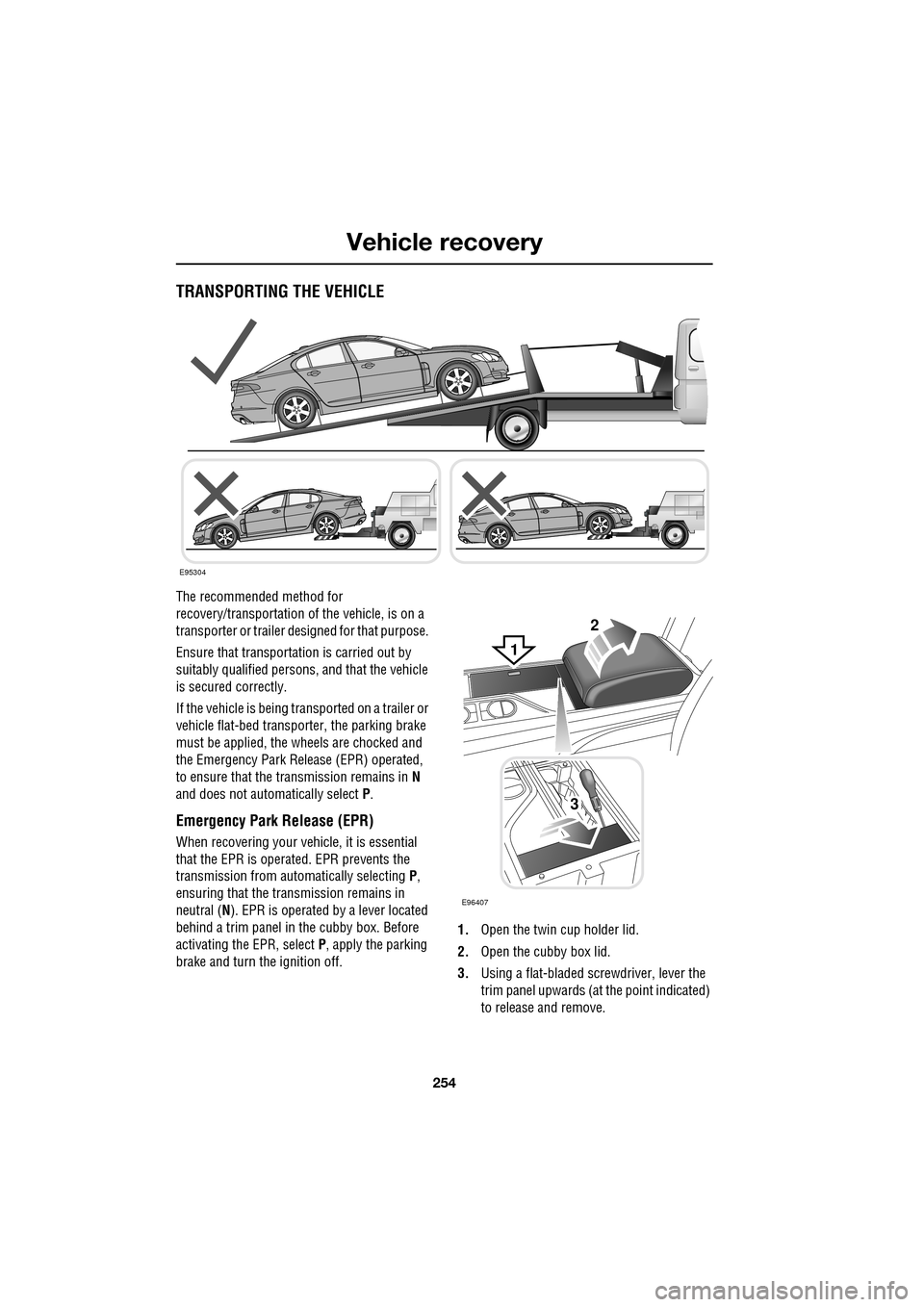
The recommended method for
recovery/transportation of the vehicle, is on a
transporter or trailer de signed for that purpose.
Ensure that transporta tion is carried out by
suitably qualified persons , and that the vehicle
is secured correctly.
If the vehicle is being tr ansported on a trailer or
vehicle flat-bed transporter, the parking brake
must be applied, the wheels are chocked and
the Emergency Park Re lease (EPR) operated,
to ensure that the transmission remains in N
and does not automatically select P.
Emergency Park Release (EPR)
When recovering your vehicle, it is essential
that the EPR is operated. EPR prevents the
transmission from automatically selecting P,
ensuring that the transmission remains in
neutral ( N). EPR is operated by a lever located
behind a trim panel in the cubby box. Before
activating the EPR, select P, apply the parking
brake and turn the ignition off. 1.
Open the twin cup holder lid.
2. Open the cubby box lid.
3. Using a flat-bladed screwdriver, lever the
trim panel upwards (at the point indicated)
to release and remove.
E95304
2
3
E96407
1
Page 256 of 391
Vehicle recovery
256
TOWING THE VEHICLE ON FOUR
WHEELS
Note: The recommended recovery method is
to raise all four wheels.
Towing procedure
1. The vehicle should be parked on firm level
ground, with the parking brake on, and the
gear selector in P (Park).
2. Secure the towing attachment from the
recovery vehicle to the front towing eye.
See TOWING POINTS (page 253).
3. Dock the Jaguar Smart Key and switch on
the ignition. See GENERAL INFORMATION
(page 132). 4.
Apply the foot brake and release the
parking brake.
5. With the foot brake st ill applied, activate
the Emergency Park Release (EPR).
See TRANSPORTING THE VEHICLE
(page 254).
6. The vehicle can now be towed a maximum
of 0.8 km (0.5 miles) at a maximum speed
of 48 kmh (30 mph).
7. Upon arrival at the destination, ensure
wherever possible that the vehicle is
parked on firm level ground.
8. Lower the Emergency Park Release (EPR)
lever, to cancel EP R and to re-engage P
(Park).
9. Apply the parking brake.
10. Switch off the ignition and remove the
Jaguar Smart Key.
11. Remove the towing attachment from the
towing eye.
WARNINGS
Ensure that the remote control
remains docked whilst the vehicle is
being towed. Removing the remote
control will engage the steering lock, which
will prevent the vehicle from steering
correctly.
If the engine cannot be run whilst the
vehicle is being towed, there will be
no power assistance for the steering
or brakes. This will result in greater effort
being required to steer or slow the vehicle, and
greatly increased stopping distances.
CAUTIONS
The vehicle should only be towed in a
forward direction with all four wheels on
the ground.
The vehicle should only be towed for a
maximum of 0.8 km (0.5 miles), at a
maximum speed of 48 km/h (30 mph). Towing
for a greater distance or at a higher speed, may
result in serious damage to the transmission.
CAUTION
Leaving the ignition switched on for
extended periods will cause the battery
to drain.
WARNING
Use extreme caution when detaching
towing equipment. Vehicle movement
is possible which can result in serious
injuries.
Page 272 of 391
Audio unit operation
272
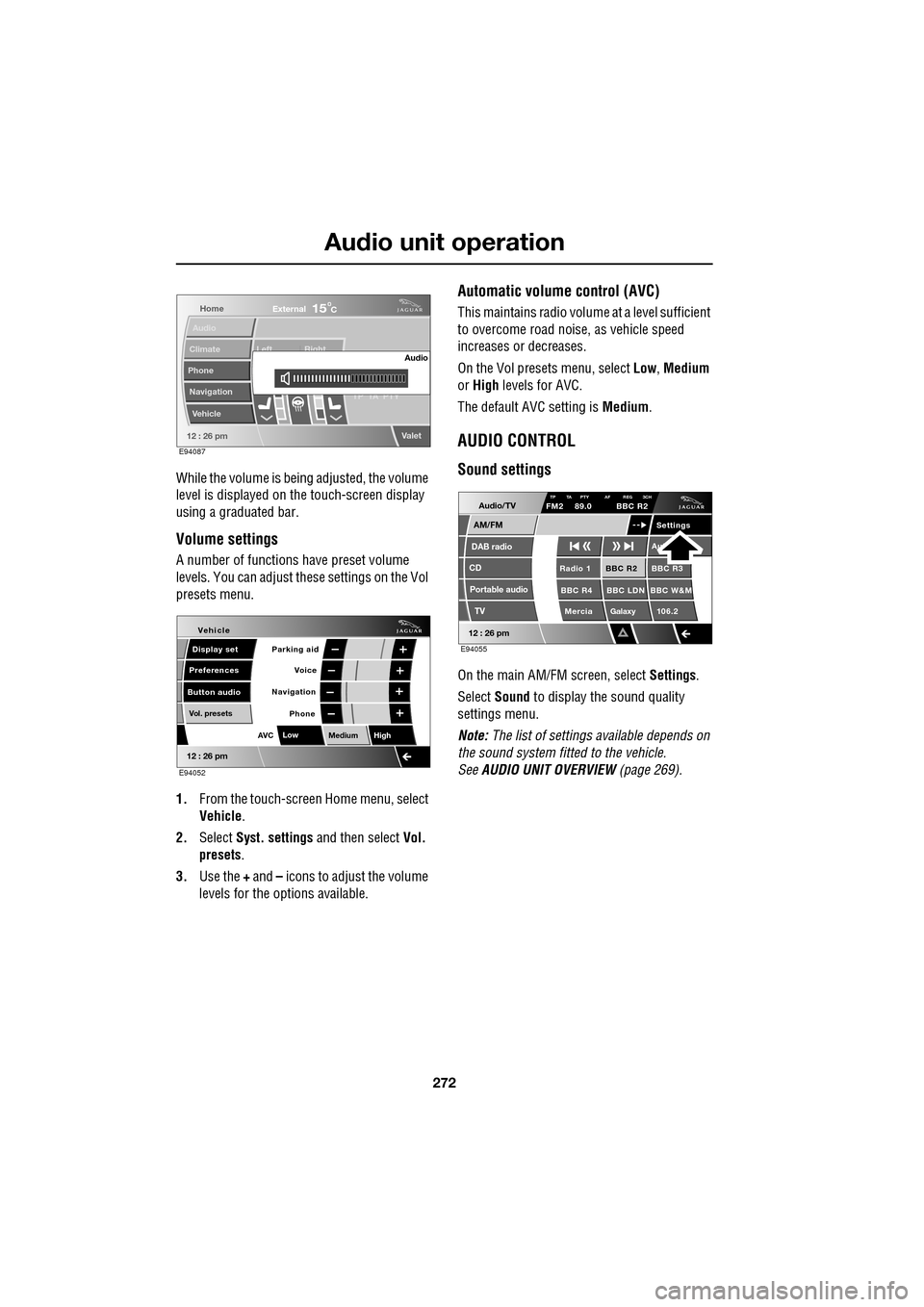
While the volume is being adjusted, the volume
level is displayed on the touch-screen display
using a graduated bar.
Volume settings
A number of functions have preset volume
levels. You can adjust these settings on the Vol
presets menu.
1. From the touch-screen Home menu, select
Vehicle .
2. Select Syst. settings and then select Vol.
presets .
3. Use the + and – icons to adjust the volume
levels for the options available.
Automatic volume control (AVC)
This maintains radio volume at a level sufficient
to overcome road noise, as vehicle speed
increases or decreases.
On the Vol presets menu, select Low, Medium
or High levels for AVC.
The default AVC setting is Medium.
AUDIO CONTROL
Sound settings
On the main AM/FM screen, select Settings.
Select Sound to display the sound quality
settings menu.
Note: The list of settings available depends on
the sound system fitted to the vehicle.
See AUDIO UNIT OVERVIEW (page 269).
Home
Audio
Climate
Phone
Navigation
Vehicle Left Right
TP T
A PTY
Valet12 : 26 pm
Audio
External15C
E94087
Voice
Vehicle
Display set
Preferences
Button audioParking aid
Vol. presets
AVC Low
MediumHigh
12 : 26 pm
Navigation
Phone
E94052
Audio/TV
DAB radio
CD
AM/FM
12 : 26 pm
BBC R2 BBC R3
BBC R4 BBC LDN BBC W&M Mercia Galaxy 106.2Radio 1
Settings
Aut
TP TA PTY AF REG 3CHFM2 89.0 BBC R2
Portable audio TV
E94055
Page 364 of 391
Navigation system
364
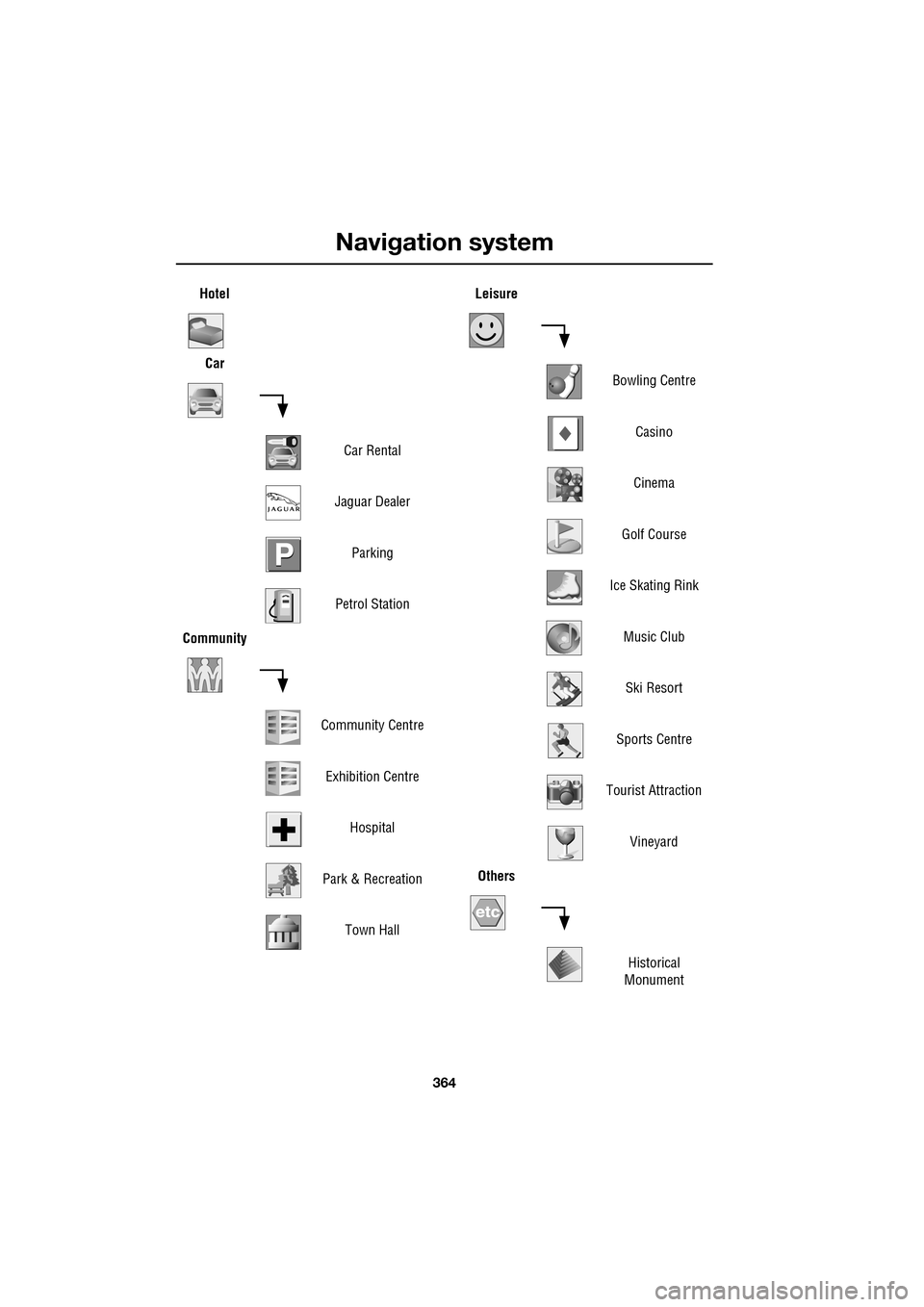
HotelCar
Car Rental
Jaguar Dealer Parking
Petrol Station
Community
Community CentreExhibition Centre Hospital
Park & Recreation Town HallLeisure
Bowling CentreCasino
Cinema
Golf Course
Ice Skating Rink Music ClubSki Resort
Sports Centre
Tourist Attraction Vineyard
Others
Historical
Monument
Page 368 of 391
Navigation system
368
RDS-TMC OVERVIEW
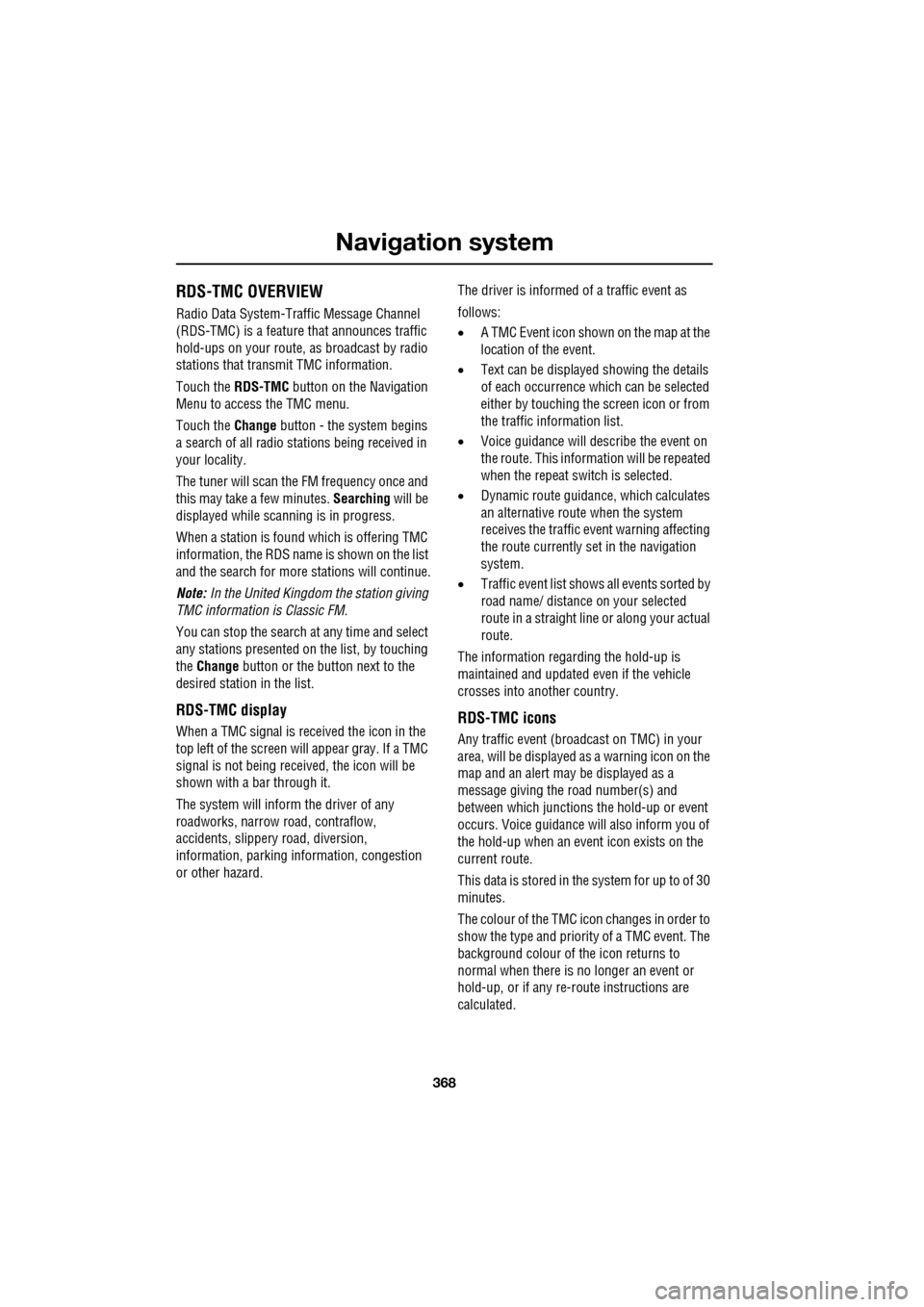
Radio Data System-Traffic Message Channel
(RDS-TMC) is a feature that announces traffic
hold-ups on your route, as broadcast by radio
stations that transmit TMC information.
Touch the RDS-TMC button on the Navigation
Menu to access the TMC menu.
Touch the Change button - the sy stem begins
a search of all radio stat ions being received in
your locality.
The tuner will scan the FM frequency once and
this may take a few minutes. Searching will be
displayed while sca nning is in progress.
When a station is found which is offering TMC
information, the RDS name is shown on the list
and the search for more stations will continue.
Note: In the United Kingdom the station giving
TMC information is Classic FM.
You can stop the search at any time and select
any stations presented on the list, by touching
the Change button or the button next to the
desired station in the list.
RDS-TMC display
When a TMC signal is received the icon in the
top left of the screen w ill appear gray. If a TMC
signal is not being rece ived, the icon will be
shown with a bar through it.
The system will inform the driver of any
roadworks, narrow road, contraflow,
accidents, slippery road, diversion,
information, parking in formation, congestion
or other hazard. The driver is informed of a traffic event as
follows:
•
A TMC Event icon shown on the map at the
location of the event.
• Text can be displaye d showing the details
of each occurrence wh ich can be selected
either by touching the screen icon or from
the traffic information list.
• Voice guidance will describe the event on
the route. This information will be repeated
when the repeat switch is selected.
• Dynamic route guidance, which calculates
an alternative route when the system
receives the traffic event warning affecting
the route currently set in the navigation
system.
• Traffic event list shows all events sorted by
road name/ distance on your selected
route in a straight line or along your actual
route.
The information rega rding the hold-up is
maintained and updated even if the vehicle
crosses into another country.RDS-TMC icons
Any traffic event (broadcast on TMC) in your
area, will be displayed as a warning icon on the
map and an alert may be displayed as a
message giving the road number(s) and
between which junctions the hold-up or event
occurs. Voice guidance will also inform you of
the hold-up when an event icon exists on the
current route.
This data is stored in the system for up to of 30
minutes.
The colour of the TMC icon changes in order to
show the type and priori ty of a TMC event. The
background colour of the icon returns to
normal when there is no longer an event or
hold-up, or if any re-route instructions are
calculated.
Page 369 of 391
369
Navigation system
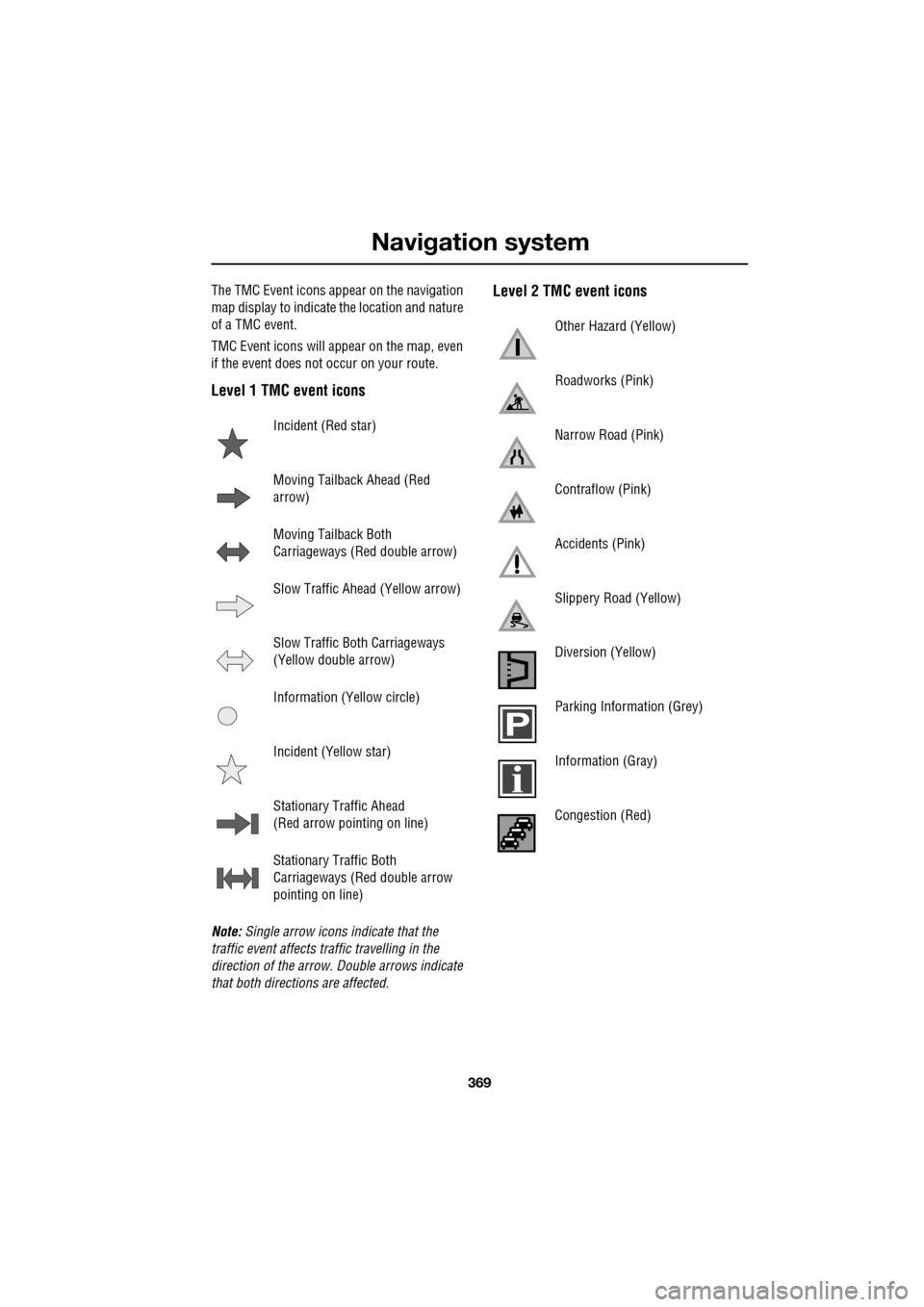
The TMC Event icons appear on the navigation
map display to indicate the location and nature
of a TMC event.
TMC Event icons will appear on the map, even
if the event does not occur on your route.
Level 1 TMC event icons
Note: Single arrow icons indicate that the
traffic event affects traffic travelling in the
direction of the arrow. Double arrows indicate
that both directions are affected.
Level 2 TMC event icons
Incident (Red star)
Moving Tailback Ahead (Red
arrow)
Moving Tailback Both
Carriageways (Red double arrow)
Slow Traffic Ahead (Yellow arrow)
Slow Traffic Both Carriageways
(Yellow double arrow)
Information (Yellow circle)
Incident (Yellow star)
Stationary Traffic Ahead
(Red arrow pointing on line)
Stationary Traffic Both
Carriageways (Red double arrow
pointing on line)
Other Hazard (Yellow)
Roadworks (Pink)
Narrow Road (Pink)
Contraflow (Pink)
Accidents (Pink)
Slippery Road (Yellow)
Diversion (Yellow)
Parking Information (Grey)
Information (Gray)
Congestion (Red)
Page 377 of 391
377
Navigation system
NAVIGATION SHOW TRAFFIC INFORMATION Displays Traffic information.
NAVIGATION HIDE TRAFFIC INFORMATION Hides Traffic information.
NAVIGATION STORE NAME Allows you to store nametags for waypoints or
destinations. Each nametag must meet the following
criteria:
• Be spoken in more than 0.4 seconds, but less than four
seconds.
• Not similar to any other nametag.
• Once stored, you must always speak the name in the
same manner as during storage.
If the criteria is not met, the system will supply one of the
following feedback:
• Name too short, new name please .
• Name too long, new name please .
• (nametag) sounds too much like (another nametag) .
• The names entered are different, new name please.
NAVIGATION (POI) Provided that the map ma gnification is at 1 km (0.6 mile) or
less, this voice command allows you to select up to five
Points Of Interest (POI) from the list below.
• Petrol
• Parking
• Town centre
• Hotel
• Hospital
• Golf course
• Shopping
• Restaurant
• I’m hungry
• Tourist information
• Jaguar (Dealer) - not Australia
• Motorway services
If more then five POIs are selected, a feedback message of
Navigation POI off will be heard. Clear your current
selection to allow furthe r POIs to be displayed.
NAVIGATION POI OFF Hid es all the POI icons.
Voice command
System response
Page 383 of 391
Index
383
D
Destination entry . . . . . . . . . . . . . . . . . . . 356choosing your route . . . . . . . . . . . . . . 356
coordinates . . . . . . . . . . . . . . . . . . . . . 357
map . . . . . . . . . . . . . . . . . . . . . . . . . . 357
memory . . . . . . . . . . . . . . . . . . . . . . . 358
motorway . . . . . . . . . . . . . . . . . . . . . . 359
points of interest. . . . . . . . . . . . . . . . . 356
postcode . . . . . . . . . . . . . . . . . . . . . . . 357
previous . . . . . . . . . . . . . . . . . . . . . . . 358
setting a destination . . . . . . . . . . . . . . 356
start guidance . . . . . . . . . . . . . . . . . . . 356
Diesel particulate filter (DPF). . . . . . . . . . 135 regeneration . . . . . . . . . . . . . . . . . . . . 135
regeneration procedure. . . . . . . . . . . . 136
warning indicators a nd messages. . . . 135
Digital audio broadcasting general information. . . . . . . . . . . . . . . 280
Dimensions . . . . . . . . . . . . . . . . . . . . . . . 260 brake pedal travel (China only) . . . . . . 261
wheel alignment data (C hina only) . . . 261
Dipstick - electronic . . . . . . . . . . . . 199, 202
Direction indicators . . . . . . . . . . . . . . . . . . 78
Disability modifications . . . . . . . . . . . . . . . 11
Disarming . . . . . . . . . . . . . . . . . . . . . . . . . 18
Disarming the alarm . . . . . . . . . . . . . . . . . 38 deactivating the alarm when triggered . 38
disarming when the unlock button fails to work . . . . . . . . . . . . . . . . . . . . . . . . . 38
Display options . . . . . . . . . . . . . . . . . . . . 283
DAB radio text. . . . . . . . . . . . . . . . . . . 283
touch-screen information panel . . . . . 283
Docking the Jaguar Smart Key . . . . . . . . . 20
DPF . . . . . . . . . . . . . . . . . . . . . . . . . . . . . 135
Drive control general information. . . . . . . . . . . . . . . 169
Driving after a collision . . . . . . . . . . . . . . 251 before starting or driving . . . . . . . . . . 251
resetting the fuel cut-off . . . . . . . . . . . 251
when driving . . . . . . . . . . . . . . . . . . . . 252
Dynamic mode . . . . . . . . . . . . . . . . . . . . 170
E
Economical driving . . . . . . . . . . . . . . . . . . 155 driving tips for economy . . . . . . . . . . . 155
maintenance and fuel economy . . . . . . 155
E-Diff (differential) . . . . . . . . . . . . . . . . . . 172
Ejecting compact discs . . . . . . . . . . . . . . . 294
Electric parking brake (EPB) . . . . . . . . . . . 146
Electric seats . . . . . . . . . . . . . . . . . . . . . . . 42 driving position memory . . . . . . . . . . . . 43
Electric sunroof . . . . . . . . . . . . . . . . . . . . 121 anti-trap mechanism . . . . . . . . . . . . . . 121
calibration . . . . . . . . . . . . . . . . . . . . . . 122
operation . . . . . . . . . . . . . . . . . . . . . . . 121
sunroof blind . . . . . . . . . . . . . . . . . . . . 122
Electric windows . . . . . . . . . . . . . . . . . . . . 93
one-shot operation. . . . . . . . . . . . . . . . . 93
overriding anti-trap protection . . . . . . . . 93
window isolator . . . . . . . . . . . . . . . . . . . 94
window reset . . . . . . . . . . . . . . . . . . . . . 93
Emergency brake assist (advanced) . . . . . 165
Emergency key blade . . . . . . . . . . . . . . 25, 28
Engine block heaters . . . . . . . . . . . . . . . . . . . . 134
Engine compartment overview . . . . . . . . . 196
brake fluid reservoir . . . . . . . . . . . . . . . 196
coolant reservoir . . . . . . . . . . . . . . . . . 197
engine oil dipsticks . . . . . . . . . . . . . . . 197
engine oil filler . . . . . . . . . . . . . . . . . . . 196
power steering fluid reservoir . . . . . . . 197
washer fluid reservoir . . . . . . . . . . . . . 196
Engine coolant check . . . . . . . . . . . . . . . . 204 checking the coolant level . . . . . . . . . . 204
topping up the coolant . . . . . . . . . . . . . 205
Engine number . . . . . . . . . . . . . . . . . . . . . 257 diesel engines . . . . . . . . . . . . . . . . . . . 257
petrol engines . . . . . . . . . . . . . . . . . . . 257
Engine oil check engine oil consumption . . . . . . . . 199, 201
engine oil specification. . . . . . . . . . . . . 203
V6 diesel engines . . . . . . . . . . . . . . . . . 201
V6 petrol engines . . . . . . . . . . . . . . . . . 197
V8 petrol engines . . . . . . . . . . . . . . . . . 199
Engine specifications . . . . . . . . . . . . . . . . 258
EPB. . . . . . . . . . . . . . . . . . . . . . . . . . . . . . 146
Errors in vehicle position . . . . . . . . . . . . . 335
Page 386 of 391
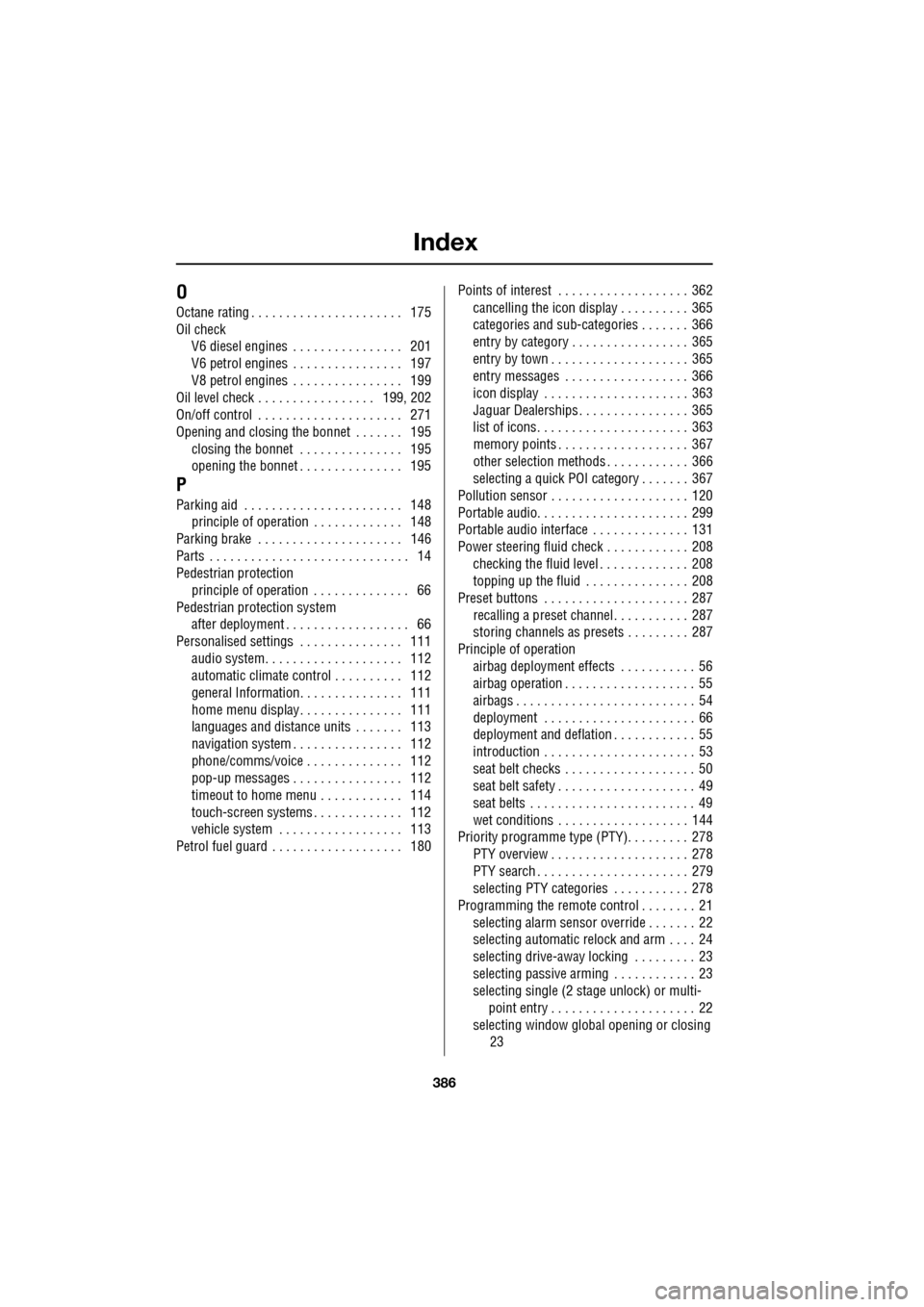
Index
386
O
Octane rating . . . . . . . . . . . . . . . . . . . . . . 175
Oil checkV6 diesel engines . . . . . . . . . . . . . . . . 201
V6 petrol engines . . . . . . . . . . . . . . . . 197
V8 petrol engines . . . . . . . . . . . . . . . . 199
Oil level check . . . . . . . . . . . . . . . . . 199, 202
On/off control . . . . . . . . . . . . . . . . . . . . . 271
Opening and closing the bonnet . . . . . . . 195 closing the bonnet . . . . . . . . . . . . . . . 195
opening the bonnet . . . . . . . . . . . . . . . 195
P
Parking aid . . . . . . . . . . . . . . . . . . . . . . . 148principle of operation . . . . . . . . . . . . . 148
Parking brake . . . . . . . . . . . . . . . . . . . . . 146
Parts . . . . . . . . . . . . . . . . . . . . . . . . . . . . . 14
Pedestrian protection principle of operation . . . . . . . . . . . . . . 66
Pedestrian protection system after deployment . . . . . . . . . . . . . . . . . . 66
Personalised settings . . . . . . . . . . . . . . . 111
audio system. . . . . . . . . . . . . . . . . . . . 112
automatic climate control . . . . . . . . . . 112
general Information. . . . . . . . . . . . . . . 111
home menu display. . . . . . . . . . . . . . . 111
languages and distance un its . . . . . . . 113
navigation system . . . . . . . . . . . . . . . . 112
phone/comms/voice . . . . . . . . . . . . . . 112
pop-up messages . . . . . . . . . . . . . . . . 112
timeout to home menu . . . . . . . . . . . . 114
touch-screen systems . . . . . . . . . . . . . 112
vehicle system . . . . . . . . . . . . . . . . . . 113
Petrol fuel guard . . . . . . . . . . . . . . . . . . . 180 Points of interest . . . . . . . . . . . . . . . . . . . 362
cancelling the icon display . . . . . . . . . . 365
categories and sub-categories . . . . . . . 366
entry by category . . . . . . . . . . . . . . . . . 365
entry by town . . . . . . . . . . . . . . . . . . . . 365
entry messages . . . . . . . . . . . . . . . . . . 366
icon display . . . . . . . . . . . . . . . . . . . . . 363
Jaguar Dealerships . . . . . . . . . . . . . . . . 365
list of icons. . . . . . . . . . . . . . . . . . . . . . 363
memory points . . . . . . . . . . . . . . . . . . . 367
other selection methods . . . . . . . . . . . . 366
selecting a quick POI category . . . . . . . 367
Pollution sensor . . . . . . . . . . . . . . . . . . . . 120
Portable audio. . . . . . . . . . . . . . . . . . . . . . 299
Portable audio interface . . . . . . . . . . . . . . 131
Power steering fluid check . . . . . . . . . . . . 208 checking the fluid level . . . . . . . . . . . . . 208
topping up the fluid . . . . . . . . . . . . . . . 208
Preset buttons . . . . . . . . . . . . . . . . . . . . . 287 recalling a preset channel . . . . . . . . . . . 287
storing channels as presets . . . . . . . . . 287
Principle of operation airbag deployment effects . . . . . . . . . . . 56
airbag operation . . . . . . . . . . . . . . . . . . . 55
airbags . . . . . . . . . . . . . . . . . . . . . . . . . . 54
deployment . . . . . . . . . . . . . . . . . . . . . . 66
deployment and deflation . . . . . . . . . . . . 55
introduction . . . . . . . . . . . . . . . . . . . . . . 53
seat belt checks . . . . . . . . . . . . . . . . . . . 50
seat belt safety . . . . . . . . . . . . . . . . . . . . 49
seat belts . . . . . . . . . . . . . . . . . . . . . . . . 49
wet conditions . . . . . . . . . . . . . . . . . . . 144
Priority programme type (PTY). . . . . . . . . 278
PTY overview . . . . . . . . . . . . . . . . . . . . 278
PTY search . . . . . . . . . . . . . . . . . . . . . . 279
selecting PTY categories . . . . . . . . . . . 278
Programming the remote control . . . . . . . . 21 selecting alarm sensor override . . . . . . . 22
selecting automatic relock and arm . . . . 24
selecting drive-away locking . . . . . . . . . 23
selecting passive arming . . . . . . . . . . . . 23
selecting single (2 stage unlock) or multi-
point entry . . . . . . . . . . . . . . . . . . . . . 22
selecting window global opening or closing 23