Display JAGUAR XF 2009 1.G Workshop Manual
[x] Cancel search | Manufacturer: JAGUAR, Model Year: 2009, Model line: XF, Model: JAGUAR XF 2009 1.GPages: 391, PDF Size: 19.32 MB
Page 144 of 391
Brakes
144
PRINCIPLE OF OPERATION
Brake pads
Brake pads require a period of bedding in when
new. Drive with extra caution for the first
500 km (300 miles) to avoid the need for heavy
braking.
Brake pad wear warning
When the brake pads are wearing low, the
warning message BRAKE PADS LOW is
displayed in the message centre. Arrange for
your vehicle to be se en by your Dealer/
Authorised Repairer at the earliest opportunity.
Wet conditions
Driving through heavy ra in or water can have
an adverse effect on braking efficiency. Under
such circumstances, it is recommended that
you lightly a pply the brakes intermittently to
dry the brakes.
ABS warning indicator
If this amber warning indicator
illuminates while driving and/or
ABS FAULT is displayed in the
message centre, drive with extra caution, avoid
heavy braking where possible, and seek
qualified assistance as soon as possible.
If this red warning indicator
illuminates while driving and/or the
message LOW BRAKE FLUID is
displayed in the message centre, check the
brake fluid level at the earliest opportunity and
top-up as required. See BRAKE FLUID CHECK
(page 206).
HINTS ON DRIVING WITH ABS
ABS (Anti-Lock Braking System) allows
maximum brake pressure, and thus maximum
braking efficiency, to be applied, and prevents
the road wheels locking. This allows the driver
to retain steering control during heavy braking
under most road conditions.
ABS optimises tyre to road adhesion under
maximum braking conditions, though it cannot
provide increased cornering ability.
WARNINGS
Do not rest your foot on the brake
pedal whilst the vehicle is in motion.
This may cause a light application of
the brakes, which can result in overheating,
reduced brake performance, and excessive
brake wear.
Never allow the vehicle to coast
(freewheel) with the engine turned
off. The engine must be running to
provide full braking assistance. The brakes will
still function with the e ngine off, but far more
pressure will be required to operate them.
If the red brake warning indicator
illuminates, safely bring the vehicle to
a stop, as quickly as possible. Seek
qualified assistance before proceeding.
Never place non-approved floor
matting or any ot her obstructions
under the brake pedal. This restricts
pedal travel and braking efficiency.
WARNINGS
ABS cannot overcome the physical
limitations of braking distance. Nor
can it overcome the lack of grip on a
road surface (e.g. aquaplaning on water).
Braking distance is increased on a
slippery surface. This applies to all
vehicles, even those fitted with ABS.
The driver should not be tempted to
take risks when driving, in the hope
that ABS will correct errors of
judgement. In all cases it remains the driver's
responsibility to driv e with due care and
attention, payi ng particular attention to the
effects of speed, weather, road conditions etc.
Page 145 of 391
145
Brakes
During emergency braking conditions ABS
constantly monitors the speed of each wheel.
ABS varies the brake pressure to individual
wheels, according to the grip available. The
constant alteration of brake pressure can be
felt as a pulsing sensation through the brake
pedal. This is not a caus e for concern, as it is
designed to demonstrate to the driver that ABS
is operating.
ABS braking techniques
For optimum ABS performance, these
instructions on braking techniques during ABS
operation should be followed:
• Do not release the brake pressure when
the pulsating effect is felt. Maintain a
constant pressure until the manoeuvre is
completed.
• To familiarise y ourself with the feel of the
brake pedal during ABS braking, practise
an emergency stop pr ocedure, always
making sure it is safe to do so. With the
seat belts fitted to all occupants, drive the
vehicle at 32 km/h (20 mph) and brake
sharply.
• ABS enables the driver to steer around
obstacles during em ergency braking.
However, the consequences of turning
sharply at high speed cannot be overcome
by the ABS.
• Do not attempt to pump the brakes to
avoid skidding, as this can interfere with
ABS operation. The ABS will not allow the
wheels to skid under normal road
conditions.
• The ABS will tend to keep the vehicle
straight during braki ng. Because braking
distances may increase under certain road
conditions, it is nece ssary to plan and
make turning manoeuvres as early as
possible.
Electronic Brakeforce Distribution (EBD)
EBD balances the distribution of braking forces
between the wheels on the front and rear axles,
to maintain maximum braking under all vehicle
loading conditions.
For example; Under light loads, EBD applies
less braking effort to the rear wheels, to
maintain stability. Conv ersely, it allows full
braking effort to the rear wheels when the
vehicle is towing or is heavily laden.
A fault with the EBD system is
indicated by illumination of the red
brake warning indicator and the
message EBD FAULT is displayed in the
message centre. Gently stop the vehicle, as
soon as safety permit s, and seek qualified
assistance.
Page 146 of 391
Brakes
146
Emergency Brake Assist (EBA)
The EBA system measures the rate at which the
brake pressure increases. If the system detects
an emergency braking situation, EBA
automatically init iates full braking effect. This
can reduce stopping dist ances in critical
situations.
EBA stops operating as soon as the brake pedal
is released.
EBA is part of the Dynamic Stability
Control (DSC) system and a fault
with the EBA system is indicated by
the amber DSC warning indicator illuminating
and DSC NOT AVAILABLE (with amber
backlight) displaying in the message centre.
Seek qualified assistan ce as soon as possible.
Brake vacuum assist
(V6 petrol models only)
When the engine is cold and/or engine vacuum
is low, Brake vacuum assist provides additional
brake pedal assistance. When the function is
operating, a pulsation ma y be felt through the
brake pedal - this is not a cause for concern.
A fault is indicate d by the message BRAKE
ASSIST FAULT (with amber backlight)
appearing in the message centre. Increased
brake pedal effort may be required to slow the
vehicle when the engine is cold and/or engine
vacuum is low. Seek qualified assistance.
ELECTRIC PARKING BRAKE (EPB)
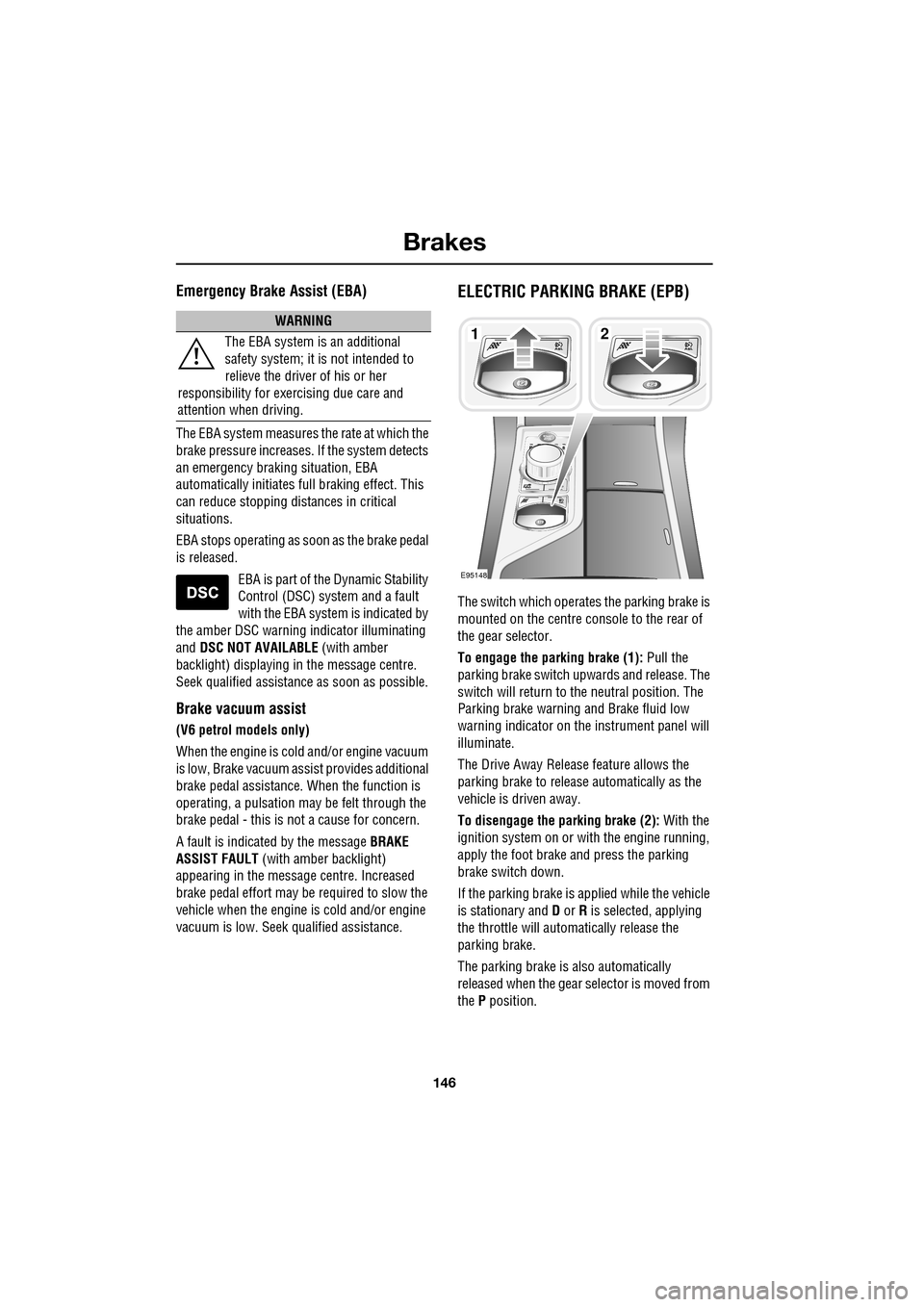
The switch which operate s the parking brake is
mounted on the centre c onsole to the rear of
the gear selector.
To engage the parking brake (1): Pull the
parking brake switch up wards and release. The
switch will return to the neutral position. The
Parking brake warning and Brake fluid low
warning indicator on the instrument panel will
illuminate.
The Drive Away Release feature allows the
parking brake to release automatically as the
vehicle is driven away.
To disengage the parking brake (2): With the
ignition system on or with the engine running,
apply the foot brake and press the parking
brake switch down.
If the parking brake is a pplied while the vehicle
is stationary and D or R is selected, applying
the throttle will auto matically release the
parking brake.
The parking brake is also automatically
released when the gear selector is moved from
the P position.
WARNING
The EBA system is an additional
safety system; it is not intended to
relieve the driver of his or her
responsibility for exercising due care and
attention when driving.12
E95148
Page 147 of 391
147
Brakes
If the parking brake is inadvertently applied
when the vehicle is moving at above 3 km/h
(1.8 mph), PARK BRAKE APPLIED is displayed
in the message centre, the warning indicator in
the instrument panel will illuminate and a
warning chime will sound.
If the parking brake is a pplied whilst the vehicle
is moving, releasing the switch will disengage
the parking brake. The parking brake cannot be
applied when the vehicle is moving, if the
accelerator pedal is pressed.
Note: If the vehicle is in motion, the parking
brake should only be used as an emergency
brake.
The warning indicator in the instrument panel
will remain on for a short time, if the parking
brake is applied when the ignition system is
reverted to the convenience mode.
If a fault in the system is detected,
the amber brake warning indicator
will illuminate and PARK BRAKE
FAULT or CANNOT APPLY PARK BRAKE will
be displayed in the message centre. Seek
qualified assistance as soon as possible.
If the battery has been discharged or
disconnected, APPLY FOOT AND PARK BRAKE
will be displayed in the message centre when
the ignition is next switched on. Depress the
foot brake and pull the parking brake switch up
to apply the parking brake. This is required to
reset the parking brake system. The parking
brake will now function correctly.
CAUTION
Always apply the parking brake when
the vehicle is parked.
Page 148 of 391

Parking aid
148
PRINCIPLE OF OPERATION
Note: Once the system has been activated by
selecting reverse or using the switch, the front
and rear sensors are active when the gear
selector is in neutral. Therefore, if an obstacle
is detected an audible warning tone will sound.
The parking aid is automatically in standby
when the ignition is on and provides the driver
with information on most obstructions, and
their distance from the vehicle, when
manoeuvring. This is ac hieved by using four
ultrasonic sensors on each bumper.
When objects are detected the Park aid will
emit a warning tone which increases in
frequency and then becomes constant, as the
vehicle gets closer to the object.
USING THE PARKING AID
Touch-screen
To set the volume of the parking aid warning
tones:
• Select Vehicle from the touch-screen
Home menu, then select Veh. settings.
• Select Parking , then select Vol. presets.
Touch the Parking aid + or - button to increase
or decrease the warning tone volume.
Note: This adjusts both front and rear speaker
volume.
WARNINGS
It remains the driver’s responsibility
to be vigilant when reversing. Small
children or animals may not be
detected by the system.
It remains the driver’s responsibility
to detect obstacles and estimate the
vehicle’s distance from them. Some
overhanging objects , barriers, thin
obstructions or painted surfaces which could
possibly cause damage to the vehicle may not
be detected by the system. Always be vigilant
when reversing.
CAUTIONS
Objects moving away from the vehicle
will be reported. Howe ver, whilst driving
away, object warning may be temporarily
reported due to ground reflection.
Systems using the same frequency
band as the front parking sensors, may
cause irregular tones to be emitted.
mirror dip
Vol. presetsOff
On
Vehicle
Security
ParkingReverse
12 : 26 pm
Navigat
Phone
Vehicle
Display set.
Preferences
Button audioParking aid
Vol. presets
AVC Low
MediumHigh
12 : 26 pm
Valet mode
E94137
Page 149 of 391
149
Parking aid
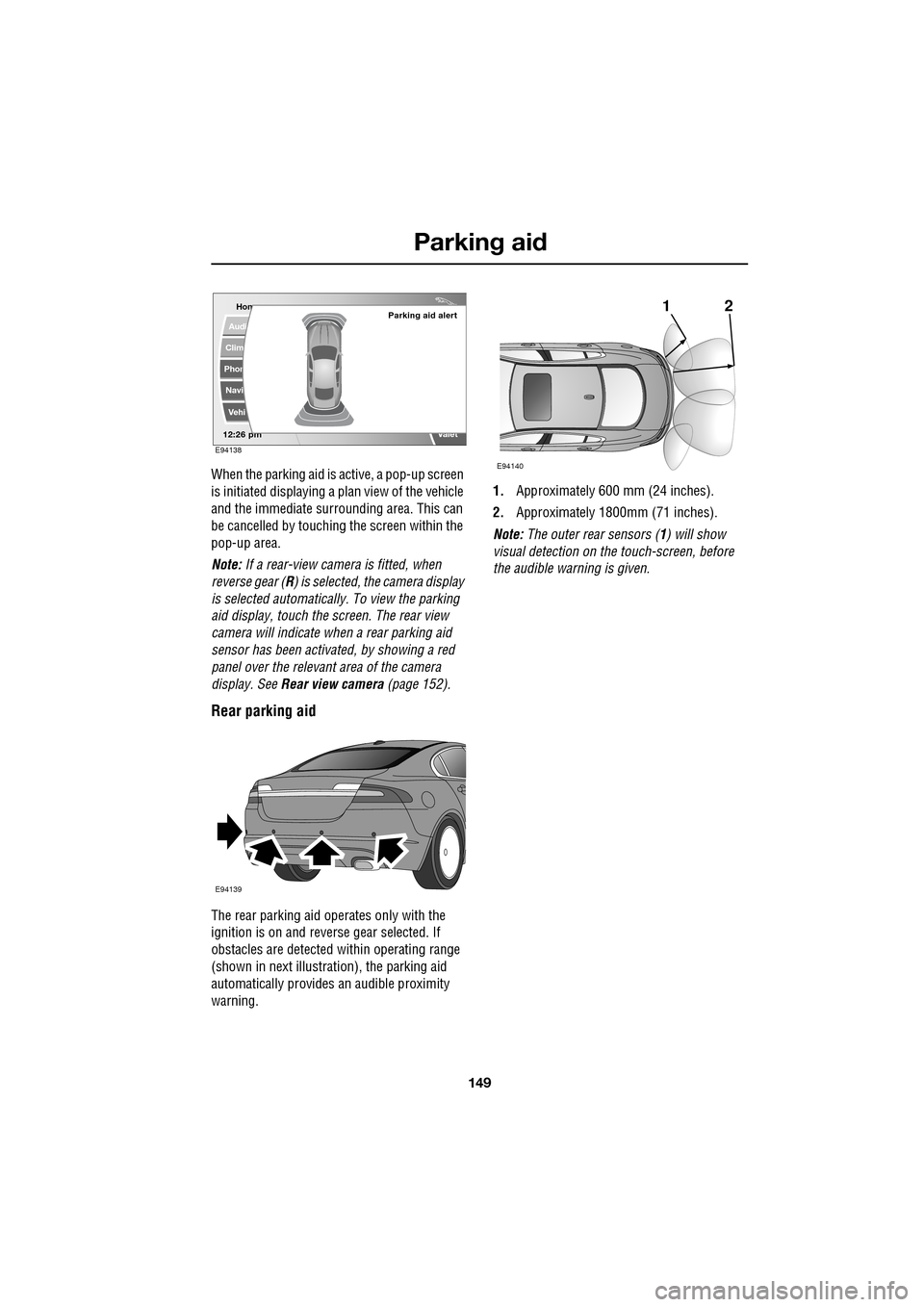
When the parking aid is active, a pop-up screen
is initiated displaying a plan view of the vehicle
and the immediate surrounding area. This can
be cancelled by touching the screen within the
pop-up area.
Note: If a rear-view camera is fitted, when
reverse gear (R ) is selected, the camera display
is selected automatically. To view the parking
aid display, touch the screen. The rear view
camera will indicate wh en a rear parking aid
sensor has been activated, by showing a red
panel over the relevant area of the camera
display. See Rear view camera (page 152).
Rear parking aid
The rear parking aid operates only with the
ignition is on and reve rse gear selected. If
obstacles are detected within operating range
(shown in next illustra tion), the parking aid
automatically provides an audible proximity
warning. 1.
Approximately 600 mm (24 inches).
2. Approximately 1800mm (71 inches).
Note: The outer rear sensors ( 1) will show
visual detection on the touch-screen, before
the audible warn ing is given.
Hom
Audi
Clim
Phon
Navi
Vehi
Valet12:26 pm
Parking aid alert
E94138
E94139
21
E94140
Page 152 of 391
Rear view camera
152
PRINCIPLE OF OPERATION
The system provides a rear view image to
assist in reversing the vehicle.
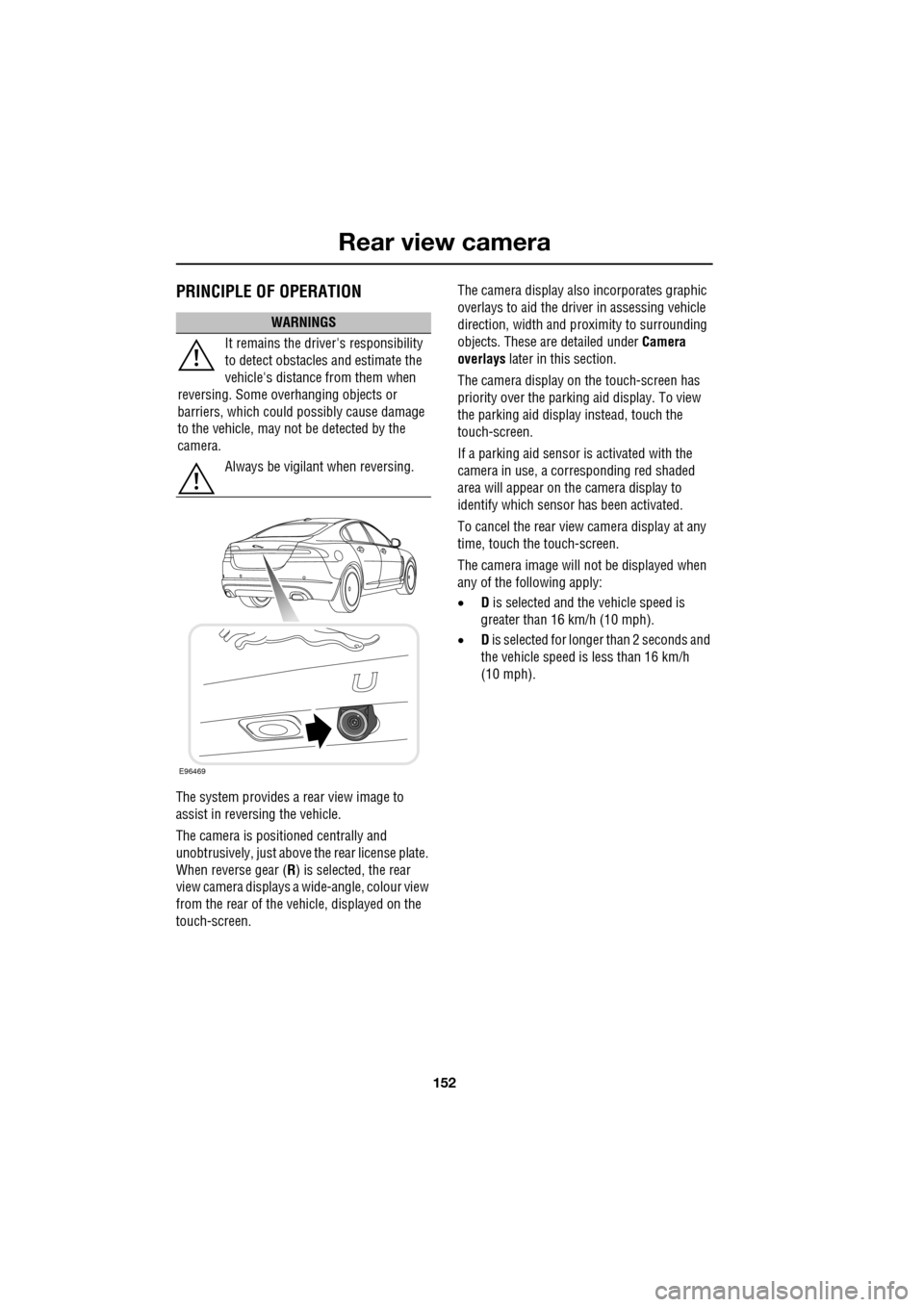
The camera is positioned centrally and
unobtrusively, just above the rear license plate.
When reverse gear (R) is selected, the rear
view camera displays a wide-angle, colour view
from the rear of the vehicle, displayed on the
touch-screen. The camera display also incorporates graphic
overlays to aid the driver in assessing vehicle
direction, width and pr
oximity to surrounding
objects. These are detailed under Camera
overlays later in this section.
The camera display on the touch-screen has
priority over the parki ng aid display. To view
the parking aid display instead, touch the
touch-screen.
If a parking aid sensor is activated with the
camera in use, a corresponding red shaded
area will appear on the camera display to
identify which sensor has been activated.
To cancel the rear view camera display at any
time, touch the touch-screen.
The camera image will not be displayed when
any of the following apply:
• D is selected and the vehicle speed is
greater than 16 km/h (10 mph).
• D is selected for longer than 2 seconds and
the vehicle speed is less than 16 km/h
(10 mph).
WARNINGS
It remains the driver's responsibility
to detect obstacles and estimate the
vehicle's distance from them when
reversing. Some ov erhanging objects or
barriers, which could possibly cause damage
to the vehicle, may not be detected by the
camera.
Always be vigilant when reversing.
E96469
Page 153 of 391
153
Rear view camera
Camera overlays
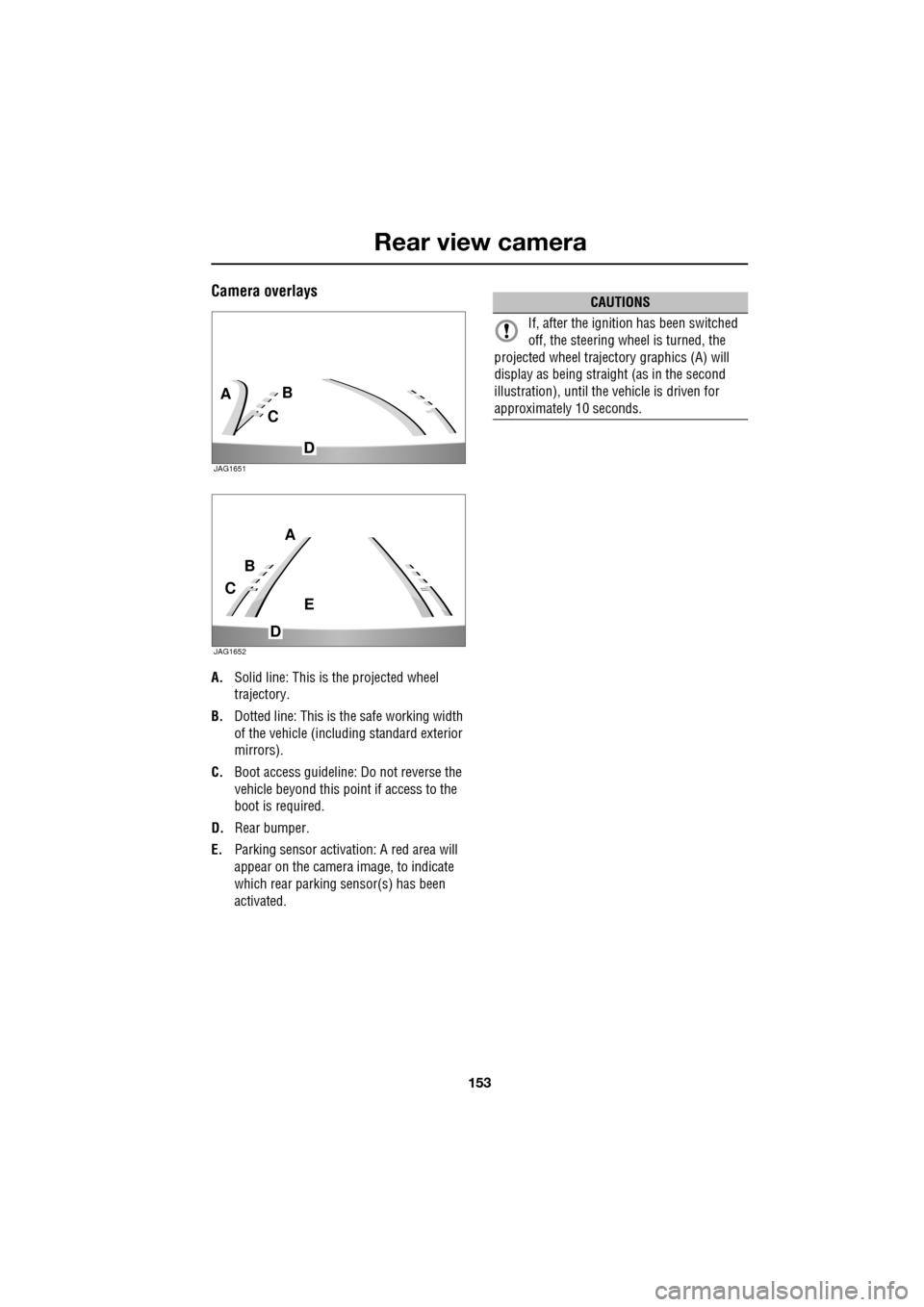
A.Solid line: This is the projected wheel
trajectory.
B. Dotted line: This is the safe working width
of the vehicle (includi ng standard exterior
mirrors).
C. Boot access guideline: Do not reverse the
vehicle beyond this point if access to the
boot is required.
D. Rear bumper.
E. Parking sensor activa tion: A red area will
appear on the camera image, to indicate
which rear parking sensor(s) has been
activated.
C
BA
D
JAG1651
C
B
A
D
E
JAG1652
CAUTIONS
If, after the ignition has been switched
off, the steering wheel is turned, the
projected wheel trajecto ry graphics (A) will
display as being straight (as in the second
illustration), until the vehicle is driven for
approximately 10 seconds.
Page 158 of 391
Cruise control
158
Message centre information displays
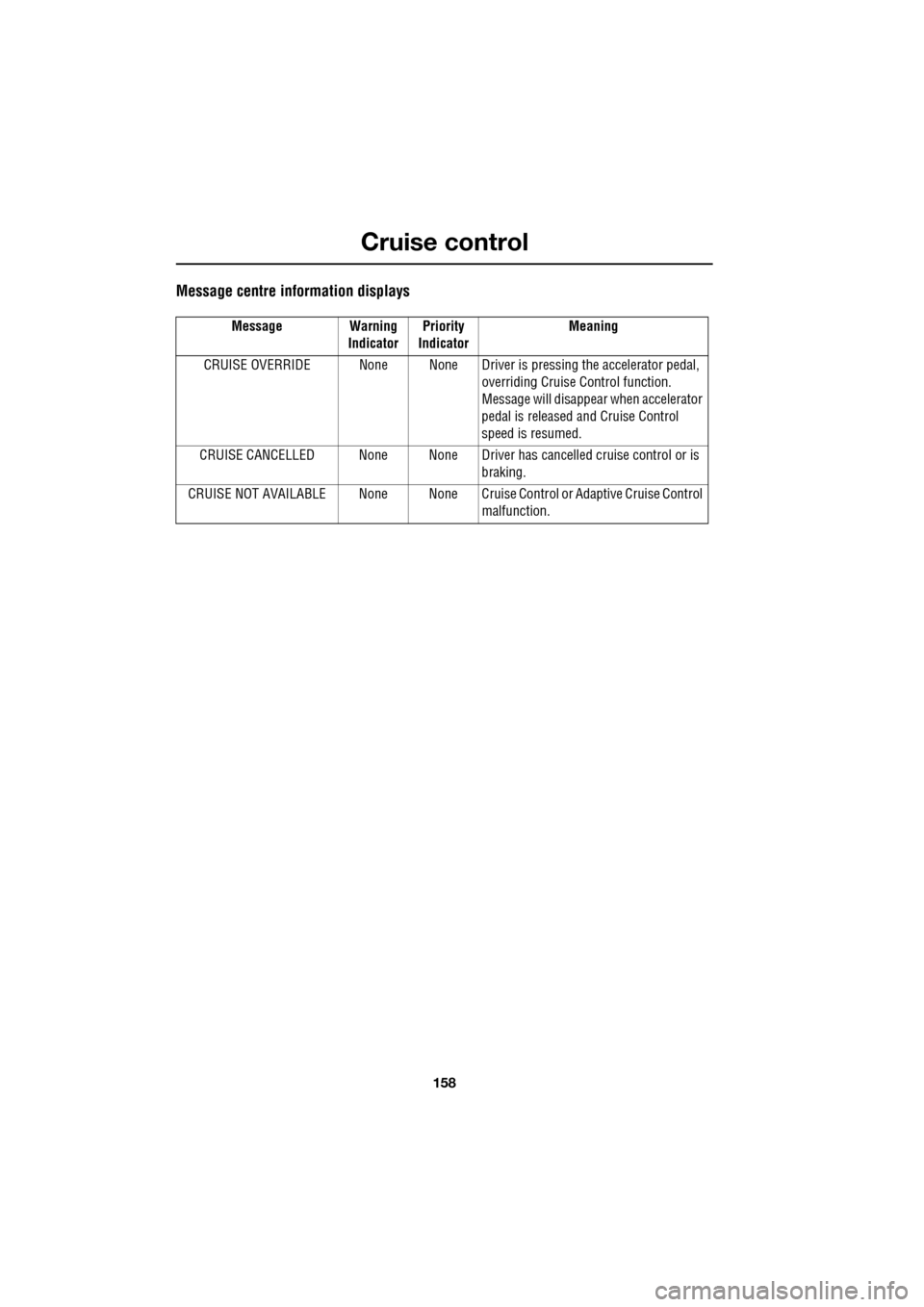
Message Warning IndicatorPriority
Indicator Meaning
CRUISE OVERRIDE None None Driver is pressing the accelerator pedal,
overriding Cruise Control function.
Message will disappear when accelerator
pedal is released and Cruise Control
speed is resumed.
CRUISE CANCELLED None None Driver has cancelled cruise control or is
braking.
CRUISE NOT AVAILABLE None None Cruise C ontrol or Adaptive Cruise Control
malfunction.
Page 160 of 391
Adaptive cruise control (ACC)
160
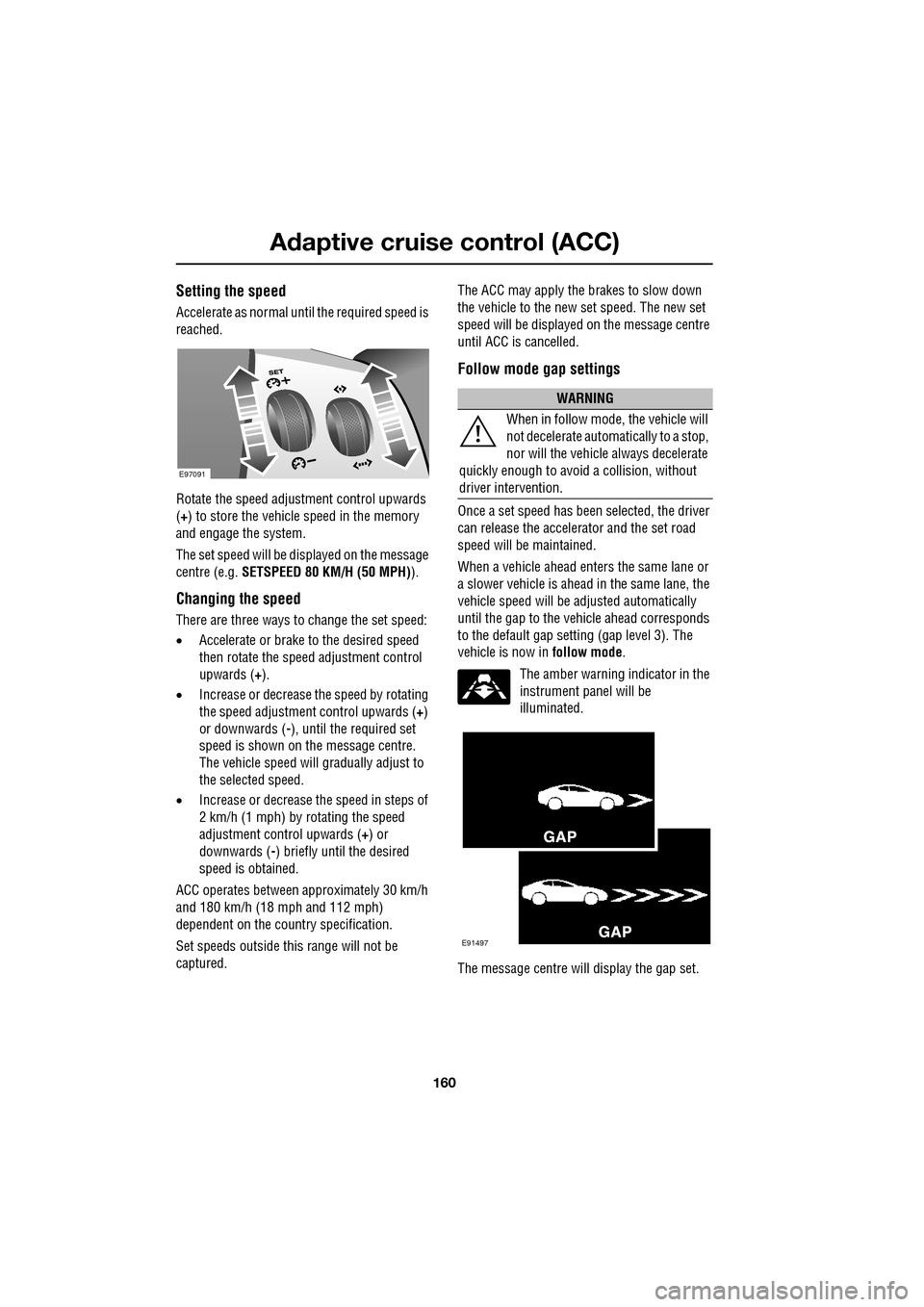
Setting the speed
Accelerate as normal until the required speed is
reached.
Rotate the speed adjustment control upwards
(+) to store the vehicle speed in the memory
and engage the system.
The set speed will be displayed on the message
centre (e.g. SETSPEED 80 KM/H (50 MPH) ).
Changing the speed
There are three ways to change the set speed:
•Accelerate or brake to the desired speed
then rotate the speed adjustment control
upwards ( +).
• Increase or decrease the speed by rotating
the speed adjustment control upwards ( +)
or downwards ( -), until the required set
speed is shown on the message centre.
The vehicle speed will gradually adjust to
the selected speed.
• Increase or decrease the speed in steps of
2 km/h (1 mph) by rotating the speed
adjustment control upwards (+) or
downwards ( -) briefly until the desired
speed is obtained.
ACC operates between approximately 30 km/h
and 180 km/h (18 mph and 112 mph)
dependent on the c ountry specification.
Set speeds outside th is range will not be
captured. The ACC may apply the brakes to slow down
the vehicle to the new set speed. The new set
speed will be displayed on the message centre
until ACC is cancelled.
Follow mode gap settings
Once a set speed has been selected, the driver
can release the accelerator and the set road
speed will be maintained.
When a vehicle ahead enters the same lane or
a slower vehicle is ahead in the same lane, the
vehicle speed will be adjusted automatically
until the gap to the vehicle ahead corresponds
to the default gap setting (gap level 3). The
vehicle is now in
follow mode.
The amber warning indicator in the
instrument panel will be
illuminated.
The message centre will display the gap set.
E97091
WARNING
When in follow mode, the vehicle will
not decelerate automatically to a stop,
nor will the vehicle always decelerate
quickly enough to avoid a collision, without
driver intervention.
E91497