lock JAGUAR XF 2009 1.G Manual PDF
[x] Cancel search | Manufacturer: JAGUAR, Model Year: 2009, Model line: XF, Model: JAGUAR XF 2009 1.GPages: 391, PDF Size: 19.32 MB
Page 232 of 391
Wheels and tyres
232
Using the Jaguar tyre repair kit
Note: All vehicle drivers and occupants should
be made aware that a temporary repair has
been made to a tyre fitted to the vehicle. They
should also be made aware of the special
driving conditions im posed when using a
repaired tyre.
Repair procedure
1. Open the tyre repair kit and peel off the
maximum speed label. Attach the label to
the fascia in the driver's field of vision.
Take care not to obstruct any of the
instruments or warning lights.
2. Uncoil the compressor power cable and
the inflation hose.
3. Unscrew the orange cap from the sealant
bottle receiver and the sealant bottle cap.
4. Screw the sealant bottle into the receiver
(clockwise) until tight.
•Screwing the bottle onto the receiver will
pierce the bottle's se al. Do not unscrew
a full, or partly us ed bottle from the
receiver. Doing so will result in sealant
leaking from the bottle.
5. Remove the valve cap from the damaged
tyre.
6. Remove the protective cap from the
inflation hose and connect the inflation
hose to the tyre valve. Ensure that the hose
is screwed on firmly.
7. Ensure that the compressor switch is in
the off (0) position.
8. Insert the power cable connector into the
auxiliary power socket. See AUXILIARY
POWER SOCKETS (page 125).
WARNINGS
Avoid skin contact with the sealant
which contains natu ral rubber latex.
If the tyre inflati on pressure does not
reach 1.8 bar (26 lbf/in², 180 kPa)
within seven minutes, the tyre may
have suffered excessive damage. A temporary
repair will not be poss ible, and the vehicle
should not be driven until the tyre has been
replaced.
CAUTIONS
Before attempting a ty re repair, ensure
that the vehicle is parked safely, as far
away from passing traffic as possible.
Ensure that the parki ng brake is applied
and P (Park) is selected.
Do not attempt to remove foreign
objects such as nails, screws, etc. from
the tyre.
Always run the engine when using the
compressor, unless the vehicle is in an
enclosed or poorly ventil ated space, as this
may cause asphyxiation.
To prevent overheating, do not operate
the compressor continuously for longer
than ten minutes.
WARNING
Check the tyre sidewall prior to
inflation. If there are any cracks,
bumps or similar damage, do not
attempt to inflate the tyre. Do not stand
directly beside the tyre while the compressor
is pumping. Watch the ty re sidewall. If any
cracks, bumps or simila r damage appear, turn
off the compressor and let the air out by
means of the pressure relief valve. Do not
continue to use the tyre.
Page 233 of 391
233
Wheels and tyres
9.Unless the vehicle is in an enclosed area,
start the engine.
10. Set the compressor switch to the on ( I)
position.
11. Inflate the tyre to a minimum of 1.9 bar
(26 lbf/in²) and a maximum of 3.5 bar
(51 lbf/in²).
•When pumping the sealant through the
tyre valve, the pressure may rise up to 6
bar (87 lbf/in²). The pressure will drop
again after approximately 30 seconds.
12. During the inflation, switch the
compressor off briefly, to check the tyre
pressure using the gauge mounted on the
compressor.
• It should not take longer than seven
minutes to inflate the tyre. If, after seven
minutes, the tyre has not yet reached
minimum pressure, the tyre should not
be used.
13. Once the tyre has been inflated, switch off
the compressor. If desired, the engine may
be turned off after the compressor has
been turned off.
14. Remove the power connector from the
auxiliary power socket.
15. Remove the inflation hose from the tyre
valve, by unscrewing it as quickly as
possible (count er-clockwise).
16. Replace the inflation hose protective cap
and the tyre valve cap.
17. Do not remove the sealant bottle from the
receiver.
18. Ensure that the tyre repair kit (including
the bottle and receiver caps) are placed
securely in the vehicle. You will need to
use the kit to check the tyre pressure after
approximately 3 km (2 miles), so ensure
they are easily accessible. 19.
Immediately drive the vehicle for
approximately 3 km (2 miles), to allow the
sealant to coat the inner surface of the tyre
and form a seal at the puncture.
Checking the tyre pressure after a repair
1.Drive the vehicle for 3 km (2 miles) then
stop in a safe place. Carry out a visual
examination of the tyres condition.
2. Make sure that the sealant container
section is in its original position.
3. Screw the inflation hos e connector firmly
onto the tyre valve.
4. Read the tyre pressure from the gauge.
5. If the pressure of the sealant filled tyre is
above 1.3 bar (19 lb/in²) adjust the
pressure to the correct value. See TYRE
CARE (page 217).
6. Ensure that the compressor switch is in
the off (O ) position and insert the power
cable connector into the auxiliary power
socket.
If the vehicle is in a well ventilated area,
start the engine.
WARNINGS
When driving the vehicle, if you
experience vibr ations, abnormal
steering, or noises, reduce speed
immediately. Drive with extreme caution and
reduced speed, to the first safe place to stop
the vehicle. Visually examine the tyre and
check its pressure. If there are any signs of
damage or deformity to the tyre, or the tyre
pressure is below 1.3 bar (19 lb/in²), do not
continue driving.
Consult a tyre repair centre or your
Dealer/Authorised Repairer, for
advice concerning the replacement of
a tyre after using a tyre repair kit.
Page 235 of 391
235
Wheels and tyres
Note: Different types of tyre may affect the
performance of the TPM system. Always
replace tyres in accordance with
recommendations. See TYRE
SPECIFICATIONS - ARDUOUS TERRAIN
(page 239).
Your vehicle may be equipped with a TPM
System which monitors pressure in each tyre
(temporary use spare wheels are not fitted with
sensors and are conseque ntly not monitored).
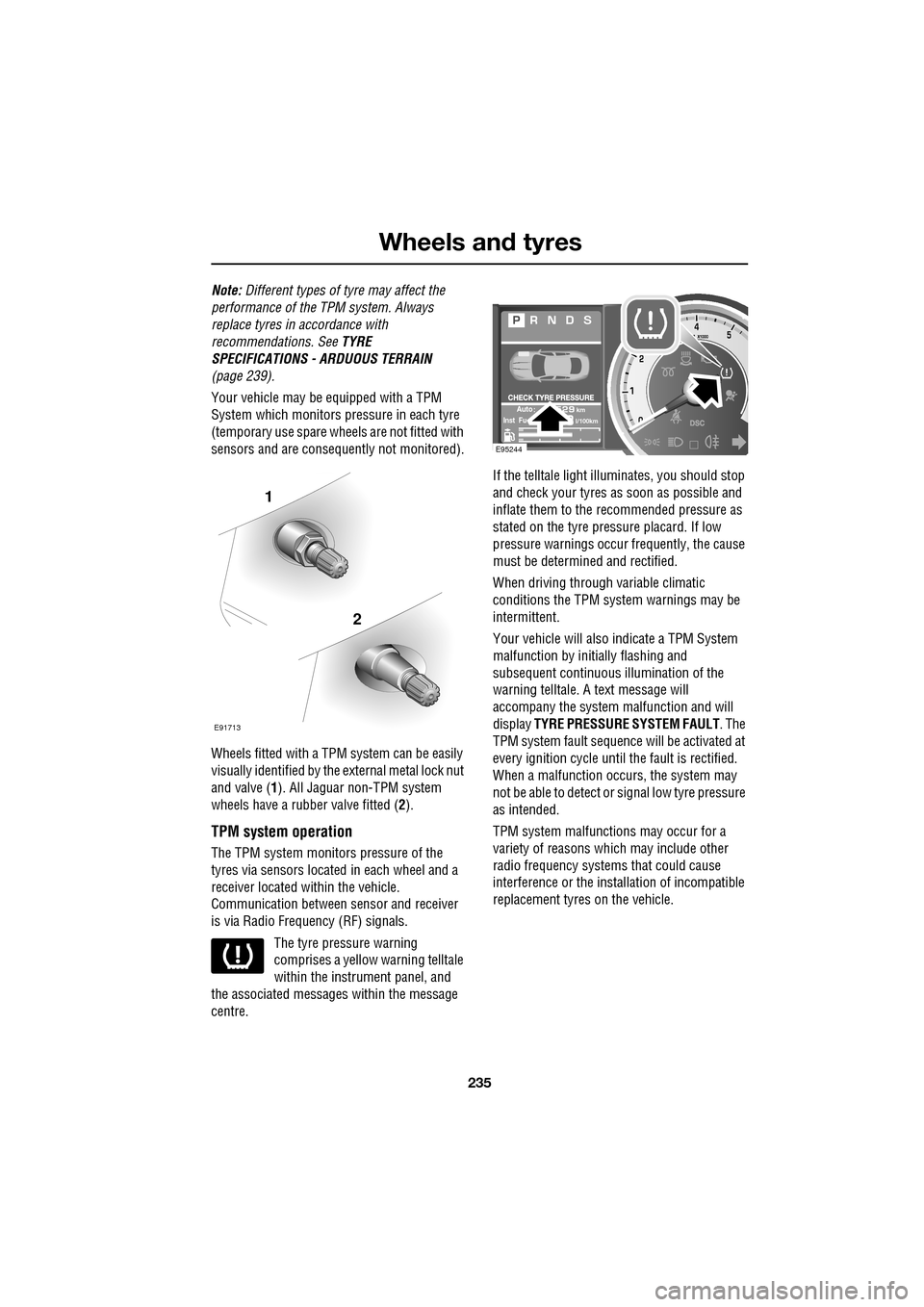
Wheels fitted with a TPM system can be easily
visually identified by the external metal lock nut
and valve ( 1). All Jaguar n on-TPM system
wheels have a rubber valve fitted (2).
TPM system operation
The TPM system monitors pressure of the
tyres via sensors located in each wheel and a
receiver located within the vehicle.
Communication between se nsor and receiver
is via Radio Frequency (RF) signals.
The tyre pressure warning
comprises a yellow warning telltale
within the instrument panel, and
the associated messages within the message
centre. If the telltale light illu
minates, you should stop
and check your tyres as soon as possible and
inflate them to the recommended pressure as
stated on the tyre pressure placard. If low
pressure warnings occur frequently, the cause
must be determined and rectified.
When driving through variable climatic
conditions the TPM syst em warnings may be
intermittent.
Your vehicle will also indicate a TPM System
malfunction by initially flashing and
subsequent continuous illumination of the
warning telltale. A text message will
accompany the system malfunction and will
display TYRE PRESSURE SYSTEM FAULT . The
TPM system fault sequence will be activated at
every ignition cycle until the fault is rectified.
When a malfunction occurs, the system may
not be able to de tect or signal low tyre pressure
as intended.
TPM system malfuncti ons may occur for a
variety of reasons which may include other
radio frequency systems that could cause
interference or the installation of incompatible
replacement tyres on the vehicle.
1
2
E91713
AutokmInst Ful/100km
E95244
Page 236 of 391
Wheels and tyres
236
Tyre pressure warning with speed
If the vehicle is to be driven at speeds in excess
of 160 km/h (100 mph), the tyre pressures
should be increased as stated in this handbook
or on the placard label. Failure to increase the
tyre pressures and driving in excess of
160 km/h (100 mph), will illuminate the yellow
warning telltale and display a text message
TYRE PRESSURES LOW FOR SPEED . In the
event of this warning be ing displayed, vehicle
speed should be reduced
Temporary use spare wheel and tyre
change
If the temporary use spare wheel is fitted the
system will automatically recognise the change
in wheel positions. The n after approximately
ten minutes of driv ing above 25 km/h
(18 mph), a message TYRE NOT MONITORED
will be displayed accompanied by illumination
of the warning telltale and the corresponding
block in the vehicle graphic.
The warning telltale will initially flash and will
subsequently revert to continuous illumination.
Extended use of the temporary use spare wheel
will produce an additional text message TYRE
PRESSURE SYSTEM FAULT .
This TPM system display sequence will be
activated at every ignition cycle until the
temporary use spare wheel is replaced by a
fully operational full size wheel and tyre
assembly.
Always replace the temporary use wheel before
having TPM system faults investigated. The
fault may well be rectified with the fitment of a
fully operational full size running tyre in lieu of
the temporary use spare wheel assembly.
Tyre changing
Always have your tyres serviced or changed by
a qualified engineer.
Care must be taken to avoid contact between
the bead of the tyre and the sensor during
removal and refitting of the tyre, otherwise the
sensor may become damaged and or
inoperable.
Sensors can be removed from the wheel by the
unscrewing of the va lve retention nut.
Replacement sensor
Should the sensor require replacing, it should
be carried out by a Dealer/Authorised Repairer.
A replacement sensor must be fitted to a
running wheel in order to be recognised by the
system. The vehicle needs to be stationary for
15 minutes during the se nsor fitment before
the system is ready to detect the new sensor.
The vehicle must be driven for a minimum of
fifteen minutes after the sensor change, and
then remain stationary for fifteen minutes to
activate full TPM system operation.
If the TPM system warning for any wheel does
not clear, even after ensuring correct inflation
and driving for more than ten minutes above
25 km/h (18 mph), you should seek qualified
assistance as soon as possible.
CAUTION
Valve stem seal, washer, nut, valve core
and cap should be replaced at every tyre
change. Valve stem seal, washer and nut must
be replaced if valve re tention nut is loosened.
Sensor units and nuts must be refitted using
correct torque figures and associated profile.
Damage to the vehicle may result if these
precautions are not taken.
Page 245 of 391
245
Fuses
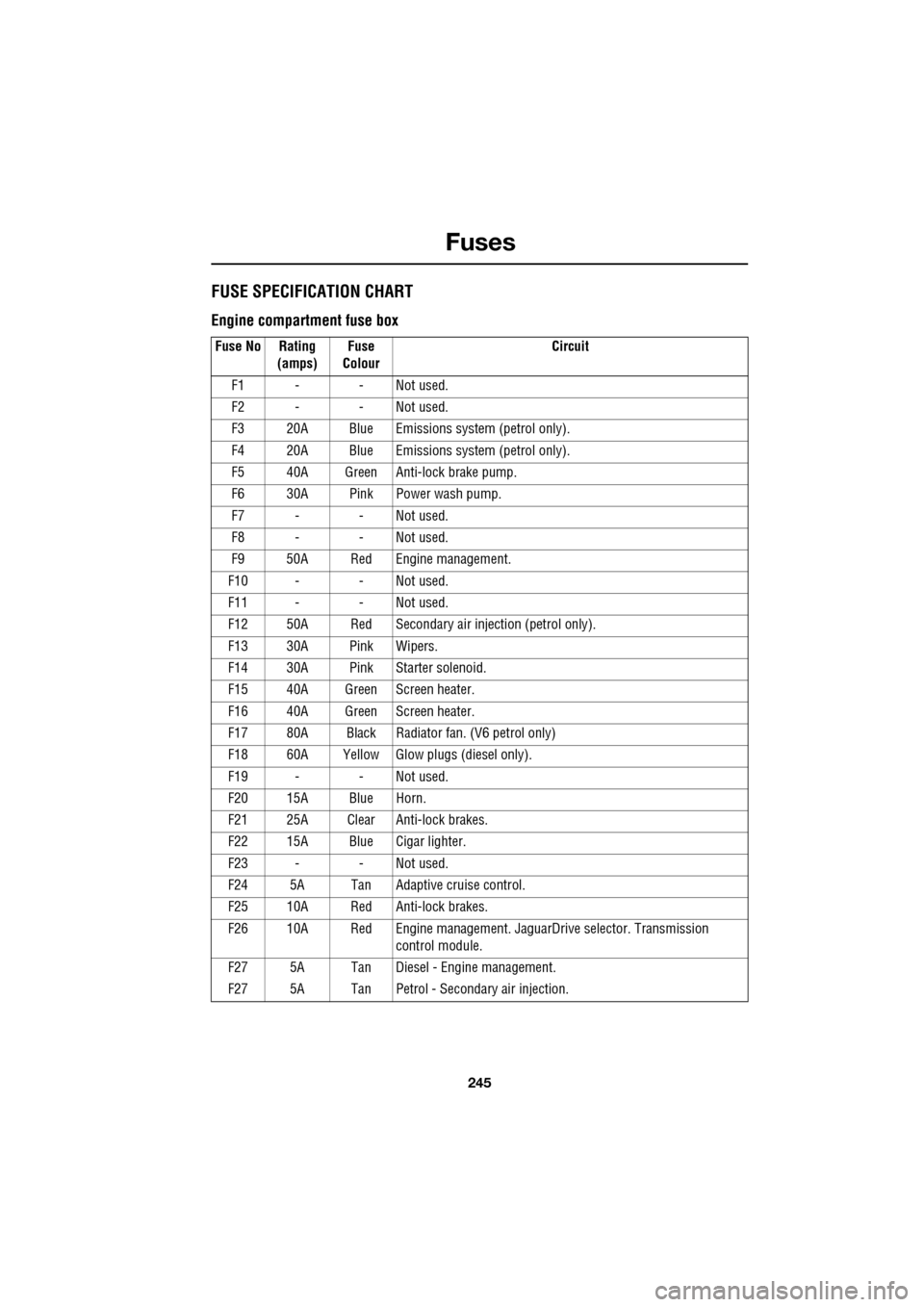
FUSE SPECIFICATION CHART
Engine compartment fuse box
Fuse No Rating (amps) Fuse
Colour Circuit
F1 - - Not used.
F2 - - Not used.
F3 20A Blue Emissions system (petrol only).
F4 20A Blue Emissions system (petrol only).
F5 40A Green Anti-lock brake pump.
F6 30A Pink Power wash pump.
F7 - - Not used.
F8 - - Not used.
F9 50A Red Engine management.
F10 - - Not used.
F11 - - Not used.
F12 50A Red Secondary air in jection (petrol only).
F13 30A Pink Wipers.
F14 30A Pink Starter solenoid.
F15 40A Green Screen heater.
F16 40A Green Screen heater.
F17 80A Black Radiator fan. (V6 petrol only)
F18 60A Yellow Glow plugs (diesel only).
F19 - - Not used.
F20 15A Blue Horn.
F21 25A Clear Anti-lock brakes.
F22 15A Blue Cigar lighter.
F23 - - Not used.
F24 5A Tan Adaptive cruise control.
F25 10A Red Anti-lock brakes.
F26 10A Red Engine manage ment. JaguarDrive selector. Transmission
control module.
F27 5A Tan Diesel - Engine management.
F27 5A Tan Petrol - Secondary air injection.
Page 251 of 391
251
Status after a collision
DRIVING AFTER A COLLISION
Before starting or driving
If the vehicle has been involved in an accident
it should be checked thoroughly before
attempting to start the engine or drive the
vehicle.
Check for:-
• Fuel leaks.
• Fluid leaks.
• Battery damage.
• Damage to wiring.
• Damage to lights.
• Damage to steering, suspension, wheels
or tyres.
• Sharp or protruding bodywork.
• Operation of doors and locks.
• Condition and operation of seat belts and
SRS components.
• Activation of the pe destrian protection
system.
• Condition of chil d seats and their
mounting/attach ment points.
Note: This list is not exhaustive.
Resetting the fuel cut-off
The fuel system cut-off forms part of the Safety
and Restraint System (SRS) fitted to your
vehicle. Following an impact, and depending on
the severity, the fuel pump may be switched
off.
1.Switch the ignition off, and wait for 10
seconds.
2. Without pressing the brake pedal, press
the engine START/STOP button, to switch
the electrical circuits on. Wait for 30
seconds.
3. Check the vehicle thoroughly for fuel leaks.
If a leak is detected switch the ignition off
immediately.
•The vehicle must not be started if a leak
is present. Seek qualified advice, and
have the vehicle recovered.
4. If no leaks are detected, start the engine.
WARNING
If the vehicle is involved in a collision
it should be checked by a Dealer/
Authorised repairer, or suitably
qualified personnel, before starting or driving.
WARNING
The fuel cut-off should never be reset
if you can smell fuel, or a leak can be
seen. Doing so can lead to a fire
which may cause personal injury or death.
Page 253 of 391
253
Vehicle recovery
TOWING POINTS
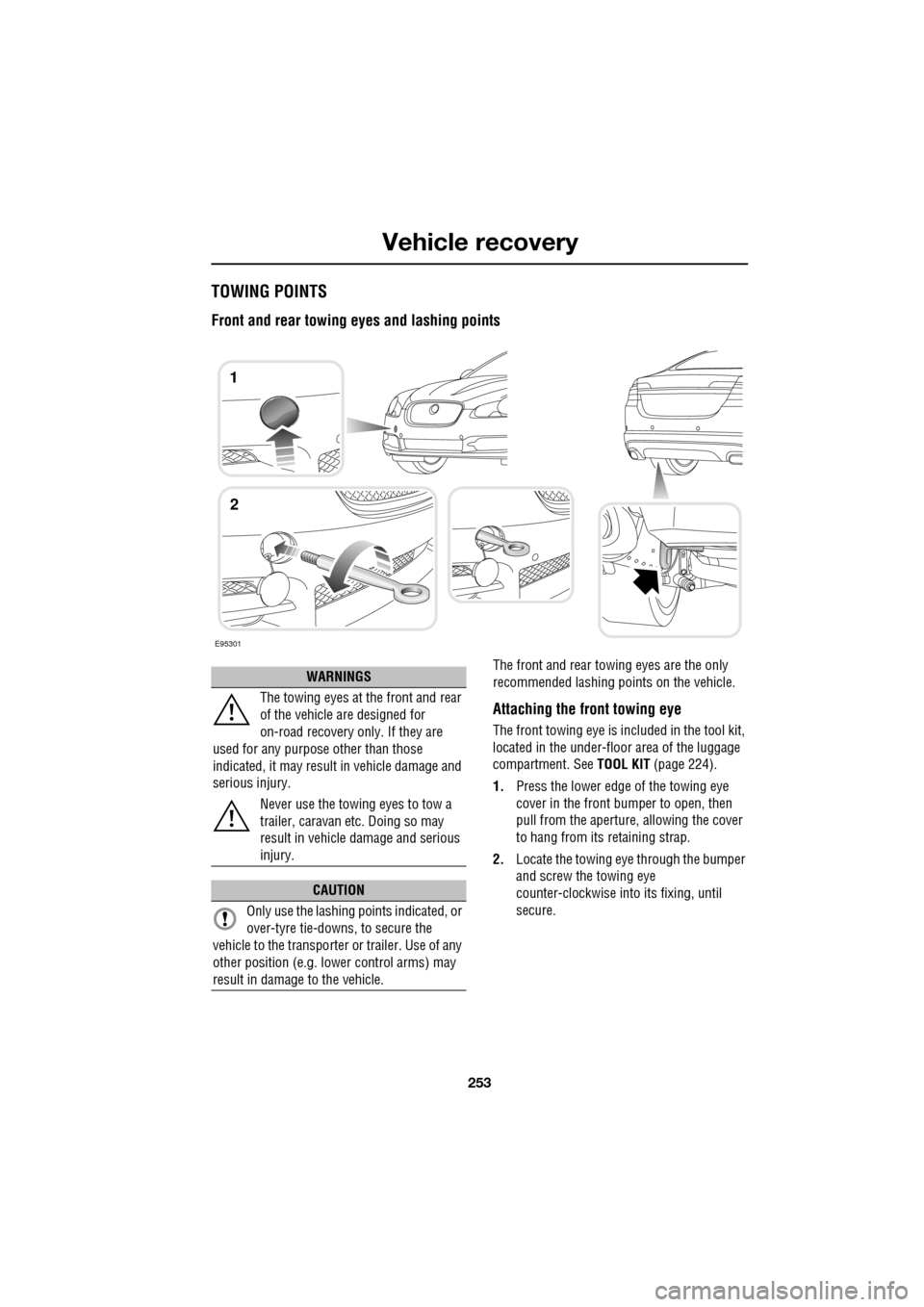
Front and rear towing eyes and lashing points
The front and rear towing eyes are the only
recommended lashing points on the vehicle.
Attaching the front towing eye
The front towing eye is included in the tool kit,
located in the under-floor area of the luggage
compartment. See TOOL KIT (page 224).
1. Press the lower edge of the towing eye
cover in the front bumper to open, then
pull from the aperture, allowing the cover
to hang from its retaining strap.
2. Locate the towing eye through the bumper
and screw the towing eye
counter-clockwise into its fixing, until
secure.
E95301
1
2
WARNINGS
The towing eyes at the front and rear
of the vehicle are designed for
on-road recovery only. If they are
used for any purpose other than those
indicated, it may result in vehicle damage and
serious injury.
Never use the towing eyes to tow a
trailer, caravan etc. Doing so may
result in vehicle damage and serious
injury.
CAUTION
Only use the lashing points indicated, or
over-tyre tie-downs, to secure the
vehicle to the transporter or trailer. Use of any
other position (e.g. lower control arms) may
result in damage to the vehicle.
Page 255 of 391
255
Vehicle recovery
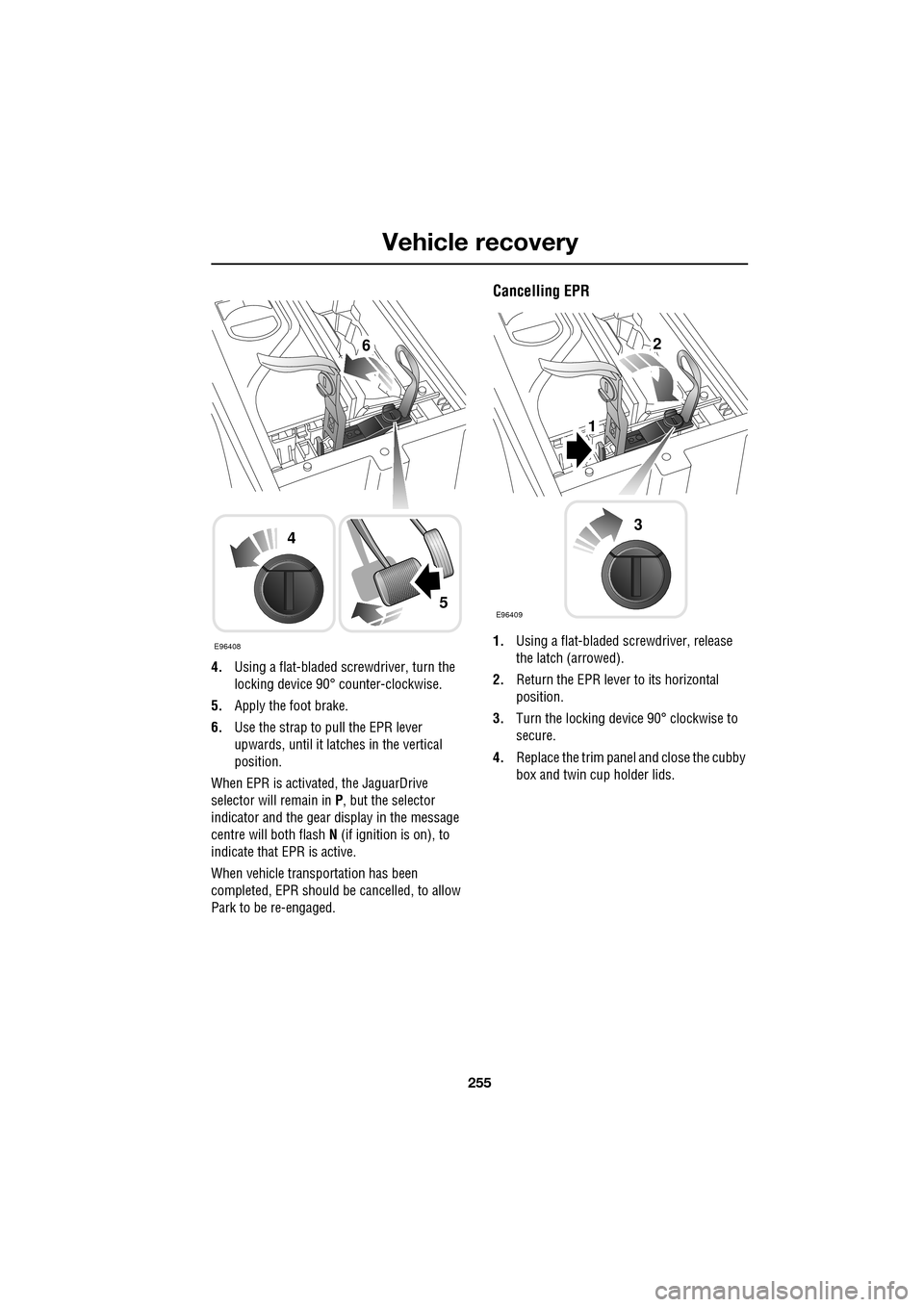
4.Using a flat-bladed screwdriver, turn the
locking device 90° counter-clockwise.
5. Apply the foot brake.
6. Use the strap to pull the EPR lever
upwards, until it latches in the vertical
position.
When EPR is activated, the JaguarDrive
selector will remain in P , but the selector
indicator and the gear display in the message
centre will both flash N (if ignition is on), to
indicate that EPR is active.
When vehicle transportation has been
completed, EPR should be cancelled, to allow
Park to be re-engaged.
Cancelling EPR
1. Using a flat-bladed sc rewdriver, release
the latch (arrowed).
2. Return the EPR lever to its horizontal
position.
3. Turn the locking device 90° clockwise to
secure.
4. Replace the trim pane l and close the cubby
box and twin cup holder lids.E96408
4
5
62
1
E96409
3
Page 256 of 391
Vehicle recovery
256
TOWING THE VEHICLE ON FOUR
WHEELS
Note: The recommended recovery method is
to raise all four wheels.
Towing procedure
1. The vehicle should be parked on firm level
ground, with the parking brake on, and the
gear selector in P (Park).
2. Secure the towing attachment from the
recovery vehicle to the front towing eye.
See TOWING POINTS (page 253).
3. Dock the Jaguar Smart Key and switch on
the ignition. See GENERAL INFORMATION
(page 132). 4.
Apply the foot brake and release the
parking brake.
5. With the foot brake st ill applied, activate
the Emergency Park Release (EPR).
See TRANSPORTING THE VEHICLE
(page 254).
6. The vehicle can now be towed a maximum
of 0.8 km (0.5 miles) at a maximum speed
of 48 kmh (30 mph).
7. Upon arrival at the destination, ensure
wherever possible that the vehicle is
parked on firm level ground.
8. Lower the Emergency Park Release (EPR)
lever, to cancel EP R and to re-engage P
(Park).
9. Apply the parking brake.
10. Switch off the ignition and remove the
Jaguar Smart Key.
11. Remove the towing attachment from the
towing eye.
WARNINGS
Ensure that the remote control
remains docked whilst the vehicle is
being towed. Removing the remote
control will engage the steering lock, which
will prevent the vehicle from steering
correctly.
If the engine cannot be run whilst the
vehicle is being towed, there will be
no power assistance for the steering
or brakes. This will result in greater effort
being required to steer or slow the vehicle, and
greatly increased stopping distances.
CAUTIONS
The vehicle should only be towed in a
forward direction with all four wheels on
the ground.
The vehicle should only be towed for a
maximum of 0.8 km (0.5 miles), at a
maximum speed of 48 km/h (30 mph). Towing
for a greater distance or at a higher speed, may
result in serious damage to the transmission.
CAUTION
Leaving the ignition switched on for
extended periods will cause the battery
to drain.
WARNING
Use extreme caution when detaching
towing equipment. Vehicle movement
is possible which can result in serious
injuries.
Page 285 of 391
285
Digital audio broadcasting
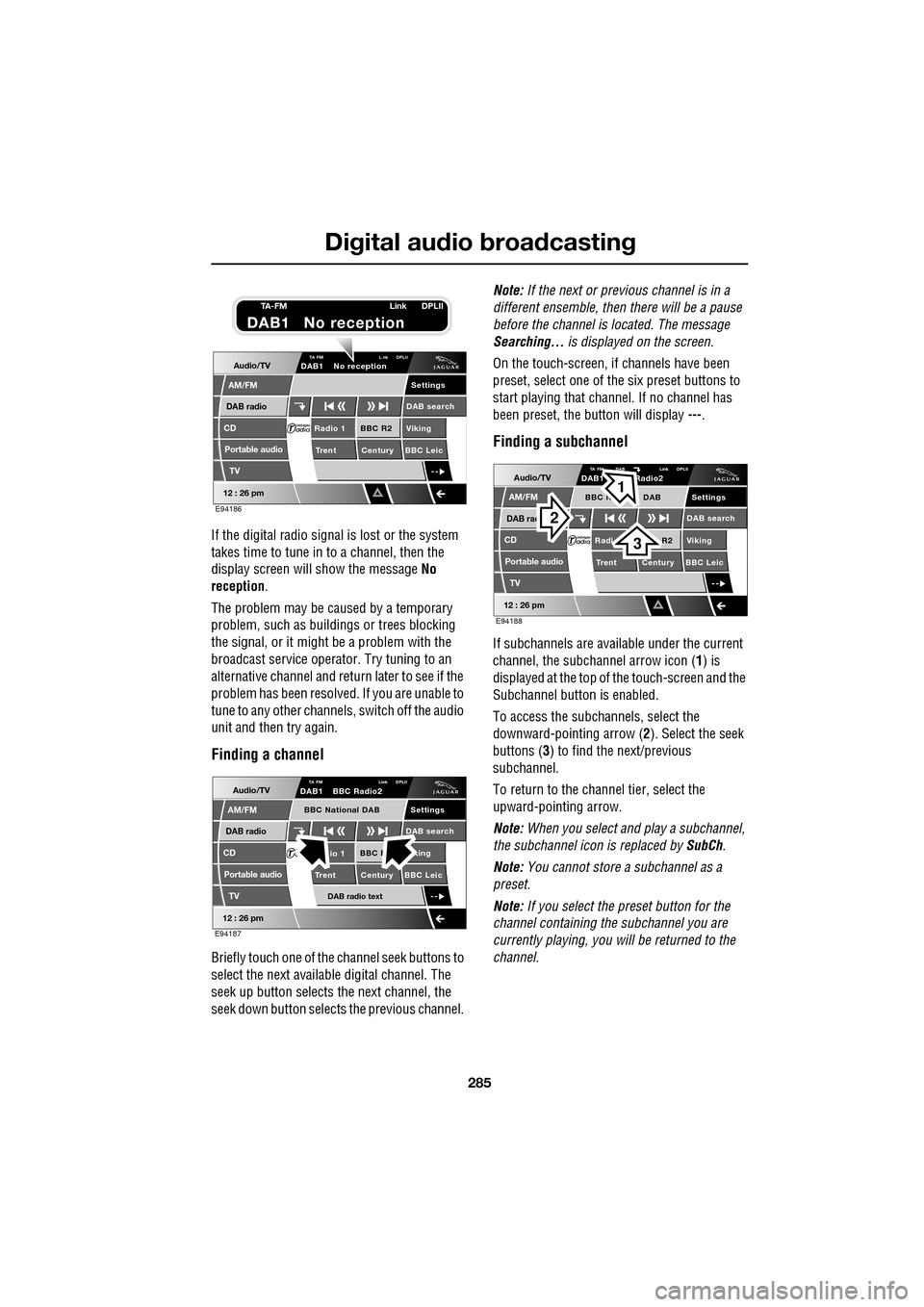
If the digital radio signal is lost or the system
takes time to tune in to a channel, then the
display screen will show the message No
reception.
The problem may be caused by a temporary
problem, such as buildings or trees blocking
the signal, or it might be a problem with the
broadcast servic e operator. Try tuning to an
alternative channel and return later to see if the
problem has been resolved. If you are unable to
tune to any other channe ls, switch off the audio
unit and then try again.
Finding a channel
Briefly touch one of the channel seek buttons to
select the next availabl e digital channel. The
seek up button selects th e next channel, the
seek down button selects the previous channel. Note:
If the next or previous channel is in a
different ensemble, then there will be a pause
before the channel is located. The message
Searching... is displayed on the screen.
On the touch-screen, if channels have been
preset, select one of the six preset buttons to
start playing that channel. If no channel has
been preset, the button will display ---.
Finding a subchannel
If subchannels are available under the current
channel, the subchannel arrow icon ( 1) is
displayed at the top of the touch-screen and the
Subchannel button is enabled.
To access the subchannels, select the
downward-pointing arrow ( 2). Select the seek
buttons ( 3) to find the next/previous
subchannel.
To return to the channel tier, select the
upward-pointing arrow.
Note: When you select and play a subchannel,
the subchannel icon is replaced by SubCh.
Note: You cannot store a subchannel as a
preset.
Note: If you select the preset button for the
channel containing the subchannel you are
currently playing, you will be returned to the
channel.
Audio/TV
DAB radio
CD
AM/FM
12 : 26 pm
BBC R2 Viking
Trent Century BBC LeicRadio 1
Settings
DAB search
TA FM L nk DPLIIDAB1 No reception
Portable audio
TV
E94186
TA-FM Link DPLII
DAB1 No reception
Audio/TV
DAB radio
CD
AM/FM
12 : 26 pm
BBC R king
Trent Century BBC Leicio 1
Settings
DAB search
TA FM Link DPLIIDAB1 BBC Radio2
Portable audio
TV
DAB radio text
BBC National DAB
E94187
Audio/TV
DAB rad
CD
AM/FM
12 : 26 pm
R2 Viking
T
rent Century BBC LeicRadi
Settings
DAB search
TA FM DAB Link DPLIIDAB1 Radio2
Portable audio
TV
BBC N DAB
E94188
2
3
1