Jaguar JAGUAR XF 2009 1.G Owners Manual
[x] Cancel search | Manufacturer: JAGUAR, Model Year: 2009, Model line: XF, Model: JAGUAR XF 2009 1.GPages: 391, PDF Size: 19.32 MB
Page 2 of 391
2
This handbook forms part of the Owner literature supplied with your new ve hicle. Left-hand drive
and right-hand drive conditi ons may be shown in the graphics a nd where information is specific to
a particular country, it is indicated as such.
Please take the time to study the operating instructions with your vehicle as soon as you can.
IMPORTANT
The information contained in this handbook covers all vehicle derivatives and optional equipment.
Some of the options may not be fitt ed to your vehicle, unless they formed part of the original vehicle
specification. Therefore, some parts of this handbook may not apply to your vehicle. Furthermore,
due to printing cycles, it may include descriptio ns of options before they become generally
available.
The options, hardware and software in your vehicle are from the available specifications for the
market in which the vehicle was intended for sale. If your vehicle is to be used in another
geographical area, you ma y have to modify the vehicle spec ification to suit local conditions.
Jaguar Cars Limited is not responsible for the cost of any modifications.
The information contained in this publication was correct when it went to print. Vehicle design
changes may have been made a fter this handbook was printed. When this occurs a handbook
supplement is added to the lite rature pack. Subsequent updates can be viewed on the Jaguar
Internet site at: www.ownerinfo.jaguar.com .
In the interest of development, the right is rese rved to change specifications, design or equipment
at any time without notice and without incurring an y obligations. This publication, or part thereof,
may not be reproduced nor tran slated without our approval. Errors and omissions excepted.
© Jaguar 2008
All rights reserved.
Published by Jaguar Te chnical Communications.
Page 3 of 391
Contents
3
Introduction
SYMBOLS GLOSSARY ...................................... 9
LABEL LOCATIONS ........................................... 9
HEALTH AND SAFETY ..................................... 10
DATA RECORDING.......................................... 11
DISABILITY MODIFICATIONS ......................... 11
FASCIA AND CONTROLS ................................ 12
PARTS AND ACCESSORIES ............................ 14
Keys and remote controls
PRINCIPLE OF OPERATION ............................ 16
GENERAL INFORMATION ON RADIO
FREQUENCIES ................................................ 16
USING THE REMOTE CONTROL ..................... 17
UNLOCKING AND DISARMING THE VEHICLE. 18
LOCKING AND ARMING THE VEHICLE ........... 19
DOCKING/UNDOCKING THE JAGUAR SMART
KEY ................................................................. 20
PROGRAMMING THE REMOTE CONTROL...... 21
CHANGING THE REMOTE CONTROL BATTERY ...
24
EMERGENCY KEY BLADE ............................... 25
Locks
LOCKING AND UNLOCKING............................ 26
USING THE EMERGENCY KEY BLADE ............ 28
VALET MODE .................................................. 30
JAGUAR SMART KEY SYSTEM TRANSMITTERS
32
KEYLESS ENTRY ............................................ 33
GLOBAL OPENING AND CLOSING .................. 35
Alarm
ARMING THE ALARM ..................................... 37
DISARMING THE ALARM ............................... 38
SECURITY SENSORS ...................................... 39
Seats
SITTING IN THE CORRECT POSITION ............ 41
ELECTRIC SEATS ............................................ 42
HEAD RESTRAINTS ........................................ 44
REAR SEATS ................................................... 45
HEATED SEATS............................................... 47
CLIMATE SEATS ............................................. 48
Seat belts
PRINCIPLE OF OPERATION ............................ 49 SEAT BELT REMINDER .................................. 50
USING SEAT BELTS DURING PREGNANCY.... 51
FASTENING THE SEAT BELTS ........................ 51
SEAT BELT HEIGHT ADJUSTMENT ................ 52
Supplementary restraints system
PRINCIPLE OF OPERATION ............................ 53
AIRBAG WARNING LAMP .............................. 57
WHIPLASH PROTECTION ............................... 57
AIRBAG LABELS ............................................. 58
AIRBAG SERVICE INFORMATION................... 58
Child safety
CHILD SEATS ................................................. 59
CHILD SEAT POSITIONING ............................ 60
BOOSTER CUSHIONS ..................................... 61
CHILD SEAT ANCHOR POINTS ....................... 62
CHILD SAFETY LOCKS ................................... 65
Pedestrian protection
PRINCIPLE OF OPERATION ............................ 66
AFTER DEPLOYMENT OF THE PEDESTRIAN
PROTECTION SYSTEM ................................... 66
Steering wheel
ADJUSTING THE STEERING WHEEL .............. 67
HORN ............................................................. 68
HEATED STEERING WHEEL............................ 68
AUDIO CONTROL ........................................... 69
VOICE CONTROL ............................................ 69
CRUISE CONTROL.......................................... 74
Lighting
LIGHTING CONTROL ...................................... 75
AUTOLAMPS .................................................. 76
REAR FOG LAMPS.......................................... 77
HAZARD WARNING FLASHERS...................... 77
DIRECTION INDICATORS ............................... 78
HEADLAMPS - DRIVING ABROAD.................. 78
HEADLAMP LEVELLING ................................. 79
CORNERING OR STATIC BENDING LAMPS.... 79
INTERIOR LAMPS .......................................... 80
APPROACH LAMPS ........................................ 81
REMOVING A HEADLAMP .............................. 81
REMOVING A REAR LAMP ............................. 82
CHANGING A BULB ........................................ 83
HEADLAMP UNIT BULBS ............................... 83
Page 7 of 391
Contents
7
MEMORY ...................................................... 353
AVOID POINTS.............................................. 355
HOME ........................................................... 355
DESTINATION ENTRY ................................... 356
POSTCODE ................................................... 357
MAP .............................................................. 357
COORDINATES ............................................. 357
MEMORY ...................................................... 358
PREVIOUS .................................................... 358
MOTORWAY ................................................. 359
COMPASS ..................................................... 360
POINTS OF INTEREST................................... 362
POI ICON DISPLAY ....................................... 363
CANCELLING POI ICON DISPLAY ................. 365
JAGUAR DEALERSHIP LOCATIONS.............. 365
ENTRY BY TOWN .......................................... 365
ENTRY BY CATEGORY .................................. 365
OTHER SELECTION METHODS ..................... 366
CATEGORIES AND SUB-CATEGORIES .......... 366
POI ENTRY MESSAGES ................................ 366
QUICK POI SELECTION ................................. 366
SELECTING A QUICK POI CATEGORY........... 367
MEMORY POINTS ......................................... 367
RDS-TMC OVERVIEW ................................... 368
USING TMC .................................................. 370
SURVEILLANCE SETTING ............................. 372
USING VOICE CONTROL ............................... 373
NAVIGATION SYSTEM VOICE COMMANDS .. 374
ORDNANCE SURVEY DATA .......................... 378
NAVTEQ CORPORATION............................... 379
EUROPEAN DECLARATION OF CONFORMITY .....
380
Page 10 of 391
Introduction
10
Warning labels
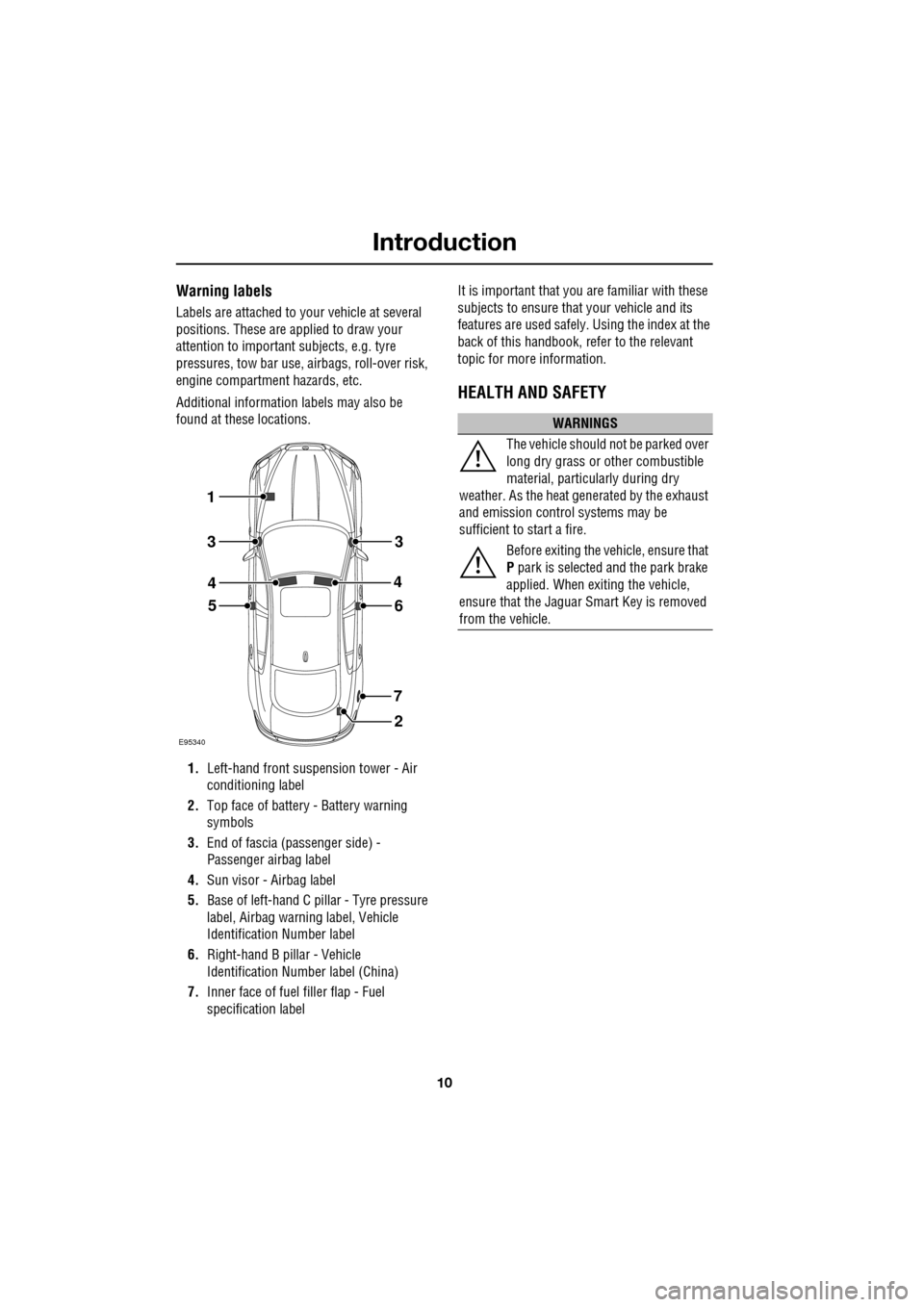
Labels are attached to your vehicle at several
positions. These are applied to draw your
attention to important subjects, e.g. tyre
pressures, tow bar use, airbags, roll-over risk,
engine compartment hazards, etc.
Additional information labels may also be
found at these locations.
1. Left-hand front suspension tower - Air
conditioning label
2. Top face of battery - Battery warning
symbols
3. End of fascia (passenger side) -
Passenger airbag label
4. Sun visor - Airbag label
5. Base of left-hand C p illar - Tyre pressure
label, Airbag warn ing label, Vehicle
Identification Number label
6. Right-hand B pillar - Vehicle
Identification Number label (China)
7. Inner face of fuel filler flap - Fuel
specification label It is important that you are familiar with these
subjects to ensure that your vehicle and its
features are used safely. Using the index at the
back of this handbook, re
fer to the relevant
topic for more information.
HEALTH AND SAFETY
E95340
1
2
56
7
3
4
3
4
WARNINGS
The vehicle should not be parked over
long dry grass or other combustible
material, particul arly during dry
weather. As the heat ge nerated by the exhaust
and emission control systems may be
sufficient to start a fire.
Before exiting the vehicle, ensure that
P park is selected and the park brake
applied. When exiting the vehicle,
ensure that the Jaguar Smart Key is removed
from the vehicle.
Page 11 of 391
11
Introduction
DATA RECORDING
Service data recording
Service data recorders in your vehicle are
capable of collecting and storing diagnostic
information about your vehicle. This potentially
includes information about the performance or
status of various syst ems and modules in the
vehicle such as engine, throttle, steering or
brakes.
In order to properly di agnose and service your
vehicle, Jaguar service and repair facilities may
access vehicle diagnos tic information through
a direct connection to your vehicle.
Event data recording
This vehicle is equipped with an Event Data
Recorder (EDR). The main purpose of an EDR
is to record, in certain crash or near crash-like
situations, such as an air bag deployment or
hitting a road obstacle, data that will assist in
understanding how a vehicle’s systems
performed. The EDR is de signed to record data
related to vehicle dynamics and safety systems
for a short period of ti me, typically 30 seconds
or less. The EDR in this vehicle is designed to
record such data as:
• How various systems in your vehicle were
operating.
• Whether or not the driver and passenger
safety belts were buckled/fastened.
• How far (if at all) the driver was depressing
the accelerator and/or the brake pedal.
• How fast the vehicle was travelling.
• The rotational position of the steering
wheel.
These data can help provide a better
understanding of the ci rcumstances in which
crashes and injuries occur. Note:
EDR data are recorded by your vehicle
only if a non-trivial cr ash situation occurs; no
data are recorded by the EDR under normal
driving conditions and no personal data (e.g.
name, gender, age and crash location) are
recorded. However, other parties, such as law
enforcement, could combine the EDR data with
the type of personally id entifying data routinely
acquired during a cr ash investigation.
To read data recorded by an EDR, special
equipment is required, and access to the
vehicle or the EDR is needed. In addition to the
vehicle manufacturer, other parties, such as
law enforcement, that have the special
equipment, can read the information if they
have access to the vehicle or the EDR.
DISABILITY MODIFICATIONS
Occupants with disabili ties which may require
modification of the ve hicle, must contact a
Dealer/Authorised Re pairer before any
modifications are made.
Page 13 of 391
13
Introduction
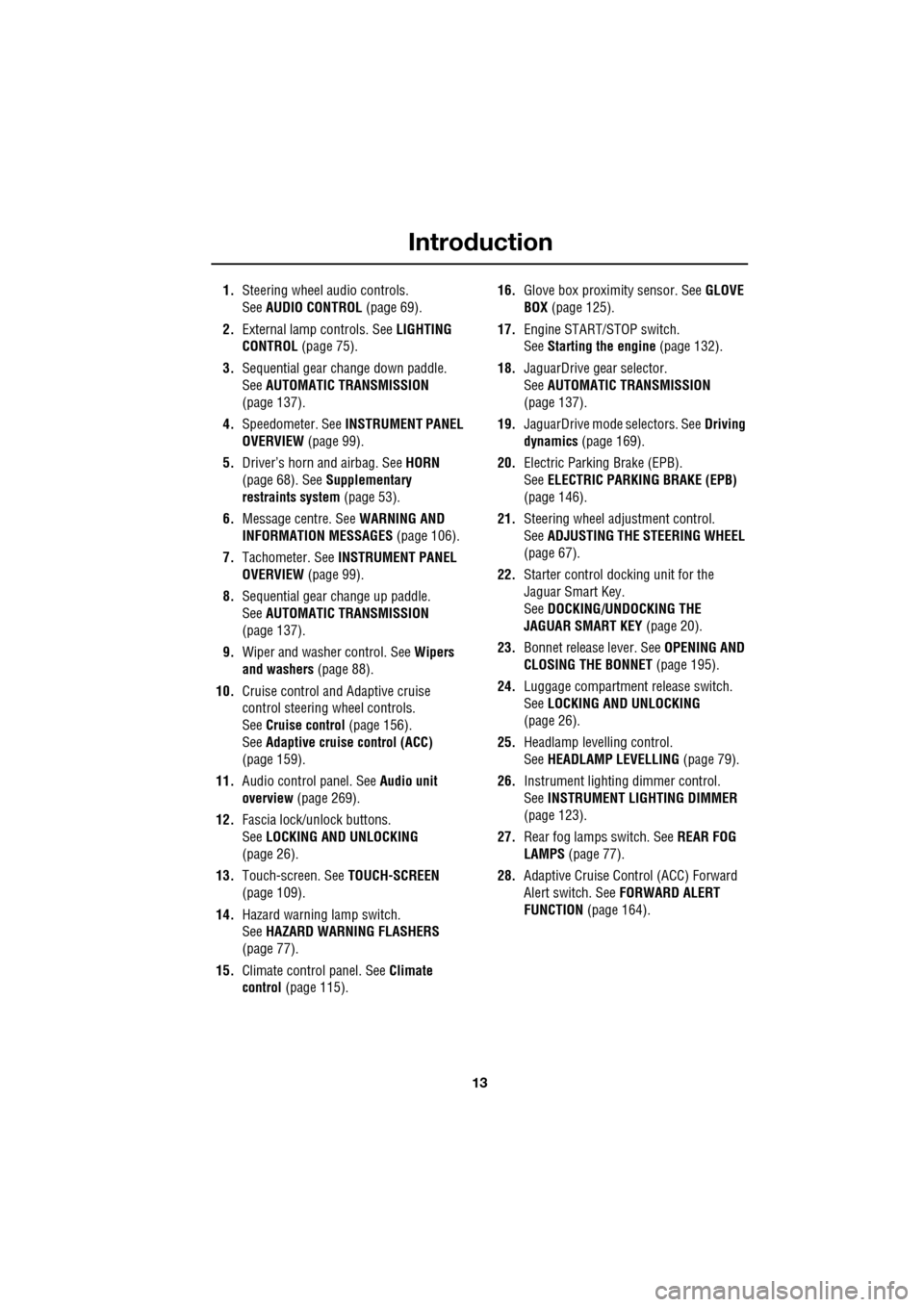
1.Steering wheel audio controls.
See AUDIO CONTROL (page 69).
2. External lamp controls. See LIGHTING
CONTROL (page 75).
3. Sequential gear change down paddle.
See AUTOMATIC TRANSMISSION
(page 137).
4. Speedometer. See INSTRUMENT PANEL
OVERVIEW (page 99).
5. Driver’s horn and airbag. See HORN
(page 68). See Supplementary
restraints system (page 53).
6. Message centre. See WARNING AND
INFORMATION MESSAGES (page 106).
7. Tachometer. See INSTRUMENT PANEL
OVERVIEW (page 99).
8. Sequential gear change up paddle.
See AUTOMATIC TRANSMISSION
(page 137).
9. Wiper and washer control. See Wipers
and washers (page 88).
10. Cruise control and Adaptive cruise
control steering wheel controls.
SeeCruise control (page 156).
See Adaptive cruise control (ACC)
(page 159).
11. Audio control panel. See Audio unit
overview (page 269).
12. Fascia lock/unlock buttons.
SeeLOCKING AND UNLOCKING
(page 26).
13. Touch-screen. See TOUCH-SCREEN
(page 109).
14. Hazard warning lamp switch.
SeeHAZARD WARNING FLASHERS
(page 77).
15. Climate contro l panel. SeeClimate
control (page 115). 16.
Glove box proximity sensor. See GLOVE
BOX (page 125).
17. Engine START/STOP switch.
SeeStarting the engine (page 132).
18. JaguarDrive gear selector.
SeeAUTOMATIC TRANSMISSION
(page
137).
19. JaguarDrive mode selectors. See Driving
dynamics (page 169).
20. Electric Parking Brake (EPB).
SeeELECTRIC PARKIN G BRAKE (EPB)
(page 146).
21. Steering wheel adju stment control.
See ADJUSTING THE STEERING WHEEL
(page 67).
22. Starter control docking unit for the
Jaguar Smart Key.
SeeDOCKING/UNDOCKING THE
JAGUAR SMART KEY (page 20).
23. Bonnet release lever. See OPENING AND
CLOSING THE BONNET (page 195).
24. Luggage compartment release switch.
SeeLOCKING AND UNLOCKING
(page 26).
25. Headlamp levelling control.
SeeHEADLAMP LEVELLING (page 79).
26. Instrument lighting dimmer control.
SeeINSTRUMENT LIGHTING DIMMER
(page 123).
27. Rear fog lamps switch. See REAR FOG
LAMPS (page 77).
28. Adaptive Cruise Control (ACC) Forward
Alert switch. See FORWARD ALERT
FUNCTION (page 164).
Page 14 of 391
Introduction
14
PARTS AND ACCESSORIES
The vehicle has been designed, built and
tested, to cope with a variety of driving
conditions, some of which can place the
severest possible demands on control systems
and components. As such, fitting replacement
parts and accessories that have been
developed and tested to the same stringent
standards as the orig inal components, will
safeguard the continued reliability, safety and
performance of your vehicle.
To augment the vehicle's already impressive
performance, a comprehe nsive range of Jaguar
approved spare parts and accessories is
available. Jaguar parts are the only parts built to original
equipment specificati
ons and approved by
Jaguar designers; this means that every single
part and accessory has been rigorously tested
by the same engineeri ng team that designed
and built the vehicle.
A full list and description of all accessories is
available from your Dealer/Authorised
Repairer.
Electrical equipment
Always consult your Dealer/Authorised
Repairer before fitting any accessory.
Fitting inferior quality parts or accessories,
may be dangerous and could invalidate the
vehicle warranty.
It is recommended that you always consult
your Dealer/Authorised Repairer for advice
regarding the approval, suitability, installation
and use of any parts or accessories before
fitting.
WARNINGS
Do not fit non-approved parts and
accessories or carry out
non-approved alterations or
conversions. It may be dangerous and could
affect the safety of th e vehicle and occupants.
Also, the terms and conditions of the vehicle
warranty may be invalidated.
Jaguar will not accept any liability for
death, personal injury or damage to
property which may occur as a direct
result of fitment of non-approved accessories
or the carrying out of non-approved
conversions to Jaguar vehicles.
Jaguar strongly advise against
making any modifications to the
suspension or steering system. This
could seriously affe ct the handling and
stability of the vehicle leading to loss of control
or roll-over.
WARNING
It is extremely hazardous to fit or
replace parts or accessories, the
installation of which requires the
dismantling of, or addition to, either the
electrical or fuel systems.
Page 15 of 391
15
Introduction
Airbag system
To prevent malfunction of the airbag system
always consult your Dealer/Authorised
Repairer before fitting any of the following:
• Electronic equipment such as a mobile
phone, two-way radio or in-car
entertainment system.
• Accessories attached to the front of the
vehicle.
• Any modification to the front of the vehicle.
• Any modification involving the removal or
repair of any wiring or component in the
vicinity of any of the airbag system
components, including the steering wheel,
steering column, instrument or fascia
panels.
• Any modification to th e fascia panels or
steering wheel.
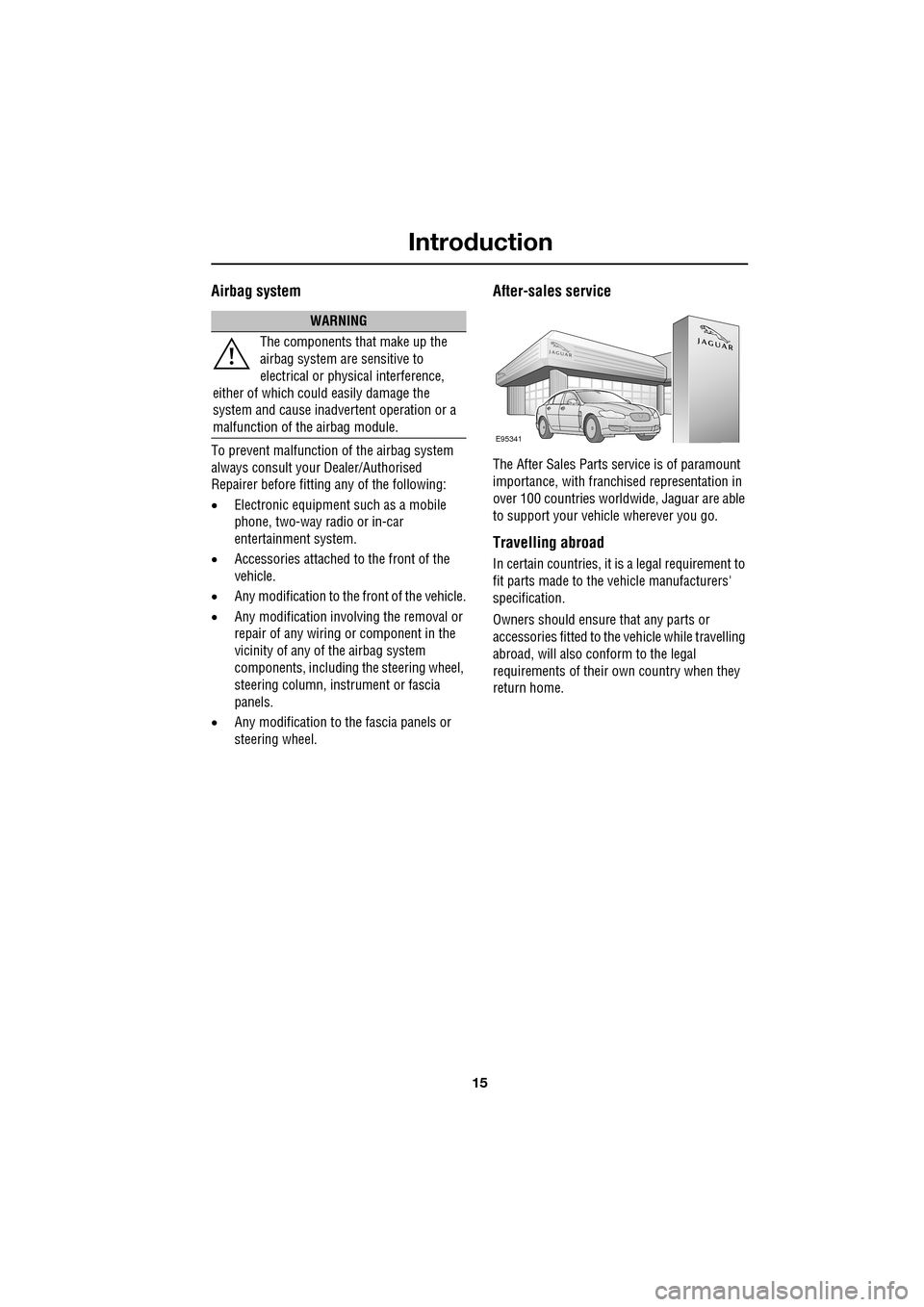
After-sales service
The After Sales Parts service is of paramount
importance, with franchised representation in
over 100 countries worldw ide, Jaguar are able
to support your vehicle wherever you go.
Travelling abroad
In certain countries, it is a legal requirement to
fit parts made to the vehicle manufacturers'
specification.
Owners should ensure that any parts or
accessories fitted to the vehicle while travelling
abroad, will also conform to the legal
requirements of their own country when they
return home.
WARNING
The components that make up the
airbag system are sensitive to
electrical or physical interference,
either of which could easily damage the
system and cause inadvertent operation or a
malfunction of the airbag module.
E95341
Page 16 of 391
Keys and remote controls
16
PRINCIPLE OF OPERATION
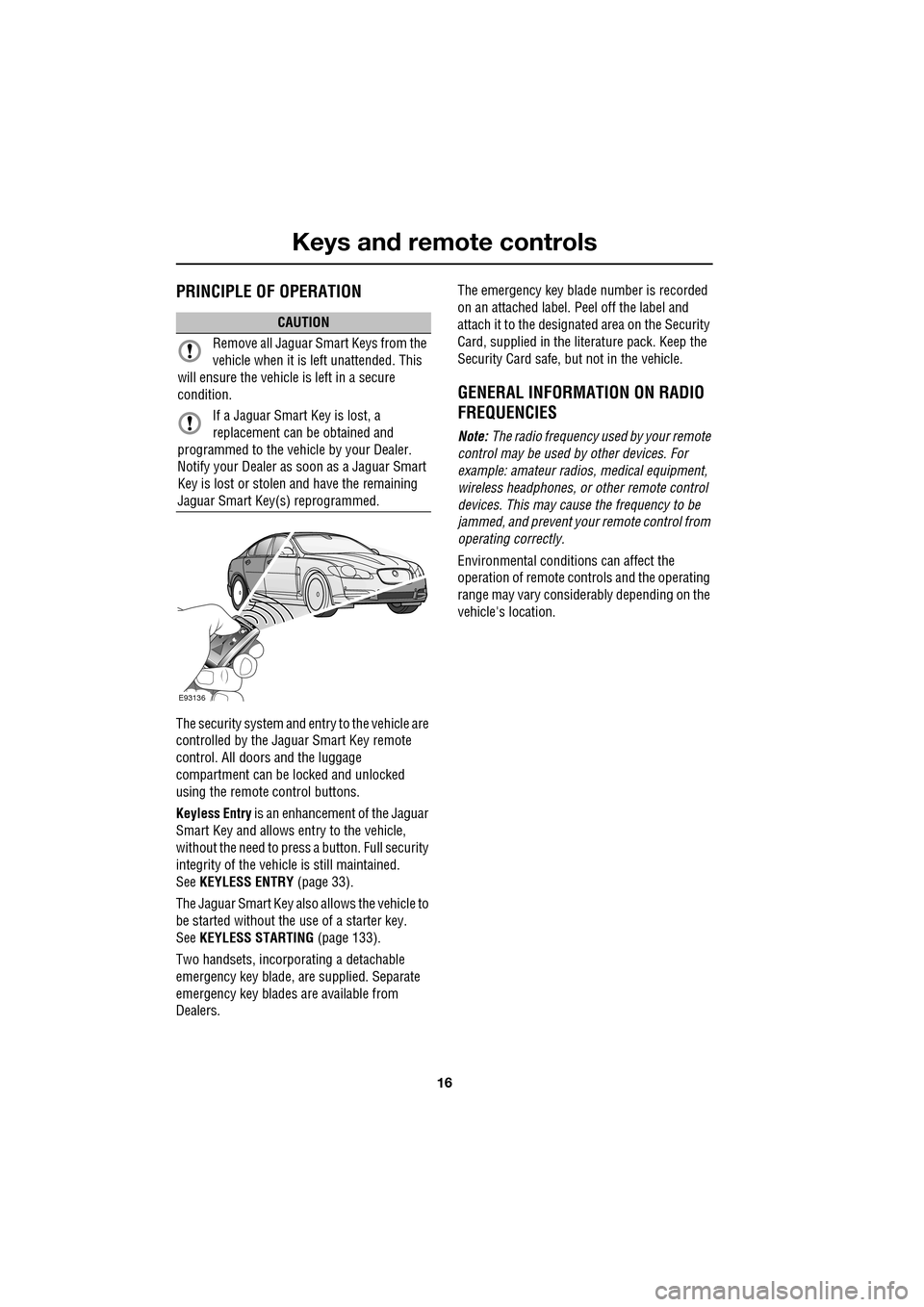
The security system and entry to the vehicle are
controlled by the Jaguar Smart Key remote
control. All doors and the luggage
compartment can be locked and unlocked
using the remote control buttons.
Keyless Entry is an enhancement of the Jaguar
Smart Key and allows entry to the vehicle,
without the need to press a button. Full security
integrity of the vehicl e is still maintained.
See KEYLESS ENTRY (page 33).
The Jaguar Smart Key also allows the vehicle to
be started without the use of a starter key.
See KEYLESS STARTING (page 133).
Two handsets, incorporating a detachable
emergency key blade, are supplied. Separate
emergency key blades are available from
Dealers. The emergency key blade number is recorded
on an attached label. Peel off the label and
attach it to the designated area on the Security
Card, supplied in the lite
rature pack. Keep the
Security Card safe, but not in the vehicle.
GENERAL INFORMATION ON RADIO
FREQUENCIES
Note: The radio frequency used by your remote
control may be used by other devices. For
example: amateur radios , medical equipment,
wireless headphones, or other remote control
devices. This may cause the frequency to be
jammed, and prevent your remote control from
operating correctly.
Environmental conditions can affect the
operation of remote controls and the operating
range may vary considerably depending on the
vehicle's location.
CAUTION
Remove all Jaguar Smart Keys from the
vehicle when it is le ft unattended. This
will ensure the vehicle is left in a secure
condition.
If a Jaguar Smart Key is lost, a
replacement can be obtained and
programmed to the vehi cle by your Dealer.
Notify your Dealer as soon as a Jaguar Smart
Key is lost or stolen and have the remaining
Jaguar Smart Key(s) reprogrammed.
E93136
Page 17 of 391
17
Keys and remote controls
USING THE REMOTE CONTROL
Jaguar Smart Key
Note: The operational range of the Jaguar
Smart Key will vary considerably depending on
atmospheric conditions and interference from
other transmitting devices.
Note: Some features of the security system are
market dependent or ar e options, so may not
be present on your vehicle.
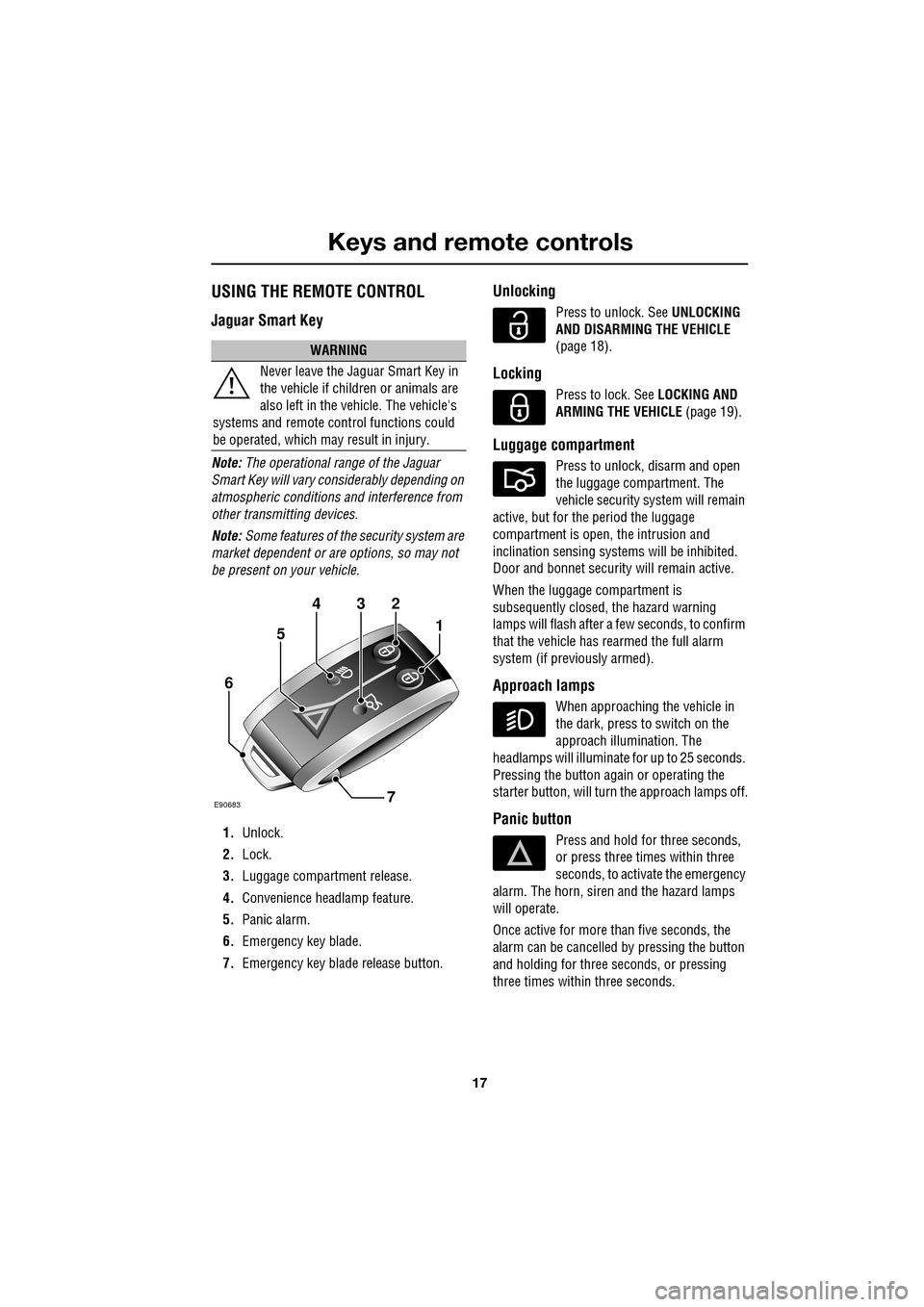
1. Unlock.
2. Lock.
3. Luggage compartment release.
4. Convenience headlamp feature.
5. Panic alarm.
6. Emergency key blade.
7. Emergency key blad e release button.
Unlocking
Press to unlock. See UNLOCKING
AND DISARMING THE VEHICLE
(page 18).
Locking
Press to lock. See LOCKING AND
ARMING THE VEHICLE (page 19).
Luggage compartment
Press to unlock, disarm and open
the luggage compartment. The
vehicle security system will remain
active, but for the period the luggage
compartment is open, the intrusion and
inclination sensing system s will be inhibited.
Door and bonnet security will remain active.
When the luggage compartment is
subsequently closed, the hazard warning
lamps will flash after a few seconds, to confirm
that the vehicle has rearmed the full alarm
system (if previously armed).
Approach lamps
When approaching the vehicle in
the dark, press to switch on the
approach illumination. The
headlamps will illuminate for up to 25 seconds.
Pressing the button again or operating the
starter button, will turn the approach lamps off.
Panic button
Press and hold for three seconds,
or press three times within three
seconds, to activate the emergency
alarm. The horn, siren and the hazard lamps
will operate.
Once active for more than five seconds, the
alarm can be cancelled by pressing the button
and holding for three seconds, or pressing
three times within three seconds.
WARNING
Never leave the Jaguar Smart Key in
the vehicle if children or animals are
also left in the vehicle. The vehicle's
systems and remote c ontrol functions could
be operated, which ma y result in injury.
432
1
7
6
5
E90683