Wiring JAGUAR XFR 2010 1.G Workshop Manual
[x] Cancel search | Manufacturer: JAGUAR, Model Year: 2010, Model line: XFR, Model: JAGUAR XFR 2010 1.GPages: 3039, PDF Size: 58.49 MB
Page 1744 of 3039
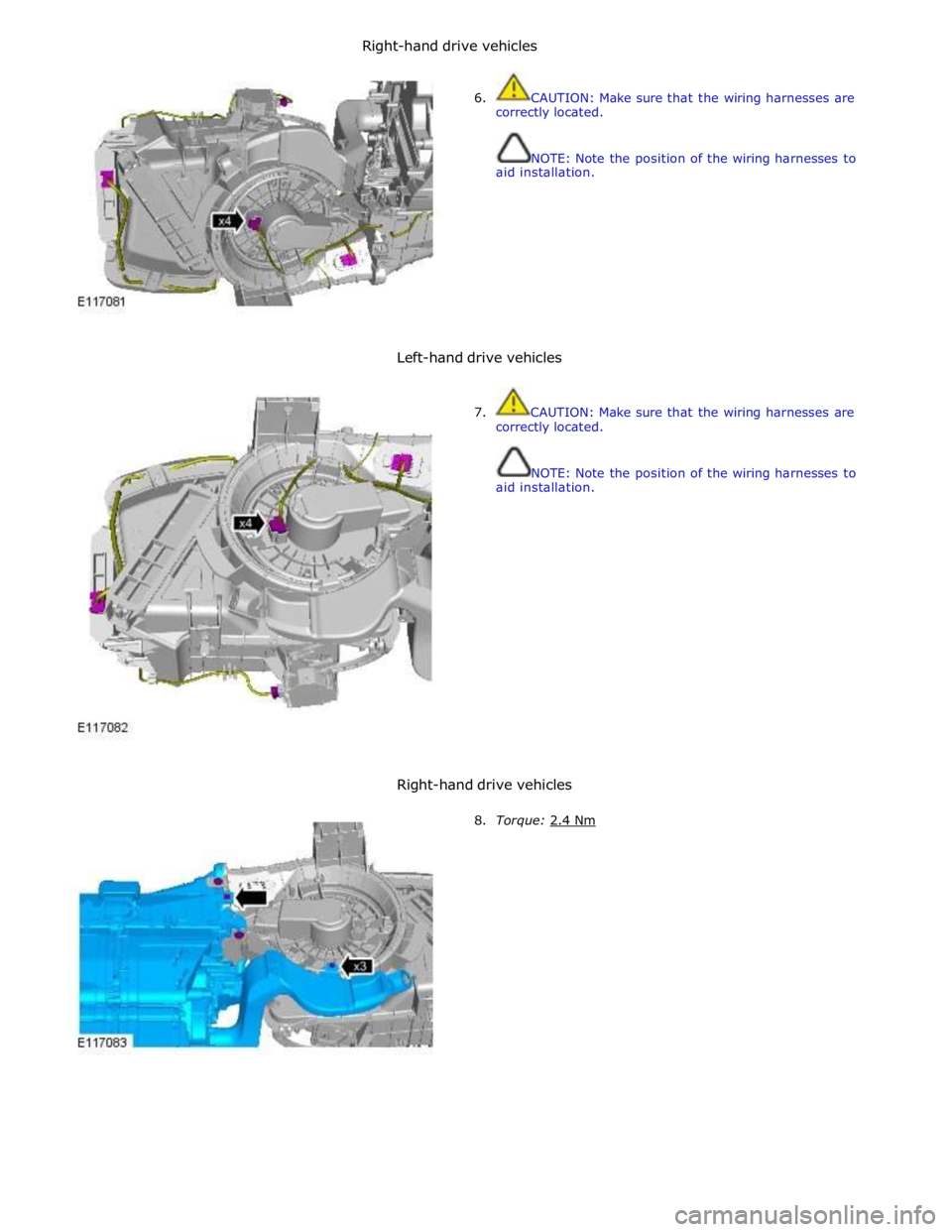
6. CAUTION: Make sure that the wiring harnesses are
correctly located.
NOTE: Note the position of the wiring harnesses to
aid installation.
Left-hand drive vehicles
7. CAUTION: Make sure that the wiring harnesses are
correctly located.
NOTE: Note the position of the wiring harnesses to
aid installation.
Right-hand drive vehicles
8. Torque: 2.4 Nm
Right-handdrivevehicles
Page 1791 of 3039
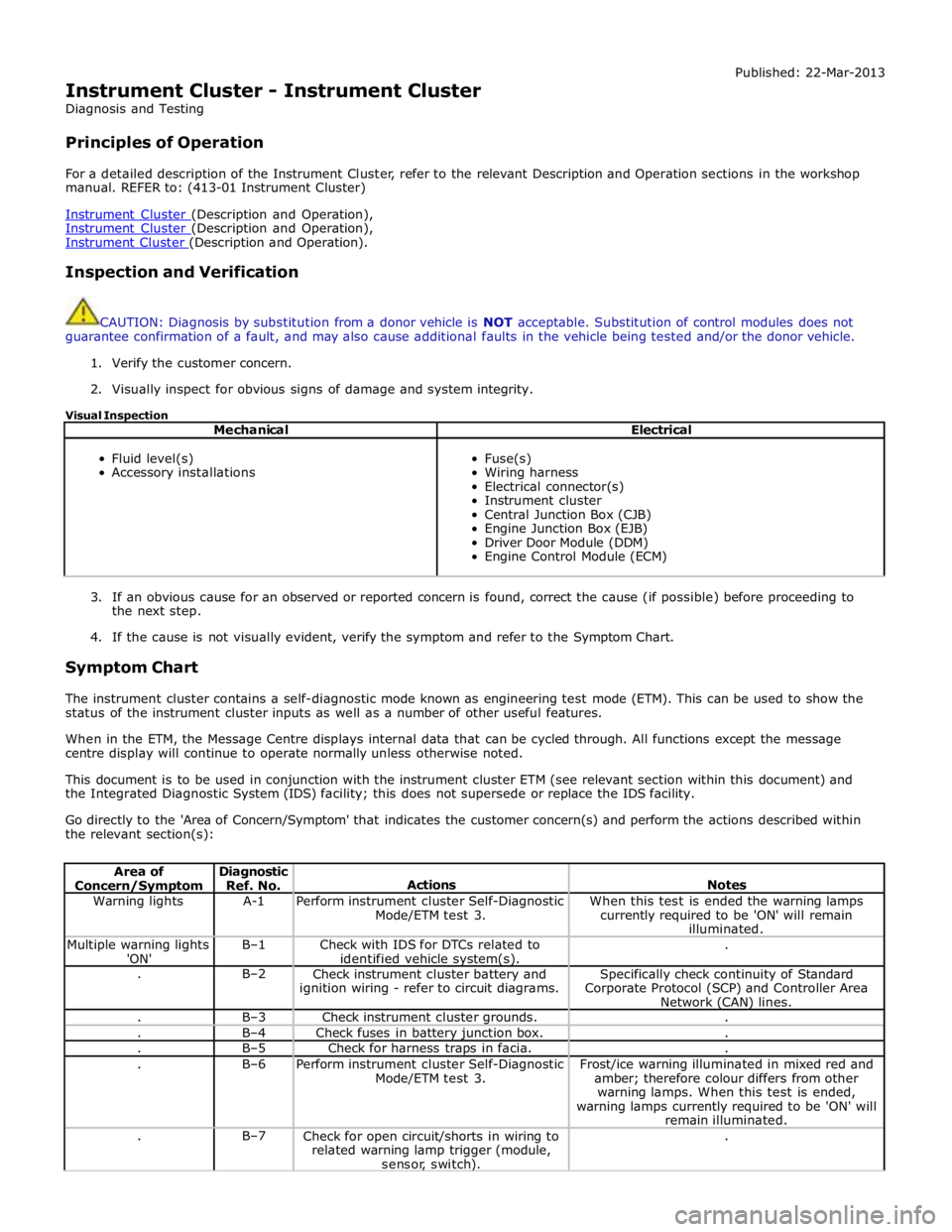
Instrument Cluster - Instrument Cluster
Diagnosis and Testing
Principles of Operation Published: 22-Mar-2013
For a detailed description of the Instrument Cluster, refer to the relevant Description and Operation sections in the workshop
manual. REFER to: (413-01 Instrument Cluster)
Instrument Cluster (Description and Operation), Instrument Cluster (Description and Operation), Instrument Cluster (Description and Operation).
Inspection and Verification
CAUTION: Diagnosis by substitution from a donor vehicle is NOT acceptable. Substitution of control modules does not
guarantee confirmation of a fault, and may also cause additional faults in the vehicle being tested and/or the donor vehicle.
1. Verify the customer concern.
2. Visually inspect for obvious signs of damage and system integrity.
Visual Inspection
Mechanical Electrical
Fluid level(s)
Accessory installations
Fuse(s)
Wiring harness
Electrical connector(s)
Instrument cluster
Central Junction Box (CJB)
Engine Junction Box (EJB)
Driver Door Module (DDM)
Engine Control Module (ECM)
3. If an obvious cause for an observed or reported concern is found, correct the cause (if possible) before proceeding to
the next step.
4. If the cause is not visually evident, verify the symptom and refer to the Symptom Chart.
Symptom Chart
The instrument cluster contains a self-diagnostic mode known as engineering test mode (ETM). This can be used to show the
status of the instrument cluster inputs as well as a number of other useful features.
When in the ETM, the Message Centre displays internal data that can be cycled through. All functions except the message
centre display will continue to operate normally unless otherwise noted.
This document is to be used in conjunction with the instrument cluster ETM (see relevant section within this document) and
the Integrated Diagnostic System (IDS) facility; this does not supersede or replace the IDS facility.
Go directly to the 'Area of Concern/Symptom' that indicates the customer concern(s) and perform the actions described within
the relevant section(s):
Area of Concern/Symptom Diagnostic
Ref. No.
Actions
Notes Warning lights A-1
Perform instrument cluster Self-Diagnostic
Mode/ETM test 3. When this test is ended the warning lamps
currently required to be 'ON' will remain
illuminated. Multiple warning lights
'ON' B–1
Check with IDS for DTCs related to
identified vehicle system(s). . . B–2
Check instrument cluster battery and
ignition wiring - refer to circuit diagrams. Specifically check continuity of Standard
Corporate Protocol (SCP) and Controller Area
Network (CAN) lines. . B–3 Check instrument cluster grounds. . . B–4 Check fuses in battery junction box. . . B–5 Check for harness traps in facia. . . B–6
Perform instrument cluster Self-Diagnostic
Mode/ETM test 3. Frost/ice warning illuminated in mixed red and
amber; therefore colour differs from other
warning lamps. When this test is ended,
warning lamps currently required to be 'ON' will
remain illuminated. . B–7
Check for open circuit/shorts in wiring to
related warning lamp trigger (module,
sensor, switch). .
Page 1792 of 3039

Specific warning lamp
'ON' C–1
Check with IDS for DTCs related to
identified vehicle system. . . C–2
Check for open circuit/shorts in wiring
related to warning lamp circuit (module,
sensor, switch) where appropriate. . . C–3
Perform cluster Self-Diagnostic Mode/ETM
test 3. Frost/ice warning illuminated in mixed red and
amber; therefore colour differs from other
warning lamps. When this test is ended,
warning lamps currently required to be 'ON' will
remain illuminated. . C–4
Check the specific vehicle system
indicated by the warning lamp
illuminated? What is the warning lamp telling me? Does this
check out with the DTC logged by the system indicating the fault? Fuel gauge operation D–1
Perform Self-Diagnostic Mode/ETM test 21
to establish if fuel level input to cluster is
out of range or invalid. 0 - 9 = short circuit; gauge will show empty. 10
– 254 = normal range. 255 = open circuit;
gauge will show empty. --- = missing signal; gauge will show empty. . D–2
Check gauge function versus
Self-Diagnostic Mode/ETM test 21. 0 = empty, 254 = full. 255 = invalid; gauge will
show empty. . D–3
Check for open circuit/shorts in wiring
between the Fuel Delivery Module, Jet
Pump Module and Rear Electronic Module (REM). . Fuel gauge reading E–1
Check gauge position versus
Self-Diagnostic Mode/ETM test 21. 0 = empty to 254 = full (255 invalid; gauge will
show empty). Other values percentage of above range e.g. 127 = half. . E–2
Calculate percentage fuel level from figure
obtained from Self-Diagnostic Mode/ETM
test 21 and compare to IDS vehicle fuel percentage test. Self-Diagnostic Mode fuel level percentage can
be calculated as follows: Value from
Self-Diagnostic Mode test 26 ÷ 254 x 100 = %
shown on gauge. . E–3
Monitor value of Self-Diagnostic Mode
test/ETM test 21 (during test drive) to
establish if input drops out of range. 0 - 9 = short circuit; gauge will show empty. 10
– 254 = normal range. 255 = open circuit;
gauge will show empty. --- = missing signal; gauge will show empty. . E–4
Monitor 'FUEL LEVEL' in IDS data logger
(during test drive) to correlate gauge position to vehicle reported fuel level. Gauge function is damped so will not follow
rapidly changing Fuel Delivery Module values. Speedometer
operation H–1
Monitor Self-Diagnostic Mode/ETM test 19
(during test drive) check to establish if
vehicle speed input to cluster is out of range or invalid. Display speed input in 1/10 mile/h, no decimal
point shown, and is compensated for tire size
etc. Displays ---- or INV if message is not
received or if received data is invalid. Speedometer reading I–1
During test drive compare speedometer
position to Self-Diagnostic Mode/ETM test
19, displayed value. Self-Diagnostic Mode displayed speed figure will
be approx 3% higher than speed indicated by
speedometer. Allowed tolerance – minus nothing/+ 10% + 2.5 mile/h. . I–2
Monitor Self-Diagnostic Mode/ETM test 19
(during test drive) to establish if vehicle
speed input to cluster drops out of range
or is invalid. Displays ---- if message is not received or if
received data is invalid for two seconds or more. . I–3
Check that installed wheels and tires are
standard Jaguar fitment. Confirm wheel
size in IDS, 'ADD REMOVE ACCESSORY'
section. Non standard wheels and tires may lead to
speed indication inaccuracies. Incorrectly set
wheel size will result in speed indication
inaccuracies. Trip and odometer distance
accumulation will also be incorrect. Tachometer operation J–1
Perform Self-Diagnostic Mode/ETM test 20
to establish if vehicle rpm input to cluster
out of range or invalid. Displays ---- or INV if message is not received
or if received data is invalid. Tachometer reading K–1
Check tachometer position versus
Self-Diagnostic Mode/ETM test 20, displayed value. Tachometer accuracy +/- 100 rpm. . K–2
Monitor 'ENGINE RPM' in IDS data logger
at constant engine rpm to compare
tachometer indicated engine rpm to
engine rpm reported by Engine Control
Module (ECM). Tachometer accuracy +/- 100 rpm. . K–3
Monitor Self-Diagnostic Mode test/ETM
test 20, (during test drive) to establish if
input to cluster drops out of range or is
invalid. Displays ---- or INV if message is not received
or if received data is invalid. Gauge judder L–1
Perform Self-Diagnostic Mode test/ETM
test 2, to prove out smooth gauge operation. . Gauge noise M–1
Perform vehicle road test. Gauges should
not be audible during operation in drive cycle. . www.JagDocs.com
Page 1793 of 3039

. M–2
Benchmark noise against non-complaint
vehicle. . Trip (fuel) computer N–1
Check for consistent display (during test
drive) of valid 'Rolling Odometer' count in
Self-Diagnostic Mode/ETM test 24. Displays ---- , INV or 255 if message is not
received, or if received data is invalid. . N–2
Check that installed wheels and tires are
standard Jaguar fit. Confirm fitted wheel
size in IDS, 'ADD REMOVE ACCESSORY'
section. Non standard wheels and tires or incorrectly set
wheel size may lead to Odometer increment
inaccuracies. This will impact the distance
accumulators, which in turn affects the rolling
average, fuel economy and range values. Trip
distance accumulation will also be incorrect. . N–3
Consider noting odometer value and
resetting fuel computer system. Advise
customer to conduct brim-to-brim fuel
tank test. Use collected information to
determine if system accurate. . Column adjust O-1
Check with IDS for DTCs related to powered column system. . O-2
Check cluster battery supply voltage and
ground resistance. Check for loose
connections. . O-3
Check power column motors supply voltage. . O-4
Check power column switch for physical damage. . Passive Anti-Theft
System (PATS)
indicator P–1
Check for three second prove out when
vehicle start button is pressed. . . P–2
Check for loose connections/wiring continuity. . . P–3 Check ignition switch for physical damage. . Cluster illumination Q–1
Check for loose connections/wiring continuity. . . Q–2 Check dimmer switch operation. . Cluster backlight operation R–1
Is the backlight on other components inoperative. . . R–2 Check dimmer switch operation. . . R–3
Check for loose connections/wiring continuity. . Chime/tone operation S–1 Check vehicle configuration. . . S–2
Utilize lights ON, ignition OFF, door open warning to verify chime operation. . . S–3 Check appropriate sensing circuit. . Continuous chime/tone T–1 Check appropriate sensing circuit. . Unexpected chime operation U–1 Check vehicle configuration. . Message centre display illumination V–1
Is the backlight 'ON' and other components dim? . . V–2
Does the lighting level of other
components change when dimmer adjusted? . Message centre
display issue W–1
Perform Self-Diagnostic Mode test/ETM
tests 5 to 9, to prove out LCD display
function. . Message centre
missing lines X–1
Perform Self-Diagnostic Mode test/ETM
tests 5 to 9, to prove out LCD display
function. . Message centre
incorrect message Y–1 What is the message? . . Y–2
Check for open circuit/shorts in wiring to
related warning light trigger (module,
sensor, switch). . Cluster/connectivity Z–1 Check cluster battery and ignition wiring. . . Z–2 Check cluster grounds. . . Z–3 Disconnect/reconnect cluster. . . Z–4
Attempt to enter Self-Diagnostic
Mode/ETM to prove cluster response to inputs. . No crank AA–1
Check with IDS for presence of related
DTCs. . . AA–2
Is there a Passive Anti-Theft System (PATS) flash code? . . AA–3
Does the vehicle crank with the other passive key? .
Page 1828 of 3039
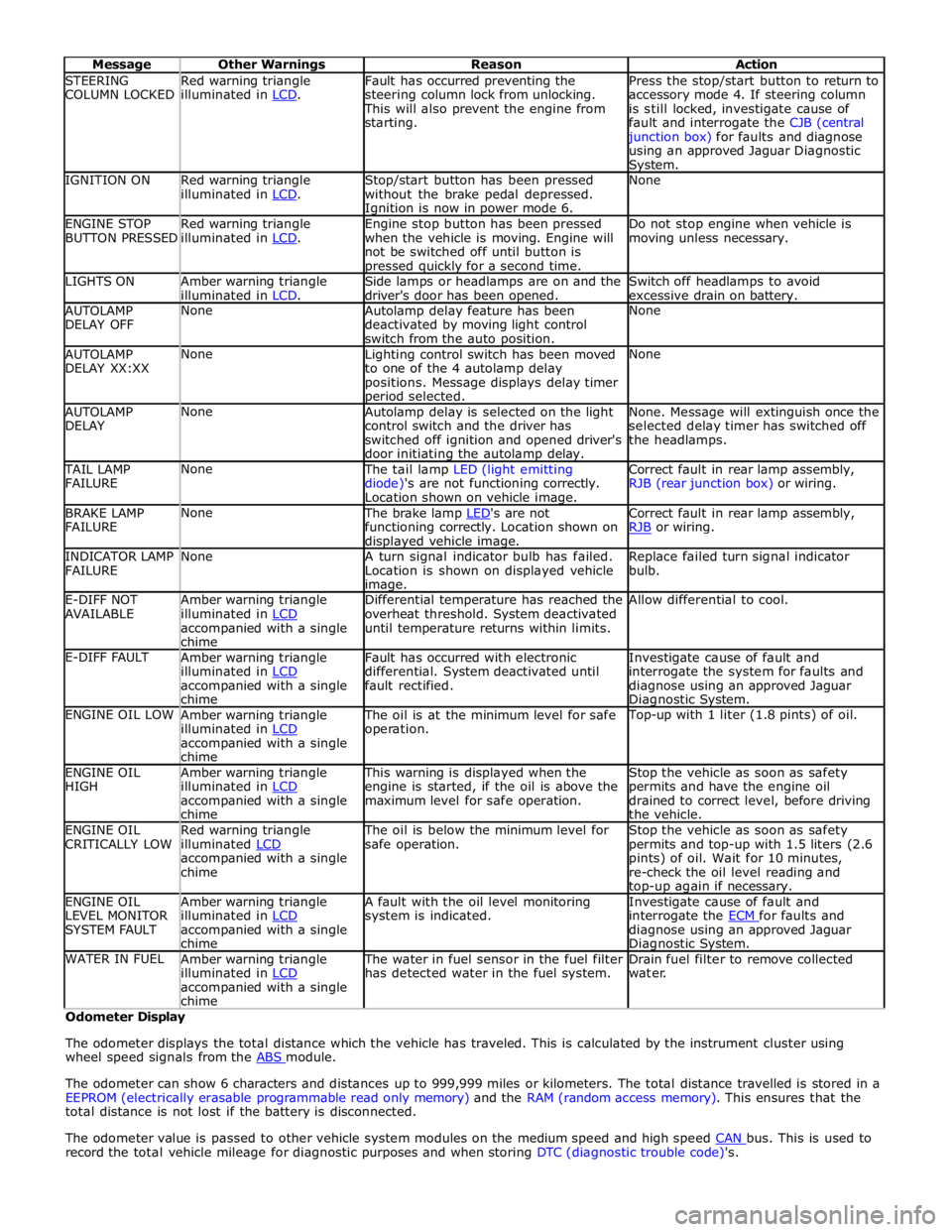
STEERING
COLUMN LOCKED Red warning triangle
illuminated in LCD. Fault has occurred preventing the
steering column lock from unlocking. This will also prevent the engine from
starting. Press the stop/start button to return to
accessory mode 4. If steering column
is still locked, investigate cause of
fault and interrogate the CJB (central junction box) for faults and diagnose
using an approved Jaguar Diagnostic System. IGNITION ON
Red warning triangle
illuminated in LCD. Stop/start button has been pressed
without the brake pedal depressed. Ignition is now in power mode 6. None ENGINE STOP
BUTTON PRESSED Red warning triangle
illuminated in LCD. Engine stop button has been pressed
when the vehicle is moving. Engine will
not be switched off until button is pressed quickly for a second time. Do not stop engine when vehicle is
moving unless necessary. LIGHTS ON
Amber warning triangle
illuminated in LCD. Side lamps or headlamps are on and the
driver's door has been opened. Switch off headlamps to avoid
excessive drain on battery. AUTOLAMP
DELAY OFF None
Autolamp delay feature has been
deactivated by moving light control
switch from the auto position. None AUTOLAMP
DELAY XX:XX None
Lighting control switch has been moved
to one of the 4 autolamp delay
positions. Message displays delay timer period selected. None AUTOLAMP
DELAY None
Autolamp delay is selected on the light
control switch and the driver has
switched off ignition and opened driver's
door initiating the autolamp delay. None. Message will extinguish once the
selected delay timer has switched off
the headlamps. TAIL LAMP
FAILURE None The tail lamp LED (light emitting
diode)'s are not functioning correctly.
Location shown on vehicle image. Correct fault in rear lamp assembly,
RJB (rear junction box) or wiring. BRAKE LAMP
FAILURE None The brake lamp LED's are not functioning correctly. Location shown on displayed vehicle image. Correct fault in rear lamp assembly,
RJB or wiring. INDICATOR LAMP
FAILURE None
A turn signal indicator bulb has failed.
Location is shown on displayed vehicle image. Replace failed turn signal indicator
bulb. E-DIFF NOT
AVAILABLE Amber warning triangle
illuminated in LCD accompanied with a single
chime Differential temperature has reached the
overheat threshold. System deactivated
until temperature returns within limits. Allow differential to cool. E-DIFF FAULT
Amber warning triangle
illuminated in LCD accompanied with a single
chime Fault has occurred with electronic
differential. System deactivated until
fault rectified. Investigate cause of fault and
interrogate the system for faults and
diagnose using an approved Jaguar Diagnostic System. ENGINE OIL LOW
Amber warning triangle
illuminated in LCD accompanied with a single
chime The oil is at the minimum level for safe
operation. Top-up with 1 liter (1.8 pints) of oil. ENGINE OIL
HIGH Amber warning triangle
illuminated in LCD accompanied with a single
chime This warning is displayed when the
engine is started, if the oil is above the
maximum level for safe operation. Stop the vehicle as soon as safety
permits and have the engine oil
drained to correct level, before driving
the vehicle. ENGINE OIL
CRITICALLY LOW Red warning triangle
illuminated LCD accompanied with a single
chime The oil is below the minimum level for
safe operation. Stop the vehicle as soon as safety
permits and top-up with 1.5 liters (2.6
pints) of oil. Wait for 10 minutes,
re-check the oil level reading and top-up again if necessary. ENGINE OIL
LEVEL MONITOR
SYSTEM FAULT Amber warning triangle
illuminated in LCD accompanied with a single
chime A fault with the oil level monitoring
system is indicated. Investigate cause of fault and
interrogate the ECM for faults and diagnose using an approved Jaguar Diagnostic System. WATER IN FUEL
Amber warning triangle
illuminated in LCD accompanied with a single
chime The water in fuel sensor in the fuel filter
has detected water in the fuel system. Drain fuel filter to remove collected
water. Odometer Display
The odometer displays the total distance which the vehicle has traveled. This is calculated by the instrument cluster using
wheel speed signals from the ABS module.
The odometer can show 6 characters and distances up to 999,999 miles or kilometers. The total distance travelled is stored in a
EEPROM (electrically erasable programmable read only memory) and the RAM (random access memory). This ensures that the
total distance is not lost if the battery is disconnected.
The odometer value is passed to other vehicle system modules on the medium speed and high speed CAN bus. This is used to record the total vehicle mileage for diagnostic purposes and when storing DTC (diagnostic trouble code)'s.
Page 1836 of 3039
Warning Devices - Warning Devices
Diagnosis and Testing
Principles of Operation Published: 29-Apr-2013
For a detailed description of the Blindspot Monitoring system, refer to the relevant Description and Operation sections in the
workshop manual. REFER to: (413-09 Warning Devices)
Blindspot Monitoring System (Description and Operation), Blindspot Monitoring System (Description and Operation), Blindspot Monitoring System (Description and Operation).
Inspection and Verification
CAUTION: Diagnosis by substitution from a donor vehicle is NOT acceptable. Substitution of control modules does not
guarantee confirmation of a fault, and may also cause additional faults in the vehicle being tested and/or the donor vehicle.
1. Verify the customer concern.
2. Visually inspect for obvious signs of damage and system integrity.
NOTE: Particular attention should be paid to the following items where DTCs may not be logged:
Check for contamination (e.g. dirt, grime, frosting, ice) around the blindspot monitoring sensors and clear.
Visual Inspection
Mechanical Electrical
Exterior rear view mirror glass
Mud or sleet contamination around rear bumper area
Blindspot Monitoring Modules
Fuse(s)
Relay(s)
Wiring Harness
Electrical connector(s)
Blindspot Monitoring Modules
3. If an obvious cause for an observed or reported concern is found, correct the cause (if possible) before proceeding to
the next step.
4. If the cause is not visually evident, verify the symptom and refer to the Symptom Chart, alternatively, check for
Diagnostic Trouble Codes (DTCs) and refer to the DTC Index.
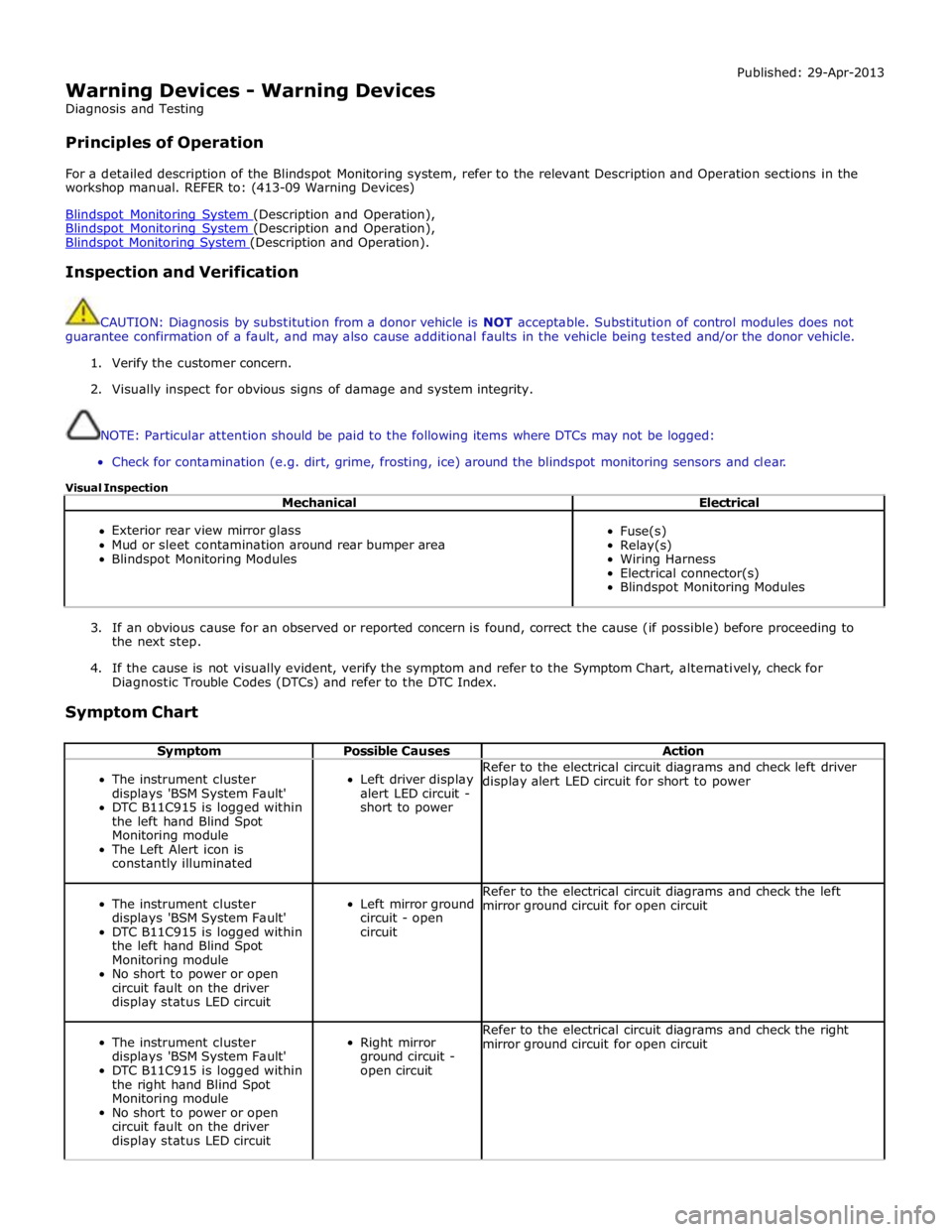
Symptom Chart
Symptom Possible Causes Action
The instrument cluster
displays 'BSM System Fault'
DTC B11C915 is logged within
the left hand Blind Spot
Monitoring module
The Left Alert icon is
constantly illuminated
Left driver display
alert LED circuit -
short to power Refer to the electrical circuit diagrams and check left driver
display alert LED circuit for short to power
The instrument cluster
displays 'BSM System Fault'
DTC B11C915 is logged within
the left hand Blind Spot
Monitoring module
No short to power or open
circuit fault on the driver
display status LED circuit
Left mirror ground
circuit - open
circuit Refer to the electrical circuit diagrams and check the left
mirror ground circuit for open circuit
The instrument cluster
displays 'BSM System Fault'
DTC B11C915 is logged within
the right hand Blind Spot
Monitoring module
No short to power or open
circuit fault on the driver
display status LED circuit
Right mirror
ground circuit -
open circuit Refer to the electrical circuit diagrams and check the right
mirror ground circuit for open circuit
Page 1850 of 3039
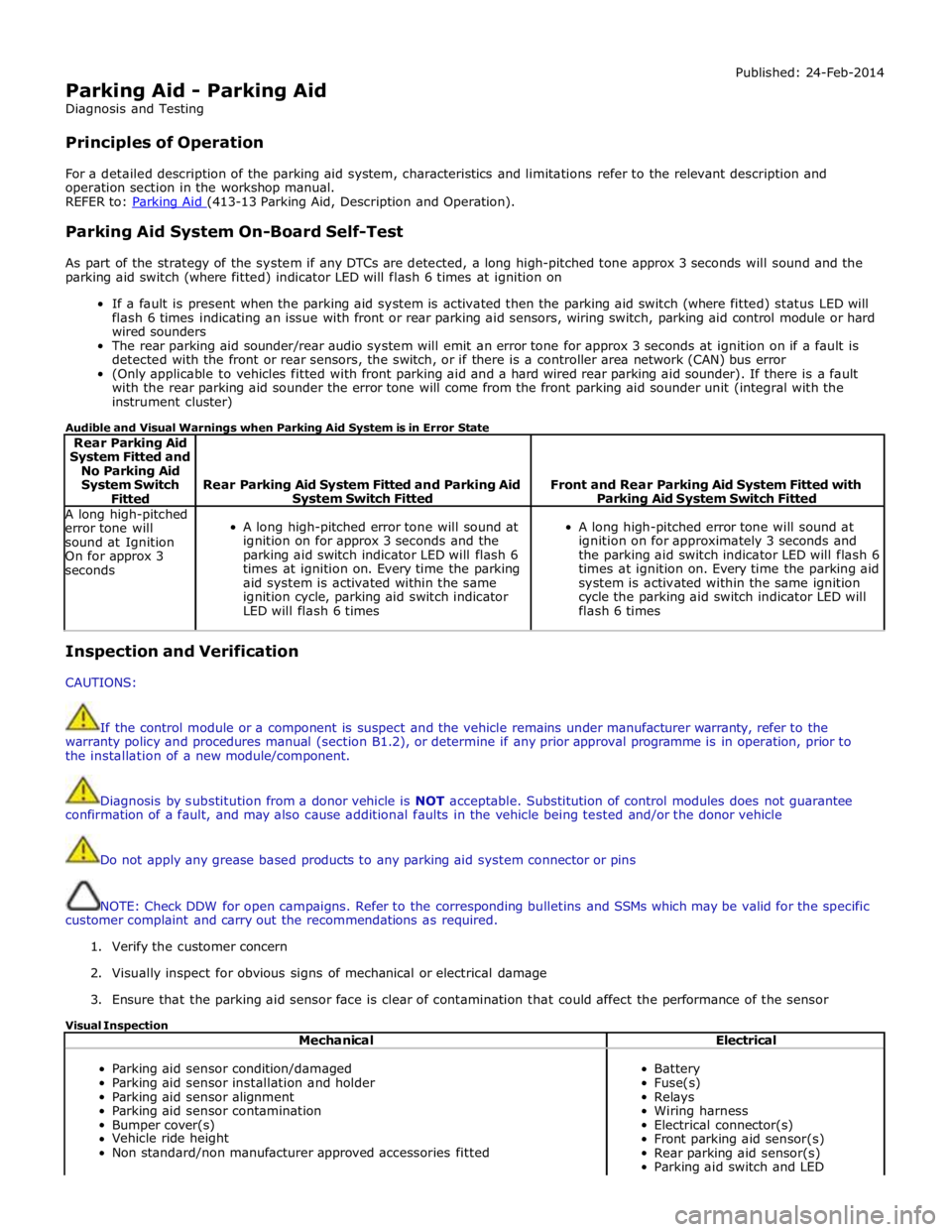
Parking Aid - Parking Aid
Diagnosis and Testing
Principles of Operation Published: 24-Feb-2014
For a detailed description of the parking aid system, characteristics and limitations refer to the relevant description and
operation section in the workshop manual.
REFER to: Parking Aid (413-13 Parking Aid, Description and Operation).
Parking Aid System On-Board Self-Test
As part of the strategy of the system if any DTCs are detected, a long high-pitched tone approx 3 seconds will sound and the
parking aid switch (where fitted) indicator LED will flash 6 times at ignition on
If a fault is present when the parking aid system is activated then the parking aid switch (where fitted) status LED will
flash 6 times indicating an issue with front or rear parking aid sensors, wiring switch, parking aid control module or hard
wired sounders
The rear parking aid sounder/rear audio system will emit an error tone for approx 3 seconds at ignition on if a fault is
detected with the front or rear sensors, the switch, or if there is a controller area network (CAN) bus error
(Only applicable to vehicles fitted with front parking aid and a hard wired rear parking aid sounder). If there is a fault
with the rear parking aid sounder the error tone will come from the front parking aid sounder unit (integral with the
instrument cluster)
Audible and Visual Warnings when Parking Aid System is in Error State
Rear Parking Aid
System Fitted and
No Parking Aid
System Switch
Fitted
Rear Parking Aid System Fitted and Parking Aid System Switch Fitted
Front and Rear Parking Aid System Fitted with Parking Aid System Switch Fitted A long high-pitched
error tone will
sound at Ignition
On for approx 3
seconds
A long high-pitched error tone will sound at
ignition on for approx 3 seconds and the
parking aid switch indicator LED will flash 6
times at ignition on. Every time the parking
aid system is activated within the same
ignition cycle, parking aid switch indicator
LED will flash 6 times
A long high-pitched error tone will sound at
ignition on for approximately 3 seconds and
the parking aid switch indicator LED will flash 6
times at ignition on. Every time the parking aid
system is activated within the same ignition
cycle the parking aid switch indicator LED will
flash 6 times Inspection and Verification
CAUTIONS:
If the control module or a component is suspect and the vehicle remains under manufacturer warranty, refer to the
warranty policy and procedures manual (section B1.2), or determine if any prior approval programme is in operation, prior to
the installation of a new module/component.
Diagnosis by substitution from a donor vehicle is NOT acceptable. Substitution of control modules does not guarantee
confirmation of a fault, and may also cause additional faults in the vehicle being tested and/or the donor vehicle
Do not apply any grease based products to any parking aid system connector or pins
NOTE: Check DDW for open campaigns. Refer to the corresponding bulletins and SSMs which may be valid for the specific
customer complaint and carry out the recommendations as required.
1. Verify the customer concern
2. Visually inspect for obvious signs of mechanical or electrical damage
3. Ensure that the parking aid sensor face is clear of contamination that could affect the performance of the sensor
Visual Inspection
Mechanical Electrical
Parking aid sensor condition/damaged
Parking aid sensor installation and holder
Parking aid sensor alignment
Parking aid sensor contamination
Bumper cover(s)
Vehicle ride height
Non standard/non manufacturer approved accessories fitted
Battery
Fuse(s)
Relays
Wiring harness
Electrical connector(s)
Front parking aid sensor(s)
Rear parking aid sensor(s)
Parking aid switch and LED
Page 1852 of 3039

Symptom Possible Causes Action Parking aid sensors are being
returned with no faults found
or signs of water
ingress/corrosion Possible issue with sensor connectors
not latched correctly
When either no/intermittent operation has been
reported the following action should be taken
1. Using Datalogger, identify the position of the
suspect parking aid sensor within the bumper
2. Visually locate the position of the suspect
parking aid sensor. Inspect and provide details in
claim if the sensor has any sign of physical
damage
3. Remove the bumper. Disconnect the wiring at
the main harness connector. Inspect the main
harness connectors and terminals for signs of
damage, backed out pins, corrosion and water
ingress, or damage to the seals. Provide details in
claim if any of the above symptoms are present
4. Attempt to remove the harness connector from
the suspect parking aid sensor without using the
connector latch i.e. lightly pull back on ALL wires
together, ensuring the harness is held close to the
back of the connector, not elsewhere on the wiring
harness. DO NOT apply excessive force. If the
connector can be removed without using the latch,
provide details in claim if connector is loose. If the
connector is fully latched, disconnect it from the
sensor
5. Inspect and provide details in claim if the
suspect sensor harness connector has any sign of
water ingress/corrosion
6. Inspect and provide details in claim if the
suspect parking aid sensor harness connector
shows any sign that the terminals have backed-out
of the connector or for any damage to the terminal
seals. Replace/repair the harness as required and
proceed
7. Remove the suspect parking aid sensor from the
bumper. Inspect the parking aid sensor connector
for signs of water ingress/corrosion. Provide details
in claim if corrosion/water ingress is present
8. Exchange the suspect parking aid sensor with
another parking aid sensor within the bumper that
is performing correctly. Reconnect all sensors and
reconnect the bumper main harness connector.
Repeat step 1. Confirm if the original fault now
appears at the new position of the suspect parking
aid sensor, if so, proceed to step 10
9. If not, carry out the appropriate open circuit and
short circuit checks between the original suspect
parking aid sensor harness connector and the
parking aid control module
10. Refit the parking aid sensors to their original
position in the bumper
11. Reconnect the parking aid sensor to the
bumper harness connector. Reconnect main harness
connector and refit the bumper
12. Repeat Step 1. If fault is still present, replace
only the faulty sensor
PINPOINT TEST A : PARKING AID SYSTEM NOT FUNCTIONING CORRECTLY WITH NO DTCS LOGGED TEST
CONDITIONS DETAILS/RESULTS/ACTIONS A1: PERMANENT FAULT 1 When the parking aid system is activated, there is a vibration on the parking aid sensor membrane. This can be verified by touching the parking aid sensor face with a hard item such as a pencil, ball-pen, small
screwdriver, or fingernail. Ensure no damage is caused to sensor painted surface Are the parking aid sensor(s) vibrating? Yes
GO to A2. No
GO to A5. A2: SENSORS VIBRATING WITH PARKING AID FAULT 1 Clean the parking aid sensor face Parking aid system functioning correctly? Yes
No further action required
No www.JagDocs.com
Page 1853 of 3039

A3: SENSORS VIBRATING WITH PARKING AID FAULT 1 Check parking aid sensors correctly mounted. Parking aid sensor holder correctly mounted. Parking aid sensor decoupler ring fitted or fitted correctly. Parking aid sensor positioning correct. Parking aid sensor
painted without being removed from the bumper assembly or not painted to manufacturer specification.
Rectify as required Parking aid system functioning correctly? Yes
No further action required
No
GO to A4. A4: SENSORS VIBRATING WITH PARKING AID FAULT 1 Carry out speaker test. Only applicable to vehicles with rear hard wired parking aid speakers. Check the parking aid speaker wiring circuit and connector. Rectify as required. Check and install a new parking aid
speaker as required. Vehicles with audio parking aid system. Confirm audio system is functioning
correctly. Refer to the relevant section of the workshop manual Parking aid system functioning correctly Yes
No further action required A5: SENSORS NOT VIBRATING WITH PARKING AID FAULT 1 Isolate the fault to front or rear parking aid sensors Are all rear parking aid sensors vibrating? Yes
GO to A6. No
GO to A10. A6: FRONT SENSORS NOT VIBRATING WITH PARKING AID FAULT 1 Check the parking aid control module is correctly configured. Check and update the car configuration file as required Parking aid system functioning correctly? Yes
No further action required
No
GO to A7. A7: FRONT SENSORS NOT VIBRATING WITH PARKING AID FAULT 1 Check the correct parking aid control module is installed to the vehicle Parking aid system functioning correctly? Yes
No further action required
No
GO to A8. A8: FRONT SENSORS NOT VIBRATING WITH PARKING AID FAULT 1 If all 4 front parking aid sensors are not vibrating, carry out harness test on common ground, power supply. Check main parking aid harness connector to bumper harness connector. Rectify as required Parking aid system functioning correctly? Yes
No further action required
No
GO to A9. A9: FRONT SENSORS NOT VIBRATING WITH PARKING AID FAULT 1 Check and install a new parking aid control module as required. Refer to the warranty policy and procedures manual, or determine if any prior approval programme is in operation, prior to the installation
of a new module/component Parking aid system functioning correctly Yes
No further action required A10: REAR SENSORS NOT VIBRATING WITH PARKING AID FAULT 1 Check the parking aid control module is correctly configured. Check and update the car configuration file as required Parking aid system functioning correctly? Yes
No further action required
No
GO to A11. A11: REAR SENSORS NOT VIBRATING WITH PARKING AID FAULT 1 If all 4 rear parking aid sensors are not vibrating, carry out harness test on common ground, power supply. Check main parking aid harness connector to bumper harness connector. Rectify as required Parking aid system functioning correctly Yes
No further action required
No
GO to A12. A12: REAR SENSORS NOT VIBRATING WITH PARKING AID FAULT 1 Check and install a new parking aid control module as required. Refer to the warranty policy and procedures manual, or determine if any prior approval programme is in operation, prior to the installation
of a new module/component
Page 1855 of 3039
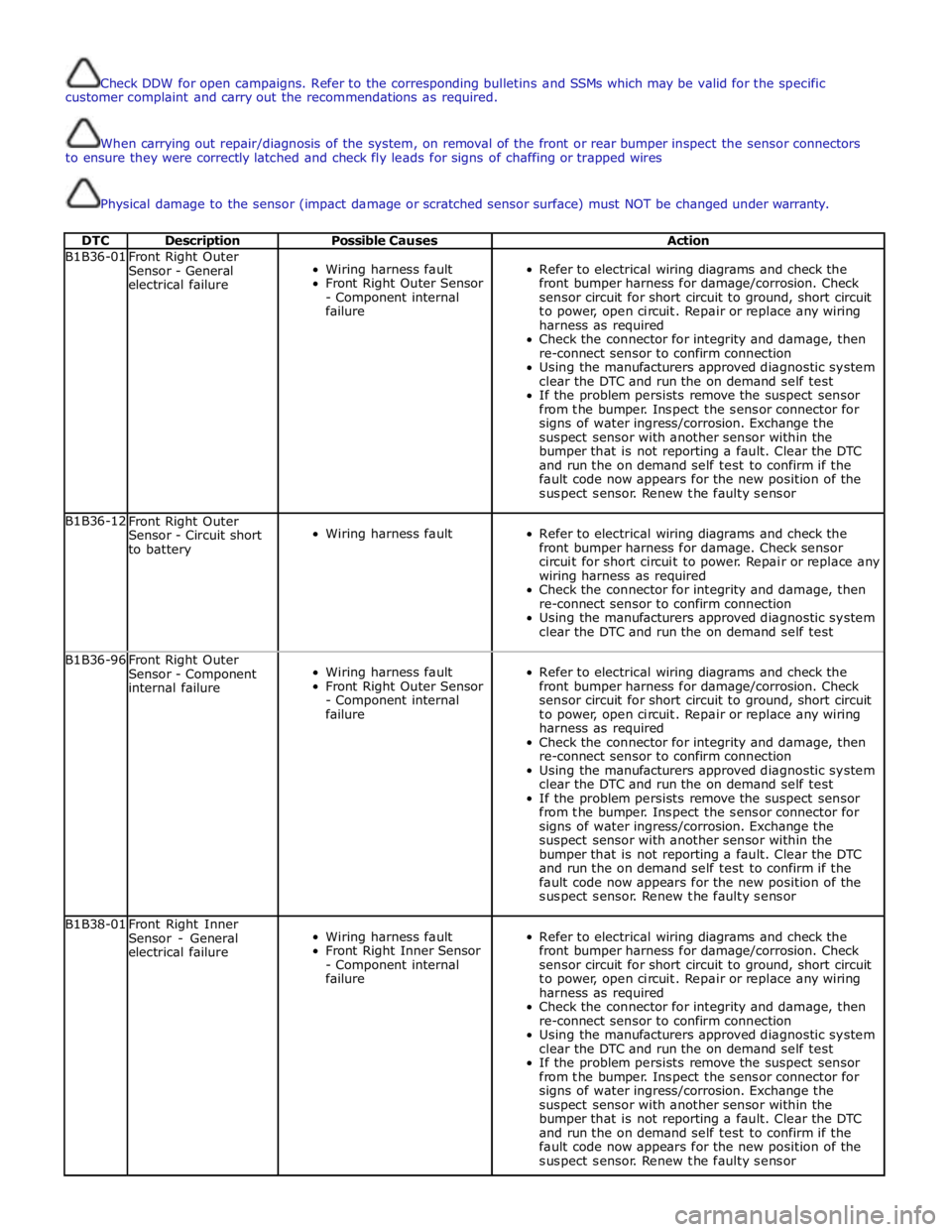
Check DDW for open campaigns. Refer to the corresponding bulletins and SSMs which may be valid for the specific
customer complaint and carry out the recommendations as required.
When carrying out repair/diagnosis of the system, on removal of the front or rear bumper inspect the sensor connectors
to ensure they were correctly latched and check fly leads for signs of chaffing or trapped wires
Physical damage to the sensor (impact damage or scratched sensor surface) must NOT be changed under warranty.
DTC Description Possible Causes Action B1B36-01
Front Right Outer
Sensor - General
electrical failure
Wiring harness fault
Front Right Outer Sensor
- Component internal
failure
Refer to electrical wiring diagrams and check the
front bumper harness for damage/corrosion. Check
sensor circuit for short circuit to ground, short circuit
to power, open circuit. Repair or replace any wiring
harness as required
Check the connector for integrity and damage, then
re-connect sensor to confirm connection
Using the manufacturers approved diagnostic system
clear the DTC and run the on demand self test
If the problem persists remove the suspect sensor
from the bumper. Inspect the sensor connector for
signs of water ingress/corrosion. Exchange the
suspect sensor with another sensor within the
bumper that is not reporting a fault. Clear the DTC
and run the on demand self test to confirm if the
fault code now appears for the new position of the
suspect sensor. Renew the faulty sensor B1B36-12
Front Right Outer
Sensor - Circuit short
to battery
Wiring harness fault
Refer to electrical wiring diagrams and check the
front bumper harness for damage. Check sensor
circuit for short circuit to power. Repair or replace any
wiring harness as required
Check the connector for integrity and damage, then
re-connect sensor to confirm connection
Using the manufacturers approved diagnostic system
clear the DTC and run the on demand self test B1B36-96
Front Right Outer
Sensor - Component
internal failure
Wiring harness fault
Front Right Outer Sensor
- Component internal
failure
Refer to electrical wiring diagrams and check the
front bumper harness for damage/corrosion. Check
sensor circuit for short circuit to ground, short circuit
to power, open circuit. Repair or replace any wiring
harness as required
Check the connector for integrity and damage, then
re-connect sensor to confirm connection
Using the manufacturers approved diagnostic system
clear the DTC and run the on demand self test
If the problem persists remove the suspect sensor
from the bumper. Inspect the sensor connector for
signs of water ingress/corrosion. Exchange the
suspect sensor with another sensor within the
bumper that is not reporting a fault. Clear the DTC
and run the on demand self test to confirm if the
fault code now appears for the new position of the
suspect sensor. Renew the faulty sensor B1B38-01
Front Right Inner
Sensor - General
electrical failure
Wiring harness fault
Front Right Inner Sensor
- Component internal
failure
Refer to electrical wiring diagrams and check the
front bumper harness for damage/corrosion. Check
sensor circuit for short circuit to ground, short circuit
to power, open circuit. Repair or replace any wiring
harness as required
Check the connector for integrity and damage, then
re-connect sensor to confirm connection
Using the manufacturers approved diagnostic system
clear the DTC and run the on demand self test
If the problem persists remove the suspect sensor
from the bumper. Inspect the sensor connector for
signs of water ingress/corrosion. Exchange the
suspect sensor with another sensor within the
bumper that is not reporting a fault. Clear the DTC
and run the on demand self test to confirm if the
fault code now appears for the new position of the
suspect sensor. Renew the faulty sensor