battery JAGUAR XFR 2010 1.G Workshop Manual
[x] Cancel search | Manufacturer: JAGUAR, Model Year: 2010, Model line: XFR, Model: JAGUAR XFR 2010 1.GPages: 3039, PDF Size: 58.49 MB
Page 654 of 3039

Symptom Possible Cause Action The parking brake will not
engage or release (with
parking brake warning
message)
Cables fouled, trapped or damaged
Cables incorrectly routed or installed
Rear lining wear
Actuator malfunction
Caliper malfunction
Check the rear and primary
cables for correct installation
and damage
Inspect the rear brake linings for
wear
Re-calibrate the parking brake,
refer to the calibration procedure
Check the rear service brake for
correct installation and operation No communication with the
parking brake module
Fuse
Module off Bus
CAN network error
Parking brake module fault
Check fuses
Ensure battery is fully charged
and in serviceable condition.
Check battery voltage at parking
brake module
Check CAN network using
manufacturer approved
diagnostic system 'Park brake Fault' displayed on
message center with
associated warning lamps
Parking brake system fault
Check the parking brake module
for DTCs and refer to DTC Index Brakes drag
Parking brake not re-calibrated after battery has
been disconnected or has been in a state of
discharge, or repairs have been carried out to
the rear service or parking brake system
Service brake system fault
Re-calibrate parking brake, refer
to the calibration procedure
Check the service brake for
correct operation DTC Index
For a list of diagnostic trouble codes that could be logged on this vehicle, please refer to Section 100-00.
REFER to: Diagnostic Trouble Code (DTC) Index - DTC: Electric Parking Brake (PBM) (100-00 General Information, Description and Operation).
Page 657 of 3039
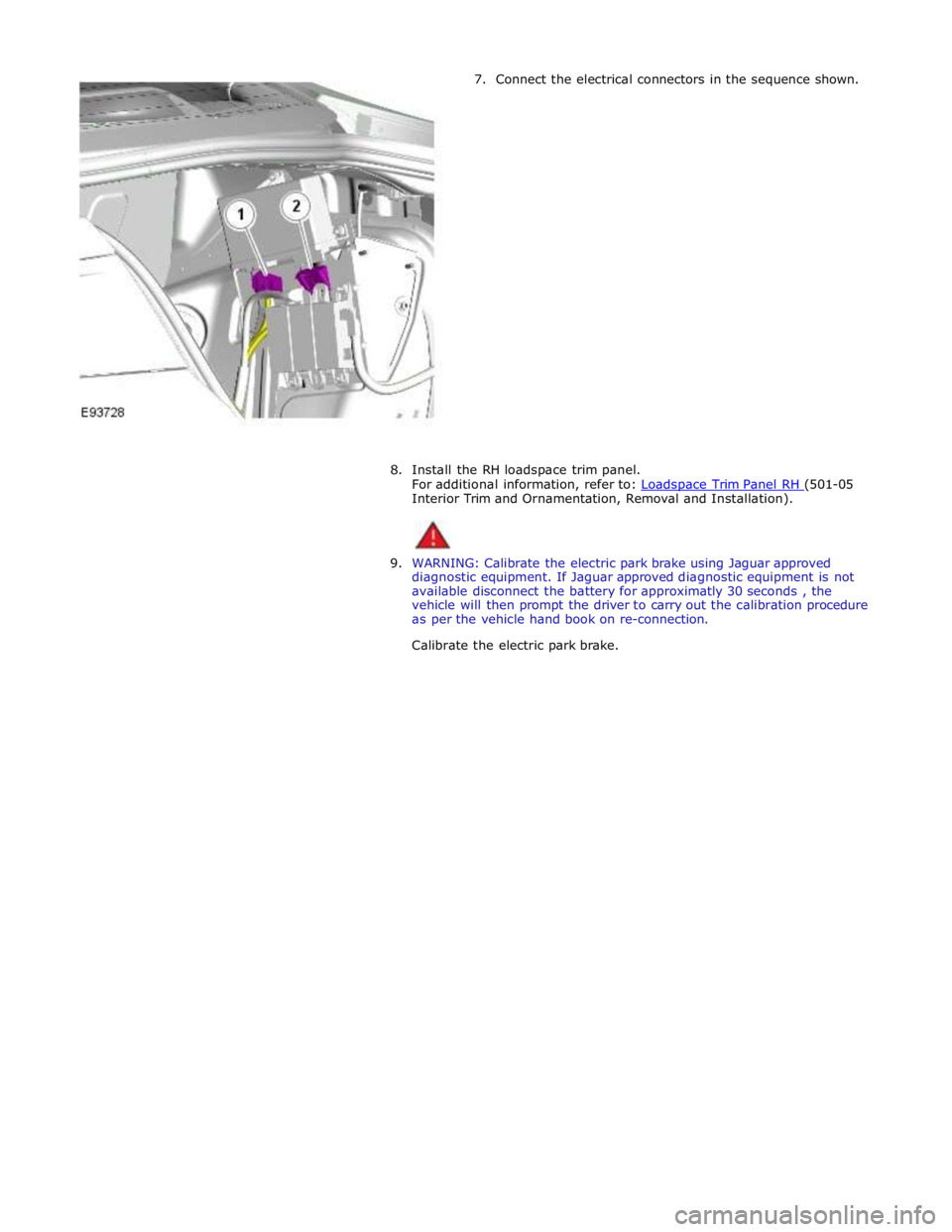
7. Connect the electrical connectors in the sequence shown.
8. Install the RH loadspace trim panel.
For additional information, refer to: Loadspace Trim Panel RH (501-05 Interior Trim and Ornamentation, Removal and Installation).
9. WARNING: Calibrate the electric park brake using Jaguar approved
diagnostic equipment. If Jaguar approved diagnostic equipment is not
available disconnect the battery for approximatly 30 seconds , the
vehicle will then prompt the driver to carry out the calibration procedure
as per the vehicle hand book on re-connection.
Calibrate the electric park brake.
Page 662 of 3039

Parking Brake and Actuation - Parking Brake Module
Removal and Installation
Removal
NOTE: Removal steps in this procedure may contain installation details. Published: 11-May-2011
1. Refer to: Battery Disconnect and Connect (414-01 Battery, Mounting and Cables, General Procedures).
2. Refer to: Loadspace Trim Panel RH (501-05 Interior Trim and Ornamentation, Removal and Installation).
Installation
3. Torque: 4 Nm
1. To install, reverse the removal position
2. Configure the electronic parking brake (EPB) using the diagnostic tool.
Page 663 of 3039
Parking Brake and Actuation - Parking Brake Switch
Removal and Installation
Removal
NOTES: Published: 12-Jun-2013
The parking brake switch is part of the transmission control switch (TCS) assembly and therefore can not be serviced
separately.
Removal steps in this procedure may contain installation details.
1. Refer to: Battery Disconnect and Connect (414-01 Battery, Mounting and Cables, General Procedures).
2. Refer to: Transmission Control Switch (TCS) (307-05A Automatic Transmission/Transaxle External Controls - V6 3.0L Petrol, Removal and
Installation).
Installation
1. CAUTION: Make sure that all diagnostic trouble codes (DTCs) have
been removed after the road test.
To install, reverse the removal procedure.
Page 666 of 3039
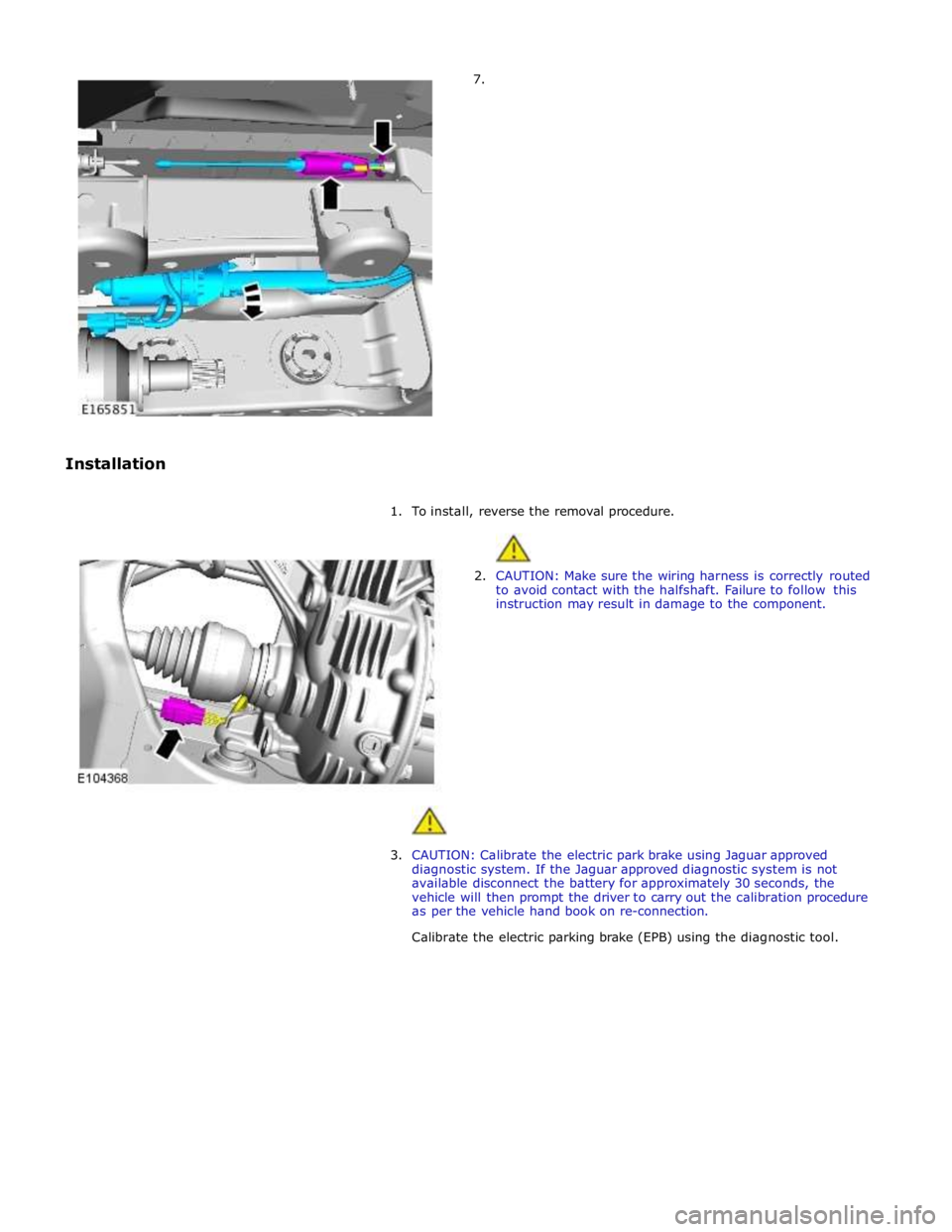
7.
Installation
1. To install, reverse the removal procedure.
2. CAUTION: Make sure the wiring harness is correctly routed
to avoid contact with the halfshaft. Failure to follow this
instruction may result in damage to the component.
3. CAUTION: Calibrate the electric park brake using Jaguar approved
diagnostic system. If the Jaguar approved diagnostic system is not
available disconnect the battery for approximately 30 seconds, the
vehicle will then prompt the driver to carry out the calibration procedure
as per the vehicle hand book on re-connection.
Calibrate the electric parking brake (EPB) using the diagnostic tool.
Page 693 of 3039
Published: 11-May-2011
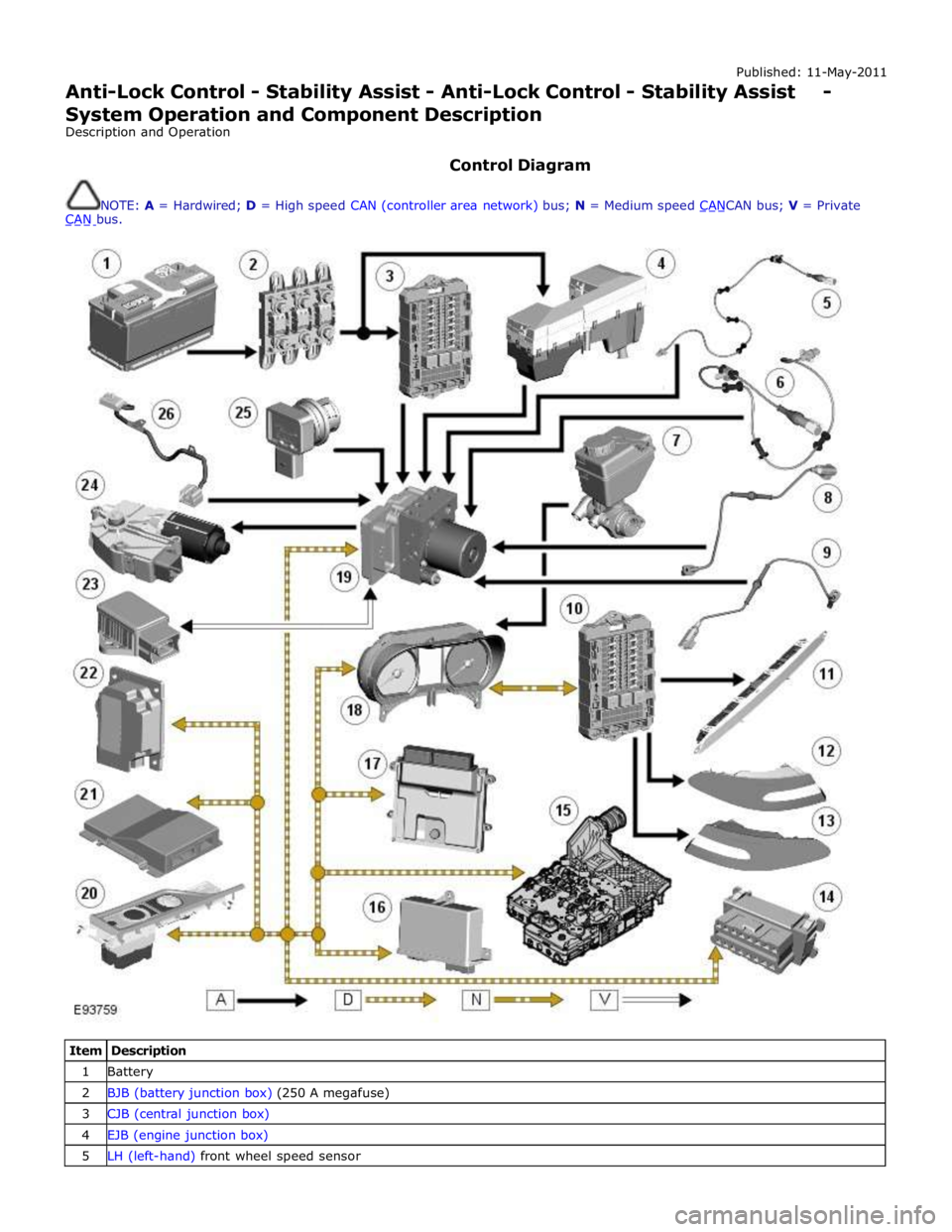
Anti-Lock Control - Stability Assist - Anti-Lock Control - Stability Assist - System Operation and Component Description
Description and Operation
Control Diagram
NOTE: A = Hardwired; D = High speed CAN (controller area network) bus; N = Medium speed CANCAN bus; V = Private CAN bus.
Item Description 1 Battery 2 BJB (battery junction box) (250 A megafuse) 3 CJB (central junction box) 4 EJB (engine junction box) 5 LH (left-hand) front wheel speed sensor
Page 708 of 3039
Published: 11-May-2011
Anti-Lock Control - Stability Assist - Hydraulic Control Unit (HCU)
Removal and Installation
Removal
All vehicles
1. Disconnect the battery ground cable.
For additional information, refer to: Battery Disconnect and Connect (414-01 Battery, Mounting and Cables, General Procedures).
Left-hand drive vehicles
2. Remove the secondary bulkhead RH panel.
For additional information, refer to: Secondary Bulkhead Panel RH - 3.0L NA V6 - AJ27 (501-02 Front End Body Panels, Removal and Installation).
Right-hand drive vehicles
3. Remove the secondary bulkhead LH panel.
For additional information, refer to: Secondary Bulkhead Panel LH - 3.0L NA V6 - AJ27 (501-02 Front End Body Panels, Removal and Installation).
All vehicles
4. WARNING: Do not work on or under a vehicle supported only by a
jack. Always support the vehicle on safety stands.
Raise and support the vehicle.
5. Connect brake bleed pipes and bottles to the left-hand front and the
left-hand rear brake caliper bleed nipples and loosen the brake caliper
bleed nipples.
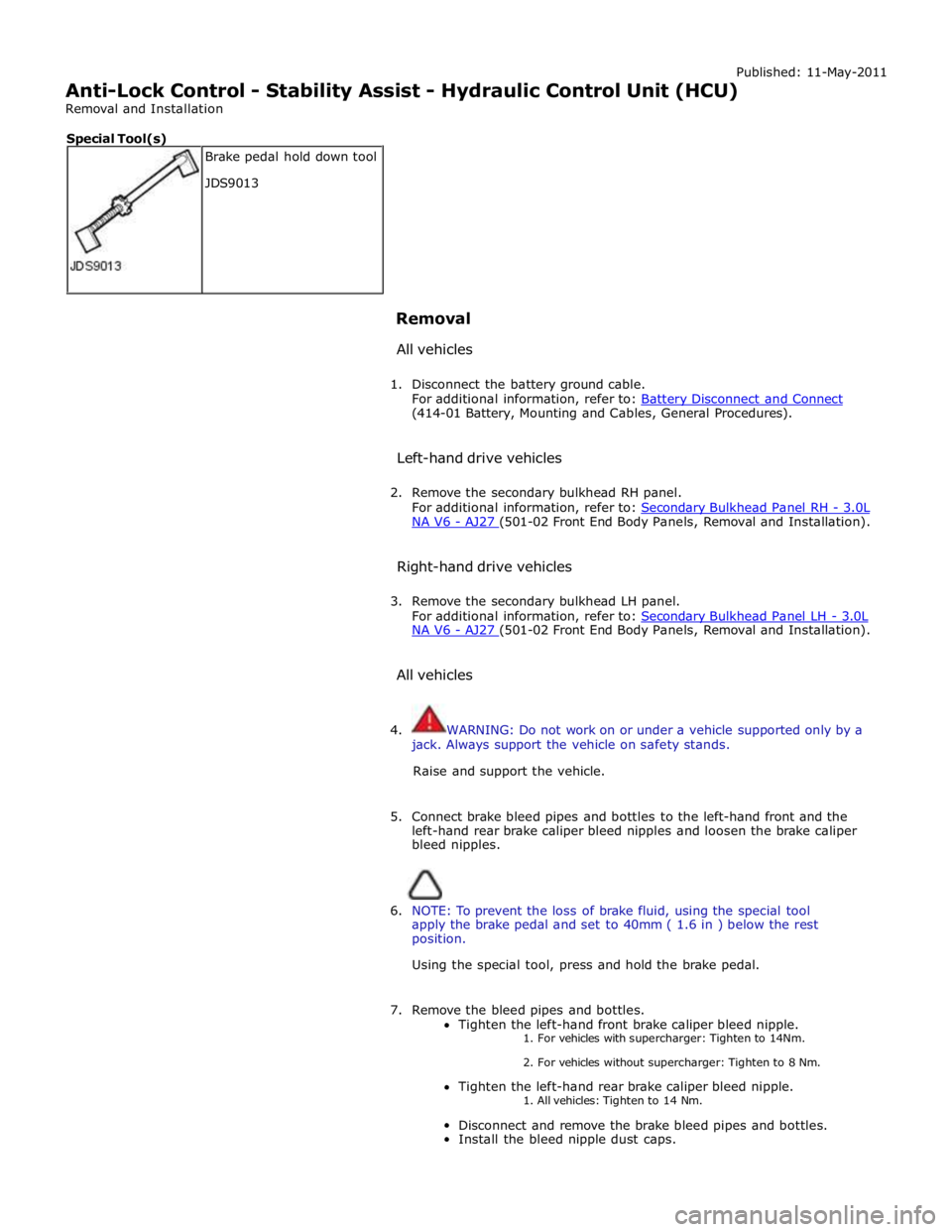
6. NOTE: To prevent the loss of brake fluid, using the special tool
apply the brake pedal and set to 40mm ( 1.6 in ) below the rest
position.
Using the special tool, press and hold the brake pedal.
7. Remove the bleed pipes and bottles.
Tighten the left-hand front brake caliper bleed nipple. 1. For vehicles with supercharger: Tighten to 14Nm.
2. For vehicles without supercharger: Tighten to 8 Nm.
Tighten the left-hand rear brake caliper bleed nipple.
1. All vehicles: Tighten to 14 Nm.
Disconnect and remove the brake bleed pipes and bottles.
Install the bleed nipple dust caps. Brake pedal hold down tool
JDS9013 Special Tool(s)
Page 711 of 3039

NA V6 - AJ27 (501-02 Front End Body Panels, Removal and Installation).
Right-hand drive vehicles
7. Install the secondary bulkhead LH panel.
For additional information, refer to: Secondary Bulkhead Panel LH - 3.0L NA V6 - AJ27 (501-02 Front End Body Panels, Removal and Installation).
All vehicles
8. Connect the battery ground cable.
For additional information, refer to: Battery Disconnect and Connect (414-01 Battery, Mounting and Cables, General Procedures).
9. Using the diagnostic tool, configure the new HCU.
Page 715 of 3039
Published: 11-May-2011
Anti-Lock Control - Stability Assist - Steering Wheel Rotation Sensor
Removal and Installation
Removal
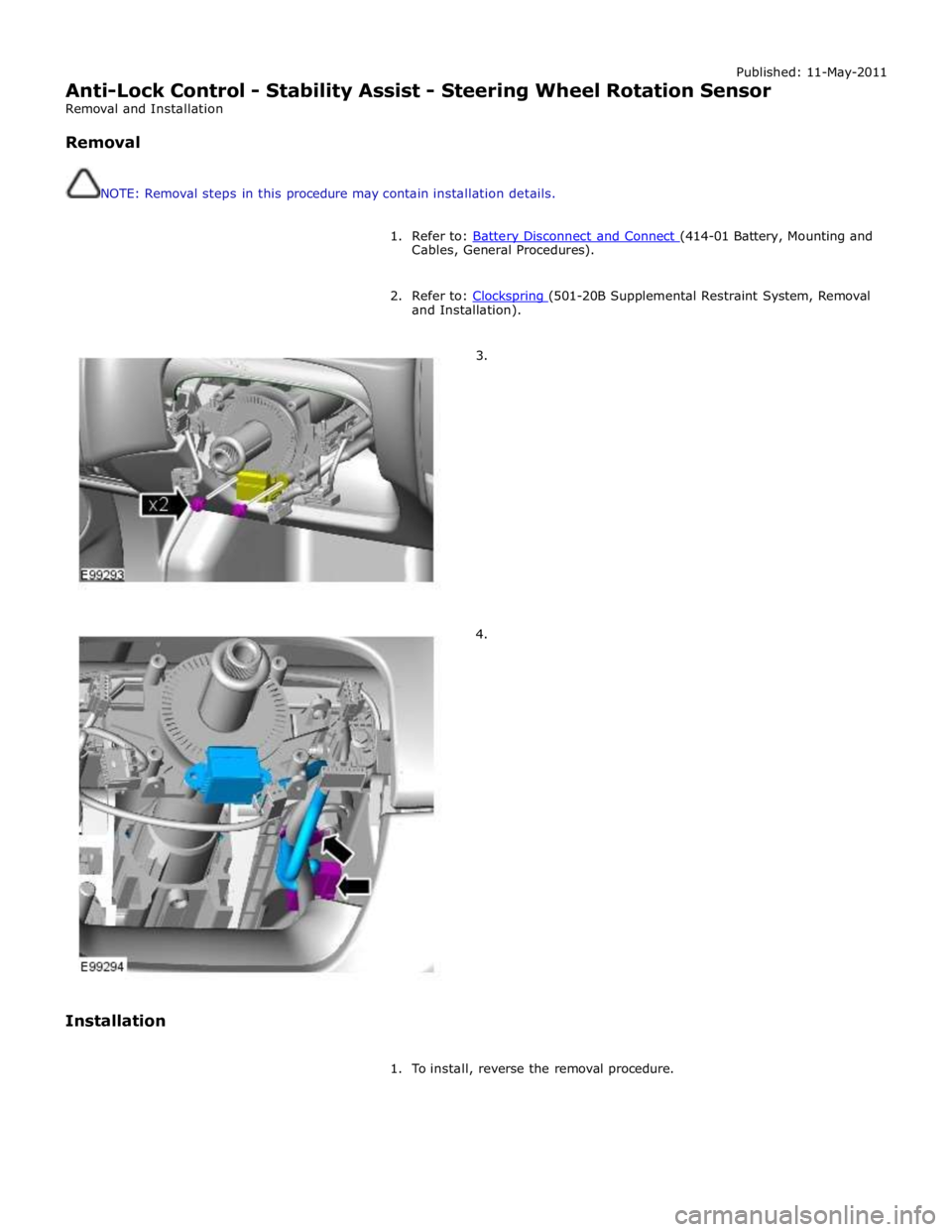
NOTE: Removal steps in this procedure may contain installation details.
1. Refer to: Battery Disconnect and Connect (414-01 Battery, Mounting and Cables, General Procedures).
2. Refer to: Clockspring (501-20B Supplemental Restraint System, Removal and Installation).
3.
4.
Installation
1. To install, reverse the removal procedure.
Page 716 of 3039
Published: 11-May-2011
Anti-Lock Control - Stability Assist - Yaw Rate Sensor and Accelerometer
Removal and Installation
Removal
NOTE: Removal steps in this procedure may contain installation details.
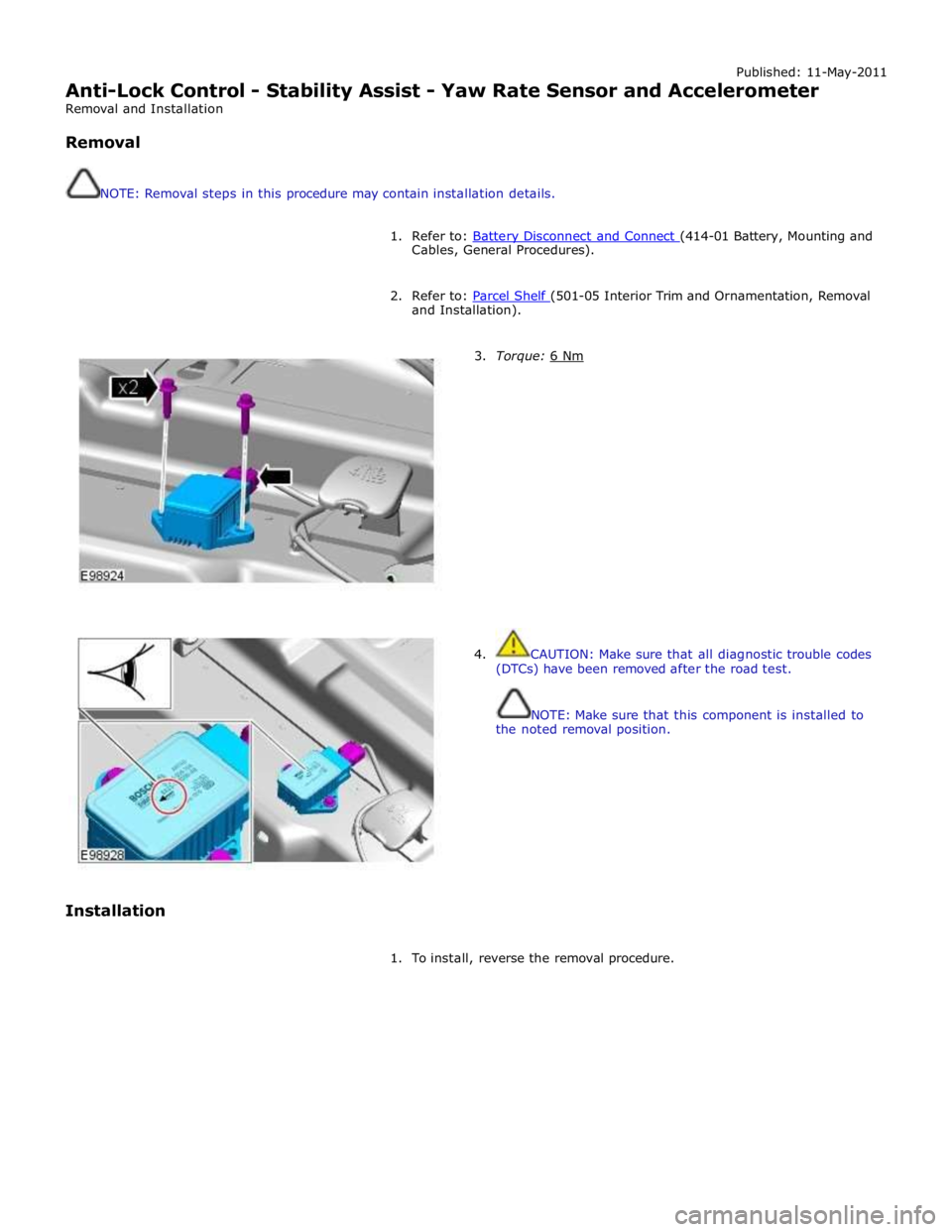
1. Refer to: Battery Disconnect and Connect (414-01 Battery, Mounting and Cables, General Procedures).
2. Refer to: Parcel Shelf (501-05 Interior Trim and Ornamentation, Removal and Installation).
Installation
3. Torque: 6 Nm
4. CAUTION: Make sure that all diagnostic trouble codes
(DTCs) have been removed after the road test.
NOTE: Make sure that this component is installed to
the noted removal position.
1. To install, reverse the removal procedure.